Tell different stories within the same universe

You might know this from fantasy book series: the author creates a unique world, a whole universe of their own and sets a story or series of books within it. Then, a few years later, a new series is released. It is set in the same universe, but at a different time, with different characters, and tells a completely new story. Still, it builds on the foundation of that original world. The author does not reinvent everything from scratch. They use the same map, the same creatures, the same customs and rules established in the earlier books.

Examples of this are the Harry Potter series and Fantastic Beasts, or The Lord of the Rings and The Hobbit.

But what does this have to do with software development?
In one of my projects, I faced a very similar use case. I had to implement several services, each covering a different use case, but all sharing the same set of peripherals, adapters, and domain types.

So I needed an architecture that did not just allow for interchangeable periphery, as is usually the focus, but also supported interchangeable use cases. In other words, I needed a setup that allowed for multiple “books” to be written within the same “universe.”

Architecture

Let’s start with a simple example: user management.
I originally implemented it following Clean Architecture principles, where the structure resembles an onion, dependencies flow inward, from the outer layers to the core domain logic. This makes the outer layers (the “peel”) easily replaceable or extendable.
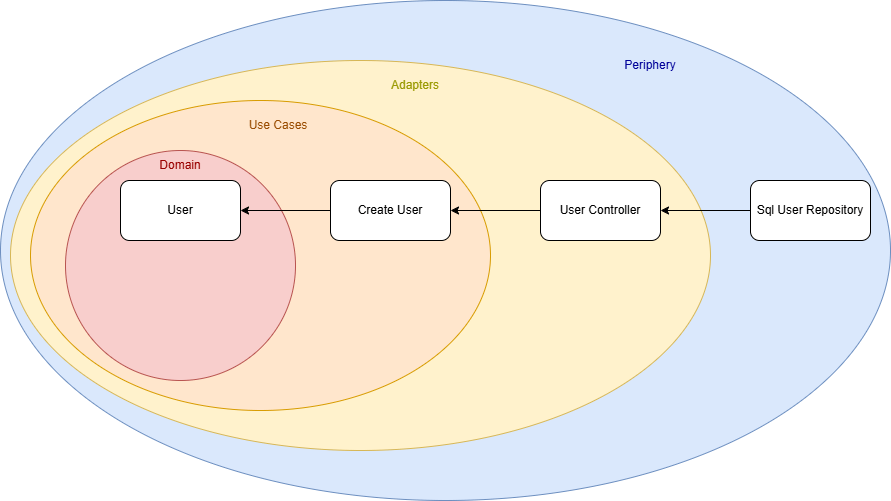
Our initial use case is a service that creates a user. The use case defines an interface that the user controller implements, meaning the dependency flows from the outer layer (the controller) toward the core. So far, so good.

However, I wanted to evolve the architecture to support multiple use cases. For that, the direct dependency from the UserController to the CreateUser use case had to be removed.

My solution was to introduce a new domain module, a shared foundation that contains all interfaces, data types, and common logic used by both use cases and adapters. I called this module the UseCaseService.

The result is a new architecture diagram:
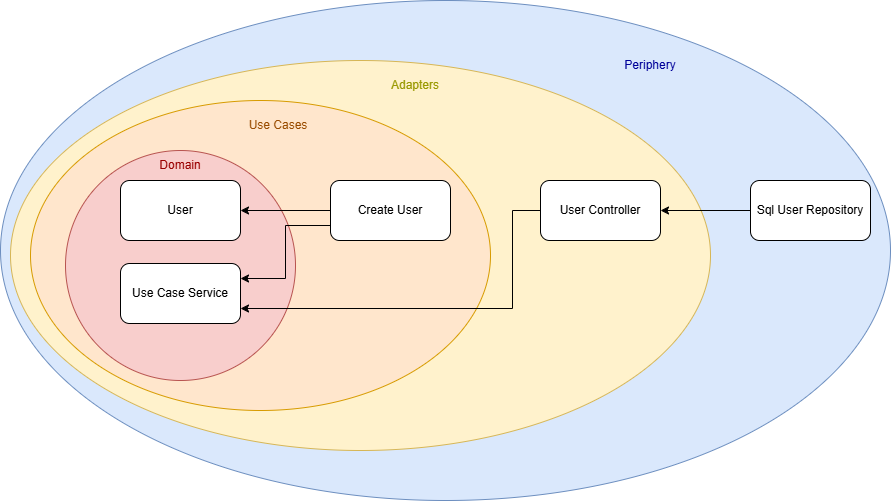
There is no longer a direct connection between a specific use case and an adapter. Instead, both depend on the shared UseCaseService module. With this setup, I can easily create new use cases that reuse the existing ecosystem without duplicating code or logic.
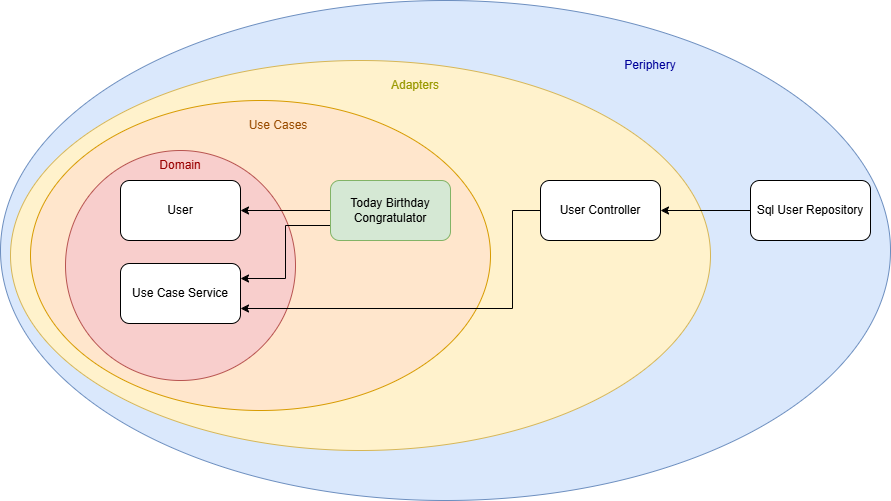
For example, I could implement another service that retrieves all users whose birthday is today and sends them birthday greetings. (Whether this is GDPR-compliant is another discussion!) But thanks to this architecture, I now have the freedom to implement that use case cleanly and efficiently.

Conclusion

Architecture is a highly individual matter. There is no one-size-fits-all solution that solves every problem or suits every project. Models like Clean Architecture can be helpful guides, but ultimately, you need to define your own architectural requirements and find a solution that meets them. This was a short story of how one such solution came to life based on my own needs.

It is also a small reminder to keep the freedom to think outside the box. Do not be afraid to design an architecture that truly fits you and your project, even if it deviates from the standard models.

Forking an Open Source Repository in Good Faith

One might love Open Source for different reasons: Maybe as a philosophical concept of transcendental sharing and human progress, maybe for reasons of transparency and security, maybe for the sole reason of getting stuff for free…

But, as a developer, Open Source is additionally appealing for the sake of actively participating, learning and sharing on a directly personal level.

Now I would guess that most repository forks are probably done for rather practical reasons (“I wanna have that!”), the forks get some minor patches one happens to need right now – or for some super-specific use case – and then hang around for some time until that use case vanishes or the changes are so vast that there will never be a merge (a situation commonly known as “der Zug ist abgefahren”), one might sometimes try to supply one’s work for the good of more than oneself. That is what I hereby declare a “Fork in Good Faith.”

A fork can happen in good faith if some conditions are true, like:

  • I am sure that someone else can benefit from my work
  • My technical skills match the technical level of the repository in question
  • Said upstream repository is even open for contributions (i.e. not understaffed)
  • My broader vision does not diverge from the original maintainers’ vision

Maybe there are more of these, but the most essential point is a mindset:

  • I declare to myself that I want to stay compatible with the upstream as long as is possible from both sides.

To fork with Good Faith is, then, a great idea because it helps to advance much more causes at once than just the stuff for free, i.e. on a developmental level:

  1. You learn from the existing code, i.e. the language, coding style, design patterns, specific solutions, algorithms, hidden gems, …
  2. You learn from the existing repository, i.e. how commits and branches are organized, how commit messages are used productively, how to manage patches or changes in general, …
  3. In reverse, the original maintainers might learn from you, or at least future contributors might
  4. You might get more people to actually see / try / use your awesome feature, thus getting more feedback or bug reports than brewing your own soup
  5. You might consider it as a workout of professional confidence, to advocate your use cases or implementation decisions against other developers, training to focus on rational principles and unlearning the reflexes of your ego.
  6. This can also serve as a workout in mental fluidity, by changing between different coding styles or conventions – if you are e.g. used of your super-perfect-one-and-only way of doing things, it might just positively blow your mind to see that other conventions can work too, if done properly.
  7. Having someone to actually review your changes in a public pull request (merge request) gives you feedback also on an organisational level, as in “was all of this part actually important for your feature?”, “can you put that into a future pull request?” or “why did you rewrite all comments for some Paleo-Siberian language??”

Not to forget, you might grow your personal or professional network to some degree, or at least get the occasional thank you from anyone (well…).

But the basic point of this post is this:

Maintaining a Fork in Good Faith is active, continuous work.

And there is no shame in abandoning that claim, but if you do once, there might be no easy return.

Just think about the pure sadness of features that are sometimes replicated over-and-over again, or get lost over the time;

And just think about how confusing or annoying that already could have been for yourself, e.g. with some multiply-forked npm package or maybe full-fledged end-user projects (… how many forks of e.g. WLED do even exist?).

This is just some reflection of how careful such a decision should be done. Of course, I am writing this because I recently became aware of that point of bifurcation, i.e. not the point where a repository is forked, but the one where all of the advantages mentioned above are weighed against real downsides.

And these might be legitimate, and numerous, too. Just to name a few,

  1. Maybe the existing conventions are just not “done properly”, and following them for the sake of uniformity makes you unproductive over time?
  2. Maybe the original maintainers are just understaffed, non-responsive or do not adhere to a style of communication that works with you?
  3. Maybe most discussions are really just debates of varying opinion (publicly, over the internet – that usually works!) and not vehicles of transcending the personal boundaries of human knowledge after all?
  4. Maybe you are stuck with sub-par legacy code, unable to boy-scout away some technical debt because “that is not the point right now”, or maybe every other day some upstream commit flushes in more freshly baked legacy code?
  5. Maybe no one understands your use case and contrary to the idea mentioned above – in order to get appropriate feedback about your features, and to prove its worth, you need to distribute this independently?
  6. Maybe at one point the maintainers of an upstream repository change, and from now on you have to name your variables in some Paleo-Siberian language?

I guess you get the point by now. There is much energy to be saved by never considering upstream compatibility in the first place, but there is also much potential to be wasted. I have no clear answer – yet – how to draw the line, but maybe you have some insight on that topic, too.

Are there any examples of forks that live on their own, still with the occasional cherry-pick, rebase, merge? Not one comes to my mind.

Experimenting with CMake’s unity builds

CMake has an option, CMAKE_UNITY_BUILD, to automatically turn your builds into unity-builds, which is essentially combining multiple source files into one. This is supposed to make your builds more efficient. You can just enable enable it while executing the configuration step of your CMake builds, so it is really easy to test. It might just work without any problems. Here are some examples with actual numbers of what that does with build times.

Project A

Let us first start with a relatively small project. It is a real project we have been developing, that reads sensor data, transports it over the network and displays it using SDL and Dear ImGui. I’m compiling it with Visual Studio (v17.13.6) in CMake folder mode, using build insights to track the actual time used. For each configuration, I’m doing a clean rebuild 3 times. The steps are the number of build statements that ninja runs.

Unity Build#StepsTime 1Time 2Time 3
OFF4013.3s13.4s13.6s
ON2810.9s10.7s9.7s

That’s a nice, but not massive, speedup of 124,3% for the median times.

Project A*

Project A has a relatively high number of non-compile steps: 1 step is code generation, 6 steps are static library linking, and 7 steps are executable linking. That’s a total of 14 non-compile steps, which are not directly affected by switching to unity builds. 5 of the executables in Project A are non-essential, basically little test programs. So in an effort to decrease the relative number of non-compile steps, I disabled those for the next test. Each of those also came with an additional source file, so the total number of steps decreased by 10. This really only decreased the relative amount of non-compile steps from 35% to 30%, but the numbers changes quite a bit:

Unity Build#StepsTime 1Time 2Time 3
OFF309.9s10.0s9.7s
ON189.0s8.8s9.1s

Now the speedup for the median times was only 110%.

Project B

Project B is another real project, but much bigger than Project A, and much slower to compile. It’s a hardware orchestration system with a web interface. As the project size increases, the chance for something breaking when enabling unity builds also increases. In no particular order:

  • Include guards really have to be there, even if that particular header was not previously included multiple times
  • Object files will get a lot bigger, requiring /bigobj to be enabled
  • Globally scoped symbols will name-clash across files. This is especially true for static globals or things in unnamed namespaces, which basically don’t do their job anymore. More subtly, things moved into the global namespace will also clash, such as the classes with the same name moved into the global namespace via using namespace.

In general, that last point will require the most work to resolve. If all fails, you can disable unity build on a target via set_target_properties(the_target PROPERTIES UNITY_BUILD OFF) or even just skip specific files for unity build inclusion via SKIP_UNITY_BUILD_INCLUSION. In Project B, I only had to do this for files generated by CMakeRC. Here are the results:

Unity Build#StepsTime 1Time 2Time 3
OFF416279.4s279.3s284,0s
ON11873.2s76.6s74.5s

That’s a massive speedup of 375%, just for enabling a build-time switch.

When to use this

Once your project has a certain size, I’d say definitely use this on your CI pipeline, especially if you’re not doing incremental builds. It’s not just time, but also energy saved. And faster feedback cycles are always great. Enabling it on developer machines is another matter: it can be quite confusing when the files you’re editing do not correspond to what the build system is building. Also, developers usually do more incremental builds where the advantages are not as high. I’ve also used hybrid approaches where I enable unity builds only for code that doesn’t change that often, and I’m quite satisfied with that. Definitely add an option to turn that off for debugging though. Have you had similar experiences with unity builds? Do tell!

Deferred Constraints in Oracle DB

Foreign key constraints are like rules in your Oracle database that make sure data is linked properly between tables. For example, you can’t add an order for a customer who doesn’t exist – that’s the kind of thing a foreign key will stop. They help enforce data integrity by ensuring that relationships between tables remain consistent. But hidden in the toolbox of Oracle Database is a lesser-known trick: deferred foreign key constraints.

What Are Deferred Constraints?

By default, when you insert or update data that violates a foreign key constraint, Oracle will throw an error immediately. That’s immediate constraint checking.

But with deferred constraints, Oracle lets you temporarily violate a constraint during a transaction – as long as the constraint is satisfied by the time the transaction is committed.

Here’s how you make a foreign key deferrable:

ALTER TABLE orders
  ADD CONSTRAINT fk_orders_customer
  FOREIGN KEY (customer_id)
  REFERENCES customers(customer_id)
  DEFERRABLE INITIALLY DEFERRED;

That last part – DEFERRABLE INITIALLY DEFERRED – is the secret sauce. Now, the constraint check for fk_orders_customer is deferred until the COMMIT.

Use Cases

Let’s look at a few situations where this is really helpful.

One use case are circular references between tables. Say you have two tables: one for employees, one for departments. Each employee belongs to a department. But each department also has a manager – who is an employee. You end up in a “chicken and egg” situation. Which do you insert first? With deferred constraints, it doesn’t matter – you can insert them in any order, and Oracle will only check everything after you’re done.

Another use case is the bulk import of data. If you’re importing a bunch of data (like copying from another system), it can be really hard to insert things in the perfect order to keep all the foreign key rules happy. Deferred constraints let you just insert everything, then validate it all at the end with one COMMIT.

Deferred constraints also help when dealing with temporary incomplete data: Let’s say your application creates a draft invoice before all the customer info is ready. Normally, this would break a foreign key rule. But if the constraint is deferred, Oracle gives you time to finish adding all the pieces before checking.

Caution

Using deferred constraints recklessly can lead to runtime surprises. Imagine writing a huge batch job that appears to work fine… until it crashes at COMMIT with a constraint violation error – rolling back the entire transaction. So only defer constraints when you really need to.

One last tip

If you want to check if a constraint is deferrable in your database you can use the following SQL query:

SELECT constraint_name, deferrable, deferred
  FROM user_constraints
 WHERE table_name='ORDERS';