Open Source Love Day May 2010

Our Open Source Love Day for May 2010 brought love for Netty, Launch4j and RXTX. Everything went smooth again this time.

Last friday, we held our Open Source Love Day for May 2010. After the excessive yak shaving of last month’s OSLD, this one was more productive. We got one feature right nearly instantly and several others throughout the day. To keep us from feeling depressed, we allocated dedicated “research time” to get to know a project before starting to develop on it. So one point on our current list of accomplishments is only research work that should be counted as “thought investment” for further improvements.

The Open Source Love Day

We introduced a monthly Open Source Love Day (OSLD) to show our appreciation to the Open Source software ecosystem and to donate back. We heavily rely on Open Source software for our projects. We would be honored if you find our contributions useful. Check out our first OSLD blog posting for details on the event itself.

On this OSLD, we accomplished the following tasks:

  • Netty is a java framework to perform network communication, transparently using different transport mechanisms. We use it in a customer project environment and it worked mostly well. But we noticed some issues that might have to do with the framework, so we decided to put it under development. But before hopping in right away, we invested some hours to really anatomize it. Our achievement isn’t noticeable yet, but might be in the future.
  • Launch4j is a java application launcher for Windows, handling all the stuff a startup script (the infamous start.bat) would do, too. One thing that’s easy to perform in a batch script is to restart the application if it went down with an error. We wanted this feature in Launch4j and we succeeded. Before releasing the changes to the project, we need some rethinking of our approach, as it is very special to our case, but if you are interested, we send you the patch on request.
  • RXTX is a project to perform serial (RS232) communication. Over the course of the last OSLDs, we worked on an issue that appears in combination with serial converters. See the OSLD posting for march 2010 for details. This issue seems to be completely fixed now. We will run some longterm stability tests with it and then release a patch to the issue tracker of RXTX, issue #144.
  • Our internal tool for business administration was greatly improved this time. The tool isn’t open sourced yet, but we are not afraid to publish it in the future. The new features will directly decrease our administrative overhead and give us more time to perform our main duty – developing software.

A sidenote regarding the yaks (see last month’s OSLD posting to understand this one)

Our monthly “Homepage Comittee” meeting went smooth this time. The setup pain of last month is now paying out and we got our homepage updated. It seems the yaks haven’t grown beards again yet.

What were our lessons learnt today?

  • Pure C code tends to produce endless code blocks. Simple refactorings like extract method/function take a long time and aren’t supported by the IDE. The sentence “there is no boolean!” left some of us impressed, too.
  • The C/C++ Eclipse workbench (in fact, a bunch of plugins for Eclipse) was a joke instead of a help. It didn’t exactly prevent us from doing our work, but that’s all it did. Launch4j came along with project files for the Bloodshed Dev-C++ IDE, which – besides its bloody name – seems to be up to its tasks. We decided to use Dev-C++ over Eclipse for development on Launch4j.
  • Hpricot is a very versatile HTML parser/manipulator. It is just pure joy to work with. (Ok, we knew that one before)

After the fruitless OSLD of april, this one was a great relief for us. The new restart feature for Launch4j worked out instantly and will solve many of our current immediate problems (and some of yours, hopefully). The solution for RXTX got us out of trouble, too. All in all, this was a successful OSLD.

Follow-up to our Dev Brunch May 2010

A follow-up to our May 2010 Dev Brunch, summarizing the talks and providing bonus material.

Last sunday, we held our Dev Brunch for May 2010. It was a small group of developers brunching together this time. One reason was a communication failure on my part, as a crucial email announcing a change in the appointment didn’t reach everyone interested in participating. Sorry for this one again! The other reason was more of a pleasure: Two of our regular brunch attendees are turning into parents. But a core group brunched and talked in the office roof garden, discussing the topics listed below.

The Dev Brunch

If you want to know more about the meaning of the term “Dev Brunch” or how we implement it, have a look at the follow-up posting of the brunch in October 2009. We continue to allow presence over topics. Our topics for the brunch were:

  • Options in Scala – If you are used to traditional programming languages like Java, you might be surprised that you can’t nullify a reference in Scala. There is no concept of “null” in Scala, therefore avoiding the so-called billion dollar mistake (you might want to listen to the guy who invented the mistake, too). If you want to use “uncertain” references, you should look into the Option type of Scala, which was the main topic of this talk. With some code examples, this was a decent introduction into the concept.
  • Summary of the Sensor+Test trade fair – This talk was a short report of the recently visited german Sensor+Test measurement fair in Nuremburg. Details may follow on this blog, but the overall summary is that the measurement industry in Germany and neighbours is mostly self-confident and down-to-earth.
  • The Modbus protocol – This talk was a short introduction to the ancient (but still useful) Modbus protocol and the possibilities to access it in Java. There are at least two projects that provide full coverage of the protocol: jamod and modbus4j. The protocol itself is rather low-level, but sufficient for simple control and data query tasks on an embedded device. The possibility to be mostly agnostic over the physical transport layer is a strength of the Modbus protocol and its implementations.
  • Usage patterns for mocks – Most of us had to confess: we are mockists. But there are many different flavors of using mocks in tests. Inspired by the book “Growing Object-Oriented Software, Guided by Tests”, this talk was an open discussion round about personal mock usage preferences.

As usual, the topics ranged from first-hand experiences and impressions to literature reviews and research. For additional information provided by the talk authors, check out the comment section (or leave a comment to request further content). Comments and resources might be in german language.

Retrospection of the brunch

The usual brunch setup is nearly perfect. What was lacking this time was the coordination of the appointment. To further improve on that point, we introduced a new mailing list, containing everone that is currently interested in participating the brunch.

Keeping it simple is hard indeed

A true story I was reminded of when I read Chad LaVigne’s essay on simplicity from the book “97 Things Every Software Architect Should Know”.

When I read the great book (or collection of essays) “97 Things Every Software Architect Should Know”, there was a story I had experienced first-hand for nearly every chapter. But it was only after I read about it in the well-placed words of somebody with greater in-depth experience than me that it appeared clear to me. The essence of my own experience was written down so I could iterate over it. Here is a story about simplicity that I hope will help somebody out there iterate over the same thought sometimes.

The problem

In the early days, we were asked to provide custom software for a nearly robot-like machine that performs measurements. Our software had to control some engines that could move sensors and actuators around. The whole machine was built by another company that only had eyes for the mechanical and electrical aspects. As a result, the communication protocol between the microcontrollers of the machine and our software was horribly awkward and unpleasant in regard of the software engineering side of the project.

One engine was the so-called “vertical engine”, because it could move an array of sensors up and down. There were four actual positions where the engine would stop automatically upon contact. It was the job of our software to send the correct commands in the correct order at the correct time to reach the destination. Effectively, we would “hop” from position to position, either moving the sensors up or down. If only the communication protocol would’ve allowed that. What we got was two commands: moving one position down and moving up to the topmost position. The movement options are depicted here:

The first solution

But what would a developer’s life be without a few challenges? Our team quickly came up with several possible solutions, from finite state machines to object graphs of “position” instances that offered several “movement options” to an agent-like object travelling inside the graph. In the brainstorming session, even more sophisticated possibilities were discussed. The solution we finally implemented was complex in terms of clarity. We needed quite a few unit and integration tests to proof the whole thing correct. During all this process, nobody ever questioned the complexity of the problem.

The essay

The chapter I read in the book “97 Things Every Software Architect Should Know” when this story came back to me was “Make Sure the Simple Stuff Is Simple” written by Chad LaVigne. Let me cite some sentences to show the message of his essay:

“People who design software are smart – really smart. The simple problem-complex solution trap can be an easy one to fall into because we like to demonstrate our knowledge. If you find yourself designing a solution so clever that it may become self-aware, stop and think. Does the solution fit the problem?”

The essay hit the nail on the head for me. Our solutions for this “vertical engine” were all clever and solved the problem, but a much more complex problem than the one that was really needed.

The second solution

Our first version of the software went into production and worked a treat. Years later, the hardware (specifically the microcontrollers) fell apart and was replaced by more sophisticated electronics. We needed to rewrite parts of our software, especially the engine controls. But this time, we had real movement patterns of all engines, collected in the logfiles. Some regular expression magic later (remember, we are smart people and like to show that!), it was clear that the vertical engine had never used two of the possible movement options. The real usage pattern of the engine is depicted in the picture below:

The real problem we should have solved from the beginning is much simpler than the original one. Every engine position has only one successor, there is no need to choose from several options or to calculate the shortest path to the destination. It’s the most boring finite state machine you’ve ever seen and there is no need for recursive structures.

It was our own cleverness that made the problem appear more complex than it really was, just because we could handle it. Some investigation on the problem domain instead of the solution domain would have brought us to the same conclusion that the log file analysis finally revealed.

The lesson learnt

The whole story isn’t about failure. Both solutions worked for the customer. In fact, he never noticed a difference when the second solution was going live. This story is about accidental complexity and about being smarter than the requirement. It’s in our nature to accept a problem as “given” and come up with an elegant solution. It might be much more effective to question the problem instead.

Thank you, Chad, for your great essay!

Open Source Love Day April 2010

Our Open Source Love Day for April 2010 didn’t yield the desired results. Instead, we went to give our yaks a shave.

Today, we held our Open Source Love Day for April 2010. Well, to be honest, we tried to. We didn’t achieve that much to present publically and felt really depressed at the end of the day. At least, we can try to explain what went wrong. It all has to do with our own breed of yaks that needed to be shaved today. But first, lets explain the basics.

The Open Source Love Day

We introduced a monthly Open Source Love Day (OSLD) to show our appreciation to the Open Source software ecosystem and to donate back. We heavily rely on Open Source software for our projects. We would be honored if you find our contributions useful. Check out our first OSLD blog posting for details on the event itself.

Today, we reached out to perform the following tasks:

  • RXTX is a fine java library to access the (rather legacy) serial port to send and receive data over the RS232. On our last Open Source Love Day, we proposed a patch for a problem with disappearing emulated COM ports. This happens a lot if you use USB or ethernet converters and unplug them accidentally or because your intranet got shut down. The patch works well, but not perfectly. We noticed that the IOException we introduced gets thrown much too often. Today, we wanted to fix our fix. We only came to the conclusion that the problem might be a lot more complex than we initially thought.
  • Launch4j is another java library/tool we use to deliver production-ready software bundles. It’s a launcher that increases the user experience at the critical “first contact” for Windows users. The project is mature and useful, but out of development for nearly two years now. We want some features in it, so we thought we might build them today. But the yaks didn’t let us.
  • We have an internal tool for our business administration that desperately needs some hugs. So even if this isn’t strictly Open Source yet, we allocated some time to add a few features. But they outgrew their timebox, too.

At the end of the day, we didn’t accomplish anything ready to be released. That’s frustrating to us and has no value to anybody else. We promise to do better next time.

How the yaks got shaved

Every organization has a secret stable where yaks are raised just for the sake of raising yaks. Once a year or so, they need a shave, so you’ll find yourself shaving yaks before you know what’s happening. That’s what happened to us today.

The term “yak shaving” isn’t our invention. It describes the result of a process when in order to accomplish task A, you need to do task B first. Task B can’t be done before tasks C and D both are completed. Task D, you figure it already, is dependent on task E, which in turn… Soon and inevitably, you’ll find yourself shaving yaks because it is what needs to be done to accomplish your todo list.

This is our story: On every Open Source Love Day, we also gather to have a short “Homepage Comittee” meeting. This is our formal approval process to publish content on our website. One improvement we wanted to implement today was an automatic publishing process. It copies the content of our internal Content Management System to our webserver. Simple as that. This was the starting point of an odyssee.

To copy the content, we used wget. But wget in the version of our distribution had a bug (and missed a feature), so we needed to update wget… Soon afterwards, we found ourselves upgrading our main PostgreSQL database (which went incredibly smooth but took forever) and wrestling with certain dependencies of other parts of the system. We realized we are now officially shaving yaks when we got the error message:

You need to have ruby gems 1.3.2 installed. Your version is 1.3.1!

Remember we started with taking a snapshot of our CMS using wget. Clearly, separating our services to more machines would have helped a lot. But that would’ve taken more than one day to do. It’s on our wish list for the next Admin Day.

Let’s conclude this blog post with the insight that we need to timebox our work better when working for the OSLD. And our yaks are shaved and ready for the summertime.

Follow-up to our Dev Brunch April 2010

A follow-up to our April 2010 Dev Brunch, summarizing the talks and providing bonus material.

Last sunday, we held our Dev Brunch for April 2010. It was the start of the open air season, introducing our new office roof garden. We brunched under a clear, sunny sky (no clouds, even no vapor trails from airplanes, as they aren’t allowed to fly because of some distant volcano ash emission) and talked about agile processes and books. A major part of the brunch was graded as “informal chatter”, just as it should be like.

The Dev Brunch

If you want to know more about the meaning of the term “Dev Brunch” or how we implement it, have a look at the follow-up posting of the brunch in October 2009. We continue to allow presence over topics. Our topics for the brunch were:

  • Agile life planning – Your software development daily routine is to incrementally build software from a backlog and release it after a fixed timebox. What might happen if you transfer this process to your private life (often called “real life”)? You’ll release a week’s life every week and have a week planning meeting on sunday, filling your week/sprint backlog with the most important items of your life’s backlog. Telling from this first hand experience of about a year, it works exceptionally well, improving the leisure time quality and making “progress” visible even at harder times. The only remaining question is who acts as the product owner.
  • Converting to Scrum – First hand experience of a team that, after years of “alarm call”-style development, successfully implemented Scrum as their primary process. The effects were at least less overtime, improved progress tracking, improved code quality (though Scrum is  only a management process!) and less pressure in the project. The customer even adjusted their wording when talking about new features: “next sprint” instead of “immediately, now”. The implemented process isn’t vanilla Scrum, but works nevertheless.
  • Defending Continuous Integration – What if, after an initial phase of excitement over the new tool, the continuous integration server really reveals flaws in your project? There seems to be the tendency to kill the messenger: Shut down the CI server and everything’s fine again. This talk was about the reasoning of both sides and some basic insights gained about machine sharing. Tip of the talk: Reserve your CI server exclusively for this task.
  • Book recommendations – A random collection of technical books read in the last half year, presented with a short summary and personal rating. Titles included were Coders At Work, Founders At Work, 97 Things Every Software Architect Should Know, 97 Things Every Project Manager Should Know, 97 Things Every Programmer Should Know, Hiring the Best Knowledge Workers, Techies & Nerds and Manage Your Project Portfolio. Yes, there are some patterns visible in the book titles. And it’s a good idea to keep some checklist of read articles for most of these books.
  • Dreyfus Model of Skill Acquisition – The Dreyfus Model differentiates five to six different stages of learning some arbitrary skill. It makes assumptions how the members of the stages work, how they process feedback information and what they need to get better. See the comment section for more information and bonus material.

As usual, the topics ranged from first-hand experiences to literature research. For additional information, check out the comment sections. Comments and resources might be in german language.

Retropection of the brunch

Holding the brunch in the bright morning sun, surrounded by rooftops and birds, really is a huge gain for the ambience factor. We even found a solution to produce fresh coffee up there. This will be a fun summer for the Dev Brunch.

Prettier failures using Swing TaskDialog

An introduction to the Swing TaskDialog project, a fine little gem to spice up your (java swing) dialogs. Includes a real usage example.

The standard way to present graphical user interfaces (GUI) on a desktop machine in java is to use Swing. It’s a very flexible API with a steep learning curve and some oddities (e.g. EDT handling is cumbersome at least), beginning to show some age. There were several attempts to take the Swing experience to a new level, including the marvellous book “Filthy Rich Clients” by Chet Haase (we miss you in the Java camp!) and Romain Guy. So Swing isn’t dead or dying, it’s just getting old.

A pain point of Swing

One thing always bothered me with Swing: It is relatively easy to present a basic message or input dialog. But to add slightly more complexity to a dialog suddenly means substantially more effort. Dialogs don’t scale in Swing. If you ever “designed” an error dialog for your end user, presenting the essence of an exception that just occurred, you already know what I’m talking about. I have to make a confession: Our exception/error dialogs were nearly as nasty as the exception itself. But nobody wants to fail nasty.

Swing TaskDialog to the rescue

At late february this year, Eugene Ryzhikov published his Swing TaskDialog project on his blog. His release pace has been a new version once a week since then. So I’m writing on a moving target.

The TaskDialog project provides basic message, progress and input dialogs based on the operating system’s “User Experience Guidelines”. The visual content is very appealing as a result. But the project doesn’t stop here. The programming API is very understandable and to the point. You don’t have to hassle with big concepts to use it, just look at the examples and start from there.

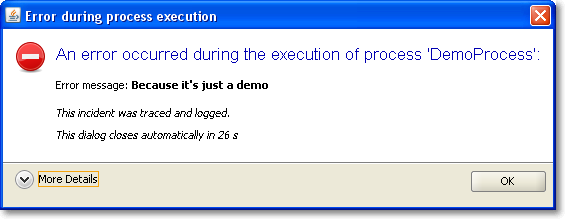
It was a matter of minutes to replace our old, nasty error dialog with a much prettier one using TaskDialog. Here are two screenshots of it in action, with the detail section retracted (initial state) and flipped open.

Of course, this is only the Windows version of the dialog. You should head over to the TaskDialog examples page to get an idea how this might look on a Mac. This is a dialog that’s pretty enough to not scare the user away by sheer uglyness. The code for this dialog is something like:


TaskDialog dialog = new TaskDialog("Error during process execution");
 dialog.setIcon(TaskDialog.StandardIcon.ERROR);
 dialog.setInstruction("An error occurred during the execution of process 'DemoProcess':");

 Exception exception = new Exception("Because it's just a demo");
 StringBuilder detailMessage = new StringBuilder();
 for (StackTraceElement stackTraceElement : exception.getStackTrace()) {
 detailMessage.append(stackTraceElement.toString());
 detailMessage.append("\n");
 }
 dialog.setText("Error message: <b>" + exception.getMessage() + "</b>\n\n<i>This incident was traced and logged.</i>");
 dialog.getDetails().setExpandableComponent(
 new JLabel(Strings.toHtml(detailMessage.toString())));
 dialog.getDetails().setExpanded(false);

 JLabel waitLabel = new JLabel(Strings.toHtml("<i>This dialog closes automatically in 26s</i>"));
 dialog.setFixedComponent(waitLabel);

 dialog.show();

Notice the usage of Strings.toHtml() to convert plain Strings to HTML-rendered rich text elements.

Timed dialogs

If you look at the presented information, you’ll notice it’s just a demo presenting a fake exception. But you’ll notice another thing, too: This dialog is about to close itself automatically soon. This is a speciality of our project: The GUI runs unattended by users for long periods of time. If you encounter an error every ten minutes and an user returns to the screen after a week, the system isn’t accessable without closing a million dialogs first. You might argue why a system error lasts for a week, but that’s a reality in this project we cannot change. So we came up with timed dialogs that go away on their own after a while. The information of the dialog is persisted in the log files that get evaluated periodically.

The TaskDialog API provides easy integration for a GUI widget to be included in the dialog. In our timed dialog use case, it’s a JLabel, as highlighted in the code example at lines 16 and 17. A background thread periodically updates the text and closes the dialog when time runs out. But you’ll find examples with progress bars and other components on Eugene’s blog.

Conclusion

The Swing TaskDialog project is a fine little gem to spice up your application. It’s API is simple, yet powerful and has proven customizable to our special use case. Finally, effort for basic dialogs in Swing scales again.

Blog harvest, March/Easter 2010

Some noteworthy blog articles, harvested for March/Easter 2010. You’ll hear a lot about common software bugs, Java, inappropriate hiring procedures and Scala. If you ever wanted to know about the Fussy Bird in Scala, this blog post is for you, too.

Easter times means springtime, an hour stolen by the daylight saving time, rapidly changing weather and the first days without gloves (I catch chillblains very quick. There isn’t an adequate word for them in the german language, so I couldn’t name it for years). We are looking forward for a very hot summer, not only with the weather. But now, let’s talk about software.

  • Top 10 Web Software Application Security Risks – The OWASP community has released their current list of web programmer gotchas. There is nothing to add but “don’t try this at work, kids!”. For a broader audience, there’s the updated “Top 25 Most Dangerous Programming Errors” from the Common Weakness Enumeration project.
  • The 10 most common mistakes made in software development – Another top list with developer mistakes, written by Peter Horsten from GOYELLO IT Services. This one isn’t too code centric and doesn’t provide many solutions, but there is much wisdom in top 9 and 10.
  • I Have No Talent – There is a saying that open source development will make you humble, but John Nunemaker takes it to an extreme. He speaks true words. My favourite phrase is the last one, saying that he doesn’t compare himself to others, but to his own progress. If only everybody would do.
  • Why I love everything you hate about Java – An interesting blog entry by Nick Kallen. He takes a stand for the “bloated” middle-layer in (java) code. The post tends to be a long read, but I found it worthwile. The one thing I hate about Java is the slow progress in recent years.
  • Why I dropped Scala in favor of Java? – While you might argue about the universal importance of Subhash Chandran’s reasoning, it’s still valid. Combined with the previous blog harvest entry, there’s a pattern to be discovered: the grass isn’t always greener on the other side. But you have to change sides to see it.
  • NIO.2 : The new Path API in Java 7 – Java makes slow progress in recent years, but there is progress to be seen. The Path API is something we could have used years earlier. The DirectoryStream and WatchService are two functionalities you couldn’t easily build on your own yet.
  • Ant 1.8 Scanning Leaves 1.7.1 in the Dust – If you are using Ant, you can regain performance with just an upgrade. And you will find the other new features (like lexically scoped properties) really useful.

This was the more serious part of this harvesting. Let’s read some articles that share their message in a lighter way:

Finally, I want to introduce a “interesting tool” section. Each new harvest should present a framework/product/project I found interesting enough to tell you about it:

  • op4j – It calls itself a developer happiness tool. You may call it a stress test for static imports, collection kung-fu or fluency madness. But nevertheless, it’s fun to apply it to your boring old data structures.

P.S.: No easter egg is to be found in this posting.

Open Source Love Day March 2010

Our Open Source Love Day for March 2010 brought love for Grails, our cmake hudson plugin, RXTX and winp. Everything went smooth and was lots of fun.

Yesterday, we held our first Open Source Love Day (OSLD) for this year. The last OSLD was at December 2009. Then, we reassigned a day in January and February each to perform our relocation to the new (and much bigger) office. But now we are back to regular duty and had the time to donate some work back to the Open Source ecosystem.

The Open Source Love Day

We introduced a monthly Open Source Love Day to show our appreciation to the Open Source software ecosystem and to donate back. We heavily rely on Open Source software for our projects. We would be honored if you find our contributions useful. Check out our first OSLD blog posting for details on the event itself.

Participate at our OSLD by using the features we’ve built today:

  • Grails still has some bugs. Instead of only complaining about them, we try to fix them. There is a bug with checkboxes and nested boolean properties that bugged us in a customer project. It’s filed unter GRAILS-3299 and has a proposed patch now.
  • In previous OSLDs, we produced the cmake hudson plugin. In the corresponding blog entry, comments with bug reports began to pile up. They addressed issues with hudson master/slave setups. So we implemented a hudson master/slave test environment, using VirtualBox virtual machines to perform as slaves. This setup quickly revealed the problems that were typical enough to devote a complete blog entry about this topic soon. Fixing the problems resulted in the new cmake hudson plugin version 1.2 to be released yesterday.
  • We are using the RXTX project to perform serial (RS232) communication in several projects. We are really glad the project exists, because the “official” communications API from Sun/Oracle is nothing but a mess. With RXTX, we only had a problem with emulated COM ports. Emulated COM ports exist when you use a USB->Serial or Ethernet->Serial converter, which is what our customer chose to do. If you unplug the converter during operation, the corresponding COM port disappears. This causes RXTX to crash, bringing the JVM down, too. We wrote a test application and used it with every converter we own (and we own quite a lot of them!). Then we began tracing the RXTX source code (at C code level), altering it to “only” throw an IOException when the virtual COM port disappears. The corresponding patch will be proposed to the RXTX project soon.
  • Another API we use a lot is the tiny winp project, written by Kohsuke Kawaguchi, the creator of hudson. We kill Windows processes with it, within a project that runs on Windows 2000, Windows XP and Windows 7. The latest Windows version seemed incompatible with winp, even the 32bit edition. We didn’t find the cause for this, but developed a workaround that will be proposed to the winp project soon.

What were our lessons learnt today?

  • If you face OutOfMemoryErrors on a 64bit Java6 JVM, try to switch back to a 32bit Java5 JVM. It helped us with our Grails bugfixing (during the test phase).
  • Hudson Master/Slave support for plugins isn’t particularly hard. It’s just that you need to be aware of the topic and replace some types like java.io.File. We gathered the same experience twice with our Crap4J plugin and the cmake plugin. It’s time to tell the world about it. Stay tuned!
  • The good old error return code is an error prone coding paradigm, because all too often, users of a function/method just forget to check the returned result. This was the case with a call to WaitForSingleObject in RXTX.
  • If you don’t understand an implementation well enough to fix the cause, you might at least be able to produce a workaround. It’ll work for you and provide guidance for the original author about where the bug might hide. This is why we count our winp efforts as success, too.
  • Your project either is mavenized or it isn’t. Everything in between is half-assed.

This OSLD was a bit short, as we had some guests in the evening, but nevertheless, it was fun. Well, to be precise, it was this special software engineer’s type of fun: The whole company was remarkably quiet most of the day, with everyone working totally focussed. We scratched our own itches, enhanced our customer projects and contributed to the open source community. A very good day!

Stay tuned if you want to know more about the specifics of the hudson plugin development or the to-be-proposed patches. We will publish them here.

Follow-up to our Dev Brunch March 2010

A follow-up to our March 2010 Dev Brunch, summarizing the talks and providing bonus material.

Yesterday we held our Dev Brunch for this month. It was the second brunch in our new office, with some attendees visiting it for the first time. The reactions were the same: “I want to move in here!”. The topics were of different kinds, from live presentations to mere questions open for discussion.

The Dev Brunch

If you want to know more about the meaning of the term “Dev Brunch” or how we implement it, have a look at the follow-up posting of the brunch in October 2009. We continued to allow presence over topics. These topics were discussed today:

  • Singleton vs. Monostate – We all know that Singletons are bad for your test coverage, they make a poor performance on your dependency chart and are generally seen as “evil”. We discussed the Monostate pattern and if it could solve some of the problems Singletons inherently bring along. Based upon the article from Uncle Bob, we concluded that Monostates are difficile at least and don’t help with the abovementioned problems.
  • What is “agile” for you? – This simple question provoked a lot of thoughts. You can always obey the Agile Manifesto word by word without understanding what the deeper motives are. The answer that fitted best was: “You can name it when you see it”. We concluded that it’s easy and common practice to label any given process “agile” just to sound modern.
  • News around Yoxos – If you are using Eclipse, you’ve certainly heard about Yoxos already. Now during the EclipseCon 2010, good news were announced. We got a sneak peek on the new Yoxos Launcher and how it will help in managing your pack of Eclipse installations. We are looking forward to become beta testers because we can’t wait to use it.
  • Teaser talk for “Actors in Scala” – The actor paradigm for parallel programming is a promising alternative to threads. While threads are inevitable complex even for simple tasks, actors seem to recreate  a more natural approach to parallelism. This talk was only the teaser for a more in-depth talk next time, with hands-on code examples.
  • Properties in Scala – This talk had lots of code examples and hands-on discussion about the Properties feature of Scala. Properties are an elegant way to reduce your boilerplate code for simple objects and to sustain compatibility with Java frameworks that rely on the Java Beans semantics. We clearly understood the advantages, but ran into some strangeness related to the conjoint namespaces of fields and methods along the way. Scala isn’t Java, that’s for sure.
  • Introduction to PreziPrezi is a modern presentation tool in the tradition of the dreaded PowerPoint or Apple’s Keynote. It adds a twist to your presentation by adding two new dimensions: laying out everything on a big single canvas (no slides!) and relying heavily on zooming effects. The online editor is surprisingly usable, yet simple and lightweight. If you want to meet prezi, check out the introduction prezis and the showcase on their homepage.

As usual, the topics ranged from first-hand experiences to literature research. For additional information, check out the comment sections. Comments and resources might be in german language.

Retrospection of the brunch

We keep getting better in timing our talks. We nearly maintained our time limit and didn’t hurry anything. For the next brunch, we are looking forward to use our new office roof garden to brunch and talk in the springtime sun.

Gesture Touchscreens might render Paper Prototyping useless

With the advent of highly dynamic, gesture-controlled user interfaces for touchscreens, Paper Prototyping seems to lose its applicability.

Paper Prototyping is an highly effective tool to examine the usability of software, even before it is written. The basic idea of Paper Prototyping is that you perform real (software) tasks with real users, but replace everything technical with low-fi substitutes.

Adventures in Low-fi

A typical Paper Prototyping session looks like this:

  • The user gets his task description and has to perform it with the software
  • The computer screen is replaced by an arrangement of paper sheets on a desk
  • The graphical user interface is replaced by hand-drawn copies on paper
  • The computer itself is replaced by a human, mimicking the software responses to input
  • The user operates by finger-pointing or writing with a pen

Advantages of Paper Prototyping

The whole situation described above seems awkward on first look, but is really rewarding for a project in its early stages. The customer has to provide real end user tasks and enough details of the solution to make up a prototype. The team has to produce reasonable drafts of the software GUI and come up with enough understanding of the processes and tasks involved to survive the session without major outages.

The result of a Paper Prototyping session can be used in various ways:

  • Detailed specification of the GUI
  • Use Case or User Story (acted out already)
  • Mock screenshots for the user manual
  • Data for initial acceptance tests

Classical user interface vs. gestures

This approach worked very well as long as the user only had a mouse (pointing, clicking) and a keyboard (writing) at hands. Even then, advanced features like grabbing (drag&drop) or automatic scrolling challenged the creativity of the prototypers. But most GUIs were rather dull and static. The perfect playground for Paper Prototyping.

With the advent of touchscreens, we soon realized that pointing and clicking only needs one finger out of ten. Gestures were introduced to keep all our fingertips busy and to enrich the interaction between user and GUI. We instantly understand the “zoom in” or “scroll down” gestures because it resembles natural behaviour (at least for some of us).

In the wake of gestures, the GUI of our software gets more and more dynamic. The GUI has to be minimalistic so we can control it even with stubby fingers (the new handicap of our generation, compare cell phone key pads). Detailed information has to be provided on demand and only temporarily. Everything can be manipulated. The classical approach to tab through a form (by carefully designed tab orders) isn’t that suitable anymore.

Gestures vs. Paper Prototyping

When using a Paper Prototype, the throughput of scribbled paper is enormous even with the classical GUIs. The more dynamic some dialog is, the more different parts need to be prepared in various states and locations (depending on the fragmentation of the paper screen). With gestures on a touchscreen, the user needs to be able to express them on the screen. Most touchscreen interfaces heavily depend on the (simulated) physical interaction between the fingers and some drawn “objects” on the interface. This is the moment when Paper Prototyping falls short of resembling the real interaction. You just can’t fiddle that fast with all the paper shreds.

No solution yet

I observed this effect when performing a Paper Prototype workshop with my students. The interfaces with classical mouse/keyboard handling performed well in the sessions. Interfaces for touchscreens (iPhone apps were the big newcomer here) just didn’t work out well, especially when downsized to palm size. We weren’t able to come up with a viable solution to make Paper Prototyping perform again for touchscreens and gestures.

Any ideas out there?