Different view on Apache Maven

Many people see Apache Maven as a build and dependency management tool. I see its strengths in other areas. Recently we had an in-house discussion about maven and I want to present my views here:

Pros

  • Maven standardizes your project layout and thus lowers the entry barrier for other developers.
  • Maven provides a IDE/tool agnostic way of describing a project and infrastructure to work with it. You get things like build and launch targets for free, depending on the archetype.
  • Archetypes (templates) for new projects make getting up to speed faster and easier.
  • Integration in many tools like continuous integration servers or IDEs is very good, so not much configuration work has to be done to get your project under test and supervision of analysis tools.
  • Ready-to-use plugins for many tasks.
  • Usable software distribution model helping in distibuted environments.

Cons

  • Big, ugly xml-specification (maven2, still need to check out the groovy and scala DSLs for poms) of the project.
  • Lacking documentation in some areas, e.g. certain plugins and best practices.
  • Once in a while “downloading the internet”-effect and auto-magic you need cope with.
  • Does not really solve dependency problems the way many people expect it.

So while you certainly can implement all wanted features of maven with other build and scripting systems and setup nice self-contained projects using maven can help you depending on your scenario. You have to know the strengths and weaknesses of your tools and try to decide accordingly. My experience is that you can get a basic project up and running in a healthy state very fast with maven. As the project grows the complexity will too and may outweigh the initial benefits. All tools require that you understand and use them well or they will stand in your way more and more. Especially using maven makes only sense if you adopt its style and conventions. If you strongly disagree there you will be happier with some solution like ant, cmake, gradle, ivy, make, sbt or the like providing more freedom by leaving more descisions up to you.

We are using different build and project description tools depending on the environment, involved technologies and project size and scope. Often this decision will not or cannot be changed so try to make a sensible decision considering all available information at hand.

Refactor now

What would you say about a mechanic or a craftsman who makes his work and does not clean up afterwards? Would you drive your car with stuff lying in the engine bay? Or use your bath with dirt all over?

Sometimes we write code or a test and think: make it work first and refactor it later. But this ‘later’ may not come in a while.
What would you say about a mechanic or a craftsman who makes his work and does not clean up afterwards? Would you drive your car with stuff lying in the engine bay? Or use your bath with dirt all over?
Certainly not.
So don’t wait until someone cleans your code or until you come back after a while and the first thing you do is cleaning up.
I know that when things get tough, deadlines are near, refactoring does not have top priority. So why not use an iteration or even some hours to clean up afterwards? It will help you in the future.

Take your programming course with a grain of salt, please

If you are cursed with silly rules in your programming course, we offer you some word of encouragement to find a mentor and keep your mental sanity and programming habits.

Lately, we had a talk with one of our former interns who now happens to study informatics at university. He presented some code he had written for his programming course and we did a team code review. The review itself was a lot of fun and sparked quite a few discussions. At one point, we assessed the different implementation styles of a method, changing the rather complex single return code into an early return method. Our former intern (now student) listened to the solution and stated: “I am not allowed to do that.”

There was a sudden silence, as everyone tried to comprehend what that means.

The student explained: “my course instructor prefers the single return approach over the early return style”. Well, that’s one thing, we can handle different opinions. “And”, he continued, “he announced there will be a painful deduction of points if we don’t comply to this style.” When the course tried to discuss this point, the explanation given was: “the single return style is superior because the other style is frowned upon.”

We couldn’t believe it. But, as it turns out, there are many rules like the one above in this programming course. And nearly every rule is highly debatable if not plain wrong (in our perception).

There is no problem with the presentation of certain rules in a beginner’s programming course. Novices need clear and precise rules to learn, according to the Dreyfus Model of Skill Acquisition. The concept just doesn’t work for students that aren’t on the Novices level anymore. These students are explicitely forbidden to create more advanced solutions. They are discouraged to look into different programming styles because it will only harm their grades.

We can think of a possible explanation for this scenario: The assignments have to be evaluated by the course instructors. It takes a lot of hard work (and time) to evaluate hundreds of totally different solutions for the same problem. If the solutions are mostly similar in style and concepts, the evaluation is a lot easier and can be done without full understanding of the code.

This is a rather poor explanation. It says “don’t be too advanced in your field of study or you will be too troublesome to attend to”. This is essentially an anesthetization by decree. But the real problem arises when you realize that there won’t be any continuative programming courses. They will never teach you all the more advanced concepts or rectify the silly rules that should get you along as a beginner. After you’ve successfully mastered this course, the studying focusses on the more academic topics of our field. The next possibility to develop your programming skills in a professional setting is your first software development job.

We don’t have a practical solution to this problem. One obvious solution would be to have more instructors evaluate less assignment solutions in the same time, enabling them to dive deeper in the code and give better personalized feedback. This scenario lacks at least enough capable instructors. The reality shows that Novices level students (in the sense of the Dreyfus Model) are often taught by Advanced Beginner level instructors (called a “tutor”).

But we have a word of encouragement for all you students out there, feeling dumbed down by your instructors: It’s not your fault! Take your programming course rules with a (big) grain of salt and talk to other developers. If you don’t know anybody already in the industry, try to make contact with some fellow open source developer on the web. It’s really just the advice “Find a Mentor” from the book Apprenticeship Patterns (highly recommended for aspiring software developers) applied in real life.

Because if you don’t actively unlearn all these arbitrary rules or at least put them into perspective, you’ll start your professional developer career with the burden of some really antic code quirks.

Good luck and tell us your story, if you want.

The Impatient Acceptance Test

When implementing new features it is always a good idea to test them – preferably with automated acceptance tests. Yet, there is a vast number of pitfalls to be avoided when doing so in order to put the testing effort to proper use. Just last week, I encountered a new one (at least for me): The impatient test.

The new feature was basically a long taking background operation which presents its result in a table on the GUI. If the operation succeeded, date and time are displayed in the accordant cell of the table, if not, the cell is left untouched (e.g. left empty if there was no successful run yet, or, if there was, the date of the last successful run is shown).

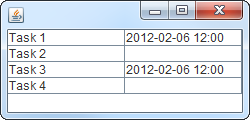
During the test, four tasks were to be completed by the background operation, two of which were supposed to succeed and the others to fail. So, the expected result was something like:

Expected result

Having obeyed  the “fail-first” guideline and having seen the test pass later on, I was quite sure the test and the feature worked as intended. Yet, manual testing proved otherwise. With the exact same scenario, task 4 always succeeded.

In fact, there was a bug that caused task 4 to result in a false-positive. But why did the automated test not uncover this flaw? Let’s recall what the test does:

  1. Prepare the test environment and the application
  2. Start the background operation comprised of tasks 1-4
  3. Wait
  4. Evaluate/assert the results
  5. Clean up

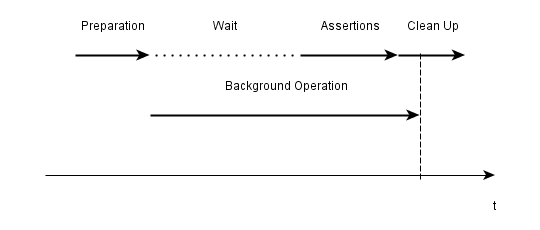
Some investigation unveiled that the problem was caused by the fact that the test just did not wait long enough for the background operation to finish properly, e.g. the results were evaluated before task 4 was finished. Thus, the false-positive occurred just after the test checked whether it was there:

Timeline of the test
Results being evaluated before everything is finished

After having spotted the source of the problem, several possible solutions ranging from “wait longer in the test” to “explicitly display unfinished runs in the application” came to mind. The most elegant and practical of which is to have the test waiting for the background operation to finish instead of just waiting a given period. Even though this required some more infrastructure.

Though acceptance testing is a great tool for developing software, this experience reminded me that there is also the possibility of flawed, or not completely correct, tests luring you into a false sense of security if you pay too few attention. Manual testing in addition to automated testing may help to avoid these pitfalls.