Add flair to your code: Code Squiggles

Introduction to Code Squiggles, a coding style that improves the readability of your java code.

Wrought Iron by quadriremeFor several months now, I’m experimenting with a programming style that you might want to call “syntax aware programming”. Every coding step starts with the question “what do I want to achieve and how do I want to write it down?”. Then I proceed to write it down in this perfect manner, mostly some english sentence, and try to incrementally convert the syntax into something the java compiler stops complaining about. There’s a lot to be learnt about API design, naming and creative syntax usage this way. One thing I’ve discovered along the way are Code Squiggles.

Introduction to Code Squiggles

Code squiggles are little methods that contain no functionality, other than directly returning the single given parameter. Their purpose is to make the code more fluently readable by casual readers. Calling these methods is absolutely optional, as they offer no behaviour at runtime. But by bloating your code with these method calls, you lower the amount of syntax rules and conventions the reader has to know before being able to understand the code. The process of adding the method calls feels like adding “happy little squiggles” (I certainly miss Bob Ross!) to your code.

Adding Code Squiggles by example

Let me give you a full example how Code Squiggles can turn your boring old java code into something even non-programming readers can grasp without problems. Note that the process of transforming the code isn’t the process I initially described, but the way to deal with existing code.

The initial code fragment looks like this:

assertTrue(filesDirectory.getChild("0.png").isFile());

As you can see, it’s an assertion line of an unit test. We improve the readability by extracting the intent of the assertion into the called method name (it’s a normal “extract method” refactoring):

assertFileExists("0.png", filesDirectory);

Now is the time to add the first Code Squiggle:

assertFileExists("0.png", in(filesDirectory));

You’ve noticed the difference? It’s just the word “in”, but it improves the semantics of the second parameter. As I promised, Code Squiggles are methods without any functionality worth talking about:

protected VirtualFile in(VirtualFile filesDirectory) {
    return filesDirectory;
}

The method takes a parameter and returns it. The real “functionality” of this method lies within its name. Everything else is only necessary to overcome (or overcode) java’s shortcoming of advanced syntax definition measures.

That’s all about Code Squiggles. But it doesn’t stop here. Let’s improve the example to its final shape, when we add two squiggles:

assertFile(withName("0.png"), existsIn(filesDirectory));

Read this line out loud! And notice the subtle change in the assertion method’s name. It begins to deminish clarity without the Code Squiggles. That’s when your API begins to depend on them. But it’s still perfectly valid java code if you just omit them.

The conceptual origin of Code Squiggles clearly comes from the behaviour driven development (BDD) style of writing tests and the ScalaTest Matchers. So I can’t claim much originality or cleverness myself here. But Code Squiggles, despite this initial example, aren’t limited to test code.

Adding inline documentation with Code Squiggles

Remember the last time you needed to integrate an horrible third-party API? Probably, there was a method with seven or eight parameters and all of them were primitive ints. No matter how often you called this method, you couldn’t remember the order of these ints. That’s when Code Squiggles might help you a bit.

This is the signature of a fairly complex method:

protected int performCalculation(int value, int lowerLimit, int upperLimit, int offset) { ...

Therefore, your call isn’t very self-explanatory:

int result = performCalculation(10, 2, 23, 13);

But it might be a lot more understandable when you add some squiggles:

int result = performCalculation(value(10), lowerLimit(2), upperLimit(23), offset(13));

I won’t spell out the squiggle implementations, as they should be straight-forward. Note that the java compiler doesn’t catch up here. You can easily swap the squiggles around to obfuscate your code. All you got is read-time safety. If you want compile-time safety, you need to replace the primitives with types and probably pay for some rounds of beer for the third-party API developers to include your changes or write an adapter (“corruption layer” is my preferred term here).

Regular use of Code Squiggles

If you want to use squiggles a lot, you might think about collecting them in a dedicated class. Design them to be static and generic, and you can use them easily with static imports:

public static <T> T existsIn(T instance) {
    return instance;
}

But remember that there are reserved keywords in java that might hamper you a bit.

Conclusion

Code Squiggles are useless bloat to your code unless you value read-time safety or casual readability. They can tidy up your code to a point where method or even class names are affected to form a block of code where you only have to replace the funnier chars with blanks to obtain a paragraph of plain written english anybody can read and understand.

What are your ideas towards Code Squiggles? Have you used them on your code? Mind to share the result?

Code squiggles are little methods that contain no functionality, other than directly returning the single given parameter. Their purpose is to make the code more fluently readable by casual readers.

Follow-up to our Dev Brunch June 2010

A follow-up to our June 2010 Dev Brunch, summarizing the talks and providing bonus material.

Today, we held our Dev Brunch for June 2010. It was a small group of developers this time, too, as some of our usual attendees turned into parents and can’t wrap their head around anything but their kid. First things first. The good news is that today, we had a new attendee that joined our group after reading our blog articles. This time, the communication beforehands went right. Our office roof garden once again served as a great hangout place as we discussed the topics listed below.

The Dev Brunch

If you want to know more about the meaning of the term “Dev Brunch” or how we implement it, have a look at the follow-up posting of the brunch in October 2009. We continue to allow presence over topics. Our topics for the brunch were:

Google Web Toolkit, internationalization (i18n) and customer customizable text – This wasn’t a presentation, but more a discussion of different options around the fact that GWT i18n works best (and smoothest) when baked into the compiled binary. If you have a customer that wants to change every textual aspect of your projects, chances are that performance will suffer. If your job is to provide a flexible, yet powerful base product as a starting point for individual customer solutions, there’s a huge tradeoff to make here.

First-hand experience of Yoxos 5 Beta – The EclipseSource Yoxos Launcher is a cool new product that helps to keep the management overhead in setting up your IDE (eclipse as you might already have concluded) minimal. It’s a little program that downloads and sets up everything you specified in your launch profile and starts a ready-to-use eclipse instance. You can share the launch profile and keep it in sync so everybody in your group can be sure to work with the complete official setup. This talk was about a real-world use case, the unique features and the areas that still need a bit more work. Remember that it’s beta.

A book chapter review of The Passionate Programmer – The book is the second revision of the former “My Job Went To India…” book from the Pragmatic Bookshelf. It contains insights and advices on making a living in software development. It also has a focus on enterprise career planning in the IT with the background threat of outsourcing or even offshoring. Two chapters were discussed in more detail: That you should keep a map of your technology skills up-to-date (like this example) and that you really should seek to make friends with software maintainance work, as it probably will be the actual job that pays your bills.

Introduction to Code Squiggles – One of the results of a experimental quest to improve the coding style in Java are Code Squiggles. There will be a full-detail blog entry about them shortly, so this is just a teaser. Code Squiggles don’t add functionality or safety to your code, but seek to improve the readability of your code. The ultimate goal is to have your program written down in plain english with a few funny letters in between. Basically, they are intentional bloat to help the casual code reader.

As usual, the topics ranged from first-hand experiences and impressions to literature reviews and research. For additional information provided by the talk authors, check out the comment section (or leave a comment to request further content). Comments and resources might be in german language.

Retrospection of the brunch

Today, we started by giving a quick introduction of ourselves to each other. Being a small group, we digressed a lot more as time wasn’t that much of an issue. The list above is in no way a summary of all the sidenotes and topics we really talked about, it’s just the main topics that served as a starting point for insightful developer chatter. The brunch keeps getting better.

Review of the Sensor+Test 2010 Measurement Fair

A review of our visit to the Sensor+Test 2010 Measurement Fair in Nuremburg, Germany. The most suprising discovery was a Java Virtual Machine running on an eight bit microprocessor, offering threading, garbage collection and exception handling.

Two weeks ago, we visited the german Sensor+Test 2010 Measurement Fair in Nuremburg. It’s a central trade fair for the sensor technology sector in Germany and Europe. We as software developers weren’t directly interested in the sensor hardware that was presented to the qualified visitors. We didn’t take part in the technical conference that was held in parallel. Why we were there and what we’ve found is the topic of this blog post.

General impressions of the trade fair

The sensor industry has a strong orientation towards classical technology and engineering. It’s not “new economy”, as you can tell from the exhibition booths and their setup. Most booths look like they have been used for several years with variations only in details. Most booth personal are engineers or managers of the companies presenting their latest products. It’s unlikely to talk to a sales person, several booths even had a paper sign saying “salesman needed” attached nearby. The industry knows very well what it is selling and capable to promise and achieve. We didn’t spot a single “booth bunny” on the whole trade fair, which is in great contrast to some high-strung events of other industries. Instead, you could walk into a booth and talk to the engineers without having to pass several layers of sales representatives.

Impressions of the exhibited technology

Miniaturization is a key trend for the hardware part of the sensors. Some display cabinets would have gone through as empty if there wasn’t a descriptive plate pointing to the dust particles that resemble whole sensor arrays. Energy efficiency and the new trend of energy harvesting, utilizing even minor differences in temperature or other physical quantities to power a device are this year’s buzzwords, too.

Why we were there

Our goal was to find out about the software side of the sensors. We wanted to grasp the software technologies used to drive the hardware and to process the data. We wanted to know what to expect when “technical software products” are exhibited. And we wanted to find out about the depth of knowledge about software development in these companies.

What we found out

  • Technical software products aren’t pretty. We’ve known this before, but had some hopes for stylish new user interfaces with Apple-like multitouch screen gesture controls and graphical effects. Instead, we’ve seen the same old 16-color line charts oscillating on a screen that contains all the buttons and handles that the program can offer. The graphical level was comparable to plain Windows 95 dialogs. Even when new-era Office ribbons were used, the main content stayed the same, posing an even bigger contrast. One thing that bugs me about technical software is the common existence of a big red “exit/quit/leave/stop” button on the main screen. I wonder where that might come from (see picture for hints).

  • The software platform in use is legacy Microsoft products. That’s not a problem for us, we are polyglot programmers. But only a few booths had other operating systems booted or an Apple in use. We asked one of them for visitor feedback on the Apples, they got told that their choice of hardware was “exotic, but likeable”. We didn’t find any Windows 7 in use on the whole trade fair.
  • Most sensor companies know a lot about software development tools. Anticipating the level of detail the engineers know about specific programming languages or tools from their rather monocultural choice for their products fails. Topics like Java, Eclipse, Smartphone programming, Android, etc. aren’t news to them. For example, in the recent professional journals of their sector, they discuss the different languages and platforms for smartphone software development.
  • Most sensor companies are desperate for embedded device programmers. We didn’t find a booth that wasn’t interested in finding conventional embedded device programmers (mostly a domain for C language experts with a good grasp of hardware design). So if you happen to be one, scan the exhibitor list and make some phone calls.

What we discovered

Somewhere in a corner of the second hall, in one of the last booths before the press center, there was a stand with big posters stating “Java on an 8-bit microcontroller” and “Exceptions, Threads, Garbage Collection within 60 kByte”. The whole buzzwords seemed a bit out of place, given that the booths around were announcing “better energy efficiency” or “greater effective range”. But it was a pleasant surprise for us. The german company calls itself Virtenio and is a new-founded spin-off of the Technische Universität Berlin. They achieved to develop a Java Virtual Machine that fits the teeniest ARM processor while still offering some performance and a good level of comfort for the programmers. It’s a very promising combination of embedded device and platform for “normal” software developers.

Summary of our visit

Our visit of the Sensor+Test 2010 Measurement Fair did pay off in many directions. We good our questions answered, discovered some new technologies and got very much inspiration about what’s going on in the embedded device sector. We are looking forward to be there again next year.

Blog harvest, May 2010

Some noteworthy blog articles, harvested for May 2010. You’ll hear a lot about Java, a bit about Clojure, a fair share about Pair Programming and some thoughts about the advantage of employee exchange programs.

You can tell from the frequency of recent blog harvests that we are slightly overloaded with work at the moment. This is a rather preferred state to be in as a small contract development company, but everything not ultimately necessary is reduced during those phases. We consider blog reading as indispensable, but reporting the best of articles (our blog harvest) isn’t. So right now, we have a very long list of articles in our harvest barn. Here are some articles of the last two months:

  • Does Groovy Know You Are Seeing Clojure? – A real world story of learning Clojure, the Functional Programming language on top of the JVM. I can wholeheartly agree with the sentence “In the intervening 30 years since starting out on a TRS-80 Model 1 nothing has been more difficult in terms of solving even the most trivial of problems than learning Clojure.”, but in my case, it has been a little more than 15 years of real experience. After a year trying to “get” Clojure, I deferred it for more productive work.
  • Don’t return null; use a tail call – A blog entry about the billion-dollar-mistake (null pointers) and API design. It got inspired by Steve Freeman’s book “Growing Object-Oriented Software” (see next section for more content by Steve Freeman). The idea of “tail calls” or callbacks isn’t new or revolutionary, but widely underused. Personally, I found the idea of returning empty Iterables (as an abstract commonplace of Collections) useful in some scenarios.
  • Practical Styles of Pair Programming – First hand experiences of a pair programming enthusiast (Iwein Fuld). His scenarios seem familiar and the advices given reasonable. Reading the article sharpened my awareness about pair programming. There is only one complaint about the article from my side: Using headphones while programming doesn’t turn you into a zombie, it just eliminates the outer world for some time. That’s Alone Time, and it’s there for a reason, too.
  • Java1.6u18 and double array creation – A little story about flawed unit tests, recent java improvements and the value of nightly builds. Thanks for sharing this with the world, David Shay.
  • Do You Like Pain? – Jared Richardson shares his story and advice about getting used to the “pain” in any environment. I like the idea of the “prisoner swap” to identify pain points a lot. But from my own experience I can tell that the messenger might be muted by labelling him “not fully aware”.
  • Exploring Google GuavaGoogle Guava is the new Apache Commons. There are some neat features, though. Definitely worth the 20-minutes-read this article by Dan Lewis provides.
  • Java Post Mortem with Gilad Bracha – A post mortem should only be done on “dead” people/projects. So the title alone is a harsh statement. But the summary of the talk contains some valid points and a lot of opinions to think about. I particularly like the term “cottage industry” for DI framework vendors.

Next comes the video section of this blog harvest. I’ve found the time invested in these talks worthwhile:

  • Threading is not a model (35min) – Joe Gregorio presents the lack of advanced multiprocessing tools in most programming languages. His talk covers a lot more than just that and gives some appetizers on Python. The solicited lack of MP support was my reason to learn Clojure (see first entry in the list above).
  • Sustainable Test-Driven Development (55min) – Steve Freeman gives a whole bunch of advanced tips to write unit tests. The talk is given from the TDD/BDD point of view, but mostly applies to unit tests in general. You should be familiar with JUnit to fully understand this talk.

And at last, there is a tool I want to present you (this kind of resembles the fun section, too):

  • Dollar – An experimental java API that shows how much you can bend the java syntax to suit your personal taste. Through inspiration by this project I’ve come to some unique ways to make my code more expressive – without using funny signs. Thanks to Davide Angelocola for his unique approach.

Open Source Love Day May 2010

Our Open Source Love Day for May 2010 brought love for Netty, Launch4j and RXTX. Everything went smooth again this time.

Last friday, we held our Open Source Love Day for May 2010. After the excessive yak shaving of last month’s OSLD, this one was more productive. We got one feature right nearly instantly and several others throughout the day. To keep us from feeling depressed, we allocated dedicated “research time” to get to know a project before starting to develop on it. So one point on our current list of accomplishments is only research work that should be counted as “thought investment” for further improvements.

The Open Source Love Day

We introduced a monthly Open Source Love Day (OSLD) to show our appreciation to the Open Source software ecosystem and to donate back. We heavily rely on Open Source software for our projects. We would be honored if you find our contributions useful. Check out our first OSLD blog posting for details on the event itself.

On this OSLD, we accomplished the following tasks:

  • Netty is a java framework to perform network communication, transparently using different transport mechanisms. We use it in a customer project environment and it worked mostly well. But we noticed some issues that might have to do with the framework, so we decided to put it under development. But before hopping in right away, we invested some hours to really anatomize it. Our achievement isn’t noticeable yet, but might be in the future.
  • Launch4j is a java application launcher for Windows, handling all the stuff a startup script (the infamous start.bat) would do, too. One thing that’s easy to perform in a batch script is to restart the application if it went down with an error. We wanted this feature in Launch4j and we succeeded. Before releasing the changes to the project, we need some rethinking of our approach, as it is very special to our case, but if you are interested, we send you the patch on request.
  • RXTX is a project to perform serial (RS232) communication. Over the course of the last OSLDs, we worked on an issue that appears in combination with serial converters. See the OSLD posting for march 2010 for details. This issue seems to be completely fixed now. We will run some longterm stability tests with it and then release a patch to the issue tracker of RXTX, issue #144.
  • Our internal tool for business administration was greatly improved this time. The tool isn’t open sourced yet, but we are not afraid to publish it in the future. The new features will directly decrease our administrative overhead and give us more time to perform our main duty – developing software.

A sidenote regarding the yaks (see last month’s OSLD posting to understand this one)

Our monthly “Homepage Comittee” meeting went smooth this time. The setup pain of last month is now paying out and we got our homepage updated. It seems the yaks haven’t grown beards again yet.

What were our lessons learnt today?

  • Pure C code tends to produce endless code blocks. Simple refactorings like extract method/function take a long time and aren’t supported by the IDE. The sentence “there is no boolean!” left some of us impressed, too.
  • The C/C++ Eclipse workbench (in fact, a bunch of plugins for Eclipse) was a joke instead of a help. It didn’t exactly prevent us from doing our work, but that’s all it did. Launch4j came along with project files for the Bloodshed Dev-C++ IDE, which – besides its bloody name – seems to be up to its tasks. We decided to use Dev-C++ over Eclipse for development on Launch4j.
  • Hpricot is a very versatile HTML parser/manipulator. It is just pure joy to work with. (Ok, we knew that one before)

After the fruitless OSLD of april, this one was a great relief for us. The new restart feature for Launch4j worked out instantly and will solve many of our current immediate problems (and some of yours, hopefully). The solution for RXTX got us out of trouble, too. All in all, this was a successful OSLD.

Follow-up to our Dev Brunch May 2010

A follow-up to our May 2010 Dev Brunch, summarizing the talks and providing bonus material.

Last sunday, we held our Dev Brunch for May 2010. It was a small group of developers brunching together this time. One reason was a communication failure on my part, as a crucial email announcing a change in the appointment didn’t reach everyone interested in participating. Sorry for this one again! The other reason was more of a pleasure: Two of our regular brunch attendees are turning into parents. But a core group brunched and talked in the office roof garden, discussing the topics listed below.

The Dev Brunch

If you want to know more about the meaning of the term “Dev Brunch” or how we implement it, have a look at the follow-up posting of the brunch in October 2009. We continue to allow presence over topics. Our topics for the brunch were:

  • Options in Scala – If you are used to traditional programming languages like Java, you might be surprised that you can’t nullify a reference in Scala. There is no concept of “null” in Scala, therefore avoiding the so-called billion dollar mistake (you might want to listen to the guy who invented the mistake, too). If you want to use “uncertain” references, you should look into the Option type of Scala, which was the main topic of this talk. With some code examples, this was a decent introduction into the concept.
  • Summary of the Sensor+Test trade fair – This talk was a short report of the recently visited german Sensor+Test measurement fair in Nuremburg. Details may follow on this blog, but the overall summary is that the measurement industry in Germany and neighbours is mostly self-confident and down-to-earth.
  • The Modbus protocol – This talk was a short introduction to the ancient (but still useful) Modbus protocol and the possibilities to access it in Java. There are at least two projects that provide full coverage of the protocol: jamod and modbus4j. The protocol itself is rather low-level, but sufficient for simple control and data query tasks on an embedded device. The possibility to be mostly agnostic over the physical transport layer is a strength of the Modbus protocol and its implementations.
  • Usage patterns for mocks – Most of us had to confess: we are mockists. But there are many different flavors of using mocks in tests. Inspired by the book “Growing Object-Oriented Software, Guided by Tests”, this talk was an open discussion round about personal mock usage preferences.

As usual, the topics ranged from first-hand experiences and impressions to literature reviews and research. For additional information provided by the talk authors, check out the comment section (or leave a comment to request further content). Comments and resources might be in german language.

Retrospection of the brunch

The usual brunch setup is nearly perfect. What was lacking this time was the coordination of the appointment. To further improve on that point, we introduced a new mailing list, containing everone that is currently interested in participating the brunch.

Keeping it simple is hard indeed

A true story I was reminded of when I read Chad LaVigne’s essay on simplicity from the book “97 Things Every Software Architect Should Know”.

When I read the great book (or collection of essays) “97 Things Every Software Architect Should Know”, there was a story I had experienced first-hand for nearly every chapter. But it was only after I read about it in the well-placed words of somebody with greater in-depth experience than me that it appeared clear to me. The essence of my own experience was written down so I could iterate over it. Here is a story about simplicity that I hope will help somebody out there iterate over the same thought sometimes.

The problem

In the early days, we were asked to provide custom software for a nearly robot-like machine that performs measurements. Our software had to control some engines that could move sensors and actuators around. The whole machine was built by another company that only had eyes for the mechanical and electrical aspects. As a result, the communication protocol between the microcontrollers of the machine and our software was horribly awkward and unpleasant in regard of the software engineering side of the project.

One engine was the so-called “vertical engine”, because it could move an array of sensors up and down. There were four actual positions where the engine would stop automatically upon contact. It was the job of our software to send the correct commands in the correct order at the correct time to reach the destination. Effectively, we would “hop” from position to position, either moving the sensors up or down. If only the communication protocol would’ve allowed that. What we got was two commands: moving one position down and moving up to the topmost position. The movement options are depicted here:

The first solution

But what would a developer’s life be without a few challenges? Our team quickly came up with several possible solutions, from finite state machines to object graphs of “position” instances that offered several “movement options” to an agent-like object travelling inside the graph. In the brainstorming session, even more sophisticated possibilities were discussed. The solution we finally implemented was complex in terms of clarity. We needed quite a few unit and integration tests to proof the whole thing correct. During all this process, nobody ever questioned the complexity of the problem.

The essay

The chapter I read in the book “97 Things Every Software Architect Should Know” when this story came back to me was “Make Sure the Simple Stuff Is Simple” written by Chad LaVigne. Let me cite some sentences to show the message of his essay:

“People who design software are smart – really smart. The simple problem-complex solution trap can be an easy one to fall into because we like to demonstrate our knowledge. If you find yourself designing a solution so clever that it may become self-aware, stop and think. Does the solution fit the problem?”

The essay hit the nail on the head for me. Our solutions for this “vertical engine” were all clever and solved the problem, but a much more complex problem than the one that was really needed.

The second solution

Our first version of the software went into production and worked a treat. Years later, the hardware (specifically the microcontrollers) fell apart and was replaced by more sophisticated electronics. We needed to rewrite parts of our software, especially the engine controls. But this time, we had real movement patterns of all engines, collected in the logfiles. Some regular expression magic later (remember, we are smart people and like to show that!), it was clear that the vertical engine had never used two of the possible movement options. The real usage pattern of the engine is depicted in the picture below:

The real problem we should have solved from the beginning is much simpler than the original one. Every engine position has only one successor, there is no need to choose from several options or to calculate the shortest path to the destination. It’s the most boring finite state machine you’ve ever seen and there is no need for recursive structures.

It was our own cleverness that made the problem appear more complex than it really was, just because we could handle it. Some investigation on the problem domain instead of the solution domain would have brought us to the same conclusion that the log file analysis finally revealed.

The lesson learnt

The whole story isn’t about failure. Both solutions worked for the customer. In fact, he never noticed a difference when the second solution was going live. This story is about accidental complexity and about being smarter than the requirement. It’s in our nature to accept a problem as “given” and come up with an elegant solution. It might be much more effective to question the problem instead.

Thank you, Chad, for your great essay!

Open Source Love Day April 2010

Our Open Source Love Day for April 2010 didn’t yield the desired results. Instead, we went to give our yaks a shave.

Today, we held our Open Source Love Day for April 2010. Well, to be honest, we tried to. We didn’t achieve that much to present publically and felt really depressed at the end of the day. At least, we can try to explain what went wrong. It all has to do with our own breed of yaks that needed to be shaved today. But first, lets explain the basics.

The Open Source Love Day

We introduced a monthly Open Source Love Day (OSLD) to show our appreciation to the Open Source software ecosystem and to donate back. We heavily rely on Open Source software for our projects. We would be honored if you find our contributions useful. Check out our first OSLD blog posting for details on the event itself.

Today, we reached out to perform the following tasks:

  • RXTX is a fine java library to access the (rather legacy) serial port to send and receive data over the RS232. On our last Open Source Love Day, we proposed a patch for a problem with disappearing emulated COM ports. This happens a lot if you use USB or ethernet converters and unplug them accidentally or because your intranet got shut down. The patch works well, but not perfectly. We noticed that the IOException we introduced gets thrown much too often. Today, we wanted to fix our fix. We only came to the conclusion that the problem might be a lot more complex than we initially thought.
  • Launch4j is another java library/tool we use to deliver production-ready software bundles. It’s a launcher that increases the user experience at the critical “first contact” for Windows users. The project is mature and useful, but out of development for nearly two years now. We want some features in it, so we thought we might build them today. But the yaks didn’t let us.
  • We have an internal tool for our business administration that desperately needs some hugs. So even if this isn’t strictly Open Source yet, we allocated some time to add a few features. But they outgrew their timebox, too.

At the end of the day, we didn’t accomplish anything ready to be released. That’s frustrating to us and has no value to anybody else. We promise to do better next time.

How the yaks got shaved

Every organization has a secret stable where yaks are raised just for the sake of raising yaks. Once a year or so, they need a shave, so you’ll find yourself shaving yaks before you know what’s happening. That’s what happened to us today.

The term “yak shaving” isn’t our invention. It describes the result of a process when in order to accomplish task A, you need to do task B first. Task B can’t be done before tasks C and D both are completed. Task D, you figure it already, is dependent on task E, which in turn… Soon and inevitably, you’ll find yourself shaving yaks because it is what needs to be done to accomplish your todo list.

This is our story: On every Open Source Love Day, we also gather to have a short “Homepage Comittee” meeting. This is our formal approval process to publish content on our website. One improvement we wanted to implement today was an automatic publishing process. It copies the content of our internal Content Management System to our webserver. Simple as that. This was the starting point of an odyssee.

To copy the content, we used wget. But wget in the version of our distribution had a bug (and missed a feature), so we needed to update wget… Soon afterwards, we found ourselves upgrading our main PostgreSQL database (which went incredibly smooth but took forever) and wrestling with certain dependencies of other parts of the system. We realized we are now officially shaving yaks when we got the error message:

You need to have ruby gems 1.3.2 installed. Your version is 1.3.1!

Remember we started with taking a snapshot of our CMS using wget. Clearly, separating our services to more machines would have helped a lot. But that would’ve taken more than one day to do. It’s on our wish list for the next Admin Day.

Let’s conclude this blog post with the insight that we need to timebox our work better when working for the OSLD. And our yaks are shaved and ready for the summertime.

Follow-up to our Dev Brunch April 2010

A follow-up to our April 2010 Dev Brunch, summarizing the talks and providing bonus material.

Last sunday, we held our Dev Brunch for April 2010. It was the start of the open air season, introducing our new office roof garden. We brunched under a clear, sunny sky (no clouds, even no vapor trails from airplanes, as they aren’t allowed to fly because of some distant volcano ash emission) and talked about agile processes and books. A major part of the brunch was graded as “informal chatter”, just as it should be like.

The Dev Brunch

If you want to know more about the meaning of the term “Dev Brunch” or how we implement it, have a look at the follow-up posting of the brunch in October 2009. We continue to allow presence over topics. Our topics for the brunch were:

  • Agile life planning – Your software development daily routine is to incrementally build software from a backlog and release it after a fixed timebox. What might happen if you transfer this process to your private life (often called “real life”)? You’ll release a week’s life every week and have a week planning meeting on sunday, filling your week/sprint backlog with the most important items of your life’s backlog. Telling from this first hand experience of about a year, it works exceptionally well, improving the leisure time quality and making “progress” visible even at harder times. The only remaining question is who acts as the product owner.
  • Converting to Scrum – First hand experience of a team that, after years of “alarm call”-style development, successfully implemented Scrum as their primary process. The effects were at least less overtime, improved progress tracking, improved code quality (though Scrum is  only a management process!) and less pressure in the project. The customer even adjusted their wording when talking about new features: “next sprint” instead of “immediately, now”. The implemented process isn’t vanilla Scrum, but works nevertheless.
  • Defending Continuous Integration – What if, after an initial phase of excitement over the new tool, the continuous integration server really reveals flaws in your project? There seems to be the tendency to kill the messenger: Shut down the CI server and everything’s fine again. This talk was about the reasoning of both sides and some basic insights gained about machine sharing. Tip of the talk: Reserve your CI server exclusively for this task.
  • Book recommendations – A random collection of technical books read in the last half year, presented with a short summary and personal rating. Titles included were Coders At Work, Founders At Work, 97 Things Every Software Architect Should Know, 97 Things Every Project Manager Should Know, 97 Things Every Programmer Should Know, Hiring the Best Knowledge Workers, Techies & Nerds and Manage Your Project Portfolio. Yes, there are some patterns visible in the book titles. And it’s a good idea to keep some checklist of read articles for most of these books.
  • Dreyfus Model of Skill Acquisition – The Dreyfus Model differentiates five to six different stages of learning some arbitrary skill. It makes assumptions how the members of the stages work, how they process feedback information and what they need to get better. See the comment section for more information and bonus material.

As usual, the topics ranged from first-hand experiences to literature research. For additional information, check out the comment sections. Comments and resources might be in german language.

Retropection of the brunch

Holding the brunch in the bright morning sun, surrounded by rooftops and birds, really is a huge gain for the ambience factor. We even found a solution to produce fresh coffee up there. This will be a fun summer for the Dev Brunch.

Prettier failures using Swing TaskDialog

An introduction to the Swing TaskDialog project, a fine little gem to spice up your (java swing) dialogs. Includes a real usage example.

The standard way to present graphical user interfaces (GUI) on a desktop machine in java is to use Swing. It’s a very flexible API with a steep learning curve and some oddities (e.g. EDT handling is cumbersome at least), beginning to show some age. There were several attempts to take the Swing experience to a new level, including the marvellous book “Filthy Rich Clients” by Chet Haase (we miss you in the Java camp!) and Romain Guy. So Swing isn’t dead or dying, it’s just getting old.

A pain point of Swing

One thing always bothered me with Swing: It is relatively easy to present a basic message or input dialog. But to add slightly more complexity to a dialog suddenly means substantially more effort. Dialogs don’t scale in Swing. If you ever “designed” an error dialog for your end user, presenting the essence of an exception that just occurred, you already know what I’m talking about. I have to make a confession: Our exception/error dialogs were nearly as nasty as the exception itself. But nobody wants to fail nasty.

Swing TaskDialog to the rescue

At late february this year, Eugene Ryzhikov published his Swing TaskDialog project on his blog. His release pace has been a new version once a week since then. So I’m writing on a moving target.

The TaskDialog project provides basic message, progress and input dialogs based on the operating system’s “User Experience Guidelines”. The visual content is very appealing as a result. But the project doesn’t stop here. The programming API is very understandable and to the point. You don’t have to hassle with big concepts to use it, just look at the examples and start from there.

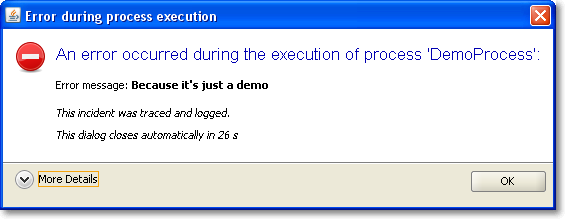
It was a matter of minutes to replace our old, nasty error dialog with a much prettier one using TaskDialog. Here are two screenshots of it in action, with the detail section retracted (initial state) and flipped open.

Of course, this is only the Windows version of the dialog. You should head over to the TaskDialog examples page to get an idea how this might look on a Mac. This is a dialog that’s pretty enough to not scare the user away by sheer uglyness. The code for this dialog is something like:


TaskDialog dialog = new TaskDialog("Error during process execution");
 dialog.setIcon(TaskDialog.StandardIcon.ERROR);
 dialog.setInstruction("An error occurred during the execution of process 'DemoProcess':");

 Exception exception = new Exception("Because it's just a demo");
 StringBuilder detailMessage = new StringBuilder();
 for (StackTraceElement stackTraceElement : exception.getStackTrace()) {
 detailMessage.append(stackTraceElement.toString());
 detailMessage.append("\n");
 }
 dialog.setText("Error message: <b>" + exception.getMessage() + "</b>\n\n<i>This incident was traced and logged.</i>");
 dialog.getDetails().setExpandableComponent(
 new JLabel(Strings.toHtml(detailMessage.toString())));
 dialog.getDetails().setExpanded(false);

 JLabel waitLabel = new JLabel(Strings.toHtml("<i>This dialog closes automatically in 26s</i>"));
 dialog.setFixedComponent(waitLabel);

 dialog.show();

Notice the usage of Strings.toHtml() to convert plain Strings to HTML-rendered rich text elements.

Timed dialogs

If you look at the presented information, you’ll notice it’s just a demo presenting a fake exception. But you’ll notice another thing, too: This dialog is about to close itself automatically soon. This is a speciality of our project: The GUI runs unattended by users for long periods of time. If you encounter an error every ten minutes and an user returns to the screen after a week, the system isn’t accessable without closing a million dialogs first. You might argue why a system error lasts for a week, but that’s a reality in this project we cannot change. So we came up with timed dialogs that go away on their own after a while. The information of the dialog is persisted in the log files that get evaluated periodically.

The TaskDialog API provides easy integration for a GUI widget to be included in the dialog. In our timed dialog use case, it’s a JLabel, as highlighted in the code example at lines 16 and 17. A background thread periodically updates the text and closes the dialog when time runs out. But you’ll find examples with progress bars and other components on Eugene’s blog.

Conclusion

The Swing TaskDialog project is a fine little gem to spice up your application. It’s API is simple, yet powerful and has proven customizable to our special use case. Finally, effort for basic dialogs in Swing scales again.