Eliminate the Water Carrier

A water carrier brings something from A to B. In the field of IT, there is no place for water carriers.

Some years ago, an old lady with more than hundred years of life experience im America was asked which technology changed her life the most. She didn’t hesitate to answer: running water. The ability to open the tap and have instant access to fresh water was the single most important technology in her life, even before electricity and all the household appliances it enables. Without running water, every household is forced to employ or pay a worker that does nothing else but to carry water from the source to the sink.

In today’s physical world, with physical goods, there is still a profession that relies on a specific aspect of physical objects: They won’t move from A to B without a carrier. The whole field of logistics and transportation would be obsolete in the instant that physical goods learn to move themselves. The water carrier lives on, in the form of a cardboard or palette carrier.

The three basic goods of IT are software, data and information. They all share a common trait: They can move without a human carrier. In the old days before the internet, software was distributed on physical objects like floppy disks (think of oddly shaped usb sticks) or CDs later. With the ubiquitous access to running data (often called the internet and mobile computing), we can draw our software straight from the tap. (And yes, I like the metaphor of the modem as an “information tap”). As the data throughput of our internet connections grew, it became feasible to move large amounts of data into “the cloud”. The paper boy that brings the newspaper early every morning is replaced by a virtual newspaper that updates every few seconds. The profession of a data carrier didn’t exist outside of very delicate data movements. And even them got replaced by strong cryptography.

Even information and knowledge, a classic carrier-bound good, is slowly replaced by books and pre-recorded online courses. The “wise man” (or woman) still exists, but his range was extended from his immediate geographical surrounding and his arbirtrary placement on the timeline to the whole world and all times after his publication. We don’t need to be physically present to attend a course anymore and we don’t need to synchronize our schedule with the lecturer. Knowledge and information is free to roam the planet.

With all this said and known, why are there still jobs and activities that resemble nothing more than the water carrier of our information age? Let me reiterate once more what a water carrier does: He takes something from position A and moves it to position B. In the ideal case, everything he picked up at A is delivered at B, in full and unchanged. We don’t want the carrier to lose part of the water underway and we surely don’t want him to tamper with our water.

As soon as you add something valueable to the payload (you augment it) while you carry it from A to B, you aren’t a water carrier anymore, you can be described in terms of your augmentation. But what if you add nothing? If you deliver the payload in the same condition as you picked it up? Then you are a water carrier. You don’t have a justification for your work in IT. Or you have one that I can’t see right now, then I’m eager to hear from you! Please leave a comment.

There is a classic movie that describes life and work in IT perfectly: Office Space. If you haven’t seen it yet, please put it on your watch list. I’m sure you can even draw it from your information tap. In the movie, a company with a generic IT name needs to “consolidate their staff” (as in lose some slackers). They hire some consultants that interview the whole crew. Each interview is hilarious in itself, but one is funny, tragic and suitable for our topic at hand, the water carrier:

The problem with Tom Smykowski (the guy trying to defend his job) is, that he’s probably better with people than most developers, but he still cannot sell his augmentations to the two consultants. They try to tie him down to a physical good that must be carried, but even Tom has to admit that somebody else covers the physical level. So he tries to sell his “good influence” on the process as the augmentation, but the consultants are too ignorant to recognize it. Needless to say, Tom loses his job.

Every time you just relay information without transforming it (like appending additional information or condensing it to its essence), you just carry water. Improve your environment by bypassing yourself. If you take yourself out of the communication queue, you will save time and effort and nobody has a disadvantage. You should only be part of a communication or work queue if you can augment the thing being passed through the queue. If you can’t specify your augmentation, perhaps somebody else behind you in the queue can give you hints about it. I would argue that being able to pinpoint one’s contribution to the result is the most important part of every workplace description. If you know your contribution, you can improve it. Otherwise, you may be carrying water without even knowing it.

Eliminate the middlemen in your work queues to improve efficiency. But be sure to keep anybody who contributes to the result. So, eliminate the water carriers.

Recap of the Schneide Dev Brunch 2017-04-09

If you couldn’t attend the Schneide Dev Brunch at 09th of April 2017, here is a summary of the main topics.

brunch64-borderedLast sunday, we held another Schneide Dev Brunch, a regular brunch on the second sunday of every other (even) month, only that all attendees want to talk about software development and various other topics. This brunch was well-attended and opened the sunroof season for us. We even had to take turns on the sunny places because we didn’t want to catch a sunburn in April. As usual, the main theme was that if you bring a software-related topic along with your food, everyone has something to share. Because we were very invested in our topics, we established an agenda for the event. As usual, a lot of topics and chatter were exchanged. This recapitulation tries to highlight the main topics of the brunch, but cannot reiterate everything that was spoken. If you were there, you probably find this list inconclusive:

Online courses

Our first topic was an report on an ongoing online course, a so-called MOOC (Massive Open Online Course) on the topic “Software Design for Non-Designers”. It aims at bringing basic knowledge of UX and UI design to programmers, who frequently lack even the most fundamental principles of design (other than code design and even that is open for discussion). A great advantage of these MOOCs is that you can minimize your brutto time investment and therefor maximize your netto yield. You are not bound to a certain place, free from specific times (other than the interaction with other participants) and yet free to engage in a community of peers. The question that remains is how valueable the certificate will be. But the initial expectations are met: The specific course is very practical and requires moderate effort in reasonable periods.

One crucial aspect is the professionality of the presenting lecturer. In this MOOC, there are talk-oriented presenters and then there is Scott Klemmer. His lectures stand out because he writes on an invisible wall before him. The camera looks through the wall. What seems like nice CGI turns out to be a real glass pane. Mr. Klemmer puts down his note in mirror writing! Once you realize that, you cannot help it but be in awe.

There are a lot of MOOCs nowadays. Other courses that got mentioned cover the topic of machine learning https://www.coursera.org/learn/machine-learning and Getting Started with Redux (a famous Javascript framework) by Dan Abramov on Egghead: https://egghead.io/courses/getting-started-with-redux. Some courses even take place on Youtube, if you manage to avoid the comment sections, like the talks from Geoffrey Hinton about neuronal networks and machine learning. Mr. Hinton is part of the Google Brain team.

The critical part of each MOOC is the final examination. Some courses require online or even real-time tests, some online provide certificates for test results in a certain timespan. Usually, the training assignments are peer reviewed by other course participants.

We will probably see this type of knowledge transfer more often in the future.

Interesting websites

While we talked about a lot of topics at once, some websites and projects got mentioned. I include them here without full coverage of the topics that led to it:

  • jsfiddle: A website that provides a quick sketchboard for web technologies like Javascript, HTML and CSS. It’s like a repl for the web.
  • regex101: A website that provides a quick sketchboard (and debugger) for regular expressions in different languages. It’s like an online IDE for regular expressions.
  • codefights: A website that puts you in the fighting pit for developers. Prove your programming skills against competition all around the globe!
  • vimgolf: A website that lets you prove your proficiency in the only text editor that counts: vim. Every keystroke counts and a mouse cannot be found!

Some of these websites might be a lot more fun in a team, except the regex one. Don’t use regular expressions in a team project! It’s a violation of the sane developer’s rules of engagement.

Workplace conflicts

One participant reported about his latest insights in conflict management during work. He applied the concepts of warfare and the four steps of complex tasks to recent disputes and had tremenduous results. Even the introduction chapter of the Strategies of War book was enough to install new notions and terms into his planning and acting. He was astounded by the positive effects of his new portfolio.

The new terminology seems to be the essential part. European (or even western) adults don’t learn the terminology of conflict and therefore cannot process disputes on a rational level, only with emotions. You cannot plan or communicate with emotions, so you cannot plan your conflict behaviour. As soon as you have the language to describe the things you perceive, you can analyze them, reflect on them and plan for them. Making a solid plan (other than “go in and win somehow”) is the best preparation for an upcoming conflict. Words shape our world. I’ve seldomly seen it clearer than in this report.

Just for starters, there is a difference between a “friend” and an “ally”.

Project documentation

An open question to all participants was our handling of documentation efforts in a project, be it for the user, customer or following developer. We discussed it with this open scope and came up with some tools that I can repeat here:

  • The arc42 software architecture template can help to shape the documentation effort for future developers or current developers if they aren’t included in the architecture effort.
  • The user manual is often written in TEX. Developers are used to the tool by constant exposition during their academic studies.
  • One idea was to generate the requirements for the developers from the user manual, as in “user manual first” or “user manual driven development”.
  • The good old Markdown syntax is useable but has its limits in top-notch aesthetics.
  • We see some potential in ASCIIDoc, but it needs to improve further to play in the same league as other tools.
  • Several participants have tried to automate the process of taking screenshots of the software for usage in various documents. If you want to try this, be warned! There are many detail problems that need to be solved before your solution will be fully automatic and reliable. A good starting point for thoughts is the “handbook data set” that can reproduce the same screenshot content (like entries in lists, etc.) in a different software version.

In the outskirt area of this discussion, the worthwhile talk “Stop Refactoring!” by Nat Pryce was mentioned. He presents an interesting take on the old question of “good enough”.

Epilogue

As usual, the Dev Brunch contained a lot more chatter and talk than listed here. The number of attendees makes for an unique experience every time. We are looking forward to the next Dev Brunch at the Softwareschneiderei in June. We even have some topics already on the agenda (like a report about first-hand experiences with the programming language Rust). And as always, we are open for guests and future regulars. Just drop us a notice and we’ll invite you over next time.

Look at the automated tests to diagnose the project ailments

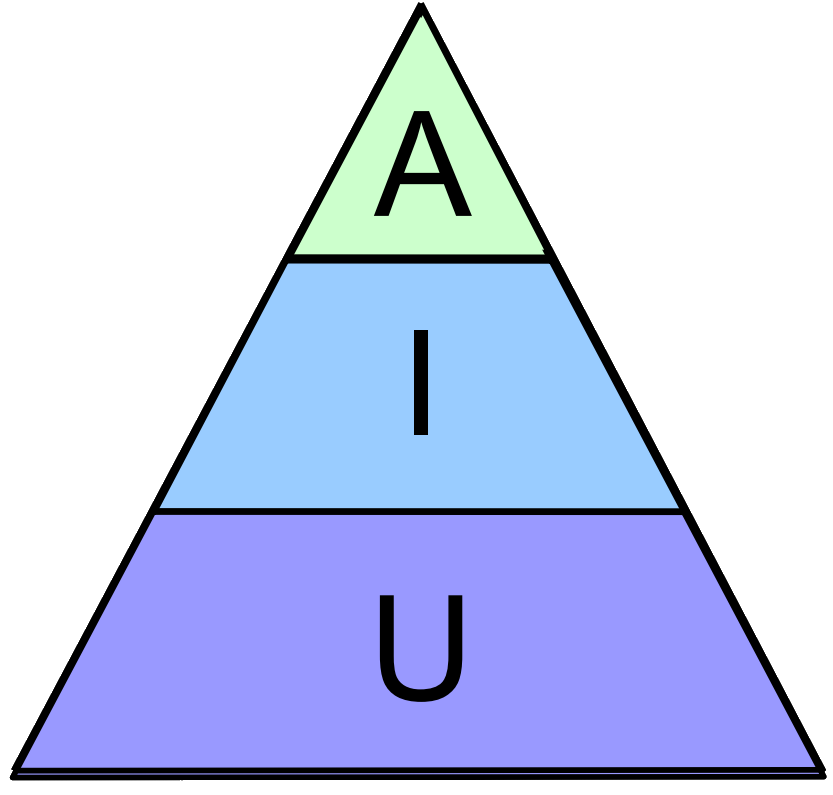
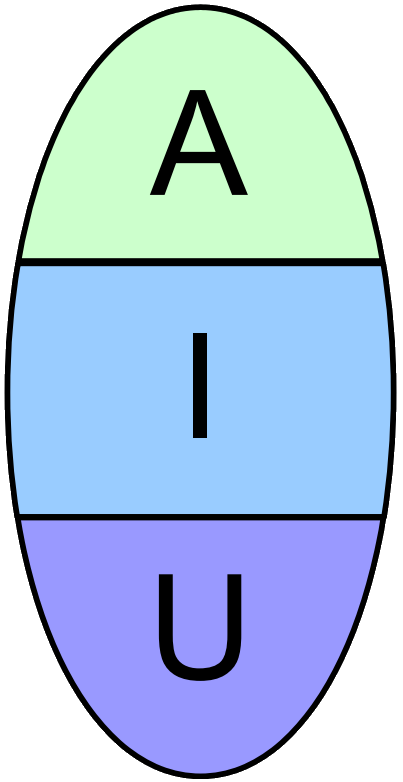
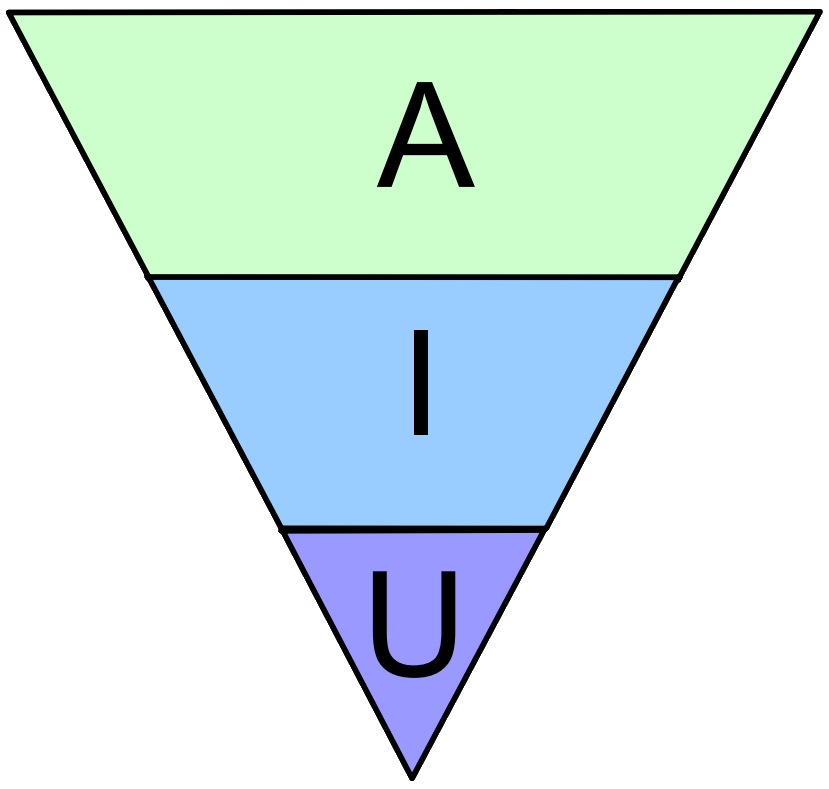
If you have to evaluate a new software project, draw the outline of the existing test types. If it doesn’t look like a pyramide, you might be in trouble. Here are some common non-pyramide outlines and what they mean.

A cornerstone of modern software development is developer testing. That means that developers are the primary authors of automated test code. In theory, that is a good thing and might look like the quality assurance department is out of work soon. In practice, we as a profession tried for nearly twenty years to install a culture of developer testing in our work and still end up with software projects that feature no automated tests at all (Side note: JUnit 1.0 was released in February of 1998).

What we know about automated tests

One piece of common understanding about developer testing is the test pyramide. Let’s iterate quickly what we know about it. There are different kinds of automated tests and the test pyramide differentiates three of them:

  • Acceptance tests or UI tests are the heaviest type of automated test. They operate on the software from the outside, with the means of a real user and try to assert that real use cases are accomplishable.
  • Integration tests often use several parts of the system in a test scenario that asserts the correct collaboration of the parts. Integration tests may take some time to come to a conclusion and utilize real hardware like network or disks.
  • Unit tests tend to be small and quick and focus on a particular aspect of an “unit” like a class or entity aggregate. Their reach into the system should be short and might be forcefully restricted by employing mocks.

These three types, the A, I and U of automated tests, should come in different numbers. A good rule of thumb is that for every acceptance test, there might be up to one thousand unit tests. If you draw the quantities as areas, they appear in form of a pyramide. A small top of acceptance tests rests on a broader seating of integration tests that relies on a groundwork of many unit tests. A healthy test pyramide looks like this:

Take this picture as an orientation, not as an absolute scale. But be sure to count your different test types from time to time.

Outlining the tests

This is actually one of the first things I do when I get introduced to a new and unknown code base. This happens quite often when I do consulting work for existing development teams. Have a look at the automated tests, determine their type and count their numbers. If it resembles anything close to the test pyramide, you’ve got a chance. If the resulting shape looks different, you might find this blog entry useful:

The Tower

If you have a hard time finding any tests (because there are none) or you find only some half-assed attempts to produce a meaningful automated test suite, you look at a tower project. The tower is rather small in diameter, in the cases of absent tests it is nothing more than a thin vertical line (the “stick”). If you find a solid number of tests for every type, you’ve found a “block” project. Block projects usually don’t have a problem, but a history of test effort migration either from unit to acceptance tests or, more common, in the other direction. If you find a block, you are fine.

The tower, though, is a case of neglect. The project team might have started serious efforts to automated their tests, but got demotivated by intrinsic or extrinsic influences and abandoned the tests soon after their creation. Nobody has looked after them since and the only reason they still pass green is that they didn’t really test anything to begin with or only cover an area of the system that is as finished as it is boring. Topics like user management or utility classes are usually the first and only things that got tests in a tower scenario.

Don’t get me wrong, the tower indicates the absence of tests, but not the absence of willingness to write automated tests, unless the tower is really a stick. A team willing to invest in automated tests may only lack knowledge and coaching about the topic. Be sure to lead them bottom-up (unit tests first), though.

The Egg

If you’ve categorized and counted the tests and couldn’t find many acceptance or unit tests, you’ve found an egg. The egg consists of mostly integration tests that may lean into unit testing territory by asserting smallest bits of functionality here and there (often embedded in an overarching test storyline) or dip their toes into gui-based testing by asserting presentation-specific properties of widget objects. While they provide ample test coverage for the system, they also tie application logic and presentation details together and don’t help to separate domain code from the use cases.

The project team is probably proud of their test coverage and doesn’t see any value in differentiating the automated tests types, because “every test improves the situation”. The blindness to test types is the core problem that may be cured with training and coaching (I’ve found the ATRIP-rules to be particularly effective to distinguish integration and unit tests), but the symptoms, especially the lack of separation of concerns, have to be mitigated soon, too.

One way to start there is to break the tests down into their integration and their unit test parts. You can work from assertion to assertion and ask: is this necessary to ensure the current use case? If not, extract a new unit test focussed on only this one assertion.

As soon as you add a pedestal consisting of unit tests to your egg, you are on your best way to a healthy test pyramide.

The Ice Cream Cone

This is the most fearsome automated test outline in existence, even more dramatic than the stick. Usually, the project team is really enthusiastic about writing tests or at least follow order to do so, but they cannot test parts of the application in isolation. A really tragic case was a complex system that was so entangled with its database, through countless stored procedures that contributed to the application logic, that it was hopeless to think about tests without the database. And because every automated test had to start the whole system including the database, there was really no need to differentiate between application logic and presentation logic. It all became a gordic knot of dependencies that enforced the habit of writing elaborate automated GUI-based tests to test the smallest logic bits deep inside the core. It felt like eating single rice grains with overly long, flimsy wooden chopsticks that would break often.

The ice cream cone is problematic because the project team needs to realize that their effort was mislead and the tests are all telling the bitter truth: the system’s architecture isn’t fit for proper automated tests. It’s not the tests, it’s you (or your architecture)! Nobody wants to hear that and more so, nobody wants to untangle the mess (without the help of a proper safety net consisting of automated tests). Pinning tests are probably helpful in this scenario.

But you need to turn the test pyramide around or the project team will suffocate by the overly costly test tax while increasing technical debt.

Epilogue

Please keep in mind that it’s not a problem in itself that your project doesn’t have a normal test pyramide. It’s great that you have automated tests at all! But your current test type distribution might not be as effective as possible, might be more expensive than necessary and might be not the right automated test setup for your development goals.

What are your stories with automated test setups? Care to share it with us in the comments?

Recap of the Schneide Dev Brunch 2017-02-12

If you couldn’t attend the Schneide Dev Brunch at 12th of February 2017, here is a summary of the main topics.

brunch64-borderedYesterday at sunday, we held another Schneide Dev Brunch, a regular brunch on the second sunday of every other (even) month, only that all attendees want to talk about software development and various other topics. This brunch was a little smaller in numbers of attendents, but very interesting nonetheless. As usual, the main theme was that if you bring a software-related topic along with your food, everyone has something to share. Because we were very invested in our topics, we established an agenda for the event. As usual, a lot of topics and chatter were exchanged. This recapitulation tries to highlight the main topics of the brunch, but cannot reiterate everything that was spoken. If you were there, you probably find this list inconclusive:

Household roboters

We started our brunch talk by mentioning the services our five years old roombas provide for us, especially keeping the floor free of any small things. The biggest effect when having an electronic pet like a roomba is that you learn to keep your things above ground, especially cords with expensive electronics on the other end. The continuous elimination of dust is just a positive bonus on top of your behaviour adjustment. You keep the floor tidy, the roomba just mercilessly enforces this rule.

Today, there are many alternatives to the original roomba and most have really nice features and abilities. So no matter what brand you buy, you’ll get a capable floor police.

Code Review priorities

In our recent dev brunches, we talked about code review tools and code review habits. This time, we talked about code review priorities and the sorry state we are still in with current tools. We worked out that its nearly useless to only show the diff with a few lines of surrounding code and expect a thorough review. Even the concept of “changed files” is rather distracting in an object-oriented language. But even the current tools are only as good as we make use of them.

The first priority of code reviews should be finding and eliminating bugs – “real” bugs that would have had surfaced in production otherwise and “hypothetical” bugs that could have shown up in production. This means that code review is in its core an activity for the user of the software. Only second priority is the understandibility of the source code. If the reviewer doesn’t understand the code, chances are high that nobody will, including the author in a few weeks or months. Cleaning up the code now mitigates the problem for the lowest possible cost because the “hurdle of understanding” isn’t raised yet. A code review should never work on the level of linters and should not address topics that can be checked by an automatic tool. Suggestions about refactorings should be kept to a minimum because they may serve no purpose if the code isn’t touched again. Refactor when the code is opened for the second edit, not on the first review. Review the code on the semantic level, not on the syntactic.

And keep in mind that code review tend to be used for conditioning remarks (“don’t do that”, “this is ugly”, “I don’t approve”, etc.). Try to avoid conditioning and strive to provide educational comments (“if you change this to that, then you’ll profit from this benefit”, “here’s a suggestion for a better approach and here’s why it is better”, etc.). But we also discussed that at this point, the code review remarks are probably better said in a pair programming session.

Code reviews are a powerful tool for development teams, but with power comes danger. Hopefully, we get adequate software tools to help us avoid the common traps soon.

Time management

Out of interest, we talked about some principles and practices to better manage one’s time.

The first thing to be aware of are the two fundamentally different schedules of management and development. The manager’s schedule is clocked in 30 minute intervals and driven by outside demand (meaning that a manager idles when not requested), while the maker’s schedule works with 4-hour blocks of uninterrupted, deeply concentrated work. You can probably see the problems that arise when somebody in a maker cycle is interrupted multiple times as if he was in a manager cycle. The first thing you can do is to announce your maker cycles (by clear “busy right now” indicators like headphones or a “do not disturb” sign) or announce your manager cycles much to the effect of consultation hours. Let your disturber know if he can disturb safely or if even the question causes damage.

Another important thing is to arrange your surrounding according to your schedule. Your schedule is so important that you should choose your service providers according to it. For example, if you work full time, look for hairdressers that work saturdays or dentists that offer appointments in the night. If you need to contact people for personal matters during work hours, allocate a specific timebox each day or at one day in the week and do it then. Announce this timebox to everybody who might want to contact you during work. This way, to can differentiate people that respect your (announced!) schedule and people that don’t. Depending on your rigorousness, you can cut the people that harm your schedule out of your life.

Work only with people who value your expectations (if reasonable). If you give a task to somebody, let’s say a craftsman, and state the deadline, you need to be sure the deadline is met without you checking or the craftsman will report back in time. Don’t give tasks to people who leave you in the lurch.

It all boils down to keep the control about your calendar. Whenever you give somebody else the opportunity to “conquer” a slice of your available time at their convenience, you increase your own inconvenience.

Karlsruhe C++ User Group

The year 2017 started with a new-founded C++ user group in karlsruhe that started with great events. David, the organisator of the user group is a regular attendee at our Dev Brunch and reported about his experiences with the boot process of the user group. He found a sponsor in the Clausmark GmbH and accompanied the monthly talks and programming events with a regular table that provides a similar format as our Dev Brunch, just in the night and not in the morning. We also talked about possible future content, and found code-centric “git guided live casts” a worthwhile format. Another format, the excellent code retreats are a great way to learn from others, but require a full day and not just two hours in the evening. The Game of Life kata is really fun, even when done repeatedly. Once you discover the solution in APL, you’ll want a special APL keyboard, too.

We are looking forward to hear great talks and meet cool people at the C++ user group Karlsruhe.

Sales knowledge

Our last topic in the bonus time (we were lenient with our scheduled time box, it’s sunday!) was about sales and the installation of sales knowledge and sales behaviour in a group of developers. We agreed that starting with Strategic Selling is a good choice because the process/framework is compatible with established developer culture and effective in its results. The resulting shift in the perception of occurrences is immediate and powerful. Strategic Selling is a rather old sales process that share some similarities with Solution Selling, another nerd-friendly process for complex business-to-business (B2B) sales.

Epilogue

As usual, the Dev Brunch contained a lot more chatter and talk than listed here. The number of attendees makes for an unique experience every time. We are looking forward to the next Dev Brunch at the Softwareschneiderei in April. We even have some topics already on the agenda (like a report about first-hand experiences with the programming language Rust and a discussion about the concept of provisioning). And as always, we are open for guests and future regulars. Just drop us a notice and we’ll invite you over next time.

The Four Steps of Complex Tasks (Part II)

Trying to succeed in a complex task without solid experience is a challenging endeavour. A simple framework with four steps can help you with it.

In the first part of this blog entry, we talked about how complex tasks need to be addressed with a proper problem-solving framework. One such mental framework can be found in traditional warfare. It involves all the anticipated artifacts like headquarters, mission statements and a general’s map, but will likely omit the gruesome parts of actual battle.

We started with the mission statement and then began to make a plan with four steps:

  • Reconnaissance
  • Maneuver
  • Offensive
  • Defensive

Step one: Reconnaissance

In the first step, we tried to unveil every part of the scenario and draw a complete map of the terrain. A botched reconnaissance is probably the root cause of most failed missions. You can read all the details about the reconnaissance step in the first part of this blog entry.

Step two: Maneuver

Emergency preparation equipment on the grass, on the nature backgroundFor a real army, maneuvering means to “change position”. In preparation of a battle, it means to secure the positions that will maximize the own effect and/or minimize the effect of the opponent. Most battles are already decided in this phase, with the following fighting being more or less the playback of the drama the generals anticipated. The ultimate victory in military warfare is the victory by maneuver, when the opponent revises his position before the battle and concedes that he lost already.

In our example case, we wage war on the call for proposals for a big software project. It would be our ultimate victory if we could convince the project owner that no call for proposals is even necessary because we are clearly the best-fitting proposer. But that would have required actions from our side in the past and that chance has passed. We need to prepare for the “fight” under the rules of the project owner, we need to submit a better proposal than everybody else.

Our maneuver step contains every preparative action we need to do so we can play out the last two steps in a smooth fashion. If we need to create an account to submit our proposal, then now is the time to create it. If we need to buy some office supplies to print the proposal in top-notch quality, we should buy them now. Just like a real army stocks their supplies near the anticipated battlefield, we need to stock our supplies, physical like the office supplies or virtual like the user account or a signing certificate.

The goal of maneuvering is to never stall when the last two steps are due. We take our knowledge from the reconnaissance step and interpolate it into the future. The maneuver actions support our scenario of the future. Once the third step is in progress, every negligence in maneuvering will mean delay, makeshift solutions and partial failure. If the negligence is too widespread, it will result in overall failure.

Step three: Offensive

Hiker crossing rocky terrain in the Bryce Canyon National Park, USAIn a real battle, once the maneuvering is done, things “get real”. This usually means that shots are fired. In our example, we also fire shots, but imaginative ones. During the offensive, we really work on the meat of the proposal. We dig into the details of the project and produce estimates and concepts. We use the mandated structure for the proposal to fill our proposition in. We concentrate on fabricating content.

In this phase, things get messy and confusing very fast. There are just way too many details needing attention all at once. This is where our plan from the reconnaissance step comes to our rescue. We need to make sure that we don’t stray from the plan too much. Remember, our “opponent” isn’t moving, it’s a static target. So our plan will stay mostly valid during the offensive. If not, this indicates flaws in previous steps and should be taken seriously. If you can afford it, time- or effortwise, rewind your mission back to step one if you find yourself attacking dummy problems or empty terrain that leads you nowhere. A well-planned offensive has immediate and visible effects.

Your work during the offensive phase might look chaotic and erratic from the outside, but it should be cold-blooded and calculated in your experience. This phase is known to intimidate you with overwhelming feelings of anxiety and despair. Stick to your plan and don’t panic! If you’ve planned it well, it will go well. If you didn’t trust your plans beforehands, why would you even proceed to this step? There is no damage done when your reconaissance unveils a task to heavy for your taste and you make an immediate retreat. There is little loss in surrendering your efforts to an opponent that played the maneuvering game better than you, like requiring several comparable projects as reference for the proposal, but you are a newcomer on the market. It will ache, but you cut your losses and move on. But starting an all-out offensive that you are not sure you’ll win? That’s just stupid or desperate.

Two remarks here: First, Being sure you’ll win means you are sure to fulfill your mission, in our example to submit a valid proposal. That doesn’t imply you need to be sure to win the pitch itself. Stick to your mission statement and win the battle before you try to win the whole war. Second, if you hold back on your offensive, you set yourself up for failure because of indecision and foot-dragging. Every offensive should be all-out or not started at all. You are in this game to win, not to play.

Step four: Defensive

Let’s assume our offensive was successful. In a real battle, we have conquered the enemy’s stronghold or additional terrain. The enemy is defeated. A movie would now show the end credits, a computer game the game results. But this is real life, there is no “end point”. Your troops are all over the place, probably in a sorry shape and without a clear goal to look forward to. If your enemy has any troops left, now is the best moment to run you over. Your victory would be pyrrhic, your winning would finally cause your defeat.

The clever strategist has already planned the defense after the offensive (and victory). Often, this means a partial retreat after the battle in order to “straighten the lines”. We can’t do that in our example, it would mean we take back promises after our proposal wins the pitch. But we can plan our defense after victory.

Let’s assume our proposal wins. What does that mean for our company? Who will work on the project? Can we keep our promises even if external circumstances like other projects, other proposals or our staff changes? What will we gain from the project? What concessions can we make to the customer if he wants to re-negociate? Do we need to re-negociate as soon as the agreement is made? The last question answered with yes is a typical sign of over-commitment in the offensive phase and tells about poor leadership.

In our example, let’s say we’ve promised the customer a 24/7 support hotline for the software. We need to make sure how to fulfill this promise before we send out our proposal. There is no value in making hollow promises that we cannot keep. This would be like losing captured terrain again just because you cannot provide enough troops to secure it. It’s not worth the effort and an all-around damper on morale. Just to be clear here: You don’t need to act on the fullfilling of the promises before you’ve won, but you cannot wait with the planning. So we need to have a clear plan on how to implement a 24/7 support hotline, but we only need to act on it as soon as we are sure it is really necessary. We need to take steps one and two for the support hotline mission, but hold back the later steps until our proposal has won and the contracts are signed.

Don’t omit this step in your planning. A successful offensive without the backing of a good defensive is the prelude to a disaster.

Conclusion

We’ve learnt the four steps to master each complex task, lent from the art of warfare, namely reconaissance, maneuver, offensive and defensive, that form a pattern you can repeat each time with the same structure, but always different content. Every task will require a different solution, but the solution’s framework is always the same. This framework can be applied to tasks that seem to have nothing in common with warfare, but still play by the same rules. This is a powerful tool because it opens centuries of knowledge in military warfare to your creative transfer approach. And it is an effective tool because you don’t need to study history to apply it to your cause. Just reiterate the four steps and conquer your task.

If you’ve already applied these four steps, perhaps without consciously realizing it, I would love to hear your story and the outcome. Please leave your comment below!

The Four Steps of Complex Tasks (Part I)

Trying to succeed in a complex task without solid experience is a challenging endeavour. A simple framework with four steps can help you with it.

In software development, we often face complex tasks that need to be addressed with nearly certain success rates. “Failure is not an option” is an easy sentence to say, but hard to implement. As experienced software developers, we’ve learnt our share from failures or near-misses and have probably derived an implicit problem-solving framework for our typical tasks. But what if the tasks are not so typical? What if we need to do complex work where we lack experience – and know it?

Adopting a problem-solving framework

In order to keep this blog entry as practical as possible, lets tell the theory with the help of an example that will be foreign to most software developers: You need to participate in a call for proposals for a big software project. You are responsible for the complete process from downloading and reading all documents for the call for proposals, making sense of the requirements, making a plan and an estimate, writing everything up and delivering your proposal in time and form at the right address. You cannot rely on the help of more experienced colleagues. You will probably feel overwhelmed and a bit helpless.

Now is the time to look for proven problem-solving frameworks that will at least help you coordinate your work and remind you about necessary steps that might go by the board otherwise. There are probably numerous frameworks out there, but I’ve found one to be easily applicable and reliable in the outcome. It’s the four steps of warfare. “Warfare” is a heavy word that isn’t in the dictionary of most people. It really means “to wage war” on somebody or something. But it doesn’t imply death, injury or even a “loser”. If you can wrap your head around the following sentence, we can easily forget its ancestry and follow the steps without any bloodshed: We are about to wage war on the call for proposals.

Being on a mission

We are now on a mission! Every mission starts with the most important piece of information: The mission statement. In this statement, the primary goals of the mission need to be declared as clear and unambiguous as possible. In our example, the mission statement might read like “I want to deliver a complete, believable and feasible proposal for the software project while adhering to all formalities”. It is worthwhile to write the mission statement down and keep it visible. This is your goal, this is why you wage war. Anything you do during the mission that doesn’t help you further your case in regard to the mission statement can be called a distraction (or in agile speak: “waste”).

Analyzing our example’s mission statement, we can conclude that we have two fields of work to cover: the content of the proposal and the formalities of the call. Both need to be covered successfully in order to achieve mission success. It is not enough to have a formidable proposal but send it in too late or without certain required characteristics. And it doesn’t do good to send something awful in that fulfills all technical requirements of the proposal but stands no chance because of its content. You’ve just discovered that your war will be fought on two fronts (content and formalities) and neglecting either one of them will not result in victory. That is an important discovery for the moment you employ your “troops” – time, attention, effort and material in our case.

The four steps

But slow down! We are far away from employing our troops! We first need to learn about the four steps of warfare. With our mission statement at hand, we have to make a plan for these steps:

  • Reconnaissance
  • Maneuver
  • Offensive
  • Defensive

Nearly every military mission can be broken down into these four steps in that order. We cover the first step in this blog post and the following three in the second part next week:

Step one: Reconnaissance

hunter looking through binocularsEvery warfare mission has important things at stake. There would be no mission otherwise, because each mission is expensive. With something big at stake, you want to reduce risk as much as possible. The military way to reduce risk is to gather knowledge about the enemy, to “increase intelligence”. Our “enemy” is the call for proposals with its deadline and rules and requirements. It is an easy enemy in a way, because all information is already made available in clear form and will not change over time. Or is it? Our first move should be to gather and revise all documents that tell us something about the call for proposals. Are we in possession of all available information? Nothing will break our neck more effectively than forgetting to read all documents. The sentence “I didn’t know that!” might sound like a good explanation why the mission failed, but it only indicates that you already failed in the reconnaissance step. Everything you do after a botched reconnaissance has a high risk of being ineffective, useless or downright counter-productive. You need to be sure to survey the complete terrain (read all the documents). A general that says “we don’t need to look behind this mountain, there will be nothing behind it” is in danger of failure as sure as you are if you say “that’s probably all information there is, what else should one want from me?”. Don’t underestimate your enemy! Just because you can download and read everything in regard to your call of proposals doesn’t mean it can be found at one place or will be conveniently available. Double-check that you’ve followed each hint about additional rules (like in general terms and conditions). Read all documents carefully!

When you’ve gathered a complete map of the terrain (have all rules and requirements in readable form), it’s time to mark the problematic features. Make a list of all formalities you need to adhere to. This list is already part of your battle plan. You will later need to employ resources to check off each point of this list. Mark all requirements that you find problematic or surprising. Those are like the strongholds on a battlefield. They need extra attention from you later on. Take your list of simple tasks and tack it on your mission board. If you didn’t have one yet, you’ll have it now. The mission board will look exactly like in the movies when you complete your first step. On top goes the mission statement, with your task list in whatever fashion suits you beneath it (some prefer the ordered list, some might draw a graph, whatever works for you). The mission board is for you and you only, nobody else needs to understand it. You’ve just created your headquarter! Now you have all ingredients to assemble your troops on the battlefield: you know the terrain, where the enemy resides, where you are and what your mission is.

Now is the time to get moving – in part two of this blog entry series next week. Stay tuned!

A simple yet useful project metric

If you are a project manager, this little metric might help you to quickly categorize your projects and learn about their personality.

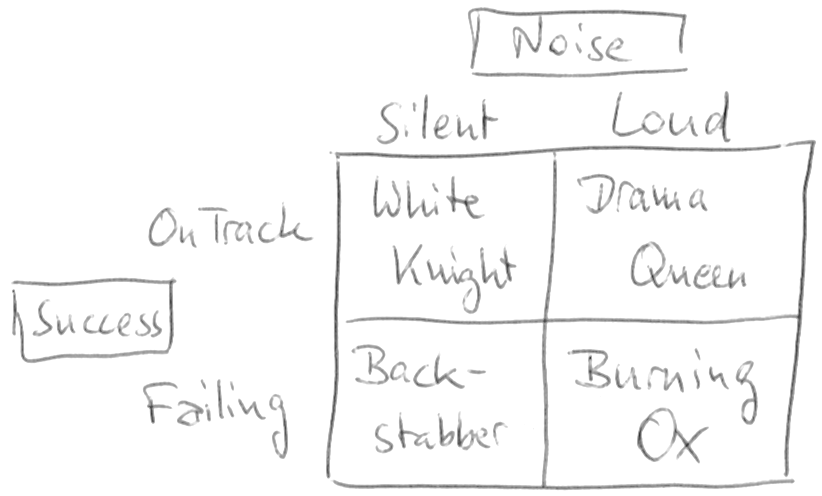
In my years of managing software development projects, I’ve come to apply a simple metric to each project to determine its “personality”. The metric consists of only two aspects (or dimensions): success and noise. Each project strives to be successful in its own terms and each project produces a certain amount of “noise” while doing so. Noise, in my definition, is necessary communication above the minimum. A perfectly silent project isn’t really silent, there are just no communicated problems. That doesn’t mean there aren’t any problems! A project team can silently overcome numerous problems on their own and still be successful. The same team can cry for help at each and any hurdle and still fail in the long run. That would mean a lot of noise without effect. I call such a project a “Burning Ox”.

Success vs. Noise

metric

As you can see, there are four types of projects with this metric. The desired type of project is the “White Knight” in the top-left quarter, while the “Burning Ox” in the bottom-right is the exact opposite. Let’s review all four types:

  • White Knight (silently on track): A project that is on track, tackles every upcoming challenge on its own, reports its status but omits the details and turns out to be a success is the dream of every project manager. You can let the team find its own way, document their progression and work on the long-term goals for the team and the product. It’s like sailing in quiet waters on a sunny day. Nothing to worry about and a pleasant experience all around.
  • Drama Queen (loud, but on track): This project is ultimately headed towards success, but every obstacle along the way results in emergency meetings, telephone conferences or e-mail exchanges. The number of challenges alone indicate that the team isn’t up to the task. You are tempted to micro-manage the project, to intervene to solve the problems and ensure success or at least progress. But you are bound to recognize some or even most problems as non-existent. The key sentence to say or think is: “Strange, nobody else ever had this problem and we’ve done it a dozen times before”. If you are a manager for several projects, the Drama Queens in your portfolio will require the majority of your time and attention. You’ll be glad when the project is over and “peaceful” times lie ahead.
  • Backstabber (silent and a failure): This is the biggest fear of every manager. The project seems alright, the team doesn’t report any problems and everything looks good. But when the cards need to be put on the table, you end up with a weak combination. It’s too late to do anything about the situation, the project is a failure. And it failed because you as the manager didn’t dig deeper, because you let them fool you. No! If you look closer, it failed because nobody dug deeper and everybody was in denial. You’ll see the warning signs in retrospective. You will become more paranoid in your next project. You’ll lose faith in the project status reports of your teams. You’ll inquire more and micro-manage the communication. You’ll become a skittish manager because of this unpleasant experience. Backstabber projects have horrendous costs for the social structure of a company.
  • Burning Ox (loud and failing): The name stems from an ancient war tactics when the enemy’s camp was overrun by a horde of oxen with burning torches bound to the horns. The panicked animals wreaked havoc along their way and started fires left and right. A Burning Ox is helpless in the situation, but takes it out on anybody and anything near it, too. This project is bound to fail, the team is in it way over their heads and no amount of support from your side or help from the outside can safe it. Well, experienced firefighters might work wonders, but they are expensive and rare (we know because we are often called in for this job). If you find a Burning Ox in your project portfolio (and you will know it, because a Burning Ox screams on the top of his lungs), prepare yourself for the inevitable: The project will fail, in scope (missing functionality), budget (higher costs) and/or time (delayed delivery). You better start with damage control now or make a call to a firefighter you can trust.

Easy assessment

This project management metric is not meant for deep inspection, but for easy assessment and quick communication. You can convey your desired communication style and the fact that everybody involved with the project is partly responsible for its success or failure. The metric states that too much detail is not helpful and too little detail can be disastrous. It also shows that loudly failing projects are not the fault of the project team alone (the ox cannot help being used as a living torch), but that the prerequisites of the project weren’t met.

Takeaway

If you are not a project manager, what can you learn from this blog post? Ask yourself if you require too much help from your manager, forcing him/her to switch into the micro-management gear, even if you could solve the problem yourself. If you cannot, ask yourself if you think that you can deliver the project in scope, time and budget or if you already smell the fire. If you can smell the fire, is your manager aware? Are you telling him/her in unclouded words about your perceived state of the project? Did you attempt to communicate your perception/feeling at least twice? If not, your manager might be shocked that he/she took care of a Backstabber project. A failing project is not your fault! You would only be to blame for the continued hiding of a known fact.

If you are a project manager, take a piece of paper, draw the metric’s chart and try to pin-point the position of all your projects. Be as honest and exact as possible. Is it really a Burning Ox or “just” a Drama Queen? Are your White Knights really above reproach or is their loyality questionable? What questions could you ask to try to unveil hidden problems, even those that nobody is aware of yet?

These quick, repeated assessments help me to manage my schedule and not forget about the silent projects because the loud projects always ellbow their way into my attention.

Recap of the Schneide Dev Brunch 2016-12-11

If you couldn’t attend the Schneide Dev Brunch at 11th of December 2016, here is a summary of the main topics.

brunch64-borderedLast week at sunday, we held another Schneide Dev Brunch, a regular brunch on the second sunday of every other (even) month, only that all attendees want to talk about software development and various other topics. This brunch was so well-attended that we had to cramp around our conference table and gather all chairs on the floor. As usual, the main theme was that if you bring a software-related topic along with your food, everyone has something to share. Because we were so many, we established a topic list and an agenda for the event. As usual, a lot of topics and chatter were exchanged. This recapitulation tries to highlight the main topics of the brunch, but cannot reiterate everything that was spoken. If you were there, you probably find this list inconclusive:

Finland

We started with a report of one of our attendees who had studied in Finland for the last two years. He visited the Aalto university and shared a lot of cultural details about Finland and the Finnish people with us.

The two most important aspects of the report were sauna and singing. The Finnish love to visit a sauna, in fact, nearly every building has a functioning sauna. Every office building has a company sauna that will get visited often. So it might happen that your first visit of a company starts right in the sauna, naked with the bosses.

And the Finnish love singing so much that they usually start singing during the sauna session. There are open social events organized around singing together.

Alcohol plays a big role in Finland, mostly because the taxes makes it incredibly expensive to obtain a proper buzz. In the southern regions, much alcohol is imported from Russia or Estonia by ferry. There are even special ferry routes designed to be cost-neutral when shopping for alcohol. But alcohol isn’t the only thing that is made expensive with special taxes. Sugar and sugary food/drinks are heavily taxed, too. So it’s actually more expensive to eat unhealthy, which sounds like a good concept to counter some civilizational diseases.

The Finnish students often wear a special boilersuit during official events that identifies their affilition with their field of study and university. They apply patches and stickers to their suit when they have completed certain tasks or chores. It’s actually a lot like a military uniform with rank and campaign insignia. Only that the Finnish student boilersuit may not be cleaned or washed other than jumping into a body of water with you in it. And the Finnish lakes are frozen most of the year, with temperatures of -27 °C being nothing extraordinary.

As you probably have guessed right now, costs for rent and electricity are high. Our attendee enjoyed his time there, but is also glad to have the singing separated from the alcohol for the most part.

Lambdas and Concurrency

The next question revolved around the correlation between lambda expressions and concurrent execution of source code. The Vert.x framework relies heavily on lambdas and provides reactive programming patterns for Java. As such, it is event driven and non blocking. That makes it hard to debug or to reason about the backstory if an effect occurs in production. The traditional tools like stacktraces don’t tell the story anymore.

We took a deep dive into the concepts behind Optionals, Promises and Futures (but forgot to talk about the Expected type in C++). There is a lot of foggy implementation details in the different programming languages around these concepts and it doesn’t help that the Java Optional tries to be more than the C++ Optional, but doesn’t muster up the courage to be a full Monad. Whether deprecating the get()-method will make things better is open for discussion.

To give a short answer to a long discussion: Lambdas facilitate concurrent programming, but don’t require or imply it.

React.js and Tests

It was only a small step from the reactive framework Vert.x to the React.js framework in Javascript. One attendee reported his experiences with using different types of tests with the React framework. He also described the origin of the framework, mentioning the concept of Flux and Redux along the way.

Sorry if I’m being vague, but each written sentence about Javascript frameworks seem to have a halflife time of about six weeks. My take on the Javascript world is to lean back, grab some popcorn and watch the carnival from the terrace, because while we’re stuck with it forever, it is tragically unfortunate. Even presumed simple things like writing a correct parser for JSON end in nightmares.

It should be noted, though, that the vue.js framework entered the “assess” stage of the Thoughtworks Techradar, while AngularJS (or just Angular, as it should be called now) is in the “hold” stage.

Code Analysis

We also talked about source code analysis tools and plugins for the IDE. The gist of it seems to be that the products of JetBrains (especially the IntelliJ IDEA IDE) have all the good things readily included, while there are standalone products or plugins for other IDEs.

Epilogue

As usual, the Dev Brunch contained a lot more chatter and talk than listed here. The number of attendees makes for an unique experience every time. We are looking forward to the next Dev Brunch at the Softwareschneiderei in February 2017. We even have some topics already on the agenda (like a report about first-hand experiences with the programming language Rust). And as always, we are open for guests and future regulars. Just drop us a notice and we’ll invite you over next time.

It’s only Cores and Caches but I like it

The programming game changed dramatically in the past ten years. We are playing CPU cores and caches now, but without proper visibility.

759px-amd_am5x86_dieMost of our software development economy is based on a simple promise: The computing power (or “performance”) of a common computer will double every two years. This promise accompanied us for 40 years now, a time during which our computers got monitors, acquired harddisks and provided RAM beyond the 640 kB that was enough for nobody. In the more recent years, we don’t operate systems with one CPU, but four, eight or even twelve of them. So it came as a great irritation when ten years ago, Herb Sutter predicted that “The free lunch is over” and even Gordon Moore, the originator of Moore’s Law that forms the basis of our simple promise said that it will only hold true for ten to fiveteen more years. Or, in other words, until today.

Irritation

That’s a bit unsettling, to say the least, and should be motivation enough to have a good look at everything we are doing. Intel, the biggest manufacturer of CPUs for computers, has indicated earlier this year that Moore’s Law cannot be fulfilled any longer. So, the free lunch is really over. And it turns out to have some hidden costs. One cost is a certain complacency, the conviction that things will continue to be as they were and that coding styles chiseled over years and decades hold an inherent value of experience.

Complacency

Don’t get me wrong – there is great value in experience, but not all knowledge of the past is helpful for the future. Sometimes, fundamental things change. Just as the tables will eventually turn for every optimization trick, we need to reevaluate some axioms of our stance towards performance. Let me reiterate some common knowledge:

There are two types of performance inherently baked into your source code: Theoretical and practical performance.

Performance

The first type is theoretical performance, measured in O(n), O(n²) or even O(n!) and mostly influenced by the complexity class of the algorithm you are using. It will translate into runtime behaviour (like in the case of O(n!) your software is already dead, you just don’t know yet), but isn’t concerned with the details of your implementation. Not using an unnecessary high complexity class for a given problem will continue to be a valueable skill that every developer should master.

On the other hand, practical performance is measured in milliseconds (or nanoseconds if you are into micro-benchmarks and can pull off to measure them correctly) and can heavily depend on just a few lines in your source code. Practical performance is the observable runtime behaviour of your software on a given hardware. There are two subtypes of practical performance:

  • Throughput (How many operations are computed by the system in a given unit of time?)
  • Latency (How long does it take one operation to be computed by the system?)

If you run a service, throughput is your main metric for performance. If you use a service, latency is your main concern. Let me explain this by the metapher of a breakfast egg. If you want to eat your breakfast at a hotel buffet and the eggs are empty, your main concern is how fast you will get your freshly boiled egg (latency). But if you run the hotel kitchen, you probably want to cook a lot of eggs at once (throughput), even if that means that one particular egg might boil slightly longer as if you’d boiled each of them individually.

Latency

Those two subtypes are not entirely independent from each other. But the main concern for most performance based work done by developers is latency. It is relatively easy to measure and to reason about. If you work with latency-based performance issues, you should know about the latency numbers every programmer should know, either in visual form or translated to a more human time scale. Lets iterate some of the numbers and their scaled counterpart here:

  • 1 CPU cycle (0.3 ns): 1 second
  • Level 1 cache access (0.9 ns): 3 seconds
  • Branch mispredict (2.5 ns): 8 seconds
  • Level 2 cache access (2.8 ns): 9 seconds
  • Level 3 cache access (12.9 ns): 43 seconds
  • Main memory access (120 ns): 6 minutes
  • Solid-state disk I/O (50-150 μs): 2-6 days
  • Rotational disk I/O (1-10 ms): 1-12 months

We can discuss any number in detail, but the overall message stands out nonetheless: CPUs are lightning fast and caches are the only system components that can somewhat keep up. As soon as your program hits the RAM, your peak performance is lost. This brings us to the main concept of latency optimization:

Your program’s latency is ultimately decided by your ability to decrease cache misses.

You can save CPU cycles by performing clever hacks, but if you are able to always read your data (and code) from the cache, you’ll be 360 times faster than if your program constantly has to read from RAM. Your source code doesn’t have to change at all for this to happen. A good compiler and/or optimizing runtime can work wonders if you adhere to your programming language’s memory model. In reality, you probably have to rearrange your instructions and align your data structures. That’s the performance optimization of today, not the old cycle stinting. The big challenge is that none of these aspects are visible on the source code level of your program. We have to develop our programs kind of blindfolded currently.

Concurrency

One way how we’ve held up Moore’s Law in the last ten years was the introduction of multiprocessor computing into normal computers. If you cram two CPUs onto the die, the number of transistors on it has doubled. A single-threaded program doesn’t run any faster, though. So we need to look at concurrent programming to unlock the full power of our systems. Basically, there are two types of concurrent programming, deliberate and mechanical.

  • Deliberate concurrent programming means that you as the developer actively introduce threads, fibers or similar concepts into your source code to control parallel computation.
  • Mechanical concurrent programming means that your source code can be parallelized by the compiler and/or runtime and/or the hardware (e.g. hyper-threading) without changing the correctness of your program.

In both types of concurrent programming, you need to be aware about the constraints and limitations of correct concurrency. It doesn’t matter if your program is blazingly fast and utilizes all cores if the result is wrong or only occasionally correct. Once again, the memory model of your programming language is a useful set of rules and abstractions to guide you. Most higher-level concurrency models like actors narrow your possibilities even further, with functional programming being one of the strictest (and most powerful ones).

In the field of software development, we are theoretically well-prepared to take on the task of pervasive concurrent programming. But we need to forget about the good old times of single-core confirmability and embrace the chaotic world of raw computing power, the world of cores and caches.

Cores ‘n’ Caches

This is our live now: We rely on Cores ‘n’ Caches to feed us performance, but the lunch isn’t free anymore. We have to adapt and adjust, to rethink our core axioms and let go of those parts of our experience that are now hindrances. Just like Rock ‘n’ Roll changed the rules in the music business, our new motto changes ours.

Let’s rock.

Children behind the wheel

What happens when you put children behind the steering wheel? This blog entry looks at the Dunning-Kruger effect in software development.

A few weeks ago, I read a funny news article about a 11 years old boy who stole a bus and drove the normal route with it. When the police stopped him, he had already picked up some passengers and somehow managed to only inflict minor damages along the way. The whole story (in german) can be read here.

Author: Vitaly Volkov, Волков Виталий Сергеевич (user kneiphof) https://commons.wikimedia.org/wiki/User:KneiphofThis blog entry is not about the unheeding passengers, it’s about the little boy and his mindset. This mindset exists in the business world, too. It’s the mixture of “what could possibly go wrong?” with “I’m totally able to pull this off” and a large dose of “everybody else is surely faking it, too”. In the context of the Dunning-Kruger effect, this mixture is called “unskilled and unaware of it”. It’s a dangerous situation for both the employee and the employer, because neither of them can properly evaluate the actual risk.

The Dunning-Kruger effect

Let’s start with the known theory. The Dunning-Kruger effect describes a cognitive bias in which unskilled individuals assess their ability (in the context of a given skill) much higher than it really is and highly skilled individuals tend to underestimate their (relative) competence. The problem is not that real experts tend to be modest about their expertise. The real problem is that “if you’re incompetent, you can’t know you’re incompetent. The skills you need to produce a right answer are exactly the skills you need to recognize what a right answer is.”

So in short: Being unskilled in a certain area probably means you don’t really know that you are unskilled.

Or, translated to our young bus driver: If you don’t know anything about driving a bus, you certainly think you are as much a decent bus driver as the man behind the wheel. It looks easy enough from the passenger seat.

The effect in practice

Why should this bother us in software development? Our education system ensures that we are exposed to enough development practice so that we can counter the “unaware of it” part of the Dunning-Kruger effect. But it isn’t effective enough, at least that’s what I see from time to time.

Every once in a while, I have the opportunity to evaluate an existing code base. Most of the time, it produces a working, profitable application, so it cannot be said to be a failure. Sometimes however, the code base itself is so convoluted, bloated and riddled with poor implementation choices that it absolutely cannot be developed any further without a high risk of regression bugs and/or absurd amounts of developer time for little changes.

These hopeless source codes have one thing in common: they are developed by one person and one person alone. This person has developed for months or even years, showing progress and reporting no problems and suddenly resigned, often shortly before a major milestone in the project like going live with the first version or announcing the next version. The code base now lies abandonded and needs to be adopted. And while no code base is perfect (or should even try to be), this one reeks of desperation and frustration. Often, the application itself is not very demanding, but the source code makes it appear to be.

A good example of this kind of project is my scrap metal tale (in three parts) from five years ago:

A more recent case is littered with inline comments that celebrate small victories of the developer:

  • 5 lines of convoluted, contradicatory statements
  • 3 lines commented out
  • 1 comment line stating “YES! This is finally working! Super!”
  • Still three obvious bugs, resource leaks or security flaws in these few lines alone

The most outrageous (and notorious) case might be the Brillant Paula Bean from the Daily WTF, but this code base is at least readily comprehensible.

The origins of the effect

I think a lot of the frustration, desperation, anxiety and outright fear that I can sense through the comments and code structure was really felt by the original author. It must have been incredibly hard to stay on course, work hard and come up with solutions in the face of imminent deadlines, ever-changing requirements and the lingering fear that you’re just not up to the task. Except that we’ve just learned that developers in the “unskilled and unaware of it” state won’t feel the fear. That’s the origin of all the bad code: The absolute conviction that “it’s not me, it’s the problem, the domain, the language, the compiler, the weather and everything else”. Programming is just hard. Nobody else could do this better. It’ll work in the end. Those “minor problems” (like never actually speaking to the hardware, hard-coded paths and addresses, etc.) will be fixed at the last moment. There’s nothing wrong with an occassional exception stack trace in the logfile and if it bothers you, I can always make the catch-block empty.

The most obvious problem is that these developers think that this is how everybody else develops software, too. That we all don’t bother with concurrency correctness, resource lifecycle management, data structures, graphical user interface design, fault tolerance or even just basic logging. That all programming is hard and frustrating. That finding out where to insert a sleep statement to quench that pesky exception is the pinnacle of developer ingenuity. That things like automated tests, code metrics, continuous integration or even version control are eccentric fads that will pass by and be forgotten soon, so no need to deal with it. That we all just fake it and dread the moment our software is used in the wild.

A possible remedy

The “unskilled and unaware of it” developer isn’t dumb or hopeless, he’s just unskilled. The real tragedy is that he doesn’t have a mentor that can alleviate the biggest problems in the code and show better approaches. The unskilled lonesome developer cannot train himself. A good explanation for this novice “lock-in” can be found in the Dreyfus Model of Skill Acquisition (I recommend you watch the excellent talk on this topic by Dave Thomas): Novices lack the skills for proper self-assessment and cannot learn from their mistakes (as stated by the Dunning-Kruger effect, too). They also cannot recognize them as “their” mistakes or even “mistakes”. They need outside feedback (and guidance) to advance themselves. A mentor’s role is to give exactly that.

Conclusion

If you find yourself in a position of being a “skilled and fairly aware of it” developer, please be aware that you’ve probably been mentored sometimes in the past. Pass it on! Be the mentor for an aspiring junior developer.

If you suspect that you might fall in the “unskilled” category of developers, don’t despair! Being aware of this is the first and most important step. Now you can act strategically to improve your skill. There is a whole book giving you invaluable advice: Apprenticeship Patterns: Guidance for the Aspiring Software Craftsman by Dave Hoover and Adewale Oshineye. Two prominent advices from the book are “Be the Worst (of your team)” and “Find Mentors“. And my most prominent advice? “Don’t stick it out alone“.

Programming is (or should be) fun after all.