On developer workplace ergonomics

Most developers don’t care much about their working equipment, especially their intimate triple. That’s a missed opportunity.

workplace_failMost developers don’t care much about their working equipment. The company they work in typically provides them a rather powerful computer with a mediocre monitor and a low-cost pair of keyboard and mouse. They’ll be given a regular chair at a regular desk in a regular office cubicle. And then they are expected (and expect themselves) to achieve outstanding results.

The broken triple

First of all, most developers are never asked about their favorite immediate work equipment: keyboard, mouse and monitor.

With today’s digitally driven flat-screens, the monitor quality is mostly sufficient for programming. It’s rather a question of screen real estate, device quantity and possibility of adjustments. Monitors get cheaper continuously.

The mouse is the second relevant input device for developers. But most developers spend more money on their daily travel than their employer spent for their mices. A good mouse has an optimal grip, a low monthly mouse mile count, enough buttons and wheels for your tasks, your favorite color and is still dirt cheap compared to the shirt you wear.

The keyboard is the most relevant device on a programmer’s desk. Your typing speed directly relies on your ability to make friends with your keyboard. Amazingly, every serious developer has her own favorite layout, keystroke behavior and general equipment. But most developers still stick to a bulk keyboard they were never asked about and would never use at home. A good keyboard matches your fingertips perfectly and won’t be much more expensive than the mouse.

Missed opportunities

The failure is two-fold: The employer misses the opportunity to increase developer productivtiy with very little financial investment and the developer misses the opportunity to clearly state her personal preferences concerning her closest implements.

Most employers will argue that it would place a heavy burden on the technical administration and the buying department to fit everybody with her personal devices. That’s probably true, but it’s nearly a one-time effort multiplied by your employee count, as most devices last several years. But it’s an ongoing effort for every developer to deliver top-notch results with cumbersome equipment. Most developers will last several years, too.

Some developers will state that they are happy with their devices. It really might be optimal, but it’s likely that the developer just hasn’t tried out alternatives yet.

Perhaps your organizational culture treats uniformity as professionality. Then why are you allowed to have different haircuts and individual ties?

Room for improvement

Our way to improve our workplaces was to introduce an annual “Creativity Budget” for every employee. It’s a fair amount of money destined to use one’s own creativity to improve productivity. It could also have been named “Productivity Budget”, but that would miss the very important part about creative solutions. There is no formal measurement of productivity and only loose rules on what not to do with the money. Above all, it’s a sign to the developer that she’s expected to personally care for her work environment, her equipment and her productivity. And that she’s not expected to do that without budget.

The Creativity Budget outcome

The most surprising fact about our budgets was that nearly none got fully spent. Most developers had very clear ideas on what to improve and just realized them – without further budget considerations. On top of that, everybody dared to express their preferences, without fear of overbearance. It’s not a big investment, but a very worthwile one.

An highly profitable investment

Some analysis on the financial aspects of using a second monitor on your computer. Dual monitoring is an investment with high payoff rates.

coinsWhen it comes to workplace ergonomics, oftentimes money matters most. And money is always short, except for a really good investment. A profitable investment is what every businessman will understand. Here is an investment that boosts both, ergonomics and finance.

The goal

In my definition, an highly profitable investment is money you get a return of an additional 25% in just a year. After that year, the investment does not vanish, but continues to pay off. The investment is socially acceptable at best: Everyone involved will feel happy as long as the investment runs. And the investment can be explained to every developer at your shop with just two words: dual monitors.

The maths

Ok, lets have some hard calculus about it. Here are some modest assumptions about the investment:

You already own a decent monitor, as you are a screen worker. Buying another one of the same type will cost you about 300 EUR, with 25% return on our investment, it needs to earn us about 400 EUR. A monitor that earns money?

Your income, without any additional costs for your employer, is at 40.000 EUR per year. If you happen to have an higher income, the investment just gets more profitable. You work for 200 days a year, according to the usual employment. If you look at the numbers, you see that you earn 200 EUR per day. The new monitor needs to earn two days worth of your work or one percent of your yearly working time.

If the monitor speeds you up by just one percent of your time, it’s a highly profitable investment.

A productivity boost by one percent

How much is one percent of your daily working time? If you work for eight hours a day, it’s about five minutes. You need to accelerate your work by using the second monitor by five minutes or one percent every day, that’s all. All the other goodies come for free: Better mood, higher motivation, lower defect rate, improved code quality.

Some minor limitations

We experimented with setups of N monitors, with N being a natural number. Three or more monitors do not pay off as much as the second one does. Hardware issues rear their ugly heads and generally, overview decreases. This might not be true with rapid context switching tasks like customer support, but with focussed software development, it is.

When using dual monitors, it’s crucial to get used to them and really utilize all their possibilities. Perhaps you might need additional software to fully drive your dual power home. You might have to rethink your application window layout habits.

Assigning a second monitor to a developer is an irreversible action. If you take it away again, the developer will feel jailed with too less screen real estate and might even suffer a mild form of claustrophobia. Morale and motivation will plummet, too.

Conclusion

Introducing dual monitoring to developers is a win-win situation for both the company and the developers. It’s a highly profitable investment while boosting staff morale and productivity. If there is one reason not to do it, it’s because of the irreversibility of the step. But a last word of secret to the management: You can even use it to raise employee loyalty, as nobody wants to work in a single monitor environment anymore.

Make it visible: The Project Cockpit

How to use a whiteboard as information radiator for project management, showing progress, importance, urgency and volume of projects.

We are a project shop with numerous customers booking software development projects as they see fit, so we always work on several projects concurrently in various sub-teams.

We always strive for a working experience that provides more productivity and delight. One major concept of achieving it is “make it visible”. This idea is perfectly described in the awesome book “Behind Closed Doors” by Johanna Rothman and Esther Derby from the Pragmatic Bookshelf. Lets see how we applied the concept to the task of managing our project load.

What is the Project Cockpit?

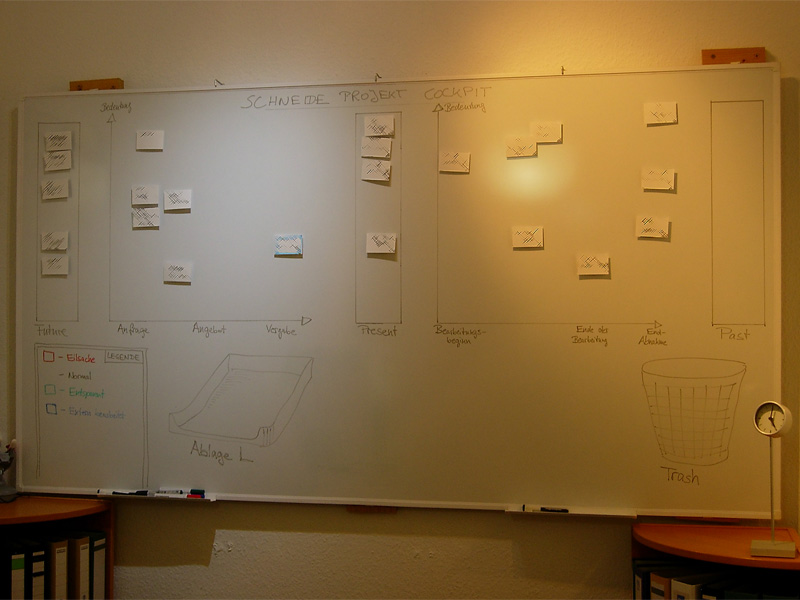
The Project Cockpit is a whiteboard with titled index cards and separated regions. If you glance at it, you might be reminded of a scrum board. In effect, it serves the same purpose: Tracking progress (of whole projects) and making it visible.

Here is a photo of our Project Cockpit (with actual project names obscured for obvious reasons):

cockpit1

How does it work?

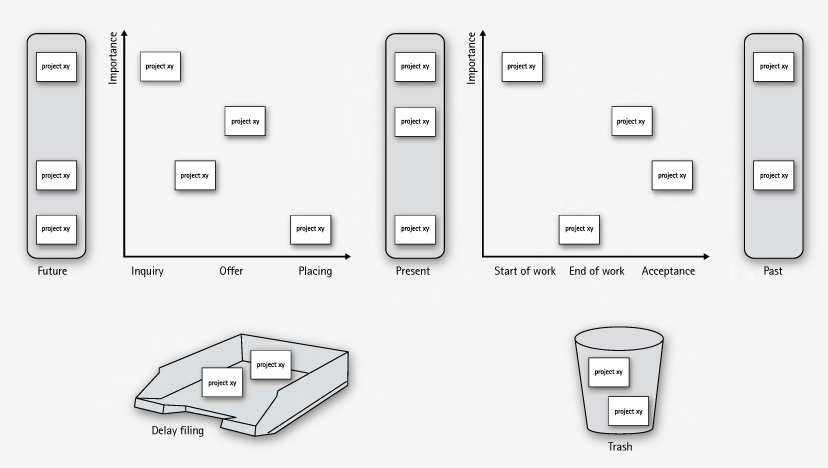
In summary, each project gets a card and transitions through its lifecycle, from left to right on the cockpit.

The Project Cockpit consists of two main areas, “upcoming projects” and “current projects”. Both areas are separated into three stages eachs, denoting the usual steps of project placing and project realization.

Every project we are contacted for gets represented by an index card with some adhesive tape and a whiteboard magnet on its back. The project card enters the cockpit on the left (in the “future” or “inquiry” region) and moves to the right during its lifecycle. The y-axis of the chart denotes the “importance” of the project, with higher being more important.

cockpit2

In the “upcoming” area, projects are in acquisition phase and might drop out to the bottom, either into the “delay filing” or the “trash”. The former is used if a project was blocked, but is likely to make progress in the future. The latter is the special place we put projects that went awry. It’s a seldom action, but finally putting a project card there was always a relief.

The more natural (and successful) progress of a project card is the advance from the “upcoming” area to the “present” bar. The project is now appointed and might get a redefinition on importance. Soon, it will enter the right area of “current” projects and be worked on.

The right area of “current” projects is a direct indicator of our current workload. From here on, project cards move to the rightmost bar labeled “past” projects. Past projects are achievements to be proud of (until the card magnet is needed for a new project card).

If you want to, you can color code the project cards for their urgency or apply fancy numbers stating their volume.

What’s the benefit?

The Project Cockpit enables every member of our company to stay informed about the project situation. It’s a great place to agree upon the importance of new projects and keep long running acquisitions (the delay filing cases) in mind. The whiteboard acts as an information radiator, everybody participates in project and workload planning because it’s always present. Unlike simpler approaches to the task, our Project Cockpit includes project importance, urgency and volume without overly complicating the matter.

The whiteboard occupies a wall in our meeting room, so every customer visiting us gets a glance on it. As we use internal code names, most customers even don’t spot their own project, let alone associate the other ones. But its always clear to them in which occupancy condition we are, without a word said about it.

Ultimately, we get visibility of very crucial information from our Project Cockpit: When the left side is crowded, it’s a pleasure, when the right side is crowded, it’s a pressure 😉

“Tag, you’re it!” – how we manage our blog heartbeat

We successfully revived a nearly abandonded blog by using a token and a few metaphors.

The new year 2009 just started. A great opportunity to review some things. Here is a review of our blogging.

heartbeatWe started this blog in February 2007. Soon afterwards, it was nearly dead, as no new articles were written. Why? We would have answered to “be under pressure” and “have more relevant things to do” or simply “have no idea about what to write”. The truth is that we didn’t regard this blog as being important to us. We didn’t allocate any ressources, be it time, topics or attention to it. Seeming unimportant is a sure death cause for any business resource in any mindful managed company.
The Revival

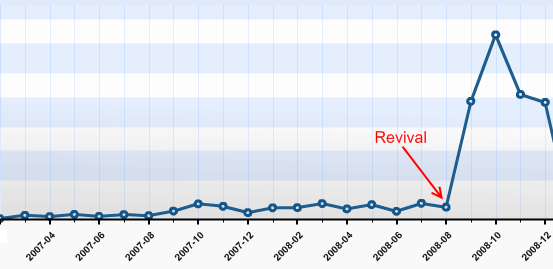
This changed in late August 2008, after we heard from several sources that our articles published so far were very promising. Some new contacts even asked about our Code Flow-O-Meter before they asked any other question. So we sat together and thought about a way to revive this blog with minimal possible effort. We came to the conclusion that, being a four-man-show company, it would be sufficient for everyone to write one blog article a month in order to show a weekly blog heartbeat. It’s simple math. The same discussion led to the conclusion that blogging in english would reach a broader audience.

It’s a management problem

This laid the foundation for a few new blog entries, as everyone was eager to tell some news. But how could we manage the blog heartbeat in a sustainable fashion, with minimal effort and attention of the individual?

blogtoken

We decided to give the “Blog Token” a try. This token is nothing more than a little index card informing you that you are responsible for the blog entry in the next week. You can keep the index card on your desk or take it with you to remind you of the task. If you published your entry, you hand it over to the following team member in line. The token order is defined on a very viewable whiteboard. It took us 5 minutes to set up the token and define the order. Everything else is managed by the one who wants to get rid of the token and the one who receives it.

It doesn’t work without metaphors

When we reviewed the process, we realized that without a few maxims and their impact, things would have gone astray even with the token in place. Here are some of our maxims, spelled by the metaphors we found for them:

  • “blog heartbeat”: When you want to “keep it flowing” in a sustainable pace, you need to have a pace first. We defined that our blog is alive when it has a periodic heartbeat. Weekly articles seemed to be a good start and were approved in every review yet.
  • “to grow vegetables”: Good ideas (and good blog topics) need to evolve and grow. You need to care about them for an amount of time and publish them when they are mature. But first of all, you need to put the seeds for ideas (and blog topics) in your garden. Whenever somebody mentions something that might be worth a blog entry, somebody calls “this is a vegetable!”. A first sketch of a new blog entry (a new vegetable in your garden) is born in this moment. To be honest, some vegetables starve over time.
  • “it’s not a competition”: We try to publish high quality blog entries. But it’s more important to us to tell you about our favorite vegetable (see second metaphor) than to win a pulitzer price for every article. We even try to remind ourselves that we do not compete for the recoginition from our readers (you, in this case!). To be honest here, too: Though it’s not a contest, we issued an internal price for our most read article: Using Hudson for C++/CMake/CppUnit

Reviewing the Revival

We revived our blog with three ingredients:

  • Our commitment (“it’s important to us”)
  • The Blog Token (“tag, you’re it!”)
  • Metaphors (“everyone can grow vegetables”)

Telling from the statistics, it simply skyrocketed us:

blog-stats

Thank YOU, our blog visitors, for making this possible. It’s been a great experience for us and we are looking forward to continue our blog heartbeat in 2009 with fully stacked vegetable gardens. Stay tuned and if you like, share your thoughts (or just say hello) by adding a comment. We really appreciate your opinion.