CMake Builder Plugin Reloaded

A few months ago I set out to build my first hudson plugin. It was an interesting, sometimes difficult journey which came to a good end with the CMake Builder Plugin, a build tool which can be used to build cmake projects with hudson. The feature set of this first version was somewhat limited since I applied the scratch-my-own-itch approach – which by the time meant only support for GNU Make under Linux.

As expected, it wasn’t long until feature requests and enhancement suggestions came up in the comments of my corresponding blog post. So in order to make the plugin more widely useable I used our second  Open Source Love Day to add some nice little features.

Update: I used our latest OSLD to make the plugin behave in master/slave setups. Check it out!

Let’s take a walk through the configuration of version 1.0 :

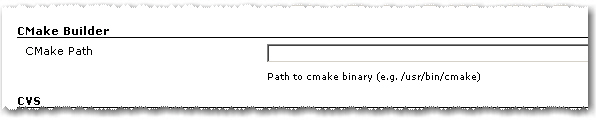
Path to cmake executable

1. As in the first version you have to set the path to the cmake executable if it’s not already in the current PATH.

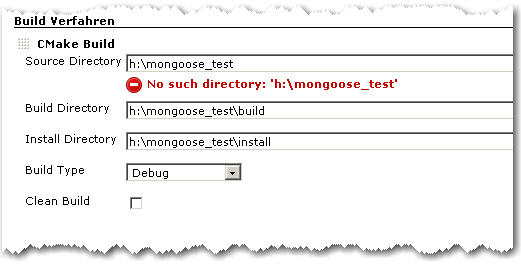
2. The build configuration starts as in the first version with Source Directory, Build Directory and Install Directory.

CMake Builder Configuration Page

3. The Build Type can now be selected more conveniently by a combo box.

4. If Clean Build is checked, the Build Dir gets deleted on every build

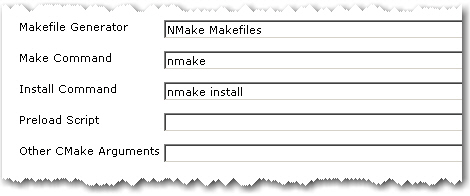
Advanced Configuration Page

5. The advanced configuration part starts with Makefile Generator parameter which can be used to utilize the corresponding cmake feature.

6. The next two parameters Make Command and Install Command can be used if make tools other than GNU Make should be used

7. Parameter Preload Script can be used to point to a suitable cmake pre-load script file. This gets added to the cmake call as parameter of the -C switch.

8. Other CMake Arguments can be used to set arbitrary additional cmake parameters.

The cmake call will then be build like this:

/path/to/cmake  \
   -C </path/to/preload/script/if/given   \
   -G <Makefile Generator>  \
   -DCMAKE_INSTALL_PREFIX=<Install Dir> \
   -DCMAKE_BUILD_TYPE=<Build Type>  \
   <Other CMake Args>  \
   <Source Dir>

After that, the given Make and Install Commands are used to build and install the project.

With all these new configuration elements, the CMake Builder Plugin should now be applicable in nearly every project context. If it is still not useable in your particular setting, please let me know. Needless to say, feedback of any kind is always appreciated.

A more elegant way to HTTP Requests in Java

The support for sending and processing HTTP requests was always very basic in the JDK. There are many, many frameworks out there for sending requests and handling or parsing the response. But IMHO two stand out: HTTPClient for sending and HTMLUnit for handling. And since HTMLUnit uses HTTPClient under the hood the two are a perfect match.

This is an example HTTP Post:

HttpClient client = new HttpClient();
PostMethod post = new PostMethod(url);
for (Entry param : params.entrySet()) {
    post.setParameter(param.key, param.value);
}
try {
    return client.executeMethod(post);
} finally {
    post.releaseConnection();
}

and HTTP Get:

WebClient webClient = new WebClient();
return (HtmlPage) webClient.getPage(url);

Accessing the returned HTML via XPath is also very straightforward:

List roomDivs=(List)page.getByXPath("//div[contains(@class, 'room')]");
for (HtmlElement div:roomDivs) {
  rooms.add(
    new Room(this,
      ((HtmlElement) div.getByXPath(".//h2/a").get(0)).getTextContent(),
      div.getId())
  );
}

One last issue remains: HTTPClient caches its cookies but HTMLUnit creates a HTTPClient on its own. But if you override HttpWebConnection and give it your HTTPClient everything works smoothly:

public class HttpClientBackedWebConnection extends HttpWebConnection {
  private HttpClient client;

  public HttpClientBackedWebConnection(WebClient webClient,
      HttpClient client) {
    super(webClient);
    this.client = client;
  }

  @Override
  protected HttpClient getHttpClient() {
    return client;
  }
}

Just set your custom webconnection on your webclient:

webClient.setWebConnection(
  new HttpClientBackedWebConnection(webClient, client)
);

A Campfire plugin for Hudson

Our last OSLD resulted in a new hudson plugin: a build notifier for Campfire. Right now it is pretty simple and just posts the last build result in a chat room:
Campfire-Notification

You can configure your account data and the room to join in the job config page under Post Build actions:
Hudson-Campfire
But there is more to come:

  • global config
  • SSL support
  • a link back to hudson

or what is your favorite missing feature?

Our second Open Source Love Day (OSLD)

A retrospective report of our second Open Source Love Day (OSLD). We present the results of our work on hudson and git and the lessons learnt.

opensourceloveday

Today we celebrated our second Open Source Love Day (OSLD). When we say “celebrated”, we actually mean that all of us worked hard and concentrated for hours, just to have a short meeting with candy at the end of the day.

The Open Source Love Day is our way to show our appreciation to the Open Source software development ecosystem. We heavily rely on Open Source products for our customer projects, so it’s just fair to donate back. You can read more about our motivation and specifica in our first OSLD blog posting.

For this day, we adjusted the rules a bit. While Object Calisthenics are very powerful in formulating rather academic software development values in some easy-to-remember rules, they just don’t fit well with existing projects. We still kept the rules in mind, but didn’t follow them strictly. We also learnt our share from last time’s experience of jumping right into the middle of arbitrary projects without a real need to do so. Today, we scratched more of our own itches.

You can participate at our OSLD by using the feature we’ve built today:

  • Hudson gets a brand new plugin. Currently, it’s in alpha status and needs some more nurturing, but is planned to be published within the next few weeks. The proof of concept was successful today. You will read more about it on this blog soon.
  • Another of our hudson plugins, namely the cmake builder plugin, got some feature love, incorporating suggestions from plugin users. We especially thank Ole B. for his feedback. The new features are checked in and will be available with the next plugin version 0.6, scheduled to be published in a few days. You’ll read the details about the new features here.
  • We’ve produced a feature implementation for hudson, adding the ability to use environment variables for the job’s workspace path. This feature touches core hudson functionality, so we just proposed a patch and leave it up to the core hudson team to decide on its inclusion. For more details, head over to the hudson issue tracker, entry #3997.
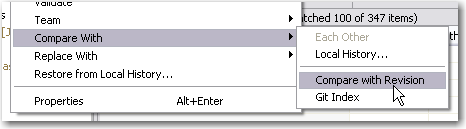
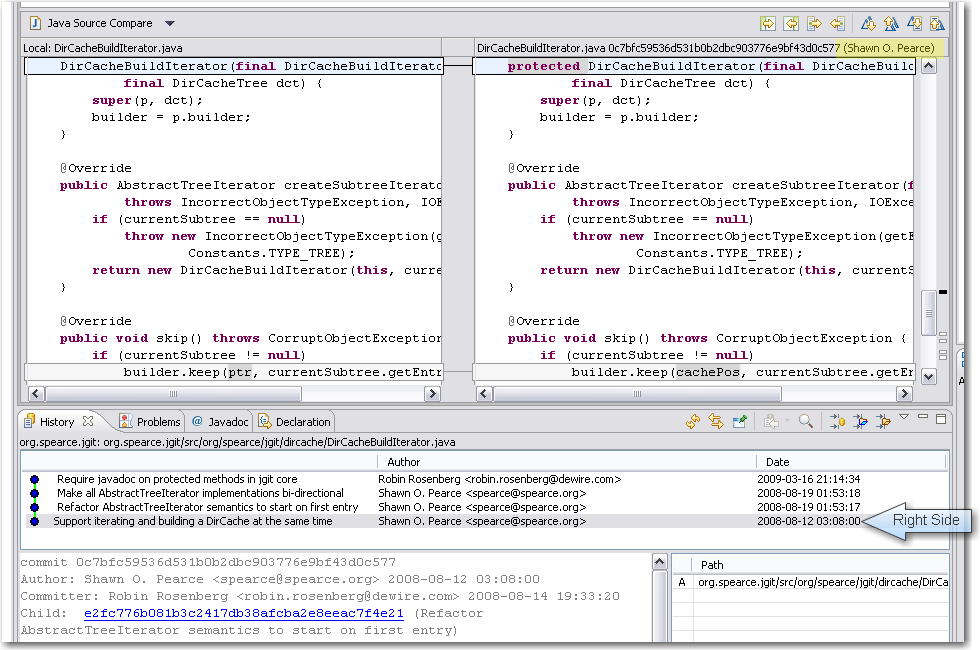
  • And we didn’t forget about git. As we are multi-IDE users (today’s development took place using NetBeans, IDEA and Eclipse), the EGit eclipse plugin for git will soon have the ability to diff the content of two revisions. An undocumented method argument took too much time to finish the feature today. After email communication with the project owner, the feature works on our machine, but needs some polishing before being committed in the near future.

As you can see, the hudson continuous integration server received a great share of our today’s love. It’s a great tool with a great community that really deserves our contributions.

What were our lessons learnt today?

  • While implementing the variable expansion feature, the author got distracted by a similar concept and followed this red herring. Namely, instead of a hudson.util.VariableResolver, we needed to use the hudson.EnvVars class. The EnvVars are pre-filled with all global variables like JAVA_HOME, while the VariableResolver is not. This could have been avoided by looking at the actual code instead of just type names. Once you think you’ve found your type, you read code the wrong way just to sustain your assumption.
  • To implement advanced plugin features, whether for hudson or eclipse, is a matter of skill with the “monkey see, monkey do” development style. Documentation is mostly non-existent or out-dated.
  • When handling HTML and HTTP in java, some survival tricks are crucial. Stay tuned for a whole blog post on that topic.
  • We still don’t feel comfortable within the JGit source code, as we still lack advanced git feature and terminology knowledge and the project lacks documentation. Our part of the problem will decline over time, as it’s a question of tool/mindset/slang exposure.

To sum it up, this OSLD worked out much better than our first one. We had more fun and yielded better results, mostly because we adjusted our goals to better suit our working style.

What are your experiences with open source development? Drop a comment!