The 2012 Experience

Do you know that feeling when you use or look at some kind of device, software, technology or service and think that there is an easier, faster, nicer or simply better way to do it? To put it simply, when something is just inconvenient to use. Earlier this year, in a discussion we had about some inconvenient every day technology the phrase “That does not feel like 2012!” was used to describe this feeling. Since then, the “2012 experience” has become kind of an inofficial commendation we award in our discussions.

For me, this sentence says it all. In the year 2012 (that some claim to be our last) there are still more than enough products that make every day life and work unnecessarily complicated. Despite various existing techniques, good practices and, most important, lots of examples that can show producers how to create a good 2012 experience.

Even though the phrase was originally coined describing a scientific API, the last few weeks taught me that this phenomenon is by no means unique to our profession. The worst non-2012 experiences I had thus far were with service hotlines. While there are many examples of good 2012 experiences leaving me with the feeling that my issue is taken care of, there are also those that leave me with the urge to immediately dial again and hope for another service employee.

Regardless of the work I do, be it developing an API, designing a GUI or providing customer support, I always try to imagine how I would expect it to be done by someone else to leave me contended.

Basic Image Processing Tasks with OpenCV

2D detectors and scientific CCD cameras produce many megabytes of image data. Open source library OpenCV is highly recommended as your work horse for all kinds of image processing tasks.

For one of our customers in the scientific domain we do a lot of integration of pieces of hardware into the existing measurement- and control network. A good part of these are 2D detectors and scientific CCD cameras, which have all sorts of interfaces like ethernet, firewire and frame grabber cards. Our task is then to write some glue software that makes the camera available and controllable for the scientists.

One standard requirement for us is to do some basic image processing and analytics. Typically, this entails flipping the image horizontally and/or vertically, rotating the image around some multiple of 90 degrees, and calculcating some statistics like standard deviation.

The starting point there is always some image data in memory that has been acquired from the camera. Most of the time the image data is either gray values (8, or 16 bit), or RGB(A).

As we are generally not falling victim to the NIH syndrom we use open source image processing librarys. The first one we tried was CImg, which is a header-only (!) C++ library for image processing. The header-only part is very cool and handy, since you just have to #include <CImg.h> and you are done. No further dependencies. The immediate downside, of course, is long compile times. We are talking about > 40000 lines of C++ template code!

The bigger issue we had with CImg was that for multi-channel images the memory layout is like this: R1R2R3R4…..G1G2G3G4….B1B2B3B4. And since the images from the camera usually come interlaced like R1G1B1R2G2B2… we always had to do tricks to use CImg on these images correctly. These tricks killed us eventually in terms of performance, since some of these 2D detectors produce lots of megabytes of image data that have to be processed in real time.

So OpenCV. Their headline was already very promising:

OpenCV (Open Source Computer Vision) is a library of programming functions for real time computer vision.

Especially the words “real time” look good in there. But let’s see.

Image data in OpenCV is represented by instances of class cv::Mat, which is, of course, short for Matrix. From the documentation:

The class Mat represents an n-dimensional dense numerical single-channel or multi-channel array. It can be used to store real or complex-valued vectors and matrices, grayscale or color images, voxel volumes, vector fields, point clouds, tensors, histograms.

Our standard requirements stated above can then be implemented like this (gray scale, 8 bit image):

void processGrayScale8bitImage(uint16_t width, uint16_t height,
                               const double& rotationAngle,
                               uint8_t* pixelData)
{
  // create cv::Mat instance
  // pixel data is not copied!
  cv::Mat img(height, width, CV_8UC1, pixelData);

  // flip vertically
  // third parameter of cv::flip is the so-called flip-code
  // flip-code == 0 means vertical flipping
  cv::Mat verticallyFlippedImg(height, width, CV_8UC1);
  cv::flip(img, verticallyFlippedImg, 0);

  // flip horizontally
  // flip-code > 0 means horizontal flipping
  cv::Mat horizontallyFlippedImg(height, width, CV_8UC1);
  cv::flip(img, horizontallyFlippedImg, 1);

  // rotation (a bit trickier)
  // 1. calculate center point
  cv::Point2f center(img.cols/2.0F, img.rows/2.0F);
  // 2. create rotation matrix
  cv::Mat rotationMatrix =
    cv::getRotationMatrix2D(center, rotationAngle, 1.0);
  // 3. create cv::Mat that will hold the rotated image.
  // For some rotationAngles width and height are switched
  cv::Mat rotatedImg;
  if ( (rotationAngle / 90.0) % 2 != 0) {
    // switch width and height for rotations like 90, 270 degrees
    rotatedImg =
      cv::Mat(cv::Size(img.size().height, img.size().width),
              img.type());
  } else {
    rotatedImg =
      cv::Mat(cv::Size(img.size().width, img.size().height),
              img.type());
  }
  // 4. actual rotation
  cv::warpAffine(img, rotatedImg,
                 rotationMatrix, rotatedImg.size());

  // save into TIFF file
  cv::imwrite("myimage.tiff", gray);
}

The cool thing is that almost the same code can be used for our other image types, too. The only difference is the image type for the cv::Mat constructor:


8-bit gray scale: CV_U8C1
16bit gray scale: CV_U16C1
RGB : CV_U8C3
RGBA: CV_U8C4

Additionally, the whole thing is blazingly fast! All performance problems gone. Yay!

Getting basic statistical values is also a breeze:

void calculateStatistics(const cv::Mat& img)
{
  // minimum, maximum, sum
  double min = 0.0;
  double max = 0.0;
  cv::minMaxLoc(img, &min, &max);
  double sum = cv::sum(img)[0];

  // mean and standard deviation
  cv::Scalar cvMean;
  cv::Scalar cvStddev;
  cv::meanStdDev(img, cvMean, cvStddev);
}

All in all, the OpenCV experience was very positive, so far. They even support CMake. Highly recommended!

Your own CI-based RPM build farm, part 3

In my previous post we learned how to build RPM packages of your software for multiple versions of your target distribution(s). Now I want to present a way of automating the build process and building packages on/for all target platforms. You should have a look at the openSUSE build service to see if it already fits your needs. Then you can stop reading here :-).

We needed better control over the platforms and the process, so we setup a build farm based on the Jenkins continuous integration (CI) server ourselves. The big picture consists of the following components:

  • build slaves allowing a jenkins user to do unattended builds of the packages
  • Jenkins continuous integration server using matrix builds with build slaves for each target platform
  • build script orchestrating the build of all our self-maintained packages
  • jenkins job to deploy the packages to our RPM repository

Preparing the build slaves

Standard installations of openSUSE need some minor tweaks so they can be used as Jenkins build slaves doing unattended RPM package builds. Here are the changes we needed to make it work properly:

  1. Add a user account for the builds, e.g. useradd -m -d /home/jenkins jenkins and setup a password with passwd jenkins.
  2. Change sshd configuration to allow password authentication and restart sshd.
  3. We will link the SOURCES and SPECS directories of /usr/src/packages to the working copy of our repository, so we need to delete the existing directories: rm -r /usr/src/packages/SPECS /usr/src/packages/SOURCES /usr/src/packages/RPMS /usr/src/packages/SRPMS.
  4. Allow non-priviledged users to work with /usr/src/packages with chmod -R o+rwx /usr/src/packages.
  5. Copy the ssh public key for our git repository to the build account in ~/.ssh/id_rsa
  6. Test ssh access on the slave as our build user with ssh -v git@repository. With this step we confirm the host authenticity one time so that future public key ssh interactions work unattended!
  7. Configure git identity on the slave with git config --global user.name "jenkins@build###-$$"; git config --global user.email "jenkins@buildfarm.myorg.net".
  8. Add privileges for the build user needed for our build process in /etc/sudoers: jenkins ALL = (root) NOPASSWD:/usr/bin/zypper,/bin/rpm

Configuring the build slaves

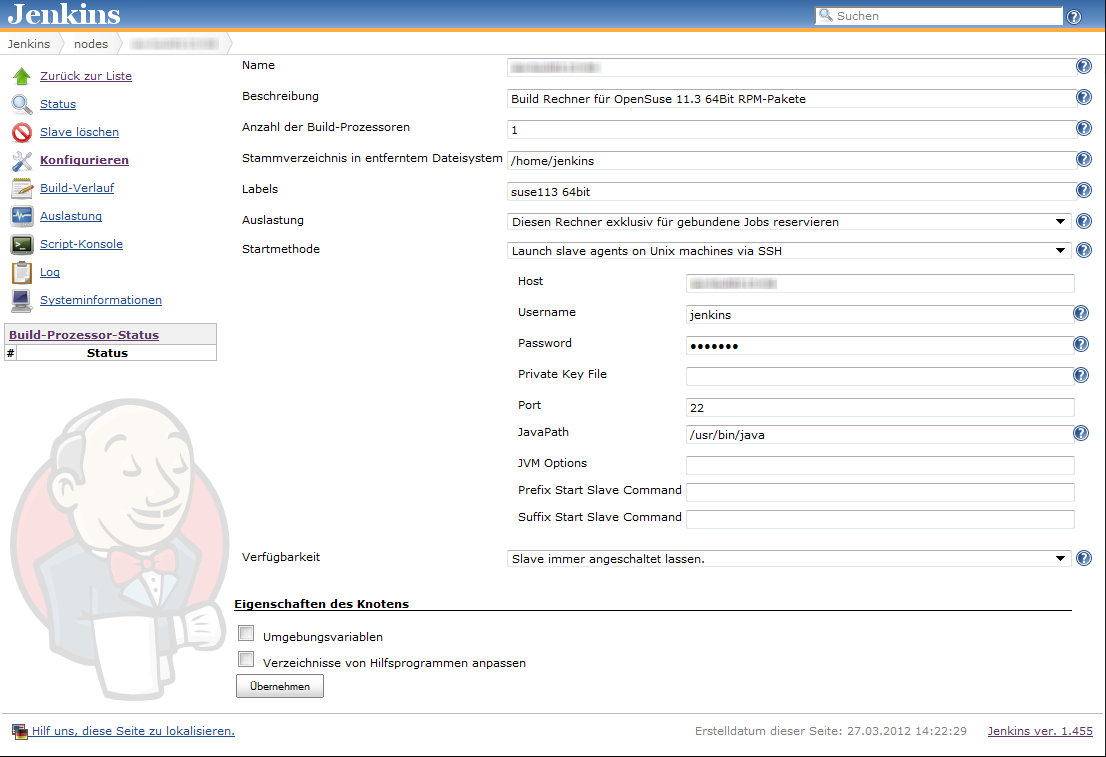
Linux build slaves over ssh are quite easily configured using Jenkins’ web interface. We add labels denoting the distribution release and architecture to be easily able to setup our matrix builds. Then we setup our matrix build as a new job with the usual parameters for source code management (in our case git) etc.

Our configuration matrix has the two axes Architecture and OpenSuseRelease and uses the labels of the build slaves. Our only build step here is calling the script orchestrating the build of our rpm packages.

Putting together the build script

Our build script essentially sets up a clean environment, builds package after package installing build prerequisites if needed. We use small utility functions (functions.sh) for building a package, installing packages from repository, installing freshly built packages and removing installed RPM. The script contains roughly the following phases:

  1. Figure out some quirks about the environment, e.g. openSUSE release number or architecture to build.
  2. Clean the environment by removing previously installed self-built packages.
  3. Setting up the build environment, e.g. linking folder from /usr/src/packages to our working copy or installing compilers, headers and the like.
  4. Building the packages and installing them locally if they are a dependency of packages yet to be built.

Here is a shortened example of our build script:

#!/bin/bash

RPM_BUILD_ROOT=/usr/src/packages
if [ "i686" = `uname -m` ]
then
  ARCH=i586
else
  ARCH=`uname -m`
fi
SUSE_RELEASE=`cat /etc/SuSE-release | sed '/^[openSUSE|CODENAME]/d' | sed 's/VERSION =//g' | tr -d '[:blank:]' | sed 's/\.//g'`

source functions.sh

# setup build environment
ensureDirectoryLinks
# force a repository refresh without checking the signature
sudo zypper -n --no-gpg-checks refresh -f OUR_REPO
# remove previously built and installed packages
removeRPM libomniORB4.1
removeRPM omniNotify2
# install needed tools
installFromRepo c++-compiler
if [ $SUSE_RELEASE -lt 121 ]
then
  installFromRepo java-1_6_0-sun-devel
else
  installFromRepo jdk
fi
installFromRepo log4j
buildRPM omniORB
installRPM $ARCH/libomniORB4.1
installRPM $ARCH/omniORB-devel
installRPM $ARCH/omniORB-servers
buildAndInstallRPM omniNotify2 $ARCH

Deploying our packages via Jenkins

We setup a second Jenkins job to deploy successfully built RPM packages to our internal repository. We use the Copy Artifacts plugin to fetch the rpms from our build job and put them into a directory like all_rpms. Then we add a build step to execute a script like this:

for i in suse-12.1 suse-11.4 suse-11.3
do
  rm -rf $i
  mkdir -p $i
  versionlabel=`echo $i | sed 's/[-\.]//g'`
  cp -r "all_rpms/Architecture=32bit,OpenSuseRelease=$versionlabel/RPMS" $i
  cp -r "all_rpms/Architecture=64bit,OpenSuseRelease=$versionlabel/RPMS" $i
  cp -r "all_rpms/Architecture=64bit,OpenSuseRelease=$versionlabel/SRPMS" $i
  rsync -e "ssh" -avz $i/* root@rpmrepository.intranet:/srv/www/htdocs/OUR_REPO/$i/
  ssh root@rpmrepository.intranet "createrepo /srv/www/htdocs/OUR_REPO/$i/RPMS"

Summary

With a setup like this we can perform an automatic build of all our RPM packages on several targetplatform everytime we update one of the packages. After a successful build we can deploy our new packages to our RPM repository making them available for our whole organisation. There is an initial amount of work to be done but the rewards are easy, unattended package updates with deployment just one button click away.