Get it up and running

West Side-project story

I have seen quite a few projects that spent a ton of calendar/developer time and bugdet in building components and frameworks instead of getting something running. Running in this sense does not mean being able to show an application started from a developers IDE on her development notebook. With running I mean versioned artifacts deployed on some sort of staging infrastructure the client/customer has access to. Let me elaborate on that:

Walking skeleton

I really like the notion of the walking skeleton coined by Steve Freeman and Nat Pryce in “Growing Object-Oriented Software, Guided by Tests“. While I do not want to emphasize TDD and/or automated end-to-end testing I see great benefits in producing a walking skeleton that touches all important parts of a system and is working with a minimal set of functionality. For me that means that all of the following elements are in place, albeit in a primitve way which can be refined on the way:

  • The code is hosted in a source code repository accessible to the project members
  • A build system is chosen and able to produce a runnable artifact
  • A continuous integration server (CI) is triggered on changes in the repository and produces the runnable artifact
  • The artifact is easily installable on the target machines and/or installed on a staging system that resembles the target system as closely as reasonable
  • If there are components they talk to another using minimal requests and stubbed replies that can be refined over time

I usually aim for that walking skeleton in the first few hours into a project after the base technologies and requirements allow starting with coding. That may take up to several days when the system is more complex but it should not take weeks. Connect different parts of the system as early as possible even if responses are minimal, hardcoded or “wrong”. It shows that the parts are able to communicate and mismatches will become visible either someway along the build process or at least when running application. Why should you choose such an approach?

Benefits

  • Most people I know are better at evolving and improving existing stuff than at creating new stuff in empty space in a focused and efficient way. If you have a skeleton of the system it is much easier to talk about the interfaces and responsibilites of the different parts of the system.
  • You get to define APIs which you can evolve over time instead of specifing the complete API and experience implementation and mismatch problems much later when the components need to be integrated.
  • Similarily it is much more difficult to package a complex system after it is finished than to package a simple minimal system and evolve all aspects – building, implemenation and packaging/deployment, maintainance – when necessary.
  • You see if things may work like expected or if there is some inherent problem in the whole design much earlier. Essentially you evolve your proof-of-concept into something with real value for your clients.
  • As soon as your system provides some value you can deploy the working stuff long before the whole project is finished.
  • It is much easier to discuss a working system than to reason about a system not yet existing.
  • You are eating your own dogfood from early on and can address pain points in development, user experience, deployment and running the application.
  • You have something to show more or less right from the beginning and progress will be visible throughout the project.
  • No “Works on my machine!” syndrome.

Potential Problems

Of course there is the challenge of continuously refactoring and extending existing stuff. Later on data migration or migration of configuration may be additional tasks. But hey, you are skilled, agile developers that embrace the idea of changing requirements and the ability to move fast. You have to pay attention not to accumulate too much technical debt as it will slow you down and hurt you in the long run.

Summary

Running systems providing value are what your clients often care about the most. If you can something like that early on communication with your stakeholders tends to be more relaxed as they have better possibilities of steering in the right direction and they steadily see progress. Running software should be the primary goal.
Quantities in C++ and User Defined Literals

Some weeks ago one of my colleagues wrote about the use and implementation of physical quantities in C#. If you are writing an application in the technical or scientific domain chances are high that you should adhere to his advice and use a suitable representation of physical quantities instead of plain primitive values. Good news is that you can easily port/implement quantities to modern C++ or use existing libraries like Boost.Units.

With C++11 you can go one step further adding the so called User-defined literals. This feature allows definition of suffices for integer, floating-point, character and string literals to produce objects of the desired (quantity) type. While there is nothing wrong with using the multiplication operator to produce quantity instances user-defined literals provide just a little bit more syntactic sugar:

// Your quantity classes...
class Angle;

// operators for user-defined literals
constexpr Angle operator "" _deg(long double deg)
{
    return deg * degrees;
}

constexpr Angle operator "" _deg(unsigned long long int deg)
{
    return deg * degrees;
}

constexpr Angle operator "" _rad(long double rad)
{
    return (rad * 180 / M_PI) * degrees;
}

// add more if needed

This allows you to write code like:

Angle rightAngle = 90_deg;
Angle halfCircle = 3.141_rad;
Angle fullCircle = 4 * 90_deg;

In many cases this looks a tad simpler and cleaner than using the multiplication operator in conjunction with a unit especially in more complex formulas. There are a few things about quantities and user-defined literals in C++ I find noteworthy:

  • These literals are only supported for the built-in literal types. If exact calculation and better than floating-point precision is needed, raw literals (instead of the explained cooked) and decimal libraries have to be used. For raw literals you have to parse the characters of the literal yourself.
  • User-defined literals need to be prefixed with _ to avoid namespace clashes with current and future standard library literals. There are for example some nice literals for durations in the <chrono>-date and time standard library.
  • If you implement your literal operators as constexpr they will be evaluated at compile time meaning slightly increased compile times and zero runtime overhead.

For some more in-depth discussion of user-defined literals have a look at the blog series from Andrzej Krzemieński.


Packaging kernel modules/drivers using DKMS

Hardware drivers on linux need to fit to the running kernel. When drivers you need are not part of the distribution in use you need to build and install them yourself. While this may be ok to do once or twice it soon becomes tedious doing it after every kernel update.

The Dynamic Kernel Module Support (DKMS) may help in such a situation: The module source code is installed on the target machine and can be rebuilt and installed automatically when a new kernel is installed. While veterans may be willing to manually maintain their hardware drivers with DKMS end user do not care about the underlying system that keeps their hardware working. They want to manage their software updates using the tools of their distribution and everything should be working automagically.

I want to show you how to package a kernel driver as an RPM package hiding all of the complexities of DKMS from the user. This requires several steps:

  1. Preparing/patching the driver (aka kernel module) to include dkms.conf and follow the required conventions of DKMS
  2. Creating a RPM spec-file to install the source, tool chain and integrate the module source with DKMS

While there is native support for RPM packaging in DKMS I found the following procedure more intuitive and flexible.

Preparing the module source

You need at least a small file called dkms.conf to describe the module source to the DKMS system. It usually looks like that:

PACKAGE_NAME="menable"
PACKAGE_VERSION=3.9.18.4.0.7
BUILT_MODULE_NAME[0]="menable"
DEST_MODULE_LOCATION[0]="/extra"
AUTOINSTALL="yes"

Also make sure that the source tarball extracts into the directory /usr/src/$PACKAGE_NAME-$PACKAGE_VERSION ! If you do not like /usr/src as a location for your kernel modules you can configure it in /etc/dkms/framework.conf.

Preparing the spec file

Since we are not building a binary and package it but install source code, register, build and install it on the target machine the spec file looks a bit different than usual: We have no build step, instead we just install the source tree and potentially additional files like udev rules or documentation and perform all DKMS work in the postinstall and preuninstall scripts. All that means, that we build a noarch-RPM an depend on dkms, kernel sources and a compiler.

Preparation section

Here we unpack and patch the module source, e.g.:

Source: %{module}-%{version}.tar.bz2
Patch0: menable-dkms.patch
Patch1: menable-fix-for-kernel-3-8.patch

%prep
%setup -n %{module}-%{version} -q
%patch0 -p0
%patch1 -p1

Install section

Basically we just copy the source tree to /usr/src in our build root. In this example we have to install some additional files, too.

%install
rm -rf %{buildroot}
mkdir -p %{buildroot}/usr/src/%{module}-%{version}/
cp -r * %{buildroot}/usr/src/%{module}-%{version}
mkdir -p %{buildroot}/etc/udev/rules.d/
install udev/10-siso.rules %{buildroot}/etc/udev/rules.d/
mkdir -p %{buildroot}/sbin/
install udev/men_path_id udev/men_uiq %{buildroot}/sbin/

Post-install section

In the post-install script of the RPM we add our module to the DKMS system build and install it:

occurrences=/usr/sbin/dkms status | grep "%{module}" | grep "%{version}" | wc -l
if [ ! occurrences > 0 ];
then
    /usr/sbin/dkms add -m %{module} -v %{version}
fi
/usr/sbin/dkms build -m %{module} -v %{version}
/usr/sbin/dkms install -m %{module} -v %{version}
exit 0

Pre-uninstall section

We need to remove our module from DKMS if the user uninstalls our package to leave the system in a clean state. So we need a pre-uninstall script like this:

/usr/sbin/dkms remove -m %{module} -v %{version} --all
exit 0

Conclusion

Packaging kernel modules using DKMS and RPM is not really hard and provides huge benefits to your users. There are some little quirks like the post-install and pre-uninstall scripts but after you got that working you (and your users) are rewarded with a great, fully integrated experience. You can use the full spec file of the driver in the above example as a template for your driver packages.

Object slicing – breaking polymorphic objects in C++

C++ has one pitfall called “object slicing” alien to most programmers using other object-oriented languages like Java. Object slicing (fruit ninja-style) occurs in various scenarios when copying an instance of a derived class to a variable with the type of (one of) its base class(es), e.g.:

#include <iostream>

// we use structs for brevity
struct Base
{
  Base() {}
  virtual void doSomething()
  {
    std::cout << "All your Base are belong to us!\n";
  }
};

struct Derived : public Base
{
  Derived() : Base() {}
  virtual void doSomething() override
  {
    std::cout << "I am derived!\n";
  }
};

static void performTask(Base b)
{
  b.doSomething();
}

int main()
{
  Derived derived;
  // here all evidence that derived was used to initialise base is lost
  performTask(derived); // will print "All your Base are belong to us!"
}

Many explanations of object slicing deal with the fact, that only parts of the fields of derived classes will be copied on assignment or if a polymorphic object is passed to a function by value. Usually this is ok because most of the time only the static type of the Base class is used further on. Of course you can construct scenarios where this becomes a problem.

I ran into the problem with virtual functions that are sliced off of polymorphic objects, too. That can be hard to track down if you are not aware of the issue. Sadly, I do not know of any compilers that issue warnings or errors when passing/copying polymorphic objects by value.

The fix is easy in most cases: Use naked pointers, smart pointers or references to pass your polymorphic objects around. But it can be really hard to track the issue down. So try to define conventions and coding styles that minimise the risk of sliced objects. Do not avoid using and passing values around just out of fear! Values provide many benefits in correctness and readability and even may improve performance when used with concrete classes.

Edit: Removed excess parameters in contruction of derived. Thx @LorToso for the comment and the hint at resharper C++!

C++ inheritance for Java developers

Both Java and C++ are modern programming languages with native support for object oriented programming (OOP). While similar in syntax and features there are a bunch of differences in implementation and (default) behaviour which can be surprising for Java developers learning C++ or vice versa. In my post I will depict the basics of inheritance and polymorphism in C++ and stress the points Java developers may find surprising.

Basic inheritance or user defined types

Every Java programmer knows that all classes have java.lang.Object at the root of their inheritance hierarchy. This is not true for C++ classes: They do not share some common base class and do not inherit more or less useful methods like toString() oder clone(). C++ classes do not have any member functions besides the constructor and destructor by default. In Java all instance methods are virtual by default, meaning that if a subclass overrides a method from a superclass only the overridden version will be visible and callable on all instances of the subclass. We will see the different behaviour in the following example:

#include <iostream>
#include <memory>

using namespace std;

class Parent
{
public:
  void myName() { cout << "Parent\n"; }
  virtual void morph() { cout << "Base class\n"; }
};

class Child : public Parent
{
public:
  void myName() { cout << "Child\n"; }
  virtual void morph() { cout << "Child class\n"; }
};

int main()
{
  // initialisations more or less equivalent to
  // Parent parent = new Parent(); etc. in Java
  unique_ptr parent(new Parent);
  unique_ptr parentPointerToChild(new Child);
  unique_ptr child(new Child);
  parent->myName(); // prints Parent as expected
  parent->morph(); // prints Base class as expected
  parentPointerToChild->myName(); // surprise: prints Parent!
  parentPointerToChild->morph(); // prints Child class as expected
  child->myName(); // prints Child as expected
  child->morph(); // prints Child class as expected
  return 0;
}

The difference to Java becomes visible in line 29 where we call to an instance of Child using the type Parent. Since myName() is not virtual the implementation in the parent class is not overridden but only shadowed by the subclass. Depending on the type of our variable on which we call the method either the parent method or the child method (line 31) is invoked.

Access modifiers in Java and C++ are almost identical as both are offering public, protected and private. As there are no packages in C++ protected restricts access to child classes only.

Different syntax and fewer keywords

There are no keywords for interface or abstract class in C++ but the concepts are supported by pure virtual functions and multiple inheritance. So a class that defines a virtual function without a body like:


class Interface
{
public:
  virtual void m() = 0;
};

becomes abstract and cannot be instanciated. Subclasses must provide implementations for all pure virtual functions or become abstract themselves. A class having exclusively pure virtual functions serves as the equivalent of an Java interface in C++. Since C++ supports inheritance from multiple classes you can easily use these features for interface segregation (see ISP). Most people advise against multiple implementation inheritance although C++ makes that possible, too.

Class interface control

One problem with inheritance in Java is that you always inherit all non-private methods of the base classes. This can lead to large and sometimes unfocused interfaces when using inheritance blindly. Delegation gives you more control about your classes interface and means less coupling but requires a bit more writing effort. While you can (and should most of the time) do the same in C++ it offers more control to your classes interface using private/protected inheritance where you can decide on an per-method-basis which functions to expose and what virtual functions you would like to override:

class ReuseMe
{
public:
    void somethingGreat();
    void somethingSpecial();
};

// does expose somethingGreat() but hides sometingSpecial()
class PrivateParent : private ReuseMe
{
public:
    using ReuseMe::somethingGreat;
};

Children also gain access to their parents protected members.

Using super class functions and delegating constructors

Calling the functions of the parent class or other constructors looks a bit different in C++, as there is no super keyword and this is only a pointer to the current instance (please excuse the contrived example…):

class CoordinateSet
{
public:
    string toString() {
        stringstream s;
        std::copy(coordinates.begin(), coordinates.end(), std::ostream_iterator<double>(s, ","));
        return s.str();
    }
protected:
    vector<double> coordinates;
};

class Point : public CoordinateSet
{
public:
    // delegating constructor
    Point() : Point(0, 0) {}
    Point(double x, double y)
    {
        coordinates.push_back(x);
        coordinates.push_back(y);
    }
    // call a function of the parent class
    void print() { cout << CoordinateSet::toString() << "\n"; }
};

I hope my little guide helps some Java people getting hold of C++ inheritance features and syntax.

Managing C++’s complexity or learning to enjoy C++

Disclaimer

I have never been a big fan of C++ coming from C and Java. C is a nice little language and yet offers many means of code structuring. Java offers many object-oriented features and makes the use of them quite easy. Together with garbage collection, a huge ecosystem and powerful IDEs it lets you work on the problem at hand at quite some speed. C++ on the other hand is a huge language with myriads of concepts and supports almost all features of C. So at first it seemed to me as worst of all worlds. Similar to Scala which is also a quite large multi-paradigm language (that I happen to like).

Why and how use C++ then?

On my job I have to work with C++ regularily. Diving deeper into the language, learning STL and modern code styles I am starting to actually like C++. In addition to the runtime-efficiency (that you can get with C too, and to some extent even with Java) C++ provides many means for robust programs and nice abstractions. Using idioms like RAII, the Algorithms library, smart pointers and operating mostly on values takes away most of the resource management and memory buffer handling hassle. But since C++ is so large and supports so many programming styles I think the following measures really help to build robust and maintainable programs and enjoy using C++:

  • Establish rules for your code, e.g. no naked pointer, no friend, no multiple inheritance, use of exceptions etc. That way you create an idyllic world where you develop most of the time and the number of pitfalls is greatly reduced. Your rules may change like you see them fit but adhere to them and do not change them lightly.
  • Protect your code from legacy/3rd party code and libraries using anti-corruption layers, wrappers and adapters. They are means to preserve your idyllic world and make life there easier. Don’t let the null pointers slip in.
  • Use modern idioms and APIs, as modern as your compiler/environment supports them (see gcc c++11 support, Visual Studio etc.). Like in other programming environments take special care regarding your dependencies! Manage them carefully.
  • Understand and learn to use STL containers, smart pointers, RAII, algorithm, streams etc. There are plethora of concise, clear and robust solutions for your everyday problems without the need of iterating over vectors with and index variable…
  • Build classes/components that manage their resources and provide easy to use interfaces. Use type-rich interfaces and work mostly with values. The compiler will help you a lot more than with a pointer-heavy and mostly primitives style. Treat delete (outside of a destructor) and naked new as smells and restrict them to areas where you cannot find a way around them.

Where is the fun for me?

I find it rewarding and satisfying carefully crafting these easy-to-use components and improving them over time. Adding some const statements, deciding between pass-by-value or pass-by-reference, making the components thread-safe, finding the right balance between using classes or free floating functions, private inheritance etc. You can really do a lot have the compiler as a friend instead of a dreaded enemy and let it guarantee many things programmers tend to do wrong. Build your components so that they are hard to use in a wrong way. Then there are really cool features like call_once library support, closures (aka lambda functions) and type inference with the auto keyword, user-defined literals and many more.


Configuration of TANGO devices

In the previous part of our TANGO tutorial trail we put our TANGO device into production by registering it with a TANGO database. The TANGO tools allowed for basic interaction with our device. Now we want to improve the device with the TANGO way of configuration: properties.

TANGO device configuration

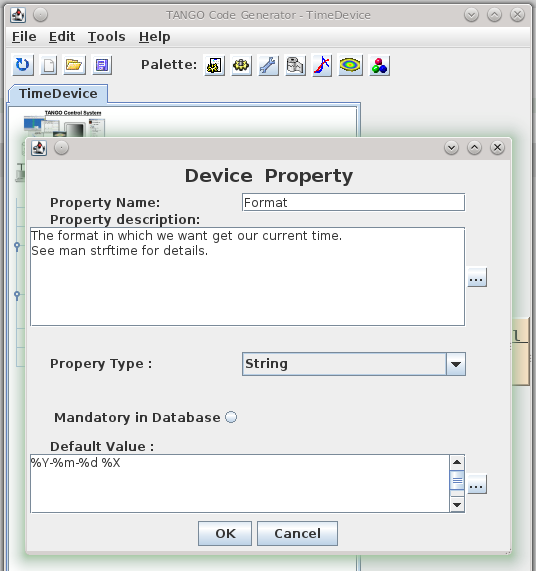
TANGO devices are configured with properties, which are not to confuse with OO-properties or TANGO attributes. TANGO properties are read on initialisation of a device and saved to the TANGO database. That way they live across server restarts. TANGO properties replace simple configuration files or registry-like configuration frameworks. As they are saved in the TANGO database it makes our devices location-agnostic – they can run on any host system on the network. Let us add a format properties to our TimeDevice to change the output to our liking. Again, we use pogo to define the property:

Pogo-Device Property

The property will be generated as a member variable of our TANGO device manage by the framework. We do not need to read it from the database ourselves – the corresponding code is generated by pogo – we just use it (format in line 5):

/*----- PROTECTED REGION ID(TimeDevice::read_CurrentTime) ENABLED START -----*/

  attr_CurrentTime_read = new Tango::DevString;
  TimeProvider timeProvider;
  *attr_CurrentTime_read = Tango::string_dup(timeProvider.now(format).c_str());
  //	Set the attribute value
  attr.set_value(attr_CurrentTime_read, 1, 0, true);

/*----- PROTECTED REGION END -----*/	//	TimeDevice::read_CurrentTime

Managing device state

The state of a TANGO device is extremely important for TANGO clients because they often decide how to interact with a device based on its state. We will cover state and the TANGO state machine in a later post but for now we make our TimeDevice sane by setting the its state to ON after correct initialisation, so that it reflects the operating state of the TimeDevice:

/*----- PROTECTED REGION ID(TimeDevice::init_device) ENABLED START -----*/

  set_state(Tango::ON);
  set_status("Ready to accept time queries.");

/*----- PROTECTED REGION END -----*/    //    TimeDevice::init_device

Here is the result in Jive and AtkPanel:

Configure Device in Jive-AtkPanel

Conclusion
We extended our to device with some real world features like configuration by the means of device properties and rudimentary state management. Real state management is an important topic on its own and deserves a separate blog post. Feel free to play with the full source code.

Using your TANGO devices

Now that we have built a nice TANGO device server in the previous part of this tutorial we finally want to use it.

After installing TANGO from the sources or binaries provided on www.tango-controls.org and running the TANGO database device server you need to register your device with the database to use it fully. There is however a nodb-mode if you absolutely cannot communicate with the the database device due to networking restrictions. We assume normal operation with a database accessible for the following stuff.

Registering a device server at a TANGO database

The database to use is specified by the environment variable TANGO_HOST. So first you run the tool jive and run the Server Wizard from the Tools menu:

Server Wizard1

The server name equals the executable name for C++ device servers but can be set by the programmer for Python and Java device servers. We use time_device_server for our tutorial. The instance name may be chosen quite freely – lets call our server instance localtime. In the next step we have to start the server with the same TANGO_HOST and the instance name as parameter. That way you can register and run the same server multiple times on the same or even different machines and distinguish the them. Then you have to declare the device classes and name the device instances of this server:

Server Wizard2 Server Wizard3

The device name is a three part identifier which is used to communicate with the device. In our example we use the first part to differentiate between real/hardware devices and virtual/logical devices implemented completely in software. It also could be used for the different departments in your institution for example. It is up to you to fill the identifier with meaningful information.

At the end of the wizard the device server is reinitialised and ready to use. Now we can use Jive to find our device:

Device in Jive-AtkPanel

Our device implementation is very basic so it provides only the meaningless state information of UNKNOWN but also our read-only attribute providing us with the current machine time in ISO format. AtkPanel polls all attributes of our devices and gives us a generic overview of the actual device state. Writable attributes can be changed through AtkPanel or with Test device from the Jive context menu (bottom window of the screenshot above). Feel free to experiment a bit with both tools.

In the next post we will improve our device server and add configuration via device properties.

TANGO device server step-by-step tutorial

Now that we learned about TANGO in general and the architecture of device servers it is time to get our hands dirty. Here is a step-by-step tutorial for making your software remotely accessible as TANGO devices.

We will develop a small C++ class that can provide us the current time and date as a string and then build a device server that makes our functionality available over TANGO to remote clients. Our plain C++ project structure looks like this:

$PROJECT_ROOT/
  CMakeLists.txt
  TimeProvider/
    CMakeLists.txt
    TimeProvider.h
    TimeProvider.cpp
    main.cpp

Here are our CMake build files:
toplevel

project(Time)
cmake_minimum_required(VERSION 2.8)

find_package(PkgConfig)

add_subdirectory(TimeProvider)

and for the TimeProvider

project(TimeProvider)

add_library(time TimeProvider.cpp)

add_executable(timeprovider main.cpp)
target_link_libraries(timeprovider time)

And the C++ sources for our standalone application:
TimeProvider.h

#include <string>

class TimeProvider
{
public:
    TimeProvider() {}

    const std::string now();
};

TimeProvider.cpp

#include "TimeProvider.h"

#include <ctime>

const std::string TimeProvider::now()
{
    time_t now = time(0);
    struct tm time;
    char timeString[100];
    time = *localtime(&now);
    strftime(timeString, sizeof(timeString), "%Y-%m-%d %X", &time);
    return timeString;
}

main.cpp

#include <iostream>
#include "TimeProvider.h"

int main()
{
    TimeProvider tp;
    std::cout << tp.now() << std::endl;
    return 0;
}

Next we create a new subdirectory “TimeDevice” and add it to our toplevel CMakeLists.txt along with the TANGO package lookup:

...
find_package(PkgConfig)
pkg_check_modules(TANGO tango>=7.2.6 REQUIRED)

add_subdirectory(TimeProvider)
add_subdirectory(TimeDevice)

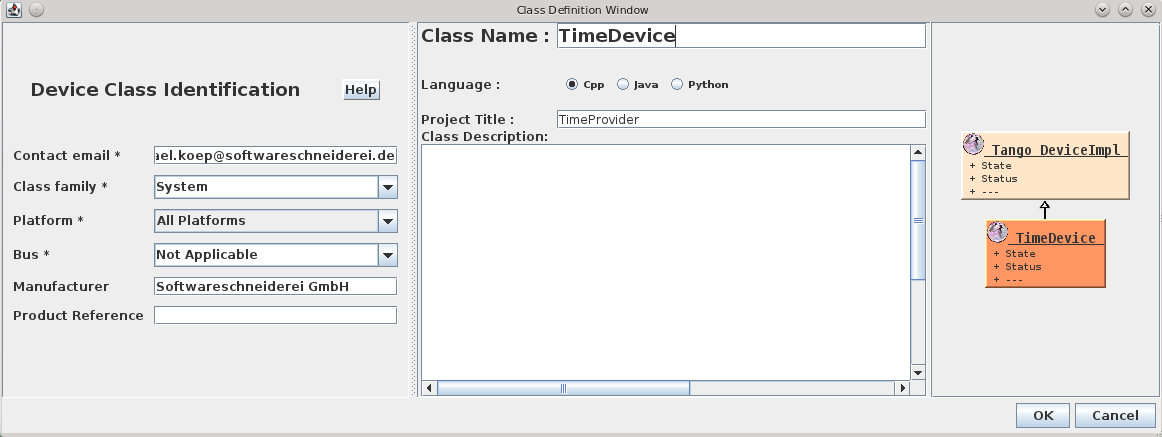
In this newly created directory we now run the Pogo application with pogo TimeDevice from our TANGO installation to generate our device server skeleton:

Pogo-Create Deviceand add the Attribute:Pogo-AddAttributeso the result looks like:

Pogo-TimeDevice

Now we need to add the generated sources to our CMake build like this:

project(TimeDevice)

set(SOURCES
    ${PROJECT_NAME}.cpp
    ${PROJECT_NAME}Class.cpp
    ${PROJECT_NAME}StateMachine.cpp
    ClassFactory.cpp
    main.cpp
)

# this is needed because of wrong generation of include statements
# you may correct them in generated code because they are in protected regions
include_directories(.)

include_directories(
    ${TimeProvider_SOURCE_DIR}
    ${TANGO_INCLUDE_DIRS}
)

add_definitions("-std=c++11")

add_executable(time_device_server ${SOURCES})
target_link_libraries(time_device_server
    time
    ${TANGO_LIBRARIES}
)

As the last step, we implement the code for the CurrentTime attribute like this:

void TimeDevice::read_CurrentTime(Tango::Attribute &attr)
{
	DEBUG_STREAM << "TimeDevice::read_CurrentTime(Tango::Attribute &attr) entering... " << endl;
	/*----- PROTECTED REGION ID(TimeDevice::read_CurrentTime) ENABLED START -----*/

    attr_CurrentTime_read = new Tango::DevString;
    TimeProvider timeProvider;
    *attr_CurrentTime_read = Tango::string_dup(timeProvider.now().c_str());
    //	Set the attribute value
    attr.set_value(attr_CurrentTime_read, 1, 0, true);

	/*----- PROTECTED REGION END -----*/	//	TimeDevice::read_CurrentTime
}

For other correct implementations of string attributes see the documentation on the TANGO website.
Now we should end up with a ready to run TANGO device server executable.

Conclusion
If  you structure your project with hindsight you can integrate your drivers or services in your TANGO control system with very low effort. In the next post we we will show how to add a device server to a TANGO database and use its facilities like device properties for configuration or jive for inspection of a device.

Feel free to download the full source code of this tutorial.

TANGO device server architecture

In my previous post I explained the basics of TANGO and why you probably want to use TANGO for development of a distributed system. Now I would like to explain how to build and design a TANGO device server. There are several best practices and even a comprehensive and ever evolving guide you should definately have a look at.

General Approach

I like to think about TANGO as a thin wrapper around some software object. That means almost all logic and hardware/platform dependent stuff is implemented in the software object which should provide all services the TANGO wrapper needs. Usually you will design an opinionated library supporting your use cases and encapsulating platform, hardware and driver issues and leaves out the stuff you do not need.

TANGO Server - ArchitectureThe opinionated library has no dependencies on TANGO and can be use in different clients independently of TANGO. The TANGO device classes mostly delegate to the library and manage just the TANGO specific things like device state, synchronisation, allowed methods and so on.

TANGO Server Architecture

As said before the TANGO device that makes use of the software component developed with TANGO in mind contains only short methods doing parameter conversion and some TANGO book keeping and life-cycle-management. The design of the server itself is an interesting part in itself though. Often it pays off to implement several devices in one (or more) TANGO servers that perform different tasks and provide special interfaces to their clients.

For example, a multi-axis motor controller could export one device per axis, so clients can move the axes independently in a natural fashion by denoting the respective axis by its device name. Alongside there may be some controller device that provides access to controller functionality not specific to a single axis like a stop all axes command. Sometimes it is helpful to let the axis devices talk to the controller and not directly to the component you are trying to expose via TANGO. That way you can for example synchronise access to the component with TANGO framework functionality on the controller device.

For imaging systems like CCD cameras or other detectors additional devices for image transformations, persisting the images or additional buffering may be a good decision. Such devices can be made largely independent of the actual hardware or imaging system which makes for nice reuse and plug-able functionality.

So it is good to think about the different tasks and aspects your TANGO server should perform and separate them into specialised devices. That should make each device itself clearer and enables specialised service interfaces for different clients. Your devices become easier to use and many parts may be even reusable. We try to standardise on device interfaces every time we identify general abstractions. That makes it much easier for the clients to work with your exposed TANGO devices.