SSD and (One)-touch Backup solution

As explained a while ago we (developers) get an annual creativity budget. This time I decided to improve my notebook working experience and reliability by introducing two new items:

  1. A fast SSD replacing the conventional relatively slow 2,5″ hard disk
  2. An one-touch backup solution which in fact is a no touch solution

The SSD is a X25-m from Intel with 160Gb and the backup solution is a Seagate Replica with 500Gb disk space. Although there are recurring problems with the firmware and toolbox software the Intel SSD seemed to be the best choice price/performance/reliability wise. To be on a safer side data wise we paired it with the backup solution. Let me first explain the migration which went really smooth and was the first stress test for the backup system. The steps were the following:

  1. Backup the existing system with the replica which does not require any user interaction after the client backup software is automatically installed
  2. replace the original harddisk with the SSD
  3. reboot the system with the recovery CD of the replica solution and restore the backed up system
  4. reboot the recovered system from the SSD

The whole process went really smooth and only took some hours of data copying. There were no hickups whatsoever. After booting from the SSD my system was exactly like before, so the replica already proved that it really works even in the worst case of a complete drive loss.

The performance of the whole system is noticable better especially at system and application startup as you would expect.

Conclusion

The backup solution is so damn easy to use that I would recommend it to all people running Windows and caring about the data on their system. To keep your backup up to date just plug the external hard drive in a free USB port and continue working. You don’t have to do any configuration and other hassles which often end any effort of deploying a working backup solution. This is even more true for private people who do not have the knowledge to fiddle with system details. So go for a “one touch backup” if you do not have some working solution in use already!

A modern SSD can really improve your working experience especially on notebooks where hard disk performance is far worse than in an workstation environment. So older hardware can get new life and make your life easier and more productive.

About breaking class contracts – fear clone()

Recently I had some discussions about copying of Objects in Java with some fellow developers. They were overriding clone() which I never felt neccessary. Shortly after I stumbled over a Checkstyle-Warning in our own code regarding clone() where overriding it is absolutely discouraged. Triggered by these two events I decided to dig a bit deeper into the issue.Climbing a Pile of Files

The bottom line is that Object.clone() has a defined contract which is very easy to break. This has to do with it’s interaction with the Cloneable interface which does not define a clone() method and the nature of Object’s clone implementation which is native.  Joshua Bloch names some problems and pitfalls with overriding clone in his excellent book Effective Java (Item 11):

  • “If you override the clone method in a nonfinal class, you shoud return an object obtained by invoking super.clone()”. A problem here is that this is never enforced.
  • “In practice, a class that implements Cloneable is expected to provide a properly functioning public clone method”. Again this is enforced nowhere.
  • “In effect, the clone method functions as another constructor; you must ensure that it does no harm to the original object and that it properly establishes invariants on the clone.”. This means paying extreme attention to the issue of shallow and deep copies. Also be sure not to forget possible side effects your constructors may have like registering the object as a listener.
  • “The clone architecture is incompatible with normal use of final fields referring to mutable objects”. You are sacrificing freedom in your class design because of flaw in the clone() concept.

He also provides better alternatives like copy constructors or copy factories if you really need object copying. I urge you to use one of the alternatives because breaking class contracts is evil and your classes may not work as expected. This one is easy to break. If you absolutely must implement a clone() method because you are subclassing an unchangeable cloneable class be sure to follow the rules. As a sidenote also be aware of the contract that hashCode() and equals() define.

Always be aware of the charset encoding hell

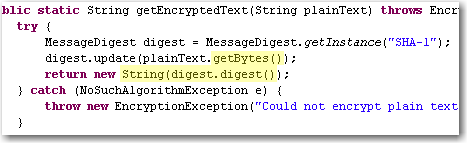
Most developers already struggled with textual data from some third party system and getting garbage special characters and the like because of wrong character encodings.  Some days ago we encountered an obscure problem when it was possible to login into one of our apps from the computer with the password database running but not from other machines using the same db.  After diving into the problem we found out that they SHA-1 hashes generated from our app were slightly different. Looking at the code revealed that platform encoding was used and that lead to different results:platform-encoding

The apps were running on Windows XP and Windows 2k3 Server respectively and you would expect that it would not make much of a difference but in fact it did!

Lesson:

Always specify the encoding explicitly, when exchanging character data with any other system. Here are some examples:

  • String.getBytes(“utf-8”), new Printwriter(file, “ascii”) in Java
  • HTML-Forms with attribute accept-charset="ISO-8859-1"
  • In XML headers <?xml version="1.0" encoding="ISO-8859-15"?>
  • In your Database and/or JDBC driver
  • In your file format documentation
  • In LaTeX documents
  • everywhere where you can provide that info easily (e.g. as a comment in a config file)

Problems with character encodings seem to appear every once in a while either as end user, when your umlauts get garbled or as a programmer that has to deal with third party input like web forms or text files.

The text file rant

After stumbling over an encoding problem *again* I thought a bit about the whole issue and some of my thought manifested in this rant about text files. I do not want to blame our computer science predecessors for inventing and using restricted charsets like ASCII or iso8859. Nobody has forseen the rapid development of computers and their worldwide adoption and use in everyday life and thus need for an extensible charset (think of the addition of new symbols like the €), let aside performance and memory considerations. The problem I see with text files is that there is no standard way to describe the used encoding. Most text files just leave it to the user to guess what the encoding might be whereas almost all binary file formats feature some kind of defined header with metadata about the content, e.g. bit depth and compression method in image files. For text files you usually have to use heuristical tools which work  more or less depending on the input.

A standardized header for text files right from the start would have helped to indicate the encoding and possibly language or encoding version information of the text and many problems we have today would not exist. The encoding attribute in the XML header or the byte order mark in UTF-8 are workarounds for the fundamental problem of a missing text file header.

Branching support missing in JIRA

JIRA is a really great tool when it comes to issue tracking. It is powerful, extensible, usable and widespread. We and many of our clients use it for years and are quite satisfied coming from other tools like Bugzilla.

One thing we find is missing though is the concept of branching. In JIRA you have projects and can define a roadmap consisting of versions that follow each other. Many software products require sooner or later a development line which is only maintained getting bug and security fixes while feature development happens on a separate branch.

Tracking issues for a software with different branches is a bit more demanding because you have to identify the branches one issue affects and possibly separately fix them on each branch. One and the same issue could have different resolutions per branch, i.e. invalid if a broken functionality does not exist anymore. Nevertheless, all branches have to be checked, likely in different time frames.

Unfortunately JIRA does not support the notion of branches. You have to emulate the behaviour using different schemes like:

  • One issue per version that represents a branch
  • Multiple fix versions for an issue
  • Subtasks for an issue or issue links to ckeck and fix the issue for different versions

To me all those are workarounds which lack polished usability and add overhead to your issue management. Real branching support could help you check on which branch an issue is done, where it has still to be resolved and so on without adding more and more (perhaps loosely connected) issues to your system or forgetting to fix the issue on some branch (no question/warning when resolving an issue with multiple fix versions).

[Update:]

I created a new feature request for JIRA where you can vote or track progress on this issue.

Don’t trust micro versions

Normally you would think, that upgrading a third party dependency where its micro version (after the second dot, like x in 2.3.x) changes should make your software work (even) better and not break it. Sadly enough it can easily happen. Some time ago we stumbled over a subtle change in the JNDI implementation of the Jetty webserver and servlet container: In version 6.1.11 you specified (or at least could specify) JNDI resources in jetty-env.xml with URLs like jdbc/myDatabase. After the update to 6.1.12 the specified resource could not be found anymore. Digging through code changelogs and the like provided a solution that finally worked with 6.1.12: java:comp/env/jdbc/myDatabase. The bad thing is that the latter does not work with 6.1.11 so that our configuration became micro-version-dependent on Jetty.

It seems that a new feature around JETTY-725 in the update from 6.1.11 to 6.1.12 broke our software.

Conclusion

Always make sure that your dependencies are fixed for your software releases and test your software everytime when upgrading a dependency. Do not trust some automatic dependency update system or the version numbers of a project. In the end they are just numbers and should indicate the impact of the changes but you never can be sure the changes do not break something for you.

How to find the HTML Entity you look for

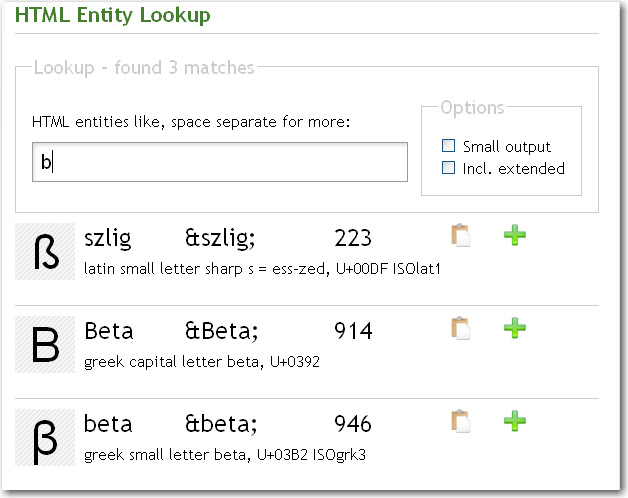
As a webdeveloper have you ever wondered how a special character has to be encoded as a html entity? There is a nice little tool available online that will answer your call for help.EntityLook for 'b' What makes the tool really rock is the simplicity and great incremental search. Typing in the letter ‘c’ will present you entities for “cent”, “copyright”, the greek “sigma” and mathematical entities like “superset” because the basic shape of the resulting special character is also considered. Upon entering a ‘b’ you will get the german ß as one of the results.This kind of search is almost a “do what I mean” feature and very helpful if you do not know exact substrings or meaning of your special character.

There is a Firefox-Extension and as a special goodie for our beloved Mac-users there is even a dashboard widget available that works without internet connection and is a bit more convenient to use than the web application.

Paging with different DBs

Sometimes you cannot or do not want to use an object-relational mapping tool. When not using an OR-mapper like Hibernate or Oracle Toplink you have to deal with database specifics. One common case especially for web applications is limiting the result set to a number of items that fit nicely on a web. You then often want to allow the users to navigate between these “pages” of items aka “paging”.

This type of functionality became part of SQL only as of SQL2008 in the following form:
SELECT * FROM t WHERE ... ORDER BY c OFFSET start_row FETCH count ONLY

Since most popular database management systems (DBMSes) do not yet implement this syntax you have to implement paging in propriatory ways.

My experience with an Oracle DBMS and the frustrating and comparatively long time it took to find the correct™ solution inspired me to write this post. Now I want to present you the syntax for some widely used DBMSes which we encounter frequently in our projects.

  • MySQL, H2 and PostgreSQL (< 8.4 which will also implement the SQL2008 standard) use the same syntax:
    SELECT * FROM t WHERE ... ORDER BY c LIMIT count OFFSET start
  • Oracle is where the fun begins. There is actually no easy and correct way of doing this. So you will end up with a mess like:
    SELECT col1 FROM (SELECT col1, ROWNUM r FROM (SELECT col1 FROM table ORDER BY col1)) WHERE r BETWEEN start AND end
  • DB2 AFAIK uses the syntax proposed in SQL2008 but correct me if I am wrong because we do not yet work with DB2 databases.
  • As we did not need paging with MS SQLServer as of now I did not bother to look for a solution yet. Hints are very welcome.

With all solutions the ORDER BY clause is critical because SQL does not guarantee the order of the returned rows.

Wikipedia delivers some additional and special case information but does not really explain the general, real world case the specific DBMSes.

I hope that I raised some awareness about database specifics and perhaps saved you some time trying to find a solution the problem using your favorite DBMS.

About String Concatenation in Java or “don’t fear the +”

When it comes to string concatenation in Java many people have almost religious views about performance and style. Sadly, there are some misconceptions and misinformation especially about the performance bits. Many people think that concatenating many strings using + means expensive string copying each time and is thus slow as hell which is mostly wrong.

Justin Lee has a nice writeup of the most prominent concatenation options. But imho he misses out some things and his benchmark is a bit oversimplified although it does tell a true story. I assume that he followed at least the basic rules for performance measurement as his results suggest.

Now I want to try to clarify some points I think he missed and I find important:

  • Concatenation using + in one statement is actually compiled to the use of StringBuilder (at least for Sun Java6 compilers, where I checked it in the debugger, try it yourself!). So it’s no surprise that there is no difference between these two options in Justin’s benchmark.
  • It should be clear that the format variants have some overhead because they actually do more than just concatenate strings. There is at least some string parsing and copying involved so that these methods should be used for the cases where for example parameter reordering (think I18N) is needed or readability suffers using normal concatenation.
  • You have to pay attention when using + concatenation over the course of multiple statements because it then involves string copying. Consider the following code: Critical String Concatenation Here it really does make a difference which option you choose. The StringBuilder will perform far better for higher loop counts. We had a real world issue back some time with that when we used the Simple web framework for serving directory listing of several thousand files. The HTML-code was generated using a concatenatePlus()-style method and took like 40(!) seconds. After changing the code to the StringBuilder variant the page was served in sub-second time.

Whether you use + or StringBuilder is mostly a matter of taste and readability in many cases. When your string concatenation gets more complex you should really consider using StringBuilder as it is the safe bet.

Creative Wordle usage

Wordle used to summarize conference programs and analyze java projects.

Many of you may have stumbled over Wordle like I did some time ago. It is a nice little tool (implemented as a Java applet) that creates nice word clouds out of some arbitrary text pasted directly into the browser or provided by an URL. Since then I have found some nice, interesting and creative uses for it.

  • schneideblogwordleSchneide Blog Wordle First a Wordle-cloud of our blog frontpage. The left image shows that we are currently talking a lot about projects and our approach to blogging. Compare that with the cloud from a few weeks ago where listener structures and memory management were hot topics.
  • The guys over at EclipseSource ran Wordle over the EclipseCon program to give a quick overview what this conference is all about.
  • Daan analyzed the class naming of popular OpenSource projects and put the very interesting results on his blog.

I quickly hacked something similar together and ran it over two of our projects. The interesting thing is that you can actually get an impression what the projects are about. Let’s take a look at it:

NPA (Nano Particle Analyzer)

NPA Wordle
This seems to be a project where everything is about measuring something. We can see that there is need for calibration and that energy and data play a major role here. We can even spot a laser (try to find it!) out there which is an important part of the whole system.

Ramses

Ramses Wordle
This project seems to be very abstract and generic but there are some concrete pointers to what’s going on here too. It works together with some spectrometry hardware via Genie2k, with a Delphin box and some camera. There seems to be an appointment management integrated, i18n support ready and some more obscure things like fesas.

If you have other cool ideas how to use Wordle I would be glad to hear about them.

Analyzing Java Heap problems Part 2: Using Eclipse MAT

In part one we saw how to obtain the data to analyze, the heap dumps. Now we are looking into a nice plugin for the Eclipse IDE for analyzing the dumps.  Compared to the basic tools described in the previous article Memory Analyzer Tool (MAT) offers better usability, performance and some high level analysis and report tools.Eclipse MAT Overview After you open a hprof heap dump with MAT it will generate index files for faster access to all the data you are interested in and show an overview with nice charts.  From here you have access to other views and features:

  • The histogram is somewhat similar to what jHat offers.mat-pathtogcroot It allows you to browse, sort and filter the object instances in memory and shows you instance count and the shallow heap (memory used only by this object instance) and retained heap (memory used by this object instance including referenced objects). From the context menu you can choose “Merge Shortest Paths to GC roots” to see the reference chain of an object all the way up to the classloader. Here we can see that the JDateChooser registers itself at the MenuSelectionManager as a listener which can cause serious memory leaks as described in another post about Java memory handling.
  • The dominator tree allows you to quickly identify the biggest objects and what they reference. Again, using the context menu on an item in the list offers many options to dive deeper into the analysis.
  • The object inspector gives you detailed information about the selected objects like shallow and retained size, its fields and the class loader by whom it was loaded.
  • The leak suspects report tries to give you some high level hints about possible causes of memory problems of your application.
  • MAT Component ReportThe component report provides some very interesting statistics about Strings and collection usage which might be worth looking at if you are not hunting down leaks but trying to reduce overall memory usage. You can even get performance hints when many overfull HashMaps are detected or there are many empty collections which could be better lazily created.

I personally am using the histogram and the dominator tree the most because I am a technical guy and like to hunt down the problems in the code. Nevertheless the reports may show use other valuable aspects which you did not think of before. The MAT team are expanding the tools nicely on that side so that the benefit of these reports is ever increasing.

It is very likely that when you analyze large heap dumps you may need to increase the Java heap size for Eclipse by using the -vmargs -Xmx<memory size> parameter. That way you are able to analyze big heaps > 500M relatively fast and comfortable. For some live demo take a look at a webinar by some of SAPs Eclipse MAT committers.