Forced into switch/case – Qt’s Model/View API

During my life as a programmer I have more and more come to dislike switch/case statements. They tend to be hard to grasp and with languages like C/C++ they are often the source of hard-to-find errors. Compilers that have warnings about missing default statements or missing cases for enumerated values can help to mitigate the situation, but still, I try to avoid them whenever I can.

The same holds true for if-elseif cascades or lots of if-elses in one method. They are hard to read, hard to maintain, increase the Crap, etc.

If you share this kind of mindset I invite you implement to some custom models with Qt4’s Model/View API. The design of the Model/View classes is derived from the well-known MVC pattern which separates data (model), presentation (view) and application logic (controller). In Qt’s case, view and controller are combined, supposedly making it simpler to use.

The basic idea of Qt’s implementation of its Model/View design is that views communicate with models using so-called model indexes. Using a table as an example, a row/column pair of (3,4) would be a model index pointing to data element in row 3, column 4. When a view is to be displayed it asks the attached model for all sorts of information about the data.

There are a few model implementations for standard tasks like simple string lists (QStringListModel) or file system manipulation (QDirModel < Qt4.4, QFileSystemModel >= Qt4.4). But usually you have to roll your own. For that, you have to subclass one of the abstract model classes that suits your needs best and implement some crucial methods.

For example, model methods rowCount and columnCount are called by the view to obtain the range of data it has to display. It then uses, among others, the data method to query all the stuff it needs to display the data items. The data method has the following signature:

QVariant data ( const QModelIndex&amp; index, int role ) const

Seems easy to understand: parameter index determines the data item to display and with QVariant as return type it is possible to return a wide range of data types. Parameter role is used to query different aspects of the data items. Apart from Qt::DisplayRole, which usually triggers the model to return some text, there are quite a lot other roles. Let’s look at a few examples:

  • Qt::ToolTipRole can be used to define a tool tip about the data item
  • Qt::FontRole can be use to define specific fonts
  • Qt::BackgroundRole and Qt::ForegroundRole can be used to set corresponding colors

So the views call data repeatedly with all the different roles and your model implementation is supposed to handle those different calls correctly. Say you implement a table model with some rows and columns. The design of the data method is forcing you into something like this …

QVariant data ( const QModelIndex&amp; index, int role ) const  {
   if (!index.isValid()) {
      return QVariant();
   }

   switch (role)
   {
      case Qt::DisplayRole:
         switch (index.column())
         {
            case 0:
               // return display data for column 0
               break;
            case 1:
               // return display data for column 1
               break;
            ...
         }
         break;

      case Qt::ToolTipRole:
         switch (index.column())
         {
            case 0:
               // return tool tip data for column 0
               break;
            case 1:
               // return tool tip data for column 1
               break;
            ...
         }
         break;
      ...
   }
}

… or equivalent if-else structures. What happens here? The design of the data method forces the implementation to “switch” over role and column in one method. But nested switch/case statements? AARGH!! With our mindset outlined in the beginning this is clearly unacceptable.

So what to do? Well, to tell the truth, I’m still working on the best™ solution to that but, anyway, here is a first easy improvement: handler methods. Define handler methods for each role you want to support and store them in a map. Like so:

#include &lt;QAbstractTableModel&gt;

class MyTableModel : public QAbstractTableModel
{
  Q_OBJECT

  typedef QVariant (MyTableModel::*RoleHandler) (const QModelIndex&amp; idx) const;
  typedef std::map&lt;int, RoleHandler&gt; RoleHandlerMap;

  public:
    enum Columns {
      NAME_COLUMN = 0,
      ADDRESS_COLUMN
    };

    MyTableModel() {
      m_roleHandlerMap[Qt::DisplayRole] =
         &amp;MyTableModel::displayRoleHandler;
      m_roleHandlerMap[Qt::ToolTipRole] =
         &amp;MyTableModel::tooltipRoleHandler;
    }

    QVariant displayRoleHandler(const QModelIndex&amp; idx) const {
      switch (idx.column()) {
        case NAME_COLUMN:
          // return name data
          break;

        case ADDRESS_COLUMN:
          // return address data
          break;

        default:
          Q_ASSERT(!&quot;Invalid column&quot;);
          break;
      }
      return QVariant();
    }

    QVariant tooltipRoleHandler(const QModelIndex&amp; idx) const {
      ...
    }

    QVariant data(const QModelIndex&amp; idx, int role) const {
      // omitted: check for invalid model index

      if (m_roleHandlerMap.count(role) == 0) {
        return QVariant();
      }

      RoleHandler roleHandler =
        (*m_roleHandlerMap.find(role)).second;
      return (this-&gt;*roleHandler)(idx);
    }
  private:
    RoleHandlerMap m_roleHandlerMap;
};

The advantage of this approach is that the supported roles are very well communicated. We still have to switch over the columns, though.

I’m currently working on a better solution which splits the data calls up into more meaningful methods and kind of binds the columns to specific parts of the data items in order to get a more row-centric approach: one row = one element, columns = element attributes. I hope this will get me out of this switch/case/if/else nightmare.

What do you think about it? I mean, is it just me, or is an API that forces you into crappy code just not so well done?

How would you solve this?
CMake Builder Plugin Reloaded

A few months ago I set out to build my first hudson plugin. It was an interesting, sometimes difficult journey which came to a good end with the CMake Builder Plugin, a build tool which can be used to build cmake projects with hudson. The feature set of this first version was somewhat limited since I applied the scratch-my-own-itch approach – which by the time meant only support for GNU Make under Linux.

As expected, it wasn’t long until feature requests and enhancement suggestions came up in the comments of my corresponding blog post. So in order to make the plugin more widely useable I used our second  Open Source Love Day to add some nice little features.

Update: I used our latest OSLD to make the plugin behave in master/slave setups. Check it out!

Let’s take a walk through the configuration of version 1.0 :

Path to cmake executable

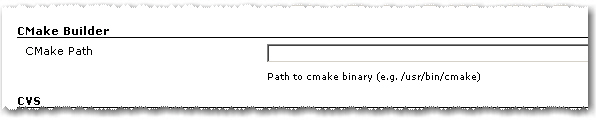
1. As in the first version you have to set the path to the cmake executable if it’s not already in the current PATH.

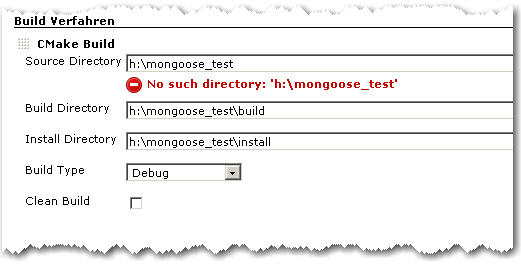
2. The build configuration starts as in the first version with Source Directory, Build Directory and Install Directory.

CMake Builder Configuration Page

3. The Build Type can now be selected more conveniently by a combo box.

4. If Clean Build is checked, the Build Dir gets deleted on every build

Advanced Configuration Page

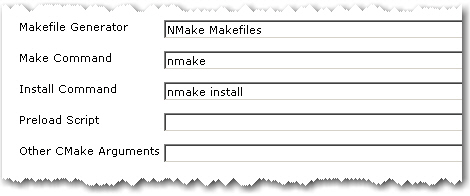
5. The advanced configuration part starts with Makefile Generator parameter which can be used to utilize the corresponding cmake feature.

6. The next two parameters Make Command and Install Command can be used if make tools other than GNU Make should be used

7. Parameter Preload Script can be used to point to a suitable cmake pre-load script file. This gets added to the cmake call as parameter of the -C switch.

8. Other CMake Arguments can be used to set arbitrary additional cmake parameters.

The cmake call will then be build like this:

/path/to/cmake  \
   -C </path/to/preload/script/if/given   \
   -G <Makefile Generator>  \
   -DCMAKE_INSTALL_PREFIX=<Install Dir> \
   -DCMAKE_BUILD_TYPE=<Build Type>  \
   <Other CMake Args>  \
   <Source Dir>

After that, the given Make and Install Commands are used to build and install the project.

With all these new configuration elements, the CMake Builder Plugin should now be applicable in nearly every project context. If it is still not useable in your particular setting, please let me know. Needless to say, feedback of any kind is always appreciated.

Object Calisthenics On Existing Projects?

A few days ago we discussed Object Calisthenics which where introduced by Jeff Bay in an article for the ThoughtWorks Anthology book. In case you have no idea what I’m talking about, here are again the 9 rules in short form (or your can study them in detail in the book):

1. One level of indentation per method
2. No else keyword
3. Wrap all primitives and strings
4. Use only one dot per line
5. Don’t abbreviate names but keep them short
6. Keep all entities small
7. No more than two instance variables per class
8. Use first-class collections
9. Don’t use any getters/setters or properties

Following the rules supposedly leads to more object-oriented code with a special emphasis on encapsulation. In his article, Jeff Bay suggests to do a new 1000 lines project and to follow the rules excessively without thinking twice. But hey, more object-oriented code can’t be bad for existing projects, either, can it?

Not only on the first look, many of the rules seem pretty hard to follow. For example, check your projects for compatibility with rule 7. How many of your classes have more than two instance variables? That’s what I thought. And sure, some primitives and collections deserve wrapping them into an extra class (rules 3 and 8), but do you really wrap all of them? Well, neither do we.

Other rules lead directly to more readable code. If you value good code quality like we do, rules 1, 2, 5 and 6 are more or less already in the back of your head during your daily programming work.

Especially rule 1 is what you automatically aim for when you want your crap load to remain low.

What really got my attention was rule 9: “Don’t use any getters/setters or properties”. This is the “most object-oriented” rule because it targets the heart of what an object should be: a combination of data and the behavior that uses the data.

But doing a little mental code browsing through our projects, it was easy to see that this rule is not easily retrofitted into an existing code base. The fact that our code is generally well covered with automated tests and considered awesome by a number of software metrics tools does not change that, either. Which is, of course, not surprising since committing to rule 9 is a downright big architectural decision.

So despite the fact that it is difficult to virtually impossible to use the rules in our existing projects right away, Object Calisthenics were certainly very valuable as motivation to constantly improving ourselves and our code. A good example is rule 2 (“No else”) which gets even more attention from now on. And there are definitely one or two primitives and collections that get their own class during the next refactoring.

A Small XML Builder in Ruby

From a C++ point of view, i.e. the statically typed world with no “dynamic” features that deserved the name, I guess you would all agree that languages like Groovy or Ruby are truly something completely different. Having strong C++ roots myself, my first Grails project gave me lots of eye openers on some nice “dynamic” possibilities. One of the pretty cool things I encountered there was the MarkupBuilder. With it you can just write XML as if it where normal Groovy Code. Simple and just downright awesome.

The other day in yet another C++ project I was again faced with the task to generate some XML from text file. And, sure enough, my thoughts wandered to the good days in the Grails project where I could just instantiate the MarkupBuilder… But wait! I remembered that a colleague had already done some scripting stuff with Ruby, so the language was already kind of introduced into the project. And despite the fact that it was a new language for him he did some heavy lifting with it in just no time (That sure does not come as a big surprise all you Ruby folks out there).

So if Ruby is such a cool language there must be something like a markup builder in it, right? Yes there is, well, sort of. Unfortunately, it’s not part of the language package and you first have to install a thing called gems to even install the XML builder package. Being in a project with tight guidelines when it comes to external dependencies and counting in the fact that we had no patience to first having to learn what Ruby gems even are, my colleague and I decided to hack our own small XML builder (and of course, just for the fun of it). I mean hey, it’s Ruby, everything is supposed to be easy in Ruby.

Damn right it is! Here is what we came up with in what was maybe an hour or so:

class XmlGen
   def initialize
      @xmlString = ""
      @indentStack = Array.new
   end

   def method_missing(tagId, attr = {})
      argList = attr.map { |key, value|
         "#{key}=\"#{value}\""
      }.reverse.join(' ')

      @xmlString << @indentStack.join('') 
      @xmlString << "<" << tagId.to_s << " " << argList
      if block_given?
         @xmlString << ">\n"
         @indentStack.push "\t"
         yield
         @indentStack.pop
         @xmlString << @indentStack.join('') << "</" << tagId.to_s << ">\n"
      else
         @xmlString << "/>\n"
      end
      self
   end

   def to_s
      @xmlString
   end
end

And here is how you can use it:

xml = XmlGen.new
xml.FirstXmlTag {
   xml.SubTagOne( {'attribute1' => 'value1'} ) {
      someCollection.each { |item|
         xml.CollectionTag( {'itemId' => item.id} )
      }
   }
}

It’s not perfect, it’s not optimized in any way and it may not even be the Ruby way. But hey, it served our needs perfectly, it was a pretty cool Ruby experience, and it sure is not the last piece of Ruby code in this project.

Evil operator overloading of the day

The other day we encountered a strange stack overflow when cout-ing an instance of a custom class. The stream output operator << was overloaded for the class to get a nice output, but since the class had only two std::string attributes the implementation was very simple:

using namespace std;

class MyClass
{
   public:
   ...
   private:
      string stringA_;
      string stringB_;

   friend ostream& operator << (ostream& out, const MyClass& myClass);
};

ostream& operator << (ostream& out, const MyClass& myClass)
{
   return out << "MyClass (A: " << myClass.stringA_ 
              <<", B: " << myClass.stringB_ << ")"  << std::endl;
}

Because the debugger pointed us to a completely separate code part, our first thought was that maybe some old libraries had been accidently linked or some memory got corrupted somehow. Unfortunately, all efforts in that direction lead to nothing.

That was the time when we noticed that using old-style printf instead of std::cout did work just fine. Hm..

So back to that completely separate code part. Is it really so separate? And what does it do anyway?

We looked closer and after a few minutes we discovered the following code parts. Just look a little while before you read on, it’s not that difficult:

// some .h file somewhere in the code base that somehow got included where our stack overflow occurred:

...
typedef std::string MySpecialName;
...
ostream& operator << (ostream& out, const MySpecialName& name);

// and in some .cpp file nearby

...
ostream& operator << (ostream& out, const MySpecialName& name)
{
   out << "MySpecialName: " << name  << std::endl;
}
...

Got it? Yes, right! That overloaded out-stream operator << for MySpecialName together with that innocent looking typedef above put your program right into death by segmentation fault.  Overloading the out-stream operator for a given type can be a good idea – as long as that type is not a typedef of std::string. The code above not only leads to the operator << recursively calling itself but also sucks every other part of the code into its black hole which happens to include the .h file and wants to << a std::string variable.

You just have to love C++…

How much boost does a C++ newbie need?

The other day, I talked to a C++ developer, who is relatively new in the language, about the C++ training they just had at his company. The training topics were already somewhat advanced and contained e.g. STL containers and their peculiarities, STL algorithms and some boost stuff like binders and smart pointers. That got me thinking about how much of STL and boost does a C++ developer just has to know in order to survive their C++ projects.

There is also another angle to this. There are certain corners of the C++ language, e.g. template metaprogramming, which are just hard to get, even for more experienced developers. And because of that, in my opinion, they have no place in a standard industry C++ project. But where do you draw the line? With template meta-programming it is obvious that it probably will never be in every day usage by Joe Developer. But what about e.g. boost’s multi-index container or their functional programming stuff? One could say that it depends on the skills of team whether more advanced stuff can be used or not. But suppose your team consist largely of C++ beginners and does not have much experience in the language, would you want to pass on using Boost.Spirit when you had to do some serious parsing? Or would you want to use error codes instead of decent exceptions, because they add a lot more potentially “invisible” code paths? Probably not, but those are certainly no easy decisions.

One of the problems with STL and boost for a C++ beginner can be illustrated with the following easy problem: How do you convert an int into a std::string and back? Having already internalized the stream classes the beginner might come up with something like this:

 int i = 5;
 std::ostringstream out;
 out << i;
 std::string i_string = out.str();  

 int j=0;
 std::istringstream in(i_string);
 in >> j;
 assert(i == j);

But if he just had learned a little boost he would know that, in fact, it is as easy as this:

 int i=5;
 std::string i_string = boost::lexical_cast<std::string>(i);

 int j = boost::lexical_cast<int>(i_string);

So you just have to know some basic boost stuff in order to write fairly decent C++ code. Besides boost::lexical_cast, which is part of the Boost Conversion Library, here is my personal list of mandatory boost knowledge:

Boost.Assign: Why still bother with std::map::push_back and the likes, if there is a much easier and concise syntax to initialize containers?

Boost.Bind (If you use functional programming): No one should be forced to wade through the mud of STL binders any longer. Boost::bind is just so much easier.

Boost.Foreach: Every for-loop becomes a code-smell after your first use of BOOST_FOREACH.

Boost.Member Function: see Boost.Bind

Boost.Smart Pointers: No comment is needed on that one.

As you can see, these are only the most basic libraries. Other extremely useful things for day-to-day programming are e.g. Boost.FileSystem, Boost.DateTime, Boost.Exceptions, Boost.Format, Boost.Unordered and Boost.Utilities.

Of course, you don’t have to memorize every part of the boost libraries, but boost.org should in any case be the first address to look for a solution to your daily  C++ challenges.

Dancing the TANGO

One of our customers is an administration department at a research center, which is responsible to operate and maintain a synchrotron light source. They are in charge of a whole bunch of “normal” IT infrastructure as well as a wide variety of electronic devices which are used in all kinds of experiment settings. These can be cameras, electronic motors, detectors of all sorts, etc. One of their main day-to-day challenges is to integrate all those devices such that they can be controlled in a uniform way with standard measurement and control tools.

In order to provide a common solution to this task the TANGO platform has been developed in a collaborative effort of some the the main European synchrotron institutes. TANGO is an object-oriented distributed control system in which every device is represented in an abstract way by a so-called Device Server. A device server provides access to a given piece of hardware by exposing its attributes, properties, states, events and supported commands in a uniform way. CORBA is used as middleware which shows that it is still popular in real-time and embedded environments. Device server instances are registered at a central database and can be accessed and controlled using a variety of TANGO tools.

The typical TANGO development process is as follows: Each device comes with some vendor provided driver library and corresponding interface documentation (C interfaces in many cases). Starting with that information, all attributes, states and supported commands are defined using a tool called POGO. The resulting model of the device is then used to generate skeleton code for the device server. Right now, POGO supports C++, Java and Python. Then, the device server skeleton code is completed by accessing the actual device using the driver library.

For example, one of our latest projects was an X-ray detector which is roughly like a CCD camera for X-rays. As such it has read-only TANGO attributes Width and Height which corresponds to the width and height of the CCD chip. Furthermore it has a read-write attribute called ROI (region of interest) which is an array of four integer values (X0, Y0, X1, X2), Exposure Time, an integer value in milliseconds and a variety of other attributes. One obvious TANGO command is Start which tells the camera to start exposure and store resulting images.

So, if you happen to have a synchrotron light source in your garage (or of course any other bunch of hardware that you want to integrate), consider dancing the TANGO.

Hudson for C++/CMake/CppUnit Revised

A few months ago, in order to use Hudson as CI for your C++/CMake/CppUnit projects you had to do quite a lot of shell scripting. By now the situation has very much improved as some very useful plugins came into existence. To cover the situation described in my previous post you can now use a combination of the CMake plugin and the CppUnit plugin.

With these extensions Hudson gets more and more useful for C/C++ developers. Yet another new plugin that supports this trend is the CCCC Plugin which uses the CCCC tool to generate trend reports for various software metrics including cyclomatic complexity.

Structuring CppUnit Tests

How to structure cppunit tests in non-trivial software systems so that they can be easily executed selectively during code-compile-test cycle and at the same time are easy to execute as a whole by your continuous integration system.

While unit testing in Java is dominated by JUnit, C++ developers can choose between a variety of frameworks. See here for a comprehensive list. Here you can find a nice comparison of the biggest players in the game.

Being probably one of the oldest frameworks CppUnit sure has some usability issues but is still widely used. It is criticised mostly because you have to do a lot of boilerplate typing to add new tests. In the following I will not repeat how tests can be written in CppUnit as this is described already exhaustively (e.g. here or here). Instead I will concentrate on the task of how to structure CppUnit tests in bigger projects. “Bigger” in this case means at least a few architectually independent parts which are compiled independently, i.e. into different libraries.

Having independently compiled parts in your project means that you want to compile their unit tests independently, too. The goal is then to structure the tests so that they can easily be executed selectively during development time by the programmer and at the same time are easy to execute as a whole during CI time (CI meaning Continuous Integration, of course).

As C++ has no reflection or other meta programming elements like the Java Annotations, things like automatic test discovery and how to add new tests become a whole topic of its own. See the CppUnit cookbook for how to do that with CppUnit . In my projects I only use the TestFactoryRegistry approach because it provides the most automatics in this regard.

Let’s begin with a simplest setup, the Link-Time Trap (see example source code): Test runner and result reporter are setup in the “main” function that is compiled into an executable. The actual unit tests are compiled in separate libraries and are all linked to the executable that contains the main function. While this solution works well for small projects it does not scale. This is simply because every time you change something during the code-compile-test cycle the unit test executable has to be relinked, which can take a considerable amount of time the bigger the project gets. You fall into the Link Time Trap!

The solution I use in many projects is as follows: Like in the simple approach, there is one test main function which is compiled into a test executable. All unit tests are compiled into libraries according to their place in the system architecture. To avoid the Link-Time-Trap, they are not linked to the test executable but instead are automatically discovered and loaded during test execution.

1. Automatic Discovery

Applying a little convention-over-configuration all testing libraries end with the suffix “_tests.so”. The testing main function can then simply walk over the directory tree of the project and find all shared libraries that contain unit test classes.

2. Loading

If a “.._test.so” library has been found, it simply gets loaded using dlopen (under Unix/Linux). When the library is loaded the unit tests are automatically registered with the TestFactoryRegistry.

3. Execution

After all unit test libraries has been found and loaded text execution is the same as in the simple approach above.

Here my enhanced testmain.cpp (see example source code).

#include ... 

using namespace boost::filesystem; 
using namespace std; 

void loadPlugins(const std::string& rootPath) 
{
  directory_iterator end_itr; 
  for (directory_iterator itr(rootPath); itr != end_itr; ++itr) { 
    if (is_directory(*itr)) {
      string leaf = (*itr).leaf(); 
      if (leaf[0] != '.') { 
        loadPlugins((*itr).string()); 
      } 
      continue; 
    } 
    const string fileName = (*itr).string();
    if (fileName.find("_tests.so") == string::npos) { 
      continue;
    }
    void * handle = 
      dlopen (fileName.c_str(), RTLD_NOW | RTLD_GLOBAL); 
    cout << "Opening : " << fileName.c_str() << endl; 
    if (!handle) { 
      cout << "Error: " << dlerror() << endl; 
      exit (1); 
    } 
  } 
} 

int main ( int argc, char ** argv ) { 
  string rootPath = "./"; 
  if (argc > 1) { 
    rootPath = static_cast<const char*>(argv[1]); 
  } 
  cout << "Loading all test libs under " << rootPath << endl; 
  string runArg = std::string ( "All Tests" ); 
  // get registry 
  CppUnit::TestFactoryRegistry& registry = 
    CppUnit::TestFactoryRegistry::getRegistry();
  
  loadPlugins(rootPath); 
  // Create the event manager and test controller 
  CppUnit::TestResult controller; 

  // Add a listener that collects test result 
  CppUnit::TestResultCollector result; 
  controller.addListener ( &result ); 
  CppUnit::TextUi::TestRunner *runner = 
    new CppUnit::TextUi::TestRunner; 

  std::ofstream xmlout ( "testresultout.xml" ); 
  CppUnit::XmlOutputter xmlOutputter ( &result, xmlout ); 
  CppUnit::TextOutputter consoleOutputter ( &result, std::cout ); 

  runner->addTest ( registry.makeTest() ); 
  runner->run ( controller, runArg.c_str() ); 

  xmlOutputter.write(); 
  consoleOutputter.write(); 

  return result.wasSuccessful() ? 0 : 1; 
}

As you can see the loadPlugins function uses the Boost.Filesystem library to walk over the directory tree.

It also takes a rootPath argument which you can give as parameter when you call the test main executable. This solves our goal stated above. When you want to execute unit tests selectively during development you can give the path of the corresponding testing library as parameter. Like so:

./testmain path/to/specific/testing/library

In your CI environment on the other hand you can execute all tests at once by giving the root path of the project, or the path where all testing libraries have been installed to.

./testmain project/root

CMake Builder Plugin for Hudson

Update: Check out my post introducing the newest version of the plugin.

Today I’m pleased to announce the first version of the cmakebuilder plugin for Hudson. It can be used to build cmake based projects without having to write a shell script (see my previous blog post). Using the scratch-my-own-itch approach I started out implementing only those features that I needed for my cmake projects which are mostly Linux/g++ based so far.

Let’s do a quick walk through the configuration:

1. CMake Path:
If the cmake executable is not in your $PATH variable you can set its path in the global Hudson configuration page.

2. Build Configuration:

To use the cmake builder in your Free-style project, just add “CMake Build” to your build steps. The configuration is pretty straight forward. You just have to set some basic directories and the build type.

cmakebuilder demo config

The demo config above results in the following behavior (shell pseudocode):

if $WORKSPACE/build_dir does not exist
   mkdir $WORKSPACE/build_dir
end if

cd $WORKSPACE/build_dir
cmake $WORKSPACE/src -DCMAKE_BUILD_TYPE=Debug -DCMAKE_INSTALL_PREFIX=$WORKSPACE/install_dir
make
make install

That’s it. Feedback is very much appreciated!!

Originally the plan was to have the plugin downloadable from the hudson plugins site by now but I still have some publishing problems to overcome. So if you are interested, make sure to check out the plugins site again in a few days. I will also post an update here as soon as the plugin can be downloaded.

Update: After fixing some maven settings I was finally able to publish the plugin. Check it out!