About String Concatenation in Java or “don’t fear the +”

When it comes to string concatenation in Java many people have almost religious views about performance and style. Sadly, there are some misconceptions and misinformation especially about the performance bits. Many people think that concatenating many strings using + means expensive string copying each time and is thus slow as hell which is mostly wrong.

Justin Lee has a nice writeup of the most prominent concatenation options. But imho he misses out some things and his benchmark is a bit oversimplified although it does tell a true story. I assume that he followed at least the basic rules for performance measurement as his results suggest.

Now I want to try to clarify some points I think he missed and I find important:

  • Concatenation using + in one statement is actually compiled to the use of StringBuilder (at least for Sun Java6 compilers, where I checked it in the debugger, try it yourself!). So it’s no surprise that there is no difference between these two options in Justin’s benchmark.
  • It should be clear that the format variants have some overhead because they actually do more than just concatenate strings. There is at least some string parsing and copying involved so that these methods should be used for the cases where for example parameter reordering (think I18N) is needed or readability suffers using normal concatenation.
  • You have to pay attention when using + concatenation over the course of multiple statements because it then involves string copying. Consider the following code: Critical String Concatenation Here it really does make a difference which option you choose. The StringBuilder will perform far better for higher loop counts. We had a real world issue back some time with that when we used the Simple web framework for serving directory listing of several thousand files. The HTML-code was generated using a concatenatePlus()-style method and took like 40(!) seconds. After changing the code to the StringBuilder variant the page was served in sub-second time.

Whether you use + or StringBuilder is mostly a matter of taste and readability in many cases. When your string concatenation gets more complex you should really consider using StringBuilder as it is the safe bet.
Analyzing Java Heap problems Part 2: Using Eclipse MAT

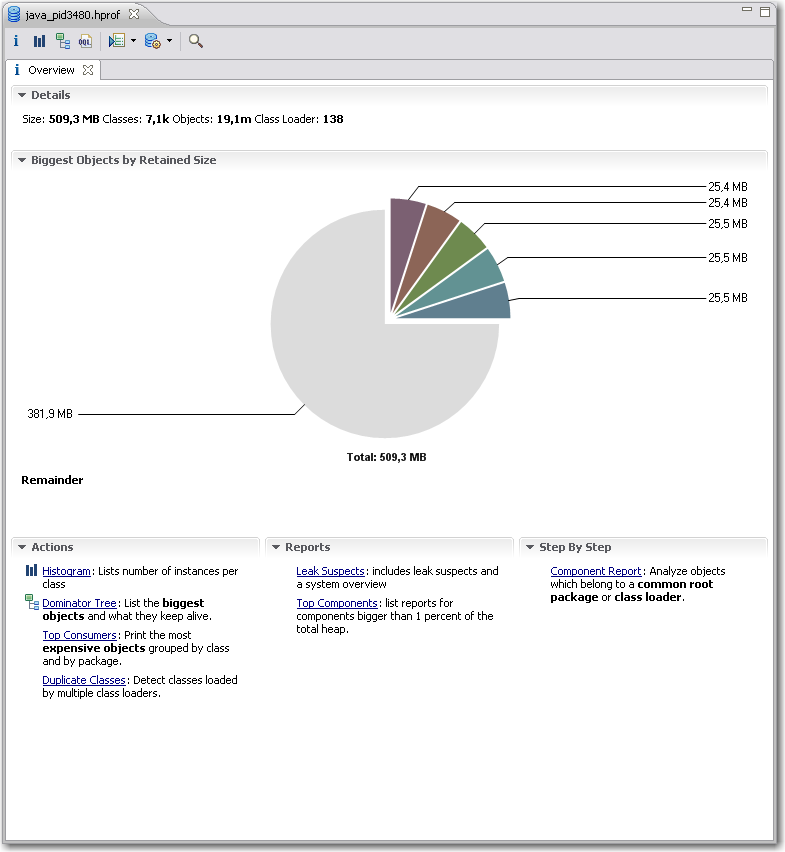
In part one we saw how to obtain the data to analyze, the heap dumps. Now we are looking into a nice plugin for the Eclipse IDE for analyzing the dumps.  Compared to the basic tools described in the previous article Memory Analyzer Tool (MAT) offers better usability, performance and some high level analysis and report tools.Eclipse MAT Overview After you open a hprof heap dump with MAT it will generate index files for faster access to all the data you are interested in and show an overview with nice charts.  From here you have access to other views and features:

  • The histogram is somewhat similar to what jHat offers.mat-pathtogcroot It allows you to browse, sort and filter the object instances in memory and shows you instance count and the shallow heap (memory used only by this object instance) and retained heap (memory used by this object instance including referenced objects). From the context menu you can choose “Merge Shortest Paths to GC roots” to see the reference chain of an object all the way up to the classloader. Here we can see that the JDateChooser registers itself at the MenuSelectionManager as a listener which can cause serious memory leaks as described in another post about Java memory handling.
  • The dominator tree allows you to quickly identify the biggest objects and what they reference. Again, using the context menu on an item in the list offers many options to dive deeper into the analysis.
  • The object inspector gives you detailed information about the selected objects like shallow and retained size, its fields and the class loader by whom it was loaded.
  • The leak suspects report tries to give you some high level hints about possible causes of memory problems of your application.
  • MAT Component ReportThe component report provides some very interesting statistics about Strings and collection usage which might be worth looking at if you are not hunting down leaks but trying to reduce overall memory usage. You can even get performance hints when many overfull HashMaps are detected or there are many empty collections which could be better lazily created.

I personally am using the histogram and the dominator tree the most because I am a technical guy and like to hunt down the problems in the code. Nevertheless the reports may show use other valuable aspects which you did not think of before. The MAT team are expanding the tools nicely on that side so that the benefit of these reports is ever increasing.

It is very likely that when you analyze large heap dumps you may need to increase the Java heap size for Eclipse by using the -vmargs -Xmx<memory size> parameter. That way you are able to analyze big heaps > 500M relatively fast and comfortable. For some live demo take a look at a webinar by some of SAPs Eclipse MAT committers.

JTable index madness

A coworker of mine recently stumbled upon a strange looking JTable:
A broken down JTable

This reminded me of an effect I have seen several times. Digging through the source code of the JTable we found an unusual handling of TableEvents:

    public void tableChanged(TableModelEvent e) {
        if (e == null || e.getFirstRow() == TableModelEvent.HEADER_ROW) {
            // The whole thing changed
            clearSelectionAndLeadAnchor();

            rowModel = null;

            if (getAutoCreateColumnsFromModel()) {
		// This will effect invalidation of the JTable and JTableHeader.
                createDefaultColumnsFromModel();
		return;
	    }

	    resizeAndRepaint();
            return;
        }
...

The hidden problem here is that the value of TableModelEvent.HEADER_ROW is -1. So sending a TableEvent to the table with a obviously wrong index causes the table to reset discarding all renderers, column sizes, etc. And this is regardless of the type of the event (INSERT, UPDATE and DELETE). Yes, it is a bug in our implementation of the table model but instead of throwing an exception like IndexOutOfBounds it causes another event which resets the table. Not an easy bug to hunt down…

Spelling the feedback: The LED bar

Our fully automated project ecosystem provides us with feedback of very different type and granularity. We felt it was impossible to render every single notable event into its own extreme feedback device (XFD). Instead, we implemented an universal feedback source: the LED bar.

ledbar-alone

You know the LED bar already from a shop window of your town. It tells you about the latest special bargain, the opening hours of the shop or just something you didn’t want to know. But you’ve read it, because it is flashing and moving. You just can’t pass that shop window without noticing the text on the LED bar.

Our LED bar sells details to us. The most important issues are already handled by the ONOZ Lamp and the Audio feedback, as both are very intrusive. The LED bar is responsible to spell the news, rather than to tell it.

A very comforting news might be “All projects sane”, which happen to be our regular state. You might be told that you rendered “project X BROKEN”, but you already know this, as the ONOZ Lamp lit up and you were the one to check in directly before. It’s better to be informed that “project X sane” was the build’s outcome. After a while, the text returns to the regular state or blanks out.

Setting up the LED bar

We aren’t the only ones out there with a LED bar on the wall. Dirk Ziegelmeier for example installed his at the same time, but blogged much earlier about it. He even gives you detailed information about the communication protocol used by the device and a C# implementation for it. The lack of protocol documentation was a bugger for us, too. We reverse engineered it independently and confirm his information. We wrote a complete Java API for the device (in our case a LSB-100R), which we might open source on request. Just drop us a note if you are interested.

Basically, we wrote an IRC bot that understands commands given to it and transforms it into API calls. The API then deals with the low-level transformation and the device handshake. This way, software modules that want to display text on the LED bar from anywhere on the internal net only need to talk on IRC.

The idea of connecting an IRC channel and the led bar isn’t unique to us, either. The F-Secure Linux Team blogged about their setup, which is disturbingly equal to ours. Kudos to you guys for being cool, too.

Effects of the LED bar

The LED bar is the perfect place to indicate project news. Its non-intrusive if you hold back those “funny” displaying effects but versatile enough to provide more than simple binary (on/off) information. Its the central place to look up to if you want to know what’s the news.

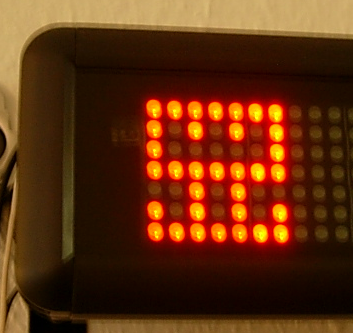
We even found out that our company logo (created by Hannafaktur) is scalable down to 7×7 pixels, which exactly fits the LED bar in height:

logo_on_led

Try this with your company’s logo!


Read more about our Extreme Feedback Devices:

Analyzing Java Heap problems Part 1: Basic actions and tools

You think that your shiny Java app has some memory issues but how do you find out if that is true and what is taking up all that memory? Knowing the potential problems is fine. Nevertheless you still have to find out your actual problems. There are several instruments available to help you analyse your Java application regarding its memory usage. I will tell you about increasing your maximum heap (most of you surely know  about that), looking at the memory of a running app, making heap dumps (on demand or on OutOfMemoryException) and analyzing the dumps.

Increasing maximum heap

The Java VM has a setting that defines the maximum amount of heap memory available to your application. It defaults to 64MB which is enough for many programs. If you have a larger application you should try to start it with that value increased by passing the -Xmx<size>m parameter to the VM at startup. <size> is the value in MBytes so just fiddle around with that. If your app is leaking memory that won’t help you for long so you have to find out *if* it leaks.

Looking at memory usage of a running application

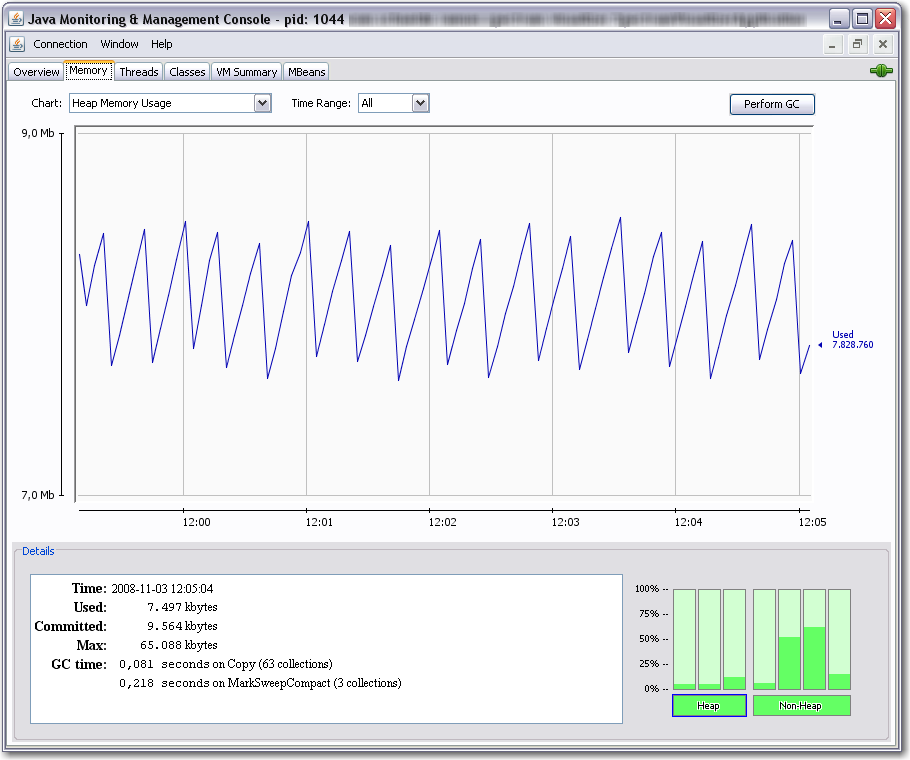
You can use jconsole for a quick look at your applications resource usage. jconsole is part of the Sun JDK since Java 6. You can connect the jconsole to any running java applications on your computer or even reachable over network and offering the Java Management Extensions (JMX) over TCP. Non-leaking programs should have a memory graph like this:

You can see, that the memory fluctuates over time because of the garbage collection cycles. But overall it does not grow. Next we will look at an application that leaks memory:

Above we see that the garbage collector (GC) tries its best but the used memory is growing over time. If we see such behaviour we probably need a heap dump to analyze the issue further.

Making a heapdump

Basically you have two nice ways to get a heap dump of your application which you can look into at a later time:

  1. Use jmap (which is also part of the Sun JDK 6) to dump the heap of a running application to a file using a command line like jmap -dump:format=b,file=myheap.hprof <pid>
  2. Tell the VM to make a heap dump when an OutOfMemoryException occurs by adding -XX:+HeapDumpOnOutOfMemoryError to the VM parameters at startup. With another switch you can specify the path for the dumps: -XX:HeapDumpPath=jmxdata .

After you have obtained a dump of your application you certainly want to have a look at it and find the issues. You can start with Sun’s jhat which is also part of current JDKs. After supplying jhat the hprof-file you can point your browser to the integrated webserver of jhat and browse the heap looking for the objects that take up your memory.

That way you can get an idea of what objects lived in memory when the heap dump was made and how they were referenced.

Conclusion

We have seen many ways to perform memory diagnostics using only free tools which are part of the JDK from Sun. They are all nice but have their limitations. Especially jhat has problems with usability and performance when you examine larger heap dumps with it.

Next time I will show you how to use the Eclipse plugin MAT for analysis of heap dumps obtained in one of the above ways. So stay tuned!

Java solves all memory problems, or maybe not?

Many people think that Java’s Garbage Collector (GC) solves all of their memory management problems. It is true that the GC does a great job in many many real world situations. It really eases your life as software developer especially compared to programming in languages like C /C++ where memory management is a major PITA. Even there you can help yourself by using object systems with reference counting, smart pointers etc. but you have to be aware of this issue all the time.

So everything regarding memory is fine in Java?

Actually not really. Many Java developers do not think about code potentially leading to memory leaks. I would like to point out some problems we encountered. The problems can be divided into two categories:

  1. Native resources which have to be managed manually
  2. Listeners attached to central objects which are never removed again

Examples of native resources

Database connections, result sets and so on are a very common native resource that need manual management. JDBC is a real pain regarding resource management and especially Oracle is very susceptical to leaking those. Either you are very careful here or you use some framework to help you. If you do not want to go the whole way to a persistence framework like hibernate, iBatis or toplink a solution like Spring JDBCTemplate may help you a lot.

Another example is the JOGL TextRenderer which has to be manually disposed or you will leak texture memory  and soon run into resource problems.

Files/Streams and Sockets should be handled carefully too. In most cases you are more or less in the same boat with the C/C++ people but using finally can help you there.

Examples of listener leaks

Sometimes something innocent looking like a Swing Component can turn into a memory leak. We used JDateChooser one of our projects and found some of our data displaying dialogs to exist several times in memory and thus taking huge amounts of RAM eventually leading to OutOfMemoryExceptions. In case of dialogs and windows a WindowListener might help.

Sometimes you might write similar objects yourself that register to some central instance (maybe even a singleton *yuck*). Deregistering them always is easily forgotten or overlooked. A common code pattern to look out for listener leaks where you cannot deregister easily at the right moment is the following:

public class MyCoolClass implements IDataListener {

    public MyCoolClass(IDataProvider dataProvider) {
        super();
        dataProvider.addDataListener(this);
    }

    ...
}

Avoid such constructs as they can prove really dangerous. There is more that can be done to lower the risk of hard-hitting memory/listener leaks: Use WeakReferences for listener management at the crucial central objects. The referenced objects are taken care of by the GC and the listener manager has to take care of the WeakReferences. They can be cleaned up periodically or when a notification takes place.

Conclusion

The Java GC helps a lot in everyday programming but there are still things to look out for. Just be aware of the resources you are using and think about their need of management. I will write some follow up articles about getting heap dumps in different situations and searching them for memory leaks using some nice free tools.

Update:

Kris Kemper wrote a nice article about Swing Memory Leaks with JCalendar and a solution to the problem.

Global error pages with Jetty and grails

We wanted to configure global error pages for our grails app. Using your favorite search engine you quickly find the following info.

At the bottom it says that in order to support global error pages you have to forward to a context because error pages can only be handled within contexts/webapps.
So I started adding a context to the contexts dir which looked like this:

<Configure class="org.mortbay.jetty.webapp.WebAppContext">
      <Set name="contextPath">/</Set>
      <Set name="war"><SystemProperty name="jetty.home" default="."/>/webapps/mywebapp.war</Set>
      <Set name="extractWAR">false</Set>
...

This caused an “IllegalArgumentException: name” at startup. The solution was to set extractWAR to true. JSPs or other resources (like GSPs) cannot be used inside a war when extractWAR is set to false. But this way got another pitfall: using localhost:8080/mywebapp won’t work. So why not just forward all requests from / to /mywebapp. Said and done:

<Set name="handler">
  <New id="Handlers" class="org.mortbay.jetty.handler.RewriteHandler">
    <Set name="rewriteRequestURI">false</Set>
    <Set name="rewritePathInfo">false</Set>
    <Set name="originalPathAttribute">requestedPath</Set>
    <Call name="addRewriteRule"><Arg>/mywebapp/*</Arg><Arg></Arg></Call>
    <Call name="addRewriteRule"><Arg>/*</Arg><Arg>/mywebapp</Arg></Call>
    <Set name="handler">
here the old handlers are inserted...

Now /mywebapp points to my webapp. / gives a 500 and other invalid urls give a 404.
To use your custom error pages inside a grails app just add the error codes you want to map inside the UrlMappings.groovy file:

class UrlMappings {
  ...
  static mappings = {
    "500"(view:'/error')
    "404"(view:'/error404')
  }
}

== or equals with Java enum

When you compare objects in Java you should prefer the equals()-method to == in general. The reason is that you get reference equality (like with ==) by default but you are able to change that behaviour. You can override equals() (DO NOT FORGET TO OVERRIDE hashCode() too because otherwise you will break the general class contract) to reflect logical equality which is often what you want, e.g when comparing some string constant with user input.

With primitive types like double and int you are more or less limited to == which is fine for those immutable value types.

But what is the right thing to to with the enum type introduced in Java 5?
Since enums look like a class with methods, fields and the like you might want to use equals() instead of ==. Now this is a special case where using reference equality is actually safer and thus better than logical equality.

Above (please mind the stupid example) we can see that comparing the EState enum with an ILamp using equals() is accepted perfectly by the compiler even though the condition never can be true in practice. Using == the compiler screams and tells us that we are comparing apples with oranges.

Using Flying Saucer PDF offline

Flying saucer is a nice tool for quick PDF generation from a (X)HTML page. Everything worked fine when we tested it at home but when we had a demo at a client’s site, no PDF could be generated. The problem was caused by a little snippet in the header of the HTML:

<!DOCTYPE html PUBLIC
"-//W3C//DTD XHTML 1.0 Transitional//EN"
"http://www.w3.org/TR/xhtml1/DTD/xhtml1-transitional.dtd">

The DTD declaration! So we took a look at the flying saucer issue database and found someone who had the same problem.
But another solution is even simpler:
Xerces has a default setting which tells the parser to load external dtds.
Turning this off solved our offline problems:

  DocumentBuilderFactory builderFactory =
    DocumentBuilderFactory.newInstance();
  builderFactory.setFeature(
    "http://apache.org/xml/features/nonvalidating/load-external-dtd",
    false);