JTable index madness

A coworker of mine recently stumbled upon a strange looking JTable:
A broken down JTable

This reminded me of an effect I have seen several times. Digging through the source code of the JTable we found an unusual handling of TableEvents:

    public void tableChanged(TableModelEvent e) {
        if (e == null || e.getFirstRow() == TableModelEvent.HEADER_ROW) {
            // The whole thing changed
            clearSelectionAndLeadAnchor();

            rowModel = null;

            if (getAutoCreateColumnsFromModel()) {
		// This will effect invalidation of the JTable and JTableHeader.
                createDefaultColumnsFromModel();
		return;
	    }

	    resizeAndRepaint();
            return;
        }
...

The hidden problem here is that the value of TableModelEvent.HEADER_ROW is -1. So sending a TableEvent to the table with a obviously wrong index causes the table to reset discarding all renderers, column sizes, etc. And this is regardless of the type of the event (INSERT, UPDATE and DELETE). Yes, it is a bug in our implementation of the table model but instead of throwing an exception like IndexOutOfBounds it causes another event which resets the table. Not an easy bug to hunt down…

Spelling the feedback: The LED bar

Our fully automated project ecosystem provides us with feedback of very different type and granularity. We felt it was impossible to render every single notable event into its own extreme feedback device (XFD). Instead, we implemented an universal feedback source: the LED bar.

ledbar-alone

You know the LED bar already from a shop window of your town. It tells you about the latest special bargain, the opening hours of the shop or just something you didn’t want to know. But you’ve read it, because it is flashing and moving. You just can’t pass that shop window without noticing the text on the LED bar.

Our LED bar sells details to us. The most important issues are already handled by the ONOZ Lamp and the Audio feedback, as both are very intrusive. The LED bar is responsible to spell the news, rather than to tell it.

A very comforting news might be “All projects sane”, which happen to be our regular state. You might be told that you rendered “project X BROKEN”, but you already know this, as the ONOZ Lamp lit up and you were the one to check in directly before. It’s better to be informed that “project X sane” was the build’s outcome. After a while, the text returns to the regular state or blanks out.

Setting up the LED bar

We aren’t the only ones out there with a LED bar on the wall. Dirk Ziegelmeier for example installed his at the same time, but blogged much earlier about it. He even gives you detailed information about the communication protocol used by the device and a C# implementation for it. The lack of protocol documentation was a bugger for us, too. We reverse engineered it independently and confirm his information. We wrote a complete Java API for the device (in our case a LSB-100R), which we might open source on request. Just drop us a note if you are interested.

Basically, we wrote an IRC bot that understands commands given to it and transforms it into API calls. The API then deals with the low-level transformation and the device handshake. This way, software modules that want to display text on the LED bar from anywhere on the internal net only need to talk on IRC.

The idea of connecting an IRC channel and the led bar isn’t unique to us, either. The F-Secure Linux Team blogged about their setup, which is disturbingly equal to ours. Kudos to you guys for being cool, too.

Effects of the LED bar

The LED bar is the perfect place to indicate project news. Its non-intrusive if you hold back those “funny” displaying effects but versatile enough to provide more than simple binary (on/off) information. Its the central place to look up to if you want to know what’s the news.

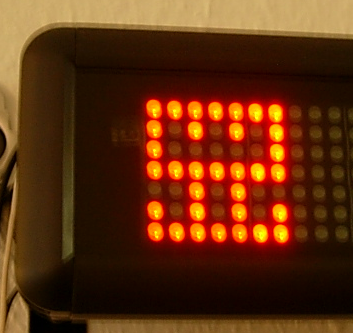
We even found out that our company logo (created by Hannafaktur) is scalable down to 7×7 pixels, which exactly fits the LED bar in height:

logo_on_led

Try this with your company’s logo!


Read more about our Extreme Feedback Devices:

Award your Customer

Recently, we successfully finished a web app project that had many specialties we never had before. Major issues were very tight budget and time constraints (about 3 months) including an absolutely unpostponable deadline. However, the bigger concern for us was the diversity of our customer. Although we had one or two main reference persons, for the project to be successful we depended on the collaboration of a total of 8 departments.

As a first step to meet those challenges we decided on one-week iteration cycles – the shortest ever for us. At the kick-off meeting, where delegates of all departments were assembled, we presented our strategy and tried to make clear that communication and collaboration would be essential for the project to succeed. We also invited everyone to come to iteration meetings even when the agenda is not exactly about their specific requirements. After the meeting we hoped for the best.

With (almost) all departments it went like this: We did one requirements gathering appointment with one or two delegates and they either showed up once or twice on following meetings or they approved our implementation based on emailed screen shots. With most departments, email response time was good, with some, well, let’s just say holiday season didn’t really help. But altogether it was sufficient to keep the project well on track.

But wait! Did I say all departments? Not exactly! One single department actually managed it to sent at least one delegate to every single iteration meeting. And they not only enjoyed coffee and cookies but contributed a great deal every time. This was very helpful for us especially because after every iteration, we were a little bit more confident that we were still on the right track. Towards the end of the project, when success was foreseeable, we had the idea that their outstanding performance had to be rewarded somehow. So at the last iteration meeting, again with people from every department, we presented them with the Continuous Collaboration Award. ccaward They were very delighted and for the others it was a good laugh. And with the help of a little champagne and some snacks it became a very nice last iteration meeting.

As many of you know, good understanding between customer and developer can never be taken for granted. This is why agile methods always put great emphasis on extensive customer communication. A-Story-of-Project-Failure-Mitch-Lacey shows that even agile-by-the-book projects can fail basically due to lack of understanding on customer side. So do it like us and, if they deserve it, show your appreciation to your customer once in a while in a more creative way. And if you use a cup, make sure that there is also champagne around to fill it.

Analyzing Java Heap problems Part 1: Basic actions and tools

You think that your shiny Java app has some memory issues but how do you find out if that is true and what is taking up all that memory? Knowing the potential problems is fine. Nevertheless you still have to find out your actual problems. There are several instruments available to help you analyse your Java application regarding its memory usage. I will tell you about increasing your maximum heap (most of you surely know  about that), looking at the memory of a running app, making heap dumps (on demand or on OutOfMemoryException) and analyzing the dumps.

Increasing maximum heap

The Java VM has a setting that defines the maximum amount of heap memory available to your application. It defaults to 64MB which is enough for many programs. If you have a larger application you should try to start it with that value increased by passing the -Xmx<size>m parameter to the VM at startup. <size> is the value in MBytes so just fiddle around with that. If your app is leaking memory that won’t help you for long so you have to find out *if* it leaks.

Looking at memory usage of a running application

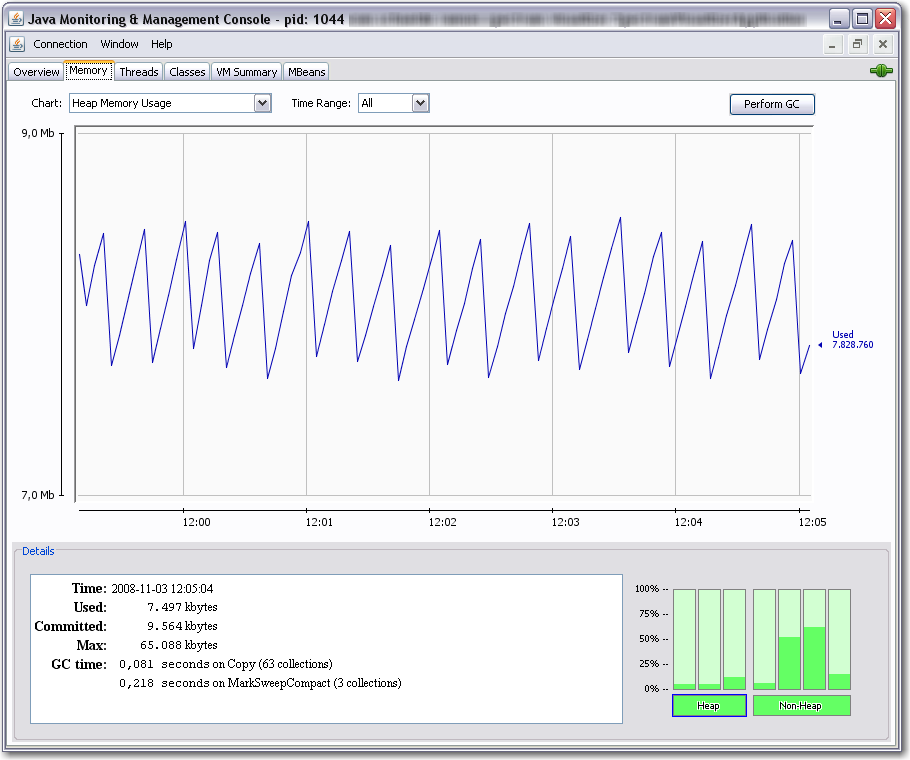
You can use jconsole for a quick look at your applications resource usage. jconsole is part of the Sun JDK since Java 6. You can connect the jconsole to any running java applications on your computer or even reachable over network and offering the Java Management Extensions (JMX) over TCP. Non-leaking programs should have a memory graph like this:

You can see, that the memory fluctuates over time because of the garbage collection cycles. But overall it does not grow. Next we will look at an application that leaks memory:

Above we see that the garbage collector (GC) tries its best but the used memory is growing over time. If we see such behaviour we probably need a heap dump to analyze the issue further.

Making a heapdump

Basically you have two nice ways to get a heap dump of your application which you can look into at a later time:

  1. Use jmap (which is also part of the Sun JDK 6) to dump the heap of a running application to a file using a command line like jmap -dump:format=b,file=myheap.hprof <pid>
  2. Tell the VM to make a heap dump when an OutOfMemoryException occurs by adding -XX:+HeapDumpOnOutOfMemoryError to the VM parameters at startup. With another switch you can specify the path for the dumps: -XX:HeapDumpPath=jmxdata .

After you have obtained a dump of your application you certainly want to have a look at it and find the issues. You can start with Sun’s jhat which is also part of current JDKs. After supplying jhat the hprof-file you can point your browser to the integrated webserver of jhat and browse the heap looking for the objects that take up your memory.

That way you can get an idea of what objects lived in memory when the heap dump was made and how they were referenced.

Conclusion

We have seen many ways to perform memory diagnostics using only free tools which are part of the JDK from Sun. They are all nice but have their limitations. Especially jhat has problems with usability and performance when you examine larger heap dumps with it.

Next time I will show you how to use the Eclipse plugin MAT for analysis of heap dumps obtained in one of the above ways. So stay tuned!

Extreme Feedback Device (XFD): The ONOZ! Lamp

When two good ideas meet, there’s a chance for an even better idea to be born. This happened to us some time ago, when the ONOZ! Lamp came up.

(This is a free translation and revision of an earlier article written in german)

The first good idea

On April 1st 2004, Alberto Savioa published a blog entry about an idea of two lava lamps (green and red) displaying the current build state of a project. I was somewhat distracted that day, marrying my wife, so the idea came to us two years later. Mike Clark wrote his wonderful book “Pragmatic Project Automation” and included not only the idea of the lava lamps, but also detailed construction guidance.

The second good idea

One day, an email contained a little animated gif with two panic guys running around.

Investigation suggests Jonn Wood as the author. We thought the guys act exactly like us after a broken build (one of the worst things that may happen here), so the gif and the word “ONOZ” were integrated into our company culture.

The birth of another idea

After we read about the lava lamps, we wanted to own them, too. But only after inspiration from the animated gif, we were sure about our specific realisation. We merged the two states into one lamp (on/off instead of green/red) and did without the lava. A normal desk light would do the job now.
We even have a good justification for the omission of the green (lava) lamp:

  • it saves energy
  • no timer switch is needed for the nights/weekends
  • our team includes colorblinds

The last reason is a good one when you look at this simulation of colorblindness:
These are pictures of the original green and red lava lamps:

This is how it looks to a colorblind employee. These images were generated by Vischeck, a website trying to inform about colorblindness practically.

Not much of a difference. If you swap them around secretly, ten percent (the percentage of colorblinds in the male population) of your team will panic without reason.

The ONOZ! Lamp

With little investment, we build a system supervising the build state of all our projects. Every build process sends its result to a server that checks for failures. If a build failed, the lamp gets switched on over traditional X10 signals. We can’t overlook the sudden burst of luminance, we panic a bit and try to fix the build. The lamp turns off when all projects are back to normal.

The ONOZ! Lamp is just a lamp standing around, until something ugly happens. Then it turns into a glowing infernal of failure. We nearly failed to give it a correctly spelled name, too. We named it “ONOEZ! Lamp” first, which seems to be the only invalid spelling of this exclamation.

The effects

The ONOZ! Lamp works great. Its mere presence has a comforting effect, as long as it is off. Which is the case most of the time. When it fires, the effect is like an alarm stopping all work. And the operator giving the alarm is always alert and incorruptible: our continuous integration server.


Read more about our Extreme Feedback Devices:

Java solves all memory problems, or maybe not?

Many people think that Java’s Garbage Collector (GC) solves all of their memory management problems. It is true that the GC does a great job in many many real world situations. It really eases your life as software developer especially compared to programming in languages like C /C++ where memory management is a major PITA. Even there you can help yourself by using object systems with reference counting, smart pointers etc. but you have to be aware of this issue all the time.

So everything regarding memory is fine in Java?

Actually not really. Many Java developers do not think about code potentially leading to memory leaks. I would like to point out some problems we encountered. The problems can be divided into two categories:

  1. Native resources which have to be managed manually
  2. Listeners attached to central objects which are never removed again

Examples of native resources

Database connections, result sets and so on are a very common native resource that need manual management. JDBC is a real pain regarding resource management and especially Oracle is very susceptical to leaking those. Either you are very careful here or you use some framework to help you. If you do not want to go the whole way to a persistence framework like hibernate, iBatis or toplink a solution like Spring JDBCTemplate may help you a lot.

Another example is the JOGL TextRenderer which has to be manually disposed or you will leak texture memory  and soon run into resource problems.

Files/Streams and Sockets should be handled carefully too. In most cases you are more or less in the same boat with the C/C++ people but using finally can help you there.

Examples of listener leaks

Sometimes something innocent looking like a Swing Component can turn into a memory leak. We used JDateChooser one of our projects and found some of our data displaying dialogs to exist several times in memory and thus taking huge amounts of RAM eventually leading to OutOfMemoryExceptions. In case of dialogs and windows a WindowListener might help.

Sometimes you might write similar objects yourself that register to some central instance (maybe even a singleton *yuck*). Deregistering them always is easily forgotten or overlooked. A common code pattern to look out for listener leaks where you cannot deregister easily at the right moment is the following:

public class MyCoolClass implements IDataListener {

    public MyCoolClass(IDataProvider dataProvider) {
        super();
        dataProvider.addDataListener(this);
    }

    ...
}

Avoid such constructs as they can prove really dangerous. There is more that can be done to lower the risk of hard-hitting memory/listener leaks: Use WeakReferences for listener management at the crucial central objects. The referenced objects are taken care of by the GC and the listener manager has to take care of the WeakReferences. They can be cleaned up periodically or when a notification takes place.

Conclusion

The Java GC helps a lot in everyday programming but there are still things to look out for. Just be aware of the resources you are using and think about their need of management. I will write some follow up articles about getting heap dumps in different situations and searching them for memory leaks using some nice free tools.

Update:

Kris Kemper wrote a nice article about Swing Memory Leaks with JCalendar and a solution to the problem.

Deploying a Grails app on an Oracle DB

Running our new grails app on HSQL and a Postgresql everything went fine. But the production DB was decided to be an Oracle. And suddenly the app crashed several times. Here’s a list of what problems we encountered:

  • ORA-00972: identifier is too long
  • want to store a null value in a non null column

Oracle identifiers are limited to 30 characters. So we thought using a mapping for the table should do the trick. But grails uses the table names to construct the n:m relations and their id column names between the domain classes. Looking at the grails docs we found a joinTable mapping:

static mapping = {
    table 'PROP'
    tablePerHierarchy false
    instrumentInfos joinTable: [name:'PROP_INS', key:'id', column:'instrumentInfos_id']
}

This worked most of the time but in some cases grails just didn’t want to take our definitions. The problem was a bug in grails. The workaround we took was to shorten the domain classes names.
The second problem arose as we tried to store empty strings into the database. Oracle stores empty strings as null values which causes a constraint violation exception. The solution was to declare the string columns nullable or not nullable and not blank but you cannot use a not nullable and blank string with an Oracle DB.

Extreme Feedback Device (XFD): The Code Flow-O-Meter

This is a free translation and revision of an earlier article written in german.

Since March 2007, the Schneide uses another Extreme Feedback Device (XFD): the Code Flow-O-Meter.

So what is this thing?

We bought a portable fountain made of slate, filled in water (no additives) and connected the power supply cord with a X10 application module. Then we programmed a litte IRC Bot (using the ten-minutes-to-success java IRC library pircbot) that triggers the module. We were then able to control the fountain by speaking to it over IRC.

Afterwards, we piped the commit messages of our source repositories to a little script that determines the “impact” of the commit by measuring the amount of changes to the code. This sounds more sophisticated as it really is, the number of changed files was a good enough guess for it. This impact is related to a duration, the more impact, the longer the timespan. Now the script tells the IRC bot to activate the fountain for that amount of time.

This way, we have a direct but unobtrusive notification about what is going on in the repositories, as this is the most important location of our company (talking about the numerous safety nets we applied to it would require another blog post). Initially, we thought about playing an audio sample singing “alleluia”, too, but this became ridiculous soon.

But why do you want this notification?

One of the rules of agile (or good) programming says “commit early, commit often”. But as soon as every little commit gets examined by a continuous integration server, all automated tests and a large number of software quality metric tools, the liability to keep the changes local a little bit longer grows. “After all, it’s ready when it’s done, and this is soon enough to check in” was a common justification especially among the less experienced programmers. But that’s the best way to miss the early feedback. And early feedback is effective feedback.

So we installed our portable fountain as a counter-incentive against late commits and started a little game. The rule of the game is simple:
Keep the Flow-O-Meter running!
When you commit, the fountain flows. The size of your commit is not as important as the commit itself, so its better to commit often. If everyone does it, the fountain may flow the whole day.

The Code Flow-O-Meter may be regarded as a measurement device of “progress”. Things are in a state of flux as long as it is running.

And did it work?

Yes, definitly. The Code Flow-O-Meter has become our little pet. Everyone loves it because it’s friendly and comforting. Think of a tamagochi, but without the annoyances. You only need to change and commit something to feed it and get the reward, nothing more.

As an additional gain, everybody else loves it, too. When we show it to a customer, they first see an ordinary portable fountain. When we explain and demonstrate our working cycle (code, commit, review) to them, something magical happens. I tend to think they involuntary get the notion of something happening after the commit when the fountain comes to life. This may be the concept of a build server, otherwise being invisible and intangible, materializing in the fountain. When we continue to explain what happens after the build, like the ONOZ! lamp lighting up to indicate a failed build, it’s already clear to them that the process does not end with the waterflow. The Code Flow-O-Meter serves as a link between the developer’s local work and the build feedback arriving out of nowhere some minutes later.


Read more about our Extreme Feedback Devices:

Using Hudson for C++/CMake/CppUnit

Update: Hudson for C++/CMake/CppUnit Revised

As a follow-up to Using grails projects in Hudson, here is another not-so-standard usage of Hudson: C++ projects with CMake and CppUnit. Let’s see how that works out.

As long as you have Java/Ant/JUnit based projects, a fine tool that it is, configuration of Hudson is pretty straight forward. But if you have a C++ project with CMake as build system and CppUnit for your unit testing, you have to dig a little deeper. Fortunately, Hudson provides the possibility to execute arbitrary shell commands. So in order to build the project and execute the tests, we can simply put a shell script to work:

   # define build and installation directories
   BUILD_DIR=$WORKSPACE/build_dir
   INSTALL_DIR=$WORKSPACE/install_dir

   # we want to have a clean build
   rm -Rf $BUILD_DIR
   mkdir $BUILD_DIR
   cd $BUILD_DIR

   # initializing the build system
   cmake  ..  -DCMAKE_INSTALL_PREFIX=$INSTALL_DIR

   # fire-up the compiler
   make install

Environment variable WORKSPACE is defined by Hudson. Other useful variables are e.g. BUILD_NUMBER, BUILD_TAG and CVS_BRANCH.

But what about those unit tests? Hudson understands JUnit test result files out-of-the-box. So all we have to do is make CppUnit spit out an xml report and then translate it to JUnit form. To help us with that, we need a little xslt transformation. But first, let’s see how we can make CppUnit generate xml results (a little simplified):

#include <cppunit/necessary/CppUnitIncludes/>
...

using namespace std;
using namespace CppUnit;

int main(int argc, char** argv)
{
   TestResult    controller;
   TestResultCollector result;
   controller.addListener(&result);

   CppUnit::TextUi::TestRunner runner;
   runner.addTest( TestFactoryRegistry::getRegistry().makeTest() );
   runner.run(controller);

   // important stuff happens next
   ofstream xmlFileOut("cpptestresults.xml");
   XmlOutputter xmlOut(&result, xmlFileOut);
   xmlOut.write();
}

The assumption here is that your unit tests are built into libraries that are linked with the main function above. To execute the unit tests we add the following to out shell script:

   export PATH=$INSTALL_DIR/bin:$PATH
   export LD_LIBRARY_PATH=$INSTALL_DIR/lib:$LD_LIBRARY_PATH

   # call the cppunit executable
   cd $WORKSPACE
   cppunittests

This results in CppUnit generating file $WORKSPACE/cpptestresults.xml. Now, with the help of a little program called xsltproc and the following little piece of XSLT code, we can translate cpptestresults.xml to testresults.xml in JUnit format.

 <?xml version="1.0" encoding="UTF-8"?>
<xsl:stylesheet version="1.0" xmlns:xsl="http://www.w3.org/1999/XSL/Transform">
    <xsl:output method="xml" indent="yes"/>
    <xsl:template match="/">
        <testsuite>
            <xsl:attribute name="errors"><xsl:value-of select="TestRun/Statistics/Errors"/></xsl:attribute>
            <xsl:attribute name="failures">
                <xsl:value-of select="TestRun/Statistics/Failures"/>
            </xsl:attribute>
            <xsl:attribute name="tests">
                <xsl:value-of select="TestRun/Statistics/Tests"/>
            </xsl:attribute>
            <xsl:attribute name="name">from cppunit</xsl:attribute>
            <xsl:apply-templates/>
        </testsuite>
    </xsl:template>
    <xsl:template match="/TestRun/SuccessfulTests/Test">
        <testcase>
            <xsl:attribute name="classname" ><xsl:value-of select="substring-before(Name, '::')"/></xsl:attribute>
            <xsl:attribute name="name"><xsl:value-of select="substring-after(Name, '::')"/></xsl:attribute>
        </testcase>
    </xsl:template>
    <xsl:template match="/TestRun/FailedTests/FailedTest">
        <testcase>
            <xsl:attribute name="classname" ><xsl:value-of select="substring-before(Name, '::')"/></xsl:attribute>
            <xsl:attribute name="name"><xsl:value-of select="substring-after(Name, '::')"/></xsl:attribute>
            <error>
                <xsl:attribute name="message">
                    <xsl:value-of select=" normalize-space(Message)"/>
                </xsl:attribute>
                <xsl:attribute name="type">
                    <xsl:value-of select="FailureType"/>
                </xsl:attribute>
                <xsl:value-of select="Message"/>
                File:<xsl:value-of select="Location/File"/>
                Line:<xsl:value-of select="Location/Line"/>
            </error>
        </testcase>
    </xsl:template>
    <xsl:template match="text()|@*"/>
</xsl:stylesheet>

The following call goes into our shell script:

xsltproc cppunit2junit.xsl $WORKSPACE/cpptestresults.xml > $WORKSPACE/testresults.xml

In the configuration page we can now check “Display JUnit test results” and give testresults.xml as result file. As a last step, we can package everything in $WORKSPACE/install_dir into a .tgz file and have Hudson to store it as build artifact. That’s it!

As always, there is room for improvements. One would be to wrap the shell script code above in a separate bash script and have Hudson simply call that script. The only advantage of the approach above is that you can see what’s going on directly on the configuration page. If your project is bigger, you might have more than one CppUnit executable. In this case, you can for example generate all testresult.xml files into a separate directory and tell Hudson to take into account all .xml files there.

Update: For the CMake related part of the above shell script I recently published the first version of a cmakebuilder plugin for Hudson. Check out my corresponding blog post.

Global error pages with Jetty and grails

We wanted to configure global error pages for our grails app. Using your favorite search engine you quickly find the following info.

At the bottom it says that in order to support global error pages you have to forward to a context because error pages can only be handled within contexts/webapps.
So I started adding a context to the contexts dir which looked like this:

<Configure class="org.mortbay.jetty.webapp.WebAppContext">
      <Set name="contextPath">/</Set>
      <Set name="war"><SystemProperty name="jetty.home" default="."/>/webapps/mywebapp.war</Set>
      <Set name="extractWAR">false</Set>
...

This caused an “IllegalArgumentException: name” at startup. The solution was to set extractWAR to true. JSPs or other resources (like GSPs) cannot be used inside a war when extractWAR is set to false. But this way got another pitfall: using localhost:8080/mywebapp won’t work. So why not just forward all requests from / to /mywebapp. Said and done:

<Set name="handler">
  <New id="Handlers" class="org.mortbay.jetty.handler.RewriteHandler">
    <Set name="rewriteRequestURI">false</Set>
    <Set name="rewritePathInfo">false</Set>
    <Set name="originalPathAttribute">requestedPath</Set>
    <Call name="addRewriteRule"><Arg>/mywebapp/*</Arg><Arg></Arg></Call>
    <Call name="addRewriteRule"><Arg>/*</Arg><Arg>/mywebapp</Arg></Call>
    <Set name="handler">
here the old handlers are inserted...

Now /mywebapp points to my webapp. / gives a 500 and other invalid urls give a 404.
To use your custom error pages inside a grails app just add the error codes you want to map inside the UrlMappings.groovy file:

class UrlMappings {
  ...
  static mappings = {
    "500"(view:'/error')
    "404"(view:'/error404')
  }
}