Building Windows C++ Projects with CMake and Jenkins

An short and easy way to build Windows C++ Software with CMake in Jenkins (with the restriction to support Visual Studio 8).

The C++ programming environment where I feel most comfortable is GCC/Linux (lately with some clang here and there). In terms of build systems I use cmake whenever possible. This environment also makes it easy to use Jenkins as CI server and RPM for deployment and distribution tasks.

So when presented with the task to set up a C++ windows project in Jenkins I tried to do it the same way as much as possible.

The Goal:

A Jenkins job should be set up that builds a windows c++ project on a Windows 7 build slave. For reasons that I will not get into here, compatibility with Visual Studio 8 is required.

The first step was to download and install the correct Windows SDK. This provides all that is needed to build C++ stuff under windows.

Then, after installation of cmake, the first naive try looked like this (in an “execute Windows Batch file” build step)

cmake . -DCMAKE_BUILD_TYPE=Release

This cannot work of course, because cmake will not find compilers and stuff.

Problem: Build Environment

When I do cmake builds manually, i.e. not in Jenkins, I open the Visual Studio 2005 Command Prompt which is a normal windows command shell with all environment variables set. So I tried to do that in Jenkins, too:

call “c:\Program Files\Microsoft SDKs\Windows\v6.0\Bin\SetEnv.Cmd” /Release /x86

cmake . -DCMAKE_BUILD_TYPE=Release

This also did not work and even worse, produced strange (to me, at least) error messages like:

‘Cmd’ is not recognized as an internal or external command, operable program or batch file.

The system cannot find the batch label specified – Set_x86

After some digging, I found the solution: a feature of windows batch programming called delayed expansion, which has to be enabled for SetEnv.Cmd to work correctly.

Solution: SetEnv.cmd and delayed expansion

setlocal enabledelayedexpansion

call “c:\Program Files\Microsoft SDKs\Windows\v6.0\Bin\SetEnv.Cmd” /Release /x86

cmake . -DCMAKE_BUILD_TYPE=Release

nmake

Yes! With this little trick it worked perfectly. And feels almost as with GCC/CMake under Linux:  nice, short and easy.

Open Source Love Day July 2010

Our Open Source Love Day for July 2010 brought love for Hudson (especially the CMake and Crap4j plugins), RXTX and JUnit.

This friday , we held our Open Source Love Day for July 2010.  We began with several internal meetings and discussion (like the Homepage Comittee meeting) and dived right in our work afterwards. Everybody had a little backlog of issues that we wanted to get done on this day. Nearly everybody succeeded (well, the author had a minor delay – read about it below). The day went by in a very fast pace, but it felt right.

The Open Source Love Day

We introduced a monthly Open Source Love Day (OSLD) to show our appreciation to the Open Source software ecosystem and to donate back. We heavily rely on Open Source software for our projects. We would be honored if you find our contributions useful. Check out our first OSLD blog posting for details on the event itself.

On this OSLD, we accomplished the following tasks:

  • There are really cool new features in the latest JUnit versions and Rules are one of them. What hurt our aesthetic sense was that the field that hold the Rule instance has to be public. Checkstyle was on our side, so we tweaked JUnit to allow all kinds of visibility. You can read about the change needed here: http://github.com/KentBeck/junit/issues#issue/31. The fix is almost trivial and will hopefully be incorporated in the next versions of JUnit, so we do not publish our altered version.
  • We constantly receive requests and remarks about our cmake plugin for Hudson. This lead to a new version of the plugin fixing two issues with matrix builds and custom build types. Head over to the plugin homepage and grab the new version 1.6. The issues were in detail:
    • The plugin can be used with matrix builds now
    • Custom build types can be defined now
  • RXTX is our choice for serial port communication with Java. We fixed some issues during the last few OSLDs, with one issue left for today: When you flush your stream while using a special type of usb-to-rs232 converter, you got an exception. The corresponding issue is #102 in the RXTX issue tracker. We proposed a patch that fixes the problem.
  • Another hudson plugin is our crap4j reporter. It lacked some love for months now and finally broke when used with the latest hudson versions. Fixing the problem was a lot harder than we thought, basically because the plugin needed adjustments to recent API changes and we couldn’t figure out exactly what adjustments are necessary. You might have a look at the developer mailing list thread for this question. Finally, we got it resolved (on sunday, with a sudden stroke of insight) and a new version 0.8 is published.
  • We use an internal time tracking tool for our projects. This tool isn’t specifically open source yet, but continues to grow in terms of features and usability. The work invested in this tool helps us to continue with the OSLD, so it’s beneficial work nonetheless.
  • During the last OSLD, we had plans for a new hudson plugin and even produced a prototype. This time, we looked around the hudson plugin zoo (it’s getting a bit difficult to keep track of all of them) for inspiration and found a wonderful piece of art: The Groovy Postbuild Plugin. Using this plugin with a small groovy script served our needs exactly. No need for a full-blown plugin when you can scratch your itch with a simple script. Thanks to Serban Iordache for his great work!

What were our lessons learnt today?

  • If you need to setup a fresh workspace for an open source project, consider to prepare it over the night before, or the download delay will kill your precious work time. There is nothing more frustrating than staring at a “downloading…” progress bar while being eager to start programming.
  • Always look around what others have done before. We wanted to build a full hudson plugin from scratch when all we needed was a little groovy script placed inside another plugin. Sweet!
  • Do not hesitate to privately fix open source issues that won’t get done in time for you. Just make sure to have a management process in place to track those changes and be able to re-apply them to future versions. More important though, be able to tell exactly when NOT to re-apply them because the original project has fixed the issue.

Retrospective of the OSLD

The OSLD went smooth and was productive. We tend to work on backlogs instead of searching for random issues now, but that’s just a sign that our approach has matured and we depend on the OSLD to get work done.

Last wednesday, we held our Open Source Love Day for June 2010. This one was productive despite the heat that had us sweating the whole day long (as a sidenote: it got even warmer the days afterwards). Some features were finished and will help at least us in our projects. We still look forward for the right way to release them. Another release was even more problematic, you will read about it below.The Open Source Love Day

We introduced a monthly Open Source Love Day (OSLD) to show our appreciation to the Open Source software ecosystem and to donate back. We heavily rely on Open Source software for our projects. We would be honored if you find our contributions useful. Check out our first OSLD blog posting for details on the event itself.

On this OSLD, we accomplished the following tasks:

Improved Version of CMake Builder for Hudson

Introducing version 1.5 of cmake builder plugin for Hudson.

Today I just want to give a small round-up of the improvements made on the cmake builder plugin since my last blog post. Back then, version 1.2 was released to support master/slave configurations. As of yesterday, we are at version 1.5 which contains the following improvements/bug-fixes:

  • Bug: The drop-down box for selecting the build type didn’t remember its value. This was fixed with a patch by Atte Timonen.
  • Improvement: Also included in Atte’s patch was the propagation of environment variables to the cmake command which now allows to do parameterized builds. A big thank’s to Atte!
  • Improvement: The install command gets only executed when install directory and install command is given. Before, the build was either broken or $WORKSPACE was used automatically as install directory. Thanks to Dat Chu for his feedback.
  • Improvement: The one-line ‘Other CMake Arguments’ field can get full pretty quickly, so it was changed to a multi-line text-area.

Thank’s again for the feedback, and have fun with the new version!

CMake Builder Plugin in Master/Slave Setups

Making the CMake Builder plugin for Hudson behave in master/slave settings.

The first versions of the cmake builder plugin were developed more or less only driven by our own needs. As people began to use it an issue came up that we hadn’t considered yet: distributed builds, a.k.a master/slave mode. So on our first OSLD in 2010 I looked into the plugin and began to rectify the situation.

My test setup consisted of a hudson master on WindowsXP box which was connected via SSH to a slave node in a Ubuntu virtual machine. The first errors were easy to find. The plugin tried to find all configured paths on the windows host and not on the ubuntu slave.

Experience from our previous Crap4J plugin development and a quick read here brought me on the right track. It’s not a good idea to use just java.io.File if you want your plugin to be master/slave capable – use hudson.FilePath instead.

So after replacing all java.io.File occurrences with hudson.FilePath the situation was much better. The plugin handled all paths correctly but still produced errors when calling cmake. I quickly discovered that java.lang.Process and java.lang.ProcessBuilder were used to call “cmake -version”. Again, not a good idea – hudson.Launcher is your friend here.

After replacing Process with Launcher I had only one strange error left. The following launcher call using a nice fluent interface wouldn’t execute on the remote machine but insisted to execute locally.

launcher.launch().cmds(cmakeCall).envs(environmentVars)
   .stdout(listener).pwd(workDir).join();

When I changed it to the seemingly equal statement

launcher.launch(cmakeCall, environmentVars,
    listener.getLogger(), workDir).join();

it worked like a charm.

After all those changes I proudly present the newest version of CMake Builder Plugin which is now ready to be used in distributed environments.

Only one little unpleasantness still exists, though: when configuring the make and install commands the plugin tries to find the executables on the PATH of host machine. For now, you can just ignore the error message. I try to look into it, soon. Apart from that, have fun with the new version.

Open Source Love Day December 2009

Our Open Source Love Day for November 2009 brought love for EGit and several hudson plugins. We got slightly frustrated over KDevelop4.

On Tuesday, we had our last regular working day for 2009. We celebrated this circumstance by having our fourth Open Source Love Day (OSLD). The day was successful, you can review our list of today’s achievements below.

We introduced a monthly Open Source Love Day to show our appreciation to the Open Source software ecosystem and to donate back We heavily rely on Open Source software for our projects. We would be honored if you find our contributions useful. Check out our first OSLD blog posting for details on the event itself.

Participate at our OSLD by using the features we’ve built today:

  • Our campfire plugin for hudson was updated to version 1.1. The new version contains the improvements Mark Woods suggested (global configuration and login recovery). Thank you, Mark!
  • The campfire plugin also switched the communication model from webpage scraping to the brand new campfire API. This should improve the stability of the plugin.
  • Some of the EGit (git plugin for eclipse) patches we sent in at the last OSLD needed some rework and polishing. You can review the details in EGit’s code review system gerrit: change 121 and change 122.
  • Our cmake hudson plugin was updated to version 1.1. The new version checks the environment (installed cmake version, etc.) before delegating the call and provides better error messages.
  • We started working on a feature of KDevelop4 that was present in KDevelop3 and is now missing: “Compile file”. The progress was slowed down by some problems. See below for details.
  • Hudson got a new major version of the IRC plugin from Christoph Kutzinksi. The plugin was in a rather desolate state before. We had used a private fork with specific additions to control our infrastructure. The plugin was on our list of OSLD patients, when Christoph merged it with the hudson instant-messaging plugin and introduced a multitude of cool new features. We beta-tested the new version and it was great. The only drawback was the complete alteration in message syntax that broke our infrastructure. So in order to scratch our own itch, we programmed a little API to parse hudson IRC plugin messages of the new 2.X version stream. Our code is published on github, have a look if you are interested and drop us a line if you found it useful.

What were our lessons learnt today?

  • If maven decides to work properly, everything is really cool.
  • Just because you use JGit/EGit on top of Eclipse, all three being platform independent, doesn’t save you from slash vs. backslash issues. EGit’s initial user experience is better on unixoid platforms than on windows systems. The patch #141 helped us beyond the showstopper of unrecognized local repositories.
  • We acquired an additional share of eclipse plugin development knowledge when polishing our EGit features.
  • Working with git and gerrit is challenging on first encounter. We are constantly learning in this area.
  • Bugzilla fails to present open issues in a manner where you can quickly pick an issue of interest. If you really want to use it for your open source project, think of a scraped website that only lists the “low hanging fruits” for newbie developers.
  • KDevelop4 has outdated documentation, the projects kdevplatform and kdevelop were moved inside the repository.
  • If you encounter a rather erratic error stating that “KDE4Workspace not found”, try excluding the debuggers/gdb subproject from your build.
  • Most of us used the waiting delays of one project (“oh, maven is downloading the internet again”) to switch over to a secondary task. So this event trains our multitasking abilities right along.

In summary, this OSLD was a fun way to end a workyear on heavy duty. We will continue to celebrate OSLDs in 2010, as it’s a fun way to peek into foreign projects, learn a lot in short time and contribute to the community.

CMake Builder Plugin Reloaded

A few months ago I set out to build my first hudson plugin. It was an interesting, sometimes difficult journey which came to a good end with the CMake Builder Plugin, a build tool which can be used to build cmake projects with hudson. The feature set of this first version was somewhat limited since I applied the scratch-my-own-itch approach – which by the time meant only support for GNU Make under Linux.

As expected, it wasn’t long until feature requests and enhancement suggestions came up in the comments of my corresponding blog post. So in order to make the plugin more widely useable I used our second  Open Source Love Day to add some nice little features.

Update: I used our latest OSLD to make the plugin behave in master/slave setups. Check it out!

Let’s take a walk through the configuration of version 1.0 :

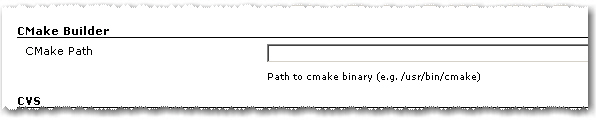
Path to cmake executable

1. As in the first version you have to set the path to the cmake executable if it’s not already in the current PATH.

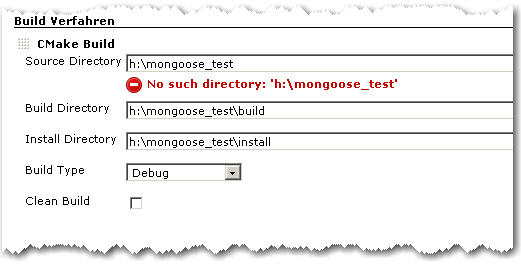
2. The build configuration starts as in the first version with Source Directory, Build Directory and Install Directory.

CMake Builder Configuration Page

3. The Build Type can now be selected more conveniently by a combo box.

4. If Clean Build is checked, the Build Dir gets deleted on every build

Advanced Configuration Page

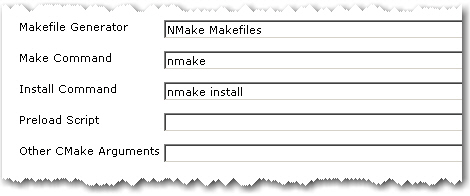
5. The advanced configuration part starts with Makefile Generator parameter which can be used to utilize the corresponding cmake feature.

6. The next two parameters Make Command and Install Command can be used if make tools other than GNU Make should be used

7. Parameter Preload Script can be used to point to a suitable cmake pre-load script file. This gets added to the cmake call as parameter of the -C switch.

8. Other CMake Arguments can be used to set arbitrary additional cmake parameters.

The cmake call will then be build like this:

/path/to/cmake  \
   -C </path/to/preload/script/if/given   \
   -G <Makefile Generator>  \
   -DCMAKE_INSTALL_PREFIX=<Install Dir> \
   -DCMAKE_BUILD_TYPE=<Build Type>  \
   <Other CMake Args>  \
   <Source Dir>

After that, the given Make and Install Commands are used to build and install the project.

With all these new configuration elements, the CMake Builder Plugin should now be applicable in nearly every project context. If it is still not useable in your particular setting, please let me know. Needless to say, feedback of any kind is always appreciated.

CMake Builder Plugin for Hudson

Update: Check out my post introducing the newest version of the plugin.

Today I’m pleased to announce the first version of the cmakebuilder plugin for Hudson. It can be used to build cmake based projects without having to write a shell script (see my previous blog post). Using the scratch-my-own-itch approach I started out implementing only those features that I needed for my cmake projects which are mostly Linux/g++ based so far.

Let’s do a quick walk through the configuration:

1. CMake Path:
If the cmake executable is not in your $PATH variable you can set its path in the global Hudson configuration page.

2. Build Configuration:

To use the cmake builder in your Free-style project, just add “CMake Build” to your build steps. The configuration is pretty straight forward. You just have to set some basic directories and the build type.

cmakebuilder demo config

The demo config above results in the following behavior (shell pseudocode):

if $WORKSPACE/build_dir does not exist
   mkdir $WORKSPACE/build_dir
end if

cd $WORKSPACE/build_dir
cmake $WORKSPACE/src -DCMAKE_BUILD_TYPE=Debug -DCMAKE_INSTALL_PREFIX=$WORKSPACE/install_dir
make
make install

That’s it. Feedback is very much appreciated!!

Originally the plan was to have the plugin downloadable from the hudson plugins site by now but I still have some publishing problems to overcome. So if you are interested, make sure to check out the plugins site again in a few days. I will also post an update here as soon as the plugin can be downloaded.

Update: After fixing some maven settings I was finally able to publish the plugin. Check it out!

Using Hudson for C++/CMake/CppUnit

Update: Hudson for C++/CMake/CppUnit Revised

As a follow-up to Using grails projects in Hudson, here is another not-so-standard usage of Hudson: C++ projects with CMake and CppUnit. Let’s see how that works out.

As long as you have Java/Ant/JUnit based projects, a fine tool that it is, configuration of Hudson is pretty straight forward. But if you have a C++ project with CMake as build system and CppUnit for your unit testing, you have to dig a little deeper. Fortunately, Hudson provides the possibility to execute arbitrary shell commands. So in order to build the project and execute the tests, we can simply put a shell script to work:

   # define build and installation directories
   BUILD_DIR=$WORKSPACE/build_dir
   INSTALL_DIR=$WORKSPACE/install_dir

   # we want to have a clean build
   rm -Rf $BUILD_DIR
   mkdir $BUILD_DIR
   cd $BUILD_DIR

   # initializing the build system
   cmake  ..  -DCMAKE_INSTALL_PREFIX=$INSTALL_DIR

   # fire-up the compiler
   make install

Environment variable WORKSPACE is defined by Hudson. Other useful variables are e.g. BUILD_NUMBER, BUILD_TAG and CVS_BRANCH.

But what about those unit tests? Hudson understands JUnit test result files out-of-the-box. So all we have to do is make CppUnit spit out an xml report and then translate it to JUnit form. To help us with that, we need a little xslt transformation. But first, let’s see how we can make CppUnit generate xml results (a little simplified):

#include <cppunit/necessary/CppUnitIncludes/>
...

using namespace std;
using namespace CppUnit;

int main(int argc, char** argv)
{
   TestResult    controller;
   TestResultCollector result;
   controller.addListener(&result);

   CppUnit::TextUi::TestRunner runner;
   runner.addTest( TestFactoryRegistry::getRegistry().makeTest() );
   runner.run(controller);

   // important stuff happens next
   ofstream xmlFileOut("cpptestresults.xml");
   XmlOutputter xmlOut(&result, xmlFileOut);
   xmlOut.write();
}

The assumption here is that your unit tests are built into libraries that are linked with the main function above. To execute the unit tests we add the following to out shell script:

   export PATH=$INSTALL_DIR/bin:$PATH
   export LD_LIBRARY_PATH=$INSTALL_DIR/lib:$LD_LIBRARY_PATH

   # call the cppunit executable
   cd $WORKSPACE
   cppunittests

This results in CppUnit generating file $WORKSPACE/cpptestresults.xml. Now, with the help of a little program called xsltproc and the following little piece of XSLT code, we can translate cpptestresults.xml to testresults.xml in JUnit format.

 <?xml version="1.0" encoding="UTF-8"?>
<xsl:stylesheet version="1.0" xmlns:xsl="http://www.w3.org/1999/XSL/Transform">
    <xsl:output method="xml" indent="yes"/>
    <xsl:template match="/">
        <testsuite>
            <xsl:attribute name="errors"><xsl:value-of select="TestRun/Statistics/Errors"/></xsl:attribute>
            <xsl:attribute name="failures">
                <xsl:value-of select="TestRun/Statistics/Failures"/>
            </xsl:attribute>
            <xsl:attribute name="tests">
                <xsl:value-of select="TestRun/Statistics/Tests"/>
            </xsl:attribute>
            <xsl:attribute name="name">from cppunit</xsl:attribute>
            <xsl:apply-templates/>
        </testsuite>
    </xsl:template>
    <xsl:template match="/TestRun/SuccessfulTests/Test">
        <testcase>
            <xsl:attribute name="classname" ><xsl:value-of select="substring-before(Name, '::')"/></xsl:attribute>
            <xsl:attribute name="name"><xsl:value-of select="substring-after(Name, '::')"/></xsl:attribute>
        </testcase>
    </xsl:template>
    <xsl:template match="/TestRun/FailedTests/FailedTest">
        <testcase>
            <xsl:attribute name="classname" ><xsl:value-of select="substring-before(Name, '::')"/></xsl:attribute>
            <xsl:attribute name="name"><xsl:value-of select="substring-after(Name, '::')"/></xsl:attribute>
            <error>
                <xsl:attribute name="message">
                    <xsl:value-of select=" normalize-space(Message)"/>
                </xsl:attribute>
                <xsl:attribute name="type">
                    <xsl:value-of select="FailureType"/>
                </xsl:attribute>
                <xsl:value-of select="Message"/>
                File:<xsl:value-of select="Location/File"/>
                Line:<xsl:value-of select="Location/Line"/>
            </error>
        </testcase>
    </xsl:template>
    <xsl:template match="text()|@*"/>
</xsl:stylesheet>

The following call goes into our shell script:

xsltproc cppunit2junit.xsl $WORKSPACE/cpptestresults.xml > $WORKSPACE/testresults.xml

In the configuration page we can now check “Display JUnit test results” and give testresults.xml as result file. As a last step, we can package everything in $WORKSPACE/install_dir into a .tgz file and have Hudson to store it as build artifact. That’s it!

As always, there is room for improvements. One would be to wrap the shell script code above in a separate bash script and have Hudson simply call that script. The only advantage of the approach above is that you can see what’s going on directly on the configuration page. If your project is bigger, you might have more than one CppUnit executable. In this case, you can for example generate all testresult.xml files into a separate directory and tell Hudson to take into account all .xml files there.

Update: For the CMake related part of the above shell script I recently published the first version of a cmakebuilder plugin for Hudson. Check out my corresponding blog post.