How I accidentally cut my audio-files in half

A couple of weeks ago, I asked my brother to test out my new game You Are Circle (please wishlist it and check out the demo, if that’s up your alley!) and among lots of other valuable feedback, he mentioned that the explosion sound effects had a weird click sound at the end that he could only hear with his headphones on. For those of you not familiar with audio signal processing, those click or pop sounds usually appear when the ‘curvy’ audio signal is abruptly cut off1. I did not notice it on my setup, but he has a lot of experience with audio mixing, so I trusted his hearing. Immediately, I looked at the source files in audacity:

They looked fine, really. The sound slowly fades out, which is the exact thing you need to do to prevent clicks & pops. Suspecting the problem might be on the playback side of his particular setup, I asked him to record the sound on his computer the next time he tested and then kind of forgot about it for a bit.

Fast-forward a couple of days. Neither of us had followed up on the little clicky noise thing. While doing some video captures with OBS, I noticed that the sound was kind of terrible in some places, the explosions in particular. Maybe that was related?

While building a new version of my game, Compiling resources... showed up in my console and it suddenly dawned on me: What if my home-brew resource compiler somehow broke the audio files? I use it to encode all the .wav originals into Ogg Vorbis for deployment. Maybe a badly configured encoding setup caused the weird audio in OBS and for my brother? So I looked at the corresponding .ogg files, and to my surprise, it indeed had a small abrupt cut-off at the end. How could that happen? Only when I put both the original and the processed file next to each other, did I see what was actually going on:
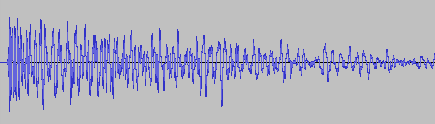
It’s only half the file! How did that happen? And what made this specific file so special for it to happen? This is one of many files that I also convert from stereo to mono in preprocessing. So I hypothesized that might be the problem. No way I missed all of those files being cut in half though, or did I? So I checked the other files that were converted from stereo to mono. Apparently, I did miss it. They were all cut in half. So I took a look at the code. It looked something like this:

while (keep_encoding)
{
  auto samples_in_block = std::min(BLOCK_SIZE, input.sample_count() - sample_offset);
  if (samples_in_block != 0)
  {
    auto samples_per_channel = samples_in_block / channel_count;
    auto channel_buffer = vorbis_analysis_buffer(&dsp_state, BLOCK_SIZE);
    auto input_samples = input.samples() + sample_offset;

    if (convert_to_mono)
    {
      for (int sample = 0; sample < samples_in_block; sample += 2)
      {
        int sample_in_channel = sample / channel_count;
        channel_buffer[0][sample_in_channel] = (input_samples[sample] + input_samples[sample + 1]) / (2.f * 32768.f);
      }
    }
    else
    {
      for (int sample = 0; sample < samples_in_block; ++sample)
      {
        int channel = sample % channel_count;
        int sample_in_channel = sample / channel_count;
        channel_buffer[channel][sample_in_channel] = input_samples[sample] / 32768.f;
      }
    }

    vorbis_analysis_wrote(&dsp_state, samples_per_channel);
    sample_offset += samples_in_block;
  }
  else
  {
    vorbis_analysis_wrote(&dsp_state, 0);
  }

  /* more stuff to encode the block using the ogg/vorbis API... */
}

Not my best work, as far as clarity and deep nesting goes. After staring at it for a while, I couldn’t really figure out what was wrong with it. So I built a small test program to debug into, and only then did I see what was wrong.

It was terminating the loop after half the file, which now seems pretty obvious given the outcome. But why? Turns out it wasn’t the convert_to_mono at all, but the whole loop. What’s really the problem here is mismatched and imprecise terminology.

What is a sample? The audio signal is usually sampled several thousand times (44.1kHz, 48kHz or 96kHz are common) per second to record the audio waves. One data point is called a sample. But that is only enough of a definition if the sound has a single channel. But all those with convert_to_mono==true were stereo, and that’s exactly were the confusion is in this code. One part of the code thinks in single-channel samples, i.e. a single sampling time-point has two samples in a stereo file, while the other part things in multi-channel samples, i.e. a single sampling time-point has only one stereo sample, that consists of multiple numbers. Specifically this line:

auto samples_in_block = std::min(BLOCK_SIZE, input.sample_count() - sample_offset);

samples_in_block and sample_offset use the former definition, while input.sample_count() uses the latter. The fix was simple: replace input.sample_count() with input.sample_count() * channel_count.

But that meant all my stereo sounds, even the longer music files, were missing the latter half. And this was not a new bug. The code was in there since the very beginning of the git history. I just didn’t hear its effects. For the sound files, many of them have a pretty long fade out in the second half, so I can kind of get why it was not obvious. But the music was pretty surprising. My game music loops, and apparently, it also loops if you cut it in half. I did not notice.

So what did I learn from this? Many of my assumptions while hunting down this bug were wrong:

  • My brother’s setup did not have anything to do with it.
  • Just because the original source file looked fine, I thought the file I was playing back was good as well.
  • The bad audio in OBS did not have anything to do with this, it was just recorded too loud.
  • The ogg/vorbis encoding was not badly configured.
  • The convert_to_mono switch or the special averaging code did not cause the problem.
  • I thought I would have noticed that almost all my sounds were broken for almost two years. But I did not.

What really cause the problem was an old programming nemesis, famously one of the two hard things in computer science: Naming things. There you have it. Domain language is hard.

  1. I think this is because this sudden signal drop equates to a ‘burst’ in the frequency domain, but that is just an educated guess. If you know, please do tell. ↩︎

Game Optimization Resolved

In my last blog post, I explained a performance problem in my game abstractanks but not how I solved it.

So I had not done any optimization work in a while, so the first thing I did turned out to be an error. And not only in hindsight – I actually knew how to tackle a problem like that – I just temporarily forgot at that point.

Going down the rabbit hole

Where we left off, my profiler showed FriendlyUnitOccupies as the culprit. That function basically does circle/circle collision detection using a quad-tree as the spatial acceleration structure. Looking at the samples from my profiler, I could see that that it was descending into the tree quite deeply. Like all tree structures, a quad-tree does pointer-chasing which is very bad for modern CPUs. So I figured I should look at how to optimize that. The data structure was implemented in a hurry, so there seemed plenty to do:

  • Instead of recursing into each node, use tail-call optimization and early culling to speed up traversal.
  • Pre-cache the query with the max-search radius and the other requirements to the units, e.g. not dead, same team, etc.. and then use that to build a new tree for the actual queries.

Because the data structure was pretty non-generic, I started to basically rewrite it to use it in this scenario. While I was about half way through with that, it dawned on me that I was barking at the wrong tree.

Taking a step back

The excellent book Video Game Optimization has some great advice on which level to attack an optimization problem.

  1. System-level. Can you change the system to do something differently and still solve your problem?
  2. Algorithm-level. Are you using the most efficient right algorithm for the data you have?
  3. Micro-level. Are you not wasting any processing power on the lower levels?

I was already on the algorithm level. So I went back to the systemic level: What if the AI did not try to change the target position that often, maybe just every few seconds? That effectively meant lowering the AIs APM. It’s not a bad solution, especially since that makes the AI behave more human. But on the other hand, real-time games, as the name implies, have a soft real-time requirement. So you generally like to avoid huge workloads that go over your frame budget. With how slow the algorithm was, that could easily be the case. The solution is then to do the work concurrently, either by splitting it up or doing it in the background. Both solutions seemed difficult, since the AI code does currently not allow for easy concurrency. So that idea was out.

What if the parking-positions where cached? Subsequent calls to get parking positions could probably reuse a lot of the positions that were computed in previous frames, given that the target point only moves by a little bit each frame. I figured that might work, but it requires more housekeeping and data-dependencies – the result of the previous query needs to be used for the next. That seemed complex and therefore brittle.

A Solution?

Temporal coherency was a pretty good idea though, but not the scale was to big this time. What if I exploited it within a single frame? Now the original code did obscure this, but maybe it gets a little more clear if I write it like this:

optional<v2> GameWorld::FindFreePosition(v2 Center, std::vector<v2> const& Occupied)
{
  auto CheckPosition = [&](v2 Candiate)
  {
    if (!IsPassable(Candidate))
      return false;

    if (OverlapsWith(Occupied))
      return false;

    return !FriendlyUnitOccupies(Candidate);  
  };
  auto Samples = SampledPositions(Center, SomeRandomness());
  auto Found = find_if(SampledPositions.begin(), SampledPositions.end(), CheckPosition(Position));
  
  return (Found != SampledPositions.end()) ? *Found : none;
}

Now as I explained in the previous post, this was called in a loop for each unit to be parked.

std::vector<v2> GameWorld::FindParkingPositions(v2 Center, std::size_t N)
{
  std::vector<v2> Results;
  for (std::size_t i = 0; i < N; ++i)
  {
    auto MaybePosition = FindFreePosition(Center, Results);
    if (!MaybePosition) // No more free space?
      break;
    Results.push_back(*MaybePosition);
  }
  return Results;
}

Easy to see: counting the number of CheckPosition calls, this algorithm is O(n) in number of sampled positions. The number of sampled positions depends linearly on the number of units to be parked, because more units obviously need more parking positions, essentially making this O(n²) for the unit count! But the positions get resampled for each unit – with the only change being the little bit of randomness that is injected everytime. In other words, each call would just test false for sampled positions roughly corresponding to the units that are already placed.

So what I did was a very small change: only inject the randomness once and merge the loops:

auto Samples = SampledPositions(Center, SomeRandomness());
std::vector<v2> Results;

for (auto const& Sample : Samples)
{
  if (CheckPosition(Sample))
    Results.push_back(Sample);

  if (Result.size() >= N)
    break;
}
return Results;

And this did the trick! The algorithm’s run-time when below the 1ms range, and the smaller variation in randomness is not really visible.

Conslusions

I was thrown off-track be the false conclusion that CheckPositions was too slow when it was in fact just called too often. Context is key! Always approach these things outside-in.
Using less-than-optimal abstractions obscured the opportunity to hoist out the sample generation from me. Iteration is always a separate concern, even when it is not on containers!

A Game Optimization War Story

As our customers surely know, I’m not working here on fridays. This is because that’s the time I allocate to my side project, an arcade real-time strategy game called abstractanks. It is a passion project above all else, but of course, I am also learning a lot, much of which I can apply to my “day job” here as well. Today I want to share the story of how I optimized a critical bit of code in that game.

The Big Slowdown

While working on scripted missions, one main element I am using is to make a group of units attack when you enter an area (a.k.a. a zone-trigger). This seems easy enough, but was causing massive slowdowns as soon as the enemy group started moving. My average logic frame-time jumped from 0.3 ms to more than 1500 ms, which essentially makes the game unplayable. When seeing a performance problem, your first instinct should always be to profile it. So I booted up WPR/WPA and did just that. Once I had the profile, I followed the most-sampled path in the stack and found my way to the supposed culprit: the parking algorithm.

Context

When optimizing, you need as much context as you possible to find the best possible course of action. So let me explain how that algorithm fits into the broader picture.

Parking

My main game-mechanic is moving around your units. You do this by selecting a group and then clicking somewhere on the map to issue the move-order. In addition to path-finding process, this also runs an algorithm I call park-planning (as in parking a car). It makes sure that the units know to position themselves around the target point in a roughly circular shape once they arrive. It is essential to the interaction of this mechanic with the capturing of objectives, which are circular as well. Before this was implemented, the units would just decelerate after passing the target point. This caused them to “overshot” and miss the objectives, which was frustrating to the players: they clicked in the right place, but the units would not stop there, but slightly behind it. To make things worse, units arriving later, would bump into those that were already there, further pushing them away and clumping up.

AI Moving

In my particular case, the AI enemy was repeatedly issuing move-orders to close in on the intruder – the player. Since the player group usually also moved, the AI was trying to adapt by changing the move order every frame (effectively working at around 2000 APMs).

Diving into the code

My park-planning implementation is divided into two steps: finding enough parking spots, and then assigning units to it. The profiler was showing that the first part was the problem while the assignment was negligible in terms of run-time. Historically, the first step was reusing and extending some code I first wrote for spawning units, which worked like this:

optional<v2> GameWorld::FindFreePosition(v2 Center, std::vector<v2> const& Occupied)
{
  auto CheckPosition = [&](v2 Candiate)
  {
    if (!IsPassable(Candidate))
      return false;

    if (OverlapsWith(Occupied))
      return false;

    return !FriendlyUnitOccupies(Candidate);   
  };

  if (CheckPosition(Center))
    return Center;

  auto Radius = UNIT_SIZE;
  while (Radius < MAX_SEARCH_RADIUS)
  {
    // Roll a random starting angle
    auto AngleOffset = RandomAngle();
    auto Angle = 0.f;
    while (Angle < 2*Pi)
    {
      auto Candidate = Center + AngleVector(Angle + AngleOffset)*Radius;
      if (CheckPosition(Candidate))
        return Candidate;

      // Move along this circle
      Angle += 2*Pi*Radius / UNIT_SIZE / OVERSAMPLING_FACTOR;
    }

    // Increase the Radius
    Radius += UNIT_SIZE;
  }
  return none;  
}

Note that all the functions in the CheckPosition lambda are “size aware” and respect the UNIT_SIZE – so they are slightly more complex than what the pseudo-code here would have you believe.
The occupied parameter was added for the parking-position finding. It successively fills up the std::vector with positions and uses them once it found enough.

Back to the profiling results: They were showing that most of the time was spent in the FriendlyUnitOccupies, followed by IsPassable and and then OverlapsWith. FriendlyUnitOccupies dominated the time by about 8x times the rest. That function uses a quad-tree to accelerate spatial queries for other units.

Next steps

Obviously, this code uses pretty simplistic approach to the problem – basically just brute-forcing it. But that’s good now there are many different paths to take, many optimization opportunities. My approach was a relatively simple change that got the frame time back down below 1 ms, but before I did that, I considered many and tested a few other different approaches. I will talk about that in detail in my next post. How would you approach this?