JSON Web Token (JWT) and Security

General

JWT is an open standard for transmitting information as a JSON object. The most common scenario is authorization.

Unfortunately, the token keeps cropping up in connection with the security vulnerability. For example, it is mentioned in the OWASP top ten under the item “Broken Access Control”. In the following, I would like to briefly explain the JWT and point out a few risks when using it.

The token consists of three parts: the header, payload, and signature. Each part has been encoded with Base64Url, and all parts are joined together, separated by dots.

The type of the token and the signing algorithm is typically defined in the header.

{
  "alg": "HS256",
  "typ": "JWT"
}

The payload contains the information that should be transmitted. In cases of authorization, the user and permissions. It is also possible to define token metadata, like an expiration time. Such information must be checked by the developer. The token itself has no expiration.

{
  "exp": 1516242622,
  "name": "Max Mustermann",
  "admin": true
}

The signature take the encoded header, the encodes payload and a secret and encode it with the algorithm defined in header.

HMACSHA256(
  base64UrlEncode(header) + "." +
  base64UrlEncode(payload),
  secret)

In the authorization scenario, the token is requested from the client and created by the authorization server. The client uses the token to authorize a resource server. Therefore, the token is sent in the authorization header using the bearer schema.

Security Issues

JWT has a lot of attack surfaces, like the None Hashing Algorithm, ECDSA “Psychic Signatures”, Weak HMAC Keys, HMAC vs Public Key Confusion, Attacker Provided Public Key and the plaintext transmitting of the payload. All in all, JWT is vulnerable to replaying or tampering. Especially if the secret is not strong, the token does not expire, or no signature is used at all.

In the following, I will take a closer look at the none hashing algorithm issue as an example:

JWT allows you to set the algorithm in the header to none. So the signature part that tries to detect tampering is missing. It is just the first two parts and the point of waiting for a signature, which does not come.

eyJhbGciOiAibm9uZSIsICJ0eXAiOiAiSldUIn0K.eyJ1c2VybmFtZSI6ImFkbWluaW5pc3RyYXRvciIsImlzX2FkbWluIjp0cnVlLCJpYXQiOjE1MTYyMzkwMjIsImV4cCI6MTUxNjI0MjYyMn0.

All security precautions are already suspended, and the attacker can create his own tokens or modify intercepted ones at his leisure.

Some frameworks forbid this configuration, but in the JWT standard, it is possible. Although many applications and libraries that use JWT have disabled the option or at least tried to do so, there are still security vulnerabilities due to the configuration option. For example, because only case-sensitive “none”  was checked, settings like “None” or “NoNe” could still be used as an attack surface. So if you want to forbid this setting, it is important to do it case-insensitively.

Since this is a big problem that also occurs again and again, there is a website that counts the days since the last none algorithm problem: https://www.howmanydayssinceajwtalgnonevuln.com/.

The none algorithm is not the only attack surface on the algorithm usage. Most of the before named issues are related to the algorithm part.

How to use most secure

At best, the token should only be used once to confirm authentication and authorization. It should not be used for session management and has a short lifespan. Thus, the time span for attacks can be minimized. Also, the algorithm none option should be prevented, and a proper signature algorithm should be used. Additional information and configuration recommendations can be found under: https://jwt.io/ and OWASP cheatsheet.
Do Not Just Eat That Frog!

It is surely remarkable how much advice on Software Development is actually advice on Project Management, sometimes bordering into the psychological field and being more like management of personal Energy, Attention or Motivation. But this does make sense, considering how so often, some seemingly simple task can blow up to something difficult to manage, then becoming trivial again, then mathematically impossible, then simple again.

All of that within a context where somewhere, some customers enjoy their day, not being inclined to be part of these emotional loops at all. Just solve their problems. Which is our job.

So, one of the frequent Time Management tips passed around is “Eat That Frog” (Originally by Brian Tracy with some help from Mark Twain). The main idea is that some seriously demanding task (“having to eat a live frog”) will not become more attractive during the day, so it’s important to make it your very first priority to gulp that thing down, first thing the morning.

I found this approach quite helpful, and it can be part of a larger strategy known as “Risk First” as commonly mentioned by other authors around here.

However, any good advice can only be applied within boundaries and recently, I was dealing with several harder issues that made me refine the original thesis quite a bit.

I did not find this knowledge somewhere else, so feel free to discuss and correct me on my points of view. Not that I could be mistaken, though ¯\_(ツ)_/¯

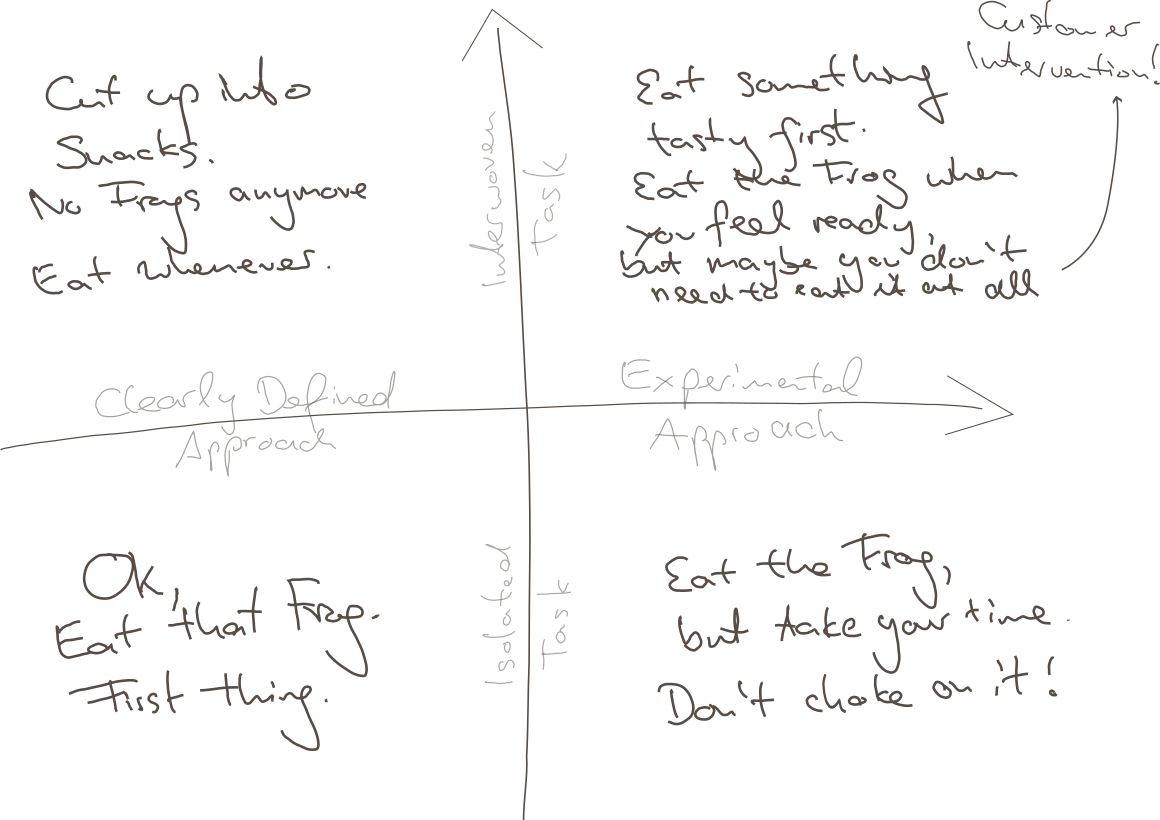
It turns out, there are several cases where it would be straightway destructive just to Eat the next-best Frog, and I will try to explain this to you using my impressive drawing skills:

Point being, there are at least two boundaries of application:

  • Clarity of Approach: How clearly-defined is it, as opposed to requiring one or multiple experimental, creative approachs?
  • Relation to other Tasks: How isolated is your task, is it heavily interwoven with other tasks?

Why these distinctions? Maybe we can agree on

  • Overwhelming Frog tasks can act stifling on your creativity, so if that very mindset is required for your approach, you will not succeed by pressuring through.
  • Thinking yourself into a complex topic first thing in the morning might require some warm up time for your brain, booting every relevant detail into your cloud of thoughts.
  • Parkinson’s Law states “Work expands so as to fill the time available for its completion.” – from which I derive: If your task is too large but it could be divided into sub-tasks, you might use any available time to do something related to your giant Frog, but not necessarily the most precise thing to do.
  • The motivation of having done multiple small tasks can provide you with the energy of finishing “That Frog” within the near future.

So to relate that to the Frogophage subject at hand; my findings are:

  • Bottom Right: If your task is quite isolated from other tasks, but still it’s approach isn’t very clear, do not think of your problem as a frog to be eaten right now. You will have to eventually have eaten it, but take your time, don’t choke on it – don’t destroy your creative thinking by believing that you can rush through it.
  • Top Left: If your Frog is defined as one well-defined task, but can actually be seen as a composition of many Sub-Frogs, stop for a minute and invest your time in actually resolving the atomic issues. This might feel like slowing you down, but there is no honor in having eaten That Disgusting Frog, if actually you could have eaten a tasty buffet of small snacks instead.
  • Top Right: Interwoven Tasks that also require an Experimental Approach are hard because you might just waste your time trying to upfront define your smaller snacks, and you might not have all the relevant information booted into your brain at the time of your supposed Frog Breakfast, so: Try to warm up yourself by solving some smaller of the connected issues first; by bringing your consciousness into the right state it can very well appear what can be tried.
    • Bonus Point: It can also render your whole Frog irrelevant when it becomes clear that your whole problem has to be redefined by Customer Intervention. Sometimes you just have to explain the poor guys that something is complicated (costly for them), and they might come up with a request that is completely different from your original frog.
  • Bottom Left: However, if none of thse apply and there’s just a nauseating thing in front of you, that you just know has to be done, you have somewhat of a clear idea how to start, it does not depend on many other things done first or simultaneously – better Eat That Frog. It likely won’t go away and you can then use the resulting feel-good moment to inspire the rest of your day.
Conclusion

I guess this all boils down to “whatever advice there is, there are some limits to its applications”. I hope you already weren’t the type of person who would just think of any problem as some big unquestionable Frog to be gobbled up without reconsideration…

… but nonetheless, maybe this can help in evaluating your strategy when facing the next difficult thing.

And don’t just eat frogs, please.

Finding refactoring candidates using reflection

If some of your types are always used together, that is probably a sign that you are missing an abstraction that bundles them. For example, if I always see the types Rectangle and Color together, it’s probably a good idea to create a ColoredRectangle class that combines the two. However, these patterns tend to emerge over time, so it’s hard to actually find them manually.

Reflection can help find these relationships between types. For example, you can look at all the function/method parameter lists in your code and mark all types appearing there as ‘being used together’. Then count how often these tuples appear, and you might have a good candidate for refactoring.

Here’s how to do that in C#. First pick a few assemblies you want to analyze. One way to get them is using Assembly.GetAssembly(typeof(SomeTypeFromYourAssembly)). Then get all the methods from all the types:

IEnumerable<MethodInfo> GetParameterTypesOfAllMethods(IEnumerable<Assembly> assemblies)
{
  var flags = BindingFlags.Instance | BindingFlags.Static | BindingFlags.Public
    | BindingFlags.NonPublic | BindingFlags.DeclaredOnly;
  foreach (var assembly in assemblies)
  {
    foreach (var type in assembly.GetTypes())
    {
      foreach (var method in type.GetMethods(flags))
      {
        yield return method;
      }
    }
  }
}

The flags are important: the default will not include NonPublic and DeclaredOnly. Without those, the code will not report private methods but give you methods from base classes that we do not want here.

Now this is where things become a little more muddy, and specific to your application. I am skipping generated methods with “IsSpecialName”, and then I’m only looking at non-generic class parameters:

foreach (var method in GetParameterTypesOfAllMethods(assemblies))
{
  if (method.IsSpecialName)
    continue;

  var parameterList = method.GetParameters();

  var candidates = parameterList
      .Select(x => x.ParameterType)
      .Where(x => !x.IsGenericParameter)
      .Where(x => x.IsClass);

  /* more processing here */
}

Then I convert the types to a string using ToString() to get a nice identifier that includes filled generic parameters. I sort and join the type ids to get a key for my tuple and count the number of appearances in a Dictionary<string, int>:

var candidateNames = candidates
    .Select(x => x.ToString())
    .OrderBy(x => x)
    .ToList();

if (candidateNames.Count <= 1)
  continue;

if (candidateNames.Any(string.IsNullOrWhiteSpace))
  continue;

var key = string.Join(",", candidateNames);

if (!lookup.ContainsKey(key))
{
  lookup.Add(key, 1);
}
else
{
  lookup[key]++;
}

Once that is done, you can sort the resulting lookup, print out all the tuples, and see if there are any good candidates.

There’s much room for improvement with a method like this. For example, skipping non-class types is a pretty arbitrary choice. And you will not find new tuples built from built-in types this way. However, because those types offer very little semantic by themselves, it can be hard to correlate multiple occurrences simply by their types.

Using the File System as an Interaction Device

In a recent project, my job was to build a scientific data processing pipeline for a new algorithm that wasn’t set in stone yet. Part of my work would be to explore different mathematical formulas interactively with the customer.

My usual approach to projects is a “risk first” strategy. I try to identify the riskiest or most demanding part of the project and deal with it first. This approach essentially resembles the “fail fast” mindset, just that we haven’t failed yet.

In the case of the calculation pipeline, the riskiest part and at the same time the functionality that matters to the customer most, was the pipeline itself. If we were able to implement a system that can transform the given entry data into the desired results, we had an end-to-end prototype and the means to explore different mathematical approaches.

The pipeline consists of different steps that can be described as a complex transformation each. The first step/transformation takes a proprietary data format file and converts it into a big JSON file. The main effort of this step is a deep physical analysis of the data contained in the proprietary format. This analysis requires a lot of thought, exploration and work, but can be seen as a black box that the data traverses on its way from proprietary format to JSON.

The next step takes the JSON input and extracts the necessary information required by the following step. It is essentially a data reduction operation.

The third step feeds the analyzed, reduced data into the formulas and stores the calculation result.

The fourth step aggregates the calculation results into a daily time series report in a format that can be read by a spreadsheet application. This report is the end product of the pipeline and will be used to make decisions and to rule out certain environmental hazards.

The main difference of this project to virtually every project before is that I didn’t write any user interface code. The application’s main window is still blank. The whole interaction of the system with other systems that provide the entry data, of the pipeline steps among each other and with the human user is based on files in the file system.

The system periodically checks for the existence of new entry data. If some is found, it is copied in the “inbox” directory of the first step. The first step periodically checks for the existence of files in its inbox and processes them into its “outbox” that conveniently serves as the inbox of the second step. You probably get the idea by now. All the steps in the system, including the upstream data fetching routine, are actors in an file-based actor model. The files serve as messages from one actor to another. The file system and its directory structure is the common communication channel that passes the messages around.

Each processing step is an actor node with input and output storages

One advantage of this approach is that the file system viewer application of the operating system can be used as the (graphical) user interface. By opening the appropriate directories and viewing their content, the user can supervise the operating state of the system. The system can report problems by moving the incoming message not in the step’s “done” directory , but into its “failed” or “problem” directory. If several directories are on display at once, the user can follow a specific piece of data through the pipeline and view the intermediate results. For domain specific reasons, the actors in this project also have the result directory “omitted” for data that will not be processed any further because some domain rules have determined a cancellation.

An user can even manipulate the data’s flow by moving files away or into a specific directory. Let’s say that we want to calculate a certain amount of data again, we can just copy the files from the “done” directory of the first step into its “inbox” and the system will process it again.

Because the analysis step takes some time while the calculation step is surprisingly fast, we can perform just the calculation again by not moving the initial data files, but the analyzed and reduced entry files for the calculation step. Using this approach, we can try different mathematical formulas by stopping the system, swapping the calculation step with a new version, starting the system again and moving the desired entry files into its inbox.

Using the file system as an interaction device for the user and the system’s parts has many immediate advantages, but some drawbacks, too. One drawback is performance. Using the harddisk for data transfer is the slowest possible way to bring data from step X to step X+1. If your system is required to have high throughput or low latency, this approach isn’t suitable. My project has a low, forecastable throughput and a latency requirement that is measured in minutes or seconds, but not in milliseconds or even nanoseconds. It can spend some time in the filesystem, because the first step alone takes several seconds for each file.

Another drawback is a certain fragility of the communication medium, the file system. You have to account for concurrent reads, writes or even deletes. The target platform of my system (Microsoft Windows) exhibits signs of exhaustion if the amount of files in one directory grows too large. This means that your file selection, already a costly operation, becomes more costly if the systems is put under pressure. If your throughput is usually steady, which is the case in my project, this won’t be a problem. Until you manually copy 100k files in an inbox for swift recalculation and discover that the file copy process alone takes several minutes.

Of course, the system cannot operate without a graphical user interface forever. But some basic interactions with the system will probably just result in some files being copied from one directory to another one in the background.