The Four Steps of Complex Tasks (Part II)

Trying to succeed in a complex task without solid experience is a challenging endeavour. A simple framework with four steps can help you with it.

In the first part of this blog entry, we talked about how complex tasks need to be addressed with a proper problem-solving framework. One such mental framework can be found in traditional warfare. It involves all the anticipated artifacts like headquarters, mission statements and a general’s map, but will likely omit the gruesome parts of actual battle.

We started with the mission statement and then began to make a plan with four steps:

  • Reconnaissance
  • Maneuver
  • Offensive
  • Defensive

Step one: Reconnaissance

In the first step, we tried to unveil every part of the scenario and draw a complete map of the terrain. A botched reconnaissance is probably the root cause of most failed missions. You can read all the details about the reconnaissance step in the first part of this blog entry.

Step two: Maneuver

Emergency preparation equipment on the grass, on the nature backgroundFor a real army, maneuvering means to “change position”. In preparation of a battle, it means to secure the positions that will maximize the own effect and/or minimize the effect of the opponent. Most battles are already decided in this phase, with the following fighting being more or less the playback of the drama the generals anticipated. The ultimate victory in military warfare is the victory by maneuver, when the opponent revises his position before the battle and concedes that he lost already.

In our example case, we wage war on the call for proposals for a big software project. It would be our ultimate victory if we could convince the project owner that no call for proposals is even necessary because we are clearly the best-fitting proposer. But that would have required actions from our side in the past and that chance has passed. We need to prepare for the “fight” under the rules of the project owner, we need to submit a better proposal than everybody else.

Our maneuver step contains every preparative action we need to do so we can play out the last two steps in a smooth fashion. If we need to create an account to submit our proposal, then now is the time to create it. If we need to buy some office supplies to print the proposal in top-notch quality, we should buy them now. Just like a real army stocks their supplies near the anticipated battlefield, we need to stock our supplies, physical like the office supplies or virtual like the user account or a signing certificate.

The goal of maneuvering is to never stall when the last two steps are due. We take our knowledge from the reconnaissance step and interpolate it into the future. The maneuver actions support our scenario of the future. Once the third step is in progress, every negligence in maneuvering will mean delay, makeshift solutions and partial failure. If the negligence is too widespread, it will result in overall failure.

Step three: Offensive

Hiker crossing rocky terrain in the Bryce Canyon National Park, USAIn a real battle, once the maneuvering is done, things “get real”. This usually means that shots are fired. In our example, we also fire shots, but imaginative ones. During the offensive, we really work on the meat of the proposal. We dig into the details of the project and produce estimates and concepts. We use the mandated structure for the proposal to fill our proposition in. We concentrate on fabricating content.

In this phase, things get messy and confusing very fast. There are just way too many details needing attention all at once. This is where our plan from the reconnaissance step comes to our rescue. We need to make sure that we don’t stray from the plan too much. Remember, our “opponent” isn’t moving, it’s a static target. So our plan will stay mostly valid during the offensive. If not, this indicates flaws in previous steps and should be taken seriously. If you can afford it, time- or effortwise, rewind your mission back to step one if you find yourself attacking dummy problems or empty terrain that leads you nowhere. A well-planned offensive has immediate and visible effects.

Your work during the offensive phase might look chaotic and erratic from the outside, but it should be cold-blooded and calculated in your experience. This phase is known to intimidate you with overwhelming feelings of anxiety and despair. Stick to your plan and don’t panic! If you’ve planned it well, it will go well. If you didn’t trust your plans beforehands, why would you even proceed to this step? There is no damage done when your reconaissance unveils a task to heavy for your taste and you make an immediate retreat. There is little loss in surrendering your efforts to an opponent that played the maneuvering game better than you, like requiring several comparable projects as reference for the proposal, but you are a newcomer on the market. It will ache, but you cut your losses and move on. But starting an all-out offensive that you are not sure you’ll win? That’s just stupid or desperate.

Two remarks here: First, Being sure you’ll win means you are sure to fulfill your mission, in our example to submit a valid proposal. That doesn’t imply you need to be sure to win the pitch itself. Stick to your mission statement and win the battle before you try to win the whole war. Second, if you hold back on your offensive, you set yourself up for failure because of indecision and foot-dragging. Every offensive should be all-out or not started at all. You are in this game to win, not to play.

Step four: Defensive

Let’s assume our offensive was successful. In a real battle, we have conquered the enemy’s stronghold or additional terrain. The enemy is defeated. A movie would now show the end credits, a computer game the game results. But this is real life, there is no “end point”. Your troops are all over the place, probably in a sorry shape and without a clear goal to look forward to. If your enemy has any troops left, now is the best moment to run you over. Your victory would be pyrrhic, your winning would finally cause your defeat.

The clever strategist has already planned the defense after the offensive (and victory). Often, this means a partial retreat after the battle in order to “straighten the lines”. We can’t do that in our example, it would mean we take back promises after our proposal wins the pitch. But we can plan our defense after victory.

Let’s assume our proposal wins. What does that mean for our company? Who will work on the project? Can we keep our promises even if external circumstances like other projects, other proposals or our staff changes? What will we gain from the project? What concessions can we make to the customer if he wants to re-negociate? Do we need to re-negociate as soon as the agreement is made? The last question answered with yes is a typical sign of over-commitment in the offensive phase and tells about poor leadership.

In our example, let’s say we’ve promised the customer a 24/7 support hotline for the software. We need to make sure how to fulfill this promise before we send out our proposal. There is no value in making hollow promises that we cannot keep. This would be like losing captured terrain again just because you cannot provide enough troops to secure it. It’s not worth the effort and an all-around damper on morale. Just to be clear here: You don’t need to act on the fullfilling of the promises before you’ve won, but you cannot wait with the planning. So we need to have a clear plan on how to implement a 24/7 support hotline, but we only need to act on it as soon as we are sure it is really necessary. We need to take steps one and two for the support hotline mission, but hold back the later steps until our proposal has won and the contracts are signed.

Don’t omit this step in your planning. A successful offensive without the backing of a good defensive is the prelude to a disaster.

Conclusion

We’ve learnt the four steps to master each complex task, lent from the art of warfare, namely reconaissance, maneuver, offensive and defensive, that form a pattern you can repeat each time with the same structure, but always different content. Every task will require a different solution, but the solution’s framework is always the same. This framework can be applied to tasks that seem to have nothing in common with warfare, but still play by the same rules. This is a powerful tool because it opens centuries of knowledge in military warfare to your creative transfer approach. And it is an effective tool because you don’t need to study history to apply it to your cause. Just reiterate the four steps and conquer your task.

If you’ve already applied these four steps, perhaps without consciously realizing it, I would love to hear your story and the outcome. Please leave your comment below!

A simple yet useful project metric

If you are a project manager, this little metric might help you to quickly categorize your projects and learn about their personality.

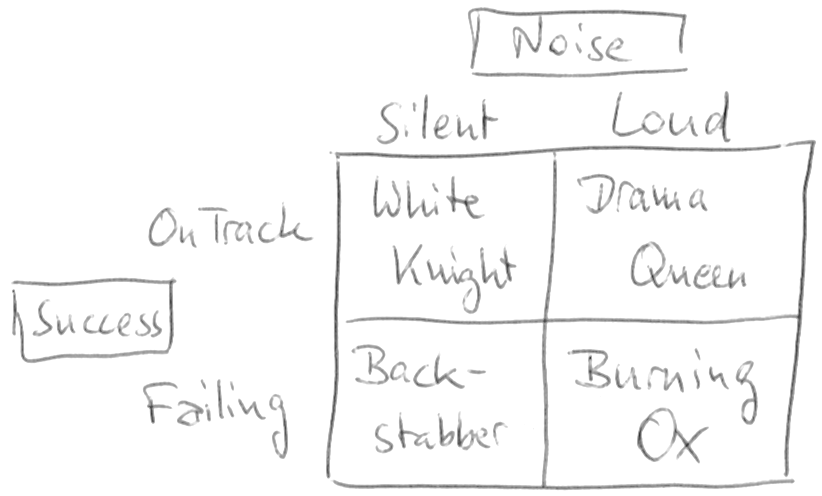
In my years of managing software development projects, I’ve come to apply a simple metric to each project to determine its “personality”. The metric consists of only two aspects (or dimensions): success and noise. Each project strives to be successful in its own terms and each project produces a certain amount of “noise” while doing so. Noise, in my definition, is necessary communication above the minimum. A perfectly silent project isn’t really silent, there are just no communicated problems. That doesn’t mean there aren’t any problems! A project team can silently overcome numerous problems on their own and still be successful. The same team can cry for help at each and any hurdle and still fail in the long run. That would mean a lot of noise without effect. I call such a project a “Burning Ox”.

Success vs. Noise

metric

As you can see, there are four types of projects with this metric. The desired type of project is the “White Knight” in the top-left quarter, while the “Burning Ox” in the bottom-right is the exact opposite. Let’s review all four types:

  • White Knight (silently on track): A project that is on track, tackles every upcoming challenge on its own, reports its status but omits the details and turns out to be a success is the dream of every project manager. You can let the team find its own way, document their progression and work on the long-term goals for the team and the product. It’s like sailing in quiet waters on a sunny day. Nothing to worry about and a pleasant experience all around.
  • Drama Queen (loud, but on track): This project is ultimately headed towards success, but every obstacle along the way results in emergency meetings, telephone conferences or e-mail exchanges. The number of challenges alone indicate that the team isn’t up to the task. You are tempted to micro-manage the project, to intervene to solve the problems and ensure success or at least progress. But you are bound to recognize some or even most problems as non-existent. The key sentence to say or think is: “Strange, nobody else ever had this problem and we’ve done it a dozen times before”. If you are a manager for several projects, the Drama Queens in your portfolio will require the majority of your time and attention. You’ll be glad when the project is over and “peaceful” times lie ahead.
  • Backstabber (silent and a failure): This is the biggest fear of every manager. The project seems alright, the team doesn’t report any problems and everything looks good. But when the cards need to be put on the table, you end up with a weak combination. It’s too late to do anything about the situation, the project is a failure. And it failed because you as the manager didn’t dig deeper, because you let them fool you. No! If you look closer, it failed because nobody dug deeper and everybody was in denial. You’ll see the warning signs in retrospective. You will become more paranoid in your next project. You’ll lose faith in the project status reports of your teams. You’ll inquire more and micro-manage the communication. You’ll become a skittish manager because of this unpleasant experience. Backstabber projects have horrendous costs for the social structure of a company.
  • Burning Ox (loud and failing): The name stems from an ancient war tactics when the enemy’s camp was overrun by a horde of oxen with burning torches bound to the horns. The panicked animals wreaked havoc along their way and started fires left and right. A Burning Ox is helpless in the situation, but takes it out on anybody and anything near it, too. This project is bound to fail, the team is in it way over their heads and no amount of support from your side or help from the outside can safe it. Well, experienced firefighters might work wonders, but they are expensive and rare (we know because we are often called in for this job). If you find a Burning Ox in your project portfolio (and you will know it, because a Burning Ox screams on the top of his lungs), prepare yourself for the inevitable: The project will fail, in scope (missing functionality), budget (higher costs) and/or time (delayed delivery). You better start with damage control now or make a call to a firefighter you can trust.

Easy assessment

This project management metric is not meant for deep inspection, but for easy assessment and quick communication. You can convey your desired communication style and the fact that everybody involved with the project is partly responsible for its success or failure. The metric states that too much detail is not helpful and too little detail can be disastrous. It also shows that loudly failing projects are not the fault of the project team alone (the ox cannot help being used as a living torch), but that the prerequisites of the project weren’t met.

Takeaway

If you are not a project manager, what can you learn from this blog post? Ask yourself if you require too much help from your manager, forcing him/her to switch into the micro-management gear, even if you could solve the problem yourself. If you cannot, ask yourself if you think that you can deliver the project in scope, time and budget or if you already smell the fire. If you can smell the fire, is your manager aware? Are you telling him/her in unclouded words about your perceived state of the project? Did you attempt to communicate your perception/feeling at least twice? If not, your manager might be shocked that he/she took care of a Backstabber project. A failing project is not your fault! You would only be to blame for the continued hiding of a known fact.

If you are a project manager, take a piece of paper, draw the metric’s chart and try to pin-point the position of all your projects. Be as honest and exact as possible. Is it really a Burning Ox or “just” a Drama Queen? Are your White Knights really above reproach or is their loyality questionable? What questions could you ask to try to unveil hidden problems, even those that nobody is aware of yet?

These quick, repeated assessments help me to manage my schedule and not forget about the silent projects because the loud projects always ellbow their way into my attention.

Recap of the Schneide Dev Brunch 2016-12-11

If you couldn’t attend the Schneide Dev Brunch at 11th of December 2016, here is a summary of the main topics.

brunch64-borderedLast week at sunday, we held another Schneide Dev Brunch, a regular brunch on the second sunday of every other (even) month, only that all attendees want to talk about software development and various other topics. This brunch was so well-attended that we had to cramp around our conference table and gather all chairs on the floor. As usual, the main theme was that if you bring a software-related topic along with your food, everyone has something to share. Because we were so many, we established a topic list and an agenda for the event. As usual, a lot of topics and chatter were exchanged. This recapitulation tries to highlight the main topics of the brunch, but cannot reiterate everything that was spoken. If you were there, you probably find this list inconclusive:

Finland

We started with a report of one of our attendees who had studied in Finland for the last two years. He visited the Aalto university and shared a lot of cultural details about Finland and the Finnish people with us.

The two most important aspects of the report were sauna and singing. The Finnish love to visit a sauna, in fact, nearly every building has a functioning sauna. Every office building has a company sauna that will get visited often. So it might happen that your first visit of a company starts right in the sauna, naked with the bosses.

And the Finnish love singing so much that they usually start singing during the sauna session. There are open social events organized around singing together.

Alcohol plays a big role in Finland, mostly because the taxes makes it incredibly expensive to obtain a proper buzz. In the southern regions, much alcohol is imported from Russia or Estonia by ferry. There are even special ferry routes designed to be cost-neutral when shopping for alcohol. But alcohol isn’t the only thing that is made expensive with special taxes. Sugar and sugary food/drinks are heavily taxed, too. So it’s actually more expensive to eat unhealthy, which sounds like a good concept to counter some civilizational diseases.

The Finnish students often wear a special boilersuit during official events that identifies their affilition with their field of study and university. They apply patches and stickers to their suit when they have completed certain tasks or chores. It’s actually a lot like a military uniform with rank and campaign insignia. Only that the Finnish student boilersuit may not be cleaned or washed other than jumping into a body of water with you in it. And the Finnish lakes are frozen most of the year, with temperatures of -27 °C being nothing extraordinary.

As you probably have guessed right now, costs for rent and electricity are high. Our attendee enjoyed his time there, but is also glad to have the singing separated from the alcohol for the most part.

Lambdas and Concurrency

The next question revolved around the correlation between lambda expressions and concurrent execution of source code. The Vert.x framework relies heavily on lambdas and provides reactive programming patterns for Java. As such, it is event driven and non blocking. That makes it hard to debug or to reason about the backstory if an effect occurs in production. The traditional tools like stacktraces don’t tell the story anymore.

We took a deep dive into the concepts behind Optionals, Promises and Futures (but forgot to talk about the Expected type in C++). There is a lot of foggy implementation details in the different programming languages around these concepts and it doesn’t help that the Java Optional tries to be more than the C++ Optional, but doesn’t muster up the courage to be a full Monad. Whether deprecating the get()-method will make things better is open for discussion.

To give a short answer to a long discussion: Lambdas facilitate concurrent programming, but don’t require or imply it.

React.js and Tests

It was only a small step from the reactive framework Vert.x to the React.js framework in Javascript. One attendee reported his experiences with using different types of tests with the React framework. He also described the origin of the framework, mentioning the concept of Flux and Redux along the way.

Sorry if I’m being vague, but each written sentence about Javascript frameworks seem to have a halflife time of about six weeks. My take on the Javascript world is to lean back, grab some popcorn and watch the carnival from the terrace, because while we’re stuck with it forever, it is tragically unfortunate. Even presumed simple things like writing a correct parser for JSON end in nightmares.

It should be noted, though, that the vue.js framework entered the “assess” stage of the Thoughtworks Techradar, while AngularJS (or just Angular, as it should be called now) is in the “hold” stage.

Code Analysis

We also talked about source code analysis tools and plugins for the IDE. The gist of it seems to be that the products of JetBrains (especially the IntelliJ IDEA IDE) have all the good things readily included, while there are standalone products or plugins for other IDEs.

Epilogue

As usual, the Dev Brunch contained a lot more chatter and talk than listed here. The number of attendees makes for an unique experience every time. We are looking forward to the next Dev Brunch at the Softwareschneiderei in February 2017. We even have some topics already on the agenda (like a report about first-hand experiences with the programming language Rust). And as always, we are open for guests and future regulars. Just drop us a notice and we’ll invite you over next time.

It’s only Cores and Caches but I like it

The programming game changed dramatically in the past ten years. We are playing CPU cores and caches now, but without proper visibility.

759px-amd_am5x86_dieMost of our software development economy is based on a simple promise: The computing power (or “performance”) of a common computer will double every two years. This promise accompanied us for 40 years now, a time during which our computers got monitors, acquired harddisks and provided RAM beyond the 640 kB that was enough for nobody. In the more recent years, we don’t operate systems with one CPU, but four, eight or even twelve of them. So it came as a great irritation when ten years ago, Herb Sutter predicted that “The free lunch is over” and even Gordon Moore, the originator of Moore’s Law that forms the basis of our simple promise said that it will only hold true for ten to fiveteen more years. Or, in other words, until today.

Irritation

That’s a bit unsettling, to say the least, and should be motivation enough to have a good look at everything we are doing. Intel, the biggest manufacturer of CPUs for computers, has indicated earlier this year that Moore’s Law cannot be fulfilled any longer. So, the free lunch is really over. And it turns out to have some hidden costs. One cost is a certain complacency, the conviction that things will continue to be as they were and that coding styles chiseled over years and decades hold an inherent value of experience.

Complacency

Don’t get me wrong – there is great value in experience, but not all knowledge of the past is helpful for the future. Sometimes, fundamental things change. Just as the tables will eventually turn for every optimization trick, we need to reevaluate some axioms of our stance towards performance. Let me reiterate some common knowledge:

There are two types of performance inherently baked into your source code: Theoretical and practical performance.

Performance

The first type is theoretical performance, measured in O(n), O(n²) or even O(n!) and mostly influenced by the complexity class of the algorithm you are using. It will translate into runtime behaviour (like in the case of O(n!) your software is already dead, you just don’t know yet), but isn’t concerned with the details of your implementation. Not using an unnecessary high complexity class for a given problem will continue to be a valueable skill that every developer should master.

On the other hand, practical performance is measured in milliseconds (or nanoseconds if you are into micro-benchmarks and can pull off to measure them correctly) and can heavily depend on just a few lines in your source code. Practical performance is the observable runtime behaviour of your software on a given hardware. There are two subtypes of practical performance:

  • Throughput (How many operations are computed by the system in a given unit of time?)
  • Latency (How long does it take one operation to be computed by the system?)

If you run a service, throughput is your main metric for performance. If you use a service, latency is your main concern. Let me explain this by the metapher of a breakfast egg. If you want to eat your breakfast at a hotel buffet and the eggs are empty, your main concern is how fast you will get your freshly boiled egg (latency). But if you run the hotel kitchen, you probably want to cook a lot of eggs at once (throughput), even if that means that one particular egg might boil slightly longer as if you’d boiled each of them individually.

Latency

Those two subtypes are not entirely independent from each other. But the main concern for most performance based work done by developers is latency. It is relatively easy to measure and to reason about. If you work with latency-based performance issues, you should know about the latency numbers every programmer should know, either in visual form or translated to a more human time scale. Lets iterate some of the numbers and their scaled counterpart here:

  • 1 CPU cycle (0.3 ns): 1 second
  • Level 1 cache access (0.9 ns): 3 seconds
  • Branch mispredict (2.5 ns): 8 seconds
  • Level 2 cache access (2.8 ns): 9 seconds
  • Level 3 cache access (12.9 ns): 43 seconds
  • Main memory access (120 ns): 6 minutes
  • Solid-state disk I/O (50-150 μs): 2-6 days
  • Rotational disk I/O (1-10 ms): 1-12 months

We can discuss any number in detail, but the overall message stands out nonetheless: CPUs are lightning fast and caches are the only system components that can somewhat keep up. As soon as your program hits the RAM, your peak performance is lost. This brings us to the main concept of latency optimization:

Your program’s latency is ultimately decided by your ability to decrease cache misses.

You can save CPU cycles by performing clever hacks, but if you are able to always read your data (and code) from the cache, you’ll be 360 times faster than if your program constantly has to read from RAM. Your source code doesn’t have to change at all for this to happen. A good compiler and/or optimizing runtime can work wonders if you adhere to your programming language’s memory model. In reality, you probably have to rearrange your instructions and align your data structures. That’s the performance optimization of today, not the old cycle stinting. The big challenge is that none of these aspects are visible on the source code level of your program. We have to develop our programs kind of blindfolded currently.

Concurrency

One way how we’ve held up Moore’s Law in the last ten years was the introduction of multiprocessor computing into normal computers. If you cram two CPUs onto the die, the number of transistors on it has doubled. A single-threaded program doesn’t run any faster, though. So we need to look at concurrent programming to unlock the full power of our systems. Basically, there are two types of concurrent programming, deliberate and mechanical.

  • Deliberate concurrent programming means that you as the developer actively introduce threads, fibers or similar concepts into your source code to control parallel computation.
  • Mechanical concurrent programming means that your source code can be parallelized by the compiler and/or runtime and/or the hardware (e.g. hyper-threading) without changing the correctness of your program.

In both types of concurrent programming, you need to be aware about the constraints and limitations of correct concurrency. It doesn’t matter if your program is blazingly fast and utilizes all cores if the result is wrong or only occasionally correct. Once again, the memory model of your programming language is a useful set of rules and abstractions to guide you. Most higher-level concurrency models like actors narrow your possibilities even further, with functional programming being one of the strictest (and most powerful ones).

In the field of software development, we are theoretically well-prepared to take on the task of pervasive concurrent programming. But we need to forget about the good old times of single-core confirmability and embrace the chaotic world of raw computing power, the world of cores and caches.

Cores ‘n’ Caches

This is our live now: We rely on Cores ‘n’ Caches to feed us performance, but the lunch isn’t free anymore. We have to adapt and adjust, to rethink our core axioms and let go of those parts of our experience that are now hindrances. Just like Rock ‘n’ Roll changed the rules in the music business, our new motto changes ours.

Let’s rock.

Children behind the wheel

What happens when you put children behind the steering wheel? This blog entry looks at the Dunning-Kruger effect in software development.

A few weeks ago, I read a funny news article about a 11 years old boy who stole a bus and drove the normal route with it. When the police stopped him, he had already picked up some passengers and somehow managed to only inflict minor damages along the way. The whole story (in german) can be read here.

Author: Vitaly Volkov, Волков Виталий Сергеевич (user kneiphof) https://commons.wikimedia.org/wiki/User:KneiphofThis blog entry is not about the unheeding passengers, it’s about the little boy and his mindset. This mindset exists in the business world, too. It’s the mixture of “what could possibly go wrong?” with “I’m totally able to pull this off” and a large dose of “everybody else is surely faking it, too”. In the context of the Dunning-Kruger effect, this mixture is called “unskilled and unaware of it”. It’s a dangerous situation for both the employee and the employer, because neither of them can properly evaluate the actual risk.

The Dunning-Kruger effect

Let’s start with the known theory. The Dunning-Kruger effect describes a cognitive bias in which unskilled individuals assess their ability (in the context of a given skill) much higher than it really is and highly skilled individuals tend to underestimate their (relative) competence. The problem is not that real experts tend to be modest about their expertise. The real problem is that “if you’re incompetent, you can’t know you’re incompetent. The skills you need to produce a right answer are exactly the skills you need to recognize what a right answer is.”

So in short: Being unskilled in a certain area probably means you don’t really know that you are unskilled.

Or, translated to our young bus driver: If you don’t know anything about driving a bus, you certainly think you are as much a decent bus driver as the man behind the wheel. It looks easy enough from the passenger seat.

The effect in practice

Why should this bother us in software development? Our education system ensures that we are exposed to enough development practice so that we can counter the “unaware of it” part of the Dunning-Kruger effect. But it isn’t effective enough, at least that’s what I see from time to time.

Every once in a while, I have the opportunity to evaluate an existing code base. Most of the time, it produces a working, profitable application, so it cannot be said to be a failure. Sometimes however, the code base itself is so convoluted, bloated and riddled with poor implementation choices that it absolutely cannot be developed any further without a high risk of regression bugs and/or absurd amounts of developer time for little changes.

These hopeless source codes have one thing in common: they are developed by one person and one person alone. This person has developed for months or even years, showing progress and reporting no problems and suddenly resigned, often shortly before a major milestone in the project like going live with the first version or announcing the next version. The code base now lies abandonded and needs to be adopted. And while no code base is perfect (or should even try to be), this one reeks of desperation and frustration. Often, the application itself is not very demanding, but the source code makes it appear to be.

A good example of this kind of project is my scrap metal tale (in three parts) from five years ago:

A more recent case is littered with inline comments that celebrate small victories of the developer:

  • 5 lines of convoluted, contradicatory statements
  • 3 lines commented out
  • 1 comment line stating “YES! This is finally working! Super!”
  • Still three obvious bugs, resource leaks or security flaws in these few lines alone

The most outrageous (and notorious) case might be the Brillant Paula Bean from the Daily WTF, but this code base is at least readily comprehensible.

The origins of the effect

I think a lot of the frustration, desperation, anxiety and outright fear that I can sense through the comments and code structure was really felt by the original author. It must have been incredibly hard to stay on course, work hard and come up with solutions in the face of imminent deadlines, ever-changing requirements and the lingering fear that you’re just not up to the task. Except that we’ve just learned that developers in the “unskilled and unaware of it” state won’t feel the fear. That’s the origin of all the bad code: The absolute conviction that “it’s not me, it’s the problem, the domain, the language, the compiler, the weather and everything else”. Programming is just hard. Nobody else could do this better. It’ll work in the end. Those “minor problems” (like never actually speaking to the hardware, hard-coded paths and addresses, etc.) will be fixed at the last moment. There’s nothing wrong with an occassional exception stack trace in the logfile and if it bothers you, I can always make the catch-block empty.

The most obvious problem is that these developers think that this is how everybody else develops software, too. That we all don’t bother with concurrency correctness, resource lifecycle management, data structures, graphical user interface design, fault tolerance or even just basic logging. That all programming is hard and frustrating. That finding out where to insert a sleep statement to quench that pesky exception is the pinnacle of developer ingenuity. That things like automated tests, code metrics, continuous integration or even version control are eccentric fads that will pass by and be forgotten soon, so no need to deal with it. That we all just fake it and dread the moment our software is used in the wild.

A possible remedy

The “unskilled and unaware of it” developer isn’t dumb or hopeless, he’s just unskilled. The real tragedy is that he doesn’t have a mentor that can alleviate the biggest problems in the code and show better approaches. The unskilled lonesome developer cannot train himself. A good explanation for this novice “lock-in” can be found in the Dreyfus Model of Skill Acquisition (I recommend you watch the excellent talk on this topic by Dave Thomas): Novices lack the skills for proper self-assessment and cannot learn from their mistakes (as stated by the Dunning-Kruger effect, too). They also cannot recognize them as “their” mistakes or even “mistakes”. They need outside feedback (and guidance) to advance themselves. A mentor’s role is to give exactly that.

Conclusion

If you find yourself in a position of being a “skilled and fairly aware of it” developer, please be aware that you’ve probably been mentored sometimes in the past. Pass it on! Be the mentor for an aspiring junior developer.

If you suspect that you might fall in the “unskilled” category of developers, don’t despair! Being aware of this is the first and most important step. Now you can act strategically to improve your skill. There is a whole book giving you invaluable advice: Apprenticeship Patterns: Guidance for the Aspiring Software Craftsman by Dave Hoover and Adewale Oshineye. Two prominent advices from the book are “Be the Worst (of your team)” and “Find Mentors“. And my most prominent advice? “Don’t stick it out alone“.

Programming is (or should be) fun after all.

A procedure to deal with big amounts of email

How can you survive the daily email flood and still keep track of your work? Here is one personal ruleset that adapts real-life habits to virtual message management.

The problem

You probably know the problem already: A day with less than 500 emails feels like your internet connection might be lost. The amount of emails you receive can accurately predict the time of day. In my case, I’ll always receive my 300th email each day right before lunch. Imagine that I’ve spent one minute for each message, then I would have done nothing but reading emails yet. And by the time I return from lunch, more emails have found their way into my inbox. My job description is not “email reader”. It actually is one of the lesser prioritized activities of my job. But I keep most answering times low and always know the content of my inbox. You’ll seldom hear “sorry, I haven’t seen your email yet” from me. How I keep the email flood in check is the topic of this blog entry. It’s my personal procedure, so nothing fancy with a big name, but you might recognize some influence from well-known approaches like “Getting Things Done” by David Allen.

The disclaimer

Disclaimer: You might entirely disagree with my approach. That’s totally acceptable. But keep in mind that it works for at least one person for a long time now, even if it doesn’t fit your style. Email processing seems to be a delicate topic, please keep your comments constructive. By the way, I’d love to hear about your approach. I’m always eager to learn and improve.

The analogy

Let me start with a common analogy: Your email inbox is like your mailbox. All letters you receive go through your mailbox. All emails you receive go through your inbox. That’s where this analogy ends and it was never useful to begin with. Your postman won’t show up every five minutes and stuff more commercial mailings, letters, postcards and post-it notes into your mailbox (raising that little flag again that indicates the presence of mail). He also won’t announce himself by ringing your door bell (every five minutes, mind you) and proclaiming the first line of three arbirtrarily chosen letters. Also, I’ve rarely seen mailboxes that contain hundreds if not thousands of letters, some read, some years old, in different states of decay. It’s a common sight for inboxes whose owners gave up on keeping up. I’ve seen high stacks of unanswered correspondence, but never in the mailbox. And this brings me to my new analogy for your email inbox: Your email inbox is like your desk. The stacks of decaying letters and magazines? Always on desks (and around it in extreme cases). The letters you answer directly? You bring them to your desk first. Your desk is usually clear of pending work documents and this should be the case for your inbox, too.

(c) Fotolia Datei: #87397590 | Urheber: thodonal

The rules

My procedure to deal with the continuous flood of e-amils is based on three rules:

  • The inbox is the only queue of emails that needs attention. It is only filled with new emails (which require activity from my side) or emails that require my attention in the foreseeable future. The inbox is therefor only filled with pending work.
  • Email processing is done manually. I look at each email once and hopefully only once. There are no automatic filters that sort emails into different queues before I’ve seen them.
  • For every email, interaction results in an activity or decision on my side. No email gets “left there”.

Let me explain the context of the rules in a bit more detail:

My email account has lots and lots of folders to store all emails until eternity. The folders are organized in a hierarchy, but that doesn’t really matter, because every folder can hold emails. The hierarchy of folders isn’t pre-planned, it emerges from the urge to group emails together. It’s possible that I move specific emails from one folder to another because the hierarchy has changed. I will use automatic filters to process emails I’ve already read. But I will mark every email as read by myself and not move unread emails around automatically. This narrows the place to look for new emails to one place: the inbox. Every other folder is only for archivation, not for processing.

The sweeps

The amount of unread emails in my inbox is the amount of work I need to do to return to the “only pending work” state. Let’s say that I opened my email reader and it shows 50 new messages in the inbox. Now I’ll have to process and archivate these 50 emails to be in the same state as before I had opened it. I usually do three separate processing steps:

  • The first sweep is to filter out any spam messages by immediate tell-tale signs. This is the only automatic filter that I’ll allow: the junk filter. To train it, I mark any remaining junk mail as spam and let the filter deal with it. I’m still not sure if the junk filter really makes it easier for me, because I need to scan through the junk regularly to “rescue” false positives (legitimate mails that were wrongfully sorted out), but the junk filter in combination with my fast spam sweep will lower the message count significally. In our example, we now have 30 mails left.
  • The second sweep picks every email that is for information purpose only. Usually those mails are sent by software tools like issue trackers, wikis, code review tools or others. Machines don’t feel the effort of writing an email, so they’ll write a lot. Most of the time, the message content is only a few lines of text. I grab each of these mails and drag them into their corresponding folder. While I’m dragging, I read (and memorize) the content of the email. The problem with this kind of information is that it’s a lot of very small chunks of data for a lot of different contexts. In order to understand those messages, you have to switch your mental context in a matter of seconds. You can do it, but only if you aren’t interrupted by different mental states. So ignore any email that requires more than a few seconds of focused attention from you. Let them sit into your inbox along with the emails that require an answer. The only activity for mails included in your second sweep is “drag to folder & memorize”. Because machines write often, we now have 10 mails left in our example.
  • The third sweep now attends to each remaining mail independently. Here, the three-minutes rule applies: If it takes less than three minutes to reply to the email right now, then do it right now and archivate the mail in a suitable folder (you might even create a new folder for it). Remember: if you’ve processed an email, it leaves the inbox. If it takes more than three minutes, you need to schedule an attention slot for this particular message on your todo-list. This is the only time the email remains in the inbox, because it’s a signal of pending work. In our example, 7 emails could be answered with short replies, but 3 require deep concentration or some more text for the answer.

After the three sweeps, only emails that indicate pending work remain in the inbox. They only leave the inbox after I’ve dealt with them. I need to schedule a timebox to work on them, but after that, they’ll find themselves out of the inbox and in a folder. As soon as an email is in a folder, I forget about its existence. I need to remember the information that were in it, but not the message itself.

The effects

While dealing with each email manually sounds painfully slow at first, it becomes routine after only a short while. The three sweeps usually take less than five minutes for 50 emails, excluding the three major correspondence tasks that make their way as individual items on my work schedule. Depending on your ratio of spam to information messages to real correspondence, your results may vary.

The big advantage of dealing manually with each email is that I’ve seen each message with my own eyes. Every email that an automatic filter grabs and hides before you can see it should not have been sent in the first place – it’s simulating a pull notification scheme (you decide when to receive it by opening the folder) rather than leveraging the push notification scheme (you need to deal with it right now, not later) that emails are inherently. Things like timelines, activity streams or message boards are pull-oriented presentations of presumably the same information, perhaps that’s what you should replace your automatically hidden emails with.

You’ll have an ever-growing archive with lots of folders for different things (think of a shelf full of document files in real life), but you’ll never look into them as long as you don’t desperately search “that one mail from 3 months ago”. You’ll also have a clean inbox, preferably in “blank slate” condition or at least with only emails that require actions from you. So you’ll have a clear overview of your pending work (the things in your inbox) and the work already done (the things  in your folders).

The epilogue

That’s when you discover that part of your work can be described as “look at each email and move it to a folder” as if you were an official in charge for virtual paper. We virtualized our paperwork, letters, desks, shelves and document files. But the procedures to deal with them is still the same.

Your turn now

How do you process your emails? What are your rules and habits? What are your experiences with folders vs. tags? I would love to hear from you – in a comment, not an email.

Recap of the Schneide Dev Brunch 2016-08-14

If you couldn’t attend the Schneide Dev Brunch at 14th of August 2016, here is a summary of the main topics.

brunch64-borderedTwo weeks ago at sunday, we held another Schneide Dev Brunch, a regular brunch on the second sunday of every other (even) month, only that all attendees want to talk about software development and various other topics. This brunch had its first half on the sun roof of our company, but it got so sunny that we couldn’t view a presentation that one of our attendees had prepared and we went inside. As usual, the main theme was that if you bring a software-related topic along with your food, everyone has something to share. We were quite a lot of developers this time, so we had enough stuff to talk about. As usual, a lot of topics and chatter were exchanged. This recapitulation tries to highlight the main topics of the brunch, but cannot reiterate everything that was spoken. If you were there, you probably find this list inconclusive:

Open-Space offices

There are some new office buildings in town that feature the classic open-space office plan in combination with modern features like room-wide active noise cancellation. In theory, you still see your 40 to 50 collegues, but you don’t necessarily hear them. You don’t have walls and a door around you but are still separated by modern technology. In practice, that doesn’t work. The noise cancellation induces a faint cheeping in the background that causes headaches. The noise isn’t cancelled completely, especially those attention-grabbing one-sided telephone calls get through. Without noise cancellation, the room or hall is way too noisy and feels like working in a subway station.

We discussed how something like this can happen in 2016, with years and years of empirical experience with work settings. The simple truth: Everybody has individual preferences, there is no golden rule. The simple conclusion would be to provide everybody with their preferred work environment. Office plans like the combi office or the flexspace office try to provide exactly that.

Retrospective on the Git internal presentation

One of our attendees gave a conference talk about the internals of git, and sure enough, the first question of the audience was: If git relies exclusively on SHA-1 hashes and two hashes collide in the same repository, what happens? The first answer doesn’t impress any analytical mind based on logic: It’s so incredibly improbable for two SHA-1 hashes to collide that you might rather prepare yourself for the attack of wolves and lightning at the same time, because it’s more likely. But what if it happens regardless? Well, one man went out and explored the consequences. The sad result: It depends. It depends on which two git elements collide in which order. The consequences range from invisible warnings without action over silently progressing repository decay to immediate data self-destruction. The consequences are so bitter that we already researched about the savageness of the local wolve population and keep an eye on the thunderstorm app.

Helpful and funny tools

A part of our chatter contained information about new or noteworthy tools to make software development more fun. One tool is the elastic tabstop project by Nick Gravgaard. Another, maybe less helpful but more entertaining tool is the lolcommits app that takes a mugshot – oh sorry, we call that “aided selfie” now – everytime you commit code. That smug smile when you just wrote your most clever code ever? It will haunt you during a git blame session two years later while trying to find that nasty heisenbug.

Anonymous internet communication

We invested a lot of time on a topic that I will only decribe in broad terms. We discussed possibilities to communicate anonymously over a compromised network. It is possible to send hidden messages from A to B using encryption and steganography, but a compromised network will still be able to determine that a communication has occured between A and B. In order to communicate anonymously, the network must not be able to determine if a communication between A and B has happened or not, regardless of the content.

A promising approach was presented and discussed, with lots of references to existing projects like https://github.com/cjdelisle/cjdns and https://hyperboria.net/. The usual suspects like the TOR project were examined as well, but couldn’t hold up to our requirements. At last, we wanted to know how hard it is to found a new internet service provider (ISP). It’s surprisingly simple and well-documented.

Web technology to single you out

We ended our brunch with a rather grim inspection about the possibilities to identify and track every single user in the internet. To use completely exotic means of surfing is not helpful, as explained in this xkcd comic. When using a stock browser to surf, your best practice should be to not change the initial browser window size – but just see for yourself if you think it makes a difference. Here is everything What Web Can Do Today to identify and track you. It’s so extensive, it’s really scary, but on the other hand quite useful if you happen to develop a “good” app on the web.

Epilogue

As usual, the Dev Brunch contained a lot more chatter and talk than listed here. The number of attendees makes for an unique experience every time. We are looking forward to the next Dev Brunch at the Softwareschneiderei. And as always, we are open for guests and future regulars. Just drop us a notice and we’ll invite you over next time.

For the gamers: Schneide Game Nights

Another ongoing series of events that we established at Softwareschneiderei are the Schneide Game Nights that take place at an irregular schedule. Each Schneide Game Night is a saturday night dedicated to a new or unknown computer game that is presented by a volunteer moderator. The moderator introduces the guests to the game, walks them through the initial impressions and explains the game mechanics. If suitable, the moderator plays a certain amount of time to show more advanced game concepts and gives hints and tipps without spoiling too much suprises. Then it’s up to the audience to take turns while trying the single player game or to fire up the notebooks and join a multiplayer session.

We already had Game Nights for the following games:

  • Kerbal Space Program: A simulator for everyone who thinks that space travel surely isn’t rocket science.
  • Dwarf Fortress: A simulator for everyone who is in danger to grow attached to legendary ASCII socks (if that doesn’t make much sense now, lets try: A simulator for everyone who loves to dig his own grave).
  • Minecraft: A simulator for everyone who never grew out of the LEGO phase and is still scared in the dark. Also, the floor is lava.
  • TIS-100: A simulator (sort of) for everyone who thinks programming in Assembler is fun. Might soon be an olympic discipline.
  • Faster Than Light: A roguelike for everyone who wants more space combat action than Kerbal Space Program can provide and nearly as much text as in Dwarf Fortress.
  • Don’t Starve: A brutal survival game in a cute comic style for everyone who isn’t scared in the dark and likes to hunt Gobblers.
  • Papers, Please: A brutal survival game about a bureaucratic hero in his border guard booth. Avoid if you like to follow the rules.
  • This War of Mine: A brutal survival game about civilians in a warzone, trying not to simultaneously lose their lives and humanity.
  • Crypt of the Necrodancer: A roguelike for everyone who wants to literally play the vibes, trying to defeat hordes of monsters without skipping a beat.
  • Undertale: A 8-bit adventure for everyone who fancies silly jokes and weird storytelling. You’ll feel at home if you’ve played the NES.

The Schneide Game Nights are scheduled over the same mailing list as the Dev Brunches and feature the traditional pizza break with nearly as much chatter as the brunches. The next Game Night will be about:

  • Factorio: A simulator that puts automation first. Massive automation. Like, don’t even think about doing something yourself, let the robots do it a million times for you.

If you are interested in joining, let us know.

Three natural resources of information technology

There are quite a few commodities in IT that we use every day to gather and process the natural resources of IT. But what are the resources of IT? And are there more than the three I found?

Disclaimer: English is not my native language, so it is possible that my terminology is a little skewed in this blog entry. If you have a suggestion for better words, please let me know.

IT Currencies

Everybody working in the vast field of information technology knows about the three constraints in the project management triangle, namely

  • Cost
  • Scope
  • Schedule

We can translate these constraints in the three currencies of business:

  • Money
  • Effort
  • Time

You can virtually achieve anything in IT if you are willing to spend lots of these three currencies (except solving the Halting problem and similar decision problems).

IT Commodities

You surely also know about the three upscaling commodities of our profession:

  • processing power (think CPU)
  • memory (think RAM or HDD)
  • bandwidth (think network throughput)

If you are willing to invest more business currency, you’ll get more of these commodities. You’ll invest mostly money or time, albeit Moore’s Law seems to dwindle, so spending time, as in waiting for the next generation of computers, is not the superior deal it used to be.

There are three downscaling commodities, too:

  • latency (think caches or parallelism)
  • physical size (think USB sticks the size of a fingernail)
  • energy consumption (think Rasperry PCs that are powered over USB)

These commmodities are getting reduced with every new generation of computers. What once was a super-computer is now a 30$ Mini-PC. I vividly remember my university announcing their latest piece of technology during my first year of study: a computer with 1 GHz CPU, 1 GB RAM and 1 TB HDD. This machine was used by all students concurrently. Today, my phone provides more power and fits into my pocket.

IT natural resources

By Stepanovas (Stapanov Alexander). Timestamp at the bottom right was removed by Michiel Sikma in 2006. - Own work, CC BY-SA 3.0, https://commons.wikimedia.org/w/index.php?curid=350061Now, with currency and commodity defined, let me introduce you to the concept of natural resources of IT. Natural resources are things that have value to the business and need to be harvested instead of being just bought. While you shouldn’t envision material natural resources now, it helps to introduce the concept of a natural resource: You may buy a whole mountain, but the iron ore in it (a major natural resource for the industry) still needs to be mined. Raw iron ore is the starting point for many processing steps, each one refining the input material and producing output material of higher value. There are countless different materials in the world, but only a handful of major natural resources. Whoever was the first to drill a hole in the ground and get crude oil back was a rich man. Keep this imagery in mind when we talk about the natural resources of IT, but please forget about the aspect of mass. Our natural resources don’t have a mass. They do keep a location, though.

Data or information: You’ve already guessed this. The oil of IT is data. Data can be labeled as crude oil, information is refined data then. Just imagine you drill a hole in the ground and it spits out random facts. You could just record the facts and build a knowledge database out of it. If you want to give your hole in the ground a name, you could name it Facebook, Twitter or something alike. Data is processed and turned into information, information is combined and aggregated to give us more valueable information, just like the iron ore example beforehands. In the old days, data was provided by human effort (aka typing). In the era of the internet of things, most data is provided by sensors all over the world. And while data still maintains a location (but increasingly fuzzy in the era of cloud computing), it has no mass. This means it can be copied without cost, a feature no material natural resource can offer. Data as a natural resource of IT is so widely known, it even gave IT its first name: electronic data processing.

Source code: The fabric all software is made of is another natural resource of IT. You could argue that code is just data, but I think its whole processing pipeline is so remarkely different from data, it should be discussed seperately. Source code is still harvested from hand, by humans typing words into a text editor like it’s 1980. Source code is refined to running software programs, a process that got fully automated in the recent years. The software is then used to gather data, distill information out of data or, well, entertain us. Source code is a rare natural resource, because it needs to be harvested by highly skilled workers in a delicate process called programming. The number of programmers worldwide doubles every five years, but the demand for software rises even faster. All the while, we still haven’t figured out to maintain an acceptable quality level. If source code is the equivalent to gold (rare, valueable, sought-after), it most often comes mixed with all kinds of scrap metal.

Random numbers: The raw material of anything cryptographic are random numbers. They might be seen as data, too, but again, I think their unique properties require a separate examination. Random numbers need to be truly random. The higher the randomness, the higher the quality of this natural resource. A lot of random numbers we use (or consume) today are really just pseudorandom numbers, obtained from an ultimately deterministic generator. We rely on this second-grade material because the harvesting speed for real random numbers is pitiful slow and cannot satisfy our need of random numbers. Imagine again that you drill a hole in the ground and it spits out random numbers. You’re going to get rich, because random numbers are the crude oil of cryptography and therefore of every serious data transfer today. If you think about sources of randomness, radioactive decay or cosmic radiation are very high on the list. The RANDOM.ORG service uses atmospheric noise, as if the weather in Ireland would provide much noise – it will rain tomorrow, too. A speciality of random numbers is that they can only be used once to provide their full value. Nobody wants to use second-hand random numbers because they lose their randomness once they are known (much like you can’t bet on last week’s sport events). So while we can still say that random numbers have no mass, they are more similar to their material counterparts in that they can’t be copied and are affected by decay over time.

What now?

This blog post was meant to inspire and to share a question: are those all natural resources in the field of IT? I thought long about it but could only find derived products like blockchain blocks that ultimately rely on brute-forcing one-way functions like hashes in the wrong way. To mine a bitcoin, for example, the most prominent implementation of a blockchain, you only need commodities like processing power and some time. There is nothing inherently “unique” about a blockchain block. Nice choice of terminology with “mining bitcoins”, though.

So, the question goes to you: Can you think of another natural resource of IT? Please leave a comment if you do.

Recap of the Schneide Dev Brunch 2016-06-12

If you couldn’t attend the Schneide Dev Brunch at 12th of June 2016, here is a summary of the main topics.

brunch64-borderedLast sunday, we held another Schneide Dev Brunch, a regular brunch on the second sunday of every other (even) month, only that all attendees want to talk about software development and various other topics. This brunch was a little different because it had a schedule for the first half. That didn’t change much of the outcome, though. As usual, the main theme was that if you bring a software-related topic along with your food, everyone has something to share. We were quite a lot of developers this time, so we had enough stuff to talk about. As usual, a lot of topics and chatter were exchanged. This recapitulation tries to highlight the main topics of the brunch, but cannot reiterate everything that was spoken. If you were there, you probably find this list inconclusive:

The internals of git

Git is a version control system that has, in just a few years, taken over the places of nearly every previous tool. It’s the tool that every developer uses day in day out, but nobody can explain the internals, the “plumbing” of it. Well, some can and one of our attendees did. In preparation of a conference talk with live demonstration, he gave the talk to us and told us everything about the fundamental basics of git. We even created our own repository from scratch, using only a text editor and some arcane commands. If you visited the Karlsruhe Entwicklertag, you could hear the gold version of the talk, we got the release candidate.

The talk introduced us to the basic building blocks of a git repository. These elements and the associated commands are called the “plumbing” of git, just like the user-oriented commands are called the “porcelain”. The metaphor was clearly conceived while staring at the wall in a bathroom. Normal people only get to see the porcelain, while the plumber handles all the pipework and machinery.

Code reviews

After the talk about git and a constructive criticism phase, we moved on to the next topic about code reviews. We are all interested in or practicing with different tools, approaches and styles of code review, so we needed to get an overview. There is one company called SmartBear that has its public relationship moves done right by publishing an ebook about code reviews (Best Kept Secrets of Code Review). The one trick that really stands out is adding preliminary comments about the code from the original author to facilitate the reviewer’s experience. It’s like a pre-review of your own code.

We talked about different practices like the “30 minutes, no less” rule (I don’t seem to find the source, have to edit it in later, sorry!) and soon came to the most delicate point: the programmer’s ego. A review isn’t always as constructive as our criticism of the talk, so sometimes an ego will get bruised or just appear to be bruised. This is the moment emotions enter the room and make everything more complicated. The best thing to keep in mind and soul is the egoless programming manifesto and, while we are at it, the egoless code review. If everything fails, your process should put a website between the author and the reviewer.

That’s when tools make their appearance. You don’t need a specific tool for code reviews, but maybe they are helpful. Some tools dictate a certain workflow while others are more lenient. We concentrated on the non-opinionated tools out there. Of course, Review Ninja is the first tool that got mentioned. Several of our regular attendees worked on it already, some are working with it. There are some first generation tools like Barkeep or Review Board. Then, there’s the old gold league like Crucible. These tools feel a bit dated and expensive. A popular newcomer is Upsource, the code review tool from JetBrains. This is just a summary, but there are a lot of tools out there. Maybe one day, a third generation tool will take this market over like git did with version control.

Oh, and you can read all kind of aspects from reviewed code (but be sure to review the publishing date).

New university for IT professionals

In the german city of Köln (cologne), a new type of university is founded right now: https://code.university/ The concept includes a modern approach to teaching and learning. What’s really cool is that students work on their own projects from day one. That’s a lot like we started our company during our studies.

Various chatter

After that, we discussed a lot of topics that won’t make it into this summary. We drifted into ethics and social problems around IT. We explored some standards like the infamous ISO 26262 for functional safety. We laughed, chatted and generally had a good time.

Economics of software development

At last, we talked about statistical analysis and economic viewpoints of software development. That’s actually a very interesting topic if it were not largely about huge spreadsheets filled with numbers, printed on neverending pages referenced by endless lists of topics grouped by numerous chapters. Yes, you’ve already anticipated it, I’m talking about the books of Capers Jones. Don’t get me wrong, I really like them:

There a some others, but start with these two to get used to hard facts instead of easy tales. In the same light, you might enjoy the talk and work of Greg Wilson.

Epilogue

As usual, the Dev Brunch contained a lot more chatter and talk than listed here. The number of attendees makes for an unique experience every time. We are looking forward to the next Dev Brunch at the Softwareschneiderei. And as always, we are open for guests and future regulars. Just drop us a notice and we’ll invite you over next time.

Every time you write a getter, a function dies

This blog post explores the difference between classic and Tell, don’t Ask-style code without any sourcecode examples.

Don’t be too alarmed by the title. Functions are immortal concepts and there’s nothing wrong with a getter method. Except when you write code under the rules of the Object Calisthenics (rule number 9 directly forbids getter and setter methods). Or when you try to adhere to the ideal of encapsulation, a cornerstone of object-oriented programming. Or when your code would really benefit from some other design choices. So, most of the time, basically. Nobody dies if you write a getter method, but you should make a concious decision for it, not just write it out of old habit.

One thing the Object Calisthenics can teach you is the immediate effect of different design choices. The rules are strict enough to place a lot of burden on your programming, so you’ll feel the pain of every trade-off. In most of your day-to-day programming, you also make the decisions, but don’t feel the consequences right away, so you get used to certain patterns (habits) that work well for the moment and might or might not work in the long run. You should have an alternative right at hands for every pattern you use. Otherwise, it’s not a pattern, it’s a trap.

Some alternatives

Here is an incomplete list of common alternatives to common patterns or structures that you might already be aware of:

  • if-else statement (explicit conditional): You can replace most explicit conditionals with implicit ones. In object-oriented programming, calling polymorphic methods is a common alternative. Instead of writing if and else, you call a method that is overwritten in two different fashions. A polymorphic method call can be seen as an implicit switch-case over the object type.
  • else statement: In the Object Calisthenics, rule 2 directly forbids the usage of else. A common alternative is an early return in the then-block. This might require you to extract the if-statement to its own method, but that’s probably a good idea anyway.
  • for-loop: One of the basic building blocks of every higher-level programming language are loops. These explicit iterations are so common that most programmers forget their implicit counterpart. Yeah, I’m talking about recursion here. You can replace every explicit loop by an implicit loop using recursion and vice versa. Your only limit is the size of your stack – if you are bound to one. Recursion is an early brain-teaser in every computer science curriculum, but not part of the average programmer’s toolbox. I’m not sure if that’s a bad thing, but its an alternative nonetheless.
  • setter method: The first and foremost alternative to a state-altering operation are immutable objects. You can’t alter the state of an immutable, so you have to create a series of edited copies. Syntactic sugar like fluent interfaces fit perfectly in this scenario. You can probably imagine that you’ll need to change the whole code dealing with the immutables, but you’ll be surprised how simple things can be once you let go of mutable state, bad conscience about “wasteful” heap usage and any premature thought about “performance”.

Keep in mind that most alternatives aren’t really “better”, they are just different. There is no silver bullet, every approach has its own advantages and drawbacks, both shortterm and in the long run. Your job as a competent programmer is to choose the right approach for each situation. You should make a deliberate choice and probably document your rationale somewhere (a project-related blog, wiki or issue tracker comes to mind). To be able to make that choice, you need to know about the pros and cons of as much alternatives as you can handle. The two lamest rationales are “I’ve always done it this way” and “I don’t know any other way”.

An alternative for get

In this blog post, you’ll learn one possible alternative to getter methods. It might not be the best or even fitting for your specific task, but it’s worth evaluating. The underlying principle is called “Tell, don’t Ask”. You convert the getter (aka asking the object about some value) to a method that applies a function on the value (aka telling the object to work with the value). But what does “applying” mean and what’s a function?

191px-Function_machine2.svgA function is defined as a conversion of some input into some output, preferably without any side-effects. We might also call it a mapping, because we map every possible input to a certain output. In programming, every method that takes a parameter (or several of them) and returns something (isn’t void) can be viewed as a function as long as the internal state of the method’s object isn’t modified. So you’ve probably programmed a lot of functions already, most of the time without realizing it.

In Java 8 or other modern object-oriented programming languages, the notion of functions are important parts of the toolbox. But you can work with functions in Java since the earliest days, just not as convenient. Let’s talk about an example. I won’t use any code you can look at, so you’ll have to use your imagination for this. So you have a collection of student objects (imagine a group of students standing around). We want to print a list of all these students onto the console. Each student object can say its name and matriculation number if asked by plain old getters. Damn! Somebody already made the design choice for us that these are our duties:

  • Iterate over all student objects in our collection. (If you don’t want to use a loop for this you know an alternative!)
  • Ask each student object about its name and matriculation number.
  • Carry the data over to the console object and tell the console to print both informations.

But because this is only in our imagination, we can go back in imagined time and eliminate the imagined choice for getters. We want to write our student objects without getters, so let’s get rid of them! Instead, each student object knows about their name and matriculation number, but cannot be asked directly. But you can tell the student object to supply these informations to the only (or a specific) method of an object that you give to it. Read the previous sentence again (if you’ve not already done it). That’s the whole trick. Our “function” is an object with only one method that happens to have exactly the parameters that can be provided by the student object. This method might return a formatted string that we can take to the console object or it might use the console itself (this would result in no return value and a side effect, but why not?).  We create this function object and tell each student object to use it. We don’t ask the student object for data, we tell it to do work (Tell, don’t Ask).

In this example, the result is the same. But our first approach centers the action around our “main” algorithm by gathering all the data and then acting on it. We don’t feel pain using this approach, but we were forced to use it by the absence of a function-accepting method and the presence of getters on the student objects. Our second approach prepares the action by creating the function object and then delegates the work to the objects holding the data. We were able to use it because of the presence of a function-accepting method on the student objects. The absence of getters in the second approach is a by-product, they simply aren’t necessary anymore. Why write getters that nobody uses?

We can observe the following characteristics: In a “traditional”, imperative style with getters, the data flows (gets asked) and the functionality stays in place. In a Tell, don’t Ask style with functions, the data tends to stay in place while the functionality gets passed around (“flows”).

Weighing the options

This is just one other alternative to the common “imperative getter” style. As stated, it isn’t “better”, just maybe better suited for a particular situation. In my opinion, the “functional operation” style is not straight-forward and doesn’t pay off immediately, but can be very rewarding in the long run. It opens the door to a whole paradigm of writing sourcecode that can reveal inherent or underlying concepts in your solution domain a lot clearer than the imperative style. By eliminating the getter methods, you force this paradigm on your readers and fellow developers. But maybe you don’t really need to get rid of the getters, just reduce their usage to the hard cases.

So the title of this blog post is a bit misleading. Every time you write a getter, you’ve probably considered all alternatives and made the informed decision that a getter method is the best way forward. Every time you want to change that decision afterwards, you can add the function-accepting method right alongside the getters. No need to be pure or exclusive, just use the best of two worlds. Just don’t let the functions die (or never be born) because you “didn’t know about them” or found the style “unfamiliar”. Those are mere temporary problems. And one of them is solved right now. Happy coding!