About PrintStream and Exceptions

Several of our projects deal with sensor hardware of different types often connected via the good old™ serial port. That is fine most of the time because most protocols are simple and RXTX provides a nice cross-platform library for most of your serial port needs. But many new computers do not feature the old RS232 serial ports anymore or other contraints prevent the use of a plain RS232 serial port. Here come serial converters like the Advantech ADAM 4570 (serial-to ethernet) or usb-to-serial converters into play. Usually this works fine.

Now one of our customers had a test system using an unreliable converter with sensor hardware. The hardware problems uncovered a robustness issue in our software which crashed the JVM when the virtual serial port of the converter disappeared and our app tried to write to it. Despite the faulty hardware our software had to be robust because it manages many more devices other than just that one sensor over serial. Looking at the problem we discovered that the crash occurred somewhere in the native part of RXTX. So we decided to scratch our own itch (and the one of the customer) and set out to fix the issue in RXTX at a Open Source Love Day (OSLD) . So we fixed the problem and submitted the patch to the bugtracker of the RXTX project. Our sample program now worked flawlessly and threw an IOException when the serial port failed in some way.

Happy to have fixed the problem we incorporated the patch RXTX in our production software but it still crashed and no IOException appeared anywhere in the logs. After another bughunting session we spotted the subtle difference of sample and production program: the use of OutputStream insted of PrintStream. PrintStream silently swallows all exceptions which proved fatal in our use case with the unreliable stream carrier. So the final fix was essentially replacing our PrintStream code

RXTXPort port = new RXTXPort("COM6");
PrintStream p = new PrintStream(port.getOutputStream(), true, "iso8859");
p.print("command");

with using OutputStream directly:

RXTXPort port = new RXTXPort("COM6");
OutputStream o = port.getOutputStream();
o.write("command".getBytes("iso8859"));

Conclusion

Be careful when using PrintStream with unreliable stream carriers it swallows exceptions! That may shadow problems which you may want to know of. Often PrintStreams behaviour will not be a problem but in certain cases like the one depicted above it causes a lot of headaches.

Database Versioning with Liquibase

In my experience software developers and database people do not fit too well together. The database guys like to think of their database as a solid piece and dislike changing the schema. In an ideal world the schema is fixed for all time.

Software developers on the other hand tend to think about everything as a subject to change. This is even more true for agile teams embracing refactoring. Liquibase is a tool making database refactorings feasible and revertable. For the cost of only one additional jar-file you get a very flexible tool for migrating from one schema version to another.

Using Liquibase

  • You formulate the changes in XML, plain SQL or even as custom java migration classes. If you are careful and sometimes provide additional information your changes can be made rollbackable so that changing between schema revisions becomes a breeze.
  • To apply the changes you simply run the liquibase.jar as a standalone java application. You can specify tags to update or rollback to or the count of changesets to apply. This allows putting the database in an arbitrary state within changeset granularity.

Additional benefits

  • An important benefit of Liquibase is that you can easily put all your changesets under version control so that they are managed exactly the same as the rest of the application.
  • Liquibase stores the changelog directly in the database in a table called databasechangelog. This enables the developer and the application to check the schema revision of the database and thus find inkonsistent states much easier.

Conclusion
All of the above is especially useful when multiple installations or development/test databases with different verions of the software and therefore database have to be used at the same time. Tracking the changes to the database in the repository and having a small cross platform tool to apply them is priceless in many situations.

Poor man’s TimeMachine

Some weeks ago I wrote about a easy and cheap backup solution for windows users. But what about Mac and Linux users? The Mac guys have a similar solution right at hand: TimeMachine. It is quite easy to backup the most important stuff regularily onto an external drive while working. The configuration and hardware investment is minimal.

Now what if I happen to use Linux as an operating system? I looked for solutions similar to the Seagate Replica or TimeMachine expecting less comfort. My first try was rsnapshot because a friend of mine recommended it. While it works nicely and has quite some features it requires manual editing of text configuration files. Nothing, that a casual user would like and even I was not quite satisfied. A little more research on the web brought me to Back in time.

Back in time was exactly what I wanted: simple install from the Ubuntu package repository, a GNOME gui (KDE version is available too) to configure and maintain everything and unobstrusive background operation. You can configure it even to run with root priviledges to backup files the logged in user cannot access. So you can keep system configuration files etc. backed up, too.

One hint for ubuntu users: You may need to install the “menu”-package to be able to use the root version.

Conclusion

With these backup solutions available for all major operating systems one can achive basic data security at virtually no cost. There is no compelling reason to risk many hours of work to a drive failure or a user delete without undelete possibilies (think rm -rf *). Of course one can improve that backup strategy further, but for me this is a baseline nobody should miss.

FindBugs-driven bughunting in legacy projects

I have been working on a >100k lines legacy project for a while now. We have to juggle customer requests, bug fixes and refactoring so it is hard to improve the quality and employ new techniques or tools while keeping the software running and the clients happy. Initially there were no unit tests and most of the code had a gigantic cyclomatic complexity. Over the course of time we managed to put the system under continuous integration, employed quite some unit tests and analyzed code “hotspots” and our progress with crap4j.

Normally we get bug reports from our userbase or have to test manually to find bugs. A few weeks ago I tried a new approach to bughunting in legacy projects using FindBugs. Many of you surely know this useful tool, so I just want to describe my experiences in that project using FindBugs. Many of the bugs may be in parts of the application which are seldom used or only appear in hard to reproduce circumstances. First a short list of what I encountered and how I dealt with it.

Interesting found bugs in the project

  • There was a calculation using an integer division but returning a double. So the actual computation result was wrong but yet the error would have been hard to catch because people rarely recalculate results of a computer. When writing the test associated to the bugfix I found a StackOverFlowError too!
  • There were quite some null dereferences found, often in contructs like
     if (s == null && s.length() == 0)
     

    instead of

    if (s == null || s.length() == 0)
    

    which could be simplified or rewritten anyway. Sometimes there were possibilities for null dereferences on some paths despite of several null checks in the code.

  • Many performance bugs which may or may not have an effect on overall performance of the system like: new String(), new Integer(12), string concatenation across loops, inefficient usage of java.util.Map.keySet() instead of java.util.Map.entrySet() etc.
  • Some dead stores of local variables and statements without effect which could be thrown away or be corrected to do the intended things.

Things you may want to ignore

There are of course some bugs that you may ignore for now because you know that it is a common pattern in the team and abuse and thus errors are extremely unlikely. I, for example, opted to ignore some dozens of “may expose internal representation” found bugs regarding arrays in interfaces or accessibly via getters because it is a common pattern on the team not to tamper existing arrays as they are seen as immutable by the team members. It would have taken too much time to fix all those without that much of a benefit.

You may opt to ignore the performance bugs too but they are usually easy to fix.

Tips

  • If you have many foundbugs, fix the easy ones to be able to see the important ones more easily.
  • Ignore certain bug categories for now, fix them later, when you stumble upon them.
  • Concentrate on the ones that lead to wrong behaviour and crashes of your application.
  • Try to reproduce the problem with unit test and then fix the code whenever feasible! Tests are great to expose the bug and fix it without unwanted regressions!
  • Many bugs appear in places which need refactoring anyway so here is your chance to catch several flies at once.

Conclusion

With FindBugs you can find common programming errors sprinkled across the whole application in places where you probably would not have looked for years. It can help you to understand some common patterns of your team members and help you all to improve your code quality. Sometimes it even finds some hard to spot errors like the integer computation or null dereferences on certain paths. This is even more true in entangled legacy projects without proper test coverage.

SSD and (One)-touch Backup solution

As explained a while ago we (developers) get an annual creativity budget. This time I decided to improve my notebook working experience and reliability by introducing two new items:

  1. A fast SSD replacing the conventional relatively slow 2,5″ hard disk
  2. An one-touch backup solution which in fact is a no touch solution

The SSD is a X25-m from Intel with 160Gb and the backup solution is a Seagate Replica with 500Gb disk space. Although there are recurring problems with the firmware and toolbox software the Intel SSD seemed to be the best choice price/performance/reliability wise. To be on a safer side data wise we paired it with the backup solution. Let me first explain the migration which went really smooth and was the first stress test for the backup system. The steps were the following:

  1. Backup the existing system with the replica which does not require any user interaction after the client backup software is automatically installed
  2. replace the original harddisk with the SSD
  3. reboot the system with the recovery CD of the replica solution and restore the backed up system
  4. reboot the recovered system from the SSD

The whole process went really smooth and only took some hours of data copying. There were no hickups whatsoever. After booting from the SSD my system was exactly like before, so the replica already proved that it really works even in the worst case of a complete drive loss.

The performance of the whole system is noticable better especially at system and application startup as you would expect.

Conclusion

The backup solution is so damn easy to use that I would recommend it to all people running Windows and caring about the data on their system. To keep your backup up to date just plug the external hard drive in a free USB port and continue working. You don’t have to do any configuration and other hassles which often end any effort of deploying a working backup solution. This is even more true for private people who do not have the knowledge to fiddle with system details. So go for a “one touch backup” if you do not have some working solution in use already!

A modern SSD can really improve your working experience especially on notebooks where hard disk performance is far worse than in an workstation environment. So older hardware can get new life and make your life easier and more productive.

About breaking class contracts – fear clone()

Recently I had some discussions about copying of Objects in Java with some fellow developers. They were overriding clone() which I never felt neccessary. Shortly after I stumbled over a Checkstyle-Warning in our own code regarding clone() where overriding it is absolutely discouraged. Triggered by these two events I decided to dig a bit deeper into the issue.Climbing a Pile of Files

The bottom line is that Object.clone() has a defined contract which is very easy to break. This has to do with it’s interaction with the Cloneable interface which does not define a clone() method and the nature of Object’s clone implementation which is native.  Joshua Bloch names some problems and pitfalls with overriding clone in his excellent book Effective Java (Item 11):

  • “If you override the clone method in a nonfinal class, you shoud return an object obtained by invoking super.clone()”. A problem here is that this is never enforced.
  • “In practice, a class that implements Cloneable is expected to provide a properly functioning public clone method”. Again this is enforced nowhere.
  • “In effect, the clone method functions as another constructor; you must ensure that it does no harm to the original object and that it properly establishes invariants on the clone.”. This means paying extreme attention to the issue of shallow and deep copies. Also be sure not to forget possible side effects your constructors may have like registering the object as a listener.
  • “The clone architecture is incompatible with normal use of final fields referring to mutable objects”. You are sacrificing freedom in your class design because of flaw in the clone() concept.

He also provides better alternatives like copy constructors or copy factories if you really need object copying. I urge you to use one of the alternatives because breaking class contracts is evil and your classes may not work as expected. This one is easy to break. If you absolutely must implement a clone() method because you are subclassing an unchangeable cloneable class be sure to follow the rules. As a sidenote also be aware of the contract that hashCode() and equals() define.

Always be aware of the charset encoding hell

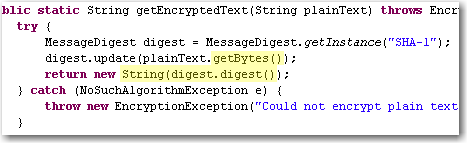
Most developers already struggled with textual data from some third party system and getting garbage special characters and the like because of wrong character encodings.  Some days ago we encountered an obscure problem when it was possible to login into one of our apps from the computer with the password database running but not from other machines using the same db.  After diving into the problem we found out that they SHA-1 hashes generated from our app were slightly different. Looking at the code revealed that platform encoding was used and that lead to different results:platform-encoding

The apps were running on Windows XP and Windows 2k3 Server respectively and you would expect that it would not make much of a difference but in fact it did!

Lesson:

Always specify the encoding explicitly, when exchanging character data with any other system. Here are some examples:

  • String.getBytes(“utf-8”), new Printwriter(file, “ascii”) in Java
  • HTML-Forms with attribute accept-charset="ISO-8859-1"
  • In XML headers <?xml version="1.0" encoding="ISO-8859-15"?>
  • In your Database and/or JDBC driver
  • In your file format documentation
  • In LaTeX documents
  • everywhere where you can provide that info easily (e.g. as a comment in a config file)

Problems with character encodings seem to appear every once in a while either as end user, when your umlauts get garbled or as a programmer that has to deal with third party input like web forms or text files.

The text file rant

After stumbling over an encoding problem *again* I thought a bit about the whole issue and some of my thought manifested in this rant about text files. I do not want to blame our computer science predecessors for inventing and using restricted charsets like ASCII or iso8859. Nobody has forseen the rapid development of computers and their worldwide adoption and use in everyday life and thus need for an extensible charset (think of the addition of new symbols like the €), let aside performance and memory considerations. The problem I see with text files is that there is no standard way to describe the used encoding. Most text files just leave it to the user to guess what the encoding might be whereas almost all binary file formats feature some kind of defined header with metadata about the content, e.g. bit depth and compression method in image files. For text files you usually have to use heuristical tools which work  more or less depending on the input.

A standardized header for text files right from the start would have helped to indicate the encoding and possibly language or encoding version information of the text and many problems we have today would not exist. The encoding attribute in the XML header or the byte order mark in UTF-8 are workarounds for the fundamental problem of a missing text file header.

Branching support missing in JIRA

JIRA is a really great tool when it comes to issue tracking. It is powerful, extensible, usable and widespread. We and many of our clients use it for years and are quite satisfied coming from other tools like Bugzilla.

One thing we find is missing though is the concept of branching. In JIRA you have projects and can define a roadmap consisting of versions that follow each other. Many software products require sooner or later a development line which is only maintained getting bug and security fixes while feature development happens on a separate branch.

Tracking issues for a software with different branches is a bit more demanding because you have to identify the branches one issue affects and possibly separately fix them on each branch. One and the same issue could have different resolutions per branch, i.e. invalid if a broken functionality does not exist anymore. Nevertheless, all branches have to be checked, likely in different time frames.

Unfortunately JIRA does not support the notion of branches. You have to emulate the behaviour using different schemes like:

  • One issue per version that represents a branch
  • Multiple fix versions for an issue
  • Subtasks for an issue or issue links to ckeck and fix the issue for different versions

To me all those are workarounds which lack polished usability and add overhead to your issue management. Real branching support could help you check on which branch an issue is done, where it has still to be resolved and so on without adding more and more (perhaps loosely connected) issues to your system or forgetting to fix the issue on some branch (no question/warning when resolving an issue with multiple fix versions).

[Update:]

I created a new feature request for JIRA where you can vote or track progress on this issue.

Don’t trust micro versions

Normally you would think, that upgrading a third party dependency where its micro version (after the second dot, like x in 2.3.x) changes should make your software work (even) better and not break it. Sadly enough it can easily happen. Some time ago we stumbled over a subtle change in the JNDI implementation of the Jetty webserver and servlet container: In version 6.1.11 you specified (or at least could specify) JNDI resources in jetty-env.xml with URLs like jdbc/myDatabase. After the update to 6.1.12 the specified resource could not be found anymore. Digging through code changelogs and the like provided a solution that finally worked with 6.1.12: java:comp/env/jdbc/myDatabase. The bad thing is that the latter does not work with 6.1.11 so that our configuration became micro-version-dependent on Jetty.

It seems that a new feature around JETTY-725 in the update from 6.1.11 to 6.1.12 broke our software.

Conclusion

Always make sure that your dependencies are fixed for your software releases and test your software everytime when upgrading a dependency. Do not trust some automatic dependency update system or the version numbers of a project. In the end they are just numbers and should indicate the impact of the changes but you never can be sure the changes do not break something for you.

How to find the HTML Entity you look for

As a webdeveloper have you ever wondered how a special character has to be encoded as a html entity? There is a nice little tool available online that will answer your call for help.EntityLook for 'b' What makes the tool really rock is the simplicity and great incremental search. Typing in the letter ‘c’ will present you entities for “cent”, “copyright”, the greek “sigma” and mathematical entities like “superset” because the basic shape of the resulting special character is also considered. Upon entering a ‘b’ you will get the german ß as one of the results.This kind of search is almost a “do what I mean” feature and very helpful if you do not know exact substrings or meaning of your special character.

There is a Firefox-Extension and as a special goodie for our beloved Mac-users there is even a dashboard widget available that works without internet connection and is a bit more convenient to use than the web application.