Paging with different DBs

Sometimes you cannot or do not want to use an object-relational mapping tool. When not using an OR-mapper like Hibernate or Oracle Toplink you have to deal with database specifics. One common case especially for web applications is limiting the result set to a number of items that fit nicely on a web. You then often want to allow the users to navigate between these “pages” of items aka “paging”.

This type of functionality became part of SQL only as of SQL2008 in the following form:
SELECT * FROM t WHERE ... ORDER BY c OFFSET start_row FETCH count ONLY

Since most popular database management systems (DBMSes) do not yet implement this syntax you have to implement paging in propriatory ways.

My experience with an Oracle DBMS and the frustrating and comparatively long time it took to find the correct™ solution inspired me to write this post. Now I want to present you the syntax for some widely used DBMSes which we encounter frequently in our projects.

  • MySQL, H2 and PostgreSQL (< 8.4 which will also implement the SQL2008 standard) use the same syntax:
    SELECT * FROM t WHERE ... ORDER BY c LIMIT count OFFSET start
  • Oracle is where the fun begins. There is actually no easy and correct way of doing this. So you will end up with a mess like:
    SELECT col1 FROM (SELECT col1, ROWNUM r FROM (SELECT col1 FROM table ORDER BY col1)) WHERE r BETWEEN start AND end
  • DB2 AFAIK uses the syntax proposed in SQL2008 but correct me if I am wrong because we do not yet work with DB2 databases.
  • As we did not need paging with MS SQLServer as of now I did not bother to look for a solution yet. Hints are very welcome.

With all solutions the ORDER BY clause is critical because SQL does not guarantee the order of the returned rows.

Wikipedia delivers some additional and special case information but does not really explain the general, real world case the specific DBMSes.

I hope that I raised some awareness about database specifics and perhaps saved you some time trying to find a solution the problem using your favorite DBMS.

About String Concatenation in Java or “don’t fear the +”

When it comes to string concatenation in Java many people have almost religious views about performance and style. Sadly, there are some misconceptions and misinformation especially about the performance bits. Many people think that concatenating many strings using + means expensive string copying each time and is thus slow as hell which is mostly wrong.

Justin Lee has a nice writeup of the most prominent concatenation options. But imho he misses out some things and his benchmark is a bit oversimplified although it does tell a true story. I assume that he followed at least the basic rules for performance measurement as his results suggest.

Now I want to try to clarify some points I think he missed and I find important:

  • Concatenation using + in one statement is actually compiled to the use of StringBuilder (at least for Sun Java6 compilers, where I checked it in the debugger, try it yourself!). So it’s no surprise that there is no difference between these two options in Justin’s benchmark.
  • It should be clear that the format variants have some overhead because they actually do more than just concatenate strings. There is at least some string parsing and copying involved so that these methods should be used for the cases where for example parameter reordering (think I18N) is needed or readability suffers using normal concatenation.
  • You have to pay attention when using + concatenation over the course of multiple statements because it then involves string copying. Consider the following code: Critical String Concatenation Here it really does make a difference which option you choose. The StringBuilder will perform far better for higher loop counts. We had a real world issue back some time with that when we used the Simple web framework for serving directory listing of several thousand files. The HTML-code was generated using a concatenatePlus()-style method and took like 40(!) seconds. After changing the code to the StringBuilder variant the page was served in sub-second time.

Whether you use + or StringBuilder is mostly a matter of taste and readability in many cases. When your string concatenation gets more complex you should really consider using StringBuilder as it is the safe bet.

Creative Wordle usage

Wordle used to summarize conference programs and analyze java projects.

Many of you may have stumbled over Wordle like I did some time ago. It is a nice little tool (implemented as a Java applet) that creates nice word clouds out of some arbitrary text pasted directly into the browser or provided by an URL. Since then I have found some nice, interesting and creative uses for it.

  • schneideblogwordleSchneide Blog Wordle First a Wordle-cloud of our blog frontpage. The left image shows that we are currently talking a lot about projects and our approach to blogging. Compare that with the cloud from a few weeks ago where listener structures and memory management were hot topics.
  • The guys over at EclipseSource ran Wordle over the EclipseCon program to give a quick overview what this conference is all about.
  • Daan analyzed the class naming of popular OpenSource projects and put the very interesting results on his blog.

I quickly hacked something similar together and ran it over two of our projects. The interesting thing is that you can actually get an impression what the projects are about. Let’s take a look at it:

NPA (Nano Particle Analyzer)

NPA Wordle
This seems to be a project where everything is about measuring something. We can see that there is need for calibration and that energy and data play a major role here. We can even spot a laser (try to find it!) out there which is an important part of the whole system.

Ramses

Ramses Wordle
This project seems to be very abstract and generic but there are some concrete pointers to what’s going on here too. It works together with some spectrometry hardware via Genie2k, with a Delphin box and some camera. There seems to be an appointment management integrated, i18n support ready and some more obscure things like fesas.

If you have other cool ideas how to use Wordle I would be glad to hear about them.

Analyzing Java Heap problems Part 2: Using Eclipse MAT

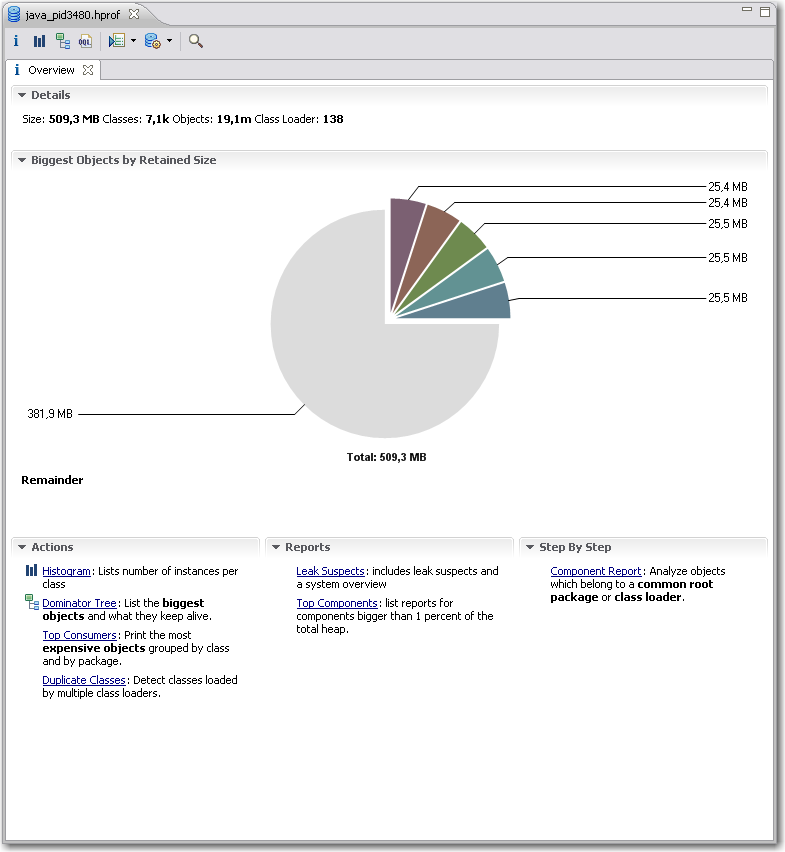
In part one we saw how to obtain the data to analyze, the heap dumps. Now we are looking into a nice plugin for the Eclipse IDE for analyzing the dumps.  Compared to the basic tools described in the previous article Memory Analyzer Tool (MAT) offers better usability, performance and some high level analysis and report tools.Eclipse MAT Overview After you open a hprof heap dump with MAT it will generate index files for faster access to all the data you are interested in and show an overview with nice charts.  From here you have access to other views and features:

  • The histogram is somewhat similar to what jHat offers.mat-pathtogcroot It allows you to browse, sort and filter the object instances in memory and shows you instance count and the shallow heap (memory used only by this object instance) and retained heap (memory used by this object instance including referenced objects). From the context menu you can choose “Merge Shortest Paths to GC roots” to see the reference chain of an object all the way up to the classloader. Here we can see that the JDateChooser registers itself at the MenuSelectionManager as a listener which can cause serious memory leaks as described in another post about Java memory handling.
  • The dominator tree allows you to quickly identify the biggest objects and what they reference. Again, using the context menu on an item in the list offers many options to dive deeper into the analysis.
  • The object inspector gives you detailed information about the selected objects like shallow and retained size, its fields and the class loader by whom it was loaded.
  • The leak suspects report tries to give you some high level hints about possible causes of memory problems of your application.
  • MAT Component ReportThe component report provides some very interesting statistics about Strings and collection usage which might be worth looking at if you are not hunting down leaks but trying to reduce overall memory usage. You can even get performance hints when many overfull HashMaps are detected or there are many empty collections which could be better lazily created.

I personally am using the histogram and the dominator tree the most because I am a technical guy and like to hunt down the problems in the code. Nevertheless the reports may show use other valuable aspects which you did not think of before. The MAT team are expanding the tools nicely on that side so that the benefit of these reports is ever increasing.

It is very likely that when you analyze large heap dumps you may need to increase the Java heap size for Eclipse by using the -vmargs -Xmx<memory size> parameter. That way you are able to analyze big heaps > 500M relatively fast and comfortable. For some live demo take a look at a webinar by some of SAPs Eclipse MAT committers.

Analyzing Java Heap problems Part 1: Basic actions and tools

You think that your shiny Java app has some memory issues but how do you find out if that is true and what is taking up all that memory? Knowing the potential problems is fine. Nevertheless you still have to find out your actual problems. There are several instruments available to help you analyse your Java application regarding its memory usage. I will tell you about increasing your maximum heap (most of you surely know  about that), looking at the memory of a running app, making heap dumps (on demand or on OutOfMemoryException) and analyzing the dumps.

Increasing maximum heap

The Java VM has a setting that defines the maximum amount of heap memory available to your application. It defaults to 64MB which is enough for many programs. If you have a larger application you should try to start it with that value increased by passing the -Xmx<size>m parameter to the VM at startup. <size> is the value in MBytes so just fiddle around with that. If your app is leaking memory that won’t help you for long so you have to find out *if* it leaks.

Looking at memory usage of a running application

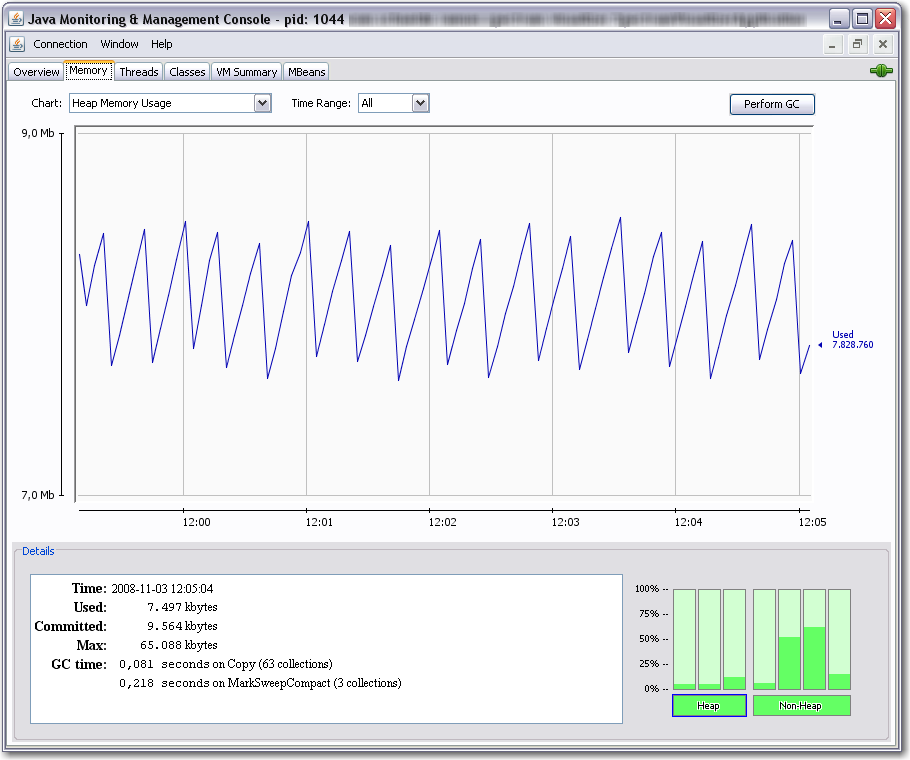
You can use jconsole for a quick look at your applications resource usage. jconsole is part of the Sun JDK since Java 6. You can connect the jconsole to any running java applications on your computer or even reachable over network and offering the Java Management Extensions (JMX) over TCP. Non-leaking programs should have a memory graph like this:

You can see, that the memory fluctuates over time because of the garbage collection cycles. But overall it does not grow. Next we will look at an application that leaks memory:

Above we see that the garbage collector (GC) tries its best but the used memory is growing over time. If we see such behaviour we probably need a heap dump to analyze the issue further.

Making a heapdump

Basically you have two nice ways to get a heap dump of your application which you can look into at a later time:

  1. Use jmap (which is also part of the Sun JDK 6) to dump the heap of a running application to a file using a command line like jmap -dump:format=b,file=myheap.hprof <pid>
  2. Tell the VM to make a heap dump when an OutOfMemoryException occurs by adding -XX:+HeapDumpOnOutOfMemoryError to the VM parameters at startup. With another switch you can specify the path for the dumps: -XX:HeapDumpPath=jmxdata .

After you have obtained a dump of your application you certainly want to have a look at it and find the issues. You can start with Sun’s jhat which is also part of current JDKs. After supplying jhat the hprof-file you can point your browser to the integrated webserver of jhat and browse the heap looking for the objects that take up your memory.

That way you can get an idea of what objects lived in memory when the heap dump was made and how they were referenced.

Conclusion

We have seen many ways to perform memory diagnostics using only free tools which are part of the JDK from Sun. They are all nice but have their limitations. Especially jhat has problems with usability and performance when you examine larger heap dumps with it.

Next time I will show you how to use the Eclipse plugin MAT for analysis of heap dumps obtained in one of the above ways. So stay tuned!

Java solves all memory problems, or maybe not?

Many people think that Java’s Garbage Collector (GC) solves all of their memory management problems. It is true that the GC does a great job in many many real world situations. It really eases your life as software developer especially compared to programming in languages like C /C++ where memory management is a major PITA. Even there you can help yourself by using object systems with reference counting, smart pointers etc. but you have to be aware of this issue all the time.

So everything regarding memory is fine in Java?

Actually not really. Many Java developers do not think about code potentially leading to memory leaks. I would like to point out some problems we encountered. The problems can be divided into two categories:

  1. Native resources which have to be managed manually
  2. Listeners attached to central objects which are never removed again

Examples of native resources

Database connections, result sets and so on are a very common native resource that need manual management. JDBC is a real pain regarding resource management and especially Oracle is very susceptical to leaking those. Either you are very careful here or you use some framework to help you. If you do not want to go the whole way to a persistence framework like hibernate, iBatis or toplink a solution like Spring JDBCTemplate may help you a lot.

Another example is the JOGL TextRenderer which has to be manually disposed or you will leak texture memory  and soon run into resource problems.

Files/Streams and Sockets should be handled carefully too. In most cases you are more or less in the same boat with the C/C++ people but using finally can help you there.

Examples of listener leaks

Sometimes something innocent looking like a Swing Component can turn into a memory leak. We used JDateChooser one of our projects and found some of our data displaying dialogs to exist several times in memory and thus taking huge amounts of RAM eventually leading to OutOfMemoryExceptions. In case of dialogs and windows a WindowListener might help.

Sometimes you might write similar objects yourself that register to some central instance (maybe even a singleton *yuck*). Deregistering them always is easily forgotten or overlooked. A common code pattern to look out for listener leaks where you cannot deregister easily at the right moment is the following:

public class MyCoolClass implements IDataListener {

    public MyCoolClass(IDataProvider dataProvider) {
        super();
        dataProvider.addDataListener(this);
    }

    ...
}

Avoid such constructs as they can prove really dangerous. There is more that can be done to lower the risk of hard-hitting memory/listener leaks: Use WeakReferences for listener management at the crucial central objects. The referenced objects are taken care of by the GC and the listener manager has to take care of the WeakReferences. They can be cleaned up periodically or when a notification takes place.

Conclusion

The Java GC helps a lot in everyday programming but there are still things to look out for. Just be aware of the resources you are using and think about their need of management. I will write some follow up articles about getting heap dumps in different situations and searching them for memory leaks using some nice free tools.

Update:

Kris Kemper wrote a nice article about Swing Memory Leaks with JCalendar and a solution to the problem.

== or equals with Java enum

When you compare objects in Java you should prefer the equals()-method to == in general. The reason is that you get reference equality (like with ==) by default but you are able to change that behaviour. You can override equals() (DO NOT FORGET TO OVERRIDE hashCode() too because otherwise you will break the general class contract) to reflect logical equality which is often what you want, e.g when comparing some string constant with user input.

With primitive types like double and int you are more or less limited to == which is fine for those immutable value types.

But what is the right thing to to with the enum type introduced in Java 5?
Since enums look like a class with methods, fields and the like you might want to use equals() instead of ==. Now this is a special case where using reference equality is actually safer and thus better than logical equality.

Above (please mind the stupid example) we can see that comparing the EState enum with an ILamp using equals() is accepted perfectly by the compiler even though the condition never can be true in practice. Using == the compiler screams and tells us that we are comparing apples with oranges.

“Poor man’s reporting” oder Ultraleichtgewichtiges Java Reporting

In den meisten unserer Softwarelösungen wird irgendwann irgendeine Form von Reportdokument erstellt. Meist fällt dem Kunden ein, dass er gerne ein hübsches Pdf mit Messwerten und ein paar Diagrammen hätte. Im Laufe der Zeit haben wir diverse freie (sowohl wie in Bier als auch Rede) als auch kommerzielle Lösungen ausprobiert und eingesetzt. Darunter sind u.a. Jasper Reports und RReport, jedoch hatten sie alle ihre mehr oder weniger großen Haken und Ösen. Die meisten teureren kommerziellen Lösungen (wie z.B. Big Faceless PDF) kamen wegen des jeweiligen Projektumfangs und den wenigen benötigten Features nicht in Betracht.

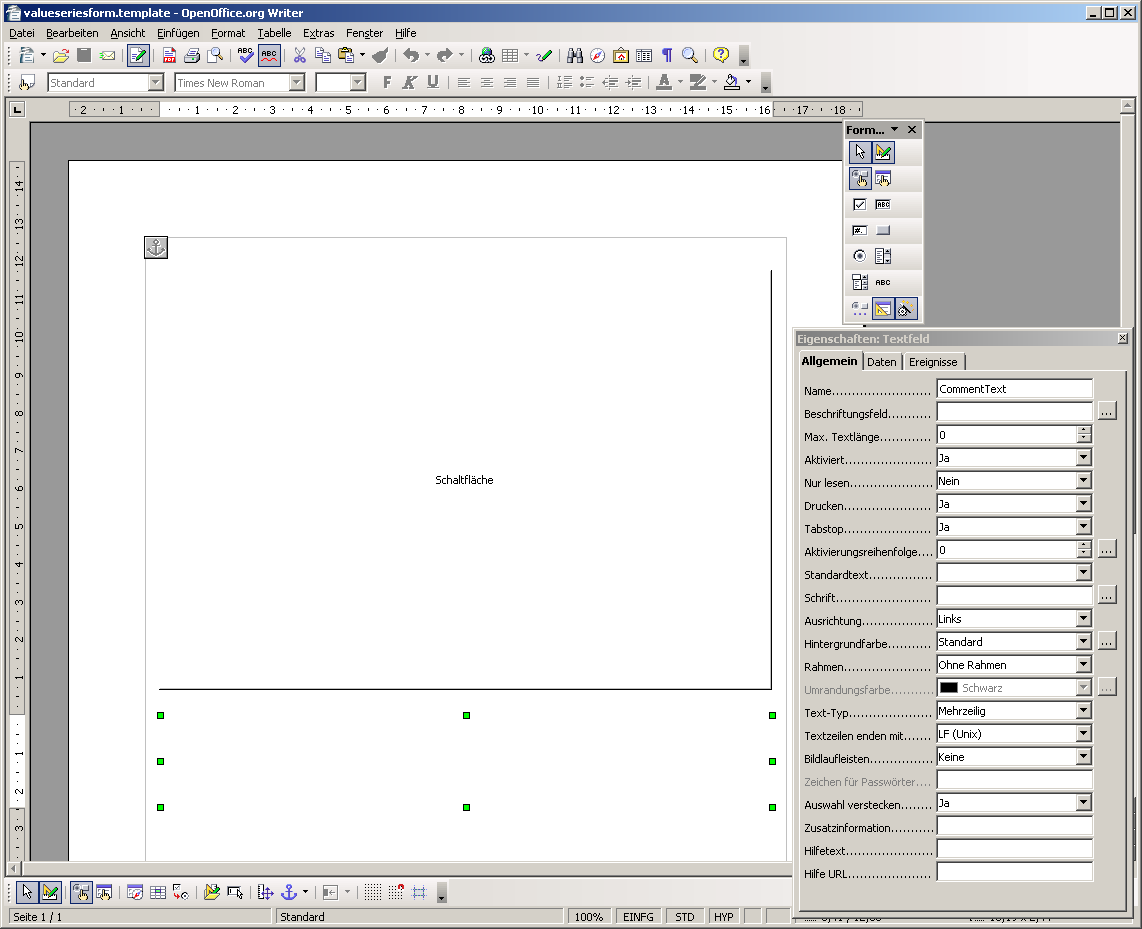
Nach der Lektüre von iText in Action zur Pdf-Erzeugung und -Manipulation und der Suche nach einem Werkzeug, mit dem man einfach und bequem Acroforms erzeugen kann kristallisierte sich eine neue, extrem leichtgewichtige Lösung für das Reporting-Problem heraus: OpenOffice und iText. Carl Young beschreibt in seinem Blog die Benutzung von OpenOffice als Designwerkzeug für Acrobat Forms.OpenOffice Form

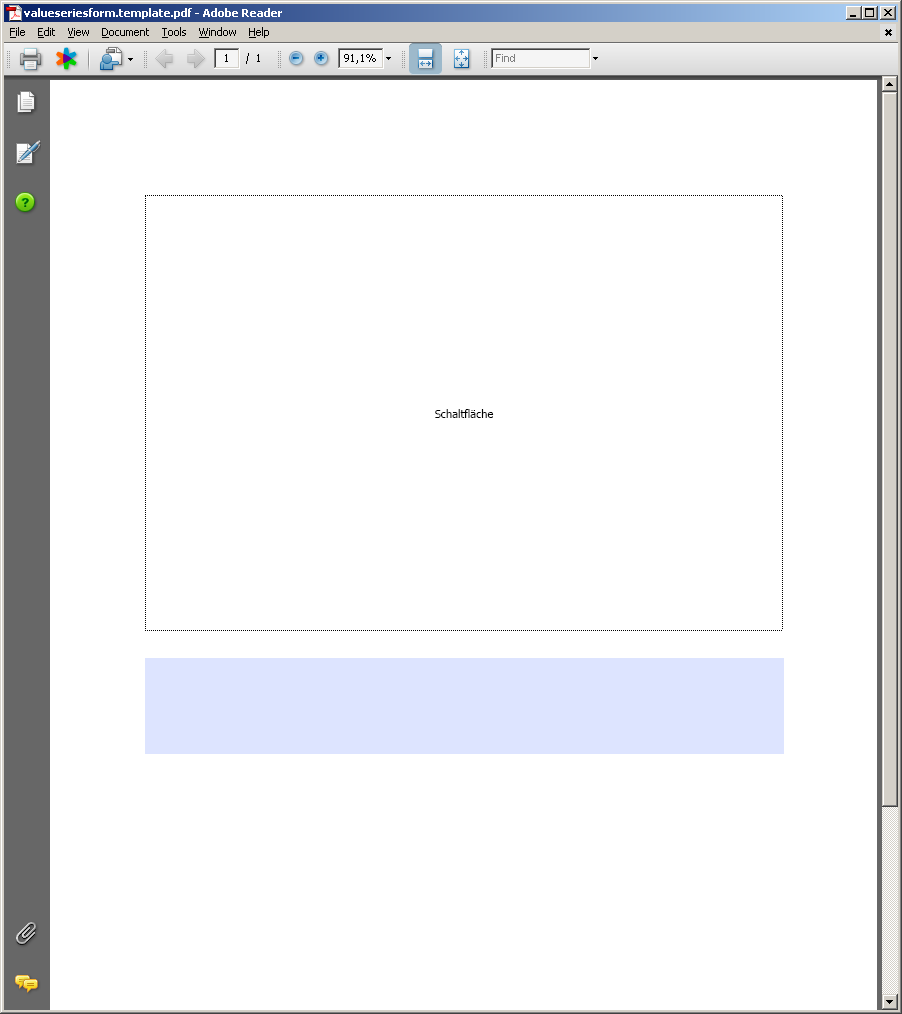
Solche Pdf-Formulare lassen sich relativ einfach mit iText ausfüllen und mit Bildern versehen und dann abspeichern.

Form in AcrobatFilled Form

Damit hat man eine pure Java-Lösung in der Software und ein mächtiges, plattformübergreifendes Designwerkzeug für die Reports.

Die augenscheinlichsten Vorteile dieser Lösung sind:

  • Reportvorlagen liegen in Pdf vor, sind somit von jedem einsehbar und kontrollierbar
  • Die Quellen für die Reportvorlagen können mit OpenOffice erstellt und geändert werden und einfach per Knopfdruck als Pdf exportiert werden
  • Die Reportdaten können in beliebigen Formaten abgelegt oder im Programm generiert werden und dann mithilfe von iText in das Pdf-Formular übertragen werden

Die bisher festgestellten Nachteile sind je nach Einsatzzweck vernachlässigbar, können aber auch zum Showstopper werden:

  • Man muss immer feste Bereiche für die Daten festlegen, sind diese zu groß, werden sie wahlweise skaliert oder abgeschnitten (geht sowohl mit Bildern als auch mit Text!). Hat man also einen langen Fließtext und der Platz im Formularfeld reicht nicht aus, so hat man ein ziemliches Problem.
  • Man bekommt kein Format für die Formulardaten selbst geschenkt, sondern muss sich selbst um deren Speicherung kümmern, um den selben Report zu einem späteren Zeitpunkt neu zu erstellen oder die Reportdaten zur weiteren Verarbeitung bereitstellen zu können. Die programmatische Extraktion der Reportdaten aus dem fertigen Pdf-Report ist extrem aufwändig bis unmöglich.

Die bisherigen Erfahrungen mit dieser OpenOffice+iText-Lösung sind sehr positiv und helfen auch sehr bei der Kommunikation mit dem Kunden. In manchen Fällen fühlt sich dieser aufgrund der Textverarbeitung sogar in der Lage, selbst Layoutänderung auszuprobieren und durchzuführen. Selbst ungeschickte Entwickler bekommen durch OpenOffice mit vergleichsweise geringem Einarbeitungsaufwand ansehnliche Reports hin oder können die Sekretärin damit beauftragen. Kostenlos ist die ganze Lösung noch dazu.