Open Source Love Day September 2010

Our Open Source Love Day for September 2010 brought love for the cmake hudson plugin and a brand new tool around crap4j that will be released soon.

On wednesday last week, we held our Open Source Love Day for September 2010. Our day started with the usual Homepage Comittee meeting and very soon, we were up and working. This time, our success rate wasn’t as high as we wanted, mostly because we worked on internal tools that didn’t work out quite as well as expected. But, we managed to produce something valuable this day.

The Open Source Love Day

We introduced a monthly Open Source Love Day (OSLD) to show our appreciation to the Open Source software ecosystem and to donate back. We heavily rely on Open Source software for our projects. We would be honored if you find our contributions useful. Check out our first OSLD blog posting for details on the event itself.

On this OSLD, we accomplished the following tasks:

  • A new version 1.6.1 of the cmakebuilder hudson plugin was published. This version consisted of bugfixes only and right now, it still seems flawed. We are working on the issue, expect a new version 1.6.2 soon.
  • Our internal time-tracking tool got love at several issues. One issue required the use of triangle-shaping CSS, as described in this blog post from Jon Rohan. Our issue weren’t finished because Javascript code can rot into a big pile of crap really quick.
  • We managed to make a long hatched dream come true at this OSLD. As you might be aware, we are big fanboys of crap4j, a metric tool that associates test coverage with code complexity. Thus, we wrote the crap4j hudson plugin, release the CrapMap and use some internal improvements, too. The main disadvantage of crap4j is the strong dependency on a specific test coverage tool. Our goal was to use the test coverage data we already collect using Cobertura. We achieved this goal and got the whole thing working. It will be released in the next few weeks, with a detailed blog post here. Stay tuned for this new tool (it already has a name: Crapertura).

What were our lessons learnt today?

  • No matter how clever you are, Javascript outsmarts you every time it appears in superior numbers. Refactoring is the key here, but difficult and tedious to apply.
  • When you dissect a foreign API or code base, you just need to find the right grip. I cannot decribe it more precise right now, but this grip is all you need to open up the code. When playing around with the crap4j code base, as soon as we held the grip, everything else followed naturally. Perhaps “the grip” can be translated with “catching the author’s intent”. These are always magical moments.

Retrospective of the OSLD

This OSLD wasn’t as successful as we wished, partly because of missing manpower (honeymoon holiday!) and because of our inability to tame a Javascript code base. We have to work on our expertise here and we are glad that we’ve found out at an OSLD, not a time- and mission-critical customer project.

Open Source Love Day July 2010

Our Open Source Love Day for July 2010 brought love for Hudson (especially the CMake and Crap4j plugins), RXTX and JUnit.

This friday , we held our Open Source Love Day for July 2010.  We began with several internal meetings and discussion (like the Homepage Comittee meeting) and dived right in our work afterwards. Everybody had a little backlog of issues that we wanted to get done on this day. Nearly everybody succeeded (well, the author had a minor delay – read about it below). The day went by in a very fast pace, but it felt right.

The Open Source Love Day

We introduced a monthly Open Source Love Day (OSLD) to show our appreciation to the Open Source software ecosystem and to donate back. We heavily rely on Open Source software for our projects. We would be honored if you find our contributions useful. Check out our first OSLD blog posting for details on the event itself.

On this OSLD, we accomplished the following tasks:

  • There are really cool new features in the latest JUnit versions and Rules are one of them. What hurt our aesthetic sense was that the field that hold the Rule instance has to be public. Checkstyle was on our side, so we tweaked JUnit to allow all kinds of visibility. You can read about the change needed here: http://github.com/KentBeck/junit/issues#issue/31. The fix is almost trivial and will hopefully be incorporated in the next versions of JUnit, so we do not publish our altered version.
  • We constantly receive requests and remarks about our cmake plugin for Hudson. This lead to a new version of the plugin fixing two issues with matrix builds and custom build types. Head over to the plugin homepage and grab the new version 1.6. The issues were in detail:
    • The plugin can be used with matrix builds now
    • Custom build types can be defined now
  • RXTX is our choice for serial port communication with Java. We fixed some issues during the last few OSLDs, with one issue left for today: When you flush your stream while using a special type of usb-to-rs232 converter, you got an exception. The corresponding issue is #102 in the RXTX issue tracker. We proposed a patch that fixes the problem.
  • Another hudson plugin is our crap4j reporter. It lacked some love for months now and finally broke when used with the latest hudson versions. Fixing the problem was a lot harder than we thought, basically because the plugin needed adjustments to recent API changes and we couldn’t figure out exactly what adjustments are necessary. You might have a look at the developer mailing list thread for this question. Finally, we got it resolved (on sunday, with a sudden stroke of insight) and a new version 0.8 is published.
  • We use an internal time tracking tool for our projects. This tool isn’t specifically open source yet, but continues to grow in terms of features and usability. The work invested in this tool helps us to continue with the OSLD, so it’s beneficial work nonetheless.
  • During the last OSLD, we had plans for a new hudson plugin and even produced a prototype. This time, we looked around the hudson plugin zoo (it’s getting a bit difficult to keep track of all of them) for inspiration and found a wonderful piece of art: The Groovy Postbuild Plugin. Using this plugin with a small groovy script served our needs exactly. No need for a full-blown plugin when you can scratch your itch with a simple script. Thanks to Serban Iordache for his great work!

What were our lessons learnt today?

  • If you need to setup a fresh workspace for an open source project, consider to prepare it over the night before, or the download delay will kill your precious work time. There is nothing more frustrating than staring at a “downloading…” progress bar while being eager to start programming.
  • Always look around what others have done before. We wanted to build a full hudson plugin from scratch when all we needed was a little groovy script placed inside another plugin. Sweet!
  • Do not hesitate to privately fix open source issues that won’t get done in time for you. Just make sure to have a management process in place to track those changes and be able to re-apply them to future versions. More important though, be able to tell exactly when NOT to re-apply them because the original project has fixed the issue.

Retrospective of the OSLD

The OSLD went smooth and was productive. We tend to work on backlogs instead of searching for random issues now, but that’s just a sign that our approach has matured and we depend on the OSLD to get work done.

Last wednesday, we held our Open Source Love Day for June 2010. This one was productive despite the heat that had us sweating the whole day long (as a sidenote: it got even warmer the days afterwards). Some features were finished and will help at least us in our projects. We still look forward for the right way to release them. Another release was even more problematic, you will read about it below.The Open Source Love Day

We introduced a monthly Open Source Love Day (OSLD) to show our appreciation to the Open Source software ecosystem and to donate back. We heavily rely on Open Source software for our projects. We would be honored if you find our contributions useful. Check out our first OSLD blog posting for details on the event itself.

On this OSLD, we accomplished the following tasks:

Open Source Love Day June 2010

Our Open Source Love Day for June 2010 brought love for Hudson (especially the Campfire Plugin), Launch4j and RXTX. Everything went smooth and we were soaked with sweat due to massive sunshine.

Last wednesday, we held our Open Source Love Day for June 2010. This one was productive despite the heat that had us sweating the whole day long (as a sidenote: it got even warmer the days afterwards). Some features were finished and will help at least us in our projects. We still look forward for the right way to release them. Another release was even more problematic, you will read about it below.

The Open Source Love Day

We introduced a monthly Open Source Love Day (OSLD) to show our appreciation to the Open Source software ecosystem and to donate back. We heavily rely on Open Source software for our projects. We would be honored if you find our contributions useful. Check out our first OSLD blog posting for details on the event itself.

On this OSLD, we accomplished the following tasks:

  • Launch4j is a java application launcher for Windows, handling all the stuff a startup script would do, too. At the last OSLD, we added the ability to restart the application in case of a crash or other unplanned exit. To utilize this feature for automatic update routines, we needed to add the additional feature of starting another command instead of the original one. If the program fills a special file with the command needed, Launch4j will execute it after the program’s exit. This patch builds onto the previous patch and we are still investigating how to publish this functionality without breaking backward compatibility. We are looking forward to release it on the next OSLD.
  • We use RXTX to perform the serial (RS232) communication on all our java projects. We worked on an issue with serial converters over the course of several OSLDs now and released the patch to the issue tracker of RXTX after a longterm stability test. See the reworked patch for issue #144. There is another issue with the flush() method that seems to affect not only virtual RS232 ports that we currently investigate. But we aren’t yet able to come up with a complete issue description or a fix, so this will be suspended until the next OSLD.
  • We have written the Campfire Hudson Plugin as part of previous OSLDs. When issues emerged, we got patches from the community here. Thank you guys! We included the changes to the code and prepared a new release, when maven failed. This is not an issue, except when it fails repeatedly and messes up the workspace and the repository. After a long time of helpless fiddling with the parameters, we decided to start over and increase the version number to 2.1 (instead of 1.2). All of a sudden, everything worked out fine. Maven is a mysterious beast.
  • The initial work for a New Hudson Plugin was made. One tradition of the OSLD has always been to scratch our own itches. While there are many useful hudson plugins, we have the immediate need for another one that doesn’t exist yet. Without going into details here (we save this for the next OSLD), we produced a proof of concept and a first iteration of the code. Stay tuned for details on the next OSLD.

What were our lessons learnt today?

  • If you don’t succeed with maven’s automatic processes, do not try to sort out things manually. You’ll just end up with a gigantic mess that won’t work either way. The best way to deal with maven failures is to revert everything and try again with different parameters.
  • The best approach to develop hudson plugins is to adapt the old “monkey see, monkey do” process. There are so many plugins already, chances are good your immediate question was already answered somewhere. Just check the found solution for accidental complexity. Sometimes, the first solution isn’t the easiest.
  • When dealing with the legacy Win32 API, combined knowledge scraping is king. We had discussions throughout the day that only consisted of little parts of recollections about knowledge that seemed long forgotten. But finally, we put the pieces together and solved the problem. It should be called teamthink, i guess.

Retrospective on the OSLD

The weather at this OSLD was way too hot to operate at normal speed. But we got some nice results and a cliffhanger for the next OSLD. We left soaked with sweat but happy that evening.

Improved Version of CMake Builder for Hudson

Introducing version 1.5 of cmake builder plugin for Hudson.

Today I just want to give a small round-up of the improvements made on the cmake builder plugin since my last blog post. Back then, version 1.2 was released to support master/slave configurations. As of yesterday, we are at version 1.5 which contains the following improvements/bug-fixes:

  • Bug: The drop-down box for selecting the build type didn’t remember its value. This was fixed with a patch by Atte Timonen.
  • Improvement: Also included in Atte’s patch was the propagation of environment variables to the cmake command which now allows to do parameterized builds. A big thank’s to Atte!
  • Improvement: The install command gets only executed when install directory and install command is given. Before, the build was either broken or $WORKSPACE was used automatically as install directory. Thanks to Dat Chu for his feedback.
  • Improvement: The one-line ‘Other CMake Arguments’ field can get full pretty quickly, so it was changed to a multi-line text-area.

Thank’s again for the feedback, and have fun with the new version!

CMake Builder Plugin in Master/Slave Setups

Making the CMake Builder plugin for Hudson behave in master/slave settings.

The first versions of the cmake builder plugin were developed more or less only driven by our own needs. As people began to use it an issue came up that we hadn’t considered yet: distributed builds, a.k.a master/slave mode. So on our first OSLD in 2010 I looked into the plugin and began to rectify the situation.

My test setup consisted of a hudson master on WindowsXP box which was connected via SSH to a slave node in a Ubuntu virtual machine. The first errors were easy to find. The plugin tried to find all configured paths on the windows host and not on the ubuntu slave.

Experience from our previous Crap4J plugin development and a quick read here brought me on the right track. It’s not a good idea to use just java.io.File if you want your plugin to be master/slave capable – use hudson.FilePath instead.

So after replacing all java.io.File occurrences with hudson.FilePath the situation was much better. The plugin handled all paths correctly but still produced errors when calling cmake. I quickly discovered that java.lang.Process and java.lang.ProcessBuilder were used to call “cmake -version”. Again, not a good idea – hudson.Launcher is your friend here.

After replacing Process with Launcher I had only one strange error left. The following launcher call using a nice fluent interface wouldn’t execute on the remote machine but insisted to execute locally.

launcher.launch().cmds(cmakeCall).envs(environmentVars)
   .stdout(listener).pwd(workDir).join();

When I changed it to the seemingly equal statement

launcher.launch(cmakeCall, environmentVars,
    listener.getLogger(), workDir).join();

it worked like a charm.

After all those changes I proudly present the newest version of CMake Builder Plugin which is now ready to be used in distributed environments.

Only one little unpleasantness still exists, though: when configuring the make and install commands the plugin tries to find the executables on the PATH of host machine. For now, you can just ignore the error message. I try to look into it, soon. Apart from that, have fun with the new version.

Open Source Love Day March 2010

Our Open Source Love Day for March 2010 brought love for Grails, our cmake hudson plugin, RXTX and winp. Everything went smooth and was lots of fun.

Yesterday, we held our first Open Source Love Day (OSLD) for this year. The last OSLD was at December 2009. Then, we reassigned a day in January and February each to perform our relocation to the new (and much bigger) office. But now we are back to regular duty and had the time to donate some work back to the Open Source ecosystem.

The Open Source Love Day

We introduced a monthly Open Source Love Day to show our appreciation to the Open Source software ecosystem and to donate back. We heavily rely on Open Source software for our projects. We would be honored if you find our contributions useful. Check out our first OSLD blog posting for details on the event itself.

Participate at our OSLD by using the features we’ve built today:

  • Grails still has some bugs. Instead of only complaining about them, we try to fix them. There is a bug with checkboxes and nested boolean properties that bugged us in a customer project. It’s filed unter GRAILS-3299 and has a proposed patch now.
  • In previous OSLDs, we produced the cmake hudson plugin. In the corresponding blog entry, comments with bug reports began to pile up. They addressed issues with hudson master/slave setups. So we implemented a hudson master/slave test environment, using VirtualBox virtual machines to perform as slaves. This setup quickly revealed the problems that were typical enough to devote a complete blog entry about this topic soon. Fixing the problems resulted in the new cmake hudson plugin version 1.2 to be released yesterday.
  • We are using the RXTX project to perform serial (RS232) communication in several projects. We are really glad the project exists, because the “official” communications API from Sun/Oracle is nothing but a mess. With RXTX, we only had a problem with emulated COM ports. Emulated COM ports exist when you use a USB->Serial or Ethernet->Serial converter, which is what our customer chose to do. If you unplug the converter during operation, the corresponding COM port disappears. This causes RXTX to crash, bringing the JVM down, too. We wrote a test application and used it with every converter we own (and we own quite a lot of them!). Then we began tracing the RXTX source code (at C code level), altering it to “only” throw an IOException when the virtual COM port disappears. The corresponding patch will be proposed to the RXTX project soon.
  • Another API we use a lot is the tiny winp project, written by Kohsuke Kawaguchi, the creator of hudson. We kill Windows processes with it, within a project that runs on Windows 2000, Windows XP and Windows 7. The latest Windows version seemed incompatible with winp, even the 32bit edition. We didn’t find the cause for this, but developed a workaround that will be proposed to the winp project soon.

What were our lessons learnt today?

  • If you face OutOfMemoryErrors on a 64bit Java6 JVM, try to switch back to a 32bit Java5 JVM. It helped us with our Grails bugfixing (during the test phase).
  • Hudson Master/Slave support for plugins isn’t particularly hard. It’s just that you need to be aware of the topic and replace some types like java.io.File. We gathered the same experience twice with our Crap4J plugin and the cmake plugin. It’s time to tell the world about it. Stay tuned!
  • The good old error return code is an error prone coding paradigm, because all too often, users of a function/method just forget to check the returned result. This was the case with a call to WaitForSingleObject in RXTX.
  • If you don’t understand an implementation well enough to fix the cause, you might at least be able to produce a workaround. It’ll work for you and provide guidance for the original author about where the bug might hide. This is why we count our winp efforts as success, too.
  • Your project either is mavenized or it isn’t. Everything in between is half-assed.

This OSLD was a bit short, as we had some guests in the evening, but nevertheless, it was fun. Well, to be precise, it was this special software engineer’s type of fun: The whole company was remarkably quiet most of the day, with everyone working totally focussed. We scratched our own itches, enhanced our customer projects and contributed to the open source community. A very good day!

Stay tuned if you want to know more about the specifics of the hudson plugin development or the to-be-proposed patches. We will publish them here.

Speed up your buildbox, Part IV: Beyond the box

This is the fourth and last part of a series on how to boost your build box without much effort. This episode talks about possible measures to increase the build performance when a single box isn’t enough.

© Friedberg - Fotolia.comIn the first three parts of our effort to speed up our buildbox, we replaced the harddisk with a RAM disk, upgraded the CPU to the top-notch model and installed plenty of fast RAM. This brought the build time down from 03:30 minutes to around 02:00 minutes. The CPU frequency was the biggest time saving factor in our case study. Two minutes is as fast as the build can get for our project without fiddling with the actual build process. It’s sufficient for our case, but it may not for yours.

Even top speed is too slow

Lets assume we maxed out the hardware and still have a build duration far beyond the magical ten minutes mark. What can we do now? There are two viable options at hand if you can exclude the possibility that your build process is really inefficient and needs optimization. In the latter case, it would be better to revise the process instead of the build infrastructure.

Two ways to speed up your build infrastructure

You can go down one or both of two general paths to speed up your build process. To understand the examples, lets assume the build takes 20 minutes to run on your top-notch build box.

  • Add more build boxes. This is the classical “parallelize it!” approach. It won’t speed up the individual build process, but enable more processes to run at the same time. This approach wont change anything if your team does seldom check-ins, which in itself is an anti-pattern to continuous integration. But if your team commits changes every ten minutes, having at least two build boxes will prevent the second committer from waiting 30 minutes on the CI results. Instead, the results will always be there after 20 minutes. You haven’t exactly sped up your build process, but the maximal waiting time of your committers. For details on the implementation, see below at “Growing a build park“.
  • Chop up your build process. This is known as “staging” or “pipelining” your build. This won’t speed up the individual build process, either, but deliver certain partial results of your build earlier. Lets assume you can split your build process into four distinct stages: compile, unit test, integration test, package. Whenever a stage yields a result, the comitter gets feedback immediately. In our example, this might be every 5 minutes. This has several disadvantages, as for example discussed in the article “The pipeline of doom” by Julian Simpson, but can lower the waiting time for specific aspects of your build drastically. You haven’t exactly sped up your build process, but the response time for partial results and therefore the average waiting time of your committer. For details on the implementation, see below at “Installing a build pipeline“.

Growing a build park

If you want to reduce the initial waiting delay of a build before it gets processed or increase the throughput of builds, the build farm pattern is your way to go. By adding slave build machines to your build master, you can distribute the workload on more shoulders. The best way to set up your infrastructure is to introduce a dedicated master box that only delegates actual builds to its slaves. The master box handles the archivation of build artifacts and deals with the web server requests, while the slaves only perform build tasks. The master box can be of average power, with increased storage size, while the slaves should be ultra-fast, without the need of big disks. Solid state disks or even RAM disks of the slaves can be tuned to actual workspace sizes, as it is all that needs to be stored there.

Distributed builds with Hudson

The Hudson continuous integration server has a strength in setting up these master/slave scenarios. It’s ridiculously easy to set up a build slave. You basically only need to click on a link to start the slave process. If you happen to have a standard build, everything needed gets downloaded automatically. If you want your slaves to operate automatically, you can install a windows daemon, provide a SSH account or write your own script. Usually, slaves are set up in a matter of minutes without hassle. A great idea is to turn powerful collegue boxes into build slaves (aka CI zombies) by booting an USB stick. The best way to start with master/slave builds is to turn your current PC into a hudson slave right now by using the Java Web Start method.

Installing a build pipeline

If you are interested in early but incomplete feedback from your build box, staging your build will help you out. If partitioned right, you’ll receive a series of answers on specific questions from your build process. The questions may be like:

  1. Will it compile?
  2. Will it pass the unit tests?
  3. Will it function (pass the integration tests)?
  4. Will it blend?

Ok, the last question is rather unlikely to be answered by your build box. The overall build process will not be any faster, but basic safety test results are reported earlier. If you combine this approach with distributed builds, there is the possibility to designate specifically tuned machines to different stages. The Hudson continuous integration server has the ability to tag a slave with different labels. You can then configure your build to only run on slaves with the desired label assigned.

Staged builds with Hudson

Staging with the Hudson continuous integration server isn’t as easy as the master/slave feature, but there are some plugins that allow for more complex setups. You might experience some functionality that’s still under development, but basic staging is possible even today. In combination with specialized slave build boxes, this approach can lower your build duration. It is a a complex endeavour, though.

Conclusion

Once your single build box is maxed out but still not fast enough, you enter a different realm of continuous integration infrastructure setups. Speeding up a build process beyond the single box isn’t as easy as installing more RAM. But with a fair amount of planning, you have a fair chance to improve the situation. Note that you won’t primarily lower build duration, but increase throughput and utilize partitioning and specialization. These are different measures and might not affect the wall clock time of your build. The combination of staging and distribution is the most powerful setup, but will result in the most complex infrastructure to maintain. Before entering this realm, be sure to apply any possible optimization to your build process. Because you’ll not leave that realm again soon.

What’s your story on build optimization beyond the box? Drop us a comment.

Speed up your buildbox, Part III: Memory

This is the third part of a series on how to boost your build box without much effort. This episode talks about the effects of faster and more RAM.

© Friedberg - Fotolia.comIn the first and second part of our effort to speed up our buildbox, we replaced the harddisk with a RAM disk and swapped in a bigger CPU. This brought the build time down from 03:30 minutes to 02:00 minutes.

Boosting the memory

When we began the journey, we wanted to undercut the 02:00 minutes threshold. The last component that directly impacts performance of our box was the memory. We started out with 4 GB of DDR2-800 modules. To have a feeling for the effects, we upgraded to 4 GB of DDR2-1066 first and then added another 4 GB, resulting in 8 GB of RAM. We expected the performance gain to be small, but noticeable. The RAM disk, for example, is directly affected by memory speed.

As much, but faster

The first upgrade brought the first surprise: Upgrading from DDR2-800 to DDR2-1066 modules didn’t change anything. It’s not that the mainboard or CPU doesn’t support the faster RAM, it just seems to be fast enough, despite the data bus clock rate. Our build process still took 02:00 minutes, reproducible and without exception.

Filling all the banks

The mainboard can load up to 16 GB of RAM, but our budget just allowed to buy 8 GB of DDR2-1066 RAM. We installed it and ran the same 32 bit Ubuntu Linux as before. The build process took 02:00 minutes, which was expected now.

Changing to 64bit

We changed to boot harddisk, installed a 64 bit Ubuntu Linux and ran the build again. Still 02:00 minutes. The switch to 64 bit wasn’t a big deal with Java, but some of the included native libraries complained about the change. Recompiling them solved the issue.

Finally reaching the target

As a last measure, we increased the maximum memory of the build JVM to the biggest value it would accept. This was -Xmx2600m, a surplus of 600 MB to the original setting. This sped up the build process by five seconds, it took 01:55 minutes now.

Conclusion and perspective

We’ve reached our anticipated target of less than two minutes build time. We exceeded our original budget of 500 EUR, but bought some parts that finally weren’t used in the build box, but elsewhere. The two parts that made the whole difference were the CPU and some more memory to spend it on the RAM disk.

If you want to speed up your single build box, aim for the CPU/RAM combo and try to install a RAM disk to perform all the work on.

This leads me to the perspective of the next part of the series: If you plugged in the most expensive CPU and enormous amounts of RAM to speed up your buildbox, you still aren’t done. You should invest some time to look into distributed builds. Hudson as our continuous integration server provides nearly instant “build slave” support. With this feature, you can set up a whole build farm to further increase your build throughput.

Stay tuned for “Part IV: Beyond the box”

CMake Builder Plugin Reloaded

A few months ago I set out to build my first hudson plugin. It was an interesting, sometimes difficult journey which came to a good end with the CMake Builder Plugin, a build tool which can be used to build cmake projects with hudson. The feature set of this first version was somewhat limited since I applied the scratch-my-own-itch approach – which by the time meant only support for GNU Make under Linux.

As expected, it wasn’t long until feature requests and enhancement suggestions came up in the comments of my corresponding blog post. So in order to make the plugin more widely useable I used our second  Open Source Love Day to add some nice little features.

Update: I used our latest OSLD to make the plugin behave in master/slave setups. Check it out!

Let’s take a walk through the configuration of version 1.0 :

Path to cmake executable

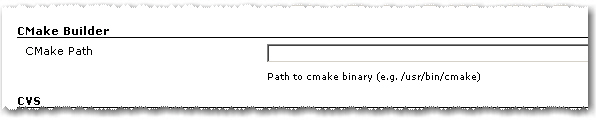
1. As in the first version you have to set the path to the cmake executable if it’s not already in the current PATH.

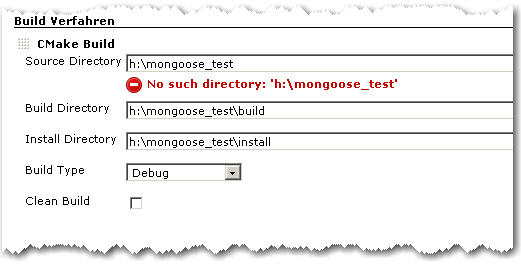
2. The build configuration starts as in the first version with Source Directory, Build Directory and Install Directory.

CMake Builder Configuration Page

3. The Build Type can now be selected more conveniently by a combo box.

4. If Clean Build is checked, the Build Dir gets deleted on every build

Advanced Configuration Page

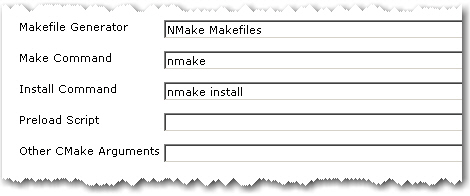
5. The advanced configuration part starts with Makefile Generator parameter which can be used to utilize the corresponding cmake feature.

6. The next two parameters Make Command and Install Command can be used if make tools other than GNU Make should be used

7. Parameter Preload Script can be used to point to a suitable cmake pre-load script file. This gets added to the cmake call as parameter of the -C switch.

8. Other CMake Arguments can be used to set arbitrary additional cmake parameters.

The cmake call will then be build like this:

/path/to/cmake  \
   -C </path/to/preload/script/if/given   \
   -G <Makefile Generator>  \
   -DCMAKE_INSTALL_PREFIX=<Install Dir> \
   -DCMAKE_BUILD_TYPE=<Build Type>  \
   <Other CMake Args>  \
   <Source Dir>

After that, the given Make and Install Commands are used to build and install the project.

With all these new configuration elements, the CMake Builder Plugin should now be applicable in nearly every project context. If it is still not useable in your particular setting, please let me know. Needless to say, feedback of any kind is always appreciated.

Blog harvest: Metaprogramming in Ruby,Hudson builds IPhone apps, Git workflow, Podcasting Equipment and Marketing

harvest64
Four blog posts:

  • Python decorators in Ruby – You can do amazing things in a language like Ruby or Lisp with a decent meta programming facility, here a language feature to annotate methods which needed a syntax change in Python is build inside of Ruby without any change to the language spec.
  • How to automate your IPhone app builds with Hudson – Another domain in which the popular CI Hudson helps: building your IPhone apps.
  • A Git workflow for agile teams – As distributed version control systems get more and more attention and are used by more teams you have to think about your utilisation of them.
  • Podcasting Equipment Guide – A bit offtopic but interesting nonetheless: if you want to do your own podcasts which equipment is right for you.

and a video: