A blind spot of Continuous Integration

Imagine you haven’t changed a continuously integrated project for months when suddenly a unit test breaks. Here’s why CI has a blind spot with flawed tests.

In the early days of April 2008, we updated our hudson continuous integration (CI) server to a new version. This was no unusual action, as there was a new version every day back then, bringing new features in a rapid rate. What was unusual after the upgrade was that one of the surveilled projects failed to build all of a sudden.

Sudden (test) failure without a change

The build was started manually, without a code change. The project itself was inactive back then, meaning that no changes were made for months. And suddenly, a unit test broke. The test was in the project for two whole years without ever going off. What happened?

Good unit tests

There are rules for good unit tests. A basic set are the A-TRIP rules formulated in the excellent beginner’s book “Pragmatic Unit Testing” by Andy Hunt and Dave Thomas. The failed test clearly disobeyed the “repeatable” rule (the R in A-TRIP): It didn’t result in the same result as before while the code under test didn’t change.

Write repeatable tests or your CI will be blind (partially)

The cause of the failed test was putting the clocks back because the daylight-saving time part of the year began. The unit test secured some date calculations by taking the current date and comparing it to future and past dates that got calculated. The calculation went wrong when the daylight-saving mode changes in the calculated period, which was a bug. Repeatability of the unit test was lost when “the current date” entered the code – whether on the unit test or productive code side.

Two years of blindness

How could this bug survive two years without being noticed? The project was under CI surveillance since the beginning, the unit test to detect the bug was present along with the bugged code. The answer is: We never programmed for this project around the weeks of the year when the clock is adjusted and the bug occurs. This was a coincidence influenced by the customer’s schedule. So every time CI (or we) ran the unit test, it passed. Until that day right after putting the clocks back.

How to avoid this blind spot

There are two things you can do to avoid this scenario:

  • Always inject a fixed “the current date” into your code when dealing with date calculations. Only use absolute dates in your unit tests. Time isn’t a healer for your tests, it’s a beast to be tamed.
  • Set up a nightly build for your project that runs once a day even when no changes have been made. It would have caught this bug one and a half year earlier.

To sum it up:

CI only spots bugs when they move (aka the code is changed). Nightly builds provide a (fuzzy) security layer against non-repeatable unit tests. And unit tests with flaws provide only delusory security.

Additional background information

After fully understanding the circumstances, we were curious why the customer didn’t notice the bug and asked him about it. The answer was delightful: “Our computers don’t adjust their clocks. Daylight-saving time only causes trouble.” What a wise decision!

For a good comparison of CI vs. Nightly Builds see this blog entry.

Speed up your buildbox, Part III: Memory

This is the third part of a series on how to boost your build box without much effort. This episode talks about the effects of faster and more RAM.

© Friedberg - Fotolia.comIn the first and second part of our effort to speed up our buildbox, we replaced the harddisk with a RAM disk and swapped in a bigger CPU. This brought the build time down from 03:30 minutes to 02:00 minutes.

Boosting the memory

When we began the journey, we wanted to undercut the 02:00 minutes threshold. The last component that directly impacts performance of our box was the memory. We started out with 4 GB of DDR2-800 modules. To have a feeling for the effects, we upgraded to 4 GB of DDR2-1066 first and then added another 4 GB, resulting in 8 GB of RAM. We expected the performance gain to be small, but noticeable. The RAM disk, for example, is directly affected by memory speed.

As much, but faster

The first upgrade brought the first surprise: Upgrading from DDR2-800 to DDR2-1066 modules didn’t change anything. It’s not that the mainboard or CPU doesn’t support the faster RAM, it just seems to be fast enough, despite the data bus clock rate. Our build process still took 02:00 minutes, reproducible and without exception.

Filling all the banks

The mainboard can load up to 16 GB of RAM, but our budget just allowed to buy 8 GB of DDR2-1066 RAM. We installed it and ran the same 32 bit Ubuntu Linux as before. The build process took 02:00 minutes, which was expected now.

Changing to 64bit

We changed to boot harddisk, installed a 64 bit Ubuntu Linux and ran the build again. Still 02:00 minutes. The switch to 64 bit wasn’t a big deal with Java, but some of the included native libraries complained about the change. Recompiling them solved the issue.

Finally reaching the target

As a last measure, we increased the maximum memory of the build JVM to the biggest value it would accept. This was -Xmx2600m, a surplus of 600 MB to the original setting. This sped up the build process by five seconds, it took 01:55 minutes now.

Conclusion and perspective

We’ve reached our anticipated target of less than two minutes build time. We exceeded our original budget of 500 EUR, but bought some parts that finally weren’t used in the build box, but elsewhere. The two parts that made the whole difference were the CPU and some more memory to spend it on the RAM disk.

If you want to speed up your single build box, aim for the CPU/RAM combo and try to install a RAM disk to perform all the work on.

This leads me to the perspective of the next part of the series: If you plugged in the most expensive CPU and enormous amounts of RAM to speed up your buildbox, you still aren’t done. You should invest some time to look into distributed builds. Hudson as our continuous integration server provides nearly instant “build slave” support. With this feature, you can set up a whole build farm to further increase your build throughput.

Stay tuned for “Part IV: Beyond the box”

CMake Builder Plugin Reloaded

A few months ago I set out to build my first hudson plugin. It was an interesting, sometimes difficult journey which came to a good end with the CMake Builder Plugin, a build tool which can be used to build cmake projects with hudson. The feature set of this first version was somewhat limited since I applied the scratch-my-own-itch approach – which by the time meant only support for GNU Make under Linux.

As expected, it wasn’t long until feature requests and enhancement suggestions came up in the comments of my corresponding blog post. So in order to make the plugin more widely useable I used our second  Open Source Love Day to add some nice little features.

Update: I used our latest OSLD to make the plugin behave in master/slave setups. Check it out!

Let’s take a walk through the configuration of version 1.0 :

Path to cmake executable

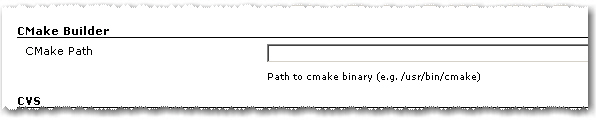
1. As in the first version you have to set the path to the cmake executable if it’s not already in the current PATH.

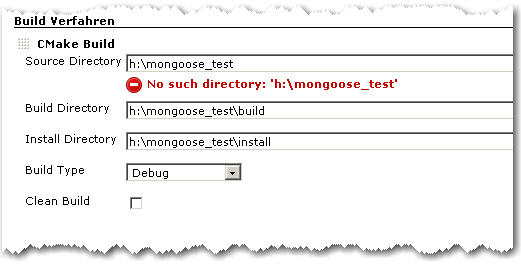
2. The build configuration starts as in the first version with Source Directory, Build Directory and Install Directory.

CMake Builder Configuration Page

3. The Build Type can now be selected more conveniently by a combo box.

4. If Clean Build is checked, the Build Dir gets deleted on every build

Advanced Configuration Page

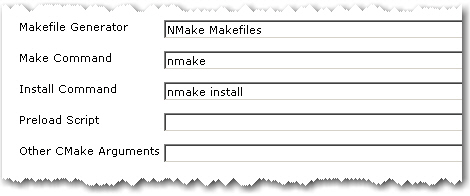
5. The advanced configuration part starts with Makefile Generator parameter which can be used to utilize the corresponding cmake feature.

6. The next two parameters Make Command and Install Command can be used if make tools other than GNU Make should be used

7. Parameter Preload Script can be used to point to a suitable cmake pre-load script file. This gets added to the cmake call as parameter of the -C switch.

8. Other CMake Arguments can be used to set arbitrary additional cmake parameters.

The cmake call will then be build like this:

/path/to/cmake  \
   -C </path/to/preload/script/if/given   \
   -G <Makefile Generator>  \
   -DCMAKE_INSTALL_PREFIX=<Install Dir> \
   -DCMAKE_BUILD_TYPE=<Build Type>  \
   <Other CMake Args>  \
   <Source Dir>

After that, the given Make and Install Commands are used to build and install the project.

With all these new configuration elements, the CMake Builder Plugin should now be applicable in nearly every project context. If it is still not useable in your particular setting, please let me know. Needless to say, feedback of any kind is always appreciated.

Blog harvest: Metaprogramming in Ruby,Hudson builds IPhone apps, Git workflow, Podcasting Equipment and Marketing

harvest64
Four blog posts:

  • Python decorators in Ruby – You can do amazing things in a language like Ruby or Lisp with a decent meta programming facility, here a language feature to annotate methods which needed a syntax change in Python is build inside of Ruby without any change to the language spec.
  • How to automate your IPhone app builds with Hudson – Another domain in which the popular CI Hudson helps: building your IPhone apps.
  • A Git workflow for agile teams – As distributed version control systems get more and more attention and are used by more teams you have to think about your utilisation of them.
  • Podcasting Equipment Guide – A bit offtopic but interesting nonetheless: if you want to do your own podcasts which equipment is right for you.

and a video:

A Campfire plugin for Hudson

Our last OSLD resulted in a new hudson plugin: a build notifier for Campfire. Right now it is pretty simple and just posts the last build result in a chat room:
Campfire-Notification

You can configure your account data and the room to join in the job config page under Post Build actions:
Hudson-Campfire
But there is more to come:

  • global config
  • SSL support
  • a link back to hudson

or what is your favorite missing feature?

Speed up your buildbox, Part II: Processor

This is the second part of a series on how to boost your build box without much effort. This episode talks about the effects of different processors.

© Friedberg - Fotolia.comIn the first part of our effort to speed up our buildbox, we replaced the spindle harddisk with a Solid State Disk (SSD) and finally, a RAM disk. This brought the build time down from 03:30 minutes to 02:50 minutes.

The Central Performance Unit

The next step on our journey to a faster buildbox was to replace the processor. Our initial processor was an Intel Core2 Duo E6750 with 2.67 GHz. To our pleasure, the processor socket, namely the LGA775 socket, is extremely versatile in supporting different processors. We had no problem in plugging in faster dual or even quad core processors, except upgrading the BIOS.

Taking the 3 GHz mark

The next processor to try out was an Intel Core2 Duo E8500 with 3.17 GHz operating frequency. The L2 cache went up from 4 MB to 6 MB.

The build time went down immediately from 02:50 minutes to 02:20 minutes. That’s nearly 20 percent less build time. And it’s perfectly linear with the CPU speed increase (also nearly 20 percent).

As a result: Investing in CPU clock power seems to pay off. The higher the frequency, the lower the build time.

Doubling the cores

Fortunately, the LGA775 socket supports quad core processors, too. We plugged in a Core2 Quad Q9550 with 2.8 GHz and ran the build again.

The result was astonishing: Despite the lower frequency, the build time dropped from 02:20 minutes to 02:00 minutes. We can’t really explain this one with basic math like the frequency coupling of the dual cores.

If your build is perfectly multithreaded, something javac isn’t, you’ll notice an even bigger speedup.

To sum it up: you can’t have enough GHz or processor cores when running a build.

Reviewing the result

We replaced the harddisk with RAM and upgraded the processor to meet the current performance threshold. This brought us from a starting 03:30 minutes build time to 02:00 minutes now. The CPU is the major player in this game, so upgrade it first.

Outlook on the third part

But what about the RAM? We really wanted to know what happens when we replace the RAM with bigger and faster one. Read more about this experiment in the third part of the series, coming soon.

Our second Open Source Love Day (OSLD)

A retrospective report of our second Open Source Love Day (OSLD). We present the results of our work on hudson and git and the lessons learnt.

opensourceloveday

Today we celebrated our second Open Source Love Day (OSLD). When we say “celebrated”, we actually mean that all of us worked hard and concentrated for hours, just to have a short meeting with candy at the end of the day.

The Open Source Love Day is our way to show our appreciation to the Open Source software development ecosystem. We heavily rely on Open Source products for our customer projects, so it’s just fair to donate back. You can read more about our motivation and specifica in our first OSLD blog posting.

For this day, we adjusted the rules a bit. While Object Calisthenics are very powerful in formulating rather academic software development values in some easy-to-remember rules, they just don’t fit well with existing projects. We still kept the rules in mind, but didn’t follow them strictly. We also learnt our share from last time’s experience of jumping right into the middle of arbitrary projects without a real need to do so. Today, we scratched more of our own itches.

You can participate at our OSLD by using the feature we’ve built today:

  • Hudson gets a brand new plugin. Currently, it’s in alpha status and needs some more nurturing, but is planned to be published within the next few weeks. The proof of concept was successful today. You will read more about it on this blog soon.
  • Another of our hudson plugins, namely the cmake builder plugin, got some feature love, incorporating suggestions from plugin users. We especially thank Ole B. for his feedback. The new features are checked in and will be available with the next plugin version 0.6, scheduled to be published in a few days. You’ll read the details about the new features here.
  • We’ve produced a feature implementation for hudson, adding the ability to use environment variables for the job’s workspace path. This feature touches core hudson functionality, so we just proposed a patch and leave it up to the core hudson team to decide on its inclusion. For more details, head over to the hudson issue tracker, entry #3997.
  • And we didn’t forget about git. As we are multi-IDE users (today’s development took place using NetBeans, IDEA and Eclipse), the EGit eclipse plugin for git will soon have the ability to diff the content of two revisions. An undocumented method argument took too much time to finish the feature today. After email communication with the project owner, the feature works on our machine, but needs some polishing before being committed in the near future.

As you can see, the hudson continuous integration server received a great share of our today’s love. It’s a great tool with a great community that really deserves our contributions.

What were our lessons learnt today?

  • While implementing the variable expansion feature, the author got distracted by a similar concept and followed this red herring. Namely, instead of a hudson.util.VariableResolver, we needed to use the hudson.EnvVars class. The EnvVars are pre-filled with all global variables like JAVA_HOME, while the VariableResolver is not. This could have been avoided by looking at the actual code instead of just type names. Once you think you’ve found your type, you read code the wrong way just to sustain your assumption.
  • To implement advanced plugin features, whether for hudson or eclipse, is a matter of skill with the “monkey see, monkey do” development style. Documentation is mostly non-existent or out-dated.
  • When handling HTML and HTTP in java, some survival tricks are crucial. Stay tuned for a whole blog post on that topic.
  • We still don’t feel comfortable within the JGit source code, as we still lack advanced git feature and terminology knowledge and the project lacks documentation. Our part of the problem will decline over time, as it’s a question of tool/mindset/slang exposure.

To sum it up, this OSLD worked out much better than our first one. We had more fun and yielded better results, mostly because we adjusted our goals to better suit our working style.

What are your experiences with open source development? Drop a comment!

Honey, I shrunk the build box

Meet the world’s smallest hudson server, operating with even less power than your energy saving light bulb.

We are currently posting an ongoing series on how to make your (hudson) build box faster. This article talks about making it smaller.

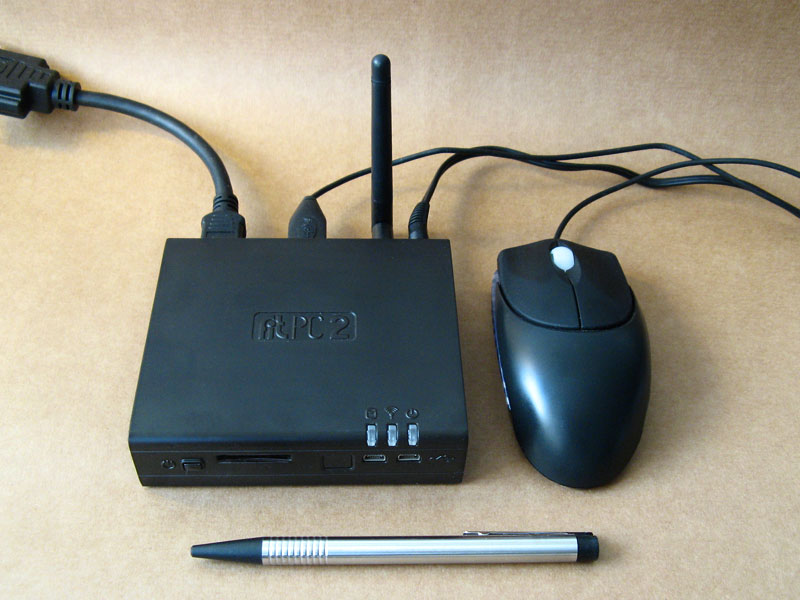
Making a build box as small as possible isn’t the most familiar requirement today and wasn’t for us. But when i privately bought a fit-PC2, we couldn’t resist trying it out as a hudson server.

The fit-PC2

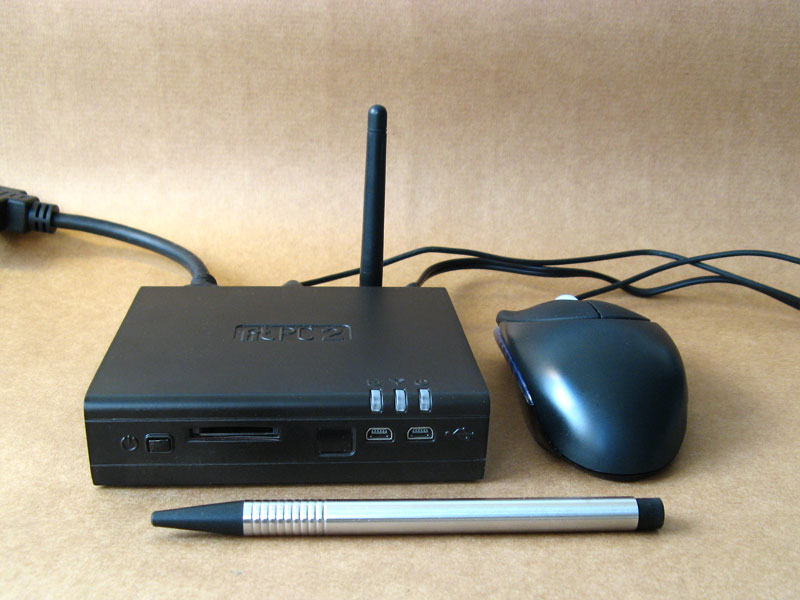
mini1This is a computer that really fits everywhere. In your car, on the back of your monitor or just, as in our case, on a beer mat. It’s a fully equipped PC with the specification of a standard netbook (Atom 1.6GHz CPU, 1GB RAM, 160GB HDD) and the dimensions of a 5-port Ethernet switch. The most astonishing fact about it is that it uses standard size 2,5″ notebook harddisks. For more information about the computer, look around the CompuLab website, they do not exaggerate.

Operating the fit-PC2

mini2The fit-PC2 is a normal computer in every aspect. We run ours with Ubuntu linux and official Java packages from Sun. As the case is fanless, it accumulates some heat, but never over 60° Celsius (140° Fahrenheit). We measured an average temperature of 45°C on the case surface while building a large project. The Gnome desktop feels snappy, application load delays are sufficiently small and customizing the software outfit is as easy as it can get with Ubuntu.

Setting up hudson

Installing the hudson continuous integration server on a Debian based linux system is a matter of three commands. See Koshuke Kawaguchi’s blog entry on that topic for details. After the automatic installation procedure, hudson already runs on port 8080 of the machine. Setting up the project’s job and initiating the first build were a matter of a few minutes. Hudson reacts swiftly to website clicks.

The world’s smallest hudson server

mini3This is the smallest hudson instance we’ve heard of up to now. It runs in a case measuring 11,5 x 10,0 x 2,6 centimeters. The power consumption is around 8 Watt when building (including the self-usage of the measuring device itself), which would be even lower once we replace the mechanical harddisk with a solid state disk (SSD).

From the performance specifications given above, you should not expect a speed wonder. The fit-PC2 finished the project’s build within 09:50 minutes, which is dangerously near the ten-minutes mark for acceptable continuous feedback. So this box will not go into regular duty, but return home to me (remember, i bought it privately).

Conclusion

The whole purpose of this experiment was to get used to a new era of microcomputers. They are palm-sized and nearly battery operated, but fully equipped with standard components and powerful enough to perform regular tasks. The fit-PC2 is a strong instance of these devices.

Show off your hudson server

Well, to be honest, another purpose of this experiment was to show off our hudson skills, operating with hudson instances from heterogeneous slave farms to this single 300 cubic centimetres box. We would like to hear from your hudson instance. You may add a comment and/or share a link with your story. Maybe the hudson wiki is the ultimate place to gather all the stories.


P.S. This blog entry’s title is an adaption of my childhood’s favorite movie.

Speed up your buildbox, Part I: Introduction & Harddisk

This is the first part of a series on how to boost your build box without much effort. This episode talks about the effects of different harddisks.

W© Friedberg - Fotolia.come actively use Hudson as our continuous integration server software. It has a nice little feature called “build history trend” that shows the duration of all archived builds. One of our major projects started out small and fast with a build duration of 01:20 minutes. One and a half year later, it reached for the 04:00 minute hurdle. It wasn’t a surprise to us, as the build has more than four times the work now and the hardware staid the same.

But a question emerged: How can we speed up our build?

Applying optimization: The basic maths

We did a quick review of our ant build scripts to ensure there’s nothing fundamentally wrong with them and then decided which road to follow first: Optimizing the build scripts or boosting the hardware? There is only one pragmatic answer to us: boost the hardware as long as it stays reasonable in price. Every optimization in the build script would need its time (which isn’t cheap) and possibly increase the script complexity (which is very expensive later on).

Optimizing the hardware

So we went on the journey to make a fast buildbox even faster. We started out with a dual core processor (2.6 GHz), a decent-but-standard harddisk and 4 GB of memory. We replaced every part on its own to see the effect. The journey includes:

Our goal is to cut our build time down by 50 percent, to a little less than 02:00 minutes. We don’t want to spend more than 500 EUR for new hardware. So now, after this introduction:

Part I: Replacing the harddisk

Our buildbox starts with a more or less normal harddisk (0.5 TB), certified for continuous usage. We could have bought just another normal harddisk of a newer generation, but that doesn’t cut it in our experience (we didn’t verify specifically, though).

Calling the carnivores

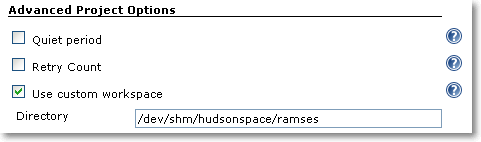
If you need to upgrade your harddisk, you can buy yourself a VelociRaptor drive and be pretty much assured that you’ll notice the difference. We had pleasant experiences with this kind of fast-spinning drives before, but this time, we wanted to go a step further and try a fast Solid State Disk (SSD). As you only need to relocate the working directories (called workspaces in hudson terminology) of your projects to the new disk, the capacity isn’t important as long as it’s greater than your project sizes. You can just plug your new disk in the buildbox and format it with a high performance file system. As our buildbox runs on Linux, relocating the workspace is just setting a symbolic link. You do not even tell hudson about it. If you happen to run on Windows, check out the “use custom workspace” setting on your job’s configuration page.

An investment of about 200 EUR and 15 minutes of installation later, we had the result: The build average before was 03:30 minutes and now 03:10 minutes. That’s not a big leap forward, as others found out, too. It’s not that the SSD was bad, it performed exceptionally well in the benchmarks, but the harddisk wasn’t the bottleneck. To further proof our assumption, we installed the fastest harddrive you can get: the RAM disk.

Only pretend to use the disk

Linux (like other unixoid systems) has the great feature of an emulated harddisk right in your memory. On Debian/Ubuntu systems, this emulated drive is mounted at /dev/shm and has a capacity of half your total physical memory. It grows dynamically, so you don’t have to worry about its initial size. But you have to check if your workspace fits into it. Our buildbox had 4 GB of RAM and 2 GB were enough to contain the hudson workspace. We configured hudson to build there (you can use symbolic links or the “custom workspace” setting as shown in the picture) and got the result: The build average went down to 02:50 minutes.

custom_workspace

Review on the results

That’s as far as we could speed up our buildbox by just replacing the harddisk. Down from 03:30 minutes to 02:50 minutes, a reduction of 40 seconds or 20 percent. In fact, we even cheated as the buildbox doesn’t use an harddisk anymore for building. With Linux, it’s incredibly easy to utilize a RAM disk as long as you have enough RAM to loan. For Windows systems, there are several software products that can do the same. If you don’t want to loan your RAM, you can look into HyperDrives, but for a price!

So we conclude that the fastest harddisk is an emulated one and even then, its effect on the build time is limited.

Stay tuned for the next episode of our journey to a faster buildbox, when we apply a faster CPU.

Smell if it’s well

Ever wondered how a code smell would taste like? We chose it to be like vanilla. Our latest extreme feedback device scents our office air depending on code quality.

We at the Softwareschneiderei are constantly searching for ways to gather feedback from our projects. We get feedback from our customers and their users, but we also get feedback directly from the code, be it through test results or code analysis. A great way to make your code speak for itself is to provide it some Extreme Feedback Devices (XFD).

IntroduciIMG_0574_smellng the Smell-O-Mat

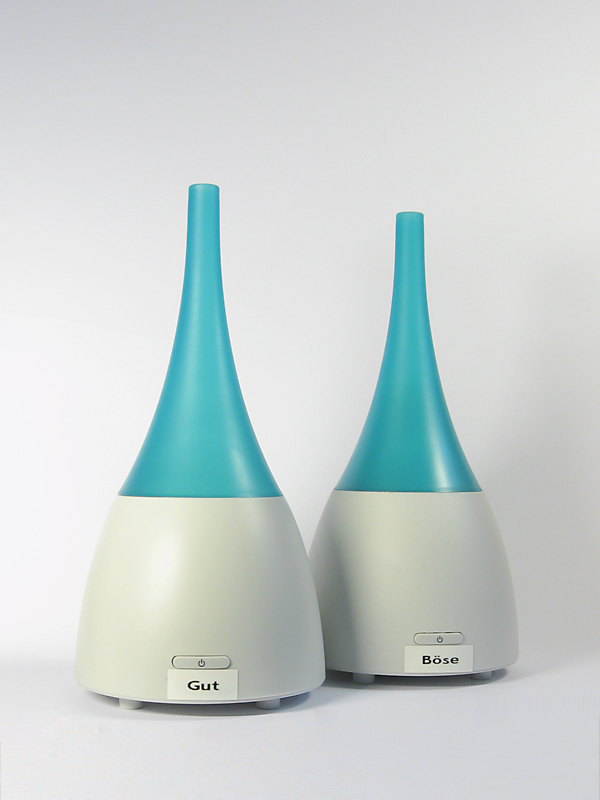
One thing we always wanted to have was “code smells” that really smell for themselves. When we ran across an ultrasonic humidifier that can produce room-wide smells by dispensing essential oils, we found the right device for this feedback. We bought two humidifiers and labeled them “good” and “evil”. The hardest part was to find a smell everybody relates to “evil”, but won’t distract you too much from your work. Whenever our code analysis finds a new real code smell, the “evil” humidifier is turned on for some minutes. If an existing code smell is fixed, we get the “good” smell.

The effects

We do not produce code smells all too often. But once in a while, it happens. And this incident can now be perceived throughout the day just by breathing. On the other hand, fixing old smells is a source of refreshing air. Whenever the office atmosphere needs replenishment, all you have to do is to fix some code smells in our large code base (they do get rare!). Of course, most junior developers just open a window for that.

We chose grapefruit being our “good” smell, so our work area tastes mostly limony now instead of just “developer’s thoughts”, a fragrance that yet has to bottled.

The technical solution

Technically, the integration of the two humidifiers with our reporting infrastructure was very easy. Every XFD is controlled by an IRC bot that understands certain commands suitable for the device and hangs around at our central IRC server. As an humidifier only understands “on” and “off”, it could be controlled just like the ONOZ! lamp. We connected the humidifiers to a remote controlled power supply, switched it on and let the bot control the supply.

Our reporting infrastructure forwards its results to an aggregation software that interprets the numbers and produces IRC commands for the device bots. All of this is done with a combination of website scraping (Hudson as our continuous integration server has a wonderful XML API) and IRC messaging.

The history of XFD so far

Over the last years, we gathered XFDs for almost every human sense. We have visual effects, audible feedback using speech synthesis and even bought an USB rocket launcher for forced feedback needs. With the Smell-O-Mat, we can now deal with smelling, too.
The last human sense we have to address is tasting. Plans for the “coffee salter” were impeded by our sense of humanity. We keep searching.


Read more about our Extreme Feedback Devices: