A few more heuristics for rejecting Merges

Since a few weeks ago, I am trying to find a few easy things to look for when facing a Merge Request (also called “Pull Request”) that is too large to be quickly accepted.

When facing a larger Merge Request, how can one rather quickly decide whether it is worth going through all changes in one session, or to decide that this is too dangerous and reject.

These thoughts apply for a medium-sized repository – I am of the opinion that if you happen to work in a large project, or contribute to a public open-source repository, one should never even aim for larger merge requests, i.e. they should be rejected if there is more than one reason any code changed in that MR.

Being too strict just for the sake of it, in my eyes, can be a costly mistake – You waste your time in unnecessary structure and, in earlier / more experimental development stages, you might not want to take the drive out of a project. Nevertheless, maintainers need to know what’s going on.

Last time, I kept two main thoughts open, and I want to discuss these here, especially since they now had time to flourish a while in the tasty marinade that is my brain.

Can you describe the changes in one sentence?

I want my code to change for a multitude of reasons, but I want to know which kind of “glasses” I read these changes with. For me, it is a lesser problem to go through many changes if I can assign them to the same “why”. I.e. introducting i18n might change many lines of codes, but as these happen for the same reason, they can be understood easily.

But if, for some reason, people decide to change the formatting (replace tabs with spaces or such shenanigans), you better make sure that this the only reason any line changes. If there is any other thing someone did “as it just appeared easy” -reject the whole MR. That is no place for the “boy scout rule”, it is just too dangerous.

For me, it is too little to always apply the same type of glasses to any Merge Request there is. One could say “I only look for technical correctness”. But usually I can very well allow myself some flexibility there. I need to know, however, that all changes happened for only a few given reasons, because only then I can be sure that the developer did not actually loose track of his goal somewhere on the way.

Does this Merge increase the trust in a collaboration?

From a bird-eye point of view, people working together should always pay attention whether a given trajectory goes in the direction of increasing trust. Of course, if you fix a broken menu button in a user interface of a large project, the MR should just do that – but if you are in a smaller project with the intention of staying there, I suggest that every MR expresses exactly that: “I understand what is important at the current stage of this collaboration and do exactly that”.

Especially when working together for a longer time, it can be easy to let the branching discipline slip a little – things might have gone well for a longer time. But this is a fragile state, because if you then care too little about the boundaries of a specific MR, this can damage the trust all too easily.

In a customer project, this trust goes out to the customer. This might be the difference between “if something breaks they’ll write you a mail, you fix it, they are happy” and “they insist on a certain test coverage”.

Conclusion

So basically, reviewing the code of others boils down to writing own code, or improving User Experience, or managing anything – think not in a list of small-scale checklists, think in terms of “Cognitive Load”. A good programmer should have a large set of possible glasses (mindsets) through which they see code, especially foreign code. One should always be honest whether a given change is compatible with only a very small number of reasons. If there is a Merge Request that allows itself to do too much, this is not the Boy Scout Rule – it is a recipe of undermining mutual trust. Do not overestimate your own brain capacity. Reject the thing, and reserve that capacity for something useful.
A few heuristics for rejecting Merges

The title of this post is somewhat of a working title. It is based on the observation, that in larger projects a day might come where you have to outsource some amount of work (an “issue”, if you will) to anyone who is not you, and maybe not even someone you already know well. Or at least now, how well they fit your image of good code.

That concept is probably not new* for you, and neither is the idea that sooner or later, the foreign code has to be merged, and you are the reviewer. (depending on your version control system, the lingo might differ, but let’s call this whole process a Merge Request for now, like GitLab does).

Now, every issue is different, therefore it is not upon me to give you hard rules what a Merge Request should do. These rules would be as diverse as the issues themselves, and there is no clear answer to “as a reviewer, what should I actually look for?”.

The Best-Case Scenario (forget about it)

The best-case scenario might be:

  • You understand the issue well enough
  • You understand the code base well enough
  • You understand the language well enough
  • The changes are few enough that you can understand them quickly enough.

In that case, you do not need some blog post to help you.

So you could try and pull up some rules for your project in which every Issue leads to Best-Case Merge Requests, but as you will fail anyway, it might be the wiser thing to lower your expectation. I mean, if all issues would match that case, you probably would be faster by writing all the code yourself.

Rather go for the Not-Good-Enough Scenarios

So, what do you do to combine the requirements a) the collaboration should really simplify your life and b) you do not want to compromise your standards too heavily?

This thought process is not finished yet, but at least I would go for some heuristics – if these are violated too heavily, chances are that everyone involved might actually profit from having this Merge Request rejected.

  • Can the issue be grasped within a few minutes?
  • Can the changes be grasped in about half an hour or less?
  • Can the problematic code pieces be described in a few short points?
  • Does this increase the feeling of trust in the collaboration?
Can the issue be grasped within a few minutes?

If it can’t, or you can’t, how come you are the reviewer? This is probably the easiest heuristic to ignore, because real-life problems and real-life programmers might be so imperfect that this is utopian, but still, if it happens, be extra wary.

Can the changes be grasped in about half an hour or less?

The half-an-hour is only a rough figure, of course, but that’s not the point.

If you ever thought “my brain is great”, remember that this was your brain speaking. Your attention span is just not good. If you think otherwise, how come you are the reviewer?

It is easy to think that longer Merge Requests just take a longer time to process. But it doesn’t scale. You will use up your willpower, motivation, attention span quicker than you would like to admit; and if you then go for “well, at least I want to finish the thing now, otherwise I have to do it even again” you will probably let too many mistakes slip.

It is just not responsible. If you want to show willpower, go for increasing your willpower in admitting that some Merge Requests are just too big, and reject them.

One can always backup a branch, create a new one, cherry-pick commits on them, even only commit portions of the same file – this might feel like a punishment at first, but chances are that this process might actually find several problems that were hidden before.

To be continued…

I spoilered my two other heuristics above, but figure that this post is long enough already. Even if you don’t agree with e.g. the time spans given above – the main idea is: Do not let a large Merge Request through just because you believe that you are strong enough to handle it. There’s noone to be impressed.

The impressive part of good work is that it doesn’t look impressive.

I will continue this, and – maybe you have some ideas from your experience? What would you do when a Merge Request is too complex?

Do Not Just Eat That Frog!

It is surely remarkable how much advice on Software Development is actually advice on Project Management, sometimes bordering into the psychological field and being more like management of personal Energy, Attention or Motivation. But this does make sense, considering how so often, some seemingly simple task can blow up to something difficult to manage, then becoming trivial again, then mathematically impossible, then simple again.

All of that within a context where somewhere, some customers enjoy their day, not being inclined to be part of these emotional loops at all. Just solve their problems. Which is our job.

So, one of the frequent Time Management tips passed around is “Eat That Frog” (Originally by Brian Tracy with some help from Mark Twain). The main idea is that some seriously demanding task (“having to eat a live frog”) will not become more attractive during the day, so it’s important to make it your very first priority to gulp that thing down, first thing the morning.

I found this approach quite helpful, and it can be part of a larger strategy known as “Risk First” as commonly mentioned by other authors around here.

However, any good advice can only be applied within boundaries and recently, I was dealing with several harder issues that made me refine the original thesis quite a bit.

I did not find this knowledge somewhere else, so feel free to discuss and correct me on my points of view. Not that I could be mistaken, though ¯\_(ツ)_/¯

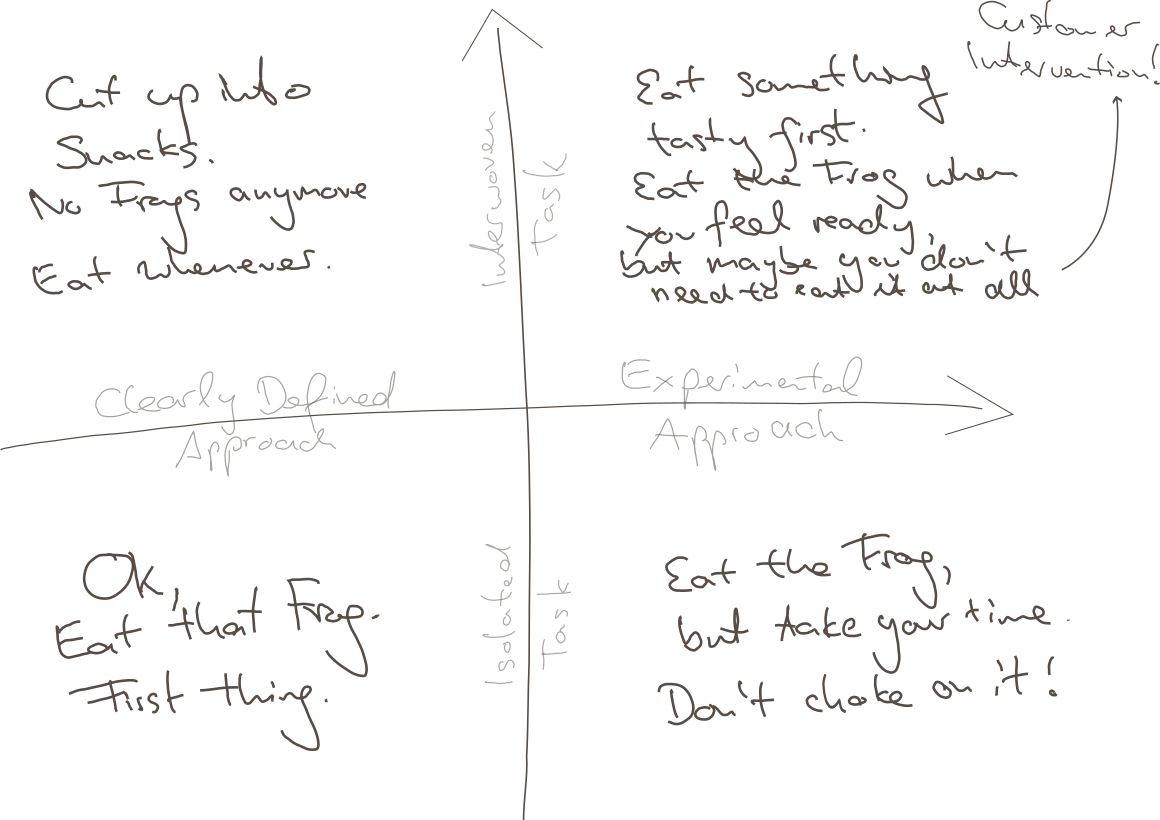
It turns out, there are several cases where it would be straightway destructive just to Eat the next-best Frog, and I will try to explain this to you using my impressive drawing skills:

Point being, there are at least two boundaries of application:

  • Clarity of Approach: How clearly-defined is it, as opposed to requiring one or multiple experimental, creative approachs?
  • Relation to other Tasks: How isolated is your task, is it heavily interwoven with other tasks?

Why these distinctions? Maybe we can agree on

  • Overwhelming Frog tasks can act stifling on your creativity, so if that very mindset is required for your approach, you will not succeed by pressuring through.
  • Thinking yourself into a complex topic first thing in the morning might require some warm up time for your brain, booting every relevant detail into your cloud of thoughts.
  • Parkinson’s Law states “Work expands so as to fill the time available for its completion.” – from which I derive: If your task is too large but it could be divided into sub-tasks, you might use any available time to do something related to your giant Frog, but not necessarily the most precise thing to do.
  • The motivation of having done multiple small tasks can provide you with the energy of finishing “That Frog” within the near future.

So to relate that to the Frogophage subject at hand; my findings are:

  • Bottom Right: If your task is quite isolated from other tasks, but still it’s approach isn’t very clear, do not think of your problem as a frog to be eaten right now. You will have to eventually have eaten it, but take your time, don’t choke on it – don’t destroy your creative thinking by believing that you can rush through it.
  • Top Left: If your Frog is defined as one well-defined task, but can actually be seen as a composition of many Sub-Frogs, stop for a minute and invest your time in actually resolving the atomic issues. This might feel like slowing you down, but there is no honor in having eaten That Disgusting Frog, if actually you could have eaten a tasty buffet of small snacks instead.
  • Top Right: Interwoven Tasks that also require an Experimental Approach are hard because you might just waste your time trying to upfront define your smaller snacks, and you might not have all the relevant information booted into your brain at the time of your supposed Frog Breakfast, so: Try to warm up yourself by solving some smaller of the connected issues first; by bringing your consciousness into the right state it can very well appear what can be tried.
    • Bonus Point: It can also render your whole Frog irrelevant when it becomes clear that your whole problem has to be redefined by Customer Intervention. Sometimes you just have to explain the poor guys that something is complicated (costly for them), and they might come up with a request that is completely different from your original frog.
  • Bottom Left: However, if none of thse apply and there’s just a nauseating thing in front of you, that you just know has to be done, you have somewhat of a clear idea how to start, it does not depend on many other things done first or simultaneously – better Eat That Frog. It likely won’t go away and you can then use the resulting feel-good moment to inspire the rest of your day.
Conclusion

I guess this all boils down to “whatever advice there is, there are some limits to its applications”. I hope you already weren’t the type of person who would just think of any problem as some big unquestionable Frog to be gobbled up without reconsideration…

… but nonetheless, maybe this can help in evaluating your strategy when facing the next difficult thing.

And don’t just eat frogs, please.

Chopping up big tasks

As a programmer, you have probably dealt with a task that seemed simple enough in the beginning but just keeps going and going and going. I have been chewing on such a task for the better part of the last three weeks and finally closed it today*. A really long time, considering I usually complete my tasks in less than a day, up to three days for especially long ones.

I know that many programmers can get lost with big tasks like this. I am certainly no exception. Analysis paralysis and decision fatigue can easily get the best of you, considering the mountain of work still ahead.

But I have a few ways to deal with such situations. Of course, your mileage may vary. But I am sure that without them, this specific issue would have taken me even longer. It boils down to one rule:

Focus on the essentials only.

This obviously relates to yak shaving. Sometimes you need to do something else first before you can complete your task. This is recursive and can quickly take up lots of time. This will ultimately be required, but for the moment it distracts from the original task. While you complete a side task, the main task will not advance, leading to a feeling of getting stuck, technical problems (like merge conflicts in long-running branches) and psychological problems (like decision fatigue).

So what can you do about this? My advice is to rigorously cut-off side tasks, by taking up technical debt temporarily. I annotate my code with HACK, TODO and FIXME to mark all the isolated spots I still need to change for the 100% version. The end feature (= user story) does not have to be completed by the end of my task, but I should be reasonably confident that the main work is done. Anything to that end will work.

Some required changes immediately appear to be too extensive for such a small annotation. In that case, I will usually create a new follow-up issue in our issue-tracker and mark the code with a link to it.

After completing the main work in this way, but before I merge my code or close my original work-item/issue, I make another pass over all the HACK, TODO and FIXMEs I generated. The smaller ones I fix right away. Anything where the way to complete them is not super obvious gets converted into an issue in the issue tracker, and cross-linked from the code. This means I add a comment referencing the issue from the code and I make sure that the issue says that it is marked in the code. E.g., for this specific task, I now have 6 open follow-up issues.

After that, I usually merge the code into the main branch. If it’d break something or be misleading with all the follow up issues not done yet, the feature can sometimes be disabled with a feature toggle. Alternatively, the follow up tasks can be completed in their own branches and merged back onto the main task’s branch, which can be merged once everything is done. This hugely depends on your product cycle, of course.

Do you have any clever methods to handle bigger tasks?

Got issues? Treat them like micro-projects

Issues should be the smallest work unit available. But what if it is still larger than you can manage? Here’s a standard process for self-management while working on an issue.

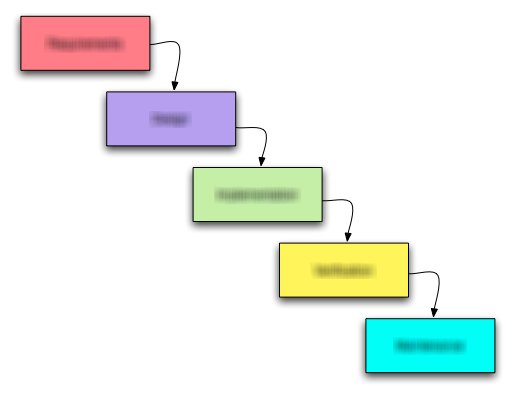
Waterfall_modelEvery professional software developer organizes his work in some separable work tasks. These tasks are called issues and often managed in an issue tracker like Bugzilla or JIRA. In bigger teams, there is a separate project role for assigning and supervising work on the issue level, namely the project manager. But below the level of a single issue, external interference would be micro-management, a state that every sane manager tries to avoid at all costs.

Underneath the radar

But what if a developer isn’t that proficient with self-management? He will struggle on a daily basis, but underneath the radar of good project management. And there is nearly no good literature that deals specifically with this short-range management habits. A good developer will naturally exhibit all traits of a good project manager and apply these traits to every aspect of his work. But to become a good developer, most people (myself included!) need to go through a phase of bad project management and learn from their mistakes (provided they are able to recognize and reflect on them).

An exhaustive framework for issue processing

This blog entry outlines a complete set of rules to handle an work task (issue) like a little project. The resulting process is meant for the novice developer who hasn’t established his successful work routine yet. It is exhaustive, in the sense that it will cover all the relevant aspects and in the sense that it contains too much management overhead to be efficient in the long run. It should serve as a starting point to adopt the habits. After a while, you will probably adjust and improve it on your own.

A set of core values

The Schneide standard issue process was designed to promote a set of core values that our developers should adhere to. The philosophy of the value set itself contains enough details to provide another blog entry, so here are the values in descending order without further discussion:

  • Reliability: Your commitments need to be trustworthy
  • Communication: You should notify openly of changes and problems
  • Efficiency: Your work needs to make progress after all

As self-evident as these three values seem to be, we often discuss problems that are directly linked to these values.

The standard issue process

The aforementioned rules consist of five steps in a process that need to be worked on in their given order. Lets have a look:

  1. Orientation
  2. Assessment
  3. Development
  4. Feedback
  5. Termination

Steps three and four (development and feedback) actually happen in a loop with fixed iteration time.

Step 1: Orientation phase

In this phase, you need to get accustomed to the issue at hand as quickly as possible. Read all information carefully and try to build a mental model of what’s asked of you. Try to answer the following questions:

  • Do I understand the requirements?
  • Does my mental model make sense? Can I explain why the requirements are necessary?
  • Are there aspects missing or not sufficiently specified?

The result of this phase should be the assignment of the issue to you. If you don’t feel up to the task or unfamiliar with the requirements (e.g. they don’t make sense in your eyes), don’t accept the issue. This is your first and last chance to bail out without breaking a commitment.

Step 2: Assessment phase

You have been assigned to work on the issue, so now you need a plan. Evaluate your mental model and research the existing code for provisions and obstacles. Try to answer the following questions:

  • Where are the risks?
  • How can I partition the work into intermediate steps?

The result of this phase should be a series of observable milestones and a personal estimate of work effort. If you can’t divide the issue and your estimate exceeds a few hours of work, you should ask for help. Communicate your milestones and estimates by writing them down in the issue tracker.

Step 3: Development phase

You have a series of milestones and their estimates. Now it’s time to dive into programming. This is the moment when most self-management effort ends, because the developer never “zooms out” again until he is done or hopelessly stuck. You need periodic breaks to assess your progress and reflect on your work so far. Try to work for an hour (set up an alarm!) and continue with the next step (you will come back here!). Try to answer the following questions:

  • What is the most risky milestone/detail?
  • How long will the milestone take?

The result of this phase should be a milestone list constantly reordered for risk. We suggest a “cover your ass” strategy for novices by tackling the riskiest aspects first. After each period of work (when your alarm clock sets off), you should make a commit to the repository and run all the tests.

Step 4: Feedback phase

After you’ve done an hour of work, it’s time to back off and reflect. You should evaluate the new information you’ve gathered. Try to answer the following questions:

  • Is my estimate still accurate?
  • Have I encountered unforeseen problems or game-changing information?
  • What crucial details were discovered just yet?

The result of this phase should be an interim report to your manager and to your future self. A comment in the issue tracker is sufficient if everything is still on track. Your manager wants to know about your problems. Call him directly and tell him honestly. The documentation for your future self should be in the issue tracker, the project wiki or the source code. Imagine you have to repeat the work in a year. Write down everything you would want written down.
If your issue isn’t done yet, return to step three and begin another development iteration.

Step 5: Termination phase

Congratulations! You’ve done it. Your work is finished and your estimation probably holds true (otherwise, you would have reported problems in the feedback phases). But you aren’t done yet! Take your time to produce proper closure. Try to answer the following questions:

  • Is the documentation complete and comprehensible?
  • Have you thought about all necessary integration work like update scripts or user manual changes?

The result of this phase should be a merge to the master branch in the repository and complete documentation. When you leave this step, there should be no necessity to ever return to the task. Assume that your changes are immediately published to production. We are talking “going gold” here.

Recapitulation

That’s the whole process. Five steps with typical questions and “artifacts”. It’s a lot of overhead for a change that takes just a few minutes, but can be a lifesaver for any task that exceeds an hour (the timebox of step three). The main differences to “direct action” processes are the assessment and feedback phases. Both are mainly about self-observation and introspection, the most important ingredient of efficient learning. You might not appreciate at first what these phases reveal about yourself, but try to see it this way: The revelations set a low bar that you won’t fall short of ever again – guaranteed.

Branching support missing in JIRA

JIRA is a really great tool when it comes to issue tracking. It is powerful, extensible, usable and widespread. We and many of our clients use it for years and are quite satisfied coming from other tools like Bugzilla.

One thing we find is missing though is the concept of branching. In JIRA you have projects and can define a roadmap consisting of versions that follow each other. Many software products require sooner or later a development line which is only maintained getting bug and security fixes while feature development happens on a separate branch.

Tracking issues for a software with different branches is a bit more demanding because you have to identify the branches one issue affects and possibly separately fix them on each branch. One and the same issue could have different resolutions per branch, i.e. invalid if a broken functionality does not exist anymore. Nevertheless, all branches have to be checked, likely in different time frames.

Unfortunately JIRA does not support the notion of branches. You have to emulate the behaviour using different schemes like:

  • One issue per version that represents a branch
  • Multiple fix versions for an issue
  • Subtasks for an issue or issue links to ckeck and fix the issue for different versions

To me all those are workarounds which lack polished usability and add overhead to your issue management. Real branching support could help you check on which branch an issue is done, where it has still to be resolved and so on without adding more and more (perhaps loosely connected) issues to your system or forgetting to fix the issue on some branch (no question/warning when resolving an issue with multiple fix versions).

[Update:]

I created a new feature request for JIRA where you can vote or track progress on this issue.