Recap of the Schneide Dev Brunch 2015-02-08

If you couldn’t attend the Schneide Dev Brunch at 08th of February 2015, here is a summary of the main topics.

brunch64-borderedYesterday, we held another Schneide Dev Brunch, a regular brunch on the second sunday of every other (even) month, only that all attendees want to talk about software development and various other topics. If you bring a software-related topic along with your food, everyone has something to share. The brunch was well-attended but there was enough space for everyone. As usual, a lot of topics and chatter were exchanged. This recapitulation tries to highlight the main topics of the brunch, but cannot reiterate everything that was spoken. If you were there, you probably find this list inconclusive:

Thoughts on the new brunch mechanics

We changed our appointment-finding process for the dev brunch this year. It’s now fixed-date, an appreciated remedy for the long doodle sessions before. But the reminder mail on the brunch mailing list is appreciated nonetheless. I hope to not forget it.

Thoughts on secure software development

Sparked by a talk about secure software development at the Objektforum series in Stuttgart, hosted by andrena Objects, we discussed typical weak points of development environments. Habits like “not my concern” or “somebody surely has approved of this” lead to situations when intruders (malicious or not) gain access to sensitive resources. Secure development begins with a security audit of the development area itself. We also want to note that just hanging out at the cafeteria of big IT companies and listening often gains crucial information that can be used in social engineering scenarios. We call the counter-measure “context awareness”. And for the Softwareschneiderei itself, being situated right next to a funeral parlor often calls for “social context awareness” (aka no laughter, no loud jokes) on our way to lunch.

Internal developer days

Two participating companies regularly hold internal “developer days” when the developers can do whatever they like, as long as its connected to software development. Both companies experience very positive results from it. We want to expand the Dev Brunch to something called the “Dev Event”, where we moderate workshops for developers. To start with it, we plan to perform the “Mäxchen” game event in March. Details and a doodle for the date finding (yes, we try to maximize participants here) will follow on the brunch mailing list.

IT security strategies

Based on the earlier discussion about secure software development, we talked about different security strategies for IT products and IT environments. The “walled castle” doctrine was highlighted. We touched topics like the recent BMW hack, the Heartbleed debacle and ready-to-use “secure” home cloud servers. Another discussion point was the TOR router that actually weakens the TOR effect. An example of top-notch obfuscation in sourcecode was a little piece of code that was thorougly examined, but still contained a surprising side effect (citation needed).

Experiences with Docker

The Docker virtualization tool is steadily climbing the hype cycle. So it’s only natural that we talk about it and share some tricks and insights. One topic was the use of Docker for High Performance Computing and a comparison of performance loss. The rule of thumb result was that Docker is “nearly native speed” (95%) while full virtual machines range in the 70% area. If you put different container tools under stress, they break in different ways. Docker will show increased latency, others lag in terms of CPU cycles, etc. The first rule of High Performance Computing is: there will be a bottleneck and it won’t be where you expect it to be.

Another tool mentioned is Docker Fig (a rather unlucky name for german ears). It’s the sugar coating needed to be productive with Docker, just like Vagrant for Virtualbox.

Tools for managing and orchestrating Docker containers are still in their childhood. We can’t wait for second-generation tools to emerge.

One magic ingredience to get the most out of virtualization is a SSD drive on the host. The cloud hosting provider DigitalOcean has a nifty offer where you can setup a virtual machine in one minute and pay a few cents for an hour of use. We truly live in exciting times.

New doctrines

We also talked about changes in the way computers are viewed and treated. The “pet vs. cattle” metaphor was an interesting take on the hardware admin’s realm. The “precious snowflake” syndrome is a sure sign of (too) old habits. For software applications to become “containerizable”, the “Twelve-Factor App” rules are the way to think and act. Plenty food for thought!

New gadgets

The Softwareschneiderei is the first company in germany to get hold of a Myo armband. This wireless gesture controller is worn like an oversized fitness tracker bracelet and combines a gyroscope with electromyographic data (the electric current in your arm muscles). This makes for an intuitive pointing device and an not-as-intuitive-yet finger/hand gesture detector. We each played a round of our custom game “Myo Huhn” (think Moorhuhn programmed over the weekend) and reached impressive scores on the first try. Sadly, the Myo isn’t ready for serious applications yet. Let’s see what future versions of this cool little device will bring. The example usages of their official video aren’t viable at the moment.

Epilogue

As usual, the Dev Brunch contained a lot more chatter and talk than listed here. The number of attendees makes for an unique experience every time. We are looking forward to the next Dev Brunch at the Softwareschneiderei. And as always, we are open for guests and future regulars. Just drop us a notice and we’ll invite you over next time.

Domain model design with food coupons

A recent customer requirement for the implementation of an application specified that every data-modifying user action has to be confirmed by the user through a confirmation prompt.
The application in question is a single page web application with client/server communication over an HTTP JSON API. The domain model is located on the server side, the client side is the user interface.

One option to accomplish the requirement could have been to implement the confirmation process exclusively on the client-side. The client code would show a confirmation dialog right before every HTTP POST, PUT, PATCH or DELETE request and perform the request only after confirmation. This would be fairly easy to implement. The downside of this approach is that the requirement is not reflected in the application’s domain model. The requirement however is so crucial that it should be part of the domain model, not just an implementation detail of the client user interface. So we opted for a different approach, which makes the confirmation process part of the domain model and exposes it through the HTTP API.

Coupon system

The basic idea is a coupon system, analogous to the ones that can be found at some food and beverage sales booths at festivals: you choose a food or drink item, pay for it at the pay booth and get a coupon. This coupon can be redeemd at a different booth where you receive the actual item.

coupon
Source: http://de.wikipedia.org/wiki/Verzehrbon | License: Public domain


Transferred to our web application the implementation looks like this: The client sends a request for an action to the server. But instead of performing the action immediately, the server stalls the action and responds with a unique confirmation token that identifies the waiting action. The client receives the token and can finally trigger the action by sending the confirmation token to a separate confirmation API endpoint. The server recognizes the pending user action based on the confirmation token and executes it. Of course, some care has to be taken that those pending actions, which are never confirmed time out after a while and that a malicious user can’t flood the server with waiting actions. The confirmation dialog can be triggered from the client-side code via an HTTP response interceptor that checks for a confirmation token in the response and opens the confirmation dialog if a token is present and hands the token to the confirmation endpoint if the user clicks “Ok”.

Conclusion

With this design the requirement is encoded in the server-side domain model and becomes apparent through the API. Any user of the API is called to attention by the guidance of its design. Of course, an implementor of a new client could choose to ignore the hint and return the token directly to the server without prompting the user for confirmation, but that would be a deliberate and conscious choice and not a mere oversight.

Using your TANGO devices

Now that we have built a nice TANGO device server in the previous part of this tutorial we finally want to use it.

After installing TANGO from the sources or binaries provided on www.tango-controls.org and running the TANGO database device server you need to register your device with the database to use it fully. There is however a nodb-mode if you absolutely cannot communicate with the the database device due to networking restrictions. We assume normal operation with a database accessible for the following stuff.

Registering a device server at a TANGO database

The database to use is specified by the environment variable TANGO_HOST. So first you run the tool jive and run the Server Wizard from the Tools menu:

Server Wizard1

The server name equals the executable name for C++ device servers but can be set by the programmer for Python and Java device servers. We use time_device_server for our tutorial. The instance name may be chosen quite freely – lets call our server instance localtime. In the next step we have to start the server with the same TANGO_HOST and the instance name as parameter. That way you can register and run the same server multiple times on the same or even different machines and distinguish the them. Then you have to declare the device classes and name the device instances of this server:

Server Wizard2 Server Wizard3

The device name is a three part identifier which is used to communicate with the device. In our example we use the first part to differentiate between real/hardware devices and virtual/logical devices implemented completely in software. It also could be used for the different departments in your institution for example. It is up to you to fill the identifier with meaningful information.

At the end of the wizard the device server is reinitialised and ready to use. Now we can use Jive to find our device:

Device in Jive-AtkPanel

Our device implementation is very basic so it provides only the meaningless state information of UNKNOWN but also our read-only attribute providing us with the current machine time in ISO format. AtkPanel polls all attributes of our devices and gives us a generic overview of the actual device state. Writable attributes can be changed through AtkPanel or with Test device from the Jive context menu (bottom window of the screenshot above). Feel free to experiment a bit with both tools.

In the next post we will improve our device server and add configuration via device properties.

The developer experience (DX): Our development process

Personally I like reading stories about how others tackle problems, their way to the solution, their process. This post is intended to give you a glimpse of how we work.

Personally I like reading stories about how others tackle problems, their way to the solution, their process.
Recently our team sat down together to brainstorm what is not so good or even bad about our way of solving things. To address those problems and to improve our developer experience I researched and documented our typical development process. This post is intended to give you a glimpse of how we work.
First you have to know that we are a service business so usually a project starts with a (potential or recurring) customer coming to us with his concerns, his business needs. On the course of a typical project the following phases (some in iterations) run:

1. Identifying the problem (aka analysis)

Often the first expressed need is not the problem to be solved. We need to dig deeper and identify the core. At this point in the process we ask the customer goal oriented questions. We guide the conversation to find any constraints of the solution. One of these constraints is often the technological platform (web, mobile, desktop).
If it is a bigger problem we need to work through different levels of abstraction, one iteration at a time.
We document all the results in functional specs. These are small blocks of text in the language of the customer describing the functional side of the problem and its constraints. These specs form the basis of every project and are entered as issues in our JIRA.
Alongside we record the concepts of the domain in form of a glossary in our wiki.
Besides the text we draw complex or core parts of the domain as diagrams on paper. A rough domain model. A module concept. A high level architecture of the system.

2. Planning

In a planning poker session we estimate each issue from the analysis. The customer sets a priority. Together we develop a milestone plan for our iterations. Smaller (1 week) iterations for explorative or fast paced projects and longer (2 – 3 weeks) iterations for slow paced or well defined projects.

3. Finding a solution

Before implementing a solution to a problem in code, we create different concepts which fit the constraints we recorded earlier.
These concepts can be paper prototypes or sketches. Sometimes these are HTML mockups or simulations.
From these we choose the best suited concept by talking with the customer or from our experience.

4. Development

At the start of the project we set up the necessary internal infrastructure. This usually consists of a git repository and jenkins jobs for continuous integration. We install the libraries, frameworks and applications. We create a project in the IDE and start implementing. While developing we write automated tests where appropriate. We use manual testing to tell us what the users will see and how it behaves like we expected. When we think we are done we look for feedback.

5. Feedback and acceptance

For feedback we deploy the project on a staging or test system, email the customer so that he fulfills a manual user acceptance test.
If the customer accepts the solution we continue with the next phase. If bigger problems arise we reopen our JIRA issues or create new ones and start with the analysis again.

6. Delivery

First we need to set up a machine to our project specific needs: automatic or manual (snowflaking). This is called provisioning.
We create scripts and jobs in Jenkins for the following steps: one for release and one for deployment and commissioning.
The release step packages the project and creates documents from our JIRA issues which were resolved in this version. The deploy step takes the release artifact and transfers this to the target machine. Usually this step also runs the deployed project. Every installation (release and deploy/commisioning) is documented manually on paper to be traceable. An email to the customer tells him what the new release includes. Tags in the repository identify the deployed code.

7. Monitoring

Every error or exception occurring is sent via email to a project specific account. Additionally we create a job in Jenkins which supervises the system periodically. The job tries to reach the application and executes some health checks.

How we distribute our backups geographically

If you fear not only about single point of failure but even area of failure in your data security assessments, here is a simple and effective process to distribute your backups.

We are a software development company, so all of our most valueable assets are constantly endangered by hardware failure. We regularly do risk assessments in regard to data security and over the years created a fine-tuned system of duplication and doubled duplication to prevent data loss. Those assessments aren’t really complicated, you basically sit down, relax and think about your deepest fears on a certain topic. Then you write them down and act on their avoidance or circumvention. Here’s an example of some results:

  • No data transfer over unsecured internet connections
  • No single point of failure
  • No single area of failure

The last result is of particular interest today: We want to prevent data loss in case of “area-based desaster”, like a whole-building fire or meteorite impact. Well, to be clear on the meteorite scenario, it is both highly improbable and dangerous. If the meteorite happens to be just a bit bigger than average, we won’t worry about backups anymore because we all live in a perimeter around our company. Yes, worst-case scenarios are always morbid.

Stages of data-loss prevention

We have several measures in effect to prevent data-loss in place. Technologies like RAID drives and processes like daily backups and several copies of that backups make sure that we always have at least one copy of all important data even in the most drastic locally confined desaster. But to adhere to the first rule that no data transfer can happen over unsecured internet connections and to make sure that an internet connection isn’t a single point of failure that may compromise data security, we had to come up with a way to distribute our backups in a physical manner without much effort.

The backup export disks

Our system relies on three facts:

  • Small and resilient hard drives with high capacity are affordable
  • Every home of our employees can be an unique backup storage location
  • If we take turns, the effort is low for everybody, but high enough to be effective

So we bought an “backup export disk” for every employee. It’s an 2,5″ USB-powered hard drive with enough storage capacity to keep our most important data. All export disks are registered at the backup distribution system that can, upon connect, provide them with the most current backup. And a little “backup export token” that gets passed from employee to employee in a predetermined order. The token is just a piece of cardboard that says “tag, you are it!”.

Our backup export process

So what do you have to do when you find the “backup export token” on your desk? Just five easy steps:

  • Bring your backup export disk next day (this is the hardest part: remembering to bag the disk at home)
  • Plug it into the backup distribution system (a specific computer in off-state with an USB-cable) and switch it on
  • Wait for the system to do its job. This will take a while, but you’ll get an e-mail at completion, so just wait for the e-mail to arrive
  • Unplug the backup export disk and take it back home (store it in a dry and safe place)
  • Forward the backup export token to the next employee in line

That’s all there is to the obvious process. Some more things happen behind the scenes, but the process mostly relies on the effect of repetition by several operators.

Simple and effective

This process ensures that our backup gets “exported” at least thrice a week to different locations. All in all, we store our backup in at least five locations with a maximum age of two weeks. The system can scale up (or down) without limitation, so it won’t change even if we double or triple the location count or the export frequency. And any individual disk cannot be compromised as the data is secured by strong encryption, so there is no need to restrict physical access to it on the storage locations (like using a safe) or fret if a disk would get lost.

Decentralized, but supervised

Every time a backup export disk is connected to the backup distribution system, the disk’s health figures and remaining space is reported to the administrators. Using this information, we can also reconstruct the distribution history and fetch the most current disk in an emergency case. If a disk shows its age, it gets replaced by a new one without effort. We only need to tell the backup distribution system about it and associate it with an employee so that the e-mail is sent to the right person.

Conclusion

By assigning our employees with the core mechanics of keeping the backups distributed and automating the rest, we reached a level of data security that even protects against area effect scenarios.

The work experience improvement budget (“Kreativbudget”)

We gave our employees money to improve their work experience and it paid off tremendously. This blog entry describes the idea and rules behind it.

We at the Softwareschneiderei are a small team of software developers working in a founder-owned company. We develop software since 15 years now and have experimented with a lot of management ideas and concepts. We can conclude that a lot of things don’t work for us while others are highly effective. There is no guarantee that anything we do works anywhere else, so don’t expect wonders just because it works wonders for us. But we are willing to share nearly every detail of our management style, and here is another bit of it: the “creativity budget”.

I’ve already blogged about this idea five years ago, but it’s still a good (and fairly uncommon) idea, so why not do it again? The name “creativity budget” (“Kreativbudget” in german) is actually really bad, but it stuck and we cannot realistically change it anymore. A more fitting name would be “work experience improvement budget” or something similar. The core of the idea is simple: Every employee can spend a certain amount of money every year to improve his/her own work experience. The investment doesn’t need to be profitable, the improvement doesn’t need to be effective, whatever was bought, the employee never needs to justify it. It’s just company money that the employee can rule over to improve the company in his/her fashion.

The actual ruleset is fairly simple: In recent years, the amount was defined to be 1000 EUR per year for each employee, regardless of actual job (development or administration, for example). Our students could invest half the amount (500 EUR). You don’t need to buy coffee or food, your work computer or laptop, all the basics are provided outside of the budget. You shouldn’t spend the budget on silly things just to get rid of it, but if you have an idea – even a crazy one – and think, “hey, that would be cool to have”, you just need to create a “purchase order” issue in our administration issue tracker and flag it as “on creativity budget”. We will buy it right away, without further discussion.

Why the creativity budget?

The most competent person to improve the work experience of an employee is he himself. Every hurdle we impose between him and his improvement ideas, like bureaucratic overhead or reviews, will only damage the improvement effect, but not improve the financial situation of the company. Our financial situation is directly linked to the productivity and happiness of all employees, so we will actually damage it by trying to go cheap. Not spending money won’t buy us happiness. And remember, we are a small company. The maximum amount of all creativity budgets combined is still only a small percentage of our total revenue (under 2%). If we can improve our total revenue just a little bit, it is totally worth it. But why speculate? We have hard numbers from the last dozen years that show that it works for us.

What did the budget gain us?

The most important gain is making room for errors. If you have to plea and convince higher-ups of an improvement, it better has convincing figures and a realistic chance of success. If not, you are the moron that suggested it. Using our budget, we can try crazy things and never need to explain ourselves. If it doesn’t work – who cares? If it works – well, you were the first, now we need to implement it for everyone.
We try things earlier. New technologies like solid state disks were frowned upon in the beginning – how long do they last, etc. We tried them early and got convinced quicker than most (but that’s another blog post).
We don’t calculate improvements first. One of the most common refusals for a new idea is the worry “what if everybody wants one?”. That’s the fear of upscaling paired with the fear of failure. What if the idea works and is a huge improvement and nobody wants it? We rather err on the side of monetary losses instead of productivity loss.

But what did it gain us precisely?

Well, to answer that, I have to present you the three categories of improvements we identified (without limiting the budget to them!):

  • Hardware: A certain piece of technology believed to make work easier or more enjoyable. Examples are computer mouses (everyone has his favorite mouse), keyboards, monitor upgrades (if the default double 24″ aren’t enough), SSDs (before we got rid of spindle disks) or even your favorite computer brand. It gained us fine-tuned workplaces that fit perfectly with the developers using them – no “one size fits all”.
  • Software: A computer program that you’d like to use even if that requires license costs. Examples are IDEs, editors, version control clients or even screenshot utilities. Don’t get me wrong – we had all these things before, but mostly open source products. If you want a commercial twin of a software, you don’t have to argue. It made our software landscape more diverse and introduced some products for the whole company – SmartGit is the example of choice.
  • Wetware: An activity you’d like to undertake – in the professional context of your job. You want to visit that certain conference? Have paid training on a specific topic? This category introduced us to some conferences that are worth revisiting and some we’ve already forgotten again. We got trainings and went to workshops, without any upfront filtering or “strategic planning”.

We’ve gained a lot of agility in pursuing technical excellence, each of us on his/her own course. We gained the insight that “work experience” is something we can directly influence and steer. It makes already self-confident employees even more confident. And it relieves the boss from important, but highly individual micro-management (but that’s just my own personal gain from it all).

Summary

In giving every employee the power to improve his/her direct work experience, we improved our overall experience even more. In all these years, we never used up the budgets completely, but the effect is very noticeable. We acted on impulse, tried it out, reflected and adopted it if worthwhile. And it was very worthwhile indeed. Currently, we discuss the idea to double or even triple the budget per year and see where it leads us.

Recap of the Schneide Dev Brunch 2014-12-14

If you couldn’t attend the Schneide Dev Brunch at 14nd of December 2014, here is a summary of the main topics.

brunch64-borderedIn mid-december, we held another Schneide Dev Brunch, a regular brunch on a sunday, only that all attendees want to talk about software development and various other topics. If you bring a software-related topic along with your food, everyone has something to share. The brunch was well-attended and we didn’t even think about using the roof garden (cold and rainy). There were lots of topics and chatter. As always, this recapitulation tries to highlight the main topics of the brunch, but cannot reiterate everything that was spoken. If you were there, you probably find this list inconclusive:

International brunch

We tried to establish a video conference with a guest from San Francisco and had tried the technical implementation beforehands. But we didn’t succeed, mostly because of a sudden christmas party on the USA side. So we can’t really say if the brunch character is preserved even if you join us in the middle of the (local) night.

How much inheritance do you use?

One question was how inheritance is used in the initial development of systems. Is it a pre-planned design feature or something that helps to resolve difficult programming situations in an ad-hoc manner? How deep are the inheritance levels?
The main response was that inheritance is seldom used upfront. The initial implementations are mostly free of class hierarchies. Inheritance is often used after the fact to extract abstractions (or generalizations) from the code. The hierarchies mostly grow “upwards” from the concrete level to abstract superclasses.
Another use case of inheritance is the handling of special cases with further specialization through subclasses. The initial class is modified just enough to enable proper insertion of the new code in its own subclass.
A third use case of inheritance, upfront this time, was proposed in regard of the domain model. Behavioural typing is a common motivation for the usage of inheritance in the model, as contrasted to the technical usage of inheritance to solve non-domain problems. In the domain level, inheritance resembling a “behaves-like” relation can be the most powerful expression of actual connections between types.

Book review “Analysis patterns”

The discussion about inheritance led to questions about domain models and their expression through formal notation. An example about accounts resulted in a short review of the book “Analysis Patterns”, written by Martin Fowler in 1999. The book introduces its own notation for models to be able to express the interrelations without being dragged down into the implementation level. UML isn’t suited as it’s a notation from the technical domain. Overall, the book seems to be mostly overlooked and under-appreciated. It contains a lot of valueable wisdom in the area of domain analysis, an activity that has to be done upfront of any larger project. This “upfront activity” characteristics might have led to it being ignored in most agile processes. The book is a perfect companion to Eric Evan’s “Domain-Driven Design”.

Book review “Agile!”

Another book review of this brunch was a deep review of Bertrand Meyer’s book “Agile! The Good, the Hype and the Ugly”. The book is the written opinion of Mr. Meyer in regard of all current agile processes and very polarizing as such – he does state his points clearly. But it’s also a very well-researched assessment of nearly all aspects of agile software development. You might want to argue with certain conclusions, but you’ll have to admit that Mr. Meyer knows what he’s talking about and got his facts right (even if his temper shines through sometimes). This book is the perfect companion to all the major agile books you’ve read. It serves as a counter-balance to the dogmatic views that sometimes come across. And it serves as a (albeit personal) rating of all agile practices, a gold mine for every project manager out there. the book itself is rather short with some reiterations (you’ll get the major points, even if you skip some pages) and written in an informal tone, so it’s an easy read as long as you’re neutral towards the topic.
When we reviewed the rating of agile practices on a big whiteboard, ranging from ugly to brilliant, it didn’t took long until discussions started. If nothing else, this book will help you review your practices and beliefs.

Embedded Agile on the rise

The next topic was related to agile software development, too. In the large field of embedded software development, adoption of agile practices lagged behind substantially. This has many reasons, of which we discussed a few, but the more interesting trend was that this changes. While there is still a considerable lack of literature for embedded software overall, the number of publications advocating modifications to the agile processes to fit the intricacies of embedded software development is steadily increasing.
A similar trend can be observed in the user experience community (think: user interface designers), termed “lean UX“.

Mobile game presentation

A long-awaited highlight of this brunch was the presentation of a mobile platforms game under development by one attendee. It’s a cool-looking Jump-and-Run game in the tradition of Super Mario, with lots of gimmicks and innovative effects. The best part of the presentation was the gameplay, controlled by the developer from behind the device, upside down and with live commentary. The game is developed in a platform-agnostic manner using several frameworks and suitable coding habits. Right now, it’s in its final phase of development and will be released soon. I don’t want to spoil too much beforehands and invite Martin (the author) to insert a comment below with links leading to more information.

A change in the Dev Brunch mechanics

The last topic on our agenda was a short review of the Dev Brunch series in the last years. In 2013, we introduced the extra “workshop events” that were adapted to the “game nights” in 2014. We want to return to more serious topics in 2015 and revive the workshops. Attendees (and future ones) are invited to make suggestions which workshop they would like to see. The Dev Brunch itself will be formalized further by introducing a steady pace of bi-monthly dates.

Epilogue

As usual, the Dev Brunch contained a lot more chatter and talk than listed here. The number of attendees makes for an unique experience every time. We are looking forward to the next Dev Brunch at the Softwareschneiderei. And as always, we are open for guests and future regulars. Just drop us a notice and we’ll invite you over next time.

TANGO device server step-by-step tutorial

Now that we learned about TANGO in general and the architecture of device servers it is time to get our hands dirty. Here is a step-by-step tutorial for making your software remotely accessible as TANGO devices.

We will develop a small C++ class that can provide us the current time and date as a string and then build a device server that makes our functionality available over TANGO to remote clients. Our plain C++ project structure looks like this:

$PROJECT_ROOT/
  CMakeLists.txt
  TimeProvider/
    CMakeLists.txt
    TimeProvider.h
    TimeProvider.cpp
    main.cpp

Here are our CMake build files:
toplevel

project(Time)
cmake_minimum_required(VERSION 2.8)

find_package(PkgConfig)

add_subdirectory(TimeProvider)

and for the TimeProvider

project(TimeProvider)

add_library(time TimeProvider.cpp)

add_executable(timeprovider main.cpp)
target_link_libraries(timeprovider time)

And the C++ sources for our standalone application:
TimeProvider.h

#include <string>

class TimeProvider
{
public:
    TimeProvider() {}

    const std::string now();
};

TimeProvider.cpp

#include "TimeProvider.h"

#include <ctime>

const std::string TimeProvider::now()
{
    time_t now = time(0);
    struct tm time;
    char timeString[100];
    time = *localtime(&now);
    strftime(timeString, sizeof(timeString), "%Y-%m-%d %X", &time);
    return timeString;
}

main.cpp

#include <iostream>
#include "TimeProvider.h"

int main()
{
    TimeProvider tp;
    std::cout << tp.now() << std::endl;
    return 0;
}

Next we create a new subdirectory “TimeDevice” and add it to our toplevel CMakeLists.txt along with the TANGO package lookup:

...
find_package(PkgConfig)
pkg_check_modules(TANGO tango>=7.2.6 REQUIRED)

add_subdirectory(TimeProvider)
add_subdirectory(TimeDevice)

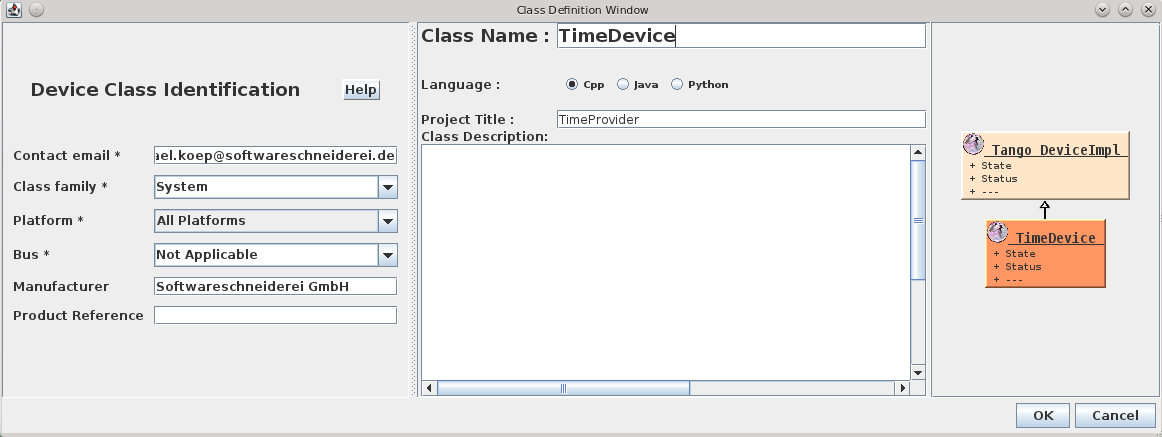
In this newly created directory we now run the Pogo application with pogo TimeDevice from our TANGO installation to generate our device server skeleton:

Pogo-Create Deviceand add the Attribute:Pogo-AddAttributeso the result looks like:

Pogo-TimeDevice

Now we need to add the generated sources to our CMake build like this:

project(TimeDevice)

set(SOURCES
    ${PROJECT_NAME}.cpp
    ${PROJECT_NAME}Class.cpp
    ${PROJECT_NAME}StateMachine.cpp
    ClassFactory.cpp
    main.cpp
)

# this is needed because of wrong generation of include statements
# you may correct them in generated code because they are in protected regions
include_directories(.)

include_directories(
    ${TimeProvider_SOURCE_DIR}
    ${TANGO_INCLUDE_DIRS}
)

add_definitions("-std=c++11")

add_executable(time_device_server ${SOURCES})
target_link_libraries(time_device_server
    time
    ${TANGO_LIBRARIES}
)

As the last step, we implement the code for the CurrentTime attribute like this:

void TimeDevice::read_CurrentTime(Tango::Attribute &attr)
{
	DEBUG_STREAM << "TimeDevice::read_CurrentTime(Tango::Attribute &attr) entering... " << endl;
	/*----- PROTECTED REGION ID(TimeDevice::read_CurrentTime) ENABLED START -----*/

    attr_CurrentTime_read = new Tango::DevString;
    TimeProvider timeProvider;
    *attr_CurrentTime_read = Tango::string_dup(timeProvider.now().c_str());
    //	Set the attribute value
    attr.set_value(attr_CurrentTime_read, 1, 0, true);

	/*----- PROTECTED REGION END -----*/	//	TimeDevice::read_CurrentTime
}

For other correct implementations of string attributes see the documentation on the TANGO website.
Now we should end up with a ready to run TANGO device server executable.

Conclusion
If  you structure your project with hindsight you can integrate your drivers or services in your TANGO control system with very low effort. In the next post we we will show how to add a device server to a TANGO database and use its facilities like device properties for configuration or jive for inspection of a device.

Feel free to download the full source code of this tutorial.

How I find the source of bugs

You know the situation: a user calls or emails you to tell you your program has a problem. Here I illustrate how I find the source of the problem

You know the situation: a user calls or emails you to tell you your program has a problem. When you are lucky he lists some steps he believe he did to reproduce the behaviour. When you are really lucky those steps are the right ones.
In some cases you even got a stacktrace on the logs. High fives all around. You follow the steps the problem shows and you get the exact position in the code where things get wrong. Now is a great time to write a test which executes the steps and shows the bug. If the bug isn’t data dependent you normally can nail it with your test. If it is dependent on the data in the production system you have to find the minimal set of data constraints which causes the problem. The test fails, fixing it should make it green and fix the problem. Done.
But there are cases where the problem is caused not in the last action but sometime before. If the data does not reflect that the problem is buried in layers between like caches, in memory structures or the particular state the system is in.
Here knowledge of the frameworks used or the system in question helps you to trace back the flow of the state and data coming to the position of the stack trace.
Sometimes the steps do not reproduce the behaviour. But most of the time the steps are an indicator for how to reproduce the problem. The stack trace should give you enough information. If it doesn’t, take a look in your log. If this also does not show enough info to find the steps you should improve your log around the position of the strack trace. Wait for the next instance or try your own luck and then you should have enough information to find the real problem.
But what if you have no stack trace? No position to start your hunt? No steps to reproduce? Just a message like: after some days I got an empty transmission happening every minute. After some days. No stack trace. No user actions. Just a log message that says: starting transmission. No error. No further info.
You got nothing. Almost. You got a message with three bits of info: transmission, every minute and empty.
I start with transmission. Where does the system transmit data. Good for the architecture but bad for tracing the transmission is decoupled from the rest of the system by using a message bus. Next.
Every minute. How does the system normally start recurring processes? By quartz, a scheduler for Java. Looking at the configuration of the live system no process is nearly triggered every minute. There must be another place. Searching the code and the log another message indicates a running process: a watchdog. This watchdog puts a message on the bus if it detects a problem. Which is then send by the transmission process. Bingo. But why is it empty?
Now the knowledge about the facilities the system uses comes into play: UMTS. Sometimes the transmission rate is so low that the connection does not transfer any packages. The receiving side records a transmission but gets no data.
Most of the time the problem can be found in your own code but all code has bugs. If you assume after looking at your code that the frameworks you use have a bug. Search the bug database of the framework hopefully it is found there and already fixed.

The four rules of data safety

I tried to translate the four rules of gun safety to the task of data validation in order to formulate a behavioural framework of improved input safety.

firefly-gunOne of the most dangerous objects to handle is guns. No wonder there are strict and understandable rules how to handle them safely. The Canadians have The Four Firearm ACTS, but for this blog entry, I will cite the Four Rules stated by Captain Ira L. Reeves right before the first world war and restated by Colonel Jeff Cooper:

  1. All guns are always loaded
  2. Never let the muzzle (the business end of a gun) cover anything you are not willing to destroy
  3. Keep you finger off the trigger until your sights are on the target
  4. Be sure of your target and what is beyond it

Even if you accidentally break one rule (for example, rule 3 is often blatantly disobeyed on television), there are still enough precautions in place to keep you (and everybody around you) relatively safe. The rules are meant to instill a certain amount of respect for the gun into the owner so that offloading of responsibility isn’t possible any more, as in the line “I know this gun is unloaded, so it’s probably mighty fun to point it at somebody”.

The guns of software development

In software development, the most dangerous objects we can handle is user-created data or inputs. To mitigate the risks we take when we accept inputs from our users (and most software would be pretty useless otherwise), we have the concept of validation: Before anything other may happen with the data, it needs to be validated, meaning “proved to be free of danger”. Improper input validation is so prevalent in software development that it has its own CWE number (CWE-20) and ranked number 1 on the Top 25 list of “most dangerous programming errors”.

There are some concepts ready to help us tackle this task. The most promising is the Taint checking that treats all input as dangerous and therefore unworthy of further usage unless proven otherwise. Taint checking reminds you of validation, but not how to validate and isn’t available in most programming languages, unfortunately. What we need is a language agnostic set of rules that shape our behaviour in a way that we can’t make the most common mistakes of validation. It seems that gun owners have tried the same and succeeded. So Let’s formulate our Four Rules of data safety, inspired by the gun rules.

Our four rules

  1. All data always contains malicious aspects
  2. Never accept input for modules you cannot afford to have hacked
  3. Leave input data alone until you actually want to use it
  4. Be sure what aspects to validate and how to do it properly

This is just a starting ground for discussion, let’s call it the first version of the Four Rules. Here is my motivation for each rule:

All data always contains malicious aspects

Most users of most systems are in no way harmful. But if they attempt to harm a system, it better stands prepared. Problem is, even with a thorough validation in your current context, there is always the possibility that your attacker plays a rail shot, entering the system here, but causing damage somewhere else. A good example of this practice were images with Javascript code in their metadata. An adequate validation of uploaded images would check for a valid image format, but don’t mind the “dead content” in the meta tags. A browser would later discover the Javascript and execute it – a classic cross-site scripting attack. Never treat any data as fully validated. If you know that your particular code is vulnerable to a specific threat, let’s say a zero value in a variable used as a divisor, validate once more against this threat. This practice is also contained in the idea of Defensive programming.

Never accept input for modules you cannot afford to have hacked

Behind this rule lies a simple truth: Everything that can be hacked will be hacked, given enough time. The only protection against any hack is no access at all (like in “some air between network cable and network card”). If for example you run a certificate authority and absolutely cannot risk losing your secret private key, the machine using this key must not be connected to any network. If your database contains data much too valuable to be “stolen”, the database shouldn’t be accessible directly – and all access need to be validated beforehand. You need to think about a pragmatic compromise for your scenario when following this rule, but you’ve always been warned.

Leave input data alone until you actually want to use it

This was the most difficult rule for me to decide on. The rationale is that even the slightest bit of validation is actually usage of the input. Given enough knowledge about the validation, an attacker could possibly attack the system by abusing weaknesses in the validation itself (see rule 1 for inspiration). Any contact with input data is dangerous, even when it happens with the best intentions. The downside is that you won’t have a stronghold security architecture, where a mighty wall separates the danger zone from friendly territory (or tainted from cleaned data). Remember that even persisting the input data is using it in some form.

Be sure what aspects to validate and how to do it properly

If the time has come to use the input and to validate it right before, you need to think deep about the threats you want to eliminate. Just like with guns, where real bullets (as opposed by “television bullets”) won’t stop at the shooter’s convenience, your validation has consequences beyond an immediate gain of security. A common error is the rushed countermeasure, when you think of a specific threat and immediately try to abolish it. Take your time and think deep! For example, if your users can enter way too high values, it’s of no use to constrain the input field length, because direct web requests and notations like “1E9” are still possible. But converting an input string to a number to check its value might not be the smartest idea, too. Not long ago, you could crash nearly every application by entering a certain “number of death”. Following this rule requires experience and lots of reading, learning and thinking. And even then, there’s always somebody smarter than you, so ultimately, you should plan your system under the impression of rule 2.

As stated, this is just a starting point to try to formulate rules for data validation that provide a behaviour framework that avoids the most common mistakes and pitfalls. I’m highly interested to hear your thoughts about this topic. Please leave a comment below – but be gentle with the comment validation algorithm.