Breaking WebGL Performance

A couple of weeks ago, I ported my game You Are Circle to the browser using Emscripten. Using the conan EMSDK toolchain, this was surprisingly easy to do. The largest engineering effort went into turning the “procedurally generate the level” background thread into a coroutine that I could execute in the main thread while showing the loading screen, since threads are not super well supported (and require enabling a beta feature on itch.io). I already had a renderer abstraction targeting OpenGL 4.1, which is roughly on feature parity with OpenGL ES 3.0, which is what you see WebGL2 as from Emscripten. And that just worked out of the box and things were fine for a while. Until they weren’t.

60FPS to 2FPS

Last week I finally released a new feature: breakable rocks. These are attached to the level walls and can be destroyed for power-ups. I tested this on my machine and everything seemed to be working fine. But some people soon started complaining about unplayable performance in the web build, in the range of 1-2 FPS, coming from a smooth 60 FPS on the same machine. So I took out my laptop and tested it there, and lo and behold, it was very slow indeed. On chrome, even the background music was stuttering. I did some other ‘optimization’ work in that patch, but after ruling that out as the culprit via bisection, I quickly narrowed it down to the rendering of the new breakable rocks.

The rocks are circled in red in this screenshot:
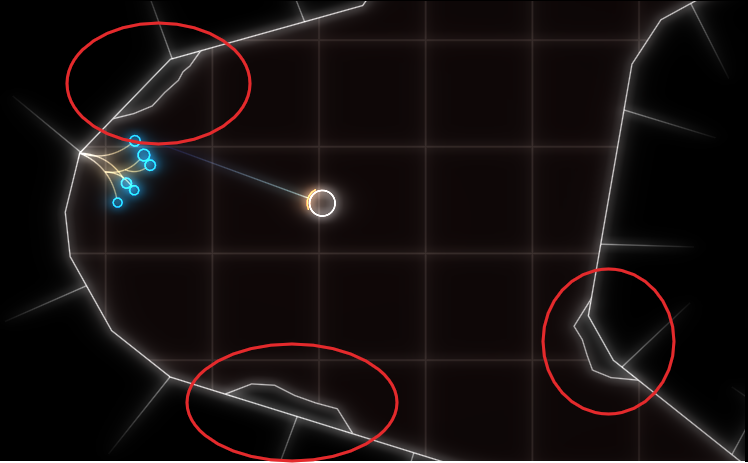
As you can see, everything is very low-poly. The rocks are rendered in two parts, a black background hiding the normal level background and the white outline. If I removed the background rendering, everything was fine (except for the ‘transparent’ rocks).

Now it’s important to know that the rendering is all but optimized at this point. I often use the most basic thing given my infrastructure that I can get away with until I see a problem. In this case, I have some thingies internally that let me draw in a pretty immediate mode way: Just upload the geometry to the GPU and render it. Every frame. At the moment, I do this with almost all the geometry, visible or not, every frame. That was fast enough, and makes it trivial to change what’s being rendered when the rock is broken. The white outline is actually more geometry generated by my line mesher than the rock-background. But that was not causing any catastrophic slow-downs, while the background was. So what was the difference? The line geometry was batched on the CPU, while I was issuing a separate draw-call for each of those rocks. To give some numbers: there were about 100 of those rocks, with each of with up to 11 triangles.

Suspecting the draw call overhead, I tried batching, e.g. merging, all the rock geometry into a single mesh and rendering it with a single draw call. That seemed to work well enough. And that is the version currently released.

Deep Dive

But the problem kept nagging at me after I released the fix. Yes, draw calls can have a lot of overhead, especially in Emscripten. But going from 60FPS to 2FPS still seemed pretty steep, and I did not fully understand why it was so extremely bad. After trying Firefox’s Gecko Profiler, which was recommended in the Emscripten docs, I finally got an idea what was causing the problem. The graphics thread was indeed very busy, and showing a lot of time in MaxForRange<>. That profiler is actually pretty cool, and you can jump directly into the Firefox source code from there to get an idea what’s going on.

Geometry is often specified via one level of indirection: The actual ‘per Point’- a.k.a. Vertex-Array and a list of indices pointing into that, with each triplet defining a triangle. This is a form of compression, and can also help the CPU avoid duplicate work by caching. But it also means that the indices can be invalid, e.g. there can be out-of-bounds indices. And browsers cannot allow that fore safety reasons, so they check the validity before actually issuing a rendering command on the GPU. MaxForRange<> is part of the machinery to do just that via its caller GetIndexedFetchMaxVert. It determines the max index of a section of an index buffer. When issuing a draw call, that max-index is checked against the size of the per-point-data to avoid out-of-range accesses.

This employs a caching scheme: For a given range in the indices, the result is cached, so it doesn’t have to be evaluated again for repeated calls on the same buffer. Also, I suspect to make this cache ‘hit’ more often, the max-index is first retrieved for the whole of the current index buffer, and only if that cannot guarantee valid access, is the subrange even checked. See the calls to GetIndexedFetchMaxVert in WebGLContext::DrawElementsInstanced. When something in the index list is changed from the user side, this cache is completely evicted.

The way that I stream my geometry data in my renderer is by using “big” (=4mb) per-frame buffers for vertex and index data that I gradually fill in some kind of emulated “immediate mode”. In the specific instance for the rocks, this looks like this:

for (auto& each : rock)
{
auto vertex_source = per_frame_buffer.transfer_vertex_data(each.vertex_data);
auto index_source = per_frame_buffer.transfer_index_data(each.index_data);
device.draw(vertex_source, index_source, ...);
}

The combination of all that turned out to be deadly for performance, and again shows why caching is one of the two hard things in IT. The code essentially becomes:

for (auto& each : rock)
{
auto vertex_source = per_frame_buffer.transfer_vertex_data(each.vertex_data);
invalidate_per_frame_index_buffer_cache();
auto index_source = per_frame_buffer.transfer_index_data(each.index_data);
fill_cache_again_for_the_whole_big_index_buffer();
device.draw(vertex_source, index_source, ...);
}

So for my 100 or so small rocks, the whole loop went through about 400mb of extra data per frame, or ~24gb per second. That’s quite something.

That also explains why merging the geometry helped, as it drastically reduced the amount of cache invalidations/refills. But now that the problem was understood, another option became apparent. Reorder the streamed buffer updates and draw calls, so that all the updates happen before all the draw calls.

Open questions

I am still not sure what the optimal way to stream geometry in WebGL is, but I suspect reordering the updates/draws and keeping the index buffer as small as possible might prove useful. So if you have any proven idea, I’d love to hear it.

I am also not entirely sure why I did not notice this catastrophic slow-down on my developer machine. I suspect it’s just because my CPU has big L2 and L3 caches that made the extra index scans very fast. I suspect I will see the performance problem in the profiler.

Generating a spherified cube in C++

In my last post, I showed how to generate an icosphere, a subdivided icosahedron, without any fancy data-structures like the half-edge data-structure. Someone in the reddit discussion on my post mentioned that a spherified cube is also nice, especially since it naturally lends itself to a relatively nice UV-map.

The old algorithm

The exact same algorithm from my last post can easily be adapted to generate a spherified cube, just by starting on different data.

cube

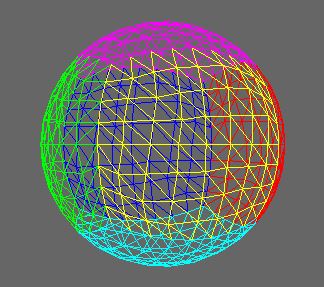
After 3 steps of subdivision with the old algorithm, that cube will be transformed into this:

split4

Slightly adapted

If you look closely, you will see that the triangles in this mesh are a bit uneven. The vertical lines in the yellow-side seem to curve around a bit. This is because unlike in the icosahedron, the triangles in the initial box mesh are far from equilateral. The four-way split does not work very well with this.

One way to improve the situation is to use an adaptive two-way split instead:
split2

Instead of splitting all three edges, we’ll only split one. The adaptive part here is that the edge we’ll split is always the longest that appears in the triangle, therefore avoiding very long edges.

Here’s the code for that. The only tricky part is the modulo-counting to get the indices right. The vertex_for_edge function does the same thing as last time: providing a vertex for subdivision while keeping the mesh connected in its index structure.

TriangleList
subdivide_2(ColorVertexList& vertices,
  TriangleList triangles)
{
  Lookup lookup;
  TriangleList result;

  for (auto&& each:triangles)
  {
    auto edge=longest_edge(vertices, each);
    Index mid=vertex_for_edge(lookup, vertices,
      each.vertex[edge], each.vertex[(edge+1)%3]);

    result.push_back({each.vertex[edge],
      mid, each.vertex[(edge+2)%3]});

    result.push_back({each.vertex[(edge+2)%3],
      mid, each.vertex[(edge+1)%3]});
  }

  return result;
}

Now the result looks a lot more even:
split2_sphere

Note that this algorithm only doubles the triangle count per iteration, so you might want to execute it twice as often as the four-way split.

Alternatives

Instead of using this generic of triangle-based subdivision, it is also possible to generate the six sides as subdivided patches, as suggested in this article. This approach works naturally if you want to have seams between your six sides. However, that approach is more specialized towards this special geometry and will require extra “stitching” if you don’t want seams.

Code

The code for both the icosphere and the spherified cube is now on github: github.com/softwareschneiderei/meshing-samples.

Generating an Icosphere in C++

If you want to render a sphere in 3D, for example in OpenGL or DirectX, it is often a good idea to use a subdivided icosahedron. That often works better than the “UVSphere”, which means simply tesselating a sphere by longitude and latitude. The triangles in an icosphere are a lot more evenly distributed over the final sphere. Unfortunately, the easiest way, it seems, is to generate such a sphere is to do that in a 3D editing program. But to load that into your application requires a 3D file format parser. That’s a lot of overhead if you really need just the sphere, so doing it programmatically is preferable.

At this point, many people will just settle for the UVSphere since it is easy to generate programmatically. Especially since generating the sphere as an indexed mesh without vertex-duplicates further complicates the problem. But it is actually not much harder to generate the icosphere!
Here I’ll show some C++ code that does just that.

C++ Implementation

We start with a hard-coded indexed-mesh representation of the icosahedron:

struct Triangle
{
  Index vertex[3];
};

using TriangleList=std::vector<Triangle>;
using VertexList=std::vector<v3>;

namespace icosahedron
{
const float X=.525731112119133606f;
const float Z=.850650808352039932f;
const float N=0.f;

static const VertexList vertices=
{
  {-X,N,Z}, {X,N,Z}, {-X,N,-Z}, {X,N,-Z},
  {N,Z,X}, {N,Z,-X}, {N,-Z,X}, {N,-Z,-X},
  {Z,X,N}, {-Z,X, N}, {Z,-X,N}, {-Z,-X, N}
};

static const TriangleList triangles=
{
  {0,4,1},{0,9,4},{9,5,4},{4,5,8},{4,8,1},
  {8,10,1},{8,3,10},{5,3,8},{5,2,3},{2,7,3},
  {7,10,3},{7,6,10},{7,11,6},{11,0,6},{0,1,6},
  {6,1,10},{9,0,11},{9,11,2},{9,2,5},{7,2,11}
};
}

icosahedron
Now we iteratively replace each triangle in this icosahedron by four new triangles:

subdivision

Each edge in the old model is subdivided and the resulting vertex is moved on to the unit sphere by normalization. The key here is to not duplicate the newly created vertices. This is done by keeping a lookup of the edge to the new vertex it generates. Note that the orientation of the edge does not matter here, so we need to normalize the edge direction for the lookup. We do this by forcing the lower index first. Here’s the code that either creates or reused the vertex for a single edge:

using Lookup=std::map<std::pair<Index, Index>, Index>;

Index vertex_for_edge(Lookup& lookup,
  VertexList& vertices, Index first, Index second)
{
  Lookup::key_type key(first, second);
  if (key.first>key.second)
    std::swap(key.first, key.second);

  auto inserted=lookup.insert({key, vertices.size()});
  if (inserted.second)
  {
    auto& edge0=vertices[first];
    auto& edge1=vertices[second];
    auto point=normalize(edge0+edge1);
    vertices.push_back(point);
  }

  return inserted.first->second;
}

Now you just need to do this for all the edges of all the triangles in the model from the previous interation:

TriangleList subdivide(VertexList& vertices,
  TriangleList triangles)
{
  Lookup lookup;
  TriangleList result;

  for (auto&& each:triangles)
  {
    std::array<Index, 3> mid;
    for (int edge=0; edge<3; ++edge)
    {
      mid[edge]=vertex_for_edge(lookup, vertices,
        each.vertex[edge], each.vertex[(edge+1)%3]);
    }

    result.push_back({each.vertex[0], mid[0], mid[2]});
    result.push_back({each.vertex[1], mid[1], mid[0]});
    result.push_back({each.vertex[2], mid[2], mid[1]});
    result.push_back({mid[0], mid[1], mid[2]});
  }

  return result;
}

using IndexedMesh=std::pair<VertexList, TriangleList>;

IndexedMesh make_icosphere(int subdivisions)
{
  VertexList vertices=icosahedron::vertices;
  TriangleList triangles=icosahedron::triangles;

  for (int i=0; i<subdivisions; ++i)
  {
    triangles=subdivide(vertices, triangles);
  }

  return{vertices, triangles};
}

There you go, a customly subdivided icosphere!
icosphere

Performance

Of course, this implementation is not the most runtime-efficient way to get the icosphere. But it is decent and very simple. Its performance depends mainly on the type of lookup used. I used a map instead of an unordered_map here for brevity, only because there’s no premade hash function for a std::pair of indices. In pratice, you would almost always use a hash-map or some kind of spatial structure, such as a grid, which makes this method a lot tougher to compete with. And certainly feasible for most applications!

The general pattern

The lookup-or-create pattern used in this code is very useful when creating indexed-meshes programmatically. I’m certainly not the only one who discovered it, but I think it needs to be more widely known. For example, I’ve used it when extracting voxel-membranes and isosurfaces from volumes. It works very well whenever you are creating your vertices from some well-defined parameters. Usually, it’s some tuple that describes the edge you are creating the vertex on. This is the case with marching cubes or marching tetrahedrons. It can, however, also be grid coordinates if you sparsely generate vertices on a grid, for example when meshing heightmaps.

Recap of the Schneide Dev Brunch 2015-08-09

If you couldn’t attend the Schneide Dev Brunch at 9th of August 2015, here is a summary of the main topics.

brunch64-borderedTwo weeks ago, we held another Schneide Dev Brunch, a regular brunch on the second sunday of every other (even) month, only that all attendees want to talk about software development and various other topics. So if you bring a software-related topic along with your food, everyone has something to share. The brunch was well attented this time with enough stuff to talk about. As usual, a lot of topics and chatter were exchanged. This recapitulation tries to highlight the main topics of the brunch, but cannot reiterate everything that was spoken. If you were there, you probably find this list inconclusive:

News on Docker

Docker is the hottest topic among developers and operators in 2015. No wonder we started chatting about it the minute we sat down. There are currently two interesting platform projects that provide runtime services for docker: Tutum (commercial) and Rancher (open source). We all noted the names and will check them out. The next interesting fact was that Docker is programmed in the Go language. The team probably one day decided to give it a go.

Air Conditioning

We all experienced the hot spell this summer and observed that work in the traditional sense is impossible beyond 30° Celsius. Why there are still so few air conditioned offices in our region is beyond our grasp. Especially since it’s possible to power the air condition system with green electricity and let sun-power deal with the problem that, well, the sun brought us. In 2015 alone, there are at minimum two work weeks lost to the heat. The productivity gain from cooling should outweigh the costs.

License Management

We talked about how different organisations deal with the challenge of software license management. Nearly every big company has a tool that does essentially the same license management but has its own cool name. Other than that, bad license management is such a great productivity killer that even air conditioning wouldn’t offset it.

Windows 10

Even if we are largely operation system agnostic, the release of Windows 10 is hot news. A few of our participants already tried it and concluded that “it’s another Windows”. A rather confusing aspect is the split system settings. And you have to abdicate the Cortana assistant if you want to avoid the data gathering.

Patch Management

A rather depressing topic was the discussion about security patches. I just repeat two highlights: A substantial number of servers on the internet are still vulnerable to the heartbleed attack. And if a car manufacturer starts a big recall campaign with cost-free replacements, less than 10 percent of the entitled cars are actually fixed on average. These explicitely includes safety-critical issues. That shouldn’t excuse us as an industry for our own shortcomings and it’s not reassuring to see that other industries face the same problems.

Self-Driving Cars

We disgressed on the future hype topic of self-driving cars. I can’t reiterate the complete discussion, but we agreed that those cars will hit the streets within the next ten years. The first use case will be freight transports, because the cargo doesn’t mind if the driver is absent and efficiency matters a lot in logistics. Plus, machines don’t need breaks. Ok, those were enough puns on the topic. Sorry.

Tests on Interfaces

An interesting question was how to build tests that can ensure a class or interface contract. Much like regression tests for recently broken functionality, compatibility tests should deal with backward compatibility issues in the interface. Turns out, the Eclipse foundation gave the topic some thoughts and came up with an exhaustive list of aspects to check. There are even some tools that might come in handy if you want to compare two versions of an API.

API Design

When the topic of API Design came up, some veterans of the Schneide Events immediately mentioned the API Design Fest we held in November 2013 to get our noses bloody on API design. Well, bleed we did. The most important take-away from the Fest was that if you plan to publish an API that can endure some years in production while being enhanced and improved, you just shouldn’t do it. Really, don’t do it, it’s probably a bad idea and you lack the required skill without even knowing it. If you want to know, participate or even host an API Design Fest.

And if you happen to design a web-based API, you might abandon backward compatibility by offering several distinct “versions” of APIs of a service. The version is included in the API URL, and acts more like a name than a version. This will ease your burden a bit. A nice reference resource might also be the PayPal API style guide.

Let’s just agree that API design is really hard and should not be done until it’s clear you don’t suffer from Dunning-Kruger effect symptoms too much.

Performance Tests

We talked about the most effective setup of performance tests. There were a lot of ideas and we cornerstoned the topic around this:

  • There was a nearly heroic effort from the Eclipse development team to measure their IDE performance, especially to compare different versions of the IDE. The Eclipse Test & Performance Tools Platform (TPTP) was (as in: discontinued) a toolkit of interesting approaches to the topic. The IDE itself was measured by performance fingerprints like this example from 2011. As far as we know, all those things ceased to exist.
  • At the last Java Forum Stuttgart, there was a talk about performance testing from an experienced tester that loved to give specific advice. The slides can be viewed online in german language (well, not really, but the talk was).
  • The book Release It! has a lot of insights to this topic. It’s one of the bigger books on the pragmatic bookshelf.
  • The engineers at NetFlix actually did a lot of thinking about the topic. They came up with Hystrix, a resilience library, aimed to make it easier to prevent complete system blackouts. They also came up with Chaos Monkey, a service that makes it easier to have a complete system blackout. If we can say anything about NetFlix, it is that they definitely approach their problems from the right angle.

Company Culture

Leaking over from the previous topic about effective performance-related measures, we talked about different company cultures, especially in regard to a centralized human resources departments and works council (german: Betriebsrat). We agreed that it is very difficult to maintain a certain culture and continued growth. We also agreed that culture trickles down from top management.

OpenGL

The last topic on this Dev Brunch was about the rendering of text or single characters in OpenGL. By using signed distance fields, you can render text more crisp and still only use cheap computation instructions. There is a paper from Valve on the topic that highlights the benefits and gives a list of additional reading. It’s always cool to learn about something simple that actually improves things.

Epilogue

As usual, the Dev Brunch contained a lot more chatter and talk than listed here. The number of attendees makes for an unique experience every time. We are looking forward to the next Dev Brunch at the Softwareschneiderei. And as always, we are open for guests and future regulars. Just drop us a notice and we’ll invite you over next time.