A Campfire plugin for Hudson

Our last OSLD resulted in a new hudson plugin: a build notifier for Campfire. Right now it is pretty simple and just posts the last build result in a chat room:
Campfire-Notification

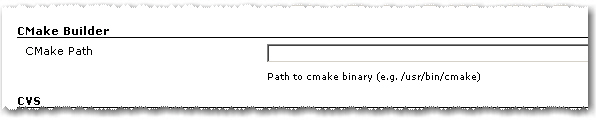
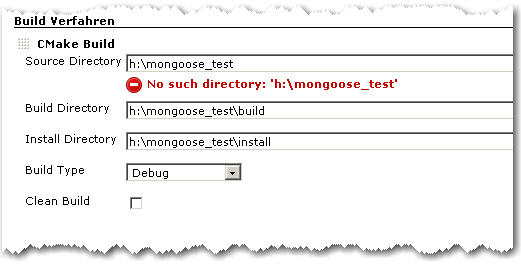
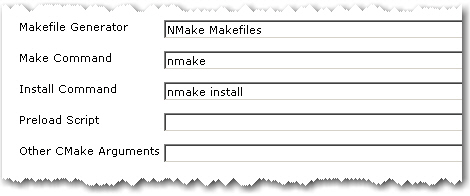
You can configure your account data and the room to join in the job config page under Post Build actions:
Hudson-Campfire
But there is more to come:

  • global config
  • SSL support
  • a link back to hudson

or what is your favorite missing feature?

Object Calisthenics On Existing Projects?

A few days ago we discussed Object Calisthenics which where introduced by Jeff Bay in an article for the ThoughtWorks Anthology book. In case you have no idea what I’m talking about, here are again the 9 rules in short form (or your can study them in detail in the book):

1. One level of indentation per method
2. No else keyword
3. Wrap all primitives and strings
4. Use only one dot per line
5. Don’t abbreviate names but keep them short
6. Keep all entities small
7. No more than two instance variables per class
8. Use first-class collections
9. Don’t use any getters/setters or properties

Following the rules supposedly leads to more object-oriented code with a special emphasis on encapsulation. In his article, Jeff Bay suggests to do a new 1000 lines project and to follow the rules excessively without thinking twice. But hey, more object-oriented code can’t be bad for existing projects, either, can it?

Not only on the first look, many of the rules seem pretty hard to follow. For example, check your projects for compatibility with rule 7. How many of your classes have more than two instance variables? That’s what I thought. And sure, some primitives and collections deserve wrapping them into an extra class (rules 3 and 8), but do you really wrap all of them? Well, neither do we.

Other rules lead directly to more readable code. If you value good code quality like we do, rules 1, 2, 5 and 6 are more or less already in the back of your head during your daily programming work.

Especially rule 1 is what you automatically aim for when you want your crap load to remain low.

What really got my attention was rule 9: “Don’t use any getters/setters or properties”. This is the “most object-oriented” rule because it targets the heart of what an object should be: a combination of data and the behavior that uses the data.

But doing a little mental code browsing through our projects, it was easy to see that this rule is not easily retrofitted into an existing code base. The fact that our code is generally well covered with automated tests and considered awesome by a number of software metrics tools does not change that, either. Which is, of course, not surprising since committing to rule 9 is a downright big architectural decision.

So despite the fact that it is difficult to virtually impossible to use the rules in our existing projects right away, Object Calisthenics were certainly very valuable as motivation to constantly improving ourselves and our code. A good example is rule 2 (“No else”) which gets even more attention from now on. And there are definitely one or two primitives and collections that get their own class during the next refactoring.

Our first Open Source Love Day (OSLD)

opensourcelovedayLast week we had our first OSLD and started with the usual hopes and fears:

  • how much time will be consumed setting the project up?
  • will we find issues that are small enough to be finished in one day?
  • the hope to learn something new: a new technology, language or tool
  • the hope to improve our skills in reading a different code style and a new codebase

As an additional challenge we tried to do object calisthenics (which we will covered in a different blog post). In short they are a list of coding guide lines which try to bend your mind to get more flexible when coding/designing software.

Start

After an initial meeting we decided to work on EGit/JGit. This project was on a familiar ground (Java) and had enough new tools (Git) and technologies (plugin development under Eclipse). Setup was very easy and fast (thanx to the EGit/JGit team!) and we started to look at the low hanging fruits linked from the EGit wiki which are basically issues that are categorized as easy. This is a very good idea for project newbies to start (in theory…). But the reality was that most of them were already patched and other had not enough information to make any sense for us (which could be also our lack of knowledge of the GIT wording and its internal concepts and function). At the end of the day we had worked on issues which were definitely too big for us (requiring changes in the infrastructure of JGit) and reported some issues as non-reproduceable.

Finish

So we learned a few things from the first day:

  • project setup can be very fast and easy
  • low hanging fruits are a very good idea
  • avoid infrastructure changes
  • a basic familiarity with the concepts involved is key to get along
  • don’t do too much on one day, instead: focus!
  • scratching your own itch would benefit the understanding of the issue and your motivation

So in the next month we give OSLD another chance and hope to learn even more.

A Small XML Builder in Ruby

From a C++ point of view, i.e. the statically typed world with no “dynamic” features that deserved the name, I guess you would all agree that languages like Groovy or Ruby are truly something completely different. Having strong C++ roots myself, my first Grails project gave me lots of eye openers on some nice “dynamic” possibilities. One of the pretty cool things I encountered there was the MarkupBuilder. With it you can just write XML as if it where normal Groovy Code. Simple and just downright awesome.

The other day in yet another C++ project I was again faced with the task to generate some XML from text file. And, sure enough, my thoughts wandered to the good days in the Grails project where I could just instantiate the MarkupBuilder… But wait! I remembered that a colleague had already done some scripting stuff with Ruby, so the language was already kind of introduced into the project. And despite the fact that it was a new language for him he did some heavy lifting with it in just no time (That sure does not come as a big surprise all you Ruby folks out there).

So if Ruby is such a cool language there must be something like a markup builder in it, right? Yes there is, well, sort of. Unfortunately, it’s not part of the language package and you first have to install a thing called gems to even install the XML builder package. Being in a project with tight guidelines when it comes to external dependencies and counting in the fact that we had no patience to first having to learn what Ruby gems even are, my colleague and I decided to hack our own small XML builder (and of course, just for the fun of it). I mean hey, it’s Ruby, everything is supposed to be easy in Ruby.

Damn right it is! Here is what we came up with in what was maybe an hour or so:

class XmlGen
   def initialize
      @xmlString = ""
      @indentStack = Array.new
   end

   def method_missing(tagId, attr = {})
      argList = attr.map { |key, value|
         "#{key}=\"#{value}\""
      }.reverse.join(' ')

      @xmlString << @indentStack.join('') 
      @xmlString << "<" << tagId.to_s << " " << argList
      if block_given?
         @xmlString << ">\n"
         @indentStack.push "\t"
         yield
         @indentStack.pop
         @xmlString << @indentStack.join('') << "</" << tagId.to_s << ">\n"
      else
         @xmlString << "/>\n"
      end
      self
   end

   def to_s
      @xmlString
   end
end

And here is how you can use it:

xml = XmlGen.new
xml.FirstXmlTag {
   xml.SubTagOne( {'attribute1' => 'value1'} ) {
      someCollection.each { |item|
         xml.CollectionTag( {'itemId' => item.id} )
      }
   }
}

It’s not perfect, it’s not optimized in any way and it may not even be the Ruby way. But hey, it served our needs perfectly, it was a pretty cool Ruby experience, and it sure is not the last piece of Ruby code in this project.

Give open source some love back!

Like many others our work is enabled by open source software. We make a heavy use of the several great open source projects out there. Since they help us doing our business and doing it in a productive way, we want to give some love aehmm work back. So we decided to dedicate one day per month to open source contributions. These can be bug fixes, new features, even documentation or bug reports. I believe that every contribution helps an open source project and many projects need help.
The whole development team will work on projects they like. One day per month does not sound much but I think even starting small helps. And maybe you can suggest a similar day in your company, too ?
Besides the obvious boost in developer motivation (and therefore productivity) there are several things your company will benefit from:

  • help in your own projects: fixing bugs in the open source projects you use is like fixing bugs in your own project
  • image for your company: being active in open source gives a better image regarding potential future employees and also shows responsibility in the field they work in
  • PR for your company and an edge over your competition: writing about your contributions and your insights in your company blog, remember: out teach your competition

So get your company to spend just one day per month or so for open source. It may not be much but every little bit helps!

Evil operator overloading of the day

The other day we encountered a strange stack overflow when cout-ing an instance of a custom class. The stream output operator << was overloaded for the class to get a nice output, but since the class had only two std::string attributes the implementation was very simple:

using namespace std;

class MyClass
{
   public:
   ...
   private:
      string stringA_;
      string stringB_;

   friend ostream& operator << (ostream& out, const MyClass& myClass);
};

ostream& operator << (ostream& out, const MyClass& myClass)
{
   return out << "MyClass (A: " << myClass.stringA_ 
              <<", B: " << myClass.stringB_ << ")"  << std::endl;
}

Because the debugger pointed us to a completely separate code part, our first thought was that maybe some old libraries had been accidently linked or some memory got corrupted somehow. Unfortunately, all efforts in that direction lead to nothing.

That was the time when we noticed that using old-style printf instead of std::cout did work just fine. Hm..

So back to that completely separate code part. Is it really so separate? And what does it do anyway?

We looked closer and after a few minutes we discovered the following code parts. Just look a little while before you read on, it’s not that difficult:

// some .h file somewhere in the code base that somehow got included where our stack overflow occurred:

...
typedef std::string MySpecialName;
...
ostream& operator << (ostream& out, const MySpecialName& name);

// and in some .cpp file nearby

...
ostream& operator << (ostream& out, const MySpecialName& name)
{
   out << "MySpecialName: " << name  << std::endl;
}
...

Got it? Yes, right! That overloaded out-stream operator << for MySpecialName together with that innocent looking typedef above put your program right into death by segmentation fault.  Overloading the out-stream operator for a given type can be a good idea – as long as that type is not a typedef of std::string. The code above not only leads to the operator << recursively calling itself but also sucks every other part of the code into its black hole which happens to include the .h file and wants to << a std::string variable.

You just have to love C++…

Grails Web Application Security: XSS prevention

XSS (Cross Site Scripting) became a favored attack method in the last years. Several things are possible using an XSS vulnerability ranging from small annoyances to a complete desaster.
The XSS prevention cheat sheet states 6 rules to prevent XSS attacks. For a complete solution output encoding is needed in addition to input validation.
Here I take a further look on how to use the built in encoding methods in grails applications to prevent XSS.

Take 1: The global option

There exists a global option that specifies how all output is encoded when using ${}. See grails-app/conf/Config.groovy:

// The default codec used to encode data with ${}
grails.views.default.codec="html" // none, html, base64

So every input inside ${} is encoded but beware of the standard scaffolds where fieldValue is used inside ${}. Since fieldValue uses encoding you get a double escaped output – not a security problem, but the output is garbage.
This leaves the tags from the tag libraries to be reviewed for XSS vulnerability. The standard grails tags use all HTML encoding. If you use older versions than grails 1.1: beware of a bug in the renderErrors tag. Default encoding ${} does not help you when you use your custom tags. In this case you should nevertheless encode the output!
But problems arise with other tags like radioGroup like others found out.
So the global option does not result in much protection (only ${}), double escaping and problems with grails tags.

Take 2: Tainted strings

Other languages/frameworks (like Perl, Ruby, PHP,…) use a taint mode. There are some research works for Java.
Generally speaking in gsps three different outputs have to be escaped: ${}, <%%> and the ones from tags/taglibs. If a tainted String appears you can issue a warning and disallow or escape it. The problem in Java/Groovy is that Strings are value objects and since get copied in every operation so the tainted flag needs to be transferred, too. The same tainted flag must also be introduced for GStrings.
Since there isn’t any implementation or plugin for groovy/grails yet, right now you have to take the classic route:

Take 3: Test suites and reviews

Having a decent test suite in e.g. Selenium and reviewing your code for XSS vulnerabilities is still the best option in your grails apps. Maybe the tainted flags can help you in the future to spot places which you didn’t catch in a review.

P.S. A short overview for Java frameworks and their handling of XSS can be found here

How much boost does a C++ newbie need?

The other day, I talked to a C++ developer, who is relatively new in the language, about the C++ training they just had at his company. The training topics were already somewhat advanced and contained e.g. STL containers and their peculiarities, STL algorithms and some boost stuff like binders and smart pointers. That got me thinking about how much of STL and boost does a C++ developer just has to know in order to survive their C++ projects.

There is also another angle to this. There are certain corners of the C++ language, e.g. template metaprogramming, which are just hard to get, even for more experienced developers. And because of that, in my opinion, they have no place in a standard industry C++ project. But where do you draw the line? With template meta-programming it is obvious that it probably will never be in every day usage by Joe Developer. But what about e.g. boost’s multi-index container or their functional programming stuff? One could say that it depends on the skills of team whether more advanced stuff can be used or not. But suppose your team consist largely of C++ beginners and does not have much experience in the language, would you want to pass on using Boost.Spirit when you had to do some serious parsing? Or would you want to use error codes instead of decent exceptions, because they add a lot more potentially “invisible” code paths? Probably not, but those are certainly no easy decisions.

One of the problems with STL and boost for a C++ beginner can be illustrated with the following easy problem: How do you convert an int into a std::string and back? Having already internalized the stream classes the beginner might come up with something like this:

 int i = 5;
 std::ostringstream out;
 out << i;
 std::string i_string = out.str();  

 int j=0;
 std::istringstream in(i_string);
 in >> j;
 assert(i == j);

But if he just had learned a little boost he would know that, in fact, it is as easy as this:

 int i=5;
 std::string i_string = boost::lexical_cast<std::string>(i);

 int j = boost::lexical_cast<int>(i_string);

So you just have to know some basic boost stuff in order to write fairly decent C++ code. Besides boost::lexical_cast, which is part of the Boost Conversion Library, here is my personal list of mandatory boost knowledge:

Boost.Assign: Why still bother with std::map::push_back and the likes, if there is a much easier and concise syntax to initialize containers?

Boost.Bind (If you use functional programming): No one should be forced to wade through the mud of STL binders any longer. Boost::bind is just so much easier.

Boost.Foreach: Every for-loop becomes a code-smell after your first use of BOOST_FOREACH.

Boost.Member Function: see Boost.Bind

Boost.Smart Pointers: No comment is needed on that one.

As you can see, these are only the most basic libraries. Other extremely useful things for day-to-day programming are e.g. Boost.FileSystem, Boost.DateTime, Boost.Exceptions, Boost.Format, Boost.Unordered and Boost.Utilities.

Of course, you don’t have to memorize every part of the boost libraries, but boost.org should in any case be the first address to look for a solution to your daily  C++ challenges.

Small gaps in the grails docs

Just for reference, if you come across one of the following problems:

Validation only datasource

Looking at the options of dbCreate in Datasource.groovy I only found 3 values: create-drop, create or update. But there is a fourth one: validate!
This one helps a lot when you use schema generation with Autobase or doing your schema updates external.

Redirect

Controller.redirect has two options for passing an id to the action id and params, but if you specify both which one will be used?

controller.redirect(id:1, params:[id:2])

Trying this out I found the id supersedes the params.id.

Update:
Thanks to Burt and Alvaro for their hints. I submitted a JIRA issue

Dancing the TANGO

One of our customers is an administration department at a research center, which is responsible to operate and maintain a synchrotron light source. They are in charge of a whole bunch of “normal” IT infrastructure as well as a wide variety of electronic devices which are used in all kinds of experiment settings. These can be cameras, electronic motors, detectors of all sorts, etc. One of their main day-to-day challenges is to integrate all those devices such that they can be controlled in a uniform way with standard measurement and control tools.

In order to provide a common solution to this task the TANGO platform has been developed in a collaborative effort of some the the main European synchrotron institutes. TANGO is an object-oriented distributed control system in which every device is represented in an abstract way by a so-called Device Server. A device server provides access to a given piece of hardware by exposing its attributes, properties, states, events and supported commands in a uniform way. CORBA is used as middleware which shows that it is still popular in real-time and embedded environments. Device server instances are registered at a central database and can be accessed and controlled using a variety of TANGO tools.

The typical TANGO development process is as follows: Each device comes with some vendor provided driver library and corresponding interface documentation (C interfaces in many cases). Starting with that information, all attributes, states and supported commands are defined using a tool called POGO. The resulting model of the device is then used to generate skeleton code for the device server. Right now, POGO supports C++, Java and Python. Then, the device server skeleton code is completed by accessing the actual device using the driver library.

For example, one of our latest projects was an X-ray detector which is roughly like a CCD camera for X-rays. As such it has read-only TANGO attributes Width and Height which corresponds to the width and height of the CCD chip. Furthermore it has a read-write attribute called ROI (region of interest) which is an array of four integer values (X0, Y0, X1, X2), Exposure Time, an integer value in milliseconds and a variety of other attributes. One obvious TANGO command is Start which tells the camera to start exposure and store resulting images.

So, if you happen to have a synchrotron light source in your garage (or of course any other bunch of hardware that you want to integrate), consider dancing the TANGO.