How I accidentally cut my audio-files in half

A couple of weeks ago, I asked my brother to test out my new game You Are Circle (please wishlist it and check out the demo, if that’s up your alley!) and among lots of other valuable feedback, he mentioned that the explosion sound effects had a weird click sound at the end that he could only hear with his headphones on. For those of you not familiar with audio signal processing, those click or pop sounds usually appear when the ‘curvy’ audio signal is abruptly cut off1. I did not notice it on my setup, but he has a lot of experience with audio mixing, so I trusted his hearing. Immediately, I looked at the source files in audacity:

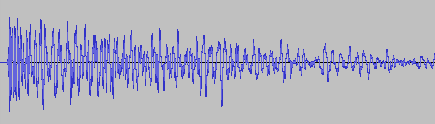
They looked fine, really. The sound slowly fades out, which is the exact thing you need to do to prevent clicks & pops. Suspecting the problem might be on the playback side of his particular setup, I asked him to record the sound on his computer the next time he tested and then kind of forgot about it for a bit.

Fast-forward a couple of days. Neither of us had followed up on the little clicky noise thing. While doing some video captures with OBS, I noticed that the sound was kind of terrible in some places, the explosions in particular. Maybe that was related?

While building a new version of my game, Compiling resources... showed up in my console and it suddenly dawned on me: What if my home-brew resource compiler somehow broke the audio files? I use it to encode all the .wav originals into Ogg Vorbis for deployment. Maybe a badly configured encoding setup caused the weird audio in OBS and for my brother? So I looked at the corresponding .ogg files, and to my surprise, it indeed had a small abrupt cut-off at the end. How could that happen? Only when I put both the original and the processed file next to each other, did I see what was actually going on:

It’s only half the file! How did that happen? And what made this specific file so special for it to happen? This is one of many files that I also convert from stereo to mono in preprocessing. So I hypothesized that might be the problem. No way I missed all of those files being cut in half though, or did I? So I checked the other files that were converted from stereo to mono. Apparently, I did miss it. They were all cut in half. So I took a look at the code. It looked something like this:

while (keep_encoding)
{
  auto samples_in_block = std::min(BLOCK_SIZE, input.sample_count() - sample_offset);
  if (samples_in_block != 0)
  {
    auto samples_per_channel = samples_in_block / channel_count;
    auto channel_buffer = vorbis_analysis_buffer(&dsp_state, BLOCK_SIZE);
    auto input_samples = input.samples() + sample_offset;

    if (convert_to_mono)
    {
      for (int sample = 0; sample < samples_in_block; sample += 2)
      {
        int sample_in_channel = sample / channel_count;
        channel_buffer[0][sample_in_channel] = (input_samples[sample] + input_samples[sample + 1]) / (2.f * 32768.f);
      }
    }
    else
    {
      for (int sample = 0; sample < samples_in_block; ++sample)
      {
        int channel = sample % channel_count;
        int sample_in_channel = sample / channel_count;
        channel_buffer[channel][sample_in_channel] = input_samples[sample] / 32768.f;
      }
    }

    vorbis_analysis_wrote(&dsp_state, samples_per_channel);
    sample_offset += samples_in_block;
  }
  else
  {
    vorbis_analysis_wrote(&dsp_state, 0);
  }

  /* more stuff to encode the block using the ogg/vorbis API... */
}

Not my best work, as far as clarity and deep nesting goes. After staring at it for a while, I couldn’t really figure out what was wrong with it. So I built a small test program to debug into, and only then did I see what was wrong.

It was terminating the loop after half the file, which now seems pretty obvious given the outcome. But why? Turns out it wasn’t the convert_to_mono at all, but the whole loop. What’s really the problem here is mismatched and imprecise terminology.

What is a sample? The audio signal is usually sampled several thousand times (44.1kHz, 48kHz or 96kHz are common) per second to record the audio waves. One data point is called a sample. But that is only enough of a definition if the sound has a single channel. But all those with convert_to_mono==true were stereo, and that’s exactly were the confusion is in this code. One part of the code thinks in single-channel samples, i.e. a single sampling time-point has two samples in a stereo file, while the other part things in multi-channel samples, i.e. a single sampling time-point has only one stereo sample, that consists of multiple numbers. Specifically this line:

auto samples_in_block = std::min(BLOCK_SIZE, input.sample_count() - sample_offset);

samples_in_block and sample_offset use the former definition, while input.sample_count() uses the latter. The fix was simple: replace input.sample_count() with input.sample_count() * channel_count.

But that meant all my stereo sounds, even the longer music files, were missing the latter half. And this was not a new bug. The code was in there since the very beginning of the git history. I just didn’t hear its effects. For the sound files, many of them have a pretty long fade out in the second half, so I can kind of get why it was not obvious. But the music was pretty surprising. My game music loops, and apparently, it also loops if you cut it in half. I did not notice.

So what did I learn from this? Many of my assumptions while hunting down this bug were wrong:

  • My brother’s setup did not have anything to do with it.
  • Just because the original source file looked fine, I thought the file I was playing back was good as well.
  • The bad audio in OBS did not have anything to do with this, it was just recorded too loud.
  • The ogg/vorbis encoding was not badly configured.
  • The convert_to_mono switch or the special averaging code did not cause the problem.
  • I thought I would have noticed that almost all my sounds were broken for almost two years. But I did not.

What really cause the problem was an old programming nemesis, famously one of the two hard things in computer science: Naming things. There you have it. Domain language is hard.

  1. I think this is because this sudden signal drop equates to a ‘burst’ in the frequency domain, but that is just an educated guess. If you know, please do tell. ↩︎

Nginx upload limit

Today, I encountered a surprising issue with my Docker-based web application. The application has an upload limit set, but before reaching it, an unexpected error appeared:

413 Request Entity Too Large

Despite the application’s upload limit being correctly configured, the error occurred much earlier—when the file was barely over 1MB. Where does this limitation come from, and how can it be changed?


Troubleshooting

The issue occurred before the request even reached the application layer, during a critical step in request processing. The root cause was Nginx, the web server and reverse proxy used in the Docker stack.

Nginx, commonly used in modern application stacks for load balancing, caching, and HTTPS handling, acts as the gateway to the application, managing all incoming requests. However, Nginx was rejecting uploads larger than 1MB. This was due to the client_max_body_size directive, which—when unset—defaults to a relatively low limit in some configurations. As a result, Nginx blocked larger file uploads before they could reach the application.

Solution

To resolve this issue, the client_max_body_size directive in the Nginx configuration needed to be updated to allow larger file uploads.

Modify the nginx.conf file or the relevant server block configuration:

server {
    listen 80;
    server_name example.com;
    client_max_body_size 100M;  # Allow uploads up to 100MB
}

After making this change, restart Nginx to apply the new configuration:

nginx -s reload

If Nginx is running in a Docker container, you can restart the container instead:

docker restart <container_name>

With this update, the upload limit increased to 100MB, allowing the application to handle larger files without premature rejection. Once the configuration was applied, the error disappeared, and file uploads worked as expected, provided they remained within the newly defined limits.

Naming is hard and Java Enums don’t help

This is a short blog post about a bug in my code that stumped me for some moments. I try to tell it in a manner where you can follow the story and try to find the solution before I reveal it. You can also just read along and learn something about Java Enums and my coding style.

A code structure that I use sometimes is the Enum type that implements an interface:

public enum BuiltinTopic implements Topic {

    administration("Administration"),
    userStatistics("User Statistics"),
    ;
	
    private final String denotation;

    private BuiltinTopic(String denotation) {
        this.denotation = denotation;
    }
	
    @Override
    public String denotation() {
        return this.denotation;
    }
}

The Topic interface is nothing special in this example. It serves as a decoupling layer for the (often large) part of client code that doesn’t need to know about any specifics that stem from the Enum type. It helps with writing tests that aren’t coupled to locked-down types like Enums. It is just some lines of code:

public interface Topic {

    String denotation();
}

Right now, everything is fine. The problems start when I discovered that the denotation text is suited for the user interface, but not for the configuration. In order to be used in the configuration section of the application, it must not contain spaces. Ok, so let’s introduce a name concept and derive it from the denotation:

public interface Topic {

    String denotation();
	
    default String name() {
        return Without.spaces(denotation());
    }
}

I’ve chosen a default method in the interface so that all subclasses have the same behaviour. The Without.spaces() method does exactly what the name implies.

The new method works well in tests:

@Test
public void name_contains_no_spaces() {
    Topic target = () -> "User Statistics";
    assertEquals(
       "UserStatistics",
       target.name()
    );
}

The perplexing thing was that it didn’t work in production. The names that were used to look up the configuration entries didn’t match the expected ones. The capitalization was wrong!

To illustrate the effect, take a look at the following test:

@Test
public void name_contains_no_spaces() {
    Topic target = BuiltinTopic.userStatistics;
    assertEquals(
        "userStatistics",
        target.name()
    );
}

You can probably spot the difference in the assertion. It is “userStatistics” instead of “UserStatistics”. For a computer, that’s a whole different text. Why does the capitalization of the name change from testing to production?

The answer lies in the initialization of the test’s target variable:

In the first test, I use an ad-hoc subtype of Topic.

In the second test and in production, I use an object of type BuiltinTopic. This object is an instance of an Enum.

In Java, Enum classes and Enum objects are enriched with automatically generated methods. One of these methods equip Enum instances with a name() method that has a default implementation to return the Enum instances’ variable/constant name. Which in my case is “userStatistics”, the same string I expect, minus the correct capitalization of the first character.

If I had named the Enum instance “UserStatistics”, everything would have worked out until somebody changes the name or adds another instance with a slight difference in naming.

If I had named my Enum instance something totally different like “topic2”, it would have been obvious. But in this case, with only the minor deviation, I was compelled to search for problems elsewhere.

The problem is that the auto-generated name() method overwrites my default method, but only in cases of real Enum instances.

So I thought hard about the name of the name() method and decided that I don’t really want a name(), I want an identifier(). And that made the problem go away:

public interface Topic {

    String denotation();
	
    default String identifier() {
        return Without.spaces(denotation());
    }
}

Because the configuration code only refers to the Topic type, it cannot see the name() method anymore and only uses the identifier() that creates the correct strings.

I don’t see any (sane) way to prohibit the Java Enum from automatically overwriting my methods when the signature matches. So it feels natural to sidestep the problem by changing names.

Which shows once more that naming is hard. And soft-restricting certain names like Java Enums do doesn’t lighten the burden for the programmer.

When laziness broke my code

I was just integrating a new task-graph system for a C# machine control system when my tests started to go red. Note that the tasks I refer to are not the same as the C# Task implementation, but the broader concept. Task-graphs are well known to be DAGs, because otherwise the tasks cannot be finished. The general algorithm to execute a task-graph like this is called topological sorting, and it goes like this:

  1. Find the number of dependencies (incoming edges) for each task
  2. Find the tasks that have zero dependencies and start them
  3. For any finished tasks, decrement the follow-up tasks dependency count by one and start them if they reach zero.

The graph that was failed looked like the one below. Task A was immediately followed by a task B that was followed by a few more tasks.

I quickly figured out that the reason that the tests were failing was that node B was executed twice. Looking at the call-stack for both executions, I could see that the first time B was executed was when A was completed. This is correct as per step 3 in the algorithm. However, the second time it was started was directly from the initial Run method that does the work from step 2: Starting the initial tasks that are not being started recursively. I was definitely not calling Run twice, so how did that happen?

public void Run()
{
    var ready = tasks
        .Where(x => x.DependencyCount == 0);

    StartGroup(ready);
}

Can you see it? It is important to note that many of the tasks in this graph are asynchronous. Their completion is triggered by an IObserver, a C# Task completing or some other event. When the event is processed, StartGroup is used to start all tasks that have no more dependencies. However, A was no such task, it was synchronous, so the StartGroup({B}) call happened while Run was still on the stack.

Now what happened was that when A (instantly!) completed, it set the DependencyCount of B to 0. Since ready in the code snippet is lazily evaluated from within StartGroup, the ‘contents’ actually change while StartGroup is running.

The fix was adding a .ToList after the .Where, a unit test that checked that this specifically would not happen again, and a mental note that lazy evaluation can be deceiving.

My own little Y2K22 bug

Ever since the year 2000 (or Y2K), software developers dread the start of a new year. You’ll never know which arbitrary limit will affect the fitness of your projects. Sometimes, it isn’t even the new year (see the year 2038 problem that will manifest itself in late January). But more often than not, the first day of a new year is a risky time.

Welcome, 2022!

The year 2022 started with Microsoft Exchange quarantining lots of e-mails for no apparent reason other than it is no longer 2021. I was amused about this “other people’s problem” until my phone rang.

A customer reported that one of my applications doesn’t start anymore, when it ran perfectly a few days ago – in 2021. My mind began to race:

The application in question wasn’t updated recently. It has to be something in the code that parses a current date with an unfortunate date/time format. My search for all format strings (my search term was “MMddHH” without the quotes) in the application source code brought some expected instances like “yyyyMMddHHmmss” and one of a very suspicious kind: “yyMMddHHmm”.

The place where this suspicious format was used took a version information file and reported a version number, some other data and a build number. The build number was defined as an integer (32 bit). Let me explain why this could be a problem:

2G should be enough for everyone!

A 32-bit integer has an arbitrary value limit of 231=2.147.483.648. If you represent the last minute of 2021 in the format above, you get 2.112.312.359 which is beneath the limit, but quite close.

If you add one minute and count up the year, you’ll be at 2.201.010.000 which is clearly above the value limit and result in either an integer overflow ending in a very negative number or an arithmetic exception.

In my case, it was the arithmetic exception which halted the program in its very first steps while figuring out what, where and when it is.

This is a rookie mistake that can only be explained by “it evolved that way”. The mistake is in the source code since the year 2004. I wrote it myself, so it is my mistake. But I didn’t just think about a weird date format that won’t spark joy 18 years later. I started with a build number from continuous integration. The first build of the project is “build 1”, the next is “build 2”, and so on. You really have to commit early, commit often (and trigger builds) to reach the integer limit that way. This is true for a linear series of builds. But what if you decide to use feature branches? The branches can happen in parallel and each have their own build number series. So “build 17” could be the 17th build of your main branch and go in production or it could be a fleeting build result on a feature branch that gets merged and deleted a few days later. If you want to use the build number as a chronological ordering, perhaps to look for updates, you cannot rely on the CI build numbering. Why not use time for your chronological ordering?

Time as an integer

And how do you capture time in an integer? You invent a clever format that captures the essence of “now” in a string that can be parsed as an integer. The infamous “yyMMddHHmm” is born. The year 2022 is a long time down the road if you apply a quick and clever fix in 2004.

But why did the application crash in 2022 without any update? The build number had to be from 2021 and would still pass the conversion. Well, it turned out that this specific application had no build number set, because we changed our build system and deemed this information not important for this application. So the string in the version file was empty. How is an empty string interpreted as today?

Well, there was another clever code by another developer from 2008 that took a string being null or empty and replaced it with the current date/time. The commit message says “Quickfix for new version format”.

Combined cleverness

Combine these three things and you have the perfect timebomb:

  1. A clever way to store a date/time as an integer
  2. A clever way to intepret missing settings
  3. A lazy way to intriduce a new build process

The problem described above was present in a total of five applications. Four applications had fixed build numbers/dates and would have broken with the next version in 2022 or later. The fifth application had an empty build number and failed exactly as programmed after the 01.01.2022.

Lessons learnt

What can we learn from this incident?

First: clever code or a quick fix is always a bad idea.

Second: cleverness doesn’t stack. One clever workaround can neutralize another clever hack even if both “solutions” would work on their own.

Third: If your solution relies on a certain limit to never be reached, it is only a temporary solution. The limit will be reached eventually. At least leave an automated test that warns about this restriction.

Fourth: Don’t mitigate a hack with another hack. You only make your situation worse in the long run.

The fourth take-away is important. You could fix the problem described above in at least two ways:

  • Replace the integer with a long (64 bit) and hope that your software isn’t in production anymore when the long wraps around. Replace the date/time format with the usual “yyyyMMddHHmmss”.
  • Leave the integer in place and change the date/time format to “yyDDDHHmm” with “DDD” being the day of the year. With this approach, you shorten the string by one digit and keep it below the limit. You also make the build number even less readable and leave a timebomb for the year 2100.

You can probably guess which route I took, even if it was a lot more work than expected. The next blog entry about this particular code can be expected at 01.01.10000.