Porting an application from Oracle to PostgreSQL

Currently, we are in the process of porting a larger application from an Oracle database to a PostgreSQL database as an additional database system. The aim is for the application to be functional not only with one database system but with both: with Oracle for one customer and with PostgreSQL for another customer.

The first step in this process was to conduct a high-level analysis of what effort this would entail and where the application would need to be adjusted. The application consists of multiple services. A frontend service in Ruby on Rails and a variety of backend services in Java. Rails uses an O/R mapper called Active Record, which is relatively database-agnostic. No major adaptation effort was expected here. Ultimately, only the Active Record adapter needs to be configured per instance.

The Java services do not use an O/R mapper. They make direct SQL queries to the target database system using JDBC. This is where the greatest potential for issues existed. Fortunately, all database queries here are encapsulated in repository classes, making the SQL queries easily accessible and adaptable for different database management systems. However, this has not proven necessary so far. The SQL queries are written in standard SQL, without using database-specific features. The code is limited to basic features such as tables, views, sequences, SELECTs, INSERTs, UPDATEs, and JOINS, all of which are supported by both databases. Particularly, no stored procedures are used, which wouldn’t necessarily be portable.

For implementation, the initial goal was to make the existing Oracle database schema of the application reproducible on a PostgreSQL database, in a way that a new instance can be set up fresh in a Docker container at any time.

The best way to achieve this is with a database migration tool. The options considered were: Active Record Migrations, Liquibase, and Flyway. We ultimately chose Liquibase, which we have had positive experiences with. It can be used standalone and allows for formulating migrations in a database-independent manner. Additionally, it offers the option to export an existing schema as a migrations changelog file using the generate-changelog command.

We only had to slightly adjust the generated changelog to make it work for both database systems. In a Liquibase changelog, you can define variables referred to as properties, which can take on different values for various database systems. One use case for this is having different names for column data types:

<property name="varchar" value="varchar" dbms="postgresql"/>
<property name="varchar" value="VARCHAR2" dbms="oracle"/>

These properties can then be used, for example, in the following way:

<column name="DESCRIPTION" type="${varchar}(4000)">

Here’s a helpful table that maps Oracle datatypes to their equivalent PostgreSQL data types. After some editing of the changelog, mainly through search and replace, we had a migration for the database schema that works for both systems.

Oracle database identity column

A few days ago, I came across the topic of identity columns in Oracle. So I decided to try it out to check if it would benefit my database tables.  I would like to share the results in this article. First, I will explain what identity columns are and how to create them.

General

If you declare a column as an identity column, the value will be automatically populated from an associated sequence generator. It is possible to add an identity column by using either the CREATE TABLE or ALTER TABLE statement. In the example below, I will show how to add it using the CREATE TABLE statement.

The column marked as an identity needs to be of the data type integer, long, or number.

CREATE TABLE EXAMPLE (
    id NUMBER GENERATED ALWAYS AS IDENTITY,
    ...
);

In this case, I ALWAYS want a value to be automatically filled in. There is also the option to only fill it if no value was specified (BY DEFAULT) or when the given value is null (BY DEFAULT ON NULL).

Additionally, you can configure the sequence as shown in the following example.

CREATE TABLE EXAMPLE (
    id NUMBER GENERATED ALWAYS AS IDENTITY
    (START WITH 1 INCREMENT BY 2 MAXVALUE 5000 NO CYCLE CACHE 100),
    ...
);

With these  settings, the sequence starts with 1 and increments by 2, so the values are 1, 3, 5, and so on. The sequence counts up to 2000 and then stop. If CYCLE is set, the sequence continues with 1 again.

The cache defines a client to request 100 pre-defined values in advance. Because of the step width of 2 for example the values 1 – 199 will be assigned. If a second client asks, it will receive the values 201 – 399. As a result, the entries in the table can have the IDs 1, 201, 3, 5, 7, 203 for example.

Using with Ruby on Rails / Active Records

My use case is to use the table in Ruby on Rails with Active Records. Here, I want Active Record to auto-increment the ID, so I can retrieve it in my program. However, if I do not use the identity column feature and also do not specify the name of a manually created sequence, Ruby always returns 0 as the ID. When I add a sequence name, I get the correct ID.

Now I am trying to change this to work with the identity column. The insert in Oracle directly with SQL works fine.

The next step is to use it in my Ruby program, and the first problem occurs. Unfortunately, it is not possible to define my own sequence name. Oracle automatically creates sequences with cryptic names like ISEQ$$_12345 for identity columns which reduces readability in code. Additionally if I recreate the table, the sequence name changes, which means I have to update my code afterwards. This seems to be the first showstopper.

Nonetheless I continue and try to create a new entry with it. The entry was created. It works! Or wait a moment. Ruby always shows 0 instead of the right ID. It seems like the program can not use the sequence correctly.  I halt my testing. Maybe it is possible to make Ruby work with identity sequences, maybe it is not. If you have already found a solution, feel free to comment.

In the end I decide that using the manually created sequence still fit better. The main reason is the naming, so I do not want to spend more time searching for a solution to make it work with Ruby.

Conclusion

Although the identity column option does not fit my use case, it is a possible to create a table column with auto-generated values in Oracle. For situations where the ID is not of interest, it can simplify the work. You do not have to create the logic with sequences and triggers on your own.

Build your own performance and log monitoring solution

Tips for a better performance only help when you know where you can improve performance. So to find the places where speed is needed you can monitor the performance of your app in production. Here we build a simple performance and log monitoring solution.

Tips for a better performance like using views or reducing the complexity of your algorithms only help when you know where you can improve performance. So to find the places where speed is needed you can build extensive load and performance tests or even better you can monitor the performance of your app in production. Many solutions exists which give you varying levels of detail (the costs of them also varies). But often a simple solution is enough. We start with a typical (CRUD) web app and build a monitor and a tool to analyse response times. The goal is to see what are the ten worst performing queries of the last week. We want an answer to this question continuously and maybe ask additional questions like what were the details of the responses like user/role, URL, max/min, views or persistence. A web app built on Rails gives us a lot of measurements we need out of the box but how do we extract this information from the logs?
Typical log entries from an app running on JRuby on Rails 4 using Tomcat looks like this:

Sep 11, 2014 7:05:29 AM org.apache.catalina.core.ApplicationContext log
Information: I, [2014-09-11T07:05:29.455000 #1234]  INFO -- : [19e15e24-a023-4a33-9a60-8474b61c95fb] Started GET "/my-app/" for 127.0.0.1 at 2014-09-11 07:05:29 +0200

...

Sep 11, 2014 7:05:29 AM org.apache.catalina.core.ApplicationContext log
Information: I, [2014-09-11T07:05:29.501000 #1234]  INFO -- : [19e15e24-a023-4a33-9a60-8474b61c95fb] Completed 200 OK in 46ms (Views: 15.0ms | ActiveRecord: 0.0ms)

Important to identify log entries for the same request is the request identifier, in our case 19e15e24-a023-4a33-9a60-8474b61c95fb. To see this in the log you need to add the following line to your config/environments/production.rb:

config.log_tags = [ :uuid ]

Now we could parse the logs manually and store them in a database. That’s what we do but we use some tools from the open source community to help us. Logstash is a tool to collect, parse and store logs and events. It reads the logs via so called inputs, parses, aggregates and filters with the help of filters and stores by outputs. Since logstash is by Elasticsearch – the company – we use elasticsearch – the product – as our database. Elasticsearch is a powerful search and analytcs platform. Think: a REST frontend to Lucene – only much better.

So first we need a way to read in our log files. Logstash stores its config in logstash.conf and reads file with the file input:

input {
  file {
    path => "/path/to/logs/localhost.2014-09-*.log"
    # uncomment these lines if you want to reread the logs
    # start_position => "beginning"
    # sincedb_path => "/dev/null"
    codec => multiline {
      pattern => "^%{MONTH}"
      what => "previous"
      negate => true
    }
  }
}

There are some interesting things to note here. We use wildcards to match the desired input files. If we want to reread one or more of the log files we need to tell logstash to start from the beginning of the file and forget that the file was already read. Logstash remembers the position and the last time the file was read in a sincedb_path to ignore that we just specify /dev/null as a path. Inputs (and outputs) can have codecs. Here we join the lines in the log which do not start with a month. This helps us to record stack traces or multiline log entries as one event.
Add an output to stdout to the config file:

output {
  stdout {
    codec => rubydebug{}
  }
}

Start logstash with

logstash -f logstash.conf --verbose

and you should see your log entries as json output with the line in the field message.
To analyse the events we need to categorise them or tag them for this we use the grep filter:

filter {
  grep {
    add_tag => ["request_started"]
    match => ["message", "Information: .* Started .*"]
    drop => false
  }
}

Grep normally drops all non matching events, so we need to pass drop => false. This filter adds a tag to all events with the message field matching our regexp. We can add filters for matching the completed and error events accordingly:

  grep {
    add_tag => ["request_completed"]
    match => ["message", "Information: .* Completed .*"]
    drop => false
  }
  grep {
    add_tag => ["error"]
    match => ["message", "\:\:Error"]
    drop => false
  }

Now we know which event starts and which ends a request but how do we extract the duration and the request id? For this logstash has a filter named grok. One of the more powerful filters it can extract information and store them into fields via regexps. Furthermore it comes with predefined expressions for common things like timestamps, ip addresses, numbers, log levels and much more. Take a look at the source to see a full list. Since these patterns can be complex there’s a handy little tool with which you can test your patterns called grok debug.
If we want to extract the URL from the started event we could use:

grok {
    match => ["message", ".* \[%{TIMESTAMP_ISO8601:timestamp} \#%{NUMBER:}\].*%{LOGLEVEL:level} .* \[%{UUID:request_id}\] Started %{WORD:method} \"%{URIPATHPARAM:uri}\" for %{IP:} at %{GREEDYDATA:}"]
 }

For the duration of the completed event it looks like:

grok {
    match => ["message", ".* \[%{TIMESTAMP_ISO8601:timestamp} \#%{NUMBER:}\].*%{LOGLEVEL:level} .* \[%{UUID:request_id}\] Completed %{NUMBER:http_code} %{GREEDYDATA:http_code_verbose} in %{NUMBER:duration:float}ms (\((Views: %{NUMBER:duration_views:float}ms \| )?ActiveRecord: %{NUMBER:duration_active_record:float}ms\))?"]
 }

Grok patterns are inside of %{} like %{NUMBER:duration:float} where NUMBER is the name of the pattern, duration is the optional field and float the data type. As of this writing grok only supports floats or integers as data types, everything else is stored as string.
Storing the events in elasticsearch is straightforward replace or add to your stdout output an elasticsearch output:

output {
  elasticsearch {
    protocol => "http"
    host => localhost
    index => myindex
  }
}

Looking at the events you see that start events contain the URL and the completed events the duration. For analysing it would be easier to have them in one place. But the default filters and codecs do not support this. Fortunately it is easy to develop your own custom filter. Since logstash is written in JRuby, all you need to do is write a Ruby class that implements register and filter:

require "logstash/filters/base"
require "logstash/namespace"

class LogStash::Filters::Transport < LogStash::Filters::Base

  # Setting the config_name here is required. This is how you
  # configure this filter from your logstash config.
  #
  # filter {
  #   transport { ... }
  # }
  config_name "transport"
  milestone 1

  def initialize(config = {})
    super
    @threadsafe = false
    @running = Hash.new
  end 

  def register
    # nothing to do
  end

  def filter(event)
    if event["tags"].include? 'request_started'
      @running[event["request_id"]] = event["uri"]
    end
    if event["tags"].include? 'request_completed'
      event["uri"] = @running.delete event["request_id"]
    end
  end
end

We name the class and config name ‘transport’ and declare it as milestone 1 (since it is a new plugin). In the filter method we remember the URL for each request and store it in the completed event. Insert this into a file named transport.rb in logstash/filters and call logstash with the path to the parent of the logstash dir.

logstash --pluginpath . -f logstash.conf --verbose

All our events are now in elasticsearch point your browser to http://localhost:9200/_search?pretty or where your elasticsearch is running and it should return the first few events. You can test some queries like _search?q=tags:request_completed (to see the completed events) or _search?q=duration:[1000 TO *] to get the events with a duration of 1000 ms and more. Now to the questions we want to be answered: what are the worst top ten response times by URL? For this we need to group the events by URL (field uri) and calculate the average duration:

curl -XPOST 'http://localhost:9200/_search?pretty' -d '
{
  "size":0,
  "query": {
    "query_string": {
      "query": "tags:request_completed AND timestamp:[7d/d TO *]"
     }
  },
  "aggs": {
    "group_by_uri": {
      "terms": {
        "field": "uri.raw",
        "min_doc_count": 1,
        "size":10,
        "order": {
          "avg_per_uri": "desc"
        }
      },
      "aggs": {
        "avg_per_uri": {
          "avg": {"field": "duration"}
        }
      }
    }
  }
}'

See that we use uri.raw to get the whole URL. Elasticsearch separates the URL by the /, so grouping by uri would mean grouping by every part of the path. now-7d/d means 7 days ago. All groups of events are included but if we want to limit our aggregation to groups with a minimum size we need to alter min_doc_count. Now we have an answer but it is pretty unreadable. Why not have a website with a list?
Since we don’t need a whole web app we could just use Angular and the elasticsearch JavaScript API to write a small page. This page displays the top ten list and when you click on one it lists all events for the corresponding URL.

<!DOCTYPE html>
<html>
  <head>
    <script type="text/javascript" src="https://ajax.googleapis.com/ajax/libs/angularjs/1.2.11/angular.min.js"></script>
    <script type="text/javascript" src="elasticsearch-js/elasticsearch.angular.js"></script>
    <script type="text/javascript" src="monitoring.js"></script>

    <link rel="stylesheet" href="http://netdna.bootstrapcdn.com/bootstrap/3.1.0/css/bootstrap.min.css">
    <link rel="stylesheet" href="http://netdna.bootstrapcdn.com/bootstrap/3.1.0/css/bootstrap-theme.min.css">
  </head>
  <body>
    <div ng-app="Monitoring" class="container" ng-controller="Monitoring">
      <div class="col-md-6">
        <h2>Last week's top ten slowest requests</h2>
        <table class="table">
          <thead>
            <tr>
              <th>URL</th>
              <th>Average Response Time (ms)</th>
            </tr>
          </thead>
          <tbody>
            <tr ng-repeat="request in top_slow track by $index">
              <td><a href ng-click="details_of(request.key)">{{request.key}}</a></td>
              <td>{{request.avg_per_uri.value}}</td>
            </tr>
          </tbody>
        </table>
      </div>
      <div class="col-md-6">
        <h3>Details</h3>
        <table class="table">
          <thead>
            <tr>
              <th>Logs</th>
            </tr>
          </thead>
          <tbody>
            <tr ng-repeat="line in details track by $index">
              <td>{{line._source.message}}</td>
            </tr>
          </tbody>
        </table>
      </div>
    </div>
  </body>
</html>

And the corresponding Angular app:

var module = angular.module("Monitoring", ['elasticsearch']);

module.service('client', function (esFactory) {
  return esFactory({
    host: 'localhost:9200'
  });
});

module.controller('Monitoring', ['$scope', 'client', function ($scope, client) {
var indexName = 'myindex';
client.search({
index: indexName,
body: {
  "size":0,
  "query": {
    "query_string": {
      "query": "tags:request_completed AND timestamp:[now-1d/d TO *]"
     }
  },
  "aggs": {
    "group_by_uri": {
      "terms": {
        "field": "uri.raw",
        "min_doc_count": 1,
        "size":10,
        "order": {
          "avg_per_uri": "desc"
        }
      },
      "aggs": {
        "avg_per_uri": {
          "avg": {"field": "duration"}
        }
      }
    }
  }
}
}, function(error, response) {
  $scope.top_slow = response.aggregations.group_by_uri.buckets;
});

$scope.details_of = function(url) {
client.search({
index: indexName,
body: {
  "size": 100,
  "sort": [
    { "timestamp": "asc" }
  ],
  "query": {
    "query_string": {
      "query": 'timestamp:[now-1d/d TO *] AND uri:"' + url + '"'
     }
  },
}
}, function(error, response) {
  $scope.details = response.hits.hits;
});
};
}]);

This is just a start. Now we could filter out the errors, combine logs from different sources or write visualisations with d3. At least we see where performance problems lie and take further steps at the right places.

Dynamic addition and removal of collection-bound items in an HTML form with Angular.js and Rails

A common pattern in one of our web applications is the management of a list of items in a web form where the user can add, remove and edit multiple items and finally submit the data:

form-fields

The basic skeleton for this type of functionality is very simple with Angular.js. We have an Angular controller with an “items” array:

angular.module('example', [])
  .controller('ItemController', ['$scope', function($scope) {
    $scope.items = [];
  }]);

And we have an HTML form bound to our Angular controller:

<form ... ng-app="example" ng-controller="ItemController"> 
  <table>
    <tr>
      <th></th>
      <th>Name</th>
      <th>Value</th>
    </tr>
    <tr ng-repeat="item in items track by $index">
      <td><span class="remove-button" ng-click="items.splice($index, 1)"></span></td>
      <td><input type="text" ng-model="item.name"></td>
      <td><input type="text" ng-model="item.value"></td>
    </tr>
    <tr>
      <td colspan="3">
        <span class="add-button" ng-click="items.push({})"></span>
      </td>
    </tr>
  </table>
  <!-- ... submit button etc. -->
</form>

The input fields for each item are placed in a table row, together with a remove button per row. At the end of the table there is an add button.

How do we connect this with a Rails model, so that existing items are filled into the form, and items are created, updated and deleted on submit?

First you have to transform the existing Ruby objects of your has-many association (in this example @foo.items) into JavaScript objects by converting them to JSON and assigning them to a variable:

<%= javascript_tag do %>
  var items = <%= escape_javascript @foo.items.to_json.html_safe %>;
<% end %>

Bring this data into your Angular controller scope by assigning it to a property of $scope:

.controller('ItemController', ['$scope', function($scope) {
  $scope.items = items;
}]);

Name the input fields according to Rails conventions and use the $index variable from the “ng-repeat” directive to provide the correct index value. You also need a hidden input field for the id, if the item already has one:

  <td>
    <input name="foo[items_attributes][$index][id]" type="hidden" ng-value="item.id" ng-if="item.id">
    <input name="foo[items_attributes][$index][name]" type="text" ng-model="item.name">
  </td>
  <td>
    <input name="foo[items_attributes][$index][value]" type="text" ng-model="item.value">
  </td>

In order for Rails to remove existing elements from a has-many association via submitted form data, a special attribute named “_destroy” must be set for each item to be removed. This only works if

accepts_nested_attributes_for :items, allow_destroy: true

is set in the Rails model class, which contains the has-many association.

We modify the click handler of the remove button to set a flag on the JavaScript object instead of removing it from the JavaScript items array:

<span class="remove-button" ng-click="item.removed = true"></span>

And we render an item only if the flag is not set by adding an “ng-if” directive:

<tr ng-repeat="item in items track by $index" ng-if="!item.removed">

At the end of the form we render hidden input fields for those items, which are flagged as removed and which already have an id:

<div style="display: none" ng-repeat="item in items track by $index"
ng-if="item.removed && item.id">
  <input type="hidden" name="foo[items_attributes][$index][id]" ng-value="item.id">
  <input type="hidden" name="foo[items_attributes][$index][_destroy]" value="1">
</div>

On submit Rails will delete those elements of the has-many association with the “_destroy” attribute set to “1”. The other elements will be either updated (if they have an id attribute set) or created (if they have no id attribute set).

How to speed up your ORM queries of n x m associations

What solution (no cache) causes a 45x speedup? Learn the different approaches and how they compare

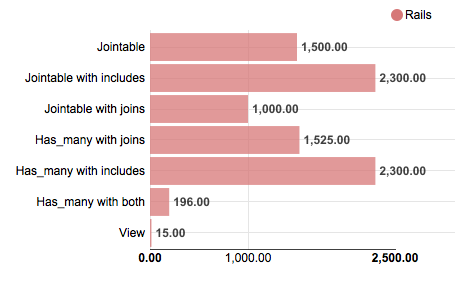
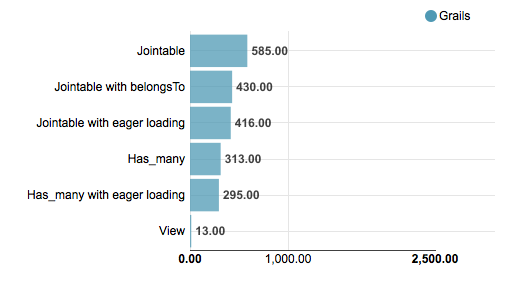
What causes a speedup like this? (all numbers are in ms)

Disclaimer: the absolute benchmark numbers are for illustration purposes, the relationship and the speedup between the different approaches are important (just for the curious: I measured 500 entries per table in a PostgreSQL database with both Rails 4.1.0 and Grails 2.3.8 running on Java 7 on a recent MBP running OSX 10.8)

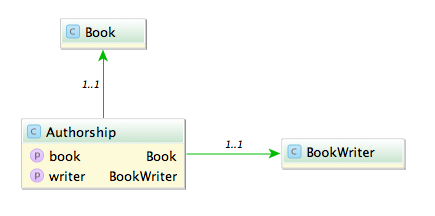
Say you have the model classes Book and (Book)Writer which are connected via a n x m table named Authorship:

A typical query would be to list all books with its authors like:

Fowler, Martin: Refactoring

A straight forward way is to query all authorships:

In Rails:

# 1500 ms
Authorship.all.map {|authorship| "#{authorship.writer.lastname}, #{authorship.writer.firstname}: #{authorship.book.title}"}

In Grails:

// 585 ms
Authorship.list().collect {"${it.writer.lastname}, ${it.writer.firstname}: ${it.book.title}"}

This is unsurprisingly not very fast. The problem with this approach is that it causes the famous n+1 select problem. The first option we have is to use eager fetching. In Rails we can use ‘includes’ or ‘joins’. ‘Includes’ loads the associated objects via additional queries, one for authorship, one for writer and one for book.

# 2300 ms
Authorship.includes(:book, :writer).all

‘Joins’ uses SQL inner joins to load the associated objects.

# 1000 ms
Authorship.joins(:book, :writer).all
# returns only the first element
Authorship.joins(:book, :writer).includes(:book, :writer).all

Additional queries with ‘includes’ in our case slows down the whole request but with joins we can more than halve our time. The combination of both directives causes Rails to return just one record and is therefore ruled out.

In Grails using ‘belongsTo’ on the associations speeds up the request considerably.

class Authorship {
    static belongsTo = [book:Book, writer:BookWriter]

    Book book
    BookWriter writer
}

// 430 ms
Authorship.list()

Also we can implement eager loading with specifying ‘lazy: false’ in our mapping which boosts a mild performance increase.

class Authorship {
    static mapping = {
        book lazy: false
        writer lazy: false
    }
}

// 416 ms
Authorship.list()

Can we do better? The normal approach is to use ‘has_many’ associations and query from one side of the n x m association. Since we use more properties from the writer we start from here.

class Writer < ActiveRecord::Base
  has_many :authors
  has_many :books, through: :authors
end

Testing the different combinations of ‘includes’ and ‘joins’ yields interesting results.

# 1525 ms
Writer.all.joins(:books)

# 2300 ms
Writer.all.includes(:books)

# 196 ms
Writer.all.joins(:books).includes(:books)

With both options our request is now faster than ever (196 ms), a speedup of 7.
What about Grails? Adding ‘hasMany’ and the authorship table as a join table is easy.

class BookWriter {
    static mapping = {
        books joinTable:[name: 'authorships', key: 'writer_id']
    }

    static hasMany = [books:Book]
}
// 313 ms, adding lazy: false results in 295 ms
BookWriter.list().collect {"${it.lastname}, ${it.firstname}: ${it.books*.title}"}

The result is rather disappointing. Only a mild speedup (2x) and even slower than Rails.

Is this the most we can get out of our queries?
Looking at the benchmark results and the detailed numbers Rails shows us hints that the query per se is not the problem anymore but the deserialization. What if we try to limit our created object graph and use a model class backed by a database view? We can create a view containing all the attributes we need even with associations to the books and writers.

create view author_views as (SELECT "authorships"."writer_id" AS writer_id, "authorships"."book_id" AS book_id, "books"."title" AS book_title, "writers"."firstname" AS writer_firstname, "writers"."lastname" AS writer_lastname FROM "authorships" INNER JOIN "books" ON "books"."id" = "authorships"."book_id" INNER JOIN "writers" ON "writers"."id" = "authorships"."writer_id")

Let’s take a look at our request time:

# 15 ms
 AuthorView.select(:writer_lastname, :writer_firstname, :book_title).all.map { |author| "#{author.writer_lastname}, #{author.writer_firstname}: #{author.book_title}" }
// 13 ms
AuthorView.list().collect {"${it.writerLastname}, ${it.writerFirstname}: ${it.bookTitle}"}

13 ms and 15 ms. This surprised me a lot. Seeing this in comparison shows how much this impacts performance of our request.

The lesson here is that sometimes the performance can be improved outside of our code and that mapping database results to objects is a costly operation.

When UTF8 != UTF8

Not all encoding problems are problems with different encodings

Problem

Recently I encountered a problem with umlauts in file names. I had to read names from a directory and find and update the appropriate entry in the database. So if I had a file named hund.pdf (Hund is German for dog) I had to find the corresponding record in the database and attach the file. Almost all files went smooth but the ones with umlauts failed all.

Certainly an encoding problem I thought. So I converted the string to UTF-8 before querying. Again the query returned an empty result set. So I read up on the various configuration options for JDBC, Oracle and Active Record (it is a JRuby on Rails based web app). I tried them all starting with nls_language and ending with temporary setting the locale. No luck.

Querying the database with a hard coded string containing umlauts worked. Both strings even printed on the console looked identically.

So last but not least I compared the string from the file name with a hard coded one: they weren’t equal. Looking at the bytes a strange character combination was revealed \204\136. What’s that? UTF8 calls this a combining diaeresis. What’s that? In UTF8 you can encode umlauts with their corresponding characters or use a combination of the character without an umlaut and the combining diaeresis. So ‘ä’ becomes ‘a\204\136’.

Solution

The solution is to normalize the string. In (J)Ruby you can achieve this in the following way:

string = string.mb_chars.normalize.to_s

And in Java this would be:

string = Normalizer.normalize(string, Normalizer.Form.NFKC)

Ruby uses NFKC (or kc for short) as a default and suggests this for databases and validations.

Lesson learned: So the next time you encounter encoding problems look twice it might be in the right encoding but with the wrong bytes.

Using Rails with a legacy database schema – Part 2

Part one of this blog post mini-series showed how to override default table names and primary key names in ActiveRecord model classes, and how to define alias attributes for legacy column names.

This part will discuss some options for primary key definitions in the schema file, which are relevant for legacy schemas, as well as primary key value generation on Oracle databases.

Primary key schema definition

The database schema definition of a Rails application is usually provided in a file called schema.rb via a simple domain specific language.

The create_table method implicitly adds a primary key column with name id (of numeric type) by default.

create_table 'users' do |t|
  t.string 'name', limit: 20
  # ...
end

If the primary key has a different name you can easily specify it via the primary_key option:

create_table 'users', primary_key: 'user_key' do |t|
  t.string 'name', limit: 20
  # ...
end

But what if a table has a primary key of non-numeric type? The Rails schema DSL does not directly support this. But there’s a workaround: you can set the id option of create_table to false, declare the primary key column like an ordinary non-nullable column, and add the primary key constraint afterwards via execute.

create_table 'users', id: false do |t|
  t.string 'user_key', null: false
  t.string 'name', limit: 20
  # ...
end
execute 'ALTER TABLE user ADD PRIMARY KEY (user_key)'

Primary key value generation

On Oracle databases new primary key values are usually created via sequences. The Oracle adapter for ActiveRecord assumes sequence names in the form of table name + “_seq”.  You can override this default sequence name in a model class via the sequence_name property:

class User < ActiveRecord::Base
  self.sequence_name = 'user_sequence'
  # ...
end

Sometimes primary key values are auto-generated via triggers. In this case you need the Oracle Enhanced adapter, which is a superset of the original ActiveRecord Oracle adapter, but with additional support for working with legacy databases. Now you can set the sequence_name property to the value :autogenerated:

class User < ActiveRecord::Base
  self.sequence_name = :autogenerated
  # ...
end

This circumvents the default convention and tells the adapter to not include primary key values in generated INSERT statements.

Using Rails with a legacy database schema

Rails is known for its convention over configuration design paradigm. For example, database table and column names are automatically derived and generated from the model classes. This is very convenient, but when you want to build a new application upon an existing (“legacy”) database schema you have to explore the configuration side of this paradigm.

The most basic operation for dealing with a legacy schema in Rails is to explicitly set the table_names and the primary_keys of model classes:

class User < ActiveRecord::Base
  self.table_name = 'benutzer'
  self.primary_key = 'benutzer_nr'
  # ...
end

Additionally you might want to define aliases for your column names, which are mapped by ActiveRecord to attributes:

class Article < ActiveRecord::Base
  # ...
  alias_attribute :author_id, :autor_nr
  alias_attribute :title, :titel
  alias_attribute :date, :datum
end

This automatically generates getter, setter and query methods for the new alias names. For associations like belongs_to, has_one, has_many you can explicitly specify the foreign_key:

class Article < ActiveRecord::Base
  # ...
  belongs_to :author, class_name: 'User', foreign_key: :autor_nr
end

Here you have to repeat the original name. You can’t use the previously defined alias attribute name. Another place where you have to live with the legacy names are SQL queries:

q = "%#{query.downcase}%"
Article.where('lower(titel) LIKE ?', q).order('datum')

While the usual attribute based finders such as find_by_* are aware of ActiveRecord aliases, Arel queries aren’t:

articles = Article.arel_table
Article.where(articles[:titel].matches("%#{query}%"))

And lastly, the YML files with test fixture data must be named after the database table name, not after the model name. So for the example above the fixture file name would be benutzer.yml, not user.yml.

Conclusion

If you step outside the well-trodden path of convention be prepared for some inconveniences.

Next part: Primary key schema definition and value generation

Aspects done right: Concerns

With aspects you cannot see (without sophisticated IDE support) which class has which aspects and which aspects are woven into the class when looking at its source. Here concerns (also called mixins or traits) come to the rescue.

The idea of encapsulating cross cutting concerns struck with me from the beginning but the implementation namely the aspects lacked clarity in my opinion. With aspects you cannot see (without sophisticated IDE support) which class has which aspects and which aspects are woven into the class when looking at its source. Here concerns (also called mixins or traits) come to the rescue. I know that aspects were invented to hide away details about which code is included and where but I find it confusing and hard to trace without tool support.

Take a look at an example in Ruby:

module Versionable
  extend ActiveSupport::Concern

  included do
    attr_accessor :version
  end
end

class Document
  include Versionable
end

Now Document has a field version and is_a?(Versionable) returns true. For clients it looks like the field version is in Document itself. So for clients of this class it is the same as:

class Document
  attr_accessor :version
end

Furthermore you can easily use the versionable concern in another class. This sounds like a great implementation of the separating of concerns principle but why isn’t everyone using it (besides being a standard for the upcoming Rails 4)? Well, some people are concerned with concerns (excuse the pun). As with every powerful feature you can shoot yourself in the foot. Let’s take a look at each problem.

  • Diamond problem aka multiple inheritance
  • Ruby has no multiple inheritance. Even when you include more than one module the modules are like superclasses for the message resolve order. Every include creates a new “superclass” above the including class. So the last include takes precedence.

  • Dependencies between concerns
  • You can have dependencies between different concerns like this concern needs another concern. ActiveSupport:Concerns handles these dependencies automatically.

  • Unforeseeable results
  • One last big problem with concerns is having side effects from combining two concerns. Take for an example two concerns which add a method with the same name. Including both of them renders one concern unusable. This cannot be solved technically but I also think this problem shows an underlying, more important cause. It could be because of poor naming. Or you did not separate these two concerns enough. As always tests can help to isolate and spot the problem. Also concerns should be tested in isolation and in integration.

RubyMotion: Ruby for iOS development

RubyMotion is a new (commercial) way to develop apps for iOS, this time with Ruby

RubyMotion is a new (commercial) way to develop apps for iOS, this time with Ruby. So why do I think this is better than the traditional way using ObjectveC or other alternatives?

Advantages to other alternatives

Other alternatives often use a wrapper or a different runtime. The problem is that you have to wait for the library/wrapper vendor to include new APIs when iOS gets a new update. RubyMotion instead has a static compiler which compiles to the same code as ObjectiveC. So you can use the myriads of ObjectiveC libraries or even the interface builder. You can even mix your RubyMotion code with existing ObjectiveC programs. Also the static compilation gives you the performance advantages of real native code so that you don’t suffer from the penalties of using another layer. So you could write your programs like you would in ObjectiveC with the same performance and using the same libraries, then why choose RubyMotion?

Advantages to the traditional way

First: Ruby. The Ruby language has a very nice foundation: everything is an expression. And everything can be evaluated with logic operators (only nil and false is false).
In ObjectiveC you would write:

  cell = tableView.dequeueReusableCellWithIdentifier(reuseId);
  if (!cell) {
    cell = [[TableViewCell alloc] initWithStyle: cellStyle, reuseIdentifier: reuseId]];
  }

whereas in Ruby you can write

cell = tableView.dequeueReusableCellWithIdentifier(@reuse_id)
  || TableViewCell.alloc.initWithStyle(@cell_style, reuseIdentifier:@reuse_id)

As you can see you can use the Cocoa APIs right away. But what excites me even more is the community which builds around RubyMotion. RubyMotion is only some months old but many libraries and even award winning apps have been written. Some libraries wrap so called boiler plate code and make it more pleasant you to use. Other introduce new metaphors which change the way apps are written entirely.
I see a bright future for RubyMotion. It won’t replace ObjectiveC for everyone but it is a great alternative.