Clean Code OSX / Cocoa Development – Setting up CI and unit testing

To start with the tool chain used by clean code development you need a continuous integration server.
Here we install Jenkins on OS X (Lion) for Cocoa development (including unit testing of course).

Prerequisites: Xcode 4 and Java 1.6 installed

To start with the tool chain used by clean code development you need a continuous integration server.
Here we install Jenkins on OS X (Lion) for Cocoa development (including unit testing of course).

Installing Jenkins

Installing Jenkins is easy if you have homebrew installed:

brew update
brew install jenkins

and start it:

java -jar /usr/local/Cellar/jenkins/1.454/lib/jenkins.war

Open your browser and go to http://localhost:8080.

Installing the Xcode plugin

Click on Manage Jenkins -> Manage Plugins
and install the following plugins:

  • Git plugin
  • Xcode plugin (not the SICCI one)

Setup Job

On the Jenkins start page navigate to New Job -> Freestyle

Choose Git as your Version control system (or what is appropriate for you). If you want to run a local git build use a file URL, supposing your project is in a directory named MyProject inside your home directory the URL would look like:

file://localhost//Users/myuser/MyProject/

Add a Xcode build step under Build -> Add build step -> Xcode
and enter your main target (which is normally your project name)
Target: MyProject
Configuration: Debug

If you got Xcode 4.3 installed you may run into

error: can't exec '/Developer/usr/bin/xcodebuild' (No such file or directory)

First you need to install the Command Line Tools Xcode 4 via Downloads Preference Pane in Xcode (you need a developer account) and run

sudo xcode-select -switch /Applications/Xcode.app/Contents/Developer

Done!
Now you can build your project via Jenkins.

GHUnit Tests

Since we want to do clean code development we need unit tests. Nowadays you have two options: OCUnit or GHUnit. OCUnit is baked into Xcode right from the start and for using it in Jenkins you just create an additional build step with your unit testing target. So why use GHUnit (besides having a legacy project using it)? For me GHUnit has one significant advantage over OCUnit: you can run an individual test. And with some additions and tweaks you have support in Xcode, too.

So if you want to use GHUnit start with installing the Xcode Templates.
In Xcode you select your targets and create a new target via New Target -> Add Target -> GHUnit -> GHUnit OSX Test Bundle with OCMock
This creates a new directory. If you use automatic reference counting (ARC), replace GHUnitTestMain.m with the one from Tae

Copy RunTests.sh into UnitTests/Supported Files which copies the file into your UnitTests directory. Make it executable from the terminal with

chmod u+x RunTests.sh

In Xcode navigate to your unit test target and in Build Phases add the following under Run Script

$TARGETNAME/RunTests.sh

In Jenkins add a new Xcode build step to your job with Job -> Configure -> Add Build Step -> Xcode
Enter your unit test target into the Target field, set the configuration to Debug and add the follwing custom xcodebuild arguments:

GHUNIT_CLI=1 GHUNIT_AUTORUN=1 GHUNIT_AUTOEXIT=1 WRITE_JUNIT_XML=YES

At the time of this writing there exists a bug that the custom xcodebuild arguments are not persisted after the first run.

At the bottom of the page check Publish JUnit Test Report and enter

build/test-results/*.xml.

Ready to start!

Clean Code Developer at your fingertips

You’ve probably already heard about the Clean Code Developer initiative. We’re donating a full spectrum of mousepad designs for your educational support.

We are participants in the Clean Code Developer (CCD) movement. This initiative provides a way to perpetually learn, train, reflect and act on the most important topics of today’s software development by formulating a value system and a learning path. The learning path is subdivided in different grades, associated with colors. Every Clean Code Developer progresses continually through the grades, focussing on the principles and practices of the current grade.

If you want a tongue-in-cheek explanation of what the Clean Code Developer is in one sentence: It’s a sight-seeing tour to the most prominent topics every professional software developer should know. But other than your usual tourist rip-off, you can just stay seated and enjoy another round without ever paying anything except attention.

Visualize it

An important aspect of learning and deliberate practice is proper visualization. We invest a lot of work at our workplace, our software and the interaction with our customers to make things visible. When we reflected on our Clean Code Developer practice, we knew that it lacked visualization.

The proposed equipment for a Clean Code Developer is a desktop background picture, a mousepad with an image of all grades at once and some rubber wristbands in the colors of the grades. The wristbands serve as a reminder and a self-assessment tool. The desktop background picture is nice, but only visible if we don’t perform actual work. This let us concentrate on the mousepad.

Duplicate if necessary

The mousepad is the most prominent “advertising” space on the typical work desktop. We want to advertise the content of our current Clean Code Developer grade to ourself. The combination of these two thoughts is not one mousepad, but one for every grade. Imagine six mousepads in the colors of the grades, displaying your currently most important topics right under your fingertips.

We liked the idea so much that we worked on it. The result is a collection of mousepads for every Clean Code Developer to enjoy.

Iterative design

It took us several full cycles of planning, design, layout and proof-reading to have the first version of mousepads produced. It took only a few hours of real-world testing to start the second iteration to further improve the design. Right now, we are on the third iteration. The first iteration had the five colored CCD grades printed on real mousepads. The second iteration added the mousepad for the white grade and a little stand-up display for the initial black grade. The third iteration incorporated the official Clean Code Developer logo, the website URL and improved some details.

Here are some promotional photos of the five first-iteration mousepads:

This slideshow requires JavaScript.

As you can see, we chose to print ultra-slim mousepads to test if it’s feasible to use them stacked all at once (it isn’t, your mileage may vary) or use them even if you aren’t used to mousepads at all (it depends, really). You might want to print the images onto the mousepad you prefer best.

Do it yourself

Yes, you’ve read it right. We are donating the mousepad images back to the community. You can download everything right here:

All documents are bare of any company logo or other advertising and free for your constructive usage. There is only one catch really: the documents are in german language. This might not be apparent at first because we really like the original english technical terms, but some content might need translation for non-german speakers. If you are interested to produce an all-english version, drop us a line.

Acknowledgements

These mousepads wouldn’t exist without the help and inspiration of many co-workers. First of all, the founders of the Clean Code Developer movement, Ralf Westphal and Stefan Lieser, provided all the content of the mousepads. Without their groundbreaking work, we probably wouldn’t have thought of this. The design and production is owed to Hannegret Lindner from the Hannafaktur, a small graphic design agency. We admire her endurance with our iterative approach. And finally, the initial inspiration sparked in a creative discussion with Eric Wolf and Benjamin Trautwein from ABAS Software AG.

It’s your turn now

We are very curious about your story, photo or action still with the mousepads (or the little stand-up display). You can also just share your thoughts about the whole idea or submit an improvement. We’d love to hear from you.

Dependencies: Let’s have just one more

A few days back, I evaluated some libraries to be used in a C++ based application. At first glance, one of these looked particularly good. Lots of well written and detailed documentation, a nice to use API and quite some success stories. I decided to give it a try, which was exactly when I encountered a first minor inconvenience. While the library was available as pre-built release for a vast amount of operating systems, 32 bit as well as 64 bit, there was no official, pre-built release for the required 64 bit Windows. Thus, I had to compile it myself. No problem so far.

For this case, the documentation even had a section listing the dependencies required for building the library. Due to this list being not very long, I was rather enthusiastic to finally be able to try the library.

To cut it short, that list was all but complete.

I spent the better part of the afternoon trying to get the build done. All in vain. When I resolved one dependency, another until then unknown dependency arose, then the next, and so on. When I reached the point where a dependency required Fortran to be built (no joke!) I eventually decided to abandon the nice looking library in favor of another one, which isn’t nearly as all-embracing and nice, but at least won’t take me even deeper into dependency hell.

This rather frustrating experience made me wonder, whether the authors of the library even once tried to build it on another than the development machine? And if so, why didn’t they bother to include a complete list of the dependencies into the documentation?

Clang, The Friendly Compiler

Clang C/C++ compiler can be called The Friendly Compiler, since it makes it much easier to find and understand compile errors and potential bugs in your code. Go use it!

A while back I suggested to make friends with your compiler as a basis for developing high quality code. My focus then was GCC since it was and still is the compiler I use most of the time. Well, turns out that although GCC may be a reasonably good companion on the C/C++ development road, there are better alternatives.

Enter Clang: I had heard about Clang a few times in the past but never gave it a real shot. That changed after I watched Chandler Carruth’s talk at GoingNative 2012.

First of all I was stunned by the quote from Richard Stallman about GCC being deliberatly designed to make it hard to use it in non-free software. I always wondered why IDEs like KDevelop keep reinventing the wheel all the time by implementing their own C/C++ parsers instead of using already existing and free GCC code. This was the answer: THEY SIMPLY COULDN’T!!

One main point of Chandler’s talk was the quality of diagnostic messages of Clang. GCC is a friend that although telling you exactly what’s wrong with your code, it often does it with complicated sentences hidden in walls of text.

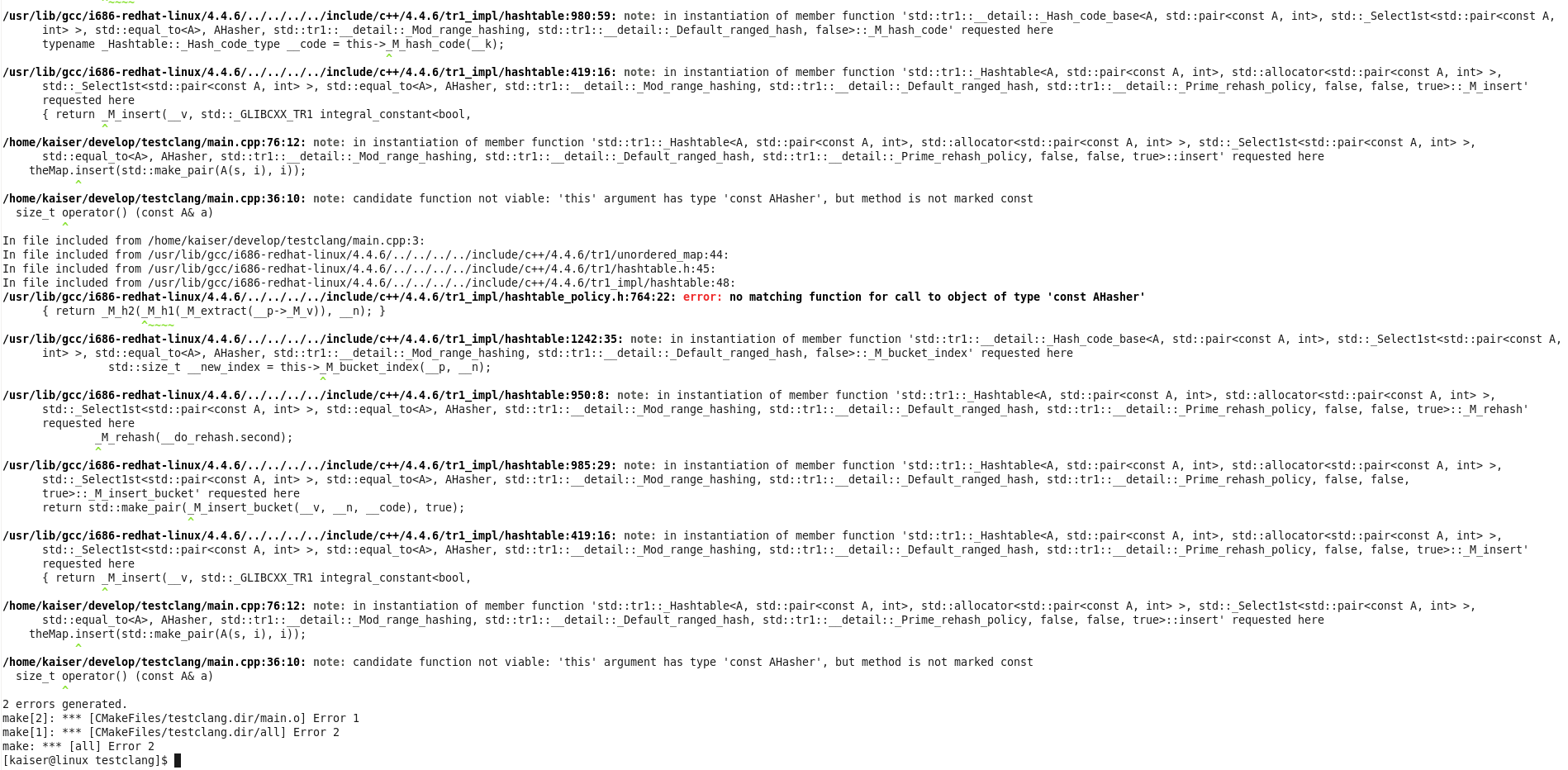
Clang on the other hand, tries very hard to comprehend what you really wanted to write, it speaks in much more understandable words and shows you the offending code locations with nice graphics.

You could say that compared to Clang, which is empathic, understanding, pragmatic and always tries to be on the same page with you, GCC comes across more like an arrogant, self-pleasing and I’m-more-intelligent-than-you kinda guy.

Where GCC says: “What? That should be a template instantiation? Guess what, you’re doing WRONG!! “, Clang is more like: “Ok my friend, now let’s sit down together and analyse step-by-step what’s the problem here. I’ll make us tea.

You’ll find many examples of Clangs nice diagnostic output in Chandler’s talk. Here is another one, as a little teaser:

struct A
{
  std::string _str1;
  std::string _str2;
};

struct AHasher
{
  std::size_t operator() (const A& a)
  {
    return std::tr1::hash()(a._str1) ^
      std::tr1::hash()(a._str2);
  }
};
...
typedef std::tr1::unordered_map<A, int> AMap;
...

What’s wrong with this code? Yes, exactly: the operator in AHasher must be const. Errors with const correctness are typical, easy-to-overlook kind of problems in day-to-day programming. GCCs reaction to something like that is that something discards qualifiers. This may be perfectly right, and after a while you even get used to it. But as you can see with Clang, you can do much better.

The following two screenshots directly compare GCCs and Clangs output compiling the code above. Because there is a template instantiation involved, GCC covers you in its typical wall of text, before it actually tells you what’s wrong (last line).

CLang’s output is much better formated, it shows you the template instantiation steps much more cleanly and in the last line it tells you to the point what is really wrong: …but method is not marked const. Yeah!