Risk First, but Not Pain First

At our company, we have an approach to project management that we call “risk first”. It means that we try to solve the hardest problems very early during development, so that we don’t fall into the “effort spent, but no real progress” trap.

One thing I want to add to my blog entry from 2018 (linked above) is that “risk” should not be conflated with “pain”. I mention it because the distinction wasn’t clear to me until recently. I try to explain what I mean.

When you approach a project in a “risk first” manner, it doesn’t feel good for quite a time. You try to stay ahead of the problem that seems overwhelming if the project isn’t trivial. Tackling the risk evokes feelings of uncertainty, doubt and even frustration. But it doesn’t hurt.

Feeling “pain” in a project has another origin. I managed several projects at once that were painful: The customers were difficult, erratic or not within reach. The requirements were unclear. My assessment was that the projects themselves are risky and every task I began had the properties of a risky task, too. But because the customers couldn’t support my work on the tasks, I made near to no progress and often had to backtrack. The tasks became more riskier the more I worked on them.

My insight was that most of my work schedule revolved around cycling through the painful projects that I wrongly classified as risky and working on their tasks that made no real progress. Hopping from painful task to painful task doesn’t feel good at all. And because the cycle of “stuck” projects is so prominent, it eclipses the lower risk projects with more relaxed deadlines and unstressed customers.

My current remedy is to budget for a maximum amount of pain per period. Each painful project only gets carefully limited attention and is alleviated by lower-risk work in more painfree projects. With this approach, there is progress in most projects and my project management focus isn’t locked on the stuck projects. You can say that I take “time off” from the more stressful situations.

I found myself in this trap because I couldn’t properly distinguish between “risk” and “pain”. Both don’t feel good, but you can work on the first with attention and effort. The level of pain in a project is nearly unswayable by your actions. You can only control your level of exposure to it.

This is where I hope for your thoughts:

  • Can you follow my distinction between “risk” and “pain”?
  • What are your indications that a task is “painful”?
  • Have you found means to decrease the level of pain in a project?

Write us a comment or even your own blog entry on the topic!

Don’t Just Blink at Me

I have a lot of electronic devices that essentially only do one thing. A flashlight, a hair trimmer, a razor, a toothbrush, some smoke detectors and a handful of power banks and other energy storage devices. They have a few things in common:

  • They have their own rechargeable battery
  • They store a (more or less) complex internal state
  • They have exactly one status LED
  • They try to communicate with me using the LED

The razor is an exception, because it has a lot more signal lights than just the LED, but I include it as the positive example. The LED of the razor changes its color to show what it wants from me.

All other devices try to convey meaning by different styles of blinking. Let’s take the hair trimmer as the negative example: It blinks when it is happy because it is fed energy. The blinking stops to indicate that it is fully loaded.

The flashlight blinks when it is unhappy and hungry. It will stop blinking when it is fed. It never indicates that it has enough, you have to guess.

The smoke detectors flash shortly once in a while to show that they are still on duty. They might flash more vigorously if they get hungry. But they have another means to get the message across: They sound a short alarm. You’ll feed them instantly and always have a spare battery at hands.

The point of this story is that it is impossible to decipher a blinking LED. What does it mean? The device is busy and I don’t need to do something? The device is on the verge of starvation and I should intervene? It’s the most ambiguous signal I can think of.

If there were a standard that blinking means the desire for human intervention, I would learn the signal and adhere to it. But nearly half of my devices blink when they are busy and don’t need anything from me. And some try to talk to me in morse.

I’m not going to learn dozens of LED signal dialects. If a device wants to be understood, it should be designed in an understandable way. Give it a color-changing LED and we can talk:

  • Steady green: I’m happy.
  • Steady orange: I’m content, but it could be better. You might allocate some care for me.
  • Steady red: Please care for me.
  • Blinking red: Attention! I need urgent care.

What does this interaction design rant have to do with software development?

I often see the same categorical error in the design of software user interfaces. And while manufacturers of cheap consumer electronics can argue that a multi-color LED is more expensive, we software developers can’t really hide behind costs.

Anything that pops up, slides in or just blinks on my screen better has a damn good reason to try to grab my attention. Grabbing not only my attention but also my input focus is the upmost interruption, comparable to the alarm signal of the smoke detector. I blogged recently about a blocking dialog that shows up unprompted and informs about some random unprompted background work.

But there is another type of ambiguous signal that I see more often than I like. It is silent and tries to shift the blame for the inevitable frustration on you: The vague selection field:

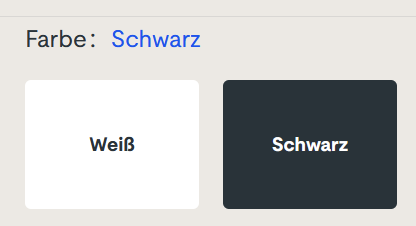
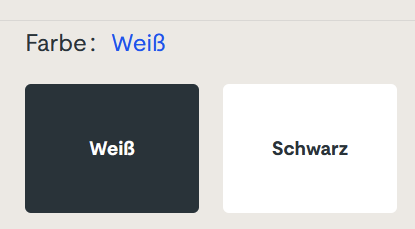
Sorry for the german text, I didn’t find it on an english website. The german website this is from is still online, so if you can find it, you can try it yourself. I won’t link it here, though. (Maybe search for “steckdosenleiste klemmbar” and roam the results)

Let me describe your experience: you can select the color of a product, either white or black. The selected color is stated above, inexplicably written in the color blue. The selected field is “highlighted” black. Or is it? Maybe the white field is the highlighted one? And why is the selection field for the color black presented in mostly white?

The selection is not communicating properly, but I feel intimidated and stupid by a simple choice between two colors.

You can probably think of dozens of improvements and that’s fine. But the designer was certainly restricted by a corporate design rulebook and had to use three colors only: blue, white and black. You decide if he used his potential successfully.

Which brings me back to the introductory example: Give an engineer a single color LED and he will implement an elaborate morse code scheme to make the most of it. The problem is the initial restriction, not the shenanigans that follow.

How We Incidentally Increased Our Display Count Up to Five per Workplace

At the beginning of the year 2023, we had the plan to improve our office desk setup in two ways:

  • All desks should be electrically height-adjustable
  • All computers should be attached to the desk and not sitting on the floor

Had we known just how much turbulence this plan brings, we might have reconsidered it. But we finally finalized the project last week, just a few days before the year was over.

This blog entry tries to recap the story of the improvement project and mentions some particular products. We really use those products and are not affiliated with the manufacturers.

Our company has ten desks on two floors. A quick survey revealed that we have five electrically height-adjustable desks already in use. The remaining five desks were not really adjustable. Our plan was to move the five existing desks on one floor and equip the second floor with brand new ones. And because we wanted to achieve the second improvement in the same step, we switched the desk model.

Our new office tables are larger than before (180×80 cm instead of 160×80 cm) and definitely leeter. They are so leet, they are even called LeetDesks. Yes, we exchanged our boring classic office desks with modern pro-gaming desks. Our reasoning is that gaming is hard work, too. The nice thing is that the LeetDesks can be equipped with additional accessories like cable trays, monitor arms and the PC holder that would achieve our second goal.

So we ordered five individually configured gaming desks last year. Deconstructing the existing desks and assembling the new ones was an ongoing task. We bought a new cordless screwdriver after the first table.

When the team began to realize that we are really adjusting our work environment from ground up, new ideas emerged. The idea with the most impact was the change from workstation PC to “notebook desk”. Instead of a dedicated office PC in addition to the mobile work notebook, the office desk should accomodate the notebook in the best possible manner.

Ok, we swapped the PC holder with a notebook holder, no big deal. But how do you connect a notebook with many displays? We bought the only docking station that we could find that can drive three 4k displays over displayport cable: The Icy Box IB-DK2254AC. The fourth display is connected via HDMI directly with the notebook.

Now, the “pandemic setup” of displays is extended by a fifth display on one side: The integrated notebook display can be used to host the e-mails exclusively or show the company chat.

Request for picture requests: I don’t have an action shot of a five-displays workplace right now. But if you are interested how the setup looks like, leave us a comment and we try to supply one later.

Because the distance between displays and computer is now fixed-length and much shorter because the docking station adds its cable length, all the existing cables were too long. We had installed cables with a length of 3 meters to enable full vertical maneuverability. Now we switched back to 2 meters (or even shorter).

Not all of our notebooks were capable of driving that many pixels. Some older models had chipset graphics that gave up after the first external display. So we replaced them with newer models with dedicated notebook graphic cards.

Six of ten desks are now converted to notebook desks, which leaves four desks with PC holders and classic tower PCs. Traditionally, our PCs live in a “normal size” tower case, the Fractal Design Define series. This case is too big and too heavy for the PC holder. So we had to transplant the remaining PCs to a smaller case, the Fractal Design Defince Compact. We transplanted two of them and replaced the other ones a little bit sooner with new computers.

There were even more minor improvements that resulted in additional purchases, but those aren’t directly focussed on a single desk. So let’s recap:

We wanted our desks to be electrically height-adjustable and our floor free of computers. We ended up buying five new desks, six new docking stations, three new notebooks, two new computers, two empty computer cases, a bunch of notebook holders and many, many cables. The amount of cables that is necessary to operate a modern computer desk is astonishing.

We deconstructed, assembled, connected and hauled many days. The project ran the whole length of 2023 and racked up material costs north of 20k EUR.

But now, the floor is unobstructed and our work stance can change from minute to minute. And we increased our display count once more!

Many Algorithms Benefit From a Partition in Two Phases

When I program code that solves a specific problem, I often design the algorithm in a way that mirrors my approach to solving the problem in the real world. That’s not a bad idea – the resulting algorithm can be thought through in a straightforward manner. But it lacks in one area: The separation of specification and execution. And for a computer, separating these two things has immediate advantages.

Let me explain the concept on a minimal coding challenge. The original challenge can be found here (by the way, codewars.com, despite the militaristic theming, is an abundant source of fun coding exercises):

Write a function that takes in a string of one or more words, and returns the same string, but with all five or more letter words reversed

Stop gninnipS My sdroW!

If you don’t want to be spoiled for this specific kata, please don’t read any further. The solution I use to explain the concept isn’t very elegant, though:

public static String reverseLongWords(String sentence) {
String result = "";
for (String each : sentence.split(" ")) {
if (each.length() >= 5) {
result += new StringBuilder(each).reverse().toString();
} else {
result += each;
}
result += " ";
}
return result.trim();
}

Please don’t mind the use of simple string concatenation or the clumsy way of string reversal. My point arises in the last two lines. Because we collect our words, reversed or not, directly in the result, we have to awkwardly remove the unnecessary blank that we just appended from it.

One reason for this subsequent correction is the missing separation in the two phases (specification and execution). Instead, we determine what strings the result should contain and build the result in one step.

Let’s separate the two phases, first in theory and then in code. We know how a specification of a sentence can look like because we already use one in the for loop. If we want to specify the resulting sentence without really building it, we need to store the words without their separators. The result of our specification phase would be a list of words, reversed or not. The execution phase takes our specification and transforms it into the required result. In our case, we just put blanks between the words:

public static String reverseLongWords2(String sentence) {
// building the render model (specification phase)
List<String> renderModel = new ArrayList<String>();
for (String each : sentence.split(" ")) {
if (each.length() >= 5) {
renderModel.add(new StringBuilder(each).reverse().toString());
} else {
renderModel.add(each);
}
}

// rendering the model (execution phase)
return String.join(" ", renderModel);
}

The resulting code is very similar, with one crucial difference: The first phase doesn’t create the result, but a model of it. We can call this model a “render model” and the execution phase the “render stage”. It sounds a little bit excessive for such a small task, but this is really the heart of the idea. When you separate your algorithm into the two phases, you’ll get a render model between them.

This render model has some advantages: You can test it independently from the actual representation. You can add transformation steps more easily before you commit it to the target format. If you need to build the render model iteratively, it can provide helpful methods that would be missing in the target format.

Another advantage: Your execution/render phase is more independent from the previous work. Imagine that we would want our words comma separated, not blank separated. The first algorithms relies on a hidden dependency between the blank character and the trim() method. In the second algorithm, you only need to change the rendering part of the code. It can work independently from the previous logic.

This way to partition an algorithm varies from the straightforward way that humans use when we perform the task in the real world. We tend to keep at least a partial render model in our head alongside the rendered result. If we would do the word spinning ourselves, but with the commas, we would recognize or “just know” that we write the last word and not include the trailing comma. This “just knowing” is information from our mental render model.

In my experience, it pays off to refactor an algorithm into a variation that uses the two phases or design it like this from the start. Revealing the hidden dependencies in the logic is a beneficial influence on the defect rate. Making the rendering step independent promotes testability and evolvability. It seems more work at first, but in my case, that was just adaptation effort caused by my problem solving habits.

The Asylum Now Chooses Its Own Endeavors

There is a classic book from 1998 about interaction design and user experience called “The Inmates Are Running the Asylum” by Alan Cooper. It essentially points out that technology that is too hard to understand or handle is a self-chosen burden. We humans decided that our technology should be the way it is. We are the inmates of our digital (or technological) asylum and we built it ourselves.

There is another classic law of software design and software evolution, called Zawinski’s law:

Every program attempts to expand until it can read mail. Those programs which cannot so expand are replaced by ones which can.

Jamie Zawinski, 1995

If you interpret the law with some degree of freedom, that might mean that e-mail client applications are the pinnacle of software evolution, because they are designed to perform the one task every other application sets out to achieve.

You might think that an e-mail client can lean back and relax, knowing that it won’t be replaced and doesn’t need to adapt. It can concentrate on the one task it is asked to do, provide the perfect service and be the most essential tool for any digital worker.

But, for reasons that baffle me, my e-mail client apparently has better things to do than to deal with those pesky mails that I receive or want to send.

Let me tell you about my e-mail client. It is a Thunderbird running on Windows. If you want to attribute all the problems I’m about to point out to these two decisions, you probably miss the greater point that I’m trying to make with this blog post. It isn’t about Thunderbird or e-mail clients, it is about a software ecosystem that strays from its original intent: To serve the human operator.

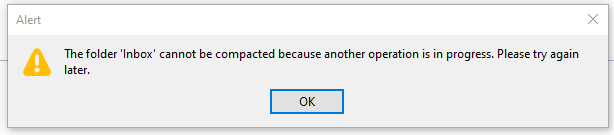
Every morning, I open my e-mail client and let it run on a secondary monitor, just visible in my peripheral vision. Most of the day, it has nothing to do. I suspect that this causes boredom, because sometimes, it shows this dialog window out of the blue:

There are a few things wrong with this dialog:

  1. I didn’t ask for a folder compaction, so it is not necessary to tell me to “try again later”.
  2. Because I didn’t ask for anything, it surprises me that Thunderbird needs my interaction with a modal dialog in order to proceed with… doing nothing?
  3. If there is “another operation” that causes problems, I can only help if it has a name. Without more details given, I can only deduce that my Inbox is involved.
  4. My only choice is to close the modal dialog window. I cannot interact with Thunderbird until I dismiss the dialog. I cannot choose to “retry” or “view details”, even if I had resolved the unnamed problem outside of Thunderbird.

Think about what really happens here from an interaction design viewpoint: I command my e-mail client to stand ready to receive or send e-mails. It suddenly decides that something else is important, too. It does the thing and fails. It fails in such a grandiose manner that it needs to inform me about it and blocks all other interaction until I acknowledge its failure. It cannot fail silently and it cannot display the alert notification in a non-modal manner. My e-mail client suddenly commands me to click an arbitrary button or else… it won’t do my e-mail stuff anymore.

The digital asylum isn’t there to serve the inmates, the inmates are there to serve the asylum. Thunderbird doesn’t help me doing my e-maily things, I need to support Thunderbird to do its own things. The assistant involves the boss for secondary (or even less important) tasks.

The problem is that I recognize this inversion of involvement all the time:

  • The windows operating system decides that it needs to update right now. My job is to keep the machine running under all circumstances. Once I ran from one train to the next with the updating notebook in my hands, carefully keeping the lid open and the updates running.
  • My text editor might open the file I want to edit later, but first I need to decide if the latest update is more important right now. I cannot imagine the scenario when an update of a text editor is so crucial that it needs to happen before my work.
  • My IDE is “reconstructing the skeletons” or “re-indexing the files” whenever it sees fit. My job is to wait until this clearly more important work is done. I can see that these things help me do my thing later. But I want to do my thing now, maybe with slightly less help for a while.

Sometimes, I feel more like a precatory guest than the root administrator on my own machine. I can use it in the gaps between computer stuff when all applications decide that they generously grant me some computation time.

It’s not that there aren’t clear rules how computers should behave towards users. The ISO norm 9241-110 is very on point about this:

Users should always be able to direct their interaction with the product. They retain control over when to begin, interrupt, or end actions.

https://www.usability.de/en/usability-user-experience/glossary/controllability.html

We just choose to ignore our own rules.

We build a digital asylum for ourselves that is complicated and hard to grasp. Then we demote ourselves to guests in the very same asylum that we built and after that, we let the asylum choose its own endeavors.

If you translate this behaviour in the real world, you would call it “not customer-centered”. It would be the barkeeper that cleans all the glasses before you can order your drink. It would be the teacher that delays all student questions to the end of the lecture. Or it would be the supermarket that you can only enter after they stored all the new products on the shelves, several hours after “being open”.

By the way, if you want to help me with my mutinous Thunderbird: The problem is already solved. It is just a striking example of the “controllability violations” that I wanted to describe.

You probably have another good example of “inversed involvement” that you can tell us in the comments.

Where the Wild Boxes Are

When I was a little child, a book that had a big impact on me and my view on the world was “Where the Wild Things Are”. Many years later, it helped me to explain my passion and profession to my grandparents. This blog post tries to give an approach to explain software development to non-technical people.

The first encounters

My first contact with computers was when I was five or six years old in the laboratory of my father. He was a young physicist and worked virtually around the clock in his university’s laboratory. The lab itself was a magical place full of machines and dangerous things like liquid nitrogen canisters. In order to keep me from touching things, he let me play with the only machine that could do no harm: the personal computer on his desk. My interaction with it basically boiled down to moving the cursor on the screen and placing characters into pictures.

When I was eight years old, we got our own family personal computer at home. This was the start of my lifelong passion to teach the machine new tricks. Of course I played every game I could get hold on, but at same time, I wanted to create my own games. By copy-typing code listings from magazines I checked out from the local library, I taught myself to transform my ideas into source code. By trial and error, I expanded my vocabulatory until I could talk to the computer in a nearly fluent fashion.

The apprenticeship

I was sure about my career wish since these days. When my extended family (like aunts and grandparents) asked what I would do once school was finished, I could tell them that I “study something with computers”. It was sufficient as an outlook.

During my studies, it was more important to them that I was studying seriously than what exactly it was that I was studying. They asked about my grades, but not about the content.

The translation gap

Then I started my company and began to earn money with my skills. That’s when the questions about what exactly I was doing emerged. And I learned that the concept of “programming a computer” is not universally understood.

My grandparents weren’t technical people. One grandfather was a railroad worker and had mechanical skills, but couldn’t grok electronics, let alone digital systems. We tried to find a level of simplification of my work that he could imagine and landed at “rapidly pressing buttons in the right order”. In his mind, I was a silent variation of a pianist.

While this is flattering, it lacks the aspect of persistence. A piano falls silent once the button-pressing is done. My computers commence their play long after my typing. A piano player is expected to repeat his “typing”, while my code only needs to be written once and can be copied automatically. The piano player teaches one specific piano how to produce music, my code can teach lots of computers at once how to produce numbers or “data”.

The wild boxes

Data is another concept that is hard to imagine with a mechanical worldview. So I tried another communication approach: the “animal tamer”. Instead of the end result, I focused on the computation process itself. I explained that every computer has its own set of behaviour and can react on incoming information (we used the metaphor of e-mails or “electronic letters”) on its own. The problem is that computers are very dumb and need extensive training to act professional. The training comes in the form of instructional electronic letters (the program code) that the computers read and adapt to.

My job is to write the instruction letters and make the computers read them. This tames the wild box and turns them into domesticated machines that work for us, just like horses or dogs.

To my surprise, this explanation lit up my grandfather’s face: “You tame machines and teach them how to read!” He could understand this process and my role in it. And because machine taming sounds dangerous and important, I earned my wages.

Domesticated boxes

In the book from my childhood, the protagonist Max befriends a group of monsters and gets them to act according to his plan. In my life, I befriend computers and make them act according to my plan. I like the metaphor of “taming” or “domesticating” computers because it highlights the benefits of my work instead of its mechanics.

We build our modern world on billions of domesticated, well-behaved computers. They work for us in exactly the way we told them. But they won’t improve by themselves because we never told them how to learn.

Self-domesticating boxes

Right now, we change our approach of teaching them. Instead of telling them what to do, we try to let them figure it out themselves by trial and error. The beneficial potential is that the machine is not burdened with our limited understanding of the world of digital data. It may be able to expand its vocabulatory until it can interact with its world in a fluent fashion.

Maybe in the future, we need to bargain with our machines so that they work for us. Maybe the next generation of “computer kids” will explain their work to me as “machine mediators”. I’m curious!

How to Lay a Minefield

… in Minesweeper, of course.

One of the basic building blocks of my hands-on software development workshops are Coding Katas. Minesweeper, the classic game that every Microsoft Windows user knows since 1992, is one of the “medium everything” Katas: Medium scope, medium complexity, medium demand. One advantage is that virtually nobody needs any more explanation than “program a Minesweeper”.

The first milestone when programming a Minesweeper game is to lay the mines on the field in a random fashion. And to my continual surprise, this seems to be a hard task for most participants. Not hard in the sense of giving up, but hard in the sense that the solution lacks suitability or even correctness.

So in order to have a reference point I can use in future workshops and to discuss the usual approaches, here is how you lay a minefield in an adequate way.

The task is to fill a grid of tiles or cells with a predefined amount of mines. Let’s say you have a grid of ten rows and ten columns and want to place ten mines randomly.

Spoiler alert: If you want to think about this problem on your own, don’t read any further and develop your solution first!

Task analysis

If you pause for a moment and think about the ingredients that you need for the task, you’ll find three things:

  • A die (in the form of a random number generator)
  • An amount of mines to place (maybe just represented by a counter variable)
  • An amount of tiles (stored in a data structure)

Each solution I’ll present uses one of these things as the primary focus of interest. My language for this effect is that the solution “takes the thing into the hands”, while the other two things “lay on the table”. That’s because if you simulate how the solution works with real objects like paper and dice, you’ll really have one thing in your hands and the others on the table most of the time.

Solution #1: The probability approach

One way to think about the task of placing 10 mines somewhere on 100 tiles is to calculate the probability of a mine being on a tile and just roll the dice for every tile.

Here’s some code that shows how this approach might look like in Java:

private static final int fieldWidth = 10;
private static final int fieldHeigth = 10;

public static Set<Point> placeMinesOn(Set<Point> field) {
	Random rng = new Random();
	final double probability = 0.1D;
	for (int column = 0; column < fieldWidth; column++) {
		for (int row = 0; row < fieldHeigth; row++) {
			if (rng.nextDouble() < probability) {
				field.add(new Point(row, column));
			}
		}
	}
	return field;
}

Before we discuss the effects of this code, let’s have a little talk about the data structure that I use for the tiles:

The most common approach to model a two-dimensional grid of tiles in software is to use a two-dimensional array. There is nothing wrong with it, it’s just not the most practical approach. In reality, it is really cumbersome compared to its alternatives (yes, there are several). My approach is to separate the aspect of “two-dimensionalness” from my data structure. That’s why I use a set of points. The set (like a HashSet) is a one-dimensional data structure that more or less can only say “yes, I know this point” or “no, I never heard of this point”. To determine if a certain point (or tile at this coordinate) contains a mine, it just needs to be included in the set. An empty set represents an empty field. If you remove “cleared” mines from the set, its size is the number of remaining mines. With a two-dimensional array, you probably write several loop-in-loop structures, one of them just to count non-cleared mines.

Ok, now back to the solution. It is the approach that holds the die in the hands and uses it for every tile. The problem with it is that our customer didn’t ask for a probability of 10 percent for a mine, he/she asked for 10 mines. And the code above might place 10 mines, or 9, or 11, or even 14. In fact, the code places somewhere between 0 and 100 mines on the field.

The one thing this solution has going for it is the guaranteed runtime. We roll the dice 100 times and that’s it.

So we can categorize this solution as follows:

  • Correctness: not guaranteed
  • Runtime: guaranteed

If I were the customer, I would reject the solution because it doesn’t produce the outcome I require. A minesweeper contest based on this code would end in a riot.

Solution #2: Sampling with replacement

If you don’t take up the die, but the mines and try to dispense them on the field, you implement our second solution. As long as you have mines on hand, you choose a field at random and place it there. The only exception is that you can’t place a mine above a mine, so you have to check for the presence of a mine first.

Here’s the code for this solution in Java:

public static Set<Point> placeMinesOn(Set<Point> field) {
	Random rng = new Random();
	int remainingMines = 10;
	while (remainingMines > 0) {
		Point randomTile = new Point(
			rng.nextInt(fieldHeigth),
			rng.nextInt(fieldWidth)
		);
		if (field.contains(randomTile)) {
			continue;
		}
		field.add(randomTile);
		remainingMines--;
	}
	return field;
}

This solution works better than the previous one for the correctness category. There will always be 10 mines on the field once we are finished. The problem is that we can’t guarantee that we are able to place the mines in time before our player gets bored. Taking it to the extreme means that this code might run forever, especially if your random number generator isn’t up to standards.

So, the participants of your minesweeper contest might not protest the arbitrary number of mines on their field, but maybe just because they don’t know yet that they’ll always get 10 mines dispersed.

  • Correctness: guaranteed
  • Runtime: not guaranteed

This solution will probably work alright in reality. I just don’t see the need to utilize it when there is a clearly superior solution at hands.

Solution #3: Sampling without replacement

So far, we picked up the die and the mines. But what if we pick up the tiles? That’s the third solution. In short, we but all tiles in a bag and pick one by random. We place a mine there and don’t put it back into the bag. After we’ve picked 10 tiles and placed 10 mines, we solved the problem.

Here’s code that implements this solution in Java:

public static Set<Point> placeMinesOn(Set<Point> field) {
	List<Point> allTiles = new LinkedList<Point>();
	for (int column = 0; column < fieldWidth; column++) {
		for (int row = 0; row < fieldHeigth; row++) {
			allTiles.add(new Point(row, column));
		}
	}
	
	Collections.shuffle(allTiles);
	
	int mines = 10;
	for (int i = 0; i < mines; i++) {
		Point tile = allTiles.remove(0);
		field.add(tile);
	}
	return field;
}

The cool thing about this solution is that it excels in both correctness and runtime. Maybe we use some additional memory for our bag and some runtime for the shuffling, but both can be predefined to an upper limit.

Yet, I rarely see this solution in my workshops. It’s only after I challenge their first solution that people come up with it. I’m biased, of course, because I’ve seen too many approaches (successful and failed) and thought about the problem way longer than usual. But you, my reader, are probably an impartial mind on this topic and can give some thoughts in the comments. I would appreciate it!

So, let’s categorize this approach:

  • Correctness: guaranteed
  • Runtime: guaranteed

If I were the customer, this would be my anticipation. My minesweeper contest would go unchallenged as long as nobody finds a flaw in the shuffle algorithm.

Summary

It is suprisingly hard to solve simple tasks like “distribute N elements on a X*Y grid” in an adequate way. My approach to deconstruct and analyze these tasks is to visualize myself doing them “in reality”. This is how I come up with the “thing in hands” metaphor that help me to imagine new solutions. I hope this helps you sometimes in the future.

How do you lay a minefield and how do you find your solutions? Write a blog post or leave a comment!

Subtle Effects of Real Hardware

One key aspect of my work is writing software that interacts directly with hardware that consists of sensors and actors. A typical hardware setting is a machine that moves big steel barrels (or “drums”) around.

In order to being able to develop my code without physically sitting right besides the machine, which might include being in a loud, hazardous or plain dangerous environment, my software architecture consists of “hardware components” that can be the real thing or a simulation that acts as real as possible.

I’m writing this kind of software for over twenty years now. But regardless of how many simulations of real hardware I’ve written, there is always a catch or at least a surprise with every new hardware.

For this story, we need to imagine a machine that can lift and rotate steel barrels on command. The machine interface consists of several status bits and some command flags. Two status bits are of importance:

  • isMoving: Indicates if the machine is changing positions or standing still.
  • isInPosition: Because the machine’s movement is bounded by physical limit switches, this flag indicates if the machine has triggered a limit switch and stopped.

I wrote the simulation for this machine and developed the application code that performs a series of movements by waiting for the location to be at a limit switch and then issuing the next movement command. Right before the command is sent, the following condition is checked:

boolean commandCanBeSent = !isMoving && isInPosition;

My application worked perfectly with the simulated hardware. But when we switched to the real hardware, the series of movements worked oftentimes, but not always. After investigating a lot of possible error sources, we boiled it down to the condition above. The condition evaluated to true most of the times, but resulted in false every time the series of movements got stuck.

Expanding the logging capabilities of the code revealed that in the error cases, the signals showed isInPosition as true and at the same time, isMoving as true, too. This is a peculiar machine state: It is at the limit switch, but still moving around?

The explanation originates from the modularity of the machine. The isInPosition flag is controlled by the physical limit switches. If one of them has contact to the moving part, the flag evaluates to true. The isMoving flag is controlled by the engine activity. As long as there is substantial engine power consumption, the flag evaluates to true. The crucial aspect of this signal is that a negative engine power consumption (or engine power generation) is still considered a deviation from zero and results in isMoving as true. Which is kind of correct, because in both cases, there will be a translocation.

But why is the engine sometimes indicating movement after it was stopped by the limit switch? The answer lies in the mass of the steel barrel. If the machine was tested empty (without a barrel), everything worked fine. But by using a heavy barrel, the stopping wasn’t as instant as before. The deceleration of the engine took longer and converted the electrical engine in a generator. The mass of the barrel produced energy in the electrical engine when stopped, and it did so long enough to see the combination isInPosition=true and isMoving=true.

My simulation of an engine with limit switches had not included the mass of the moved object until now. In my simulation, the limit switch stopped the engine instantaneously, without any residual effects.

The bugfix was only a small change: When deciding if the next movement command can be sent, my application now waits for a small duration that isMoving switches to false when isInPosition is already true.

This kind of “dirty signals” is prevalent when dealing with real hardware. The dependence on the barrel mass for the effect to show up was a new one for me. Maybe previous PLC programmers at other machine had filtered them out in their control interfaces. Maybe other signals didn’t rely on engine power consumption or ignored negative consumption. Regardless, I will be more careful when simulating signals that indicate moving masses.

Optional polymorphism by delegation

A code design pattern I’ve used a lot in recent times is the “optional-based polymorphism” that looks like a delegation to another type that might not be available. It might be an implementation of the FCoI-principle (Favour Composition over Inheritance).

Let’s look at an example: An application has several different engines that move stuff around. Some engines are based on limit switches. They move until they are stopped by a physical switch. The application can make these engines move from one predefined position to the next, but not anywhere in between. Another type of engines is based on a relative position. You give the engine the new target position and it positions itself there, without any limit switches or predefined positions.

Traditional approach

A typical implementation using inheritance would be a common supertype “Engine” that provides the functionality both engine types exhibit. From there, we would define two subtypes that extend the functionality in their desired way. One subtype would be the “LimitSwitchEngine”, the other one the “PositionableEngine”.

Our client code that wants to use a particular engine has two possibilities: It only requires the common functionality of an engine and can work with the supertype. Or it needs to perform a downcast after checking the actual type of the engine.

Cast methods

The optional-based polymorphism guides the client code towards the specific subtype by providing all possibilities in the common interface:

public interface Engine {

	/* Common functionality */
	
	boolean isMoving();
	
	void emergencyStop();
	
	/* optional-based polymorphism */
	
	Optional<LimitSwitchEngine> boundToLimitSwitches();
	
	Optional<PositionableEngine> freelyPositionable();
}

The client code uses the Engine’s interface only as a stepping stone for the specific engine that is required for your use case. If the engine object cannot provide that functionality, you’ll get an empty Optional. Else you retrieve your reference to the specific type and work with it.

Disadvantages

One disadvantage of this approach is the fact that the supertype is aware and even dependent on the different subtypes. You limit the scope of your type hierarchy to the types offered in the “entrance interface”. You can still use the traditional downcast way as described in the introduction for all other types, but that separates them into “featured” and “non-featured” subtypes. So this approach will violate the Open/Closed principle by not being open to extension without modification.

Another disadvantage is that your typical navigation in the IDE doesn’t work as well anymore. If you want to know about all the different types of engines in the system, you can’t just look at the type hierarchy of the Engine type anymore. This is because of the first advantage this pattern brings:

Advantages

Not only gets this style rid of the downcast, it frees your type system up in two different dimensions: The LimitSwitchEngine and PositionableEngine don’t need to be subtypes of Engine. They can be totally independent types with no real connection to the Engine. And they can be different instances. Of course, there is no need to use any of these freedoms. You can still inherit PositionableEngine from Engine and implement both types in the same object. But it isn’t mandatory anymore.

Another advantage is discoverability. Your typical type hierarchy lookup in the IDE is replaced with code completion lookup. If you get the names right, this pattern feels like writing code on rails, because your code completion proposals will lead you to the correct place.

Your opinion

What is your opinion on this pattern? What would you expect from a code design that provides those “casting” methods? Tell us in the comments!

The Fragmented Sources of Truth for a Software Project

For each software application, there only exists one single, authoritative source of truth: The source code. If something isn’t in the code, it doesn’t exist. This source of truth is so important that we invented version control (or source control) that allows us to:

  • travel backwards in time
  • create alternative realities
  • progress multiple realities concurrently

That’s pretty awesome and something that not many professions can rely on. It is a “hidden superpower” of software development.

But when you look at a software project and not just the application, there is a lot more “truths” or information available than what fits into the source code. Let’s have a look at a few of them:

The ticket system

The ticket system or issue tracker or bug tracker or whatever you call it is a glorified to-do list that tells people what is lacking in the source code.

One view on the ticket system could be that of a health record system. Each ticket represents an ailment that the software application has. If it’s a bug, it is clearly in an undesirable state that needs to be “healed”. If it’s a new feature, the medical metaphor doesn’t fit perfectly, but we can view our development work as some kind of plastic surgery that makes the software more appealing to the customer.

Either way, the ticket system holds episodical wisdom. It explains the state of our application in hundreds or thousands of more or less independent short stories that are worked on in isolation. To gain a complete vision about the software project from the ticket system alone is possible, but cumbersome.

If you think about it, there is a clear connection between a short story (ticket) and one alternative reality in which the application is told about the story.

The wiki

For each project, there is a lot of information that is fluid, but not episodical. The current state of truth is valid until it gets replaced by a newer truth. Attempting to capture this information in tickets would result in an awkward lack of oversight.

Luckily, there is a tool that was invented specifically for this type of information: The wiki or the editable website graph. Your project can claim an area in this graph and fragment the information according to the mental model of the project team. Every time some outdated information is found, it can be updated in place. Every time some information is not found, it can be added in the place where it was anticipated.

The file storage

Every software project that I know has a lot of accompanying documents that are important for the project, but maybe not so much for the actual day-to-day development. Depending on who you ask, these documents may very well constitute “the project” and everything “below” them are just necessary technicalities.

The nature of a document is that it exists forever once created. There are lots of attempts to bring version control to the document world, but a typical question in this area is: “Is my document still valid?”

Because documents are represented by files (in the digital and the analog world), a file storage is the least we need to manage them. If your file storage entices you to name your documents “_latest”, “_newer”, “_version2” or something like that, you probably want to step up your document versioning game. Document management systems (DMS) might be what you are looking for. For small teams, a central instance of a Nextcloud might already be sufficient.

The derived documentation

If you happen to develop a software product, you need to provide a user manual and additional technical documentation. These documents need to be in eventual synchronisation with your first and central source of truth: The source code. And because your source code adapts, these documents need to adapt constantly, too.

This is the area where our company has the most “room for improvement”. I’m not diving into details here because I know our approaches are not sustainable.

Single source of truth?

The problem with this fragmented approach to capture the whole of a project is that you need to study all the different places and combine the information in your head. And not only you, every team member has to do this.

You can try to combine different sources into one:

If you squint really hard, you might think that a wiki can replace a ticket system, because each ticket can be represented by a graph node and the linking might resemble a grouping mechanism. My uninformed guess would be that this replaces software specialization with the need for human discipline. But maybe it can work and I just don’t know about the proper tooling yet?

One rather obvious integration might be to put the wiki alongside the code. I haven’t seen a good solution for merge conflicts yet, but maybe it is possible somehow.

Putting the file storage into your source repository makes it bigger and unwieldy, but it would be a natural step towards single sourcing – until you want to give your code repository away without revealing your company’s contracts. Suddenly, separate storage areas become important.

The one thing I struggle to integrate into the source repository is the derived documentation. I can think about storing the documents alongside the code and even requiring to update them before a merge request of a feature branch is accepted, but I shudder to think about the inevitable merge requests that need to be resolved.

Maybe there is a suitable solution out there that I’m missing? Leave a hint in the comments!