Guide to better Unit Tests: Focused Tests

Every now and then we stumble over unit tests with much setup and numerous checked aspects. These tests easily become a maintenance nightmare. While J.B. Rainsberger advocates getting rid of integration tests in his somewhat lengthy but very insightful talk at Agile 2009 he gives some advice I would like to use as a guide to better unit tests. His goal is basic correctness achieved by the means of what he aptly calls focused tests. Focused tests test exactly one interesting behaviour.

The proposed way to write these focused tests is to look at three different topics for each unit under test:

  1. Interactions (Do I ask my collaborators the right questions?)
  2. Do I handle all answers correctly?
  3. Do I answer questions correctly?

Conventional unit testing emphasizes on the third topic which works fine for leave classes that do not need collaborators. Usually, your programming world is not as simple, so you need mocking and stubbing to check all these aspects without turning your unit test into some large integration test that is slow to run and potentially difficult to maintain.
I will try to show you the approach using a simple and admittedly a bit contrived example. Hopefully, it illustrates Rainsberger’s technique good enough. Assume the IllustrationController below is our unit under test:

public class IllustrationController {
    private final PermissionService permissionService;
    private final IllustrationAction action;

    public IllustrationController(PermissionService permissionService, IllustrationAction action) {
        super();
        this.permissionService = permissionService;
        this.action = action;
    }

/**
* @return true, if the action was executed, false otherwise
*/
    public boolean performIfAllowed(Role r) {
        if (!permissionService.allowed(r)) {
            return false;
        }
        this.action.execute();
        return true;
    }
}

It has two collaborators: PermissionService and IllustrationAction. The first thing to check is:

Do I ask my collaborators the right questions?

In this case this is quite simple to answer, as we only have a few cases: Do we pass the right role to the PermissionService? This results in tests like below:

@Test
public void asksForPermissionWithCorrectRole() throws Exception {
PermissionService ps = mock(PermissionService.class);
IllustrationAction action = mock(IllustrationAction.class);

IllustrationController ic = new IllustrationController(ps, action);
ic.performIfAllowed(Role.User);
// this question needs a test in PermissionService
verify(ps, atLeastOnce()).allowed(Role.User);
ic.performIfAllowed(Role.Admin);
// this question needs a test in PermissionService
verify(ps, atLeastOnce()).allowed(Role.Admin);
}

Do I handle all answers correctly?

In our example only the PermissionService provides two different answers, so we can easily test that:

@Test
public void interactsWithActionBecausePermitted() {
PermissionService ps = mock(PermissionService.class);
IllustrationAction action = mock(IllustrationAction.class);
// there has to be a case when PermissionService returns true, so write a test for it!
when(ps.allowed(any(Role.class))).thenReturn(true);

IllustrationController ic = new IllustrationController(ps, action);
ic.performIfAllowed(Role.Admin);

verify(ps, atLeastOnce()).allowed(any(Role.class));
verify(action, times(1)).execute();
}

@Test
public void noActionInteractionBecauseForbidden() {
PermissionService ps = mock(PermissionService.class);
IllustrationAction action = mock(IllustrationAction.class);
// there has to be a case when PermissionService returns false, so write a test for it!
when(ps.allowed(any(Role.class))).thenReturn(false);

IllustrationController ic = new IllustrationController(ps, action);
ic.performIfAllowed(Role.User);

verify(ps, atLeastOnce()).allowed(any(Role.class));
verify(action, never()).execute();
}

Note here, that not only return values are answers but also exceptions. If our action may throw exceptions on execution we can handle, we have to test that too!

Do I answer questions correctly?

Our controller answers the question, if the operation was performed or not by returning a boolean from its performIfAllowed()-method so lets check that:

@Test
public void handlesForbiddenExecution() throws Exception {
PermissionService ps = mock(PermissionService.class);
IllustrationAction action = mock(IllustrationAction.class);
when(ps.allowed(any(Role.class))).thenReturn(false);

IllustrationController ic = new IllustrationController(ps, action);
assertFalse("Perform returned success even though it was forbidden.", ic.performIfAllowed(Role.User));
}

@Test
public void handlesSuccessfulExecution() throws Exception {
PermissionService ps = mock(PermissionService.class);
IllustrationAction action = mock(IllustrationAction.class);
when(ps.allowed(any(Role.class))).thenReturn(true);

IllustrationController ic = new IllustrationController(ps, action);
assertTrue("Perform returned failure even though it was allowed.", ic.performIfAllowed(Role.Admin));
}

Conclusion
What we are doing here is essentially splitting different aspects of interesting behaviour in their own tests. The first two questions define the contract between our unit under test and its collaborators. For every question we ask and therefore stub using our mocking framework there has to be a test, that verifies that this question is answered like we expect it. If we handle all the answers correctly, our interaction is deemed to be correct, too. And finally, if our class implements its class contract correctly by answering the third question our clients also know what to expect and can rely on us.

Because each test focuses on only one aspect it tends to be simple and should only break if that aspect changes. In many cases these kind of tests can make your integration tests obsolete like Rainsberger states. I think there are cases in modern frameworks like grails where you do not want to mock all the framework magic because it is too easy to make wrong assumptions about the behaviour of the framework. So imho integration tests provide some additional value there because the behaviour of the platform stays part of the tests without being tests explicitly.

Build remote controllable applications – expose APIs!

With the advent of mobile computing and (almost) always available network access we should think about the way we are building our applications. We often think in terms of client and server applications. In my opinion we should expand on this and start building “schizophrenic” applications that are clients and servers at the same time even if they are running on the same machine with only one available client at first. Let me elaborate on this:

Exposing an API and thus acting as a “server” is important for many applications to make integration into other software systems possible. It is obvious in the web where you often integrate widgets or services onto your page, for example like-buttons, maps, avatars and so on. It lets others use your software in their programs via scripting and possibly other means. All that broadens the use cases for your application. It becomes more valuable because there are more possibilities for your clients or others to use it. Often your application acts as a client to different services providing value of its own. So it serves two purposes and provides double or even multiplied value!

I would like to make some more specific examples:

  • Many vendors of some piece of hardware provide a user program to their hardware as a windows application. There is no (easy) way to remote control the hardware or to use it on different platforms. Sometimes you get a driver library and can build a service around it but it usually takes a lot of work.
  • Applications provide only one interface, usually a platform specific GUI and you are stuck with it. Would it not be nice to see specialized views for your mobile device of choice? In the future it is perhaps your brand new smart watch where you would like to see the status.

If your application is build from ground up with other software as a client in mind, you (or others) can add new ways of interacting with your application and the value it provides. This comes with a side-effect that should not be underestimated: Exposing an API helps your design!

Added benefits

You do not only open your application to a plethora of use cases but you will also build a better software. Thinking of the boundaries of the system, designing an API, using it in different scenarios and with different front ends will make you system better structured and much clearer separated into modules. When you create the possibility for different clients of your system you remove most of the danger of mixing UI code with business logic. If your clients have to use a defined API, which is not necessarily the same for all clients, they have to depend on the specified behaviour exposed as a service. It does not matter if the API is Java, CORBA, REST/JSON, SOAP or what not, the pure existence will have you define boundaries to your system. Your application will become part of one or more other systems forcing you to put thought into modularisation and separation at a larger scale than classes or packages. All this will help you with the design and overall your application will handle more use-cases than you might have imagined and will be prepared for changes in computing unforeseen and yet to come.

Adding new frontends or APIs and exchanging different parts of the system become comparatively easy in contrast to many conventionally built monolithic applications.

Special upgrade notes for Grails 1.3.x to 2.2.x

Usually there are quite extensive upgrade notes that should take you from one Grails release to another. Every now and then there are subtle changes in behaviour that may break your application without being mentioned in the notes. We are maintaining some Grails applications started years ago in the Grails 1.0.x era and a bucket full of experience upgrading between major releases.

Here are our special upgrade notes for 1.3.x to 2.2.x:

  • domain constructors with default parameters lead to DuplicateMethodErrors. The easy fix is to change code like
    public MyDomain(def number = 0) {
        ...
    }
    

    to

    public MyDomain() {
        this(0)
    }
    
    public MyDomain(def number) {
        ...
    }
    
  • private static classes are disallowed in controllers. So in general avoid visibility modifiers for multiple classes in one file.
  • If you use Apache Shiro with the Grails Shiro Plugin for authentication, you will have to do some work for existing accounts to stay working because the default CredentialMatcher changed from SHA1 to SHA256. To get the old behaviour add the following to conf/spring/resources.groovy:
    import org.apache.shiro.authc.credential.Sha1CredentialsMatcher
    
    beans = {
        ...
        credentialMatcher(Sha1CredentialsMatcher) {
            storedCredentialsHexEncoded = true
        }
        ...
    }
    
    
  • A domain class property or even a domain class with the name “environment” clashes(d) with a spring bean (GRAILS-7851) and leads to unexpected effects. Renaming the property or class is a viable workaround.
  • Namespacing in tag libs is broken so that you cannot name a local variable “properties”:
        def myTag = { attrs, body ->
            String properties = 'some string'
    

    leads to a bogus error
    [groovyc] TagLib.groovy: -1: The return type of java.lang.String getProperties() in TagLib$_closure24_closure87 is incompatible with java.util.Map getProperties() in groovy.lang.Closure.Simply renaming the variable to something like props fixes the problem.

  • Migrations need package statements if you organize them in subdirectories.

In addition to the changes mentioned in the official release notes solving the issues above made our application work again with the latest and greatest Grails release.

Performance considerations with network requests, database queries and other IO

Todays processors, memory and other sub systems are wicked fast. Nevertheless, many applications feel sluggish. In my experience this is true for client and server applications and not limited to specific scenarios. So the question is, why?

Many developer rush straight into optimizing their code to save CPU cycles. Most of the time thats not the real problem. The most important rule of performance optimisation stays true: Measure first!

Often times you will find your application waiting the greater part of its running time waiting for input/output (IO). Common sources for IO are database queries, network/http request and file system operations. Many developers are aware of these facts but we see this problem very often whether in inhouse or on-site customer projects.

Profile the unresponsive/slow parts of your application and check especially for hidden excess IO, here some Java examples:

  • The innocently looking method File.isFile() typically does a seek on the harddrive on each call. Using it an a loop over several dozens of files will slow you down massively.
  • The java.net.URL class does network requests for hashCode() and equals()! Never use it in collections, especially HashMaps. It is better to use the java.net.URI for managing the resource location and only convert to URL when needed.
  • Using an object-relational-mapping (ORM) tool like hibernate most people default to lazy loading. If your usage pattern requires to load the referenced objects all or most of the time you will get many additional database requests, at least one for each accessed association. In such cases it is most likely better to use eager fetching because the network and query overhead is reduced drastically and the data has to be loaded anyway.

So if you have performance and/or responsiveness problems, keep an eye on your IO pattern and optimize the algorithms to reduce IO. Usually it will help you much more than micro optimisation of your application code.

Learning UX from your clients

One of our web apps is based around many lists of different domain specific things like special pdf documents with metadata, affiliations and users. In most places you need pagination and different filter options to effiecently work with the data. Since the whole development process is highly incremental these features are only added when needed. That way we learned something about user experience from our clients:

One day we did a large import of users and with around 2K user accounts our user management looked ugly because we had around 160 pages with default settings. Our client rightfully told us he will not use the pagination featureall-users-pagination. Our brains immediately thought about technical solutions to the problem when the client came up with a super-simple dramatic improvement: Instead of preselecting the "all" filter just preselect the "a" filter to only show the users starting with the letter 'a'.  This solution fixed 95% of the clients problems and was implemented in like 10 minutes.

In another place we were dealing with similar amounts of affiliations which consist of several lines of address information and the like. Again we immediately thought about pagination, better layouting to save space and various performance improvements to help the usability. The dead-simple solution here was using the context information available and pre-filling a filter text box to reduce the number of entries in the list to a handful of relevant items. No other changes were needed because an important thing was implemented already: The controls for the list were either at the top of the list or integrated with each item making selection and scrolling down unnecessary.

Conclusions

It often helps to listen to your client/users to learn about the workflows and the information/options really needed to accomplish the most relevant tasks. They might come up with really simple solutions to problems where it is easy to put days of thought into. Using available context information and sensible preselections may help immensly because you display the informations the users most likely needs first and above while still allowing him to navigate to less important or more seldom needed things.

Another take-away is that pagination does not scale well. In most applications with large amounts of user visible items you will need more modern features like filters, type-ahead search and tags to narrow down the results and let the users focus at the currently needed items.

Composite comparators in Java

Some time ago a fellow developer wrote a really comprehensive blog post (unfortunately only available in german) about comparator implementations in Java. More specifically it is about composite comparators used to compare entities according to different attributes. The best solution for Java 7 he comes up with is a comparator

class FoobarComparator implements Comparator {
  @Override
  public int compare(Foobar lhs, Foobar rhs) {
    return compoundCompare(
      lhs.getLastName().compareTo(rhs.getLastName()),
      lhs.getFirstName().compareTo(rhs.getFirstName()),
      lhs.getPlaceOfBirth().compareTo(rhs.getPlaceOfBirth()),
      lhs.getDateOfBirth().compareTo(rhs.getDateOfBirth()));
  }
}

with a reusable compoundCompare()-method

// utility method used with static import
int compoundCompare(int... results) {
  for (int result : results) {
    if (result != 0) {
      return result;
    }
  }
  return 0;
}

While this solution is quite clean and a vast improvement over the critized implementations it has the flaw that it eagerly evaluates all attributes even though short-circuiting may be possible for many entities. This may lead to performance problems in some cases. So he goes on to explain how Java 8 will fix this problem with Lambdas or another solution he calls “KeyMethodComparator”.

Now I want to show you an implementation very similar to his approach above but without the performance penalty and possible in Java 7 using the composite pattern:

import java.util.Arrays;
import java.util.Comparator;
import java.util.List;

class FoobarComparator implements Comparator<Foobar> {

  private List<Comparator<Foobar>> defaultFoobarComparison =
    Arrays.<Comparator<Foobar>>asList(
      new Comparator<Foobar>() {
        @Override
        public int compare(Foobar lhs, Foobar rhs) {
          return lhs.getLastName().compareTo(rhs.getLastName());
        }
      },
      new Comparator<Foobar>() {
        @Override
        public int compare(Foobar lhs, Foobar rhs) {
          return lhs.getFirstName().compareTo(rhs.getFirstName());
        }
      },
      new Comparator<Foobar>() {
        @Override
        public int compare(Foobar lhs, Foobar rhs) {
          return lhs.getPlaceOfBirth().compareTo(rhs.getPlaceOfBirth());
        }
      },
      new Comparator<Foobar>() {
        @Override
        public int compare(Foobar lhs, Foobar rhs) {
          return lhs.getDateOfBirth().compareTo(rhs.getDateOfBirth());
        }
      });

  @Override
  public int compare(Foobar lhs, Foobar rhs) {
    for (Comparator<Foobar> comp : defaultFoobarComparison) {
      int result = comp.compare(lhs, rhs);
      if (result != 0) {
        return result;
      }
    }
    return 0;
  }
}

It features the lazy evaluation demanded by my fellow for performance and allows flexible construction of different composite comparators if you, e.g. add a constructor accepting a list of comparators.
Imho, it is a quite elegant solution using standard object-oriented programming in Java today and not only in the future.

Building RPM packages of SCons-based projects

Easy delivery and installation of a project helps massively with user acceptance. Take a look at all the app stores and user friendly package managers. For quite some of our Linux specific projects we build RPM-Packages using a build farm and the Jenkins continuous integration (CI) server. Sometimes we have to package dependencies which are not available for the used distributions. Some days ago we packaged some projects that were using the SCons build system. Using SCons is quite simple but there is one caveat to make it work nicely with rpmbuild: You have to fiddle with the installation prefixes. Let’s have a look at the build and install stanza of the SPEC-file:

# build stanza
%build
scons PREFIX=/usr LIBDIR=%_libdir all

# install stanza
%install
rm -rf $RPM_BUILD_ROOT
scons PREFIX=/usr LIBDIR=%_libdir install --install-sandbox="$RPM_BUILD_ROOT"

The two crucial parts here are:

  1. Setting the correct prefixes in build and install because the build could use configured paths which have to match the situation of the installed result
  2. The --install-sandbox command line switch which tells SCons to install everything under the specified location instead of directly to the system. This allows rpmbuild to put the artifacts into the package using the correct layout.

Using the above advice it should be quite easy to build nicely working RPM packages out of projects using SCons.

Does Refactoring turn unit test of TDD to integration tests?

We really value automated tests and do experiments regarding test driven development (TDD) and tests in general from time to time. In the retrospective of our lastest experiment this question struck me: Does refactoring turn the unit tests of TDD to integration tests over time?

Let me elaborate this a bit further. When you start out with your tests you have some unit of functionality – usually a class – in mind. As you add test after test your implementation slowly fleshes out. You are repeating the TDD cycle “Write a failing test – Make test pass – Refactor” as you are adding features. The refactoring step is crucial in the whole process because it keeps the code clean and evolvable. But this step is also the cause leading to my observation: As you add new features you may extract new classes when refactoring to obey the single responsibility principle (SRP) and keep your design sane. It is very easy to forget or just ignore refactoring the tests. They still pass. You still have the same code coverage. But your tests now test the combination of several units. And what’s worse: You have units without direct tests.

This happened even in relatively small experiments on “Communication through tests” where the recontructing team could sometimes only guess that some class existed and either went on without it or created the class out of neccessity. The problem with this is that there are no obvious and clear indicators that your unit tests are not real unit tests anymore.

Conclusion

I neither have any solution nor am I completely sure how big the problem is in practice. It may help to state the TDD cycle more explicitly like “Write a failing test – Make test pass – Refactor implementation and tests” although that is no 100% remedy. One could implement a simple, checkstyle-like tool which lists all units without associated test class. I will keep an eye on the phenomenom and try to analyse it further. I would love to hear you view and experience on the matter.

1-Click Deployment of RPMs with Jenkins

In one of my previous posts we learned how to build and package our projects as RPM packages. How do we get our shiny packages to our users? If we host our own RPM repository, we can use our extisting CI infrastructure (jenkins in our case) for that. Here are the steps in detail:

Convention for the RPM location in our jobs

To reduce the work needed for our deployment job we define a location where each job puts the RPM artifacts after a successful build. Typically we use something like $workspace/build_dir for that. Because we are using matrix build for different target plattforms, we need to use the same naming conventions for our job axes, too!

Job for RPM deployment

Because of the above convention we can use one parameterized job to deploy the packages of different build jobs. We use the JOBNAME of the build job as our only parameter:

Deploy-RPM-Jobname-Parameter

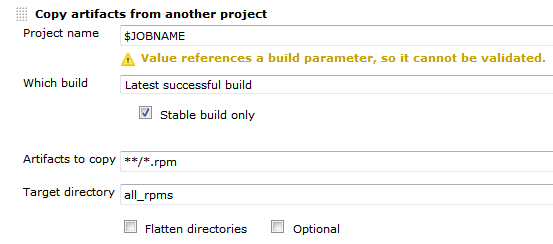
First the deploy job needs to get all the rpms from the build job. We can do this using the Copy Artifact plugin like so:Deploy-RPM-Copy-Artifacts

Since we are usually building for several distributions and processor architectures, we have a complete directory tree in our target directory. We are using a small shell script to copy all the packages to our repository using rsync. Finally we can update the remote repository over ssh. See the complete shell script below:

for i in suse-12.2 suse-12.1 suse-11.4 suse-11.3
do
  rm -rf $i
  dir32=$i/RPMS/i686
  dir64=$i/RPMS/x86_64
  mkdir -p $dir32
  mkdir -p $dir64
  versionlabel=`echo $i | sed 's/[-\.]//g'`
  if [ -e all_rpms/Architecture\=32bit\,Distribution\=$versionlabel/build_dir/ ]
  then
    cp all_rpms/Architecture\=32bit\,Distribution\=$versionlabel/build_dir/* $dir32
  fi
  if [ -e all_rpms/Architecture\=64bit\,Distribution\=$versionlabel/build_dir/ ]
  then
    cp all_rpms/Architecture\=64bit\,Distribution\=$versionlabel/build_dir/* $dir64
  fi
  rsync -e "ssh" -avz $i/* root@repository-server:/srv/www/htdocs/repo/$i/
  ssh root@repository-server "createrepo /srv/www/htdocs/repo/$i/RPMS"
done

Conclusion

With a few small tricks and scripts we can deploy the artifacts of our build jobs to the RPM repository and thus deliver a new software release at the push of a button. You could let the deployment job run automatically after a successful build, but we like to have more control over the actual software we release to our users.

Build a RPM package using CMake

Some while ago I presented a way to package projects using different build systems as RPM packages. If you are using CMake for your projects you can use CPack to build RPM packages (in addition to tarballs, NSIS installers, deb packages and so on). This is a really nice option for deployment of your own projects because installation and update can be easily done by the users using familiar package management tools like zypper, yum and yast2.

Your first CPack RPM

It is really easy to add RPM using CPack to your existing project. Just set the mandatory CPack variables and include CPack below the variable definitions, usually as one of the last steps:

project (my_project)
cmake_minimum_required (VERSION 2.8)

set(VERSION "1.0.1")
<----snip your usual build instructions snip--->
set(CPACK_PACKAGE_VERSION ${VERSION})
set(CPACK_GENERATOR "RPM")
set(CPACK_PACKAGE_NAME "my_project")
set(CPACK_PACKAGE_RELEASE 1)
set(CPACK_PACKAGE_CONTACT "John Explainer")
set(CPACK_PACKAGE_VENDOR "My Company")
set(CPACK_PACKAGING_INSTALL_PREFIX ${CMAKE_INSTALL_PREFIX})
set(CPACK_PACKAGE_FILE_NAME "${CPACK_PACKAGE_NAME}-${CPACK_PACKAGE_VERSION}-${CPACK_PACKAGE_RELEASE}.${CMAKE_SYSTEM_PROCESSOR}")
include(CPack)

These few lines should be enough to get you going. After that you can execute a make package command should obtain the RPM package.

Spicing up the package

RPM packages can contain much more metadata and especially package dependencies and a version changelog. Most of the stuff can be specified using CPACK variables. We sometimes prefer to use a SPEC file template to be filled and used by CPack because it then contains most of the RPM specific stuff in a familiar manner instead of polluting the CMakeLists.txt itself:

project (my_project)
<----snip your usual CMake stuff snip--->
<----snip your additional CPack variables snip--->
configure_file("${CMAKE_CURRENT_SOURCE_DIR}/my_project.spec.in" "${CMAKE_CURRENT_BINARY_DIR}/my_project.spec" @ONLY IMMEDIATE)
set(CPACK_RPM_USER_BINARY_SPECFILE "${CMAKE_CURRENT_BINARY_DIR}/my_project.spec")
include(CPack)

The variables in the RPM SPEC file will be replaced by the values provided in the CMakeLists.txt and then be used for the RPM package. It looks very similar to a standard SPEC file but you can omit the usual build instructions boiling down to something like this:

Buildroot: @CMAKE_CURRENT_BINARY_DIR@/_CPack_Packages/Linux/RPM/@CPACK_PACKAGE_FILE_NAME@
Summary:        My very cool Project
Name:           @CPACK_PACKAGE_NAME@
Version:        @CPACK_PACKAGE_VERSION@
Release:        @CPACK_PACKAGE_RELEASE@
License:        GPL
Group:          Development/Tools/Other
Vendor:         @CPACK_PACKAGE_VENDOR@
Prefix:         @CPACK_PACKAGING_INSTALL_PREFIX@
Requires:       opencv >= 2.4

%define _rpmdir @CMAKE_CURRENT_BINARY_DIR@/_CPack_Packages/Linux/RPM
%define _rpmfilename @CPACK_PACKAGE_FILE_NAME@.rpm
%define _unpackaged_files_terminate_build 0
%define _topdir @CMAKE_CURRENT_BINARY_DIR@/_CPack_Packages/Linux/RPM

%description
Cool project solving the problems of many colleagues.

# This is a shortcutted spec file generated by CMake RPM generator
# we skip _install step because CPack does that for us.
# We do only save CPack installed tree in _prepr
# and then restore it in build.
%prep
mv $RPM_BUILD_ROOT @CMAKE_CURRENT_BINARY_DIR@/_CPack_Packages/Linux/RPM/tmpBBroot

%install
if [ -e $RPM_BUILD_ROOT ];
then
  rm -Rf $RPM_BUILD_ROOT
fi
mv "@CMAKE_CURRENT_BINARY_DIR@/_CPack_Packages/Linux/RPM/tmpBBroot" $RPM_BUILD_ROOT

%files
%defattr(-,root,root,-)
@CPACK_PACKAGING_INSTALL_PREFIX@/@LIB_INSTALL_DIR@/*
@CPACK_PACKAGING_INSTALL_PREFIX@/bin/my_project

%changelog
* Tue Jan 29 2013 John Explainer <john@mycompany.com> 1.0.1-3
- use correct maintainer address
* Tue Jan 29 2013 John Explainer <john@mycompany.com> 1.0.1-2
- fix something about the package
* Thu Jan 24 2013 John Explainer <john@mycompany.com> 1.0.1-1
- important bugfixes
* Fri Nov 16 2012 John Explainer <john@mycompany.com> 1.0.0-1
- first release

Conclusion

Integrating RPM (or other package formats) to your CMake-based build is not as hard as it seems and quite flexible. You do not need to rely on the tools provided by your OS vendor and still deliver your software in a way your users are accustomed to. This makes CPack very continuous integration (CI) friendly too!