The migration path for Java applets

Java applets have been a deprecated technology for a while. It has become increasingly difficult to run Java applets in modern browsers. Browser vendors are phasing out support for browser plugins based on the Netscape Plugin API (NPAPI) such as the Java plugin, which is required to run applets in the browser. Microsoft Edge and Google Chrome already have stopped supporting NPAPI plugins, Mozilla Firefox will stop supporting it at the end of 2016. This effectively means that Java applets will be dead by the end of the year.

However, it does not necessarily mean that Java applet based projects and code bases, which can’t be easily rewritten to use other technologies such as HTML5, have to become useless. Oracle recommends the migration of Java applets to Java Web Start applications. This is a viable option if the application is not required to be run embedded within a web page.

To convert an applet to a standalone Web Start application you put the applet’s content into a frame and call the code of the former applet’s init() and start() from the main() method of the main class.

Java Web Start applications are launched via the Java Network Launching Protocol (JNLP). This involves the deployment of an XML file on the web server with a “.jnlp” file extension and content type “application/x-java-jnlp-file”. This file can be linked on a web page and looks like this:

<?xml version="1.0" encoding="UTF-8"?>
<jnlp spec="1.0+" codebase="http://example.org/demo/" href="demoproject.jnlp">
 <information>
  <title>Webstart Demo Project</title>
  <vendor>Softwareschneiderei GmbH</vendor>
  <homepage>http://www.softwareschneiderei.de</homepage>
  <offline-allowed/>
 </information>
 <resources>
  <j2se version="1.7+" href="http://java.sun.com/products/autodl/j2se"/>
  <jar href="demo-project.jar" main="true"/>
  <jar href="additional.jar"/>
 </resources>
 <application-desc name="My Project" main-class="com.schneide.demo.WebStartMain">
 </application-desc>
 <security>
  <all-permissions/>
 </security>
 <update check="always"/>
</jnlp>

The JNLP file describes among other things the required dependencies such as the JAR files in the resources block, the main class and the security permissions.

The JAR files must be placed relative to the URL of the “codebase” attribute. If the application requires all permissions like in the example above, all JAR files listed in the resources block must be signed with a certificate.

deployJava.js

The JNLP file can be linked directly in a web page and the Web Start application will be launched if Java is installed on the client operating system. Additionally, Oracle provides a JavaScript API called deployJava.js, which can be used to detect whether the required version of Java is installed on the client system and redirect the user to Oracle’s Java download page if not. It can even create an all-in-one launch button with a custom icon:

<script src="https://www.java.com/js/deployJava.js"></script>
<script>
  deployJava.launchButtonPNG = 'http://example.org/demo/launch.png';
  deployJava.createWebStartLaunchButton('http://example.org/demo/demoproject.jnlp', '1.7.0');
</script>

Conclusion

The Java applet technology has now reached its “end of life”, but valuable applet-based projects can be saved with relatively little effort by converting them to Web Start applications.

My favorite Unix tool

Awk is a little language designed for the processing of lines of text. It is available on every Unix (since V3) or Linux system. The name is an acronym of the names of its creators: Aho, Weinberger and Kernighan.

Since I spent a couple of minutes to learn awk I have found it quite useful during my daily work. It is my favorite tool in the base set of Unix tools due to its simplicity and versatility.

Typical use cases for awk scripts are log file analysis and the processing of character separated value (CSV) formats. Awk allows you to easily filter, transform and aggregate lines of text.

The idea of awk is very simple. An awk script consists of a number of patterns, each associated with a block of code that gets executed for an input line if the pattern matches:

pattern_1 {
    # code to execute if pattern matches line
}

pattern_2 {
    # code to execute if pattern matches line
}

# ...

pattern_n {
    # code to execute if pattern matches line
}

Patterns and blocks

The patterns are usually regular expressions:

/error|warning/ {
    # executed for each line, which contains
    # the word "error" or "warning"
}

/^Exception/ {
    # executed for each line starting
    # with "Exception"
}

There are some special patterns, namely the empty pattern, which matches every line …

{
    # executed for every line
}

… and the BEGIN and END patterns. Their blocks are executed before and after the processing of the input, respectively:

BEGIN {
    # executed before any input is processed,
    # often used to initialize variables
}

END {
    # executed after all input has been processed,
    # often used to output an aggregation of
    # collected values or a summary
}

Output and variables

The most common operation within a block is the print statement. The following awk script outputs each line containing the string “error”:

/error/ { print }

This is basically the functionality of the Unix grep command, which is filtering. It gets more interesting with variables. Awk provides a couple of useful built-in variables. Here are some of them:

  • $0 represents the entire current line
  • $1$n represent the 1…n-th field of the current line
  • NF holds the number of fields in the current line
  • NR holds the number of the current line (“record”)

By default awk interprets whitespace sequences (spaces and tabs) as field separators. However, this can be changed by setting the FS variable (“field separator”).

The following script outputs the second field for each line:

{ print $2 }

Input:

John 32 male
Jane 45 female
Richard 73 male

Output:

32
45
73

And this script calculates the sum and the average of the second fields:

{
    sum += $2
}

END {
    print "sum: " sum ", average: " sum/NR
}

Output:

sum: 150, average: 50

The language

The language that can be used within a block of code is based on C syntax without types and is very similar to JavaScript. All the familiar control structures like if/else, for, while, do and operators like =, ==, >, &&, ||, ++, +=, … are there.

Semicolons at the end of statements are optional, like in JavaScript. Comments start with a #, not with //.

Variables do not have to be declared before usage (no ‘var’ or type). You can simply assign a value to a variable and it comes into existence.

String concatenation does not have an explicit operator like “+”. Strings and variables are concatenated by placing them next to each other:

"Hello " name ", how are you?"
# This is wrong: "Hello" + name + ", how are you?"

print is a statement, not a function. Parentheses around its parameter list are optional.

Functions

Awk provides a small set of built-in functions. Some of them are:

length(string), substr(string, index, count), index(string, substring), tolower(string), toupper(string), match(string, regexp).

User-defined functions look like JavaScript functions:

function min(number1, number2) {
    if (number1 < number2) {
        return number1
    }
    return number2
}

In fact, JavaScript adopted the function keyword from awk. User-defined functions can be placed outside of pattern blocks.

Command-line invocation

An awk script can be either read from a script file with the -f option:

$ awk -f myscript.awk data.txt

… or it can be supplied in-line within single quotes:

$ awk '{sum+=$2} END {print "sum: " sum " avg: " sum/NR}' data.txt

Conclusion

I hope this short introduction helped you add awk to your toolbox if you weren’t familiar with awk yet. Awk is a neat alternative to full-blown scripting languages like Python and Perl for simple text processing tasks.

ECMAScript 6 is coming

ECMAScript is the standardized specification of the scripting language that is the basis for JavaScript implementations in web browsers.

ECMAScript 5, which was released in 2009, is in widespread use today. Six years later in 2015 ECMAScript 6 was released, which introduced a lot of new features, especially additions to the syntax.

However, browser support for ES 6 needed some time to catch up.
If you look at the compatibility table for ES 6 support in modern browsers you can see that the current versions of the main browsers now support ES 6. This means that soon you will be able to write ES 6 code without the necessity of a ES6-to-ES5 cross-compiler like Babel.

The two features of ES 6 that will change the way JavaScript code will be written are in my opinion: the new class syntax and the new lambda syntax with lexical scope for ‘this’.

Class syntax

Up to now, if you wanted to define a new type with a constructor and methods on it, you would write something like this:

var MyClass = function(a, b) {
	this.a = a;
	this.b = b;
};
MyClass.prototype.methodA = function() {
	// ...
};
MyClass.prototype.methodB = function() {
	// ...
};
MyClass.prototype.methodC = function() {
	// ...
};

ES 6 introduces syntax support for this pattern with the class keyword, which makes class definitions shorter and more similar to class definitions in other object-oriented programming languages:

class MyClass {
	constructor(a, b) {
		this.a = a;
		this.b = b;
	}
	methodA() {
		// ...
	}
	methodB() {
		// ...
	}
	methodC() {
		// ...
	}
}

Arrow functions and lexical this

The biggest annoyance in JavaScript were the scoping rules of this. You always had to remember to rebind this if you wanted to use it inside an anonymous function:

var self = this;
this.numbers.forEach(function(n) {
    self.doSomething(n);
});

An alternative was to use the bind method on an anonymous function:

this.numbers.forEach(function(n) {
    this.doSomething(n);
}.bind(this));

ES 6 introduces a new syntax for lambdas via the “fat arrow” syntax:

this.numbers.forEach((n) => this.doSomething(n));

These arrow functions do not only preserve the binding of this but are also shorter. Especially if the function body consists of only a single expression. In this case the curly braces and and the return keyword can be omitted:

// ES 5
numbers.filter(function(n) { return isPrime(n); });
// ES 6
numbers.filter((n) => isPrime(n));

Wide-spread support for ECMAScript 6 is just around the corner, it’s time to familiarize yourself with it if you haven’t done so yet. A nice overview of the new features can be found at es6-features.org.

Monitoring data integrity with health checks

An important aspect for systems, which are backed by a database storage, is to maintain data integrity. Most relational databases offer the possibility to define constraints in order to maintain data integrity, usually referential integrity and entity integrity. Typical constraints are foreign key constraints, not-null constraints, unique constraints and primary key constraints.

SQL also provides the CHECK constraint, which allows you to specify a condition on each row in a table:

ALTER TABLE table_name ADD CONSTRAINT
   constraint_name CHECK ( predicate )

For example:

CHECK (AGE >= 18)

However, these check constraints are limited. They can’t be defined on views, they can’t refer to columns in other tables and they can’t include subqueries.

Health checks

In order to monitor data integrity on a higher level that is closer to the business rules of the domain, we have deployed a technique that we call health checks in some of our applications.

These health checks are database queries, which check that certain constraints are met in accordance with the business rules. The queries are usually designed to return an empty result set on success and to return the faulty data records otherwise.

The health checks are run periodically. For example, we use a Jenkins job to trigger the health checks of one of our web applications every couple of hours. In this case we don’t directly query the database, but the application does and returns the success or failure states of the health checks in the response of a HTTP GET request.

This way we can detect problems in the stored data in a timely manner and take countermeasures. Of course, if the application is bug free these health checks should never fail, and in fact they rarely do. We mostly use the health checks as an addition to regression tests after a bug fix, to ensure and monitor that the unwanted state in the data will never happen again in the future.

Exiling a legacy COM component

One of our long-standing Java applications has several dependencies to native libraries, which are called via the Java Native Interface (JNI). We usually avoid native library dependencies, but this application must interface with some hardware devices for which the vendors only provide access through native libraries.

From 32 bit to 64 bit

Until recently the application ran in a 32-bit Java VM and the native libraries were 32-bit DLLs as well. Then the time had come to update the application to the 64-bit world. We wanted the application to run in a 64-bit JVM, and 32-bit library code cannot run in a 64-bit process.

We were able to replace the 32-bit libraries with 64-bit libraries, all except one. This particular dependency is not just a native library, but a Windows COM component. We had developed a wrapper DLL, which connected the COM component via JNI to the Java application. While we do have the source code of the wrapper DLL, we don’t have the source code of the COM component, and the vendor does not provide a 64-bit version of the component.

32 bit

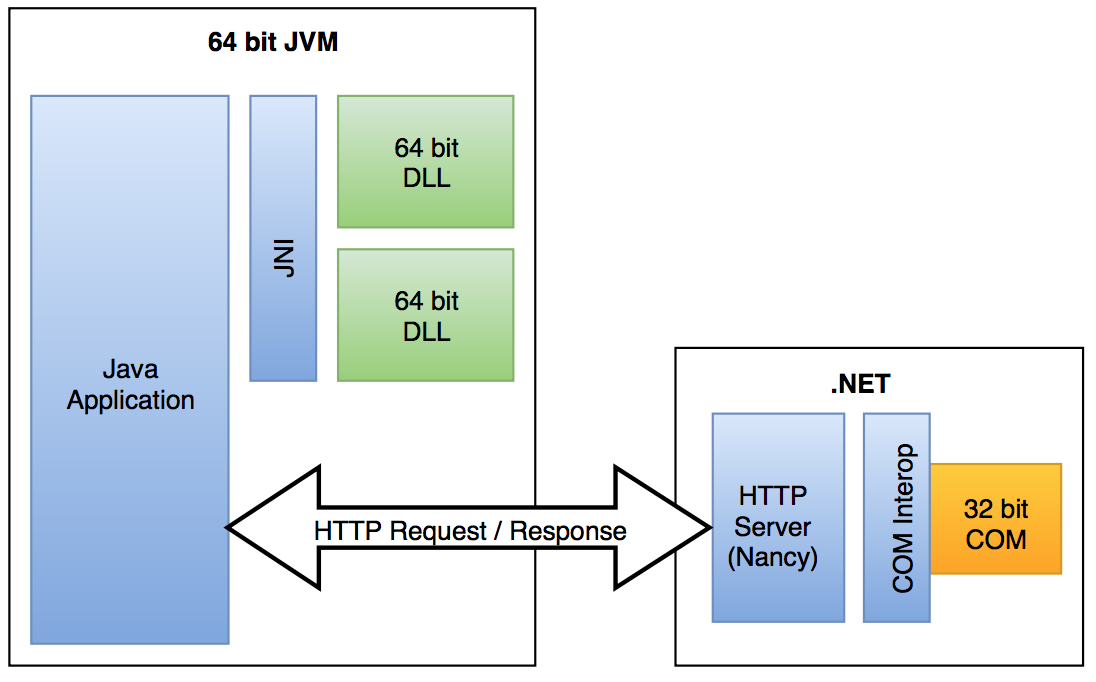
So we decided to exile this COM component to a separate process, which we refer to as a container process. The main application runs in a 64-bit JVM and communicates with this process via a simple HTTP API. The API calls from the application do not require a very low latency.

Initially we had planned to implement this container process as a C++ program. However, after a spike it turned out that there is a quicker way to both interface with a COM component and provide a simple self-hosted HTTP service on the Windows platform: The .NET framework provides excellent support for COM interoperability. Using a COM component in .NET is as simple as adding the component as a reference to the project, importing the namespace and instantiating the COM object like a regular .NET object. The event handling of the COM component, which requires quite some boilerplate code to set up in C++, gets automatically mapped to the C#/.NET event handling. The only reminder of the fact that you’re using a COM component is the amount of out and ref parameters.

For the HTTP API we chose the Nancy framework, with which we have had good experiences in previous projects. The architecture now looks like this:

64-bit

While it is a drawback that the container process now depends on the .NET runtime, it is outweighed by the benefit for us: The C#/.NET code for interfacing with the COM component is more maintainable than the previous JNI wrapper code was or a native implementation of the container process would have been.

All .NET assemblies for one and one for all

Sometimes you have developed a simple utility tool that doesn’t need the directory structure of a full-blown application for resources and other configuration. However, this tool might have a couple of library dependencies. On the .NET platform this usually means that you have to distribute the .dll files for the libraries along with the executable (.exe) file of the tool.

Wouldn’t it be nice to distribute your tool only as a single .exe file, so that users don’t have to drag around a lot of files when they move the tool from one location to another?

In the C++ world you would use static linking to link library dependencies into the resulting executable. For the .NET platform Microsoft provides a command-line tool called ILMerge. It can merge multiple .NET assemblies into a single assembly:

ILMerge

You can either download ILMerge from Microsoft as an .msi package or install it as a NuGet package from the package manager console (accessible in Visual Studio under Tools: Library Package Manager):

PM> Install-Package ilmerge

The basic command line syntax of ILMerge is:

> ilmerge /out:filename <primary assembly> [...]

The primary assembly would be the original executable of your tool. It must be listed first, followed by the library assemblies (.dll files) to merge. Here’s an example, which represents the scenario from the diagram above:

> ilmerge /out:StandaloneApplication.exe Application.exe A.dll B.dll C.dll

Keep in mind that the resulting executable is still dependent on the existence of the .NET framework on the system, it’s not completely independent.

Graphical user interface

There’s also a graphical user interface for ILMerge available. It’s an open-source tool by a third-party developer and it’s called ILMerge-GUI, published on Microsoft’s CodePlex project hosting platform.

ILMerge-GUI

You simply drag and drop the assemblies to merge on the designated area, choose a name for the output assembly and click the “Merge!” button.

The JavaScript ‘console’ Object

Most JavaScript developers are familiar with these basic functions of the console object: console.log(), .info(), .warn() and .error(). These functions dump a string or an object to the JavaScript console.

However, the console object has a lot more to offer. I’ll demonstrate a selection of the additional functionality, which is less known, but can be useful for development and debugging.

Tabular data

Arrays with tabular structure can be displayed with the console.table() function:

var timeseries = [
 {timestamp: new Date('2016-04-01T00:00:00Z'), value: 42, checked: true},
 {timestamp: new Date('2016-04-01T00:15:00Z'), value: 43, checked: true},
 {timestamp: new Date('2016-04-01T00:30:00Z'), value: 43, checked: true},
 {timestamp: new Date('2016-04-01T00:45:00Z'), value: 41, checked: false},
 {timestamp: new Date('2016-04-01T01:00:00Z'), value: 40, checked: false},
 {timestamp: new Date('2016-04-01T01:15:00Z'), value: 39, checked: false}
];

console.table(timeseries);

The browser will render the data in a table view:

Output of console.table()
JavaScript console table output

This function does not only work with arrays of objects, but also with arrays of arrays.

Benchmarking

Sometimes you want to benchmark certain sections of your code. You could write your own function using new Date().getTime(), but the functions console.time() and console.timeEnd() are already there:

console.time('calculation');
// code to benchmark
console.timeEnd('calculation');

The string parameter is a label to identify the benchmark. The JavaScript console output will look like this:

calculation: 21.460ms

Invocation count

The function console.count() can count how often a certain point in the code is called. Different counters are identified with string labels:

for (var i = 1; i <= 100; i++) {
  if (i % 15 == 0) {
    console.count("FizzBuzz");
  } else if (i % 3 == 0) {
    console.count("Fizz");
  } else if (i % 5 == 0) {
    console.count("Buzz");
  }
}

Here’s an excerpt of the output:

...
FizzBuzz: 6 (count-demo.js, line 3)
Fizz: 25 (count-demo.js, line 5)
Buzz: 13 (count-demo.js, line 7)
Fizz: 26 (count-demo.js, line 5)
Fizz: 27 (count-demo.js, line 5)
Buzz: 14 (count-demo.js, line 7)

Conclusion

The console object does not only provide basic log output functionality, but also some lesser-known, yet useful debugging helper functions. The Console API reference describes the full feature set of the console object.

IS NULL or IS NOT NULL, that is the question

Today I’ll demonstrate a curiosity of SQL regarding the NOT IN operator in combination with a subquery and NULL values.

Let’s assume we have two database tables, users and profiles:

 users              profiles
+--------------+  +-------------+
| id  username |  | id  user_id |
| 0   'joe'    |  | 0   2       |
| 1   'kate'   |  | 1   0       |
| 2   'john'   |  | 2   NULL    |
| 3   'maria'  |  +-------------+
+--------------+

We want to find all users, which have no associated profile. The intuitive solution would be a negated membership test (“NOT IN”) on the result set of a subquery:

SELECT * FROM users WHERE id NOT IN (SELECT user_id FROM profiles);

The anticipated result is:

+---------------+
| id  username	|
| 1   'kate'    |
| 3   'maria'   |
+---------------+

However, the actual result is an empty set:

+--------------+
| id  username |
+--------------+

This is irritating, especially since the non-negated form produces a sensible result:

SELECT * FROM users WHERE id IN (SELECT user_id FROM profiles);

+--------------+
| id  username	|
| 0   'joe'    |
| 2   'john'   |
+--------------+

So why does the NOT IN operator produce this strange result?

To understand what happens we replace the result of the subquery with a set literal:

SELECT * FROM users WHERE id NOT IN (2, 0, NULL);

This statement is internally translated to:

SELECT * FROM users WHERE id<>2 AND id<>0 AND id<>NULL;

And here comes the twist: a field<>NULL clause evaluates to UNKNOWN in SQL, which is treated like FALSE in a boolean expression. The desired clause would be id IS NOT NULL, but this is not what is used by SQL. As a consequence the result set is empty.

The result for the non-negated membership test (“IN”) can be explained as well. The IN clause is internally translated to:

SELECT * FROM users WHERE id=2 OR id=0 OR id=NULL;

A field=NULL clause evaluates to UNKNOWN as well. But in this case it is of no consequence, since the clause is joined via OR.

Now that we know what’s going on, how can we fix it? There are two possibilities:

One is to use an outer join:

SELECT u.id FROM users u LEFT OUTER JOIN profiles p ON u.id=p.user_id WHERE p.id IS NULL;

The other option is to filter out all NULL values in the subquery:

SELECT id FROM users WHERE id NOT IN (SELECT user_id FROM profiles WHERE user_id IS NOT NULL);

Conclusion

Both field=NULL and field<>NULL evaluate to UNKNOWN in SQL. Unfortunately, SQL uses these clauses for IN and NOT IN set operations. The solution is to work around it.

Renaming is hard work

Imagine you’ve developed a software solution for one of your customers, for example a custom CRM. Everything in this system revolves around the concept of a customer as the key entity. Of course, this is reflected in your code as well. The code is crowded with variable and class names like customerThis and CustomerThat. But now your customer wants you to change the term customer to client.

The minimal and lazy solution would be to change only those occurrences of the word, which are visible to the users. This includes:

  • Texts displayed in the user interface. If your application is internationalized or at least prepared for internationalization, they are usually neatly contained in translation files and can be easily updated.
  • User documentation like manuals. Don’t forget to update the screenshots.

However, if you do not want to let the code diverge from the language of the domain, you have to rename and update a lot more:

  • identifiers in the code (types, namespaces/packages, variables, constants)
  • source files and directories
  • code comments
  • log output strings
  • internationalization keys
  • text protocol strings (e.g. JSON keys) and HTTP API routes/parameters. Of course you can only do that if you are allowed to break the protocol! Don’t accidentaly break your API or formats, e.g. if JSON keys or XML tags are generated via reflection from code identifiers.
  • IDs of HTML tags in views, CSS class names and selector strings in referencing Javascript code
  • internal documentation (e.g. Wiki)

IDE support for renaming can help a lot. Especially the renaming of identifiers is reliable in statically typed languages. However, local variables, function parameters, and fields usually have to be renamed separately. In dynamically typed languages automated renaming of identifiers is often guesswork. Here you must rely on a good test coverage. Even in statically typed languages identifiers can be referenced via strings if reflection is used.

If you use a grep-like tool or the search feature of your IDE or editor to assist you, keep in mind that composite terms can occur in many different forms like FooBar, fooBar, foo-bar, foo_bar, foo.bar, foo bar or foobar. Don’t forget about irregular plural forms, e.g. technology – pl. technologies. Also think of abbreviations, otherwise a

for (Option opt : options)

might end up as

for (Alternative opt : alternatives)

But this is not the end of the story. A lot of renamings require migration scripts or update scripts to be executed at the time of the next update or deployment:

  • database tables and columns
  • some ORMs like Hibernate store class names in the database for the “table-per-hierarchy” mapping
  • string-based enum values in database entries
  • configuration keys and values
  • keys and values in data formats (JSON, XML, …) of stored data. You probably have to provide backward-compatibility for the old formats if the data files are not stored all in one place and can’t be converted in one go
  • names of data folders

If you don’t rename everything all at once, but decide to use the new term only in newly written code and to leave the old term in the existing code until it eventually gets replaced, you will probably end up with a long transition phase and lots of confusion for new project members who don’t know about the history of the project.

Synchronizing asynchronous calls in JavaScript

In Node.js all I/O performing operations like HTTP requests, file access etc. are designed to be non-blocking. The functions for these operations usually take a callback function argument as last parameter, which will be called once the operation is finished. The asynchronous nature of these operations often requires special means of synchronization, as exemplified in this post.

Let’s assume we want to download a set of files from a list of URLs:

var urls = [
    'http://example.org/file1',
    'http://example.org/file2',
    'http://example.org/file3',
];

If we were to use a classic, synchronous blocking function for the download operation the implementation might look like this:

urls.forEach(function(url) {
    downloadSync(url);
    console.log('Downloaded ' + url);
});
console.log('Downloads complete.')

Output:

Downloaded http://example.org/file1
Downloaded http://example.org/file2
Downloaded http://example.org/file3
Downloads complete.

The program loops through the list of URLs and downloads one file after the other. Each subsequent download is only started after the previous download has finished. No two downloads are active at the same time. Finally, the program prints a message indicating that all downloads are complete.

Now we want to embrace the asynchronous programming style of Node.js. We have a different function, downloadAsync, which is a non-blocking asynchronous function. The function uses the callback convention of Node.js to let the programmer handle the completion of the asynchronous operation:

urls.forEach(function(url) {
    downloadAsync(url, function() {
        console.log('Downloaded ' + url);
    });
});
console.log('Downloads complete.')

Output:

Downloads complete.
Downloaded http://example.org/file2
Downloaded http://example.org/file3
Downloaded http://example.org/file1

The download operations are now started at the same time and finish in a different order, depending on how long it takes each file to download. The quickest download finishes first, the slowest last. The total time for all downloads to finish is probably shorter than before, because slower connections do not make faster connections wait for them to finish.

However, there is one problem with this code: the message “Downloads complete.” is shown before the downloads are actually completed, which is obviously not the intended behavior. The reason why this happens is because the control flow immediately continues after the forEach loop has started all the downloads.

The ‘async’ module

What we need to correct this behavior is a way to wait for all asynchronous download operations started by the loop to finish before we print the “Downloads complete” message.

The async module for JavaScript provides various synchronization mechanisms for exactly these kinds of situations. In our case we’re going to use async.each:

var async = require('async');

async.each(urls, function(url, callback) {
    downloadAsync(url, function() {
        console.log('Downloaded ' + url);
        callback();
    });
}, function done() {
    console.log('Downloads complete.')
});

The async.each function is similar to JavaScript’s forEach function. However, the function called for each iteration has an additional callback parameter, which must be called when each iteration is considered to be completed. The third parameter to async.each is also a callback function. This function is called after all iterations reported their completion. This is where we place the output of the “Downloads complete” message.

Conclusion

The async module provides a rich toolset for the synchronization of asynchronous operations in JavaScript. Go check it out!