Embedding Python into C++

In one of our projects the requirement to run small user-defined Python scripts inside a C++ application arose. Thanks to Python’s C-API, nicknamed CPython, embedding (really) simple scripts is pretty straightforward:

Py_Initialize();
const char* pythonScript = "print 'Hello, world!'\n";
int result = PyRun_SimpleString(pythonScript);
Py_Finalize();

Yet, this approach does neither allow running extensive scripts, nor does it provide a way to exchange data between the application and the script. The result of this operation merely indicates whether the script was executed properly by returning 0, or -1 otherwise, e.g. if an exception was raised. To overcome these limitations, CPython offers another, more versatile way to execute scripts:

PyObject* PyRun_String(const char* pythonScript, int startToken, PyObject* globalDictionary, PyObject* localDictionary)

Besides the actual script, this function requires a start token, which should be set to Py_file_input for larger scripts, and two dictionaries containing the exchanged data:

PyObject* main = PyImport_AddModule("__main__");
PyObject* globalDictionary = PyModule_GetDict(main);
PyObject* localDictionary = PyDict_New();
PyObject* result = PyRun_String(pythonScript, Py_file_input, globalDictionary, localDictionary);

Communication between the application and the script is done by inserting entries to one of the dictionaries prior to running the script:

PyObject* value = PyString_FromString("some value");
PyDict_SetItemString(localDict, "someKey", value);

Doing so makes the variable “someKey” and its value available inside the Python script. Accessing the produced data after running the Python script is just as easy:

char* result = String_AsString(PyDict_GetItemString(localDict, "someKey"));

If a variable is created inside the Python script, this variable also becomes accessible from the application through PyDict_GetItemString (or PyDict_GetItem), even if it was not entered into the dictionary beforehand.

The following example shows the complete process of defining variables as dictionary entries, running a small script and retrieving the produced result in the C++ application:

Py_Initialize();
//create the dictionaries as shown above
const char* pythonScript = "result = multiplicand * multiplier\n";
PyDict_SetItemString(localDictionary, "multiplicand", PyInt_FromLong(2));
PyDict_SetItemString(localDictionary, "multiplier", PyInt_FromLong(5));
PyRun_String(pythonScript, Py_file_input, globalDictionary, localDictionary);
long result = PyInt_AsLong(PyDict_GetItemString(localDictionary, "result"));
cout << result << endl;
Py_Finalize();
Readability of Boolean Expressions

Readability of boolean expressions lies in the eyes of the beholder.

Following up on various previous posts on code readability and style I want to provide two more examples today – this time under the common theme of “handling of boolean values”.

Consider this (1a):

bool someMethod()
{
  if (expression) {
    return true;
  } else {
    return false;
  }
}

Yes, there are people who consider this more readable than (1b)

bool someMethod()
{
  return (expression);
}

Another example is this (2a):

  if (someExpression() == true)
    ...

versus my preferred version (2b):

  if (someExpression())
    ...

So what could be the reason for these different viewpoints? One explanation I thought of is as follows: Let’s say you have a background in C and you are therefore used to do something like:

#define FALSE (0)
#define TRUE (!FALSE)

In other words, you may not see boolean as a type of its own, like int and double, with a well-defined value range. Instead you see it more like an enumerated type which makes it feel very naturally do a expression == true comparison.

At the same time it feels not very natural to see the result of a boolean expression as being of type bool with all the consequences – e.g. to be able to return it immediately as in the first example.

Another explanation is that 1a and 2a are as verbose as it can be. You don’t have to make any mental efforts to understand what the code does.

While these may be possible explanations, my guess is that most of you, like me,  still see 1a and 2a as unnecessary visual clutter and consider 1b and 2b as far more readable.

Grails Gems: Command Objects

A series about the (little) gems found in Grails which can help many projects out there.

Besides domain objects command objects are another way to get validation and data binding of parameters. But why (or when) should you use them?
First when you do not want to persist the data. Like validating parameters for a search query.
Second when you just want a subset of the parameters which has no corresponding domain object. For example for keeping malicious data away from your domain objects.
Third when you get a delta of the new data. When you just want to add to a list and do not want to check if you get a single or a multiple value for your a parameter.

Usage

Usually you put the class of the command in the same file as the controller you use them in. The command object is declared as a parameter of the action closure. You can even use multiple one:

class MyController {
  def action = { MyCommand myCommand, YourCommand yourCommand ->
    ...
  }
}

Grails automatically binds the request parameters to the commands you supply and validates them. Then you can just call command.hasErrors() to see if the validation succeeded.

A shot at definitions beyond “unit test”

When doing research on which kinds of programmatic tests different developers and companies utilize and how they handle them, I realized that there is no common definition of terms and concepts. While most sources agree on what is and what is not a unit test, there are various contradictory definitions of what a test is, if it is not a unit test. In this blog post I’d like to present a brief overview of the definitions we are currently using. Since we steadily try to enhance and refine our development process and tools, the terms and concepts presented here are almost certain to change in the future.

Please note that this post is not intended to fully describe all the details of the different test approaches, but rather to give an idea and first impression on how we distinguish them.

Unit Tests

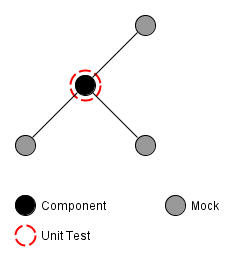
The most basic kind of programmatic tests, unit-tests, are likely to be the most commonly used kind of test. They help to determine that a small piece of code, e.g. a single method or class, behaves as intended by its developer. If properly applied, unit-tests provide a solid foundation to build an application upon. Figure 1 schematically depicts the scope of a unit-test in an exemplary software system.

Depending on the complexity of the tested system, techniques like mocking of dependencies may be required. Especially system resources need to be replaced by mocks, since unit tests need to be completely independent from them (Michael Feathers describes this and some other requirements of unit tests in his blog post “A Set of Unit Testing Rules”). Furthermore, unit tests are not meant to be long running, but instead have to execute within a split second.

Schematic view of a unit test of a component in an exemplary system
Figure 1: Schematic view of a unit test of an component in an exemplary system

Integration Tests

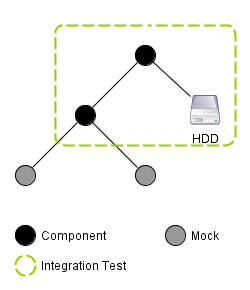
A more sophisticated approach to testing are integration tests which challenge a part or sub-system of an application made up of several units in order to determine whether these units properly cooperate. In contrast to unit tests, integration tests may include system resources and may also determine the test’s outcome by checking the state of these resources. This larger scope and the fact that the tested functionality is typically made up of several actions, leads to integration tests taking a multitude of the time taken by unit tests. Figure 2 schematically illustrates an integration test’s view on an exemplary system.

Schematic of an integration test in an exemplary system
Figure 2: Schematic of an integration test in an exemplary system

Acceptance Tests

The by far most involved technique to test the behavior of an application is the utilization of acceptance tests. While the other approaches challenge only parts of an application, acceptance tests are meant to challenge the application as a whole from a user’s point of view. This includes using system resources, as well as to control the application and verify its proper function as a user would: Through its (G)UI and without knowing anything about the internals of the software.

Schematic of an acceptance test in an exemplary system
Figure 3: Schematic of an acceptance test in an exemplary system

Conclusion

While some developers only distinguish between unit tests and other tests, defining the latter ones more clearly proved very useful when creating, using and explaining them to other developers and customers. Yet, these definitions are not carved in stone and certainly need to be refined over time. Thus, I would like to get to know your opinion on these definitions. Do you agree or do you have a completely different way of distinguishing between test approaches? How many kinds of tests do you distinguish? And why do you do so?

Grails: Beware of the second level cache

Know your caches!

Recently we were hunting a strange bug. Take the following domain model:

class Computer {
  Coder coder
}

class Coder {
  static hasMany = [projects:Project]
}

Querying the computer and iterating over the respective coder and projects sometimes resulted in strange number of projects: 1. Looking into the underlying database we quickly found out that the number of 1 was not correct. It got even more strange: getting the coder in question via Coder.get in the loop yielded the correct results. What was the problem?
After some code reading and debugging another query which was called after the first one but before accessing the coder in the loop gave some insight:

  Coder.withCriteria {
    projects {
      idEq(projectId)
    }
  }

This second query also queried the Coder but constrained the projects to a specific one. These coders were populated into the second level cache and when we called computer.coder the second level cache returned the before queried coder. But this coder had only one project!
Since we only needed the number of coders with this project we changed the second
query to using count, so no instances of Coder are returned and thus saved in the second level cache. Bug fixed.

The Great Divide

There is a great divide in the C++ developer community between “normal” developers that use only basic language features and very savvy ones that know every little corner of the language. The upcoming C++ standard deepens this divide even more.

Recently, I had two very contrary conversations about C++ which show very good the great divide in C++ developer community.

The first was with the technical lead of a team that writes and maintains drivers and control software for a scientific institution. These systems run 24/7 and have to be very stable and reliable.

I had discovered that they use a self-written toolbox library containing classes like SharedPtr<T>, and Thread and suspected immediately a classical NIH-syndrome. I asked him about it and why they don’t use well established libraries like boost. He told me that they indeed are only using the standard library and their own toolbox.

The reason he gave was that despite boost being most elegant C++ library out there, it required very good knowledge about the most advanced C++ mechanisms, and that his team was not on this level … I should probably mention here that his team does a very good job in running their systems. So, apparently, they get along very well with using only basic  C++ features and no “fancy” boost stuff.

The other conversation was with a friend of mine with whom I chat regularly about all sorts of programming related stuff. This time the topic was the upcoming  C++ standard and all its  exciting new stuff. He has lot’s of experience with C++ and knows the language very well. But even someone like him had a hard time to really understand what rvalue references are all about. I had not looked at them in detail, yet,  so he tried to explain them to me. During our discussion I was thinking about if teams like the one introduced before will ever use rvalue references, or other C++0X stuff in their production code, other than maybe the auto keyword for type inference, or constructor delegation.

Honestly, I don’t think stuff like  rvalue refs will become a feature that is often used by “standard industry” teams, because it adds a lot of complexity to an already complex language. Even easy-to-get stuff like the new keywords override, constexpr and final, or additional initialization means like std::initializer_list<T> will take a lot of time to get used regularly by most C++ teams.

Instead, most of C++0X will greatly increase the divide between “normal” C++ developers who get along well with using only basic language features, and experts that know every little corner of the language. And this is simply because there is so much more to know with C++0X.

But don’t let us paint this picture overly black. I, for one, am looking forward to the new standard and I will certainly spread the word about the new possibilities and features in every C++ team I work with.

A big benefit of Convention over Configuration

Convention over Configuration helps a lot getting a fast start on an existing project.

Recently I joined a long running Grails project and had to complete some issues in a short time. After a quick introduction I was ready to dive in and instantly could chunk out code. Convention over Configuration helped a lot getting a fast start:

  • Which classes are persisted? Look into the domain folder.
  • What controller handles xyz? It is named after xyz.
  • What is the page that is served for URL u? Look into the corresponding folder and find the view named accordingly.

IMHO this is a benefit that many conventions are determined by the framework. If you know the framework, you know the layout of the project. The opposite holds also true: if the project departs from these “standards” you have to look closely into the configuration.
So think twice before you do something your way. Sometimes you have no choice like when you are using Oracle and have to cut all table and column names to 30 characters. But normally you should keep the defaults.

Bogus Error Messages with Qt .ui Files

Name your Qt Forms correctly and you will save lots of debugging time.

Bogus errors together with their messages can have a large number of reasons – full hard drives being one of the classics. When it comes to programming and especially C++, the possibilities for cryptic, meaningless and misleading error message are infinite.

A nice one bit us at one of our customers the other day. The message was something like

QLayout can only have instances of QWidget as parent

and it appeared as standard error output during program start-up. Needless to say that the whole thing crashed with a segmentation fault after that. The only change that was made was a header file that was added to the Qt files list in the CMakeLists.txt file.  The Qt class in this header file was just in its beginnings and had not yet any QLayouts, or QWidgets in it. Even the  C++ standard measure of cleaning and recompiling everything didn’t help.

So how is it possible that an additional Qt header file that has not references to QLayout and QWidget can cause such an error message?

As all of you experienced C/C++ developers know, for the compiler, a code file is not only the stuff that it contains directly but also what is #included! The offending header file included a generated ui description file which you get when you design your windows – or Forms in Qt terminology – with the Qt designer and use the Compile-Time-Form-Processing-approach to incorporate the form into the code base.

But how can that effect anything?

The Qt designer saves the forms into .ui files. From that, the so-called User Interface Compiler (uic) generates a header file containing a C++ class together with inlined code that creates the form. Form components like line edits, or push buttons are generated as instance attributes. The name of the class is generated from the name of the form. You can even use namespaces.  By naming it e.g. myproject::BestFormEverDesigned the generated class is named BestFormEverDesigned   is put into namespace myproject.

So far, so nice, handy and easy to use.

When you create a new form in qt designer, the default name is Form. Maybe you can guess already where this leads to…

Two forms for which the respective developers forgot to set a proper name, existed in the same sub project and had been compiled and linked into the same shared library. The compiler has no chance to detect this, because it sees only one

class Form
{

at a time. The linker happily links all of this together since it thinks that all Forms are created equal. And then at run-time … Boom!

I will have to look into a little Jenkins helper which breaks the build when a Form form is checked in…

Your own dsl: a primer on operators

When writing your own domain specific language (dsl), a full fledged parser generator like antlr can be very helpful with the nitty gritty. You may come to a point where you want to use (infix) operators in your language. But beware! A naive solution might look like:

expr: number '+' expr | number '-' expr | number '*' expr | number '/' expr | …;

If you want to support mathematical like operators this solution misses two important traits: operator precedence and associativity.
Precendence can be easily achieved:

expr: term '+' expr |  term '-' expr | …;
term: number '*' term | number '/' term | …;

The operators with the lowest precedence come first, then the next and so on. Unfortunately this has one side effect: the operators are now right associative.
Which means an expression like 5 – 4 + 3 would evaluate to -2 and not 4. Because of right associativity it is the same as 5 – (4 + 3). So another refinement does the trick:

expr: term (('+'  |  '-' | …) term)*;
term: number (('*' | '/' | …) number)* | …;

How to accidentally kill your CI build time

At one of our customers I do C++ consulting in a mid-sized project which uses cmake as build system. A clean build on our Jenkins CI server takes about 40 minutes (including unit tests) which is way too long to be considered “fast feedback” in an agile kind of way.

Because of that, we do clean builds only 2 times a day – some time during the night and during lunch break. The rest of the day the CI server only does a “svn update” and a normal “make”, which takes about 3-10 minutes depending on what files have been changed.

With C++ there are lots of ways to unnecessarily lengthen your build time. The most important factor is, of course, #include dependencies. One has to be very (very) disciplined in adding #include directives in header files. Otherwise, the whole world suddenly gets rebuild when some small header file somewhere in a little corner of the code has been changed.

And I have to say, for the most part, this project is in pretty good shape with regard to #include dependencies.

So what the hell has suddenly increased our build time from 3-10 minutes to 20-25 minutes? was what I was thinking some time last week while waiting for the CI server to spit out new latest and greatest rpm packages. For some reason, our normal, rest-of-the-day build started to compile what felt like everything in our main package even on the slightest code change in a remote .cpp file.

What happened?

In order to have the build time available (e.g. to show in an “about” box), we use a preprocessor symbol like REVISION_DATE which gets filled in a CMakeLists.txt file. The whole thing looks like this:

...
EXEC_PROGRAM(date ARGS '+%F_%T' OUTPUT_VARIABLE REVISION_DATE)
...
ADD_DEFINITIONS(-DREVISION_DATE=\"${REVISION_DATE}\")
...

Since the beginning of the time these lines of CMake code lived in a small sub-sub-..-directory with little to no incomming dependencies. Then, at some point, it became necessary to have the REVISION_DATE symbol at some other place, too, which led to a move of the above code into the CMakeLists.txt file of the main package.

The value of command date +%F_%T changes every second which leads to a changed REVISION_DATE on every build – which is what we initially intended. What changes, too, of course, is the value of the ADD_DEFINITIONS directive. And as CMake is very strict with the slightest change in this value, every make target below that line gets rebuild – which in our case was everything in the main package.

So there! Build time killing creatures are lurking everywhere in our C/C++ projects. Always be aware of them!