How I accidentally cut my audio-files in half

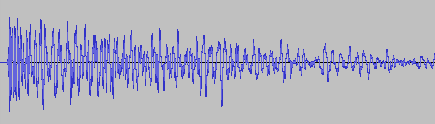
A couple of weeks ago, I asked my brother to test out my new game You Are Circle (please wishlist it and check out the demo, if that’s up your alley!) and among lots of other valuable feedback, he mentioned that the explosion sound effects had a weird click sound at the end that he could only hear with his headphones on. For those of you not familiar with audio signal processing, those click or pop sounds usually appear when the ‘curvy’ audio signal is abruptly cut off1. I did not notice it on my setup, but he has a lot of experience with audio mixing, so I trusted his hearing. Immediately, I looked at the source files in audacity:

They looked fine, really. The sound slowly fades out, which is the exact thing you need to do to prevent clicks & pops. Suspecting the problem might be on the playback side of his particular setup, I asked him to record the sound on his computer the next time he tested and then kind of forgot about it for a bit.

Fast-forward a couple of days. Neither of us had followed up on the little clicky noise thing. While doing some video captures with OBS, I noticed that the sound was kind of terrible in some places, the explosions in particular. Maybe that was related?

While building a new version of my game, Compiling resources... showed up in my console and it suddenly dawned on me: What if my home-brew resource compiler somehow broke the audio files? I use it to encode all the .wav originals into Ogg Vorbis for deployment. Maybe a badly configured encoding setup caused the weird audio in OBS and for my brother? So I looked at the corresponding .ogg files, and to my surprise, it indeed had a small abrupt cut-off at the end. How could that happen? Only when I put both the original and the processed file next to each other, did I see what was actually going on:

It’s only half the file! How did that happen? And what made this specific file so special for it to happen? This is one of many files that I also convert from stereo to mono in preprocessing. So I hypothesized that might be the problem. No way I missed all of those files being cut in half though, or did I? So I checked the other files that were converted from stereo to mono. Apparently, I did miss it. They were all cut in half. So I took a look at the code. It looked something like this:

while (keep_encoding)
{
  auto samples_in_block = std::min(BLOCK_SIZE, input.sample_count() - sample_offset);
  if (samples_in_block != 0)
  {
    auto samples_per_channel = samples_in_block / channel_count;
    auto channel_buffer = vorbis_analysis_buffer(&dsp_state, BLOCK_SIZE);
    auto input_samples = input.samples() + sample_offset;

    if (convert_to_mono)
    {
      for (int sample = 0; sample < samples_in_block; sample += 2)
      {
        int sample_in_channel = sample / channel_count;
        channel_buffer[0][sample_in_channel] = (input_samples[sample] + input_samples[sample + 1]) / (2.f * 32768.f);
      }
    }
    else
    {
      for (int sample = 0; sample < samples_in_block; ++sample)
      {
        int channel = sample % channel_count;
        int sample_in_channel = sample / channel_count;
        channel_buffer[channel][sample_in_channel] = input_samples[sample] / 32768.f;
      }
    }

    vorbis_analysis_wrote(&dsp_state, samples_per_channel);
    sample_offset += samples_in_block;
  }
  else
  {
    vorbis_analysis_wrote(&dsp_state, 0);
  }

  /* more stuff to encode the block using the ogg/vorbis API... */
}

Not my best work, as far as clarity and deep nesting goes. After staring at it for a while, I couldn’t really figure out what was wrong with it. So I built a small test program to debug into, and only then did I see what was wrong.

It was terminating the loop after half the file, which now seems pretty obvious given the outcome. But why? Turns out it wasn’t the convert_to_mono at all, but the whole loop. What’s really the problem here is mismatched and imprecise terminology.

What is a sample? The audio signal is usually sampled several thousand times (44.1kHz, 48kHz or 96kHz are common) per second to record the audio waves. One data point is called a sample. But that is only enough of a definition if the sound has a single channel. But all those with convert_to_mono==true were stereo, and that’s exactly were the confusion is in this code. One part of the code thinks in single-channel samples, i.e. a single sampling time-point has two samples in a stereo file, while the other part things in multi-channel samples, i.e. a single sampling time-point has only one stereo sample, that consists of multiple numbers. Specifically this line:

auto samples_in_block = std::min(BLOCK_SIZE, input.sample_count() - sample_offset);

samples_in_block and sample_offset use the former definition, while input.sample_count() uses the latter. The fix was simple: replace input.sample_count() with input.sample_count() * channel_count.

But that meant all my stereo sounds, even the longer music files, were missing the latter half. And this was not a new bug. The code was in there since the very beginning of the git history. I just didn’t hear its effects. For the sound files, many of them have a pretty long fade out in the second half, so I can kind of get why it was not obvious. But the music was pretty surprising. My game music loops, and apparently, it also loops if you cut it in half. I did not notice.

So what did I learn from this? Many of my assumptions while hunting down this bug were wrong:

  • My brother’s setup did not have anything to do with it.
  • Just because the original source file looked fine, I thought the file I was playing back was good as well.
  • The bad audio in OBS did not have anything to do with this, it was just recorded too loud.
  • The ogg/vorbis encoding was not badly configured.
  • The convert_to_mono switch or the special averaging code did not cause the problem.
  • I thought I would have noticed that almost all my sounds were broken for almost two years. But I did not.

What really cause the problem was an old programming nemesis, famously one of the two hard things in computer science: Naming things. There you have it. Domain language is hard.

  1. I think this is because this sudden signal drop equates to a ‘burst’ in the frequency domain, but that is just an educated guess. If you know, please do tell. ↩︎

The Dimensions of Navigation in Eclipse

Following up on “The Dimensions of Navigation in Object-Oriented Code” this post explores how Eclipse, one of the most mature IDEs for Java development, supports navigating across different dimensions of code: hierarchy, behavior, validation and utilities.

Let’s walk through these dimensions and see how Eclipse helps us travel through code with precision.

1. Hierarchy Navigation

Hierarchy navigation reveals the structure of code through inheritance, interfaces and abstract classes.

  • Open Type Hierarchy (F4):
    Select a class or interface, then press F4. This opens a dedicated view that shows both the supertype and subtype hierarchies.
  • Quick Type Hierarchy (Ctrl + T):
    When your cursor is on a type (like a class, interface name), this shortcut brings up a popover showing where it fits in the hierarchy—without disrupting your current layout.
  • Open Implementation (Ctrl + T on method):
    Especially useful when dealing with interfaces or abstract methods, this shortcut lists all concrete implementations of the selected method.

2. Behavioral Navigation

Behavioral navigation tells you what methods call what, and how data flows through the application.

  • Open Declaration (F3 or Ctrl + Click):
    When your cursor is on a method call, pressing F3 or pressing Ctrl and click on the method jumps directly to its definition.
  • Call Hierarchy (Ctrl + Alt + H):
    This is a powerful tool that opens a tree view showing all callers and callees of a given method. You can expand both directions to get a full picture of where your method fits in the system’s behavior.
  • Search Usages in Project (Ctrl + Shift + G):
    Find where a method, field, or class is used across your entire project. This complements call hierarchy by offering a flat list of usages.

3. Validation Navigation

Validation navigation is the movement between your business logic and its corresponding tests. Eclipse doesn’t support this navigation out of the box. However, the MoreUnit plugin adds clickable icons next to classes and tests, allowing you to switch between them easily.

4. Utility Navigation

This is a collection of additional navigation features and productivity shortcuts.

  • Quick Outline (Ctrl + O):
    Pops up a quick structure view of the current class. Start typing a method name to jump straight to it.
  • Search in All Files (Ctrl + H):
    The search dialog allows you to search across projects, file types, or working sets.
  • Content Assist (Ctrl + Space):
    This is Eclipse’s autocomplete—offering method suggestions, parameter hints, and even auto-imports.
  • Generate Code (Alt + Shift + S):
    Use this to bring up the “Source” menu, which allows you to generate constructors, getters/setters, toString(), or even delegate methods.
  • Format Code (Ctrl + Shift + F):
    Helps you clean up messy files or align unfamiliar code to your formatting preferences.
  • Organize Imports (Ctrl + Shift + O):
    Automatically removes unused imports and adds any missing ones based on what’s used in the file.
  • Markers View (Window Show View Markers):
    Shows compiler warnings, TODOs, and FIXME comments—helps prioritize navigation through unfinished or problematic code.

Eclipse Navigation Cheat Sheet

ActionShortcut / Location
Open Type HierarchyF4
Quick Type HierarchyCtrl + T
Open ImplementationCtrl + T (on method)
Open DeclarationF3 or Ctrl + Click
Call HierarchyCtrl + Alt + H
Search UsagesCtrl + Shift + G
MoreUnit SwitchMoreUnit Plugin
Quick OutlineCtrl + O
Search in All FilesCtrl + H
Content AssistCtrl + Space
Generate CodeAlt + Shift + S
Format CodeCtrl + Shift + F
Organize ImportsCtrl + Shift + O
Markers ViewWindow → Show View → Markers

The Dimensions of Navigation in Object-Oriented Code

One powerful aspects of modern software development is how we move through our code. In object-oriented programming (OOP), understanding relationships between classes, interfaces, methods, and tests is important. But it is not just about reading code; it is about navigating it effectively.

This article explores the key movement dimensions that help developers work efficiently within OOP codebases. These dimensions are not specific to any tool but reflect the conceptual paths developers regularly take to understand and evolve code.

1. Hierarchy Navigation: From Parent to Subtype and Back

In object-oriented systems, inheritance and interfaces create hierarchies. One essential navigation dimension allows us to move upward to a superclass or interface, and downward to a subclass or implementing class.

This dimension is valuable because:

  • Moving up let us understand general contracts or abstract logic that governs behavior across many classes.
  • Moving down help us see specific implementations and how abstract behavior is concretely realized.

This help us maintain a clear overview of where we are within the hierarchy.

2. Behavioral Navigation: From Calls to Definitions and Back

Another important movement is between where methods are defined and where they are used. This is less about structure and more about behavior—how the system flows during execution.

Understanding this movement helps developers:

  • Trace logic through the system from the point of use to its implementation.
  • Identify which parts of the system rely on a particular method or class.
  • Assess how a change to a method might ripple through the codebase.

This navigation is useful when debugging, refactoring, or working in unfamiliar code.

3. Validation Navigation: Between Code and its Tests

Writing automated tests is a fundamental part of software development. Tests are more than just safety nets—they also serve as valuable guides for understanding and verifying how code is intended to behave. Navigating between a class and its corresponding test forms another important dimension.

This movement enables developers to:

  • Quickly validate behavior after making changes.
  • Understand how a class is intended to be used by seeing how it is tested.
  • Improve or add new tests based on recent changes.

Tight integration between code and test supports confident and iterative development, especially in test-driven workflows.

4. Utility Navigation: Supporting Movements that Boost Productivity

Beyond the main three dimensions, there are several supporting movements that contribute to developer efficiency:

  • Searching across the codebase to find any occurrence of a class, method, or term.
  • Generating boilerplate code, like constructors or property accessors, to reduce repetitive work.
  • Code formatting and cleanup, which helps maintain consistency and readability.
  • Autocompletion, which reduces cognitive load and accelerates writing.

These actions do not directly reflect code relationships but enhance how smoothly we can move within and around the code, keeping us focused on solving problems rather than managing structure.

Conclusion: Movement is Understanding

In object-oriented systems, navigating through your codebase along different dimensions provides essential insight for understanding, debugging, and improving your software.

Mastering these dimensions transforms your workflow from reactive to intuitive, allowing you to see code not just as static text, but as a living system you can navigate, shape, and grow.

In an upcoming post, I will take the movement dimensions discussed here and show how they are practically supported in IDEs like Eclipse and IntelliJ IDEA.

Nginx upload limit

Today, I encountered a surprising issue with my Docker-based web application. The application has an upload limit set, but before reaching it, an unexpected error appeared:

413 Request Entity Too Large

Despite the application’s upload limit being correctly configured, the error occurred much earlier—when the file was barely over 1MB. Where does this limitation come from, and how can it be changed?


Troubleshooting

The issue occurred before the request even reached the application layer, during a critical step in request processing. The root cause was Nginx, the web server and reverse proxy used in the Docker stack.

Nginx, commonly used in modern application stacks for load balancing, caching, and HTTPS handling, acts as the gateway to the application, managing all incoming requests. However, Nginx was rejecting uploads larger than 1MB. This was due to the client_max_body_size directive, which—when unset—defaults to a relatively low limit in some configurations. As a result, Nginx blocked larger file uploads before they could reach the application.

Solution

To resolve this issue, the client_max_body_size directive in the Nginx configuration needed to be updated to allow larger file uploads.

Modify the nginx.conf file or the relevant server block configuration:

server {
    listen 80;
    server_name example.com;
    client_max_body_size 100M;  # Allow uploads up to 100MB
}

After making this change, restart Nginx to apply the new configuration:

nginx -s reload

If Nginx is running in a Docker container, you can restart the container instead:

docker restart <container_name>

With this update, the upload limit increased to 100MB, allowing the application to handle larger files without premature rejection. Once the configuration was applied, the error disappeared, and file uploads worked as expected, provided they remained within the newly defined limits.

The algorithm in an algorithm – Builder design pattern

In the following blog post, I would like to explain to you, the design pattern builder, why this is an algorithm in the algorithm and what advantages result from it.

General

The builder is a creational design pattern. It separates the construction of complex objects from their representations, allowing the same construction processes to be reused.

The design pattern consists of a director, the builder interface, and concrete builder implementations. The director is responsible for the abstract construction of the product and has a defined interface with the builder to pass the design instructions. The concrete builders then build the concrete product according to the instructions and can also provide the generated product.

So in the end, the director defines its own little programming language inside the program where the construction instructions can be programmed as algorithm. The builder then executes that algorithm. So we have a program in the program, an algorithm in the algorithm. Crazy!

Example cake recipe

We know such procedures from real life. For example, from the kitchen. When you bake a cake, you take your yellow mixing bowl, the ingredients, and the blue mixer and make the dough. Very concrete.

But now, if someone asks about the recipe, then we abstract it from our concrete equipment to a general manual. There, it only says you are mixing the ingredients, and your yellow mixing bowl and blue mixer are not mentioned. So someone else can bake the cake in their own kitchen with their own equipment. Should your blue mixer ever fail, you can easily carry out the recipe with a whisk or with the new food processor.

Example file generation

An example from programming is the generation of a file. For example, a pdf certificate. If you program everything directly in PDFBox, it works first. But if you ever want to use a different library, or if you also want the certificate as a normal text document or image, you need to rewrite everything.

With the design pattern, you would have an algorithm that says I want “certificate” as a title, then a dividing line, then a table and then this paragraph. Exactly how this will be implemented is not known. The PDFBox builder takes these instructions and creates the file with its own library-specific commands.

If the library or file type changes, only one new builder needs to be written. For example, a text file builder, an image builder or an OpenPDF builder. The logic of how the certificate should look at the end remains unchanged.

Conclusion

Finally, separating the construction from the production offers some advantages. The program is more expandable and modifiable. It also complies with the single responsibility principle. The disadvantage is a close coupling between the product, the concrete builder, and the classes involved in the construction, making it difficult to change the basic process.

How to get honest UX Feedback from the Technically Adept User? – Part 1: the problem.

After some consideration, I decided to type this title indeed with the Question Mark at its end, because it is an ongoing process, not a particular conclusion. (… and yes, this is a common theme with everything UX).

We have a wide variety of possible customers and usually an even wider variety of possible users. Sometimes, the mission statement is quite well defined, and sometimes, we just start from the acknowledgement that our customer has some pain point and some trust in that we might be able to help.

Of course, we always carefully evaluate whether we believe our uncertainties to stay manageable or rather reiterate the uncertainties / must-have requirements / minimal viable product with the potential customer, upfront. And if in these cases, we find common ground for a collaboration, it is absolutely crucial to always keep the hand on the steering wheel, always reconsidering what it is the user wants.

From very early on, this affects the aspect of User Experience, which is not something one can apply at the end of the project, some lip gloss, a little treat if everything went well before. Wherever possible, it has to be ingrained in the backbone of the software because sooner or later you could risk driving the project into limbo.

UX Limbo is, when your product is good enough so that a potential user will never openly complain about certain design choices, but still too flawed so they will never actually engage in your software, just because… there’s no flow. No dopamine. They won’t tell you – it’s just difficult.

Enter the “Technically Adept User”. If you have a project in which the end users are actually experts in the domain itselves, this is next-level difficult. Here, the problem is not that the user has a underdeveloped mental model, but that they have a time-tested one which has real value for them. But this might differ from the one that you actually implement; and

  • it might be that you “just” need to listen more accurately
  • it might be that you learned something about the problem that it new to them
  • it might be that there are more than one Technically Adept Users, and they do not notice that they hold incompatible models in their head
  • or they do notice, but due to their different roles they try to one-up each other
  • etc.

So this is the problem. If you play your cards well, you might be able to solve a problem in a way that has never been done before, the customers will feel their burdens taken away, replaced by nothing but overwhelming bliss and (…you get the point) – but it doesn’t take much in perceived imperfection, and the users will start doing mistakes, feel unsatisfied, stupid even, never understanding why you “cannot implement the easiest ideas” (most likely your fault), always pretending, always seeming obsessed, wasting their money, just not “getting” it.

And worse is, you cannot even separate yourself from the product that easily. You can always start a UX Session, like A/B Testing, with the Non-Technically-Adept User, let them tell you their emotions, difficulties, misunderstandings and due to the large gap between their mental model and yours, communication is not that hard. But with too similar mental models, they will always think A if you present B. If they don’t understand why something is implemented as B, they can’t stop their thoughts in rationalizing, maybe even nodding their heads, but what you really would need is the open discussion how a common-ground solution C might look.

They might invite you to a meeting and do not even see the points you are seeing, they might consider their problems solved from minute one – and spend the meeting talking about several possible steps ahead.

The Technically Adept User is a blessing in that their knowledge can take the onus in understing the real problem away from you a bit – but is also a challenge because they need to invest more energy in understanding your differences of understanding. There is no universal solution in how to make them.

I am writing this blog post to keep my own thoughts rolling on that topic. There must be some ways in communicating this gap. It should be done in a way that neither lets the user feel dumb, insulted, their pride taken away; but also in a way that they know that you can be both: knowledgeful about their problem AND flexible in iterating through different solutions, trying what works until something sticks. Time and patience are an issue in this, too.

If you have any suggestions or insights to share, please feel free to do so. I have some ideas in mind but will continue with Part 2. Let’s see what we can learn from this 🙂

If You Teach It, Teach It Right

Recently, I gained a glimpse of source code that gets taught in beginner’s developer courses. There was one aspect that really irked me, because I think it is fundamentally wrong from the pedagogical point of view and disrespectful towards the students.

Let me start with an abbreviated example of the source code. It is written in Java and tries to exemplify for-loops and if-statements. I omitted the if-statements in my renarration:

Scanner scanner = new Scanner(System.in);

int[] operands = new int[2];
for (int i = 0; i < operands.length; i++) {
    System.out.println("Enter a number: ");
    operands[i] = Integer.parseInt(scanner.nextLine());
}
int sum = operands[0] + operands[1];
System.out.println("The sum of your numbers is " + sum);

scanner.close();

As you can see, the code opens a possibility to input characters in the first line, asks for a number twice and calculates the sum of both numbers. It then outputs the result on the console.

There are a lot of problems with this code. Some are just coding style level, like using an array instead of a list. Others are worrisome, like the lack of exception handling, especially in the Integer.parseInt() line. Well, we can tolerate cumbersome coding style. It’s not that the computer would care anyway. And we can look over the missing exception handling because it would be guaranteed to overwhelm beginning software developers. They will notice that things go wrong once they enter non-numbers.

But the last line of this code block is just an insult. It introduces the students to the concept of resources and teaches them the wrong way to deal with them.

Just a quick reminder why this line is so problematic: The java.util.Scanner is a resource, as indicated by the implementation of the interface java.io.Closeable (that is a subtype of java.lang.AutoCloseable, which will be important in a minute). Resources need to be relased, freed, disposed or closed after usage. In Java, this step is done by calling the close() method. If you somehow fail to close a resource, it stays open and hogs memory and other important things.

How can you fail to close the Scanner in our example? Simple, just provoke an exception between the first and the last line of the block. If you don’t see the output about “The sum of your number”, the resource is still open.

You can argue that in this case, because of the missing exception handling, the JVM exits and the resource gets released nonetheless. This is correct.

But I’m not worried about my System.in while I’m running this code. I’m worried about the perception of the students that they have dealt with the resource correctly by calling close() at the end.

They learn it the wrong way first and the correct way later – hopefully. During my education, nobody corrected me or my peers. We were taught the wrong way and then left in the belief that we know everything. And I’ve seen too many other developers making the same stupid mistakes to know that we weren’t the only ones.

What is the correct way to deal with the problem of resource disposal in Java (since 2011, at least)? There is an explicit statement that supports us with it: try-with-resources, which leads to the following code:

try (
    Scanner scanner = new Scanner(System.in);
) {
int[] operands = new int[2];
for (int i = 0; i < operands.length; i++) {
        System.out.println("Enter a number: ");
        operands[i] = Integer.parseInt(scanner.nextLine());
}
int sum = operands[0] + operands[1];
System.out.println("The sum of your numbers is " + sum);
}

I know that the code looks a lot more intimidating at the beginning now, but it is correct from a resource safety point of view. And for a beginning developer, the first lines of the full example already look dreading enough:

import java.util.Scanner;

public class Main {

    public static void main(String[] arguments) {
        // our code from above
    }
}

Trying to explain to an absolute beginner why the “public class” or the “String[] arguments” are necessary is already hard. Saying once more that “this is how you do it, the full explanation follows” is doing less damage on the long run than teaching a concept wrong and then correcting it afterwards, in my opinion.

If you don’t want to deal with the complexity of those puzzling lines, maybe Java, or at least the “full-blown” Java isn’t the right choice for your course? Use a less complex language or at least the scripting ability of the language of your choice. If you want to concentrate on for-loops and if-statements, maybe the Java REPL, called JShell, is the better suited medium? C# has the neat feature of “top-level statements” that gets rid of most ritual around your code. C# also calls the try-with-resources just “using”, which is a lot more inviting than the peculiar “try”.

But if you show the complexity to your students, don’t skimp on overall correctness. Way too much bad code got written with incomplete knowledge from beginners that were never taught the correct way. And the correct way is so much easier today than 25 years ago, when I and my generation of developers scratched their heads why their programs wouldn’t run as stable and problem-free as anticipated.

So, let me reiterate my point: There is no harm in simplification, as long as it doesn’t compromise correctness. Teaching incorrect or even unsafe solutions is unfair for the students.

Risk First, but Not Pain First

At our company, we have an approach to project management that we call “risk first”. It means that we try to solve the hardest problems very early during development, so that we don’t fall into the “effort spent, but no real progress” trap.

One thing I want to add to my blog entry from 2018 (linked above) is that “risk” should not be conflated with “pain”. I mention it because the distinction wasn’t clear to me until recently. I try to explain what I mean.

When you approach a project in a “risk first” manner, it doesn’t feel good for quite a time. You try to stay ahead of the problem that seems overwhelming if the project isn’t trivial. Tackling the risk evokes feelings of uncertainty, doubt and even frustration. But it doesn’t hurt.

Feeling “pain” in a project has another origin. I managed several projects at once that were painful: The customers were difficult, erratic or not within reach. The requirements were unclear. My assessment was that the projects themselves are risky and every task I began had the properties of a risky task, too. But because the customers couldn’t support my work on the tasks, I made near to no progress and often had to backtrack. The tasks became more riskier the more I worked on them.

My insight was that most of my work schedule revolved around cycling through the painful projects that I wrongly classified as risky and working on their tasks that made no real progress. Hopping from painful task to painful task doesn’t feel good at all. And because the cycle of “stuck” projects is so prominent, it eclipses the lower risk projects with more relaxed deadlines and unstressed customers.

My current remedy is to budget for a maximum amount of pain per period. Each painful project only gets carefully limited attention and is alleviated by lower-risk work in more painfree projects. With this approach, there is progress in most projects and my project management focus isn’t locked on the stuck projects. You can say that I take “time off” from the more stressful situations.

I found myself in this trap because I couldn’t properly distinguish between “risk” and “pain”. Both don’t feel good, but you can work on the first with attention and effort. The level of pain in a project is nearly unswayable by your actions. You can only control your level of exposure to it.

This is where I hope for your thoughts:

  • Can you follow my distinction between “risk” and “pain”?
  • What are your indications that a task is “painful”?
  • Have you found means to decrease the level of pain in a project?

Write us a comment or even your own blog entry on the topic!

Where the Wild Boxes Are

When I was a little child, a book that had a big impact on me and my view on the world was “Where the Wild Things Are”. Many years later, it helped me to explain my passion and profession to my grandparents. This blog post tries to give an approach to explain software development to non-technical people.

The first encounters

My first contact with computers was when I was five or six years old in the laboratory of my father. He was a young physicist and worked virtually around the clock in his university’s laboratory. The lab itself was a magical place full of machines and dangerous things like liquid nitrogen canisters. In order to keep me from touching things, he let me play with the only machine that could do no harm: the personal computer on his desk. My interaction with it basically boiled down to moving the cursor on the screen and placing characters into pictures.

When I was eight years old, we got our own family personal computer at home. This was the start of my lifelong passion to teach the machine new tricks. Of course I played every game I could get hold on, but at same time, I wanted to create my own games. By copy-typing code listings from magazines I checked out from the local library, I taught myself to transform my ideas into source code. By trial and error, I expanded my vocabulatory until I could talk to the computer in a nearly fluent fashion.

The apprenticeship

I was sure about my career wish since these days. When my extended family (like aunts and grandparents) asked what I would do once school was finished, I could tell them that I “study something with computers”. It was sufficient as an outlook.

During my studies, it was more important to them that I was studying seriously than what exactly it was that I was studying. They asked about my grades, but not about the content.

The translation gap

Then I started my company and began to earn money with my skills. That’s when the questions about what exactly I was doing emerged. And I learned that the concept of “programming a computer” is not universally understood.

My grandparents weren’t technical people. One grandfather was a railroad worker and had mechanical skills, but couldn’t grok electronics, let alone digital systems. We tried to find a level of simplification of my work that he could imagine and landed at “rapidly pressing buttons in the right order”. In his mind, I was a silent variation of a pianist.

While this is flattering, it lacks the aspect of persistence. A piano falls silent once the button-pressing is done. My computers commence their play long after my typing. A piano player is expected to repeat his “typing”, while my code only needs to be written once and can be copied automatically. The piano player teaches one specific piano how to produce music, my code can teach lots of computers at once how to produce numbers or “data”.

The wild boxes

Data is another concept that is hard to imagine with a mechanical worldview. So I tried another communication approach: the “animal tamer”. Instead of the end result, I focused on the computation process itself. I explained that every computer has its own set of behaviour and can react on incoming information (we used the metaphor of e-mails or “electronic letters”) on its own. The problem is that computers are very dumb and need extensive training to act professional. The training comes in the form of instructional electronic letters (the program code) that the computers read and adapt to.

My job is to write the instruction letters and make the computers read them. This tames the wild box and turns them into domesticated machines that work for us, just like horses or dogs.

To my surprise, this explanation lit up my grandfather’s face: “You tame machines and teach them how to read!” He could understand this process and my role in it. And because machine taming sounds dangerous and important, I earned my wages.

Domesticated boxes

In the book from my childhood, the protagonist Max befriends a group of monsters and gets them to act according to his plan. In my life, I befriend computers and make them act according to my plan. I like the metaphor of “taming” or “domesticating” computers because it highlights the benefits of my work instead of its mechanics.

We build our modern world on billions of domesticated, well-behaved computers. They work for us in exactly the way we told them. But they won’t improve by themselves because we never told them how to learn.

Self-domesticating boxes

Right now, we change our approach of teaching them. Instead of telling them what to do, we try to let them figure it out themselves by trial and error. The beneficial potential is that the machine is not burdened with our limited understanding of the world of digital data. It may be able to expand its vocabulatory until it can interact with its world in a fluent fashion.

Maybe in the future, we need to bargain with our machines so that they work for us. Maybe the next generation of “computer kids” will explain their work to me as “machine mediators”. I’m curious!

Naming is hard and Java Enums don’t help

This is a short blog post about a bug in my code that stumped me for some moments. I try to tell it in a manner where you can follow the story and try to find the solution before I reveal it. You can also just read along and learn something about Java Enums and my coding style.

A code structure that I use sometimes is the Enum type that implements an interface:

public enum BuiltinTopic implements Topic {

    administration("Administration"),
    userStatistics("User Statistics"),
    ;
	
    private final String denotation;

    private BuiltinTopic(String denotation) {
        this.denotation = denotation;
    }
	
    @Override
    public String denotation() {
        return this.denotation;
    }
}

The Topic interface is nothing special in this example. It serves as a decoupling layer for the (often large) part of client code that doesn’t need to know about any specifics that stem from the Enum type. It helps with writing tests that aren’t coupled to locked-down types like Enums. It is just some lines of code:

public interface Topic {

    String denotation();
}

Right now, everything is fine. The problems start when I discovered that the denotation text is suited for the user interface, but not for the configuration. In order to be used in the configuration section of the application, it must not contain spaces. Ok, so let’s introduce a name concept and derive it from the denotation:

public interface Topic {

    String denotation();
	
    default String name() {
        return Without.spaces(denotation());
    }
}

I’ve chosen a default method in the interface so that all subclasses have the same behaviour. The Without.spaces() method does exactly what the name implies.

The new method works well in tests:

@Test
public void name_contains_no_spaces() {
    Topic target = () -> "User Statistics";
    assertEquals(
       "UserStatistics",
       target.name()
    );
}

The perplexing thing was that it didn’t work in production. The names that were used to look up the configuration entries didn’t match the expected ones. The capitalization was wrong!

To illustrate the effect, take a look at the following test:

@Test
public void name_contains_no_spaces() {
    Topic target = BuiltinTopic.userStatistics;
    assertEquals(
        "userStatistics",
        target.name()
    );
}

You can probably spot the difference in the assertion. It is “userStatistics” instead of “UserStatistics”. For a computer, that’s a whole different text. Why does the capitalization of the name change from testing to production?

The answer lies in the initialization of the test’s target variable:

In the first test, I use an ad-hoc subtype of Topic.

In the second test and in production, I use an object of type BuiltinTopic. This object is an instance of an Enum.

In Java, Enum classes and Enum objects are enriched with automatically generated methods. One of these methods equip Enum instances with a name() method that has a default implementation to return the Enum instances’ variable/constant name. Which in my case is “userStatistics”, the same string I expect, minus the correct capitalization of the first character.

If I had named the Enum instance “UserStatistics”, everything would have worked out until somebody changes the name or adds another instance with a slight difference in naming.

If I had named my Enum instance something totally different like “topic2”, it would have been obvious. But in this case, with only the minor deviation, I was compelled to search for problems elsewhere.

The problem is that the auto-generated name() method overwrites my default method, but only in cases of real Enum instances.

So I thought hard about the name of the name() method and decided that I don’t really want a name(), I want an identifier(). And that made the problem go away:

public interface Topic {

    String denotation();
	
    default String identifier() {
        return Without.spaces(denotation());
    }
}

Because the configuration code only refers to the Topic type, it cannot see the name() method anymore and only uses the identifier() that creates the correct strings.

I don’t see any (sane) way to prohibit the Java Enum from automatically overwriting my methods when the signature matches. So it feels natural to sidestep the problem by changing names.

Which shows once more that naming is hard. And soft-restricting certain names like Java Enums do doesn’t lighten the burden for the programmer.