Stacked smartness doesn’t add up

When a software is composed of different layers, friction occurs. That’s when features turn into bugs.

houseofcardsThere is a strong urge to make software smart. Whenever something smart gets built in, it’s called a feature. Features of a software are effects you don’t foresee, but find handy for your use case. If your use case is impaired by a feature, you’ll likely call it a bug.

Some features of various software

To make my point clear, i have to introduce two features of software that are very practical for their anticipated use case and then change their context by adding another layer:

Ant filesets

If you use Ant as a build script language, you’ll find filesets very pratical. If you want to modify, copy or delete a bunch of files, you specify a root directory and some similarities between the files (like equal filetypes or names) and you’re done. Let me give you an example to show the use case:

<delete>
    <fileset dir="${basedir}" include="**/build.xml,**/pom.xml"/>
</delete>

This will very likely delete all ant build scripts and maven setting files in your project (so please use with care). Notice how the include attribute is comma-separated for multiple patterns. According to the documentation, the comma can be omitted for a space character.

Then, there is Hudson, a very powerful continuous integration server. One source of its power is the familiarity of configuration syntax, specifically when accessing a bunch of files:

hudson-include

The given text field specifies the include attribute of an Ant fileset. You immediately inherit all the power of ant’s fileset, but the features, too. Here, it’s a feature that two pattern can be excluded by just a space character. If your path contains spaces, you cannot express your pattern in this text field. When using the fileset directly in Ant, you can alter the syntax and use multiple nested include tags, but within Hudson, you are stuck with the single include attribute.

Struts2 internationalization

The second example is fully described in my previous blog entry (“The perils of \u0027”).

As a short summary: The Struts2 framework inherits the power of Java’s MessageFormat when loading language dependent text. As the apostrophe is a special character to MessageFormat, it cannot be used directly in the text entries.

The principle behind the examples

Both examples share a common principle: “Stacked smartness doesn’t add up“. What’s a feature to one software, may be a bug to a software that builds on top of it.

Software developers tend to “stack up” different third party software products to compose their own product with even higher-level functionality. There is nothing wrong with this approach, as long as the context of the underlying products doesn’t change much. If it changes, features begin to behave like bugs.

The cost of stacking

Stacked products are likely to increase the ability of skilled users to re-use their knowledge. Every developer familiar to Ant will instantly be empowered to use the file patterns of Hudson. Every developer familiar to MessageFormat can produce powerful i18n entries that do most of the formatting automatically. That’s a great productivity gain.

But on the other side, if you aren’t familiar to ant when using hudson or know nothing about MessageFormat when just translating the i18n entries of a Struts2 webapp, you’ll be surprised by strange effects. And you won’t find sufficient documentation of these effects in the first place. There will be a link to some obscure project or class you never heard about, telling you all sorts of details you don’t want to hear right now. You can’t easily put them into the right context anyway. You will be down to trial and error, frustrated that your use case seems impossible without explanation. That’s a great productivity loss.

Often, you can’t blame any part of the stack, not even the topmost, for the occuring bugs. If a specific stack maintains and increases productivity, depends on the use case of the topmost layer compared to the underlying anticipated ones. If those aren’t documentated, its hard to notice the displacement.

A metaphor on software stacks

Whenever I hear about a software stack, a picture of a man on a stack of crates occurs to me. Here is the original photo of my thoughts.

What’s your encounter with a shaky stacking?

Easy code inspection using QDox

Spend five minutes and inspect your code for the aspect you always wanted to know using the QDox project.

Copyright by http://www.clipartof.com/So, you’ve inspected your Java code in any possible way, using Findbugs, Checkstyle, PMD, Crap4J and many other tools. You know every number by heart and keep a sharp eye on its trend. But what about some simple questions you might ask yourself about your project, like:

  • How many instance variables aren’t final?
  • Are there any setXYZ()-methods without any parameter?
  • Which classes have more than one constructor?

Each of this question isn’t of much relevance to the project, but its answer might be crucial in one specific situation.

Using QDox for throw-away tooling

QDox is a fine little project making steady progress in being a very intuitive Java code structure inspection API. It’s got a footprint of just one JAR (less than 200k) you need to add to your project and one class you need to remember as a starting point. Everything else can be learnt on the fly, using the code completion feature of your favorite IDE.

Let’s answer the first question of our list by printing out all the names of all instance variables that aren’t final. I’m assuming you call this class in your project’s root directory.

public class NonFinalFinder {
    public static void main(String[] args) {
         File sourceFolder = new File(".");
         JavaDocBuilder parser = new JavaDocBuilder();
         builder.addSourceTree(sourceFolder);
         JavaClass[] javaClasses = parser.getClasses();
         for (JavaClass javaClass : javaClasses) {
             JavaField[] fields = javaClass.getFields();
             for (JavaField javaField : fields) {
                 if (!javaField.isFinal()) {
                     System.out.println("Field "
                       + javaField.getName()
                       + " of class "
                       + javaClass.getFullyQualifiedName()
                       + " is not final.");
                }
            }
        }
    }
}

The QDox parser is called JavaDocBuilder for historical reasons. It takes a directory through addSourceTree() and parses all the java files it finds in there recursively. That’s all you need to program to gain access to your code structure.

In our example, we descend into the code hierarchy using the parser.getClasses() method. From the JavaClass objects, we retrieve their JavaFields and ask each one if it’s final, printing out its name otherwise.

Praising QDox

The code needed to answer our example question is seven lines in essence. Once you navigate through your code structure, the QDox API is self-explanatory. You only need to remember the first two lines of code to get started.

The QDox project had a long quiet period in the past while making the jump to the Java 5 language spec. Today, it’s a very active project published under the Apache 2.0 license. The developers add features nearly every day, making it a perfect choice for your next five-minute throw-away tool.

What’s your tool idea?

Tell me about your code specific aspect you always wanted to know. What would an implementation using QDox look like?

Software Craftsman Project Priority Survey

Answers to a question of project priorities from the upcoming book “Apprenticeship Patterns”.

apprenticeship-patters-coverThere is an upcoming and very promising book title written by Dave Hoover and Adewale Oshineye called “Apprenticeship Patterns: Guidance For The Aspiring Software Craftsman”.  It will cover all the basic rules you’ll need to become a Software Craftsman. This is a rather new term to describe professional software developers, eventually leading to the Software Craftsmanship Manifesto. The Manifesto itself reads like an addition to the Agile Manifesto:

As aspiring Software Craftsmen we are raising the bar of professional software development by practicing it and helping others learn the craft. Through this work we have come to value:

  • Not only working software, but also well-crafted software
  • Not only responding to change, but also steadily adding value
  • Not only individuals and interactions, but also a community of professionals
  • Not only customer collaboration,but also productive partnerships

That is, in pursuit of the items on the left we have found the items on the right to be indispensable.

© 2009, the undersigned. this statement may be freely copied in any form, but only in its entirety through this notice.

A very good question

When i read the blog of “Apprenticeship Patterns“, i noticed a very good question about project priorities:

Rank the following 3 project attributes in order of importance and explain why.

  • Test Coverage
  • Timely Delivery
  • Code Quality

This question really got me hooked, because there is no single valid answer, only personal statements about values.

An informal survey

I’m in the lucky position of meeting a lot of senior developers and a great number of software engineering students. So I instantly decided to perform a survey on this question and watch out for emerging answer patterns.

I gave each project attribute an unique letter, C for “Test Coverage”, D for “Timely Delivery” and Q for “Code Quality”. There are six possible answers, here are their rates in the survey (when 58 persons gave their answers):stats-all1

  • CDQ: 7 percent
  • CQD: 9 percent
  • DCQ: 5 percent
  • DQC: 7 percent
  • QCD: 41 percent
  • QDC: 31 percent

The vast majority of developers stated Code Quality as their highest goal. This isn’t very surprising to me, as most developers take pride in writing high quality code.

Comparing the answers

But what about the answers of only senior developers? Lets have a look at the numbers without student answers:stats-senior1

  • CDQ: 7 percent
  • CQD: 14 percent
  • DCQ: 7 percent
  • DQC: 14 percent
  • QCD: 21 percent
  • QDC: 36 percent

The big pattern still applies: Code Quality first. It’s amazing to see the other attributes gaining importance, though. To me, that’s a sign that code-centric thinking is one pattern of apprenticeship.

What’s not in the numbers

When i held the survey, the relevant group of people was gathered together, so a discussion of the results arose every time.  But the discussions followed different patterns:

  • The teams (of senior developers) gave very distinct answers while working on the same project. The answers were driven by personal conviction rather than project necessities.
  • The courses (of students) gave more similar answers while having a wide variety of backgrounds. The answers were mostly explained with current project necessities (like security-critical systems as reason for Test Coverage being most important).

When I have to compare the two groups, I tend to say that younger developers are more driven by extrinsic demands while more experienced developers act on their own internal values.

Our duty as Software Craftsman

In conclusion, I see a duty for experienced developers: to share their experience. Leading a discussion about “Team Values” at your current project is the least you can do. Helping others to develop their own set of internal values, even if it isn’t yours, seems crucial to me.

The upcoming “Apprenticeship Patterns” book and the brand new “97 Things Every Software Architect Should Know” are perfect starting points for this.

On teaching software engineering

Be sure to include current topics in your lectures when teaching software engineering. Here are some hints.

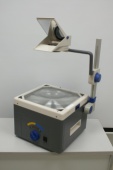
overheadIn my rare spare time, I hold lectures on software engineering at the University of Cooperative Education in Karlsruhe. The topics range from evergreens like UML to modern subjects like aspect oriented programming (AOP) or Test Driven Development (TDD).
One thing I observe is that students don’t have difficulty separating the old topics from the current ones, even if they hear both of them for the first time. It seems that subject matter ages by itself, just like source code does. So, I’m constantly searching for new topics to include in the lectures, replacing the oldest ones.

Three things to include in your lectures

Some months ago, I read a very good blog post written by Alan Skorkin, titled “3 Things They Should Have Taught In My Computer Science Degree”. Alan covers three points:

  1. Open Source Development
  2. An Agile Process (e.g. XP, Scrum)
  3. Corporate Politics/Building Relationships

The idea of missed opportunities to tell some fundamentals to my students struck me. I compared my presentations to the list, finding the leading two topics covered to a great extent. The last one, corporate politics, is a bit off-topic for a technical lecture. But nevertheless, it’s too important to omit completely, so I already had included some Tom DeMarco lessons in my presentations. Perhaps I can build this part up a bit in the future.

What they should have taught me

Soon afterwards, I though about things my lecturers missed during my study. Here’s the list with only two points in addition to Alan’s list:

  • Age and “maturity” of topic: When I was a student, I quickly identified old topics, like my students do nowadays. What I couldn’t tell was if a topic was mature (a classic) or just deprecated. It would have helped to announce that a topic was necessary, but of little actual relevance in modern software development craftmanship. Or that a topic is academical news, but yet unheard of in the industry and lacking wide-spread acceptance. Both extremes were blended together in the presentations, creating an unique mixture of antiquated and futuristic approaches. This is a common problem of Advanced Beginners in the Dreyfus model.
  • Ergonomics and Effectiveness: I still can’t believe I didn’t hear a word about proper workplace setup from my teachers. I had courses teaching me how to learn, but not a single presentation that taught me how to work. This topic ranges from the right chair over lighting to screen size and quantity and could be skimmed over in less than an hour. But it doesn’t stop with the hardware. Entire books like Neal Ford’s “The Productive Programmer” cover the software side of effective workplace setup. And even further, the minimal set of tools a software developer should use (e.g. IDE, SCM, CI, issue tracker, Wiki) wasn’t even mentioned.

I hope to provide all these topics and information to my students in a recognizable (and rememberable) manner. They deserve to learn about the latest achievements in software engineering. Otherwise you aren’t prepared to work in an industry changing fundamentally every five to ten years. Of course, hearing about the classic stuff is necessary, too.

Give me feedback. What are your missed topics during apprenticeship, study or even work?

Update: In case you can’t visit my lectures but want to know a bit about ergonomics, I’ve written two blog articles on this topic:

Make it visible: The Project Cockpit

How to use a whiteboard as information radiator for project management, showing progress, importance, urgency and volume of projects.

We are a project shop with numerous customers booking software development projects as they see fit, so we always work on several projects concurrently in various sub-teams.

We always strive for a working experience that provides more productivity and delight. One major concept of achieving it is “make it visible”. This idea is perfectly described in the awesome book “Behind Closed Doors” by Johanna Rothman and Esther Derby from the Pragmatic Bookshelf. Lets see how we applied the concept to the task of managing our project load.

What is the Project Cockpit?

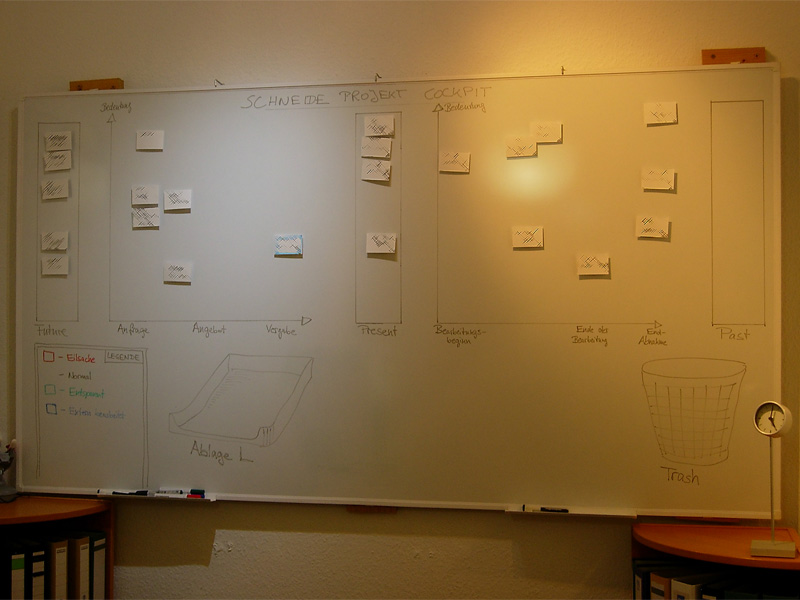
The Project Cockpit is a whiteboard with titled index cards and separated regions. If you glance at it, you might be reminded of a scrum board. In effect, it serves the same purpose: Tracking progress (of whole projects) and making it visible.

Here is a photo of our Project Cockpit (with actual project names obscured for obvious reasons):

cockpit1

How does it work?

In summary, each project gets a card and transitions through its lifecycle, from left to right on the cockpit.

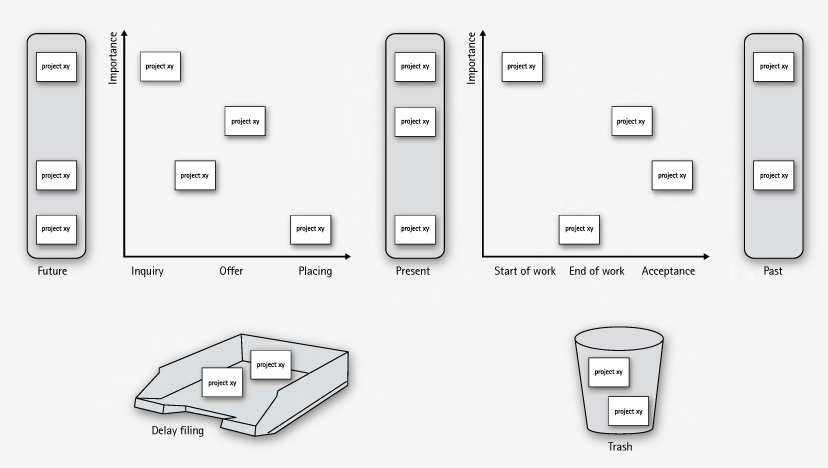
The Project Cockpit consists of two main areas, “upcoming projects” and “current projects”. Both areas are separated into three stages eachs, denoting the usual steps of project placing and project realization.

Every project we are contacted for gets represented by an index card with some adhesive tape and a whiteboard magnet on its back. The project card enters the cockpit on the left (in the “future” or “inquiry” region) and moves to the right during its lifecycle. The y-axis of the chart denotes the “importance” of the project, with higher being more important.

cockpit2

In the “upcoming” area, projects are in acquisition phase and might drop out to the bottom, either into the “delay filing” or the “trash”. The former is used if a project was blocked, but is likely to make progress in the future. The latter is the special place we put projects that went awry. It’s a seldom action, but finally putting a project card there was always a relief.

The more natural (and successful) progress of a project card is the advance from the “upcoming” area to the “present” bar. The project is now appointed and might get a redefinition on importance. Soon, it will enter the right area of “current” projects and be worked on.

The right area of “current” projects is a direct indicator of our current workload. From here on, project cards move to the rightmost bar labeled “past” projects. Past projects are achievements to be proud of (until the card magnet is needed for a new project card).

If you want to, you can color code the project cards for their urgency or apply fancy numbers stating their volume.

What’s the benefit?

The Project Cockpit enables every member of our company to stay informed about the project situation. It’s a great place to agree upon the importance of new projects and keep long running acquisitions (the delay filing cases) in mind. The whiteboard acts as an information radiator, everybody participates in project and workload planning because it’s always present. Unlike simpler approaches to the task, our Project Cockpit includes project importance, urgency and volume without overly complicating the matter.

The whiteboard occupies a wall in our meeting room, so every customer visiting us gets a glance on it. As we use internal code names, most customers even don’t spot their own project, let alone associate the other ones. But its always clear to them in which occupancy condition we are, without a word said about it.

Ultimately, we get visibility of very crucial information from our Project Cockpit: When the left side is crowded, it’s a pleasure, when the right side is crowded, it’s a pressure 😉

“Tag, you’re it!” – how we manage our blog heartbeat

We successfully revived a nearly abandonded blog by using a token and a few metaphors.

The new year 2009 just started. A great opportunity to review some things. Here is a review of our blogging.

heartbeatWe started this blog in February 2007. Soon afterwards, it was nearly dead, as no new articles were written. Why? We would have answered to “be under pressure” and “have more relevant things to do” or simply “have no idea about what to write”. The truth is that we didn’t regard this blog as being important to us. We didn’t allocate any ressources, be it time, topics or attention to it. Seeming unimportant is a sure death cause for any business resource in any mindful managed company.
The Revival

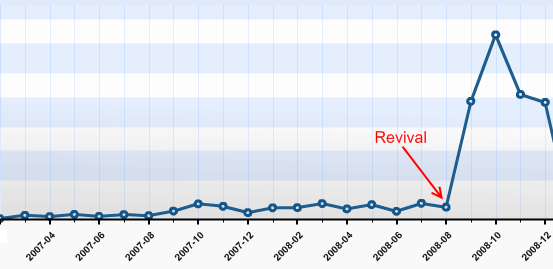
This changed in late August 2008, after we heard from several sources that our articles published so far were very promising. Some new contacts even asked about our Code Flow-O-Meter before they asked any other question. So we sat together and thought about a way to revive this blog with minimal possible effort. We came to the conclusion that, being a four-man-show company, it would be sufficient for everyone to write one blog article a month in order to show a weekly blog heartbeat. It’s simple math. The same discussion led to the conclusion that blogging in english would reach a broader audience.

It’s a management problem

This laid the foundation for a few new blog entries, as everyone was eager to tell some news. But how could we manage the blog heartbeat in a sustainable fashion, with minimal effort and attention of the individual?

blogtoken

We decided to give the “Blog Token” a try. This token is nothing more than a little index card informing you that you are responsible for the blog entry in the next week. You can keep the index card on your desk or take it with you to remind you of the task. If you published your entry, you hand it over to the following team member in line. The token order is defined on a very viewable whiteboard. It took us 5 minutes to set up the token and define the order. Everything else is managed by the one who wants to get rid of the token and the one who receives it.

It doesn’t work without metaphors

When we reviewed the process, we realized that without a few maxims and their impact, things would have gone astray even with the token in place. Here are some of our maxims, spelled by the metaphors we found for them:

  • “blog heartbeat”: When you want to “keep it flowing” in a sustainable pace, you need to have a pace first. We defined that our blog is alive when it has a periodic heartbeat. Weekly articles seemed to be a good start and were approved in every review yet.
  • “to grow vegetables”: Good ideas (and good blog topics) need to evolve and grow. You need to care about them for an amount of time and publish them when they are mature. But first of all, you need to put the seeds for ideas (and blog topics) in your garden. Whenever somebody mentions something that might be worth a blog entry, somebody calls “this is a vegetable!”. A first sketch of a new blog entry (a new vegetable in your garden) is born in this moment. To be honest, some vegetables starve over time.
  • “it’s not a competition”: We try to publish high quality blog entries. But it’s more important to us to tell you about our favorite vegetable (see second metaphor) than to win a pulitzer price for every article. We even try to remind ourselves that we do not compete for the recoginition from our readers (you, in this case!). To be honest here, too: Though it’s not a contest, we issued an internal price for our most read article: Using Hudson for C++/CMake/CppUnit

Reviewing the Revival

We revived our blog with three ingredients:

  • Our commitment (“it’s important to us”)
  • The Blog Token (“tag, you’re it!”)
  • Metaphors (“everyone can grow vegetables”)

Telling from the statistics, it simply skyrocketed us:

blog-stats

Thank YOU, our blog visitors, for making this possible. It’s been a great experience for us and we are looking forward to continue our blog heartbeat in 2009 with fully stacked vegetable gardens. Stay tuned and if you like, share your thoughts (or just say hello) by adding a comment. We really appreciate your opinion.

Der blinde Fleck von Continuous Integration

Blinder FleckAn english version of this blog entry can be found at https://schneide.wordpress.com/2009/12/28/a-blind-spot-of-continuous-integration/

Am Montag früh brach nach einem Routine-Update unseres CI-Servers und anschließendem manuell gestartetem Baudurchgang plötzlich ein Test in einem Projekt, das seit Wochen keine Änderung mehr erfahren hatte.

Die Analyse des Tests zeigte relativ schnell, dass offensichtlich die A-TRIP Regeln für gute Unit Tests verletzt wurden und der Test unter Verwendung des aktuellen Zeitpunkts Datumsberechnungen in die Zukunft und die Vergangenheit testet. Am Sonntag früh wurde auf Sommerzeit umgestellt, so dass dem Test plötzlich eine Stunde in der Vergangenheitsberechnung fehlte.

Den Test zu beheben war einfach, allerdings war er bereits seit Mai 2006 im Projekt enthalten. Seitdem muss dieses Projekt immer um die Zeitumstellung herum inaktiv gewesen sein. Unser Continuous Integration hat das Problem jedenfalls erst jetzt (und auch da nur durch den Zufall einer CI-Aktualisierung zum richtigen Zeitpunkt) gefunden.

Die Phänomene, die durch ungeschickte Unit Tests hervorgerufen werden, sind mit einem verdachtunabhängigen Nightly Build scheinbar zuverlässiger zu finden als mit Continuous Integration. Eine Kombination beider Techniken scheint uns nach dieser Erfahrung lohnenswert zu sein.

Unabhängig von CI oder Nightly Builds gilt: Ein Unit Test, der den Konstruktor von Date, DateTime, Calendar oder einer ähnlichen Klasse aufruft, ist vermutlich ein schlechter Unit Test.

“Poor man’s reporting” oder Ultraleichtgewichtiges Java Reporting

In den meisten unserer Softwarelösungen wird irgendwann irgendeine Form von Reportdokument erstellt. Meist fällt dem Kunden ein, dass er gerne ein hübsches Pdf mit Messwerten und ein paar Diagrammen hätte. Im Laufe der Zeit haben wir diverse freie (sowohl wie in Bier als auch Rede) als auch kommerzielle Lösungen ausprobiert und eingesetzt. Darunter sind u.a. Jasper Reports und RReport, jedoch hatten sie alle ihre mehr oder weniger großen Haken und Ösen. Die meisten teureren kommerziellen Lösungen (wie z.B. Big Faceless PDF) kamen wegen des jeweiligen Projektumfangs und den wenigen benötigten Features nicht in Betracht.

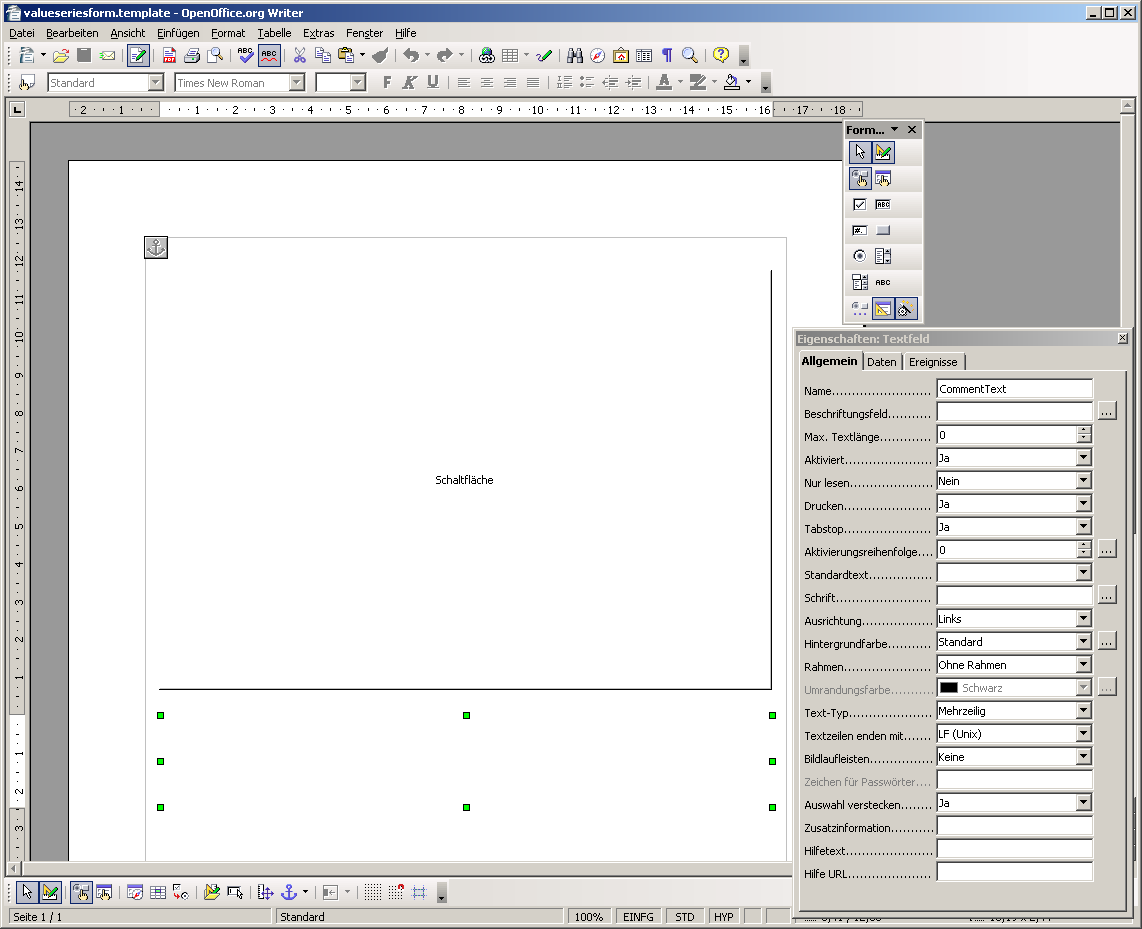
Nach der Lektüre von iText in Action zur Pdf-Erzeugung und -Manipulation und der Suche nach einem Werkzeug, mit dem man einfach und bequem Acroforms erzeugen kann kristallisierte sich eine neue, extrem leichtgewichtige Lösung für das Reporting-Problem heraus: OpenOffice und iText. Carl Young beschreibt in seinem Blog die Benutzung von OpenOffice als Designwerkzeug für Acrobat Forms.OpenOffice Form

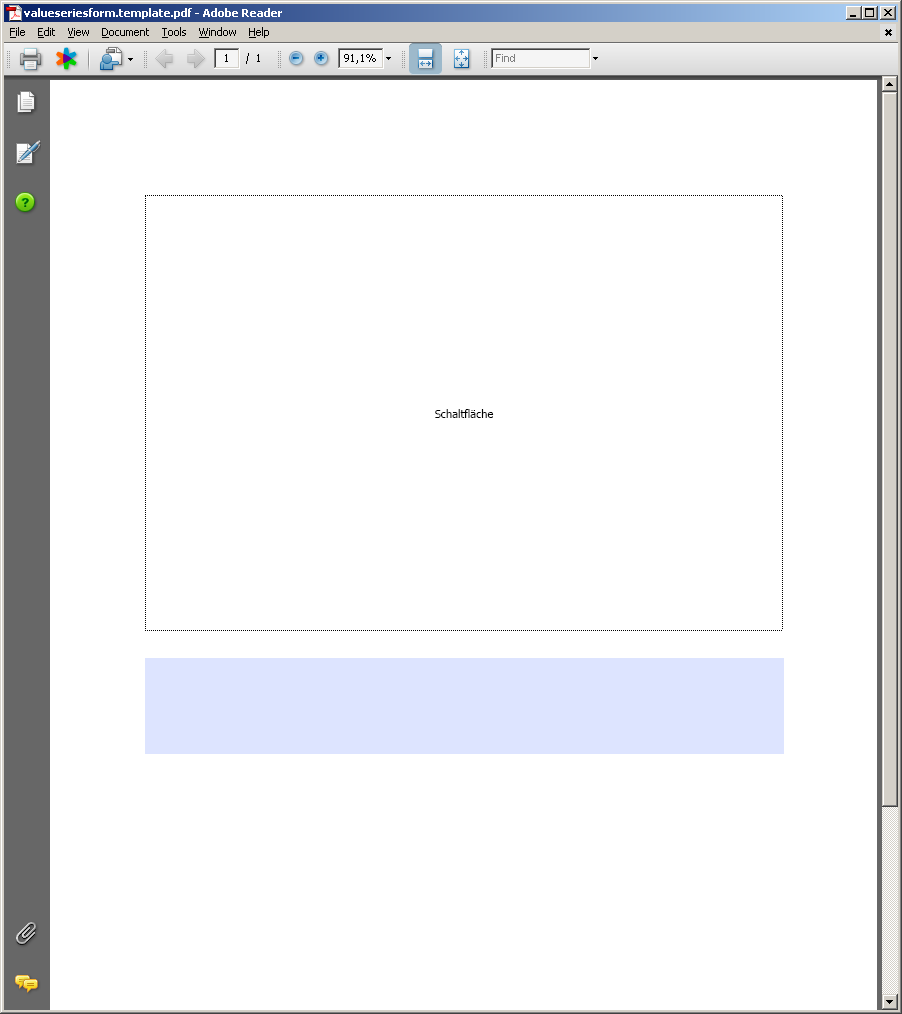
Solche Pdf-Formulare lassen sich relativ einfach mit iText ausfüllen und mit Bildern versehen und dann abspeichern.

Form in AcrobatFilled Form

Damit hat man eine pure Java-Lösung in der Software und ein mächtiges, plattformübergreifendes Designwerkzeug für die Reports.

Die augenscheinlichsten Vorteile dieser Lösung sind:

  • Reportvorlagen liegen in Pdf vor, sind somit von jedem einsehbar und kontrollierbar
  • Die Quellen für die Reportvorlagen können mit OpenOffice erstellt und geändert werden und einfach per Knopfdruck als Pdf exportiert werden
  • Die Reportdaten können in beliebigen Formaten abgelegt oder im Programm generiert werden und dann mithilfe von iText in das Pdf-Formular übertragen werden

Die bisher festgestellten Nachteile sind je nach Einsatzzweck vernachlässigbar, können aber auch zum Showstopper werden:

  • Man muss immer feste Bereiche für die Daten festlegen, sind diese zu groß, werden sie wahlweise skaliert oder abgeschnitten (geht sowohl mit Bildern als auch mit Text!). Hat man also einen langen Fließtext und der Platz im Formularfeld reicht nicht aus, so hat man ein ziemliches Problem.
  • Man bekommt kein Format für die Formulardaten selbst geschenkt, sondern muss sich selbst um deren Speicherung kümmern, um den selben Report zu einem späteren Zeitpunkt neu zu erstellen oder die Reportdaten zur weiteren Verarbeitung bereitstellen zu können. Die programmatische Extraktion der Reportdaten aus dem fertigen Pdf-Report ist extrem aufwändig bis unmöglich.

Die bisherigen Erfahrungen mit dieser OpenOffice+iText-Lösung sind sehr positiv und helfen auch sehr bei der Kommunikation mit dem Kunden. In manchen Fällen fühlt sich dieser aufgrund der Textverarbeitung sogar in der Lage, selbst Layoutänderung auszuprobieren und durchzuführen. Selbst ungeschickte Entwickler bekommen durch OpenOffice mit vergleichsweise geringem Einarbeitungsaufwand ansehnliche Reports hin oder können die Sekretärin damit beauftragen. Kostenlos ist die ganze Lösung noch dazu.

Mein Bug, dein Bug

Historisch wertvolles TerminalIm Jahr 2002 entwickelten wir Software für eine Messapparatur, die unter anderem mit einer historisch wertvollen Datenbank über eine VT3270-Terminalemulation kommunizieren musste. Der Datenaustausch geschah über kleine Textdateien, die ausgelesen oder geschrieben wurden. Das Format der Textdateien war strikt spezifiziert und auf ein Minimum reduziert. Einige Messwerte mussten im “wissenschaftlichen Format” übergeben werden:
1.32E-01 ist gleichwertig zu 0.132

Wichtig an der Spezifikation war, dass das Format nach dem Exponententrenner “E” immer ein Vorzeichen haben musste, d.h. es wurde für den Wert 132 nicht 1.32E02, sondern 1.32E+02 erwartet.

Dummerweise hatte das damals verwendete Java 1.4.0 genau an dieser Stelle einen Bug:
http://bugs.sun.com/bugdatabase/view_bug.do?bug_id=4691683
Das Format +0.00000E00 erzeugt Wertrepräsentationen wie “+1.32E+02”, aber auch solche Kuriositäten wie “+1.32E-+01”.

Interessant ist dabei, dass das Vorzeichen des Formats im Exponenten wiederholt wird. Manuelles Entfernen der überflüssigen “+”-Zeichen brachte damals das gewünschte Ergebnis in die Dateien.

Dummerweise war das nicht der einzige Bug in Hinsicht auf das wissenschaftliche Formatieren in Suns DecimalFormat, so dass mit der Version Java 1.5 das Format “+0.00000E00” Wertrepräsentationen wie “+1.32E02”, aber auch Kuriositäten wie “+-1.32E02” erzeugt.

Mit der Änderung der Java-Version kam also ein vor Jahren durch Workaround behobener Fehler zurück, da jetzt (unter anderem) der Workaround zum Fehler wurde.

Was habe ich aus dieser Episode gelernt? Liefere möglichst kein spezifiziertes Format aus, das nicht mit Unit Tests vollständig abgesichert wurde. Und vor allem: Sichere jeden Bugreport, der nach außen geht, mit einem entsprechenden Test ab. Denn wenn der Bug nicht mehr da ist, wird auch der Workaround hinfällig und im schlimmsten Fall sogar selbst zum Bug.

It’s not a bug, it’s coolness

In alten Eclipse-Versionen wurden Anwendungen meistens über den “Run-Button” gestartet. Ein Klick und die vorher gestartete Anwendung wurde erneut gestartet. Das war an sich ganz praktisch, aber für “Code->Run Test->Run Application”-Zyklen leider unpassend.

Also erfanden das Eclipse-Team eine neue Funktionalität für den alten Knopf: Context launching. Leider wurde vergessen, dies dem Benutzer mitzuteilen. Der Knopf sieht aus wie früher, verhält sich (meistens) wie früher und hat auch sonst keine neuen Features. Nur manchmal, heimlich, wechselt der Kontext und man startet völlig unvorhergesehene Dinge.

Zuerst mal ein paar gute Nachrichten zu diesem Feature:

Damit hören die guten Nachrichten aber auch schon auf und die Probleme fangen an. Eine kleine Sammlung an Bugs zum Thema findet sich in den Links.

Das Feature wird bleiben – und damit eine meiner Meinung nach mittlere Usability-Katastrophe.

  • Alle Veteranen des “Run-Button” müssen umlernen oder die Funktion deaktivieren (anstatt es bei geeigneter Coolness bewusst zu aktivieren). Ok, das ist nur ein temporäres Problem der nächsten Monate
  • Der Kontext, und damit die “Intelligenz” im Hintergrund der Entscheidung, bleibt unsichtbar. Keine Farbe, kein Sinnbild, kein Ton. Ich bin wahrlich geübt im Umgang mit interrelationsreichen Computerprogrammen und Geräten, aber diesen Kontext habe ich nicht intuitiv erfasst.
  • Der Knopf bietet keinerlei Hinweis darauf, dass er jetzt etwas anderes tun wird als gerade eben noch. Er bietet auch keinen Hinweis darauf, was er jetzt tun wird. Schon eine leichte Umfärbung bei einem Kontextwechsel wäre zumindest ein Anfang.
  • Der Knopf funktioniert entweder mit Kontext oder ohne (im sogenannten Last-launch-Modus). Eine Art “Modus-Umschaltung” durch gedrückte Shift-Taste oder ähnlich gibt es nicht. Hier hilft nur der Weg durch die globalen Einstellungen oder das Bewusstmachen des Kontextes.

Fazit: Intention des Eclipse-Teams war die Erhöhung der Coolness der IDE. Erreicht wurde meiner Meinung nach eine Verhöhnung versierter Anwender: “Ihr habt es nicht mehr im Griff!”. Echte Coolness braucht den Überraschungsmoment nicht, um zu wirken.


Nachtrag/Ergänzung: In einem Kommentar zum verlinkten Blog-Eintrag des Eclipse-Teams wird davon geredet, dass das Feature sehr praktisch ist, wenn Eclipse im Tutor-Betrieb vor Studenten eingesetzt wird. Ich hoffe, trotz der unbestrittenen Wichtigkeit der Lehre, dass dies nicht der anvisierte bzw. hauptsächliche Einsatzzweck für Eclipse sein soll.