Find the bug: Groovy and autogenerated equals

Every program has bugs. Even autogenerated code from IDEs. Can you spot this one?

Take this simple Groovy class:

public class TestClass {
    String s
}

Hitting ‘autogenerate equals and hashCode’ a popular IDE generates the following code:

public class TestClass {

    String s


    boolean equals(o) {
        if (this.is(o)) return true;

        if (!o || getClass() != o.class) return false;

        TestClass testClass = (TestClass) o;

        if (s ? !s.equals(testClass.s) : testClass.s != null) return false;

        return true;
    }

    int hashCode() {
        return (s ? s.hashCode() : 0);
    }
}

At first this looks unusual but ok, but taking a closer look there is a bug in there, can you spot it? And even better: write a test for it?

Lessons learned:

  • If something looks suspicious write a test for it.
  • Question your assumptions. There is no assumption which is safe from be in question.
  • Don’t try to be too clever.

Prettier failures using Swing TaskDialog

An introduction to the Swing TaskDialog project, a fine little gem to spice up your (java swing) dialogs. Includes a real usage example.

The standard way to present graphical user interfaces (GUI) on a desktop machine in java is to use Swing. It’s a very flexible API with a steep learning curve and some oddities (e.g. EDT handling is cumbersome at least), beginning to show some age. There were several attempts to take the Swing experience to a new level, including the marvellous book “Filthy Rich Clients” by Chet Haase (we miss you in the Java camp!) and Romain Guy. So Swing isn’t dead or dying, it’s just getting old.

A pain point of Swing

One thing always bothered me with Swing: It is relatively easy to present a basic message or input dialog. But to add slightly more complexity to a dialog suddenly means substantially more effort. Dialogs don’t scale in Swing. If you ever “designed” an error dialog for your end user, presenting the essence of an exception that just occurred, you already know what I’m talking about. I have to make a confession: Our exception/error dialogs were nearly as nasty as the exception itself. But nobody wants to fail nasty.

Swing TaskDialog to the rescue

At late february this year, Eugene Ryzhikov published his Swing TaskDialog project on his blog. His release pace has been a new version once a week since then. So I’m writing on a moving target.

The TaskDialog project provides basic message, progress and input dialogs based on the operating system’s “User Experience Guidelines”. The visual content is very appealing as a result. But the project doesn’t stop here. The programming API is very understandable and to the point. You don’t have to hassle with big concepts to use it, just look at the examples and start from there.

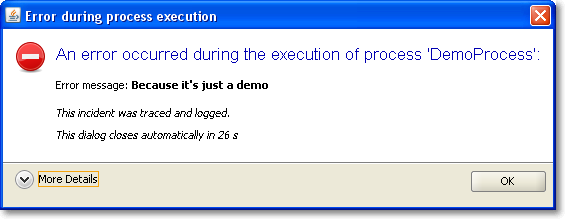
It was a matter of minutes to replace our old, nasty error dialog with a much prettier one using TaskDialog. Here are two screenshots of it in action, with the detail section retracted (initial state) and flipped open.

Of course, this is only the Windows version of the dialog. You should head over to the TaskDialog examples page to get an idea how this might look on a Mac. This is a dialog that’s pretty enough to not scare the user away by sheer uglyness. The code for this dialog is something like:


TaskDialog dialog = new TaskDialog("Error during process execution");
 dialog.setIcon(TaskDialog.StandardIcon.ERROR);
 dialog.setInstruction("An error occurred during the execution of process 'DemoProcess':");

 Exception exception = new Exception("Because it's just a demo");
 StringBuilder detailMessage = new StringBuilder();
 for (StackTraceElement stackTraceElement : exception.getStackTrace()) {
 detailMessage.append(stackTraceElement.toString());
 detailMessage.append("\n");
 }
 dialog.setText("Error message: <b>" + exception.getMessage() + "</b>\n\n<i>This incident was traced and logged.</i>");
 dialog.getDetails().setExpandableComponent(
 new JLabel(Strings.toHtml(detailMessage.toString())));
 dialog.getDetails().setExpanded(false);

 JLabel waitLabel = new JLabel(Strings.toHtml("<i>This dialog closes automatically in 26s</i>"));
 dialog.setFixedComponent(waitLabel);

 dialog.show();

Notice the usage of Strings.toHtml() to convert plain Strings to HTML-rendered rich text elements.

Timed dialogs

If you look at the presented information, you’ll notice it’s just a demo presenting a fake exception. But you’ll notice another thing, too: This dialog is about to close itself automatically soon. This is a speciality of our project: The GUI runs unattended by users for long periods of time. If you encounter an error every ten minutes and an user returns to the screen after a week, the system isn’t accessable without closing a million dialogs first. You might argue why a system error lasts for a week, but that’s a reality in this project we cannot change. So we came up with timed dialogs that go away on their own after a while. The information of the dialog is persisted in the log files that get evaluated periodically.

The TaskDialog API provides easy integration for a GUI widget to be included in the dialog. In our timed dialog use case, it’s a JLabel, as highlighted in the code example at lines 16 and 17. A background thread periodically updates the text and closes the dialog when time runs out. But you’ll find examples with progress bars and other components on Eugene’s blog.

Conclusion

The Swing TaskDialog project is a fine little gem to spice up your application. It’s API is simple, yet powerful and has proven customizable to our special use case. Finally, effort for basic dialogs in Swing scales again.

CMake Builder Plugin in Master/Slave Setups

Making the CMake Builder plugin for Hudson behave in master/slave settings.

The first versions of the cmake builder plugin were developed more or less only driven by our own needs. As people began to use it an issue came up that we hadn’t considered yet: distributed builds, a.k.a master/slave mode. So on our first OSLD in 2010 I looked into the plugin and began to rectify the situation.

My test setup consisted of a hudson master on WindowsXP box which was connected via SSH to a slave node in a Ubuntu virtual machine. The first errors were easy to find. The plugin tried to find all configured paths on the windows host and not on the ubuntu slave.

Experience from our previous Crap4J plugin development and a quick read here brought me on the right track. It’s not a good idea to use just java.io.File if you want your plugin to be master/slave capable – use hudson.FilePath instead.

So after replacing all java.io.File occurrences with hudson.FilePath the situation was much better. The plugin handled all paths correctly but still produced errors when calling cmake. I quickly discovered that java.lang.Process and java.lang.ProcessBuilder were used to call “cmake -version”. Again, not a good idea – hudson.Launcher is your friend here.

After replacing Process with Launcher I had only one strange error left. The following launcher call using a nice fluent interface wouldn’t execute on the remote machine but insisted to execute locally.

launcher.launch().cmds(cmakeCall).envs(environmentVars)
   .stdout(listener).pwd(workDir).join();

When I changed it to the seemingly equal statement

launcher.launch(cmakeCall, environmentVars,
    listener.getLogger(), workDir).join();

it worked like a charm.

After all those changes I proudly present the newest version of CMake Builder Plugin which is now ready to be used in distributed environments.

Only one little unpleasantness still exists, though: when configuring the make and install commands the plugin tries to find the executables on the PATH of host machine. For now, you can just ignore the error message. I try to look into it, soon. Apart from that, have fun with the new version.

Follow-up to our Dev Brunch March 2010

A follow-up to our March 2010 Dev Brunch, summarizing the talks and providing bonus material.

Yesterday we held our Dev Brunch for this month. It was the second brunch in our new office, with some attendees visiting it for the first time. The reactions were the same: “I want to move in here!”. The topics were of different kinds, from live presentations to mere questions open for discussion.

The Dev Brunch

If you want to know more about the meaning of the term “Dev Brunch” or how we implement it, have a look at the follow-up posting of the brunch in October 2009. We continued to allow presence over topics. These topics were discussed today:

  • Singleton vs. Monostate – We all know that Singletons are bad for your test coverage, they make a poor performance on your dependency chart and are generally seen as “evil”. We discussed the Monostate pattern and if it could solve some of the problems Singletons inherently bring along. Based upon the article from Uncle Bob, we concluded that Monostates are difficile at least and don’t help with the abovementioned problems.
  • What is “agile” for you? – This simple question provoked a lot of thoughts. You can always obey the Agile Manifesto word by word without understanding what the deeper motives are. The answer that fitted best was: “You can name it when you see it”. We concluded that it’s easy and common practice to label any given process “agile” just to sound modern.
  • News around Yoxos – If you are using Eclipse, you’ve certainly heard about Yoxos already. Now during the EclipseCon 2010, good news were announced. We got a sneak peek on the new Yoxos Launcher and how it will help in managing your pack of Eclipse installations. We are looking forward to become beta testers because we can’t wait to use it.
  • Teaser talk for “Actors in Scala” – The actor paradigm for parallel programming is a promising alternative to threads. While threads are inevitable complex even for simple tasks, actors seem to recreate  a more natural approach to parallelism. This talk was only the teaser for a more in-depth talk next time, with hands-on code examples.
  • Properties in Scala – This talk had lots of code examples and hands-on discussion about the Properties feature of Scala. Properties are an elegant way to reduce your boilerplate code for simple objects and to sustain compatibility with Java frameworks that rely on the Java Beans semantics. We clearly understood the advantages, but ran into some strangeness related to the conjoint namespaces of fields and methods along the way. Scala isn’t Java, that’s for sure.
  • Introduction to PreziPrezi is a modern presentation tool in the tradition of the dreaded PowerPoint or Apple’s Keynote. It adds a twist to your presentation by adding two new dimensions: laying out everything on a big single canvas (no slides!) and relying heavily on zooming effects. The online editor is surprisingly usable, yet simple and lightweight. If you want to meet prezi, check out the introduction prezis and the showcase on their homepage.

As usual, the topics ranged from first-hand experiences to literature research. For additional information, check out the comment sections. Comments and resources might be in german language.

Retrospection of the brunch

We keep getting better in timing our talks. We nearly maintained our time limit and didn’t hurry anything. For the next brunch, we are looking forward to use our new office roof garden to brunch and talk in the springtime sun.

Don’t let the tools use you

In today’s software development we use many tools to help us doing our job. Many of them are indispensable. But don’t make yourself a slave of the tool.

In today’s software development we use many tools to help us doing our job. Many of them are indispensable. But don’t make yourself a slave of the tool.
When we create schedules based on our estimates we have a great way to communicate how much work we think needs to be done. But don’t let the schedule fool you: you made an estimate based on your knowledge before you began to work. Maybe you need to change the infrastructure, maybe the new change interferes with a past one, in short you gain knowledge on your way. This knowledge can lead you to adapt or even rework your schedule. Your usual approach for accounting unforeseen obstacles might be to include a risk “pad”. Why not use your new gained knowledge to communicate with your client? Maybe a small change to the planned feature is much easier to implement and the client doesn’t even need the extra flexibility. Or the feature is not that important or worth. Don’t try to hold the schedule at all costs. Estimates are a communication tool not a promise we need to fulfill. (related: read also a 37signals post on It’s not a promise it’s a guess)
Or take a look at your favorite editor or IDE: if you happen to use a new language, source code management system or another new tool, the chances are high that your IDE doesn’t support all features or any features at all. You may be tempted to adapt your way to what your IDE supports. If that suits you it’s definitely ok but don’t let the IDE determine how you make use of the features.
When you use software metrics to measure and control the quality of your code you get a lot of numbers and graphs and hints. Use them when you think they benefit you. Don’t just adhere to them, they are a guideline for you, not a law.

Gesture Touchscreens might render Paper Prototyping useless

With the advent of highly dynamic, gesture-controlled user interfaces for touchscreens, Paper Prototyping seems to lose its applicability.

Paper Prototyping is an highly effective tool to examine the usability of software, even before it is written. The basic idea of Paper Prototyping is that you perform real (software) tasks with real users, but replace everything technical with low-fi substitutes.

Adventures in Low-fi

A typical Paper Prototyping session looks like this:

  • The user gets his task description and has to perform it with the software
  • The computer screen is replaced by an arrangement of paper sheets on a desk
  • The graphical user interface is replaced by hand-drawn copies on paper
  • The computer itself is replaced by a human, mimicking the software responses to input
  • The user operates by finger-pointing or writing with a pen

Advantages of Paper Prototyping

The whole situation described above seems awkward on first look, but is really rewarding for a project in its early stages. The customer has to provide real end user tasks and enough details of the solution to make up a prototype. The team has to produce reasonable drafts of the software GUI and come up with enough understanding of the processes and tasks involved to survive the session without major outages.

The result of a Paper Prototyping session can be used in various ways:

  • Detailed specification of the GUI
  • Use Case or User Story (acted out already)
  • Mock screenshots for the user manual
  • Data for initial acceptance tests

Classical user interface vs. gestures

This approach worked very well as long as the user only had a mouse (pointing, clicking) and a keyboard (writing) at hands. Even then, advanced features like grabbing (drag&drop) or automatic scrolling challenged the creativity of the prototypers. But most GUIs were rather dull and static. The perfect playground for Paper Prototyping.

With the advent of touchscreens, we soon realized that pointing and clicking only needs one finger out of ten. Gestures were introduced to keep all our fingertips busy and to enrich the interaction between user and GUI. We instantly understand the “zoom in” or “scroll down” gestures because it resembles natural behaviour (at least for some of us).

In the wake of gestures, the GUI of our software gets more and more dynamic. The GUI has to be minimalistic so we can control it even with stubby fingers (the new handicap of our generation, compare cell phone key pads). Detailed information has to be provided on demand and only temporarily. Everything can be manipulated. The classical approach to tab through a form (by carefully designed tab orders) isn’t that suitable anymore.

Gestures vs. Paper Prototyping

When using a Paper Prototype, the throughput of scribbled paper is enormous even with the classical GUIs. The more dynamic some dialog is, the more different parts need to be prepared in various states and locations (depending on the fragmentation of the paper screen). With gestures on a touchscreen, the user needs to be able to express them on the screen. Most touchscreen interfaces heavily depend on the (simulated) physical interaction between the fingers and some drawn “objects” on the interface. This is the moment when Paper Prototyping falls short of resembling the real interaction. You just can’t fiddle that fast with all the paper shreds.

No solution yet

I observed this effect when performing a Paper Prototype workshop with my students. The interfaces with classical mouse/keyboard handling performed well in the sessions. Interfaces for touchscreens (iPhone apps were the big newcomer here) just didn’t work out well, especially when downsized to palm size. We weren’t able to come up with a viable solution to make Paper Prototyping perform again for touchscreens and gestures.

Any ideas out there?

Readability of Guard Clauses in Methods

A little story about two opinions on readability of methods containing if-clauses.

Browsing through the code base of one of our customers I frequently stumbled over methods that were roughtly structured like this:

void theMethod
{
  if (some_expression)
  {
    // rest of the method body
    // ...
  }
  // no more code here!
}

And most of the time I was tempted to refactor the method using a guard clause, like so:

void theMethod
{
  if (!some_expression)
  {
    return;
  }
  // rest of the method body
  // ...
}

because this is far more readable for me. When I noticed that the methods were written all by the same guy I told him about by refactoring ideas in absolute certainty that he would agree with me. It came as quite a surprise when, in fact, he didn’t agree with me, at all. Even something like this:

void theMethod
{
  if (some_expression)
  {
    // some code
    // ...
    if (another_expression)
    {
      // some more code
      // ...
    }
    // no more code here ..
  }
  // ... and here
}

was in his eyes far more readable than the refactored version with guard clauses. His rational was that guard clauses make it harder for to see the program flow through the method. And a nested if(…) structure like above was very suitable to express slightly more complicated flows.

All my talks about crappy methods and the downsides of highly indented code were not able to change his mind.

I admit that I can somewhat understand his point about the visibility of the program flow through the method.  And sure, the (nested) ifs increase indentation and the number of possible code paths but since there are no elses and no code after the if-blocks, does that really increase the overall complexity?

Well, I still would prefer smaller methods with guard clauses but as you can see, to a great extend readability lies in the eyes of the beholder.

What do you find readable?

Start with the core

What’s the most important feature you cannot live without? Start with it, you can stop anytime because after that you have a minimal yet usuable system.

If you begin your new product, start from the core functionality. Not the core of the system or architecture.
Ask yourself: What’s the most important feature you cannot live without? Just name one, only one. Build this first and only. Eventually refine or redo if it doesn’t suit your needs. Then continue with the next. You always have a minimal but useable product and can stop anytime.
We once had to develop a web based system where users can file an application which can be reviewed, changed, rated and finally accepted or declined. We started with a web page where you could download a PDF and an email address to send it to when complete. Minimal? Yes. Useless? No. All the functionality which was needed was there. All other stuff could be done via email or phone. It was readily available and useable.
Start with the core.

Verbosity is not Java’s fault

One of Java’s most heard flaws (verbosity) isn’t really tied to the language it is rooted in a more deeply source: it comes from the way we use it.

Quiz: Whats one of the most heard flaws of Java compared to other languages?

Bad Performance? That’s a long overhauled myth. Slow startup? OK, this can be improved… It’s verbosity, right? Right but wrong. Yes, it is one of the most mentioned flaws but is it really inherit to the language Java? Do you really think Closures, annotations or any other new introduced language feature will significantly reduce the clutter? Don’t get me wrong here: closures are a mighty construct and I like them a lot. But the source of the problem lies elsewhere: the APIs. What?! You will tell me Java has some great libraries. These are the ones that let Java stand out! I don’t talk about the functionality of the libraries here I mean the design of the API. Let me elaborate on this.

Example 1: HTML parsing/manipulation

Say you want to parse a HTML page and remove all infoboxes and add your link to a blog box:

        DOMFragmentParser parser = new DOMFragmentParser();
        parser.setFeature("http://xml.org/sax/features/namespaces", false); 
        parser.setFeature("http://cyberneko.org/html/features/balance-tags", false);
        parser.setFeature("http://cyberneko.org/html/features/balance-tags/document-fragment", true);
        parser.setFeature("http://cyberneko.org/html/features/scanner/ignore-specified-charset", true);
        parser.setFeature("http://cyberneko.org/html/features/balance-tags/ignore-outside-content", true);
        HTMLDocument document = new HTMLDocumentImpl();
        DocumentFragment fragment = document.createDocumentFragment();
        parser.parse(new InputSource(new StringReader(html)), fragment);
        XPathFactory factory = XPathFactory.newInstance();
        XPath xpath = factory.newXPath();
        Node infobox = xpath.evaluate("//*/div[@class='infobox']", fragment, XPathConstants.NODE);
        infobox.getParentNode().removeChild(infobox);
        Node blog = xpath.evaluate("//*[@id='blog']", fragment, XPathConstants.NODE);
        NodeList children = blog.getChildNodes();
        for (int i = 0; i < children.getLength(); i++) {
            node.remove(children.item(i));
        }
        blog.appendChild(/*create Elementtree*/);

What you really want to say is:

HTMLDocument document = new HTMLDocument(url);
document.at("//*/div[@class='infobox']").remove();
document.at("//*[@id='blog']").setInnerHtml("<a href='blog_url'>Blog</a>");

Much more concise, easy to read and it communicates its purpose clearly. The functionality is the same but what you need to do is vastly different.

  The library behind the API should do the heavy lifting not the API's user.

Example 2: HTTP requests

Take this example of sending a post request to an URL:

HttpClient client = new HttpClient();
PostMethod post = new PostMethod(url);
for (Entry param : params.entrySet()) {
    post.setParameter(param.key, param.value);
}
try {
    return client.executeMethod(post);
} finally {
    post.releaseConnection();
}

and compare it with:

HttpClient client = new HttpClient();
client.post(url, params);

Yes, there are cases where you want to specify additional attributes or options but mostly you just want to send some params to an URL. This is the default functionality you want to use, so why not:

  Make the easy and most used cases easy,
    the difficult ones not impossible to achieve.

Example 3: Swing’s JTable

So what happens when you designed for one purpose but people usually use it for another one?
The following code displays a JTable filled with attachments showing their name and additional actions:
(Disclaimer: this one makes heavy use of our internal frameworks)

        JTable attachmentTable = new JTable();
        TableColumnBinder<FileAttachment> tableBinding = new TableColumnBinder<FileAttachment>();
        tableBinding.addColumnBinding(new StringColumnBinding<FileAttachment>("Attachments") {
            @Override
            public String getValueFor(FileAttachment element, int row) {
                return element.getName();
            }
        });
        tableBinding.addColumnBinding(new ActionColumnBinding<FileAttachment>("Actions") {
            @Override
            public IAction<?, ?>[] getValueFor(FileAttachment element, int row) {
                return getActionsFor(element);
            }
        });
        tableBinding.bindTo(attachmentTable, this.attachments);

Now think about you had to implement this using bare Swing. You need to create a TableModel which is unfortunately based on row and column indexes instead of elements, you need to write your own renderers and editors, not talking about the different listeners which need to map the passed indexes to the corresponding element.
JTable was designed as a spreadsheet like grid but most of the time people use it as a list of items. This change in use case needs a change in the API. Now indexes are not a good reference method for a cell, you want a list of elements and a column property. When the usage pattern changes you can write a new library or component or you can:

  Evolve your API.

Designed to be used

So why is one API design better than another? The better ones are designed to be used. They have a clearly defined purpose: to get the task done in a simple way. Just that. They don’t want to satisfy a standard or a specification. They don’t need to open up a huge new world of configuration options or preference tweaks.

Call to action

So I argue that to make Java (or your language of choice) a better language and environment we have to design better APIs. Better designed APIs help an environment more than just another new language feature. Don’t jump on the next super duper language band wagon because it has X or Y or any other cool language feature. Improve your (API) design skills! It will help you in every language/environment you use and will use. Learning new languages is good to give you new viewpoints but don’t just flee to them.

Speed up your buildbox, Part IV: Beyond the box

This is the fourth and last part of a series on how to boost your build box without much effort. This episode talks about possible measures to increase the build performance when a single box isn’t enough.

© Friedberg - Fotolia.comIn the first three parts of our effort to speed up our buildbox, we replaced the harddisk with a RAM disk, upgraded the CPU to the top-notch model and installed plenty of fast RAM. This brought the build time down from 03:30 minutes to around 02:00 minutes. The CPU frequency was the biggest time saving factor in our case study. Two minutes is as fast as the build can get for our project without fiddling with the actual build process. It’s sufficient for our case, but it may not for yours.

Even top speed is too slow

Lets assume we maxed out the hardware and still have a build duration far beyond the magical ten minutes mark. What can we do now? There are two viable options at hand if you can exclude the possibility that your build process is really inefficient and needs optimization. In the latter case, it would be better to revise the process instead of the build infrastructure.

Two ways to speed up your build infrastructure

You can go down one or both of two general paths to speed up your build process. To understand the examples, lets assume the build takes 20 minutes to run on your top-notch build box.

  • Add more build boxes. This is the classical “parallelize it!” approach. It won’t speed up the individual build process, but enable more processes to run at the same time. This approach wont change anything if your team does seldom check-ins, which in itself is an anti-pattern to continuous integration. But if your team commits changes every ten minutes, having at least two build boxes will prevent the second committer from waiting 30 minutes on the CI results. Instead, the results will always be there after 20 minutes. You haven’t exactly sped up your build process, but the maximal waiting time of your committers. For details on the implementation, see below at “Growing a build park“.
  • Chop up your build process. This is known as “staging” or “pipelining” your build. This won’t speed up the individual build process, either, but deliver certain partial results of your build earlier. Lets assume you can split your build process into four distinct stages: compile, unit test, integration test, package. Whenever a stage yields a result, the comitter gets feedback immediately. In our example, this might be every 5 minutes. This has several disadvantages, as for example discussed in the article “The pipeline of doom” by Julian Simpson, but can lower the waiting time for specific aspects of your build drastically. You haven’t exactly sped up your build process, but the response time for partial results and therefore the average waiting time of your committer. For details on the implementation, see below at “Installing a build pipeline“.

Growing a build park

If you want to reduce the initial waiting delay of a build before it gets processed or increase the throughput of builds, the build farm pattern is your way to go. By adding slave build machines to your build master, you can distribute the workload on more shoulders. The best way to set up your infrastructure is to introduce a dedicated master box that only delegates actual builds to its slaves. The master box handles the archivation of build artifacts and deals with the web server requests, while the slaves only perform build tasks. The master box can be of average power, with increased storage size, while the slaves should be ultra-fast, without the need of big disks. Solid state disks or even RAM disks of the slaves can be tuned to actual workspace sizes, as it is all that needs to be stored there.

Distributed builds with Hudson

The Hudson continuous integration server has a strength in setting up these master/slave scenarios. It’s ridiculously easy to set up a build slave. You basically only need to click on a link to start the slave process. If you happen to have a standard build, everything needed gets downloaded automatically. If you want your slaves to operate automatically, you can install a windows daemon, provide a SSH account or write your own script. Usually, slaves are set up in a matter of minutes without hassle. A great idea is to turn powerful collegue boxes into build slaves (aka CI zombies) by booting an USB stick. The best way to start with master/slave builds is to turn your current PC into a hudson slave right now by using the Java Web Start method.

Installing a build pipeline

If you are interested in early but incomplete feedback from your build box, staging your build will help you out. If partitioned right, you’ll receive a series of answers on specific questions from your build process. The questions may be like:

  1. Will it compile?
  2. Will it pass the unit tests?
  3. Will it function (pass the integration tests)?
  4. Will it blend?

Ok, the last question is rather unlikely to be answered by your build box. The overall build process will not be any faster, but basic safety test results are reported earlier. If you combine this approach with distributed builds, there is the possibility to designate specifically tuned machines to different stages. The Hudson continuous integration server has the ability to tag a slave with different labels. You can then configure your build to only run on slaves with the desired label assigned.

Staged builds with Hudson

Staging with the Hudson continuous integration server isn’t as easy as the master/slave feature, but there are some plugins that allow for more complex setups. You might experience some functionality that’s still under development, but basic staging is possible even today. In combination with specialized slave build boxes, this approach can lower your build duration. It is a a complex endeavour, though.

Conclusion

Once your single build box is maxed out but still not fast enough, you enter a different realm of continuous integration infrastructure setups. Speeding up a build process beyond the single box isn’t as easy as installing more RAM. But with a fair amount of planning, you have a fair chance to improve the situation. Note that you won’t primarily lower build duration, but increase throughput and utilize partitioning and specialization. These are different measures and might not affect the wall clock time of your build. The combination of staging and distribution is the most powerful setup, but will result in the most complex infrastructure to maintain. Before entering this realm, be sure to apply any possible optimization to your build process. Because you’ll not leave that realm again soon.

What’s your story on build optimization beyond the box? Drop us a comment.