A DSL for deploying grails apps

Everytime I deploy my grails app I do the same steps over and over again:

  • get the latest build from our Hudson CI
  • extract the war file from the CI archive
  • scp the war to a gateway server
  • scp the war to the target server
  • run stop.sh to shutdown the jetty
  • run update.sh to update the web app in the jetty webapps dir
  • run start.sh to start the jetty

Reading the Productive Programmer I thought: “This should be automated”. Looking at the Rails world I found a tool named Capistrano which looked like a script library for deploying Rails apps. Using builders in groovy and JSch for SSH/scp I wrote a small script to do the tedious work using a self defined DSL for deploying grails apps:

Grapes grapes = new Grapes()
def script = grapes.script {
    set gateway: "gateway-server"
    set username: "schneide"
    set password: "************"
    set project: "my_ci_project"
    set ciType: "hudson"
    set target: "deploy_target.com"
    set ci_server: "hudson-schneide"
    set files: ["webapp.war"]

    task("deploy") {
        grab from: "ci"
        scp to: "target"
        ssh "stop.sh"
        ssh "update.sh"
        ssh "start.sh"
    }
}

script.tasks.deploy.execute()

This is far from being finished but a starting point and I think about open sourcing it. What do you think: may it help you? What are your experiences with deploying grails apps?

Analyzing Java Heap problems Part 2: Using Eclipse MAT

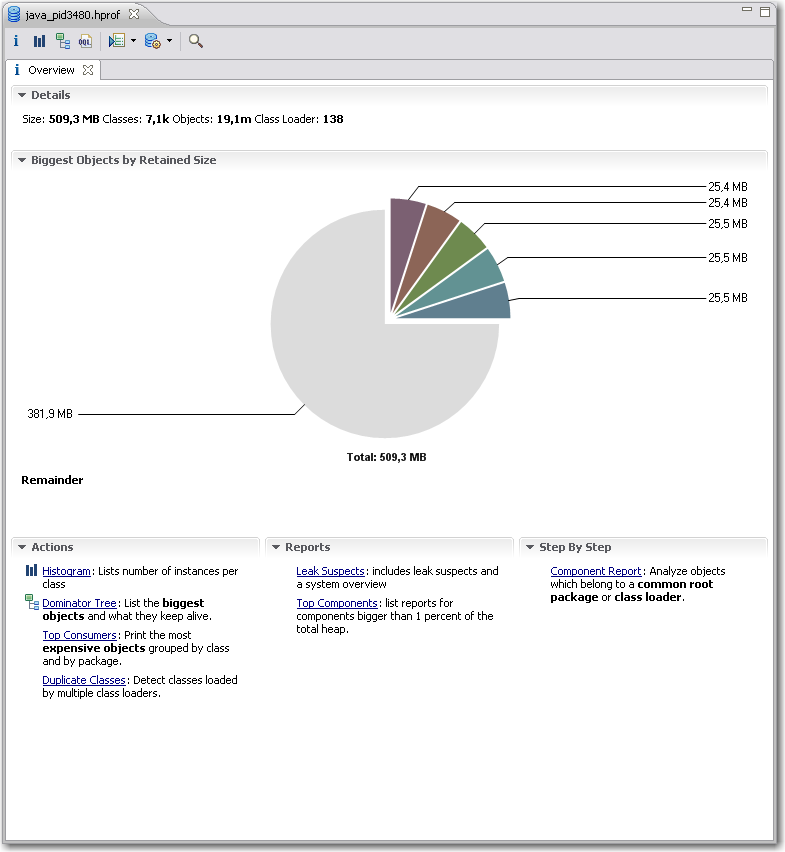
In part one we saw how to obtain the data to analyze, the heap dumps. Now we are looking into a nice plugin for the Eclipse IDE for analyzing the dumps.  Compared to the basic tools described in the previous article Memory Analyzer Tool (MAT) offers better usability, performance and some high level analysis and report tools.Eclipse MAT Overview After you open a hprof heap dump with MAT it will generate index files for faster access to all the data you are interested in and show an overview with nice charts.  From here you have access to other views and features:

  • The histogram is somewhat similar to what jHat offers.mat-pathtogcroot It allows you to browse, sort and filter the object instances in memory and shows you instance count and the shallow heap (memory used only by this object instance) and retained heap (memory used by this object instance including referenced objects). From the context menu you can choose “Merge Shortest Paths to GC roots” to see the reference chain of an object all the way up to the classloader. Here we can see that the JDateChooser registers itself at the MenuSelectionManager as a listener which can cause serious memory leaks as described in another post about Java memory handling.
  • The dominator tree allows you to quickly identify the biggest objects and what they reference. Again, using the context menu on an item in the list offers many options to dive deeper into the analysis.
  • The object inspector gives you detailed information about the selected objects like shallow and retained size, its fields and the class loader by whom it was loaded.
  • The leak suspects report tries to give you some high level hints about possible causes of memory problems of your application.
  • MAT Component ReportThe component report provides some very interesting statistics about Strings and collection usage which might be worth looking at if you are not hunting down leaks but trying to reduce overall memory usage. You can even get performance hints when many overfull HashMaps are detected or there are many empty collections which could be better lazily created.

I personally am using the histogram and the dominator tree the most because I am a technical guy and like to hunt down the problems in the code. Nevertheless the reports may show use other valuable aspects which you did not think of before. The MAT team are expanding the tools nicely on that side so that the benefit of these reports is ever increasing.

It is very likely that when you analyze large heap dumps you may need to increase the Java heap size for Eclipse by using the -vmargs -Xmx<memory size> parameter. That way you are able to analyze big heaps > 500M relatively fast and comfortable. For some live demo take a look at a webinar by some of SAPs Eclipse MAT committers.

Batteries not included

Your feature isn’t ready-to-use until you provide the necessary requirements alongside, too.

When I bought a label printing device lately, it came bundled with a label tape roll. That suggested instant usage – no need to think of additional parts upfront. Only tousb-battery-little find out that, you’ve guessed it already, batteries weren’t included. A bunch of standardized parts missing (Murphy’s law applied) and the whole ready-to-use package was rendered useless. The time and effort it took me to get the batteries was the same as to get the label tape I really wanted to use instead of the bundled one.

This is a common pattern not only with device manufacturers, but with software developers, too.

Instant feature – just add effort

Frequently, a software comes “nearly” ready-to-use. All you have to do to make it run is

  • upgrade to the latest graphics drivers
  • install some database system (we won’t tell you how as it’s not our business)
  • create some file or directory manually
  • login with administrator rights once (or worse: always) to gather write access to the registry or configuration file
  • review and change the complete configuration prior to first usage

The last point is a personal pet peeve of mine.

It all boils down to the question if a software or a feature is really ready-to-use. Most of the work you have to do manually is tedious or highly error-prone. Why not add support for this apparently crucial steps to the software in the first place?

It works instantly – with my setup

A common mistake made by developers is to forget about the history of a feature emerging in the development labs. The history includes all the little requirements (a writeable folder here, an existing database table there) that will naturally be present on the developer’s machine when she finishes work, because fulfilling them was part of the development process.

If the same developer was forced to recreate the feature on a fresh machine, she would notice all these steps with ease and probably automate or support (e.g. documentate) them, least to save herself the work of wading through it a third time.

But given that most developers regard a feature “finished”, “done” or “resolved” when the code was accepted by the repository (and hopefully the continuous integration system), the aching of the users wont reach them.

This is a case of lacking feedback.

Feel the pain – publicly

To close this open feedback loop, we established a habit of “adopting” features and bringing them to the user in person to overcome the problem of “nearly done”. If you can’t make your own feature run on the client’s machine within a few seconds, is it really that usable and “ready”? The unavoidable presence of the whole process – from the first feature request to the installed and proven-to-work software acts as a deterrent to fall for the “works on my machine” style of programming. It creates a strong relationship between the user, a feature and the developer as a side-effect.

We’ve seen quite a few junior developers experiencing a light bulb moment (and heavy sweating) in front of the customer. This is the hot-wired feedback loop working. In most cases, the situation (a feature requiring non-trivial effort to be run) will not repeat ever.

Batteries are part of the product

If your product (e.g. software) isn’t usable because some standard part (e.g. a folder) is missing, make sure you add these parts to the delivery package. It is a very pleasant experience for the user to just unwrap a software and use it right away. It shows that you’ve been cared for.

Observer/Listener structures in C++ with boost’s smart pointers

Whenever you are developing sufficiently large complex programs in languages like C++ or Java you have to deal with memory issues. This holds true especially when your program is supposed to run 24/7 or close to that. Because these kinds of issues can be hard to get right Java has this nice little helper, the garbage collector. But as Java solves all memory problems, or maybe not? points out, you can still easily shoot yourself in foot or even blow your whole leg away.  One of the problems stated there is that memory leaks can easily occur due to incorrect listener relations. Whenever a listener is not removed properly, which is either a large object itself or has references to such objects,  it’s only a matter of time until your program dies with “OutOfMemoryError” as its last words.  One of the proposed solutions is to use Java weak pointers for listener management.  Let’s see how this translates to C++.

Observer/listener management in C++ is often done using pointers to listener objects. Pointers are pretty weak by default. They can be :

  • null
  • pointing to a valid object
  • pointing to an invalid memory address

In listener relationships especially the latter can be a problem. For example, simple listener management could look like this:

   class SimpleListenerManagement
   {
   public:
      void addListener(MyListener* listener);
      void removeListener(MyListener* listener);
      void notifyListeners();
   private:
      std::list<MyListener*> listeners_;
   };

   void SimpleListenerManagement::notifyListeners()
   {
      // call notify on all listeners
      for (std::list<MyListener*>::iterator iter = listeners_.begin();
          iter != listeners_.end();
          ++iter)
      {
         (*iter)->notify(); // may be a bad idea!
      }
   }

In notifyListeners(), the pointer is used trusting that it still points to a valid object. But if it doesn’t, for instance because the object was deleted but the client forgot to removed it from the listener management, well, too bad.

Obviously, the situation would be much better if we didn’t use raw pointers but some kind of wrapper objects instead.  A first improvement would be to use boost::shared_ptr in the listener management:

   typedef boost::shared_ptr<MyListener> MyListenerPtr;

   class SimpleListenerManagement
   {
   public:
      void addListener(MyListenerPtr listener);
      void removeListener(MyListenerPtr listener);
      void notifyListeners();
   private:
      std::list<MyListenerPtr> listeners_;
   };

Provided that the given MyListenerPtr instance was created correctly by the client we can be sure now that all listeners exist when we call notify() on them.  Seems much better now. But wait! Using boost::shared_ptr, we now hold  strong references in our listeners list and are therefore kind of in the same situation as described in the post mentioned above. If the client forgets to remove its MyListenerPtr instance it never gets deleted and may be in a invalid state next time notify() is called.

A solution that works well in most cases is to use boost::weak_ptr to hold the listeners. If you see boost::shared_ptr on a level with normal Java references, boost::weak_ptrs are roughly the same as Java’ s weak references. Our listener management class would then look like this:

   typedef boost::shared_ptr<MyListener> MyListenerPtr;
   typedef boost::weak_ptr<MyListener> MyListenerWeakPtr;

   class SimpleListenerManagement
   {
   public:
      void addListener(MyListenerPtr listener);
      void removeListener(MyListenerPtr listener);
      void notifyListeners();
   private:
      std::list<MyListenerWeakPtr> listeners_; // using weak_ptr
   };

Note that addListener and removeListener still use MyListenerPtr as parameter. This ensures that the client provides valid listener objects.  The interesting stuff happens in notifyListeners():

   void SimpleListenerManagement::notifyListeners()
   {
      std::list<MyListenerWeakPtr>::iterator iter = listeners_.begin();
      while(iter != listeners_.end())
      {
         if ((*iter).expired())
         {
            iter = listeners_.erase(iter);
         }
         else
         {
            MyListenerPtr listener = (*iter).lock(); // create a shared_ptr from the weak_ptr
            listener->notify();
            ++iter;
         }
      }
   }

Each weak_ptr can now be checked if its object still exists before using it. If the weak_ptr is expired, it can simply be removed from the listeners list. With this implementation the removeListener method becomes optional and can as well be omitted. The client only has to make sure that the shared_ptr holding the listener gets deleted somehow.

JTable index madness

A coworker of mine recently stumbled upon a strange looking JTable:
A broken down JTable

This reminded me of an effect I have seen several times. Digging through the source code of the JTable we found an unusual handling of TableEvents:

    public void tableChanged(TableModelEvent e) {
        if (e == null || e.getFirstRow() == TableModelEvent.HEADER_ROW) {
            // The whole thing changed
            clearSelectionAndLeadAnchor();

            rowModel = null;

            if (getAutoCreateColumnsFromModel()) {
		// This will effect invalidation of the JTable and JTableHeader.
                createDefaultColumnsFromModel();
		return;
	    }

	    resizeAndRepaint();
            return;
        }
...

The hidden problem here is that the value of TableModelEvent.HEADER_ROW is -1. So sending a TableEvent to the table with a obviously wrong index causes the table to reset discarding all renderers, column sizes, etc. And this is regardless of the type of the event (INSERT, UPDATE and DELETE). Yes, it is a bug in our implementation of the table model but instead of throwing an exception like IndexOutOfBounds it causes another event which resets the table. Not an easy bug to hunt down…

Spelling the feedback: The LED bar

Our fully automated project ecosystem provides us with feedback of very different type and granularity. We felt it was impossible to render every single notable event into its own extreme feedback device (XFD). Instead, we implemented an universal feedback source: the LED bar.

ledbar-alone

You know the LED bar already from a shop window of your town. It tells you about the latest special bargain, the opening hours of the shop or just something you didn’t want to know. But you’ve read it, because it is flashing and moving. You just can’t pass that shop window without noticing the text on the LED bar.

Our LED bar sells details to us. The most important issues are already handled by the ONOZ Lamp and the Audio feedback, as both are very intrusive. The LED bar is responsible to spell the news, rather than to tell it.

A very comforting news might be “All projects sane”, which happen to be our regular state. You might be told that you rendered “project X BROKEN”, but you already know this, as the ONOZ Lamp lit up and you were the one to check in directly before. It’s better to be informed that “project X sane” was the build’s outcome. After a while, the text returns to the regular state or blanks out.

Setting up the LED bar

We aren’t the only ones out there with a LED bar on the wall. Dirk Ziegelmeier for example installed his at the same time, but blogged much earlier about it. He even gives you detailed information about the communication protocol used by the device and a C# implementation for it. The lack of protocol documentation was a bugger for us, too. We reverse engineered it independently and confirm his information. We wrote a complete Java API for the device (in our case a LSB-100R), which we might open source on request. Just drop us a note if you are interested.

Basically, we wrote an IRC bot that understands commands given to it and transforms it into API calls. The API then deals with the low-level transformation and the device handshake. This way, software modules that want to display text on the LED bar from anywhere on the internal net only need to talk on IRC.

The idea of connecting an IRC channel and the led bar isn’t unique to us, either. The F-Secure Linux Team blogged about their setup, which is disturbingly equal to ours. Kudos to you guys for being cool, too.

Effects of the LED bar

The LED bar is the perfect place to indicate project news. Its non-intrusive if you hold back those “funny” displaying effects but versatile enough to provide more than simple binary (on/off) information. Its the central place to look up to if you want to know what’s the news.

We even found out that our company logo (created by Hannafaktur) is scalable down to 7×7 pixels, which exactly fits the LED bar in height:

logo_on_led

Try this with your company’s logo!


Read more about our Extreme Feedback Devices:

Analyzing Java Heap problems Part 1: Basic actions and tools

You think that your shiny Java app has some memory issues but how do you find out if that is true and what is taking up all that memory? Knowing the potential problems is fine. Nevertheless you still have to find out your actual problems. There are several instruments available to help you analyse your Java application regarding its memory usage. I will tell you about increasing your maximum heap (most of you surely know  about that), looking at the memory of a running app, making heap dumps (on demand or on OutOfMemoryException) and analyzing the dumps.

Increasing maximum heap

The Java VM has a setting that defines the maximum amount of heap memory available to your application. It defaults to 64MB which is enough for many programs. If you have a larger application you should try to start it with that value increased by passing the -Xmx<size>m parameter to the VM at startup. <size> is the value in MBytes so just fiddle around with that. If your app is leaking memory that won’t help you for long so you have to find out *if* it leaks.

Looking at memory usage of a running application

You can use jconsole for a quick look at your applications resource usage. jconsole is part of the Sun JDK since Java 6. You can connect the jconsole to any running java applications on your computer or even reachable over network and offering the Java Management Extensions (JMX) over TCP. Non-leaking programs should have a memory graph like this:

You can see, that the memory fluctuates over time because of the garbage collection cycles. But overall it does not grow. Next we will look at an application that leaks memory:

Above we see that the garbage collector (GC) tries its best but the used memory is growing over time. If we see such behaviour we probably need a heap dump to analyze the issue further.

Making a heapdump

Basically you have two nice ways to get a heap dump of your application which you can look into at a later time:

  1. Use jmap (which is also part of the Sun JDK 6) to dump the heap of a running application to a file using a command line like jmap -dump:format=b,file=myheap.hprof <pid>
  2. Tell the VM to make a heap dump when an OutOfMemoryException occurs by adding -XX:+HeapDumpOnOutOfMemoryError to the VM parameters at startup. With another switch you can specify the path for the dumps: -XX:HeapDumpPath=jmxdata .

After you have obtained a dump of your application you certainly want to have a look at it and find the issues. You can start with Sun’s jhat which is also part of current JDKs. After supplying jhat the hprof-file you can point your browser to the integrated webserver of jhat and browse the heap looking for the objects that take up your memory.

That way you can get an idea of what objects lived in memory when the heap dump was made and how they were referenced.

Conclusion

We have seen many ways to perform memory diagnostics using only free tools which are part of the JDK from Sun. They are all nice but have their limitations. Especially jhat has problems with usability and performance when you examine larger heap dumps with it.

Next time I will show you how to use the Eclipse plugin MAT for analysis of heap dumps obtained in one of the above ways. So stay tuned!

Java solves all memory problems, or maybe not?

Many people think that Java’s Garbage Collector (GC) solves all of their memory management problems. It is true that the GC does a great job in many many real world situations. It really eases your life as software developer especially compared to programming in languages like C /C++ where memory management is a major PITA. Even there you can help yourself by using object systems with reference counting, smart pointers etc. but you have to be aware of this issue all the time.

So everything regarding memory is fine in Java?

Actually not really. Many Java developers do not think about code potentially leading to memory leaks. I would like to point out some problems we encountered. The problems can be divided into two categories:

  1. Native resources which have to be managed manually
  2. Listeners attached to central objects which are never removed again

Examples of native resources

Database connections, result sets and so on are a very common native resource that need manual management. JDBC is a real pain regarding resource management and especially Oracle is very susceptical to leaking those. Either you are very careful here or you use some framework to help you. If you do not want to go the whole way to a persistence framework like hibernate, iBatis or toplink a solution like Spring JDBCTemplate may help you a lot.

Another example is the JOGL TextRenderer which has to be manually disposed or you will leak texture memory  and soon run into resource problems.

Files/Streams and Sockets should be handled carefully too. In most cases you are more or less in the same boat with the C/C++ people but using finally can help you there.

Examples of listener leaks

Sometimes something innocent looking like a Swing Component can turn into a memory leak. We used JDateChooser one of our projects and found some of our data displaying dialogs to exist several times in memory and thus taking huge amounts of RAM eventually leading to OutOfMemoryExceptions. In case of dialogs and windows a WindowListener might help.

Sometimes you might write similar objects yourself that register to some central instance (maybe even a singleton *yuck*). Deregistering them always is easily forgotten or overlooked. A common code pattern to look out for listener leaks where you cannot deregister easily at the right moment is the following:

public class MyCoolClass implements IDataListener {

    public MyCoolClass(IDataProvider dataProvider) {
        super();
        dataProvider.addDataListener(this);
    }

    ...
}

Avoid such constructs as they can prove really dangerous. There is more that can be done to lower the risk of hard-hitting memory/listener leaks: Use WeakReferences for listener management at the crucial central objects. The referenced objects are taken care of by the GC and the listener manager has to take care of the WeakReferences. They can be cleaned up periodically or when a notification takes place.

Conclusion

The Java GC helps a lot in everyday programming but there are still things to look out for. Just be aware of the resources you are using and think about their need of management. I will write some follow up articles about getting heap dumps in different situations and searching them for memory leaks using some nice free tools.

Update:

Kris Kemper wrote a nice article about Swing Memory Leaks with JCalendar and a solution to the problem.

Deploying a Grails app on an Oracle DB

Running our new grails app on HSQL and a Postgresql everything went fine. But the production DB was decided to be an Oracle. And suddenly the app crashed several times. Here’s a list of what problems we encountered:

  • ORA-00972: identifier is too long
  • want to store a null value in a non null column

Oracle identifiers are limited to 30 characters. So we thought using a mapping for the table should do the trick. But grails uses the table names to construct the n:m relations and their id column names between the domain classes. Looking at the grails docs we found a joinTable mapping:

static mapping = {
    table 'PROP'
    tablePerHierarchy false
    instrumentInfos joinTable: [name:'PROP_INS', key:'id', column:'instrumentInfos_id']
}

This worked most of the time but in some cases grails just didn’t want to take our definitions. The problem was a bug in grails. The workaround we took was to shorten the domain classes names.
The second problem arose as we tried to store empty strings into the database. Oracle stores empty strings as null values which causes a constraint violation exception. The solution was to declare the string columns nullable or not nullable and not blank but you cannot use a not nullable and blank string with an Oracle DB.

Using Hudson for C++/CMake/CppUnit

Update: Hudson for C++/CMake/CppUnit Revised

As a follow-up to Using grails projects in Hudson, here is another not-so-standard usage of Hudson: C++ projects with CMake and CppUnit. Let’s see how that works out.

As long as you have Java/Ant/JUnit based projects, a fine tool that it is, configuration of Hudson is pretty straight forward. But if you have a C++ project with CMake as build system and CppUnit for your unit testing, you have to dig a little deeper. Fortunately, Hudson provides the possibility to execute arbitrary shell commands. So in order to build the project and execute the tests, we can simply put a shell script to work:

   # define build and installation directories
   BUILD_DIR=$WORKSPACE/build_dir
   INSTALL_DIR=$WORKSPACE/install_dir

   # we want to have a clean build
   rm -Rf $BUILD_DIR
   mkdir $BUILD_DIR
   cd $BUILD_DIR

   # initializing the build system
   cmake  ..  -DCMAKE_INSTALL_PREFIX=$INSTALL_DIR

   # fire-up the compiler
   make install

Environment variable WORKSPACE is defined by Hudson. Other useful variables are e.g. BUILD_NUMBER, BUILD_TAG and CVS_BRANCH.

But what about those unit tests? Hudson understands JUnit test result files out-of-the-box. So all we have to do is make CppUnit spit out an xml report and then translate it to JUnit form. To help us with that, we need a little xslt transformation. But first, let’s see how we can make CppUnit generate xml results (a little simplified):

#include <cppunit/necessary/CppUnitIncludes/>
...

using namespace std;
using namespace CppUnit;

int main(int argc, char** argv)
{
   TestResult    controller;
   TestResultCollector result;
   controller.addListener(&result);

   CppUnit::TextUi::TestRunner runner;
   runner.addTest( TestFactoryRegistry::getRegistry().makeTest() );
   runner.run(controller);

   // important stuff happens next
   ofstream xmlFileOut("cpptestresults.xml");
   XmlOutputter xmlOut(&result, xmlFileOut);
   xmlOut.write();
}

The assumption here is that your unit tests are built into libraries that are linked with the main function above. To execute the unit tests we add the following to out shell script:

   export PATH=$INSTALL_DIR/bin:$PATH
   export LD_LIBRARY_PATH=$INSTALL_DIR/lib:$LD_LIBRARY_PATH

   # call the cppunit executable
   cd $WORKSPACE
   cppunittests

This results in CppUnit generating file $WORKSPACE/cpptestresults.xml. Now, with the help of a little program called xsltproc and the following little piece of XSLT code, we can translate cpptestresults.xml to testresults.xml in JUnit format.

 <?xml version="1.0" encoding="UTF-8"?>
<xsl:stylesheet version="1.0" xmlns:xsl="http://www.w3.org/1999/XSL/Transform">
    <xsl:output method="xml" indent="yes"/>
    <xsl:template match="/">
        <testsuite>
            <xsl:attribute name="errors"><xsl:value-of select="TestRun/Statistics/Errors"/></xsl:attribute>
            <xsl:attribute name="failures">
                <xsl:value-of select="TestRun/Statistics/Failures"/>
            </xsl:attribute>
            <xsl:attribute name="tests">
                <xsl:value-of select="TestRun/Statistics/Tests"/>
            </xsl:attribute>
            <xsl:attribute name="name">from cppunit</xsl:attribute>
            <xsl:apply-templates/>
        </testsuite>
    </xsl:template>
    <xsl:template match="/TestRun/SuccessfulTests/Test">
        <testcase>
            <xsl:attribute name="classname" ><xsl:value-of select="substring-before(Name, '::')"/></xsl:attribute>
            <xsl:attribute name="name"><xsl:value-of select="substring-after(Name, '::')"/></xsl:attribute>
        </testcase>
    </xsl:template>
    <xsl:template match="/TestRun/FailedTests/FailedTest">
        <testcase>
            <xsl:attribute name="classname" ><xsl:value-of select="substring-before(Name, '::')"/></xsl:attribute>
            <xsl:attribute name="name"><xsl:value-of select="substring-after(Name, '::')"/></xsl:attribute>
            <error>
                <xsl:attribute name="message">
                    <xsl:value-of select=" normalize-space(Message)"/>
                </xsl:attribute>
                <xsl:attribute name="type">
                    <xsl:value-of select="FailureType"/>
                </xsl:attribute>
                <xsl:value-of select="Message"/>
                File:<xsl:value-of select="Location/File"/>
                Line:<xsl:value-of select="Location/Line"/>
            </error>
        </testcase>
    </xsl:template>
    <xsl:template match="text()|@*"/>
</xsl:stylesheet>

The following call goes into our shell script:

xsltproc cppunit2junit.xsl $WORKSPACE/cpptestresults.xml > $WORKSPACE/testresults.xml

In the configuration page we can now check “Display JUnit test results” and give testresults.xml as result file. As a last step, we can package everything in $WORKSPACE/install_dir into a .tgz file and have Hudson to store it as build artifact. That’s it!

As always, there is room for improvements. One would be to wrap the shell script code above in a separate bash script and have Hudson simply call that script. The only advantage of the approach above is that you can see what’s going on directly on the configuration page. If your project is bigger, you might have more than one CppUnit executable. In this case, you can for example generate all testresult.xml files into a separate directory and tell Hudson to take into account all .xml files there.

Update: For the CMake related part of the above shell script I recently published the first version of a cmakebuilder plugin for Hudson. Check out my corresponding blog post.