The real value of DSLs

A few years ago, domain specific languages (DSLs) were a really hot topic and “the future”. Now, after the dust has settled there are a bunch of successful and useful examples like LINQ and Gradle but no holy grail buzz anymore.

In some of our projects we did implement some small embedded DSLs (eDSL) if we expected great benefit. Most of the time they are just working silently in the background of our solutions. But sometimes they really shine:

A recent story involving a DSL

A few days ago, I got a request from one of our customers regarding a complex “traffic light”-like system for scientific proposals in a proposal submission system. Each proposal goes through a bunch of phases where different parties have participate. While that sounds relatively simple our system has different proposal types, different roles, different states over time and so on.

All of the above leads to “Starbuck’s menu”-style complexity. And now, after several years in production the customer comes up with some special cases that are counterintuitive.

Expecting the worst I dived into the source code and was delighted to see a quite expressive DSL. Our project and thus also the DSL for the “status overview” feature leveraged the flexible syntax of Groovy (which is also used by Gradle). After a few minutes I could not only understand all the rules for the different status lights but also pin-point the cases in question.

I then moved forward and used the rule definition in our DSL to talk to our customer directly! And after a few more minutes he – as the domain expert – also understood our rule definition and the cause for the irritating display of a certain combination of proposal type, role and phase.

The fix was more or less straightforward and I simply handed that one source file to our customer for future reference.

Here is an excerpt of our status phase rules written in our own DSL:

PhaseRules {
    submission {
        green {
            proposal.isValidated()
        }
        red {
           !proposal.isValidated()
        }
        white {
            false
        }
        user {
            yellow {
                proposal.isCallPhaseIndependent())
            }
            grey {
                false
            }
        }
        scientist {
            yellow {
                false
            }
            grey {
                proposalNeedsValidationByProposer(proposal)
            }
        }
        userOffice {
            yellow {
                false
            }
            grey {
                proposalNeedsValidationByProposer(proposal)
            }
        }
    }

    check {
        green {
            proposal.isValidated() && proposal.hasFeasibilityComment()
        }
        red {
        }
    }
    // more phases, roles, states and rules omitted...
}

In that moment I was very proud of my project team, their decision to implement a DSL for this feature and an appropriate implementation.

It saved me a lot of headaches and quite some time. Furthermore it reinforced our customers trust in the application and improved the transparency and traceability of our solution.

This high level abstraction let both me and the customer ignore all the implementation details and focus on the actual functionality and behaviour correcting/improving the status display for our users.

Separation of Intent and Implementation

Last week, my colleague wrote about building blocks and how to achieve a higher-level language in your code by using them. Instead of talking about strings and files, you change your terms to things like coordinates and resources.

I want to elaborate on one aspect of this improvement, that aims at the separation of your intent from the current implementation. Your intent is what you want to achieve with the code you write. The current implementation is how you achieve it right now. I point out the transience of the implementation so clearly because it is most likely the first (and maybe even only) thing to change.

I have an example of this concept that is hopefully understandable enough. Let’s say that you build a system that gathers a lot of environmental data and stores it for later analysis and introspection. Don’t worry, the data consists mostly of things like air pressure, temperature and radioactive load. Totally harmless stuff – unless you find the wrong isotopes. In that case, you want to have a closer look and understand the situation. Most temporarily increased radioactivity in the air is caused by a normal thunderstorm. Most temporarily decreased radioactivity in the air is caused by a normal rain.

Storing all the data requires something like an archive. We want to store the data separated by the point of measurement (a “station”), the type of data (let’s call it “data entry type” because we aren’t very creative with names here) and by the exact point in time the measurement took place. To make matters a little bit more complicated, we might have more than one device in a station that captures a specific data entry type. Think about two thermometers on both sides of the station to make local heatup effects visible.

In order to reference a definite entry in our archive, we need a value for four aspects or dimensions :

  • The station
  • The data entry type
  • The device
  • The date and time

Thinking from the computer

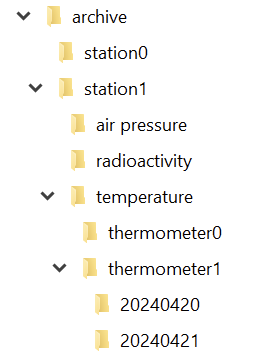
If you implement your archive in the file system, you can probably see the directory structure right before you:

And in each directory for the day, we have a file for each hour:

So we can just write a class that takes our four parameters and returns the corresponding file. That is a straighforward and correct implementation.

It is also one of the implementations that couples your intent (an archive with four dimensions of navigability) nearly inseparably with your decisions on how to use your computer’s basic resources.

Thinking from the algorithms point of view

In order to separate your intent from your current implementation, you need to specify your intent as unencumbered from details as possible. Let’s specify our 4-axis archive nagivation system as a coordinate:

public record ArchiveCoordinate(
    StationId station,
    DataEntryType type,
    DeviceId device,
    LocalDateTime measurementTime
) {
}

There is nothing in here that point towards file system things like directories or files. We might have a hunch of the actual hierarchy by looking at the order of the parameters, but it is easy to implement a hierarchy-free nagivation between coordinates:

public record ArchiveCoordinate([...]) {
    public ArchiveCoordinate withStationChangedTo(
        StationId newStation
    ) {
        [...]
    }
    
    public ArchiveCoordinate withTypeChangedTo(
        DataEntryType newType
    ) {
        [...]
    }
    
    public ArchiveCoordinate withDeviceChangedTo(
        DeviceId newDevice
    ) {
        [...]
    }
    
    public ArchiveCoordinate withMeasurementTimeChangedTo(
        LocalDateTime newMeasurementTime
    ) {
        [...]
    }
}

The concept is that if you know one coordinate, you can navigate relative to it through the archive, without knowingly changing the directory or whatever implementation structure lies beneath your model layer. Let’s say we have the coordinate of a particular measurement of one thermometer. How do we get the same measurement of the other thermometer?

ArchiveCoordinate measurementForThermometer0 = new ArchiveCoordinate([...]);
ArchiveCoordinate measurementForThermometer1 = measurementForThermometer0.withDeviceChangedTo(thermometer1);

We can provide methods that allow us to step forward and backward in time. We can provide our application code with everything it requires to implement clear and concise algorithms based on our model of the archive.

But there will be the moment where you want to “get real” and access the data. You might decide to let your current implementation shine through to your intent layer and provide an actual file:

public interface Archive {
    Optional<File> entryFor(ArchiveCoordinate coordinate);
}

That’s all you need from the archive to get your file. But you might also decide to prolong your intent layer and wrap the file in your own data type that provides everything your algorithms need without revealing that it is really a file that lies underneath:

public interface Archive {
    Optional<ArchiveResource> entryFor(ArchiveCoordinate coordinate);
}

The new ArchiveResource is a thin, but effective veneer (some might call it a wrapper or a facade) that gives us the required information:

public interface ArchiveResource {
    String name();
    long size();
    InputStream read();
}

Of course, we need to provide an implementation for all of this. But by staying vague in the intent layer, we open the door for an implementation that has nothing to do with files. Instead of a file system, there could be a relational database underneath and we wouldn’t notice. Our algorithms would still work the same way and read their data from ArchiveResources that aren’t FileArchiveResources anymore, but DatabaseArchiveResources.

You can probably imagine how you can provide the intent for data writing using the example above. If not, let me show you the necessary additions:

public interface Archive {
    Optional<ArchiveResource> entryFor(ArchiveCoordinate coordinate);
    ArchiveResource createEntryFor(ArchiveCoordinate coordinate) throws IOException;
}
public interface ArchiveResource {
    String name();
    long size();
    InputStream read();
    OutputStream write();
}

Now you can store additional data to the archive without ever knowing if you write to a file or a database or something completely different.

Summary

By separating your intent from your current actual implementation, you gain at least three things for the cost of more work and some harder thinking:

  1. Your algorithms only use your intent layer. You design it exclusively for your algorithms. It will fit like a glove.
  2. The terms you use in your intent layer shape the algorithm metaphors way better than the terms of your current implementation. You can freely decide what terms you’ll use.
  3. The algorithms and your intent layer are designed to last. Your current implementation can be swapped out without them noticing.

If this sounds familiar to you, it is a slightly different take on the “ports and adapters” architecture. The important thing is that by starting with the intent and naming it from the standpoint of your algorithms (application code), you are less prone to let your implementation shine through.

My Favorite Pattern

It has become somewhat of an internal meme that I do not like it when programmers use the word “wrapper”. When someone does say it, I usually get a cue from one of the others to start complaining about it. Do not get me wrong, though. I am very much in favor of wrapping things, but with purpose. And my favorite one is the façade.

When simple becomes complex

Many times, APIs start out simple and elegant. This usually works for a while and the API gets used a lot precisely because of its beauty and simplicity. But eventually, a new use case comes along that demands more of the API than it can currently serve. It has to be extended. This usually takes the form of an additional method or function parameter, or an additional function that needs to be called. Using the API now becomes more complex all its users.

Do not underestimate this effect. I have only anecdotal evidence, but in my experience, a lot of unnecessary software complexity can be attributed to this1. The Pareto-Principle applies here: A single use case causes all the users of the previously simple API to deal with new complexity (e.g. 10% of the use cases cause 90% of the complexity in the user-/call-sites).

Façades make it look beautiful

Luckily, it can be dealt with beautifully: using the façade pattern. This pattern abstracts a complex API behind a simple API. The trade-off, of course, is that it is less powerful than the “full API”. In our example though, all of the previous use-cases can keep using the simple API via a façade.

When to apply this

The aforementioned example, extending an API, is a very nice opportunity to apply the façade. Just keep the interface of the old API around, and re-implement it using the new, extended API, which is usually created by modifying the old API’s implementation. Now all the old call-sites can stay the same, yet you can have a more powerful API for those rare cases that need it.

Of course, you can also identify common usage patterns and refactor them using a façade, but that’s usually much harder to do.

What exactly are façades made of?

Façades do not hide the more complex API in the sense that the APIs users are not allowed to use it. Yes, façades make APIs look beautiful, but that is where the metaphor ends. You can still access what is behind the façade. You can even write more façades for the behind. Many APIs have multiple common cases and only very few complex ones.

So… Classes? Functions? Data? Any of those, in fact. Whenever you enable writing something in a simpler way for a common case, you have a façade . Very often, a small function with a simple signature is all the façade you need.

But it makes all the difference.

Now can someone please tell me what that little hook under the c is called?

  1. Façades can, of course, also contribute to creating complexity by growing the codebase and creating ‘variants’. But they rarely do. ↩︎

Many Algorithms Benefit From a Partition in Two Phases

When I program code that solves a specific problem, I often design the algorithm in a way that mirrors my approach to solving the problem in the real world. That’s not a bad idea – the resulting algorithm can be thought through in a straightforward manner. But it lacks in one area: The separation of specification and execution. And for a computer, separating these two things has immediate advantages.

Let me explain the concept on a minimal coding challenge. The original challenge can be found here (by the way, codewars.com, despite the militaristic theming, is an abundant source of fun coding exercises):

Write a function that takes in a string of one or more words, and returns the same string, but with all five or more letter words reversed

Stop gninnipS My sdroW!

If you don’t want to be spoiled for this specific kata, please don’t read any further. The solution I use to explain the concept isn’t very elegant, though:

public static String reverseLongWords(String sentence) {
String result = "";
for (String each : sentence.split(" ")) {
if (each.length() >= 5) {
result += new StringBuilder(each).reverse().toString();
} else {
result += each;
}
result += " ";
}
return result.trim();
}

Please don’t mind the use of simple string concatenation or the clumsy way of string reversal. My point arises in the last two lines. Because we collect our words, reversed or not, directly in the result, we have to awkwardly remove the unnecessary blank that we just appended from it.

One reason for this subsequent correction is the missing separation in the two phases (specification and execution). Instead, we determine what strings the result should contain and build the result in one step.

Let’s separate the two phases, first in theory and then in code. We know how a specification of a sentence can look like because we already use one in the for loop. If we want to specify the resulting sentence without really building it, we need to store the words without their separators. The result of our specification phase would be a list of words, reversed or not. The execution phase takes our specification and transforms it into the required result. In our case, we just put blanks between the words:

public static String reverseLongWords2(String sentence) {
// building the render model (specification phase)
List<String> renderModel = new ArrayList<String>();
for (String each : sentence.split(" ")) {
if (each.length() >= 5) {
renderModel.add(new StringBuilder(each).reverse().toString());
} else {
renderModel.add(each);
}
}

// rendering the model (execution phase)
return String.join(" ", renderModel);
}

The resulting code is very similar, with one crucial difference: The first phase doesn’t create the result, but a model of it. We can call this model a “render model” and the execution phase the “render stage”. It sounds a little bit excessive for such a small task, but this is really the heart of the idea. When you separate your algorithm into the two phases, you’ll get a render model between them.

This render model has some advantages: You can test it independently from the actual representation. You can add transformation steps more easily before you commit it to the target format. If you need to build the render model iteratively, it can provide helpful methods that would be missing in the target format.

Another advantage: Your execution/render phase is more independent from the previous work. Imagine that we would want our words comma separated, not blank separated. The first algorithms relies on a hidden dependency between the blank character and the trim() method. In the second algorithm, you only need to change the rendering part of the code. It can work independently from the previous logic.

This way to partition an algorithm varies from the straightforward way that humans use when we perform the task in the real world. We tend to keep at least a partial render model in our head alongside the rendered result. If we would do the word spinning ourselves, but with the commas, we would recognize or “just know” that we write the last word and not include the trailing comma. This “just knowing” is information from our mental render model.

In my experience, it pays off to refactor an algorithm into a variation that uses the two phases or design it like this from the start. Revealing the hidden dependencies in the logic is a beneficial influence on the defect rate. Making the rendering step independent promotes testability and evolvability. It seems more work at first, but in my case, that was just adaptation effort caused by my problem solving habits.

Do Not Just Eat That Frog!

It is surely remarkable how much advice on Software Development is actually advice on Project Management, sometimes bordering into the psychological field and being more like management of personal Energy, Attention or Motivation. But this does make sense, considering how so often, some seemingly simple task can blow up to something difficult to manage, then becoming trivial again, then mathematically impossible, then simple again.

All of that within a context where somewhere, some customers enjoy their day, not being inclined to be part of these emotional loops at all. Just solve their problems. Which is our job.

So, one of the frequent Time Management tips passed around is “Eat That Frog” (Originally by Brian Tracy with some help from Mark Twain). The main idea is that some seriously demanding task (“having to eat a live frog”) will not become more attractive during the day, so it’s important to make it your very first priority to gulp that thing down, first thing the morning.

I found this approach quite helpful, and it can be part of a larger strategy known as “Risk First” as commonly mentioned by other authors around here.

However, any good advice can only be applied within boundaries and recently, I was dealing with several harder issues that made me refine the original thesis quite a bit.

I did not find this knowledge somewhere else, so feel free to discuss and correct me on my points of view. Not that I could be mistaken, though ¯\_(ツ)_/¯

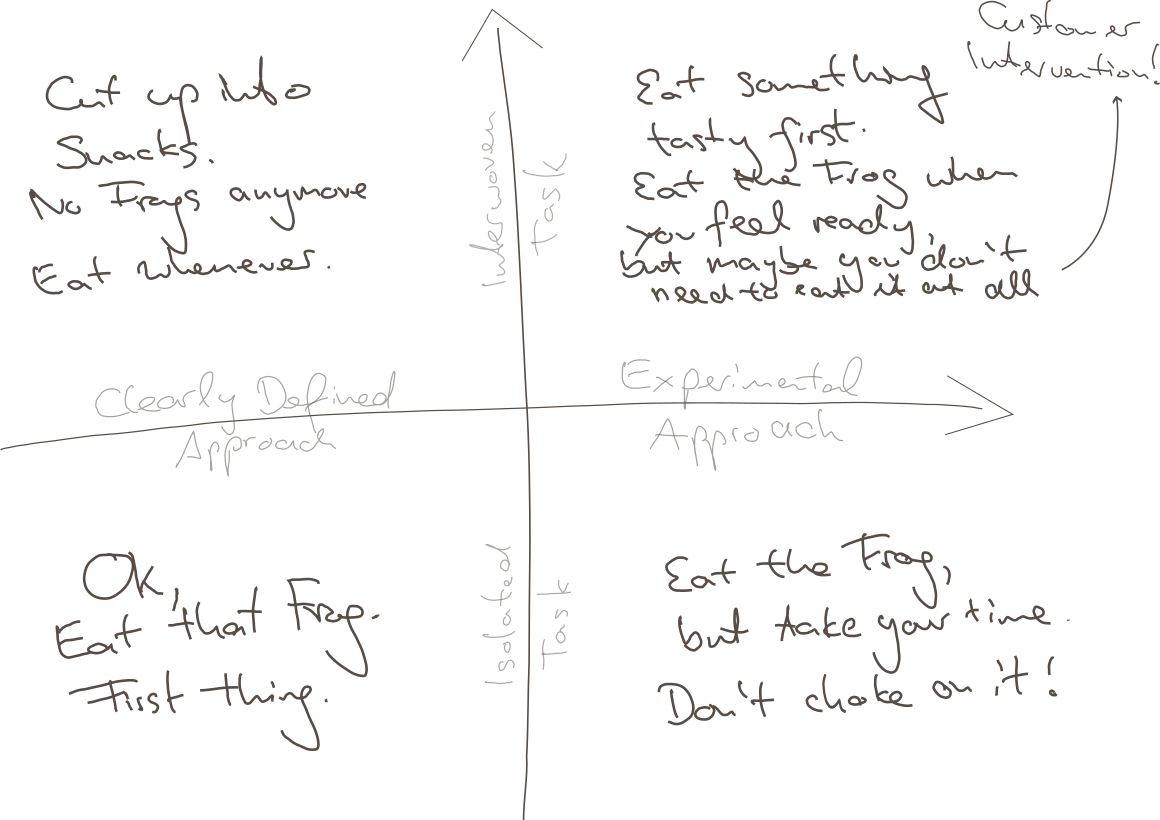
It turns out, there are several cases where it would be straightway destructive just to Eat the next-best Frog, and I will try to explain this to you using my impressive drawing skills:

Point being, there are at least two boundaries of application:

  • Clarity of Approach: How clearly-defined is it, as opposed to requiring one or multiple experimental, creative approachs?
  • Relation to other Tasks: How isolated is your task, is it heavily interwoven with other tasks?

Why these distinctions? Maybe we can agree on

  • Overwhelming Frog tasks can act stifling on your creativity, so if that very mindset is required for your approach, you will not succeed by pressuring through.
  • Thinking yourself into a complex topic first thing in the morning might require some warm up time for your brain, booting every relevant detail into your cloud of thoughts.
  • Parkinson’s Law states “Work expands so as to fill the time available for its completion.” – from which I derive: If your task is too large but it could be divided into sub-tasks, you might use any available time to do something related to your giant Frog, but not necessarily the most precise thing to do.
  • The motivation of having done multiple small tasks can provide you with the energy of finishing “That Frog” within the near future.

So to relate that to the Frogophage subject at hand; my findings are:

  • Bottom Right: If your task is quite isolated from other tasks, but still it’s approach isn’t very clear, do not think of your problem as a frog to be eaten right now. You will have to eventually have eaten it, but take your time, don’t choke on it – don’t destroy your creative thinking by believing that you can rush through it.
  • Top Left: If your Frog is defined as one well-defined task, but can actually be seen as a composition of many Sub-Frogs, stop for a minute and invest your time in actually resolving the atomic issues. This might feel like slowing you down, but there is no honor in having eaten That Disgusting Frog, if actually you could have eaten a tasty buffet of small snacks instead.
  • Top Right: Interwoven Tasks that also require an Experimental Approach are hard because you might just waste your time trying to upfront define your smaller snacks, and you might not have all the relevant information booted into your brain at the time of your supposed Frog Breakfast, so: Try to warm up yourself by solving some smaller of the connected issues first; by bringing your consciousness into the right state it can very well appear what can be tried.
    • Bonus Point: It can also render your whole Frog irrelevant when it becomes clear that your whole problem has to be redefined by Customer Intervention. Sometimes you just have to explain the poor guys that something is complicated (costly for them), and they might come up with a request that is completely different from your original frog.
  • Bottom Left: However, if none of thse apply and there’s just a nauseating thing in front of you, that you just know has to be done, you have somewhat of a clear idea how to start, it does not depend on many other things done first or simultaneously – better Eat That Frog. It likely won’t go away and you can then use the resulting feel-good moment to inspire the rest of your day.
Conclusion

I guess this all boils down to “whatever advice there is, there are some limits to its applications”. I hope you already weren’t the type of person who would just think of any problem as some big unquestionable Frog to be gobbled up without reconsideration…

… but nonetheless, maybe this can help in evaluating your strategy when facing the next difficult thing.

And don’t just eat frogs, please.

Avoid fragmenting your configuration

Nowadays configuration often is done using environment (aka ENV) variables. They work great using docker/containers, in development and production, on all platforms and using all languages. In short I think environment variables are great for configuration of many aspects of an application.

However, I encountered a pattern in several different applications that I really dislike: Several, fragmented ENV variables for one configurable aspect of the application.

Let us have a look at two examples to see what I mean, then I will try to explain where it could come from and why I think it is bad practice. Finally I will show a better alternative – at least in my opinion.

First real world example

In one javascript app a websocket url was made configurable using 4 (!) ENV variables like this:

WS_PREFIX || "wss://";
WS_HOST || "hostname";
WS_PORT || "";
WS_PATH || "/ws";

function ConnectionString(prefix, host, port, path) {
  return {
    attrib: {
      prefix, 
      host,
      port,
      path,
    },
    string: prefix + host + port + path,
  };
}

We immediately see, that the author wrote a function to deal with the complex configuration in the rest of the application. Not only the devops team or administrators need to supply many ENV variables but they have to supply them in a peculiar way:

The port needs to be specified as :8888, using a leading colon (or the host needs a trailing colon…) which is more than unexpected. The alternative would be a better and more sophisticated implementation of ConnectionString…

Another real example

In the following example the code there are again three ENV variables dealing with hosts, urls and websockets. This examples feels quite convoluted, is hard to understand and definitely needs a refactoring.

TANGOGQL_SOCKET=ws://${TANGO_HOST}:5004/socket

const defaultHost = window.TANGOGQL_HOST ?? "localhost:5004";
const defaultSocketUrl = window.TANGOGQL_SOCKET ?? ws://${defaultHost}/socket;

// dealing with config peculiarities somewhere else
const socketUrl = React.useMemo(() =>
        config.host.replace(/.*:\/\//, "ws://") + "/socket"
    , [config.host]);

Discussion

The examples show clearly that something simple like a configuration for an URL can lead to complicated and hard to use solutions. Most likely the authors tried to not repeat themselves and factored the URLs into the smallest sensible components. While this may sound like a good idea it puts burden on both the developers and the devops team configuring the application.

In my opinion it would be much simpler and more usable for both parties to have complete URLs for the different use cases. Of course this could mean repeating protocols, hostnames and ports if they are the same in the different situations. But just having one or two ENV variables like

WS_URL=wss://myhost:8080/ws
HOST_URL=https://myhost:8080

would be straightforward to use in code and to be configured in the runtime environment. At the same time the chance for errors and the complexity in the configuration is reduced.

Even though certain parts of the URLs are duplicated in the configuration I highly prefer this approach over the presented real world solutions.

Avoid special values of the result type for error indication

As many of you may know we work with a variety of programming languages and ecosystems with very different code bases. Sometimes it may be a modern green field project using state of the art frameworks. At other times it may be a dreaded legacy project initially written many years ago (either by us or someone we do not even know) using ancient languages and frameworks like really old java stuff (pre jdk 7) or C++ (pre C++11), for example.

These old projects could not use features of modern incarnations of these languages/compilers/environments – and that is fine with me. We usually gradually modernize such systems and try to update the places where we come along to fix some issues or implement new features.

Over the years I have come across a pattern that I think is dangerous and easily leads to bugs and harder to maintain code:

Special values of the resulting type of a function to indicate errors

The examples are so numerous and not confined to a certain programming environment that they urged me to write this article. Maybe some developers using this practice will change their mind and add a few tools to their box to write safer and more expressive code.

A simple example

Let us image a function that returns a simple integer number like this:

/**
 * Here we talk to a hardware sensor. If everything works, we should
 * get a value between -50 °C and +50 °C.
 * If something goes wrong, we return -9999.
int readAmbientTemperature();

Given the documentation, clients can surely use this kind of function and if every use site interprets the result correctly, nothing will ever go wrong. The problem here is, that we need a lot of domain knowledge and that we have to check for the special value.

If we use this pattern for other values where the value range is not that clearly bounded we may either run into problems or invent other “impossible values” for each use case.

If we forget to check for the special value the users may see it an be confused or even worse it could be used in calculations.

The problem even gets worse with more flexible types like floating point numbers or strings where it is harder to compare and divide valid results from failure indicators.

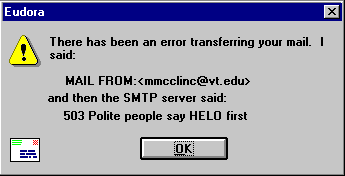
Classic error message that mixes technical code and error message in a confusing, albeit funny sentence (Source: Interface Hall Of Shame)

Of course, there are slightly better alternatives like negative numbers in a positive-only domain function or MAX_INT, NaN or the like provided by most languages.

I do not find any of the above satisfying and good enough for production use.

Better alternatives

Many may argue, that their environment lacks features to implement distinct error indicators and values but I tend to disagree and would like to name a few widely used alternatives for very different languages and environments:

  • Return codes and out-parameters for C-like languages like in the unix and win32 APIs (despite all their other flaws… 😀 )
  • Exceptions for Java, Python, .NET and maybe in some cases even C++ with sufficiently specific type and details to differentiate different failures
  • Optional return types when the failures do not need special handling and absence of a value is enough
  • HTTP status code (e.g. 400 or 404) and a JSON object containing reason and details instead of a 2xx status with the value
  • A result struct or object containing execution status and either a value on success or error details on failure

Conclusion

I am aware that I probably spent way too much words on such a basic topic but I think the number of times I have encountered such a style – especially in code of autodidacts, but also professionals – justifies such an article in my opinion. I hope I provided some inspiration for those who do not know better or those who want to help others improve.

What else can we do?

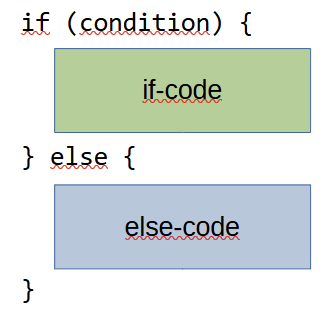
A common code structure to implement a decision is the if-statement, or in its complete form, the if-else-statement:

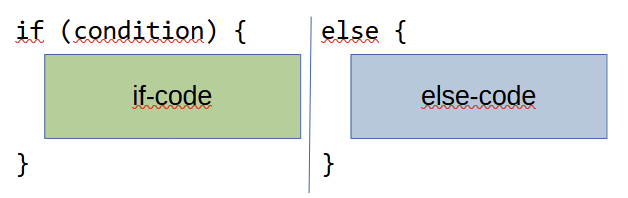
By using the explicit if-else-statement, you essentially partition a part of your code into two “execution lanes” that are used mutually exclusive. Instead of writing them one upon the other, we could, if our code editors supported it, write them side by side:

There are some graphical code editors that tried this tabular approach. It certainly looks unfamiliar to the eye trained on the first notation, but it makes one thing clear: The code flow will go through only one of the columns, not both.

Dependence on explicit conditionals

Using the if-else-statement became so second-nature to most developers that they acted confused and helpless when presented with a simple restriction:

“Don’t use the else keyword”

Jeff Bay, Object Calisthenics, 2008

The restriction is imposed as the second of nine rules from the object calisthenics by Jeff Bay. In the explanation of the rule, he stated that the rule should act as a first step towards implicit conditional statements. Paraphrased: There are 99 ways to express an else statement without using the keyword, but the average developer knows none of them.

In my opinion, the rule is merely the warm-up phase to a bigger challenge, as stated by the “anti-if campaign”: To get rid of if-statements (and else-statements by that matter) in all contexts where alternatives prove more effective.

In order to decide when not to use if-statements, we should learn about the alternatives. There are plenty to choose from! (refer to slide #4)

But we should also learn about the if-statement itself. The goal isn’t to abandon it, but to use it when appropriate and then use it to its full potential.

An interesting thought about the “else”

We already know everything about the if and else? I had the opportunity to learn something new not long ago. The hint came from Kevlin Henney in one of his talks (Non-Functional Coding):

The talk is fairly recent and has some traditional “Kevlin parts” in it. The part I highlighted is unusually aggressive for him. The reasoning is sound, but the nearly personal attack towards the audience (to “piss them off”) is uncalled for.

But, the “volume up to 200 %”-style works more often than not and the bit got me thinking. The culprit in question is this code:

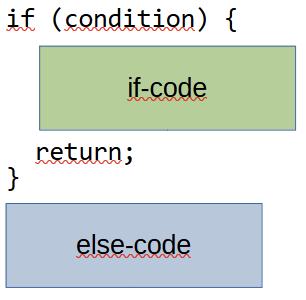
According to Kevlin, this style “is just wrong”. Let’s try to find out why.

There is one principle that is mentioned by Kevlin in passing: The “Single Level of Abstraction” principle that states that you should not mix different levels of abstraction in one block of code (the principle talks about methods). It is a foundation for the first rule in the object calisthenics: “Only one level of indentation per method”.

If you look at the if-code and else-code, they operate on the same level of abstraction. Maybe not on the same level of probability, but they deal with the same topic. Elevating one part by eliminating the else-block in favor of an early return means that this part is more important. It also designates the if-code and in fact the whole if-statement to be a guard clause. Guard clauses typically deal with invalid state and don’t complement the desired functionality. They act as gatekeepers and interdict the invalid state to enter the method’s main body. As a metaphor: The bouncers in front of a club are like guard clauses. To say that being denied entry by a bouncer is comparable fun to being in the club is probably not a widespread opinion.

Unfinished reflection

I still reflect on other clues that are name-dropped by Kevlin, like the stated reduction of refactoring opportunities, but that’s probably because I don’t have enough comparison material.

There is one thing that I haven’t got a proper hold on yet and that’s the term “control state“. My google kung-fu is not mighty enough to reach past some obscure ASP.NET concepts from ten years ago. I haven’t heard the term in books – at least I don’t remember it.

So here is my call for help: Can you provide some source or explanation about what Kevlin Henney means by “control state“?

And what else do you think about the whole discussion?

Have we made things too easy?

One of the old mantras for API design is “Make doing the right thing easy and the wrong thing hard”. This, of course, applies to much broader topics as well, such as software development or UX.

For software development specifically, are we maybe making “doing the wrong thing” too easy as well? Here are a two examples:

Web Requests

In the old times, requesting data from a web server required first setting up the request, sending it, and then getting the result back to your application either via polling or callbacks. Dave Mark once adequately called this solving the “waiting problem”. It was cumbersome, to say the least. It was clear that making such a request was something to be avoided. You did it when you had to, but you avoided setting up too many different kinds of requests implictly.

Nowadays, with the advent anonymous functions/lambdas in most mainstream programming languages, continuations became the new way handle these things: do_request(...).then(result -> ...) This already made this a lot easier. And even better, now we have some form of coroutines in many languages were you can just do result = await do_request(...). It even looks almost like a normal function call.

With this, programmers can just do requests one after the other. Need one thing from a server? Do one request. Need ten things from a server? Do ten requests. Of course, this is horribly wasteful: each request will incur the full overhead of http/https and a server roundtrip. In the old times, doing the request was painful, so you automatically looked for ways to avoid doing more, and bundle your asks into one request, argueable leading to a better program.

Dependencies

Before nice package-managers where a thing, handling dependencies was a huge pain. You would have to manually get, unpack, configure and install the dependency for each developer and/or consumer system. As a consequence, libraries were big and often duplicated foundational things. But it also caused developers carefully grooming their library selections.

Now with package managers, libraries have started to become small. Duplication within libraries certainly seems to have decreased, and the average library size has decreased. But this also caused developers to be much less cautious when adopting a dependency, with package managers handling thousands of dependencies that no one developer can possibly have a full understanding of. And this then leads to things like the leftpad disaster.

Better or worse?

I am pretty sure that both having nice abstractions to deal with asynchronicity and package managers are good things. But if they make certain things too easy, how can we deal with that? The only thing I can currently think of is figuratively sticking warning-labels on these things during review time, but because those things are now so easy and subtle, it is also easy to miss them.

Are there other examples were we maybe made the wrong thing too easy? Do you have any ideas how to deal with this problem?

Format-based sorting looks clever, but is dangerous

A neat trick I learnt early in my career, even before I learnt about version control, was how to format a date as a string so that alphabetically sorted lists would contain them in the “correct” order:

“YYYYMMDD” is the magic string.

If you format your dates as 20230122 and 20230123, the second name will be sorted after the first one. With nearly any other format, your date strings will not be sorted chronologically in the file system.

I’ve found out that this is also nearly the only format that most people cannot intuitively recognize as a date. So while it is familiar with me and conveniently sorted, it is confusing or at least in need of explanation for virtually every user of my systems.

Keep that in mind when listening to the following story:

One project I adopted is a custom enterprise resource planning system that was developed by a single developer that one day left the company and the code behind. The software was in regular use and in dire need of maintenance and new features.

One concept in the system is central to its users: the list of items in an invoice or a bill of delivery. This list contains items in a defined order that is important to the company and its customers.

To my initial surprise, the position of an item in the list was not defined by an integer, but a string. This can be explained by the need of “sub-positions” that form a hierarchy of items, like in this example:

1 – basic item

1.1 – item upgrade #1

1.2 – item upgrade #2

Both positions “1.1” and “1.2” are positioned “underneath” position “1” and should be considered glued to it. If you move position “1” to position “4”, you also move 1.1 to 4.1 and 1.2 to 4.2.

But there was a strange formatting thing going on with the positions: They were stored as strings in the database, but with a strange padding in front. Instead of “1”, “2” and “3”, the entries contained the positions ” 1″, ” 2″ and ” 3″. All positions were prefixed with two space characters!

Well, nearly all positions. As soon as the list grew, the padding turned out to be dependent on the number of digits in the position: ” 9″, but then ” 10″ and “100”.

The reason can be found relatively simple: If you prefix with spaces (or most other characters, maybe “0”), your strings will be ordered in a numerical way. Without the prefixes, they would be sorted like “1”, “10”, “11”, “2”.

That means that the desired ordering of the positions is hardcoded in the database representation! You probably already thought about the case of a position greater than 999. That’s when trouble begins! Luckily, an invoice with a thousand items on the list is unheard of in the company (yet!).

Please note that while the desired ordering is hardcoded in the database, the items are still loaded in a different order (as they were entered into the system) and need to be sorted by the application. The default sorting for strings is the alphabetical order, so the original developer probably was clever/lazy, went with it and formatted the data in a way that would produce the result and not require additional logic during the sorting.

If you look at the code, you see seemingly strange formatting calls to the position all over the place. This is necessary because, for example, every time a user enters a position into the system, it needs to be reformatted (or at least sanitized) in order to adhere to the “auto-sortable” format.

If you wonder how a hierarchical sub-position looks like with this format, its ” 1. 1″, ” 1. 10″ and even ” 1. 17. 2. 4″. The database stores mostly blanks in this field.

While this approach might seem clever at the moment, it is highly dangerous. It conflates several things that should stay separated, like “storage format” and “display format”, “item order” or just “valid value range”. It is a clear violation of the “separation of concerns” principle. And it broke the application when I missed one place where the formatting was required, but not present. Of course, this only manifests in a problem when your test cases (or manual tries) exceed a list of 9 entries – lesson learnt here.

I dread the moment when the company calls to tell me about this “unusually large invoice” that exceeds the 999 limit. This would mean a reformatting of all stored data or another even more clever hack to circumvent the problem.

Did you encounter a format that was purely there for sorting in the wild? What was the story? Tell us in the comments!