Single-Use Webapps

One of our customers has the requirement to enter data into a large database while being out in the field, potentially without any internet connection. This is a diminishing problem with the availability of satellite-based internet access, but it can be solved in different ways, not just the obvious “make internet happen” way.

One way to solve the problem is to analyze the customer’s requirements and his degrees of freedom – the things he has some leeway over. The crucial functionality is the safe and correct digital entry of the data. It would suffice to use a pen and a paper or an excel sheet if the mere typing of data was the main point. But the data needs to be linked to existing business entities and has some business rules that need to be obeyed. Neither paper nor excel would warn the user if a business rule is violated by the new data. The warning or error would be delayed until the data needs to be copied over into the real system and then it would be too late to correct it. Any correction attempt needs to happen on site, on time.

One leeway part is the delay between the data recording and the transfer into the real system. Copying the data over might happen several days later, but because the data is exclusive to the geographical spot, there are no edit collisions to be feared. So it’s not a race for the central database, it’s more of an “eventual consistency” situation.

If you take those two dimensions into account, you might invent “single-use webapps”. These are self-contained HTML files that present a data entry page that is dynamic enough to provide interconnected selection lists and real-time data checks. It feels like they gathered their lists and checks from the real system, and that is exactly what they did. They just did it when the HTML file was generated and not when it is used locally in the browser. The entry page is prepared with current data from the central database, written to the file and then forgotten by the system. It has no live connection and no ability to update its lists. It only exists for one specific data recording at one specific geographical place. It even has a “best before” date baked into the code so that it gives a warning if the preparation date and the usage date are too distant.

Like any good data entry form, the single-use webapp presents a “save data” button to the user. In a live situation, this button would transfer the data to the central database system, checking its integrity and correctness on the way. In our case, the checks on the data are done (using the information level at page creation time) and then, a transfer file is written to the local disk. The transfer file is essentially just the payload of the request that would happen in the live situation. It gets stored to be transferred later, when the connection to the central system is available again.

And what happens to the generated HTML files? The user just deletes them after usage. They only serve one purpose: To create one transfer file for one specific data entry task, giving the user the comfort and safety of the real system while entering the data.

What would your solution of the problem look like?

Disclaimer: While the idea was demonstrated as a proof of concept, it was not put into practice by the customer yet. The appeal of “internet access anywhere on the planet” is undeniably bigger and has won the competition of solutions for now. We would have chosen alike. The single-use webapp provides comfort and ease-of-use, but ubiquitous connectivity to the central system tops all other solutions and doesn’t need an extra manual or unusual handling.

Getting rid of all the files in ASP.NET “Single File” builds

I’ve come to finding it somewhat amusing, that if you build a fresh .NET project, like,

dotnet publish ./Blah.csproj ... -c Release -p:PublishSingleFile=true

that the published “Single File” contains of quite a handful of files. So do I, having studied physics and all that, have an outdated knowledge of the concept of “single”? Or is there a very specific reason for any of the files that appear that and it just has to be?
I really needed to figure that out for a small web server application (so, ASP.NET), and as we promised our customer a small, simple application; all the extra non-actually-single files were distracting spam at least, and at worst it would suggest a level of complexity to them that wasn’t helpful, or suggest a level of we-don’t-actually-care when someone opens that directory.

So what I found to do a lot was to extend my .csproj file with the following entries, which I want to explain shortly:


  <PropertyGroup Condition="'$(Configuration)'=='Release'">
    <DebugSymbols>false</DebugSymbols>
    <DebugType>None</DebugType>
  </PropertyGroup>

  <PropertyGroup>
    <PublishIISAssets>false</PublishIISAssets>
    <AspNetCoreHostingModel>OutOfProcess</AspNetCoreHostingModel>
  </PropertyGroup>	

  <ItemGroup Condition="'$(Configuration)'=='Release'">
    <Content Remove="*.Development.json" />
    <Content Remove="wwwroot\**" />
  </ItemGroup>

  <ItemGroup>
      <EmbeddedResource Include="wwwroot\**" />
  </ItemGroup>
  • The first block gets rid of any *.pdb file, which stands for “Program Debug Database” – these contain debugging symbols, line numbers, etc. that are helpful for diagnostics when the program crashes. Unless you have a very tech-savvy customer that wants to work hands-on when a rare crash occurs, end users do not need them.
  • The Second block gets rid of the files aspnetcorev2_inprocess.dll and web.config. These are the Windows “Internet Information Services” module and configuration XML that can be useful when an application needs tight integration with the environmental OS features (authentication and the likes), but not for a standalone web application that just does a simple thing.
  • And then the last two blocks can be understood nearly as simple as they are written – while a customer might find an appsettings.json useful, any appsettings.Development.json is not relevant in their production release,
  • and for a ASP.NET application, any web UI content conventionally lives in a wwwroot/ folder. While the app needs them, they might not need to be visible to the customer – so the combination of <Content Remove…/> and <EmbeddedResource Include…/> does exactly that.

Maybe this can help you, too, in publishing cleaner packages to your customers, especially when “I just want a simple tool” should mean exactly that.


Adding OpenId Connect Authentication to your .Net webapp

Users of your web applications nowadays expect a lot of convenience and a good user experience. One aspect is authentication and authorization.

Many web apps started with local user databases or with organisational accounts, LDAP/AD for example. As security and UX requirements grow single-sign-on (SSO) and two-factor-authentication (2FA) quickly become hot topics.

To meet all the requirements and expectations integrating something like OpenID Connect (OIDC) looks like a good choice. The good news are that the already is mature support for .NET. In essence you simply add Microsoft.AspNetCore.Authentication.OpenIdConnect to your dependencies and configure it according to your needs mostly following official documentation.

I did all that for one of our applications and it was quite straightforward until I encountered some pitfalls (that may be specific to our deployment scenario but maybe not):

Pitfall 1: Using headers behind proxy

Our .NET 8 application is running behind a nginx reverse proxy which provides https support etc. OpenIDConnect uses several X-Forwarded-* headers to contruct some URLs especially the redirect_uri. To apply them to our requests we just apply the forwarded headers middleware: app.UseForwardedHeaders().

Unfortunately, this did not work neither for me nor some others, see for example https://github.com/dotnet/aspnetcore/issues/58455 and https://github.com/dotnet/aspnetcore/issues/57650. One workaround in the latter issue did though:

// TODO This should not be necessary because it is the job of the forwarded headers middleware we use above. 
app.Use((context, next) =>
{
    app.Logger.LogDebug("Executing proxy protocol workaround middleware...");
    if (string.IsNullOrEmpty(context.Request.Headers["X-Forwarded-Proto"]))
    {
        return next(context);
    }
    app.Logger.LogDebug("Setting scheme because of X-Forwarded-Proto Header...");
    context.Request.Scheme = (string) context.Request.Headers["X-Forwarded-Proto"] ?? "http";
    return next(context);
});

Pitfall 2: Too large cookies

Another problem was, that users were getting 400 Bad Request – Request Header Or Cookie Too Large messages in their browsers. Deleting cookies and tuning nginx buffers and configuration did not fix the issue. Some users simply had too many claims in their organisation. Fortunately, this can be mitigated in our case with a few simple lines. Instead of simply using options.SaveTokens = true in the OIDC setup we implemented in OnTokenValidated:

var idToken = context.SecurityToken.RawData;
context.Properties!.StoreTokens([
    new AuthenticationToken { Name = "id_token", Value = idToken }
]);

That way, only the identity token is saved in a cookie, drastically reducing the cookie sizes while still allowing proper interaction with the IDP, to perform a “full logout” for example .

Pitfall 3: Logout implementation in Frontend and Backend

Logging out of only your application is easy: Just call the endpoint in the backend and call HttpContext.SignOutAsync(CookieAuthenticationDefaults.AuthenticationScheme)there. On success clear the state in the frontend and you are done.

While this is fine on a device you are using exclusively it is not ok on some public or shared machine because your OIDC session is still alive and you can easily get back in without supplying credentials again by issueing another OIDC/SSO authentication request.

For a full logout three things need to be done:

  1. Local logout in application backend
  2. Clear client state
  3. Logout from the IDP

Trying to do this in our webapp frontend lead to a CORS violation because after submitting a POST request to the backend using a fetch()-call following the returned redirect in Javascript is disallowed by the browser.

If you have control over the IDP, you may be able to allow your app as an origin to mitigate the problem.

Imho the better option is to clear the client state and issue a javascript redirect by setting window.location.href to the backend-endpoint. The endpoint performs the local application logout and sends a redirect to the IDP logout back to the browser. This does not violate CORS and is very transparent to the user in that she can see the IDP logout like it was done manually.

Customizing Vite plugins is as quick as Vite itself

Once in a blue moon or so, it might be worthwhile to look at the less frequently used features of the Vite bundler, just to know how your life could be made easier when writing web applications.

And there are real use cases to think about custom vite plugins, e.g.

  1. wanting to treat SVGs as <svg> code or React Component, not just as a <img> resource – so maye your customer can easily swap them out as separate files. That is a solved problem with existing plugins like vite-plugin-svgr or vite-svg-loader, but… once in a ultra-violet moon or so… even the existing plugins might not suffice.
  2. For teaching a few lectures about WebGL / GLSL shader programming, I wanted to readily show the results of changes in a fragment shader on the fly. That is the case in point:

I figured I could just use Vite’s Hot Module Replacement to reload the UI after changing the shader. There could have been alternatives like

  • Copying pieces of GLSL into my JS code as strings
    – which is cumbersome,
  • Using the async import() syntax of JS
    – which is then async, obviously,
  • Employing a working editor component on the UI like Ace / React-Ace
    – which is nice when it works, but is so far off my actual quest, and I guess commonplace IDEs are still more convenient for editing GLSL

I wanted the changes to be quick (like, pair-programming-quick), and Vite’s name exactly means that, and their HMR aptly so. It also gives you the option of raw string assets (import Stuff from "./stuff.txt?raw";) which is ok, but I wanted a bit of prettification to be done automatically. I found vite-plugin-glsl, but I needed it customized because I wanted to always combine multiple blank lines to a single one and this is how easy it was:

  • ./plugin/glslImport.js
    Note: this is executed by the vite dev server, not our JS app itself.
import glsl from "vite-plugin-glsl";

const originalPlugin = glsl({compress: false});

const glslImport = () => ({
    ...originalPlugin,
    enforce: "pre",
    name: "vite-plugin-glsl-custom",
    transform: async (src, id) => {
        const original = await originalPlugin.transform(src, id);
        if (!original) { // not a shader source
            return;
        }
        // custom transformation as described above:
        const code = original.code
            .replace(/\\r\\n/g, "\\n")
            .replace(/\\n(\\n|\\r|\s)*?(?=\s*\w)/g, "\\n$1");
        return {...original, code};
    },
});

export default glslImport;
  • and then the vite.config.js is simply
import { defineConfig } from 'vite';
import glslImport from './plugin/glslImport.js';

export default defineConfig({
    plugins: [
        glslImport()
    ],
    ...
})

I liked that. It kept me from transforming either the raw import or that of the original plugin in each of the 20 different files, and I could easily fiddle around in my filesystem while my students only saw the somewhat-cleaned-up shader code.

So if you would ever have some non-typical-JS files that need some transformation but are e.g. too many or too volatile to be cultivated in their respective source format, that is a nice tool to know. That is as easily-pluggable-into-other-projects as a plugin should be.

Expose your app/API with zrok during development

Nowadays many of us are developing libraries, tools and applications somehow connected to the web. Often we provide APIs over HTTP(S) for frontends or other services or develop web apps using such services or backends.

As browsers become more and more picky HTTP is pretty much dead but for developers it is extremely convenient to avoid the hassle of certificates, keystores etc.

Luckily, there is a simple and free tool, that can help in several development scenarios: zrok.io

My most common ones are:

  • Allowing customers easy (temporary) access to your app in development
  • Developing SSO and other integrations that need publicly visible HTTPS endpoints
  • Collaborating with your distributed colleagues and allowing them to develop against your latest build on your machine

What is zrok?

For our use cases think of it as an simple, ad-hoc HTTPS-proxy transport-securing your services and exposing them publicly. For the other features and technical zero trust networking platform explanation head over to their site.

How to use zrok?

You only need a few steps to get zrok up and running. Even though their quick start explains the most important steps I will mention them here too:

After these steps your are ready to go and may share your local service running on http://localhost:8080 using zrok share public 8080.

Some practical advice and examples

If you want a stable URL for your service, use a reserved share instead of the default temporary one:

.\zrok.exe reserve public http://localhost:5000 --unique-name "mydevinstance"
.\zrok.exe share reserved mydevinstance

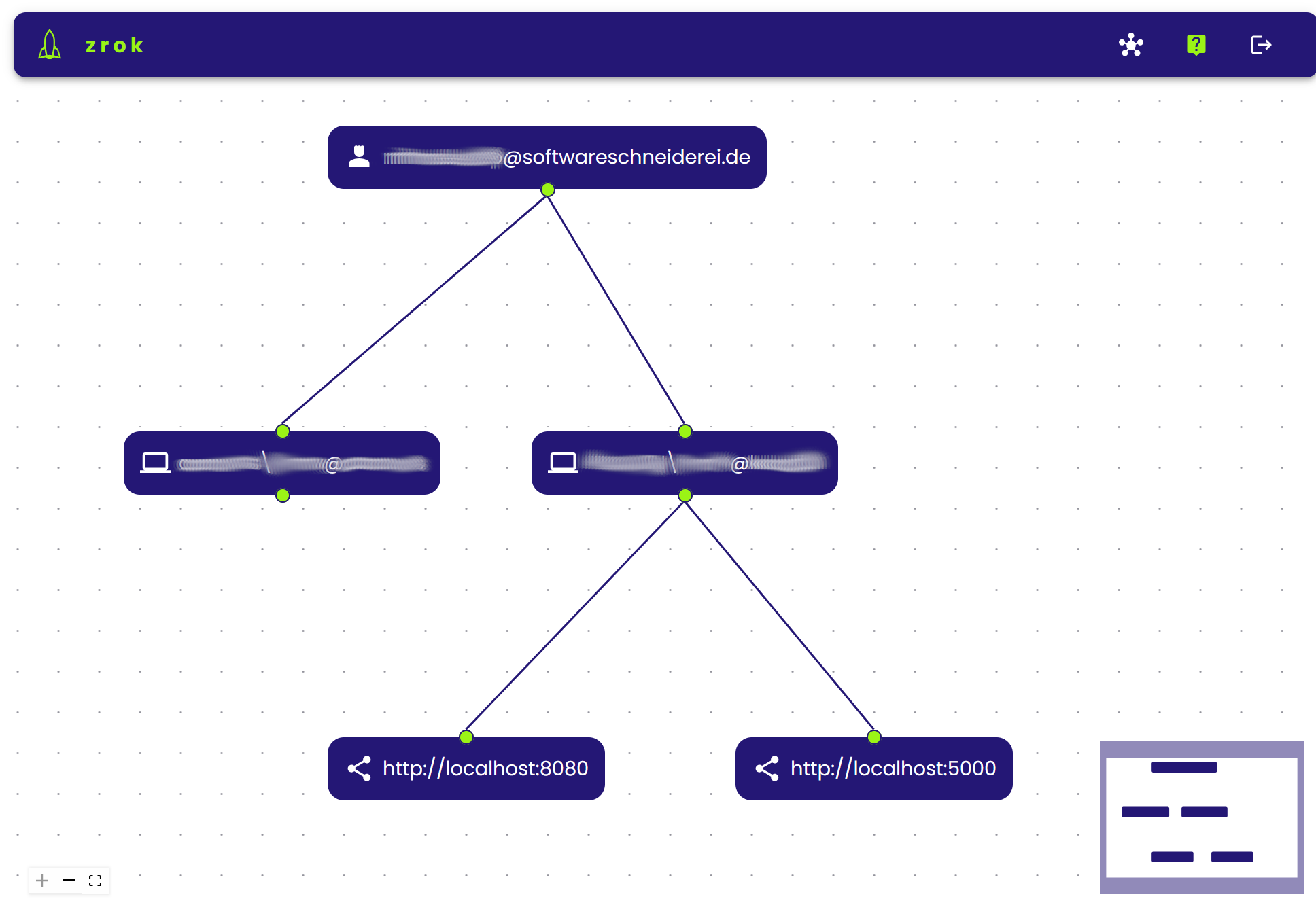
That way you get a stable endpoint over restarts which greatly reduces configuration burden in external services or communication with customers or colleagues. You can manage your shares on multiple machines online on https://api-v1.zrok.io:

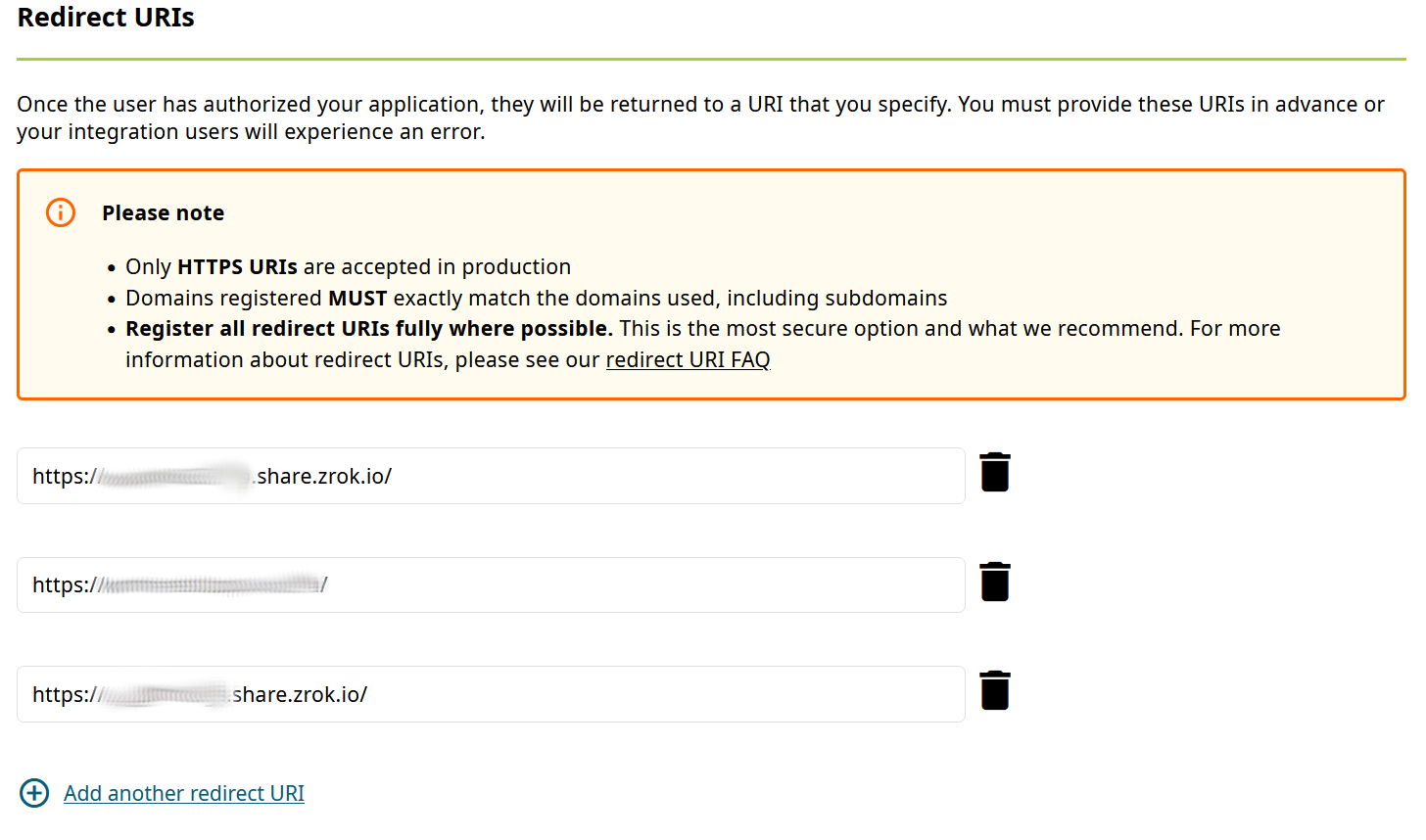
Your service is then accessible under https://mydevinstance.share.zrok.io/ and you may monitor accesses in the terminal or on the webpage above.

That enables you to use your local service for development against other services, like OAuth or OpenID single-sign-on (SSO), here with ORCID:

Conclusion

Using zrok developers may continue to ignore HTTPS for their local development instances while still being able to expose them privately or publicly including transparent SSL support.

That way you can integrate easily with other services expecting secured public endpoint or collaborate with others transparently without VPNs, tunnels or other means.

Nginx upload limit

Today, I encountered a surprising issue with my Docker-based web application. The application has an upload limit set, but before reaching it, an unexpected error appeared:

413 Request Entity Too Large

Despite the application’s upload limit being correctly configured, the error occurred much earlier—when the file was barely over 1MB. Where does this limitation come from, and how can it be changed?


Troubleshooting

The issue occurred before the request even reached the application layer, during a critical step in request processing. The root cause was Nginx, the web server and reverse proxy used in the Docker stack.

Nginx, commonly used in modern application stacks for load balancing, caching, and HTTPS handling, acts as the gateway to the application, managing all incoming requests. However, Nginx was rejecting uploads larger than 1MB. This was due to the client_max_body_size directive, which—when unset—defaults to a relatively low limit in some configurations. As a result, Nginx blocked larger file uploads before they could reach the application.

Solution

To resolve this issue, the client_max_body_size directive in the Nginx configuration needed to be updated to allow larger file uploads.

Modify the nginx.conf file or the relevant server block configuration:

server {
    listen 80;
    server_name example.com;
    client_max_body_size 100M;  # Allow uploads up to 100MB
}

After making this change, restart Nginx to apply the new configuration:

nginx -s reload

If Nginx is running in a Docker container, you can restart the container instead:

docker restart <container_name>

With this update, the upload limit increased to 100MB, allowing the application to handle larger files without premature rejection. Once the configuration was applied, the error disappeared, and file uploads worked as expected, provided they remained within the newly defined limits.

Useful browser features for the common Web Dev

Once every while, I stumble upon some minor thing ingrained in modern browsers that make some specific problem so much easier. And while the usual Developer Tools offer tons of capabilities, these are so wildly spread and grouped that you easily get used to just ignoring most of them.

So this bunch of things come to my mind that seem not to be super-common knowledge. Maybe you benefit from some of it.

Disclaimer: The browsers I know of have their Dev Tools available via pressing F12 and a somewhat similar layout, even though particular words will differ. My naming here relates to the current Chrome, so your experience might differ.

Disabling the Browser cache

Your Browser caches many resources because the standard user usually prefers speed, is used that the browser endlessly hogs memory anyway, and most resources usually do not change that often anyway.

During development, this might lead to confusion because of course, you do change your sources often (in fact, that is your job), and the browser needs to know that fact.

For that, let it be known:

The "Network Tab" has a Checkbox "Disable Cache".
And the Dev Tools have to be open for it to work.

This is usually so much the default setting on my working machines that I need to remember myself on it when I troubleshoot something on someone else’s machine. Spread the word.

Also, browsers have a Hard-Reload-Feature, like under Chrome, to cleaning the Cache before the reload without having to do so for the whole browser.

Hard-Reload: Ctrl + Shift + R

I’ve read that this is also Chrome’s behaviour when pressing F5 while the Dev Tools are open, but anyway. Take extra care that your customer does not of that feature, because sometimes they might be frustrated about a failed update of your app that is actually just a cached version.

Inspect Network Requests

Depending on the complexity of your web app, or what external dependencies you are importing, it might be that the particular order and content of network requests is not trivial anymore.

Now the “Network” tab (you know it already) is interesting on its own, but remember that it only displays the requests since opening the Dev Tools, i.e. some Page Reload (hard or soft) might be required.

And – this appears somewhat changing between browser updates, don’t ask me why that is necessary – this is good to know:

  • The first column of that list shows only the last part of each request URL, but if you click on it, a very helpful window appears with details of the Request Headers, Payload and Response
  • make sure that in the filters above, the “Fetch/XHR” is active
  • And then some day I found, that
Right-Clicking a request gives you options for Copy, e.g. Copy as fetch, to so you can repeat the exact request from javascript-code for debugging etc.

Inspecting volatile elements

The “Elements” tab (called “Inspector” in other browsers) is quite straightforward to find mistakes in styling or the rendered HTML itself – you see the whole current HTML structure, click your element in there and to the right, from bottom to top you see the CSS rules applied.

But sometimes, it can be hard to inspect elements that change on mouse interaction, and it is good to know that (again, this holds for Chrome), first,

There is a shortcut like Ctrl + Shift + C to get into the Inspector without extra mouse movements

Now think of a popup that vanishes when hovering away. You might do it by using Ctrl + Shift + C to open the Inspector, then using the Keyboard to navigate within (especially with the Tab and Cursor keys), but here’s a small trick I thought of that helped me a lot:

Add (temporarily) an on-click-handler to your popup that calls window.alert(...);

With that, you can open your popup, press Ctrl + Shift + C, then click the popup, and the alert() will now block any events and you can use your mouse to inspect all you want.

In easer cases you could just disable the code that makes the popup go away, but in that case I had, this wasn’t an option either.

Now that I think of it, I could also have used debugger; instead of the alert(), but the point is that you have to block javascript execution only after interacting with the popup element.

The performance API

I have no idea why I discovered that only recently, but if precision in timing is important – e.g. measuring the impact of a possible change on performance, one does not have to resort to Date.now() with its millisecond resolution, but

there is performance.now() to give you microsecond precision for time measurements.

It can afford that by not having the epoch “zero” of Jan 1th 1970 as reference, and instead, the moment of starting your page.

The Performance API has a lot more stuff – which I didn’t need yet.

A FPS Monitor, and a whole world of hidden features

If you do graphics programming or live data visualization of some measurement, it might be of interest to see that. There’s a whole hidden menu at least in Chrome, and you can access it by focussing the Dev Tools, then

  • press Ctrl + Shift + P
  • Enter “FPS” and select
  • Now you have a nice overlay over your page.

Even if you are not in the target group of that specific feature, it might be interesting to know that there is a whole menu of many particular (sometimes experimental) features built into all these browsers. They differ from browser to browser, and version to version, and of course, plugins can do a lot more,

but it might just be worth the idea to think that maybe your work flow can benefit from any of that stuff.

How React components can know their actual dimensions

Every once in a while, styling a Web Application can be oh so frustrating quite interesting because stuff that appears easy does actually not comply with any of your suggestions. And there are some fields that ambush me more often than I’d like to admit, and with each application there appears some unique quirk that makes a universal solution hard.

Right now, I’m thinking about a CSS-only nested layout of several areas on your available screen that need to make good use of the available space, but still be somewhat dynamic in order to be maintainable.

Web Apps are especially delicate in layout things because if you ask most customers, a fully responsive layout is never the goal (as in, way too expensive for their use case), but no matter how often you make them assure you that there is only a small set of target resolutions, there will be one day where something changed and well-yeah-these-ones-too-of-course.

It is also commonly encountered that “looking good” is “not that important”, but as progress goes, everyone still knows that that was a pure lie.

Of course, this is a manifestation of Feature Creep, but one that is hard to argue about. And we do not want to argue with customers anyway, we want to solve their problems with as little friction as possible.

So by now, one would have thought that CSS would have evolved quite enough in order to at least place dynamic content somewhat predictable. There are flexbox and grid displays and these are useful as hell, but still.

And while, for some reason or another, the width of dynamic nested content can usually be accounted for in some pure CSS solution that one can find in under a day’s work; getting the height quite right is a problem that is officially harder than all multi-order corrections I ever encountered in my studies of quantum field theory. Only solvable in some oversimplified use-cases.

The limits of “height: 100%;” are reached in cases where content is dominated by its content instead of their container; as in nested <svg> elements that love to disagree about the meaning of “100%”. Dynamic SVG content is especially more cumbersome because you neither want distorted nor cut-off content, and you can try to get along with viewBox and preserveAspectRatio, but even then.

Maybe it won’t budge, and maybe that’s the point where I find it acceptable to read the actual DOM elements even from within a React component, an approach that is usually as dangerous as it is intrusive,

but is it a code smell if it is rather concise and reliantly does the job?

const useHeightAwareRef = () => {
    const [height, setHeight] = useState({
        initialized: false,
        value: null,
    });
    const ref = useRef(null);

    useEffect(() => {
        if (!ref.current || height.initialized) {
            return;
        }

        const adjustHeight = () => {
            const rect = ref.current?.getBoundingClientRect();
            setHeight({
                value: rect?.height ?? null,
                initialized: true
            });
        };

        adjustHeight();
        window.addEventListener("resize", adjustHeight);
        return () => {
            window.removeEventListener("resize", adjustHeight);
        };
    }, [height.initialized]);

    return {
        height: height.initialized ? height.value : null,
        ref
    };
};

// then use this like:

const SomeNestedContent = () => {
    const {height, ref} = useHeightAwareRef();

    return (
        <div ref={ref}>
        {
            height &&
            <svg height={height} width={"100%"}>
                { /* ... Dragons be here ... */ }
            </svg>
        }
        </div>
    );
};

I find this worthfile to have in your toolbox. If you manage your super-dynamic* content in some other super-responsive** fashion in a way that is super-arguable*** to your customer, sure, go by it. But remember, at some point each, possibly,

  • (*) your customer might have data outside the mutually agreed use cases,
  • (**) your customer might have screens outside the mutually agreed ones,
  • (***) your customer might have less patience / time than originally intended,

so maybe move the idea of “there must be one super-elegant pure-CSS solution in the year of 2025” back into your dreams and shoehorn that <svg> & friends into where they belong :´)

Working with JSON-DOM mapping in EntityFramework and PostgreSQL

A while ago, one of my colleagues covered JSON usage in PostgreSQL on the database level in two interesting blog posts (“Working with JSON data in PostgreSQL” and “JSON as a table in PostgreSQL 17”).

Today, I want to show the usage of JSON in EntityFramework with PostgreSQL as the database. We have an event sourcing application similar to the one in my colleagues first blog post written in C#/AspNetCore using EntityFramework Core (EF Core). Fortunately, EF Core and the PostgreSQL database driver have relatively easy to use JSON support.

You have essentially three options when working with JSON data and EF Core:

  1. Simple string
  2. EF owned entities
  3. System.Text.Json DOM types

Our event sourcing use case requires query support on the JSON data and the data has no stable and fixed schema, so the first two options are not really appealing. For more information on them, see the npgsql documentation.

Let us have a deeper look at the third option which suits our event sourcing use-case best.

Setup

The setup is ultra-simple. Just declare the relevant properties in your entities as JsonDocument and make them disposable:

public class Event : IDisposable
{
    public long Id { get; set; }

    public DateTime Date { get; set; }
    public string Type { get; set; }
    public JsonDocument Data { get; set; }
    public string Username { get; set; }
    public void Dispose() => Json?.Dispose();
}

Using dotnet ef migrate EventJsonSupport should generate changes for the database migrations and the database context. Now we are good to start querying and deserializing our JSON data.

Saving our events to the database does not require additional changes!

Writing queries using JSON properties

With this setup we can use JSON properties in our LINQ database queries like this:

var eventsForId = db.Events.Where(ev =>
  ev.Data.RootElement.GetProperty("payload").GetProperty("id").GetInt64() == id
)
.ToList();

Deserializing the JSON data

Now, that our entities contain JsonDocument (or JsonElement) properties, we can of course use the System.Text.Json API to create our own domain objects from the JSON data as we need it:

var eventData = event.Data.RootElement.GetProperty("payload");
return new HistoryEntry
{
    Timestamp = eventData.Date,
    Action = new Action
    {
        Id = eventData.GetProperty("id").GetInt64(),
        Action = eventData.GetProperty("action").GetString(),
    },
    Username = eventData.Username,
};

We could for example deserialize different domain object depending on the event type or deal with evolution of our JSON data over time to accomodate new features or refactorings on the data side.

Conclusion

Working with JSON data inside a classical application using an ORM and a relational database has become suprisingly easy and efficient. The times of fragile full-text queries using LIKE or similar stuff to find your data are over!

Unexpected: Web Sockets close when downloading a file

The browsers work in mysterious ways.

That is, mostly they have certain reasons for behaving why they do, but because so many details are too sophisticated as to have been explicitly defined in some specification (…yet).

Recently, we came across a new problem that was surprisingly non-googleable.

Many of our interactive Web GUIs are based on Web Sockets for real-time updates. As is usual. Now, one live system showed a strange effect, because our Web Socket always broke down when the user clicked on a <a>...</a> link to download a file.

This was strange for multiple reasons, but it boiled down to:

  • It happened under the current Firefox, but not under Chrome
  • It happened not when the link had target = "_blank" (i.e. the link was opening in a new window)
  • The Web Socket closed with the “going away” status code 1001, indicating no further error

And to boil it further down, the solution was to definitely include the download attribute for this particular <a> Element.

The web socket stayed open for both browsers in both of these cases:

<a href="..." target="_blank" rel="noopener noreferrer">
  This leaves the Web Socket intact
</a>

<a href="..." download>
  This also leaves the Web Socket intact
</a>

<a href="...">
  This might close the Web Socket, or not, just as the browser feels today
</a>

(For the rel="noopener noreferrer", see also here.)

The data from the href endpoint was served with the corresponding Content-Disposition and Content-Type HTTP headers. For Chrome, this is enough to identify that link as a download. Firefox was not so sure, it believes that you are actually “going away”.