Find the bug: Groovy and autogenerated equals

Every program has bugs. Even autogenerated code from IDEs. Can you spot this one?

Take this simple Groovy class:

public class TestClass {
    String s
}

Hitting ‘autogenerate equals and hashCode’ a popular IDE generates the following code:

public class TestClass {

    String s


    boolean equals(o) {
        if (this.is(o)) return true;

        if (!o || getClass() != o.class) return false;

        TestClass testClass = (TestClass) o;

        if (s ? !s.equals(testClass.s) : testClass.s != null) return false;

        return true;
    }

    int hashCode() {
        return (s ? s.hashCode() : 0);
    }
}

At first this looks unusual but ok, but taking a closer look there is a bug in there, can you spot it? And even better: write a test for it?

Lessons learned:

  • If something looks suspicious write a test for it.
  • Question your assumptions. There is no assumption which is safe from be in question.
  • Don’t try to be too clever.

Prettier failures using Swing TaskDialog

An introduction to the Swing TaskDialog project, a fine little gem to spice up your (java swing) dialogs. Includes a real usage example.

The standard way to present graphical user interfaces (GUI) on a desktop machine in java is to use Swing. It’s a very flexible API with a steep learning curve and some oddities (e.g. EDT handling is cumbersome at least), beginning to show some age. There were several attempts to take the Swing experience to a new level, including the marvellous book “Filthy Rich Clients” by Chet Haase (we miss you in the Java camp!) and Romain Guy. So Swing isn’t dead or dying, it’s just getting old.

A pain point of Swing

One thing always bothered me with Swing: It is relatively easy to present a basic message or input dialog. But to add slightly more complexity to a dialog suddenly means substantially more effort. Dialogs don’t scale in Swing. If you ever “designed” an error dialog for your end user, presenting the essence of an exception that just occurred, you already know what I’m talking about. I have to make a confession: Our exception/error dialogs were nearly as nasty as the exception itself. But nobody wants to fail nasty.

Swing TaskDialog to the rescue

At late february this year, Eugene Ryzhikov published his Swing TaskDialog project on his blog. His release pace has been a new version once a week since then. So I’m writing on a moving target.

The TaskDialog project provides basic message, progress and input dialogs based on the operating system’s “User Experience Guidelines”. The visual content is very appealing as a result. But the project doesn’t stop here. The programming API is very understandable and to the point. You don’t have to hassle with big concepts to use it, just look at the examples and start from there.

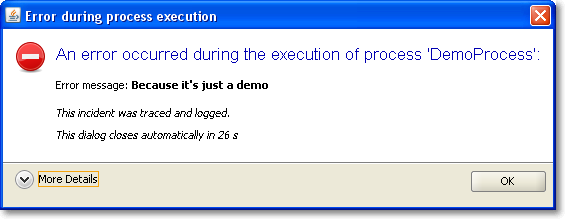
It was a matter of minutes to replace our old, nasty error dialog with a much prettier one using TaskDialog. Here are two screenshots of it in action, with the detail section retracted (initial state) and flipped open.

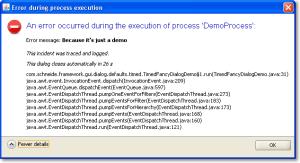
Of course, this is only the Windows version of the dialog. You should head over to the TaskDialog examples page to get an idea how this might look on a Mac. This is a dialog that’s pretty enough to not scare the user away by sheer uglyness. The code for this dialog is something like:


TaskDialog dialog = new TaskDialog("Error during process execution");
 dialog.setIcon(TaskDialog.StandardIcon.ERROR);
 dialog.setInstruction("An error occurred during the execution of process 'DemoProcess':");

 Exception exception = new Exception("Because it's just a demo");
 StringBuilder detailMessage = new StringBuilder();
 for (StackTraceElement stackTraceElement : exception.getStackTrace()) {
 detailMessage.append(stackTraceElement.toString());
 detailMessage.append("\n");
 }
 dialog.setText("Error message: <b>" + exception.getMessage() + "</b>\n\n<i>This incident was traced and logged.</i>");
 dialog.getDetails().setExpandableComponent(
 new JLabel(Strings.toHtml(detailMessage.toString())));
 dialog.getDetails().setExpanded(false);

 JLabel waitLabel = new JLabel(Strings.toHtml("<i>This dialog closes automatically in 26s</i>"));
 dialog.setFixedComponent(waitLabel);

 dialog.show();

Notice the usage of Strings.toHtml() to convert plain Strings to HTML-rendered rich text elements.

Timed dialogs

If you look at the presented information, you’ll notice it’s just a demo presenting a fake exception. But you’ll notice another thing, too: This dialog is about to close itself automatically soon. This is a speciality of our project: The GUI runs unattended by users for long periods of time. If you encounter an error every ten minutes and an user returns to the screen after a week, the system isn’t accessable without closing a million dialogs first. You might argue why a system error lasts for a week, but that’s a reality in this project we cannot change. So we came up with timed dialogs that go away on their own after a while. The information of the dialog is persisted in the log files that get evaluated periodically.

The TaskDialog API provides easy integration for a GUI widget to be included in the dialog. In our timed dialog use case, it’s a JLabel, as highlighted in the code example at lines 16 and 17. A background thread periodically updates the text and closes the dialog when time runs out. But you’ll find examples with progress bars and other components on Eugene’s blog.

Conclusion

The Swing TaskDialog project is a fine little gem to spice up your application. It’s API is simple, yet powerful and has proven customizable to our special use case. Finally, effort for basic dialogs in Swing scales again.

Blog harvest, March/Easter 2010

Some noteworthy blog articles, harvested for March/Easter 2010. You’ll hear a lot about common software bugs, Java, inappropriate hiring procedures and Scala. If you ever wanted to know about the Fussy Bird in Scala, this blog post is for you, too.

Easter times means springtime, an hour stolen by the daylight saving time, rapidly changing weather and the first days without gloves (I catch chillblains very quick. There isn’t an adequate word for them in the german language, so I couldn’t name it for years). We are looking forward for a very hot summer, not only with the weather. But now, let’s talk about software.

  • Top 10 Web Software Application Security Risks – The OWASP community has released their current list of web programmer gotchas. There is nothing to add but “don’t try this at work, kids!”. For a broader audience, there’s the updated “Top 25 Most Dangerous Programming Errors” from the Common Weakness Enumeration project.
  • The 10 most common mistakes made in software development – Another top list with developer mistakes, written by Peter Horsten from GOYELLO IT Services. This one isn’t too code centric and doesn’t provide many solutions, but there is much wisdom in top 9 and 10.
  • I Have No Talent – There is a saying that open source development will make you humble, but John Nunemaker takes it to an extreme. He speaks true words. My favourite phrase is the last one, saying that he doesn’t compare himself to others, but to his own progress. If only everybody would do.
  • Why I love everything you hate about Java – An interesting blog entry by Nick Kallen. He takes a stand for the “bloated” middle-layer in (java) code. The post tends to be a long read, but I found it worthwile. The one thing I hate about Java is the slow progress in recent years.
  • Why I dropped Scala in favor of Java? – While you might argue about the universal importance of Subhash Chandran’s reasoning, it’s still valid. Combined with the previous blog harvest entry, there’s a pattern to be discovered: the grass isn’t always greener on the other side. But you have to change sides to see it.
  • NIO.2 : The new Path API in Java 7 – Java makes slow progress in recent years, but there is progress to be seen. The Path API is something we could have used years earlier. The DirectoryStream and WatchService are two functionalities you couldn’t easily build on your own yet.
  • Ant 1.8 Scanning Leaves 1.7.1 in the Dust – If you are using Ant, you can regain performance with just an upgrade. And you will find the other new features (like lexically scoped properties) really useful.

This was the more serious part of this harvesting. Let’s read some articles that share their message in a lighter way:

Finally, I want to introduce a “interesting tool” section. Each new harvest should present a framework/product/project I found interesting enough to tell you about it:

  • op4j – It calls itself a developer happiness tool. You may call it a stress test for static imports, collection kung-fu or fluency madness. But nevertheless, it’s fun to apply it to your boring old data structures.

P.S.: No easter egg is to be found in this posting.

CMake Builder Plugin in Master/Slave Setups

Making the CMake Builder plugin for Hudson behave in master/slave settings.

The first versions of the cmake builder plugin were developed more or less only driven by our own needs. As people began to use it an issue came up that we hadn’t considered yet: distributed builds, a.k.a master/slave mode. So on our first OSLD in 2010 I looked into the plugin and began to rectify the situation.

My test setup consisted of a hudson master on WindowsXP box which was connected via SSH to a slave node in a Ubuntu virtual machine. The first errors were easy to find. The plugin tried to find all configured paths on the windows host and not on the ubuntu slave.

Experience from our previous Crap4J plugin development and a quick read here brought me on the right track. It’s not a good idea to use just java.io.File if you want your plugin to be master/slave capable – use hudson.FilePath instead.

So after replacing all java.io.File occurrences with hudson.FilePath the situation was much better. The plugin handled all paths correctly but still produced errors when calling cmake. I quickly discovered that java.lang.Process and java.lang.ProcessBuilder were used to call “cmake -version”. Again, not a good idea – hudson.Launcher is your friend here.

After replacing Process with Launcher I had only one strange error left. The following launcher call using a nice fluent interface wouldn’t execute on the remote machine but insisted to execute locally.

launcher.launch().cmds(cmakeCall).envs(environmentVars)
   .stdout(listener).pwd(workDir).join();

When I changed it to the seemingly equal statement

launcher.launch(cmakeCall, environmentVars,
    listener.getLogger(), workDir).join();

it worked like a charm.

After all those changes I proudly present the newest version of CMake Builder Plugin which is now ready to be used in distributed environments.

Only one little unpleasantness still exists, though: when configuring the make and install commands the plugin tries to find the executables on the PATH of host machine. For now, you can just ignore the error message. I try to look into it, soon. Apart from that, have fun with the new version.

Open Source Love Day March 2010

Our Open Source Love Day for March 2010 brought love for Grails, our cmake hudson plugin, RXTX and winp. Everything went smooth and was lots of fun.

Yesterday, we held our first Open Source Love Day (OSLD) for this year. The last OSLD was at December 2009. Then, we reassigned a day in January and February each to perform our relocation to the new (and much bigger) office. But now we are back to regular duty and had the time to donate some work back to the Open Source ecosystem.

The Open Source Love Day

We introduced a monthly Open Source Love Day to show our appreciation to the Open Source software ecosystem and to donate back. We heavily rely on Open Source software for our projects. We would be honored if you find our contributions useful. Check out our first OSLD blog posting for details on the event itself.

Participate at our OSLD by using the features we’ve built today:

  • Grails still has some bugs. Instead of only complaining about them, we try to fix them. There is a bug with checkboxes and nested boolean properties that bugged us in a customer project. It’s filed unter GRAILS-3299 and has a proposed patch now.
  • In previous OSLDs, we produced the cmake hudson plugin. In the corresponding blog entry, comments with bug reports began to pile up. They addressed issues with hudson master/slave setups. So we implemented a hudson master/slave test environment, using VirtualBox virtual machines to perform as slaves. This setup quickly revealed the problems that were typical enough to devote a complete blog entry about this topic soon. Fixing the problems resulted in the new cmake hudson plugin version 1.2 to be released yesterday.
  • We are using the RXTX project to perform serial (RS232) communication in several projects. We are really glad the project exists, because the “official” communications API from Sun/Oracle is nothing but a mess. With RXTX, we only had a problem with emulated COM ports. Emulated COM ports exist when you use a USB->Serial or Ethernet->Serial converter, which is what our customer chose to do. If you unplug the converter during operation, the corresponding COM port disappears. This causes RXTX to crash, bringing the JVM down, too. We wrote a test application and used it with every converter we own (and we own quite a lot of them!). Then we began tracing the RXTX source code (at C code level), altering it to “only” throw an IOException when the virtual COM port disappears. The corresponding patch will be proposed to the RXTX project soon.
  • Another API we use a lot is the tiny winp project, written by Kohsuke Kawaguchi, the creator of hudson. We kill Windows processes with it, within a project that runs on Windows 2000, Windows XP and Windows 7. The latest Windows version seemed incompatible with winp, even the 32bit edition. We didn’t find the cause for this, but developed a workaround that will be proposed to the winp project soon.

What were our lessons learnt today?

  • If you face OutOfMemoryErrors on a 64bit Java6 JVM, try to switch back to a 32bit Java5 JVM. It helped us with our Grails bugfixing (during the test phase).
  • Hudson Master/Slave support for plugins isn’t particularly hard. It’s just that you need to be aware of the topic and replace some types like java.io.File. We gathered the same experience twice with our Crap4J plugin and the cmake plugin. It’s time to tell the world about it. Stay tuned!
  • The good old error return code is an error prone coding paradigm, because all too often, users of a function/method just forget to check the returned result. This was the case with a call to WaitForSingleObject in RXTX.
  • If you don’t understand an implementation well enough to fix the cause, you might at least be able to produce a workaround. It’ll work for you and provide guidance for the original author about where the bug might hide. This is why we count our winp efforts as success, too.
  • Your project either is mavenized or it isn’t. Everything in between is half-assed.

This OSLD was a bit short, as we had some guests in the evening, but nevertheless, it was fun. Well, to be precise, it was this special software engineer’s type of fun: The whole company was remarkably quiet most of the day, with everyone working totally focussed. We scratched our own itches, enhanced our customer projects and contributed to the open source community. A very good day!

Stay tuned if you want to know more about the specifics of the hudson plugin development or the to-be-proposed patches. We will publish them here.

Follow-up to our Dev Brunch March 2010

A follow-up to our March 2010 Dev Brunch, summarizing the talks and providing bonus material.

Yesterday we held our Dev Brunch for this month. It was the second brunch in our new office, with some attendees visiting it for the first time. The reactions were the same: “I want to move in here!”. The topics were of different kinds, from live presentations to mere questions open for discussion.

The Dev Brunch

If you want to know more about the meaning of the term “Dev Brunch” or how we implement it, have a look at the follow-up posting of the brunch in October 2009. We continued to allow presence over topics. These topics were discussed today:

  • Singleton vs. Monostate – We all know that Singletons are bad for your test coverage, they make a poor performance on your dependency chart and are generally seen as “evil”. We discussed the Monostate pattern and if it could solve some of the problems Singletons inherently bring along. Based upon the article from Uncle Bob, we concluded that Monostates are difficile at least and don’t help with the abovementioned problems.
  • What is “agile” for you? – This simple question provoked a lot of thoughts. You can always obey the Agile Manifesto word by word without understanding what the deeper motives are. The answer that fitted best was: “You can name it when you see it”. We concluded that it’s easy and common practice to label any given process “agile” just to sound modern.
  • News around Yoxos – If you are using Eclipse, you’ve certainly heard about Yoxos already. Now during the EclipseCon 2010, good news were announced. We got a sneak peek on the new Yoxos Launcher and how it will help in managing your pack of Eclipse installations. We are looking forward to become beta testers because we can’t wait to use it.
  • Teaser talk for “Actors in Scala” – The actor paradigm for parallel programming is a promising alternative to threads. While threads are inevitable complex even for simple tasks, actors seem to recreate  a more natural approach to parallelism. This talk was only the teaser for a more in-depth talk next time, with hands-on code examples.
  • Properties in Scala – This talk had lots of code examples and hands-on discussion about the Properties feature of Scala. Properties are an elegant way to reduce your boilerplate code for simple objects and to sustain compatibility with Java frameworks that rely on the Java Beans semantics. We clearly understood the advantages, but ran into some strangeness related to the conjoint namespaces of fields and methods along the way. Scala isn’t Java, that’s for sure.
  • Introduction to PreziPrezi is a modern presentation tool in the tradition of the dreaded PowerPoint or Apple’s Keynote. It adds a twist to your presentation by adding two new dimensions: laying out everything on a big single canvas (no slides!) and relying heavily on zooming effects. The online editor is surprisingly usable, yet simple and lightweight. If you want to meet prezi, check out the introduction prezis and the showcase on their homepage.

As usual, the topics ranged from first-hand experiences to literature research. For additional information, check out the comment sections. Comments and resources might be in german language.

Retrospection of the brunch

We keep getting better in timing our talks. We nearly maintained our time limit and didn’t hurry anything. For the next brunch, we are looking forward to use our new office roof garden to brunch and talk in the springtime sun.

Database Versioning with Liquibase

In my experience software developers and database people do not fit too well together. The database guys like to think of their database as a solid piece and dislike changing the schema. In an ideal world the schema is fixed for all time.

Software developers on the other hand tend to think about everything as a subject to change. This is even more true for agile teams embracing refactoring. Liquibase is a tool making database refactorings feasible and revertable. For the cost of only one additional jar-file you get a very flexible tool for migrating from one schema version to another.

Using Liquibase

  • You formulate the changes in XML, plain SQL or even as custom java migration classes. If you are careful and sometimes provide additional information your changes can be made rollbackable so that changing between schema revisions becomes a breeze.
  • To apply the changes you simply run the liquibase.jar as a standalone java application. You can specify tags to update or rollback to or the count of changesets to apply. This allows putting the database in an arbitrary state within changeset granularity.

Additional benefits

  • An important benefit of Liquibase is that you can easily put all your changesets under version control so that they are managed exactly the same as the rest of the application.
  • Liquibase stores the changelog directly in the database in a table called databasechangelog. This enables the developer and the application to check the schema revision of the database and thus find inkonsistent states much easier.

Conclusion
All of the above is especially useful when multiple installations or development/test databases with different verions of the software and therefore database have to be used at the same time. Tracking the changes to the database in the repository and having a small cross platform tool to apply them is priceless in many situations.

Don’t let the tools use you

In today’s software development we use many tools to help us doing our job. Many of them are indispensable. But don’t make yourself a slave of the tool.

In today’s software development we use many tools to help us doing our job. Many of them are indispensable. But don’t make yourself a slave of the tool.
When we create schedules based on our estimates we have a great way to communicate how much work we think needs to be done. But don’t let the schedule fool you: you made an estimate based on your knowledge before you began to work. Maybe you need to change the infrastructure, maybe the new change interferes with a past one, in short you gain knowledge on your way. This knowledge can lead you to adapt or even rework your schedule. Your usual approach for accounting unforeseen obstacles might be to include a risk “pad”. Why not use your new gained knowledge to communicate with your client? Maybe a small change to the planned feature is much easier to implement and the client doesn’t even need the extra flexibility. Or the feature is not that important or worth. Don’t try to hold the schedule at all costs. Estimates are a communication tool not a promise we need to fulfill. (related: read also a 37signals post on It’s not a promise it’s a guess)
Or take a look at your favorite editor or IDE: if you happen to use a new language, source code management system or another new tool, the chances are high that your IDE doesn’t support all features or any features at all. You may be tempted to adapt your way to what your IDE supports. If that suits you it’s definitely ok but don’t let the IDE determine how you make use of the features.
When you use software metrics to measure and control the quality of your code you get a lot of numbers and graphs and hints. Use them when you think they benefit you. Don’t just adhere to them, they are a guideline for you, not a law.

Gesture Touchscreens might render Paper Prototyping useless

With the advent of highly dynamic, gesture-controlled user interfaces for touchscreens, Paper Prototyping seems to lose its applicability.

Paper Prototyping is an highly effective tool to examine the usability of software, even before it is written. The basic idea of Paper Prototyping is that you perform real (software) tasks with real users, but replace everything technical with low-fi substitutes.

Adventures in Low-fi

A typical Paper Prototyping session looks like this:

  • The user gets his task description and has to perform it with the software
  • The computer screen is replaced by an arrangement of paper sheets on a desk
  • The graphical user interface is replaced by hand-drawn copies on paper
  • The computer itself is replaced by a human, mimicking the software responses to input
  • The user operates by finger-pointing or writing with a pen

Advantages of Paper Prototyping

The whole situation described above seems awkward on first look, but is really rewarding for a project in its early stages. The customer has to provide real end user tasks and enough details of the solution to make up a prototype. The team has to produce reasonable drafts of the software GUI and come up with enough understanding of the processes and tasks involved to survive the session without major outages.

The result of a Paper Prototyping session can be used in various ways:

  • Detailed specification of the GUI
  • Use Case or User Story (acted out already)
  • Mock screenshots for the user manual
  • Data for initial acceptance tests

Classical user interface vs. gestures

This approach worked very well as long as the user only had a mouse (pointing, clicking) and a keyboard (writing) at hands. Even then, advanced features like grabbing (drag&drop) or automatic scrolling challenged the creativity of the prototypers. But most GUIs were rather dull and static. The perfect playground for Paper Prototyping.

With the advent of touchscreens, we soon realized that pointing and clicking only needs one finger out of ten. Gestures were introduced to keep all our fingertips busy and to enrich the interaction between user and GUI. We instantly understand the “zoom in” or “scroll down” gestures because it resembles natural behaviour (at least for some of us).

In the wake of gestures, the GUI of our software gets more and more dynamic. The GUI has to be minimalistic so we can control it even with stubby fingers (the new handicap of our generation, compare cell phone key pads). Detailed information has to be provided on demand and only temporarily. Everything can be manipulated. The classical approach to tab through a form (by carefully designed tab orders) isn’t that suitable anymore.

Gestures vs. Paper Prototyping

When using a Paper Prototype, the throughput of scribbled paper is enormous even with the classical GUIs. The more dynamic some dialog is, the more different parts need to be prepared in various states and locations (depending on the fragmentation of the paper screen). With gestures on a touchscreen, the user needs to be able to express them on the screen. Most touchscreen interfaces heavily depend on the (simulated) physical interaction between the fingers and some drawn “objects” on the interface. This is the moment when Paper Prototyping falls short of resembling the real interaction. You just can’t fiddle that fast with all the paper shreds.

No solution yet

I observed this effect when performing a Paper Prototype workshop with my students. The interfaces with classical mouse/keyboard handling performed well in the sessions. Interfaces for touchscreens (iPhone apps were the big newcomer here) just didn’t work out well, especially when downsized to palm size. We weren’t able to come up with a viable solution to make Paper Prototyping perform again for touchscreens and gestures.

Any ideas out there?

Readability of Guard Clauses in Methods

A little story about two opinions on readability of methods containing if-clauses.

Browsing through the code base of one of our customers I frequently stumbled over methods that were roughtly structured like this:

void theMethod
{
  if (some_expression)
  {
    // rest of the method body
    // ...
  }
  // no more code here!
}

And most of the time I was tempted to refactor the method using a guard clause, like so:

void theMethod
{
  if (!some_expression)
  {
    return;
  }
  // rest of the method body
  // ...
}

because this is far more readable for me. When I noticed that the methods were written all by the same guy I told him about by refactoring ideas in absolute certainty that he would agree with me. It came as quite a surprise when, in fact, he didn’t agree with me, at all. Even something like this:

void theMethod
{
  if (some_expression)
  {
    // some code
    // ...
    if (another_expression)
    {
      // some more code
      // ...
    }
    // no more code here ..
  }
  // ... and here
}

was in his eyes far more readable than the refactored version with guard clauses. His rational was that guard clauses make it harder for to see the program flow through the method. And a nested if(…) structure like above was very suitable to express slightly more complicated flows.

All my talks about crappy methods and the downsides of highly indented code were not able to change his mind.

I admit that I can somewhat understand his point about the visibility of the program flow through the method.  And sure, the (nested) ifs increase indentation and the number of possible code paths but since there are no elses and no code after the if-blocks, does that really increase the overall complexity?

Well, I still would prefer smaller methods with guard clauses but as you can see, to a great extend readability lies in the eyes of the beholder.

What do you find readable?