Speed up your buildbox, Part III: Memory

This is the third part of a series on how to boost your build box without much effort. This episode talks about the effects of faster and more RAM.

© Friedberg - Fotolia.comIn the first and second part of our effort to speed up our buildbox, we replaced the harddisk with a RAM disk and swapped in a bigger CPU. This brought the build time down from 03:30 minutes to 02:00 minutes.

Boosting the memory

When we began the journey, we wanted to undercut the 02:00 minutes threshold. The last component that directly impacts performance of our box was the memory. We started out with 4 GB of DDR2-800 modules. To have a feeling for the effects, we upgraded to 4 GB of DDR2-1066 first and then added another 4 GB, resulting in 8 GB of RAM. We expected the performance gain to be small, but noticeable. The RAM disk, for example, is directly affected by memory speed.

As much, but faster

The first upgrade brought the first surprise: Upgrading from DDR2-800 to DDR2-1066 modules didn’t change anything. It’s not that the mainboard or CPU doesn’t support the faster RAM, it just seems to be fast enough, despite the data bus clock rate. Our build process still took 02:00 minutes, reproducible and without exception.

Filling all the banks

The mainboard can load up to 16 GB of RAM, but our budget just allowed to buy 8 GB of DDR2-1066 RAM. We installed it and ran the same 32 bit Ubuntu Linux as before. The build process took 02:00 minutes, which was expected now.

Changing to 64bit

We changed to boot harddisk, installed a 64 bit Ubuntu Linux and ran the build again. Still 02:00 minutes. The switch to 64 bit wasn’t a big deal with Java, but some of the included native libraries complained about the change. Recompiling them solved the issue.

Finally reaching the target

As a last measure, we increased the maximum memory of the build JVM to the biggest value it would accept. This was -Xmx2600m, a surplus of 600 MB to the original setting. This sped up the build process by five seconds, it took 01:55 minutes now.

Conclusion and perspective

We’ve reached our anticipated target of less than two minutes build time. We exceeded our original budget of 500 EUR, but bought some parts that finally weren’t used in the build box, but elsewhere. The two parts that made the whole difference were the CPU and some more memory to spend it on the RAM disk.

If you want to speed up your single build box, aim for the CPU/RAM combo and try to install a RAM disk to perform all the work on.

This leads me to the perspective of the next part of the series: If you plugged in the most expensive CPU and enormous amounts of RAM to speed up your buildbox, you still aren’t done. You should invest some time to look into distributed builds. Hudson as our continuous integration server provides nearly instant “build slave” support. With this feature, you can set up a whole build farm to further increase your build throughput.

Stay tuned for “Part IV: Beyond the box”
CMake Builder Plugin Reloaded

A few months ago I set out to build my first hudson plugin. It was an interesting, sometimes difficult journey which came to a good end with the CMake Builder Plugin, a build tool which can be used to build cmake projects with hudson. The feature set of this first version was somewhat limited since I applied the scratch-my-own-itch approach – which by the time meant only support for GNU Make under Linux.

As expected, it wasn’t long until feature requests and enhancement suggestions came up in the comments of my corresponding blog post. So in order to make the plugin more widely useable I used our second  Open Source Love Day to add some nice little features.

Update: I used our latest OSLD to make the plugin behave in master/slave setups. Check it out!

Let’s take a walk through the configuration of version 1.0 :

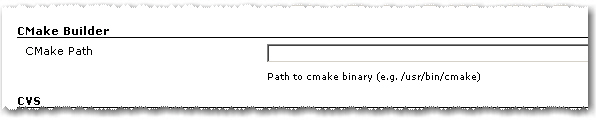
Path to cmake executable

1. As in the first version you have to set the path to the cmake executable if it’s not already in the current PATH.

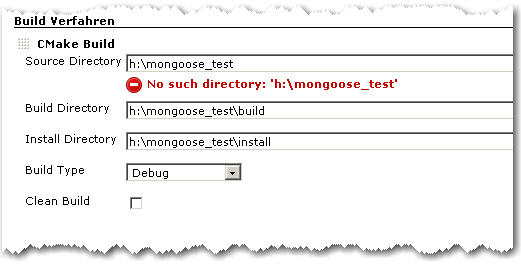
2. The build configuration starts as in the first version with Source Directory, Build Directory and Install Directory.

CMake Builder Configuration Page

3. The Build Type can now be selected more conveniently by a combo box.

4. If Clean Build is checked, the Build Dir gets deleted on every build

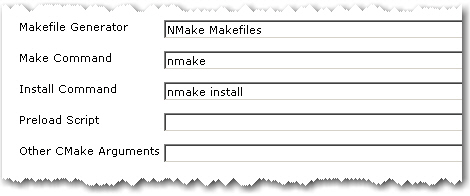
Advanced Configuration Page

5. The advanced configuration part starts with Makefile Generator parameter which can be used to utilize the corresponding cmake feature.

6. The next two parameters Make Command and Install Command can be used if make tools other than GNU Make should be used

7. Parameter Preload Script can be used to point to a suitable cmake pre-load script file. This gets added to the cmake call as parameter of the -C switch.

8. Other CMake Arguments can be used to set arbitrary additional cmake parameters.

The cmake call will then be build like this:

/path/to/cmake  \
   -C </path/to/preload/script/if/given   \
   -G <Makefile Generator>  \
   -DCMAKE_INSTALL_PREFIX=<Install Dir> \
   -DCMAKE_BUILD_TYPE=<Build Type>  \
   <Other CMake Args>  \
   <Source Dir>

After that, the given Make and Install Commands are used to build and install the project.

With all these new configuration elements, the CMake Builder Plugin should now be applicable in nearly every project context. If it is still not useable in your particular setting, please let me know. Needless to say, feedback of any kind is always appreciated.

Blog harvest: Metaprogramming in Ruby,Hudson builds IPhone apps, Git workflow, Podcasting Equipment and Marketing

harvest64
Four blog posts:

  • Python decorators in Ruby – You can do amazing things in a language like Ruby or Lisp with a decent meta programming facility, here a language feature to annotate methods which needed a syntax change in Python is build inside of Ruby without any change to the language spec.
  • How to automate your IPhone app builds with Hudson – Another domain in which the popular CI Hudson helps: building your IPhone apps.
  • A Git workflow for agile teams – As distributed version control systems get more and more attention and are used by more teams you have to think about your utilisation of them.
  • Podcasting Equipment Guide – A bit offtopic but interesting nonetheless: if you want to do your own podcasts which equipment is right for you.

and a video:

A more elegant way to HTTP Requests in Java

The support for sending and processing HTTP requests was always very basic in the JDK. There are many, many frameworks out there for sending requests and handling or parsing the response. But IMHO two stand out: HTTPClient for sending and HTMLUnit for handling. And since HTMLUnit uses HTTPClient under the hood the two are a perfect match.

This is an example HTTP Post:

HttpClient client = new HttpClient();
PostMethod post = new PostMethod(url);
for (Entry param : params.entrySet()) {
    post.setParameter(param.key, param.value);
}
try {
    return client.executeMethod(post);
} finally {
    post.releaseConnection();
}

and HTTP Get:

WebClient webClient = new WebClient();
return (HtmlPage) webClient.getPage(url);

Accessing the returned HTML via XPath is also very straightforward:

List roomDivs=(List)page.getByXPath("//div[contains(@class, 'room')]");
for (HtmlElement div:roomDivs) {
  rooms.add(
    new Room(this,
      ((HtmlElement) div.getByXPath(".//h2/a").get(0)).getTextContent(),
      div.getId())
  );
}

One last issue remains: HTTPClient caches its cookies but HTMLUnit creates a HTTPClient on its own. But if you override HttpWebConnection and give it your HTTPClient everything works smoothly:

public class HttpClientBackedWebConnection extends HttpWebConnection {
  private HttpClient client;

  public HttpClientBackedWebConnection(WebClient webClient,
      HttpClient client) {
    super(webClient);
    this.client = client;
  }

  @Override
  protected HttpClient getHttpClient() {
    return client;
  }
}

Just set your custom webconnection on your webclient:

webClient.setWebConnection(
  new HttpClientBackedWebConnection(webClient, client)
);

A Campfire plugin for Hudson

Our last OSLD resulted in a new hudson plugin: a build notifier for Campfire. Right now it is pretty simple and just posts the last build result in a chat room:
Campfire-Notification

You can configure your account data and the room to join in the job config page under Post Build actions:
Hudson-Campfire
But there is more to come:

  • global config
  • SSL support
  • a link back to hudson

or what is your favorite missing feature?

Blog harvest, October II

Some interesting blog articles, harvested for late October 2009

harvest64A great way to stay up to date with current musings and hypes of our industry is to follow other people’s blogs. We do this regularly – everybody scans his RSS feeds and roams the internet. But to have a pool of shared knowledge, we pick our favorite recent blog articles and usually write an email titled “blog harvest” to the rest of the company.

Then, the idea came up to replace the internal email by a public blog post. So here it is, the first entry of a new category called “blog harvests”. You’ll read more harvests in the future. They will be categorized and tagged appropriate and have the harvest icon nearby.

Second Blog harvest for October 2009

There are four main blog entries I want to share:

  • 8 Signs your code sucks – Let’s assume we all read Martin Fowler’s classic “Refactoring” book, then these eight signs are a mere starter. But as the follow-up post indicates, it got quite a few people started and upset for the “comments are code smells” line. Well, we heartfully agree with the premise that comments are clutter and code should be the comment. /* TODO: Add a joke using comments here */
  • ORMs are a thing of the past – Another opinion that might get in the way of hibernate fanboys. We’ve had our share of hibernate “experiences”. It’s a useful tool if you know how to use it – and when not to. Replies followed instantly, here are two noteworthy ones by Scot Mcphee and by Jens Schauder.
  • The Case for Clojure – Clojure is functional programming on the Java VM (think LISP). Stay tuned for our own book review on this topic. You can argue that Clojure isn’t pure, though.
  • Bad Programmers Create Jobs – As is already is a controversy harvesting, lets add some more, written by Mohammad Azam. Side note: Half of our work was initially created by “bad” programmers, so I think Mohammad hit the nail on the head. And remember that you’ve produced legacy code today.

Then there is a bit of (future) knowledge you shouldn’t miss:

That’s it for now. My harvest format has changed for the blog, i’ll evolve it further in the next months, Thanks for your attention, stay tuned.

Follow-up to Schneide “Dev Brunch” October 2009

A follow-up to our October 2009 Dev Brunch, summarizing the talks and providing bonus material.

brunch64Last weekend, we held our October Dev Brunch in the rooms of our company. This posting is the follow-up, summarizing the topics and providing additional information.

The Dev Brunch

Let me start by introducing the concept of a “Dev Brunch” as we perform it. Once a month, we spend nearly half a day of the weekend by meeting and talking about topics related to software development. The meeting starts at perfect brunch time, everybody brings along some brunchable food and the party begins.

Everybody who attains the Dev Brunch has to prepare a topic to tell about. We set a limit of 15 minutes for the talk and unlimited time for questions and discussion. We elect a moderator, though, to bring us back on course when we disgress too much.

To prepare a topic isn’t hard work. No slides are required, no written handout or code examples. You just have to work up a topic to fit it into 15 minutes.

The October 2009 Dev Brunch

The topics of this session were:

  • Java’s upcoming Fork/Join framework – Java 5 brought the util.concurrent classes, Java 7 will bring the Fork/Join framework to further ease concurrency in Java.
  • The current status of JIT on mobile devices – the tagline was “why is my Android phone so slow?”. This talk even included slides!
  • Project estimation with planning poker – the talk gave away the secrets of planning poker and even more secrets of how to sell it to the management.
  • Pitfalls of unit testing Spring infected code – Developers often mix up the framework with its concepts. The example given was dependency injection (concept) vs. Spring (framework).
  • First impressions of Scala – Tales of a first contact with Scala from a Java developer.

Several talks included bonus material that will be provided in the comment section of this blog posting. Most material will be in german, as were the talks. But to ease our international readers: most links within the bonus material point to english articles.

Stage your own Dev Brunch

We cannot stress this enough – holding your own Dev Brunch isn’t complicated but very valuable. Just invite your mates and bring food. Once you started, you’ll attract other developers from your vicinity and get to know them in an informal manner.

Speed up your buildbox, Part II: Processor

This is the second part of a series on how to boost your build box without much effort. This episode talks about the effects of different processors.

© Friedberg - Fotolia.comIn the first part of our effort to speed up our buildbox, we replaced the spindle harddisk with a Solid State Disk (SSD) and finally, a RAM disk. This brought the build time down from 03:30 minutes to 02:50 minutes.

The Central Performance Unit

The next step on our journey to a faster buildbox was to replace the processor. Our initial processor was an Intel Core2 Duo E6750 with 2.67 GHz. To our pleasure, the processor socket, namely the LGA775 socket, is extremely versatile in supporting different processors. We had no problem in plugging in faster dual or even quad core processors, except upgrading the BIOS.

Taking the 3 GHz mark

The next processor to try out was an Intel Core2 Duo E8500 with 3.17 GHz operating frequency. The L2 cache went up from 4 MB to 6 MB.

The build time went down immediately from 02:50 minutes to 02:20 minutes. That’s nearly 20 percent less build time. And it’s perfectly linear with the CPU speed increase (also nearly 20 percent).

As a result: Investing in CPU clock power seems to pay off. The higher the frequency, the lower the build time.

Doubling the cores

Fortunately, the LGA775 socket supports quad core processors, too. We plugged in a Core2 Quad Q9550 with 2.8 GHz and ran the build again.

The result was astonishing: Despite the lower frequency, the build time dropped from 02:20 minutes to 02:00 minutes. We can’t really explain this one with basic math like the frequency coupling of the dual cores.

If your build is perfectly multithreaded, something javac isn’t, you’ll notice an even bigger speedup.

To sum it up: you can’t have enough GHz or processor cores when running a build.

Reviewing the result

We replaced the harddisk with RAM and upgraded the processor to meet the current performance threshold. This brought us from a starting 03:30 minutes build time to 02:00 minutes now. The CPU is the major player in this game, so upgrade it first.

Outlook on the third part

But what about the RAM? We really wanted to know what happens when we replace the RAM with bigger and faster one. Read more about this experiment in the third part of the series, coming soon.

Our second Open Source Love Day (OSLD)

A retrospective report of our second Open Source Love Day (OSLD). We present the results of our work on hudson and git and the lessons learnt.

opensourceloveday

Today we celebrated our second Open Source Love Day (OSLD). When we say “celebrated”, we actually mean that all of us worked hard and concentrated for hours, just to have a short meeting with candy at the end of the day.

The Open Source Love Day is our way to show our appreciation to the Open Source software development ecosystem. We heavily rely on Open Source products for our customer projects, so it’s just fair to donate back. You can read more about our motivation and specifica in our first OSLD blog posting.

For this day, we adjusted the rules a bit. While Object Calisthenics are very powerful in formulating rather academic software development values in some easy-to-remember rules, they just don’t fit well with existing projects. We still kept the rules in mind, but didn’t follow them strictly. We also learnt our share from last time’s experience of jumping right into the middle of arbitrary projects without a real need to do so. Today, we scratched more of our own itches.

You can participate at our OSLD by using the feature we’ve built today:

  • Hudson gets a brand new plugin. Currently, it’s in alpha status and needs some more nurturing, but is planned to be published within the next few weeks. The proof of concept was successful today. You will read more about it on this blog soon.
  • Another of our hudson plugins, namely the cmake builder plugin, got some feature love, incorporating suggestions from plugin users. We especially thank Ole B. for his feedback. The new features are checked in and will be available with the next plugin version 0.6, scheduled to be published in a few days. You’ll read the details about the new features here.
  • We’ve produced a feature implementation for hudson, adding the ability to use environment variables for the job’s workspace path. This feature touches core hudson functionality, so we just proposed a patch and leave it up to the core hudson team to decide on its inclusion. For more details, head over to the hudson issue tracker, entry #3997.
  • And we didn’t forget about git. As we are multi-IDE users (today’s development took place using NetBeans, IDEA and Eclipse), the EGit eclipse plugin for git will soon have the ability to diff the content of two revisions. An undocumented method argument took too much time to finish the feature today. After email communication with the project owner, the feature works on our machine, but needs some polishing before being committed in the near future.

As you can see, the hudson continuous integration server received a great share of our today’s love. It’s a great tool with a great community that really deserves our contributions.

What were our lessons learnt today?

  • While implementing the variable expansion feature, the author got distracted by a similar concept and followed this red herring. Namely, instead of a hudson.util.VariableResolver, we needed to use the hudson.EnvVars class. The EnvVars are pre-filled with all global variables like JAVA_HOME, while the VariableResolver is not. This could have been avoided by looking at the actual code instead of just type names. Once you think you’ve found your type, you read code the wrong way just to sustain your assumption.
  • To implement advanced plugin features, whether for hudson or eclipse, is a matter of skill with the “monkey see, monkey do” development style. Documentation is mostly non-existent or out-dated.
  • When handling HTML and HTTP in java, some survival tricks are crucial. Stay tuned for a whole blog post on that topic.
  • We still don’t feel comfortable within the JGit source code, as we still lack advanced git feature and terminology knowledge and the project lacks documentation. Our part of the problem will decline over time, as it’s a question of tool/mindset/slang exposure.

To sum it up, this OSLD worked out much better than our first one. We had more fun and yielded better results, mostly because we adjusted our goals to better suit our working style.

What are your experiences with open source development? Drop a comment!

Object Calisthenics On Existing Projects?

A few days ago we discussed Object Calisthenics which where introduced by Jeff Bay in an article for the ThoughtWorks Anthology book. In case you have no idea what I’m talking about, here are again the 9 rules in short form (or your can study them in detail in the book):

1. One level of indentation per method
2. No else keyword
3. Wrap all primitives and strings
4. Use only one dot per line
5. Don’t abbreviate names but keep them short
6. Keep all entities small
7. No more than two instance variables per class
8. Use first-class collections
9. Don’t use any getters/setters or properties

Following the rules supposedly leads to more object-oriented code with a special emphasis on encapsulation. In his article, Jeff Bay suggests to do a new 1000 lines project and to follow the rules excessively without thinking twice. But hey, more object-oriented code can’t be bad for existing projects, either, can it?

Not only on the first look, many of the rules seem pretty hard to follow. For example, check your projects for compatibility with rule 7. How many of your classes have more than two instance variables? That’s what I thought. And sure, some primitives and collections deserve wrapping them into an extra class (rules 3 and 8), but do you really wrap all of them? Well, neither do we.

Other rules lead directly to more readable code. If you value good code quality like we do, rules 1, 2, 5 and 6 are more or less already in the back of your head during your daily programming work.

Especially rule 1 is what you automatically aim for when you want your crap load to remain low.

What really got my attention was rule 9: “Don’t use any getters/setters or properties”. This is the “most object-oriented” rule because it targets the heart of what an object should be: a combination of data and the behavior that uses the data.

But doing a little mental code browsing through our projects, it was easy to see that this rule is not easily retrofitted into an existing code base. The fact that our code is generally well covered with automated tests and considered awesome by a number of software metrics tools does not change that, either. Which is, of course, not surprising since committing to rule 9 is a downright big architectural decision.

So despite the fact that it is difficult to virtually impossible to use the rules in our existing projects right away, Object Calisthenics were certainly very valuable as motivation to constantly improving ourselves and our code. A good example is rule 2 (“No else”) which gets even more attention from now on. And there are definitely one or two primitives and collections that get their own class during the next refactoring.