The perils of \u0027

Adventures (read: pitfalls) of internationalization with Struts2, concerning the principle “stacked smartness doesn’t add up”.

u0027Struts2 is a framework for web application development in Java. It’s considered mature and feature-rich and inherits the internationalization (i18n) capabilities of the Java platform. This is what you would expect. In fact, the i18n features of Struts2 are more powerful than the platform ones, but the power comes with a price.

Examples of the sunshine path

If you read a book like “Struts 2 in Action” written by Donald Brown and others, you’ll come across a chapter named “Understanding internationalization” (it’s chapter 11). You’ll get a great overview with a real-world example of what is possible (placeholder expansion, for example) and if you read a bit further, there is a word of warning:

“You might also want to further investigate the MessageFormat class of the Java platform. We saw its fundamentals in this chapter when we learned of the native Java support for parameterization of message texts and the autoformatting of date and numbers. As we indicated earlier, the MessageFormat class is much richer than we’ve had the time to demonstrate. We recommend consulting the Java documentation if you have further formatting needs as well. “

If you postpone this warning, you’re doomed. It’s not the fault of the book that their examples are the sunshine case (the best circumstances that might happen). The book tries to teach you the basics of Struts2, not its pitfalls.

A pitfall of Struts2 I18N

You will write a web application in Struts2, using the powerful built-in i18n, just to discover that some entries aren’t printed right. Let’s have an example i18n entry:

impossible.action.message=You can't do this

If you include this entry in a webpage using Struts2 i18n tags, you’ll find the apostrophe (unicode character \u0027) missing:

You cant do this

What happened? You didn’t read all about MessageFormat. The apostrophe is a special character for the MessageFormat parser, indicating regions of non-interpreted text (Quoted Strings). As there is only one apostrophe in our example, it just gets omitted and ignored. If there were two of them, both would be omitted and all expansion effort between them would be ceased.

How to overcome the pitfall

You’ll need to escape the apostrophe to have it show up. Here’s the paragraph of the MessageFormat APIDoc:

Within a String, "''" represents a single quote. A QuotedString can contain arbitrary characters except single quotes; the surrounding single quotes are removed. An UnquotedString can contain arbitrary characters except single quotes and left curly brackets. Thus, a string that should result in the formatted message “‘{0}'” can be written as "'''{'0}''" or "'''{0}'''".

That’s bad news. You have to tell your translators to double-type their apostrophes, else they won’t show up. But only the ones represented by \u0027, not the specialized ones of the higher unicode regions like “grave accent”  or “acute accent”. If you already have a large amount of translations, you need to check every apostrophe if it was meant to be printed or to control the MessageFormat parser.

The underlying principle

This unexpected behaviour of an otherwise powerful functionality is a common sign of a principle I call “stacked smartness doesn’t add up”. I will blog about the principle in the near future, so here’s just a short description: A powerful (smart) behaviour makes sense in the original use case, but when (re-)used in another layer of functionality, it becomes a burden, because strange side-effects need to be taken care of.

Easy code inspection using QDox

Spend five minutes and inspect your code for the aspect you always wanted to know using the QDox project.

Copyright by http://www.clipartof.com/So, you’ve inspected your Java code in any possible way, using Findbugs, Checkstyle, PMD, Crap4J and many other tools. You know every number by heart and keep a sharp eye on its trend. But what about some simple questions you might ask yourself about your project, like:

  • How many instance variables aren’t final?
  • Are there any setXYZ()-methods without any parameter?
  • Which classes have more than one constructor?

Each of this question isn’t of much relevance to the project, but its answer might be crucial in one specific situation.

Using QDox for throw-away tooling

QDox is a fine little project making steady progress in being a very intuitive Java code structure inspection API. It’s got a footprint of just one JAR (less than 200k) you need to add to your project and one class you need to remember as a starting point. Everything else can be learnt on the fly, using the code completion feature of your favorite IDE.

Let’s answer the first question of our list by printing out all the names of all instance variables that aren’t final. I’m assuming you call this class in your project’s root directory.

public class NonFinalFinder {
    public static void main(String[] args) {
         File sourceFolder = new File(".");
         JavaDocBuilder parser = new JavaDocBuilder();
         builder.addSourceTree(sourceFolder);
         JavaClass[] javaClasses = parser.getClasses();
         for (JavaClass javaClass : javaClasses) {
             JavaField[] fields = javaClass.getFields();
             for (JavaField javaField : fields) {
                 if (!javaField.isFinal()) {
                     System.out.println("Field "
                       + javaField.getName()
                       + " of class "
                       + javaClass.getFullyQualifiedName()
                       + " is not final.");
                }
            }
        }
    }
}

The QDox parser is called JavaDocBuilder for historical reasons. It takes a directory through addSourceTree() and parses all the java files it finds in there recursively. That’s all you need to program to gain access to your code structure.

In our example, we descend into the code hierarchy using the parser.getClasses() method. From the JavaClass objects, we retrieve their JavaFields and ask each one if it’s final, printing out its name otherwise.

Praising QDox

The code needed to answer our example question is seven lines in essence. Once you navigate through your code structure, the QDox API is self-explanatory. You only need to remember the first two lines of code to get started.

The QDox project had a long quiet period in the past while making the jump to the Java 5 language spec. Today, it’s a very active project published under the Apache 2.0 license. The developers add features nearly every day, making it a perfect choice for your next five-minute throw-away tool.

What’s your tool idea?

Tell me about your code specific aspect you always wanted to know. What would an implementation using QDox look like?

CMake Builder Plugin for Hudson

Update: Check out my post introducing the newest version of the plugin.

Today I’m pleased to announce the first version of the cmakebuilder plugin for Hudson. It can be used to build cmake based projects without having to write a shell script (see my previous blog post). Using the scratch-my-own-itch approach I started out implementing only those features that I needed for my cmake projects which are mostly Linux/g++ based so far.

Let’s do a quick walk through the configuration:

1. CMake Path:
If the cmake executable is not in your $PATH variable you can set its path in the global Hudson configuration page.

2. Build Configuration:

To use the cmake builder in your Free-style project, just add “CMake Build” to your build steps. The configuration is pretty straight forward. You just have to set some basic directories and the build type.

cmakebuilder demo config

The demo config above results in the following behavior (shell pseudocode):

if $WORKSPACE/build_dir does not exist
   mkdir $WORKSPACE/build_dir
end if

cd $WORKSPACE/build_dir
cmake $WORKSPACE/src -DCMAKE_BUILD_TYPE=Debug -DCMAKE_INSTALL_PREFIX=$WORKSPACE/install_dir
make
make install

That’s it. Feedback is very much appreciated!!

Originally the plan was to have the plugin downloadable from the hudson plugins site by now but I still have some publishing problems to overcome. So if you are interested, make sure to check out the plugins site again in a few days. I will also post an update here as soon as the plugin can be downloaded.

Update: After fixing some maven settings I was finally able to publish the plugin. Check it out!

Paging with different DBs

Sometimes you cannot or do not want to use an object-relational mapping tool. When not using an OR-mapper like Hibernate or Oracle Toplink you have to deal with database specifics. One common case especially for web applications is limiting the result set to a number of items that fit nicely on a web. You then often want to allow the users to navigate between these “pages” of items aka “paging”.

This type of functionality became part of SQL only as of SQL2008 in the following form:
SELECT * FROM t WHERE ... ORDER BY c OFFSET start_row FETCH count ONLY

Since most popular database management systems (DBMSes) do not yet implement this syntax you have to implement paging in propriatory ways.

My experience with an Oracle DBMS and the frustrating and comparatively long time it took to find the correct™ solution inspired me to write this post. Now I want to present you the syntax for some widely used DBMSes which we encounter frequently in our projects.

  • MySQL, H2 and PostgreSQL (< 8.4 which will also implement the SQL2008 standard) use the same syntax:
    SELECT * FROM t WHERE ... ORDER BY c LIMIT count OFFSET start
  • Oracle is where the fun begins. There is actually no easy and correct way of doing this. So you will end up with a mess like:
    SELECT col1 FROM (SELECT col1, ROWNUM r FROM (SELECT col1 FROM table ORDER BY col1)) WHERE r BETWEEN start AND end
  • DB2 AFAIK uses the syntax proposed in SQL2008 but correct me if I am wrong because we do not yet work with DB2 databases.
  • As we did not need paging with MS SQLServer as of now I did not bother to look for a solution yet. Hints are very welcome.

With all solutions the ORDER BY clause is critical because SQL does not guarantee the order of the returned rows.

Wikipedia delivers some additional and special case information but does not really explain the general, real world case the specific DBMSes.

I hope that I raised some awareness about database specifics and perhaps saved you some time trying to find a solution the problem using your favorite DBMS.

Software Craftsman Project Priority Survey

Answers to a question of project priorities from the upcoming book “Apprenticeship Patterns”.

apprenticeship-patters-coverThere is an upcoming and very promising book title written by Dave Hoover and Adewale Oshineye called “Apprenticeship Patterns: Guidance For The Aspiring Software Craftsman”.  It will cover all the basic rules you’ll need to become a Software Craftsman. This is a rather new term to describe professional software developers, eventually leading to the Software Craftsmanship Manifesto. The Manifesto itself reads like an addition to the Agile Manifesto:

As aspiring Software Craftsmen we are raising the bar of professional software development by practicing it and helping others learn the craft. Through this work we have come to value:

  • Not only working software, but also well-crafted software
  • Not only responding to change, but also steadily adding value
  • Not only individuals and interactions, but also a community of professionals
  • Not only customer collaboration,but also productive partnerships

That is, in pursuit of the items on the left we have found the items on the right to be indispensable.

© 2009, the undersigned. this statement may be freely copied in any form, but only in its entirety through this notice.

A very good question

When i read the blog of “Apprenticeship Patterns“, i noticed a very good question about project priorities:

Rank the following 3 project attributes in order of importance and explain why.

  • Test Coverage
  • Timely Delivery
  • Code Quality

This question really got me hooked, because there is no single valid answer, only personal statements about values.

An informal survey

I’m in the lucky position of meeting a lot of senior developers and a great number of software engineering students. So I instantly decided to perform a survey on this question and watch out for emerging answer patterns.

I gave each project attribute an unique letter, C for “Test Coverage”, D for “Timely Delivery” and Q for “Code Quality”. There are six possible answers, here are their rates in the survey (when 58 persons gave their answers):stats-all1

  • CDQ: 7 percent
  • CQD: 9 percent
  • DCQ: 5 percent
  • DQC: 7 percent
  • QCD: 41 percent
  • QDC: 31 percent

The vast majority of developers stated Code Quality as their highest goal. This isn’t very surprising to me, as most developers take pride in writing high quality code.

Comparing the answers

But what about the answers of only senior developers? Lets have a look at the numbers without student answers:stats-senior1

  • CDQ: 7 percent
  • CQD: 14 percent
  • DCQ: 7 percent
  • DQC: 14 percent
  • QCD: 21 percent
  • QDC: 36 percent

The big pattern still applies: Code Quality first. It’s amazing to see the other attributes gaining importance, though. To me, that’s a sign that code-centric thinking is one pattern of apprenticeship.

What’s not in the numbers

When i held the survey, the relevant group of people was gathered together, so a discussion of the results arose every time.  But the discussions followed different patterns:

  • The teams (of senior developers) gave very distinct answers while working on the same project. The answers were driven by personal conviction rather than project necessities.
  • The courses (of students) gave more similar answers while having a wide variety of backgrounds. The answers were mostly explained with current project necessities (like security-critical systems as reason for Test Coverage being most important).

When I have to compare the two groups, I tend to say that younger developers are more driven by extrinsic demands while more experienced developers act on their own internal values.

Our duty as Software Craftsman

In conclusion, I see a duty for experienced developers: to share their experience. Leading a discussion about “Team Values” at your current project is the least you can do. Helping others to develop their own set of internal values, even if it isn’t yours, seems crucial to me.

The upcoming “Apprenticeship Patterns” book and the brand new “97 Things Every Software Architect Should Know” are perfect starting points for this.

About String Concatenation in Java or “don’t fear the +”

When it comes to string concatenation in Java many people have almost religious views about performance and style. Sadly, there are some misconceptions and misinformation especially about the performance bits. Many people think that concatenating many strings using + means expensive string copying each time and is thus slow as hell which is mostly wrong.

Justin Lee has a nice writeup of the most prominent concatenation options. But imho he misses out some things and his benchmark is a bit oversimplified although it does tell a true story. I assume that he followed at least the basic rules for performance measurement as his results suggest.

Now I want to try to clarify some points I think he missed and I find important:

  • Concatenation using + in one statement is actually compiled to the use of StringBuilder (at least for Sun Java6 compilers, where I checked it in the debugger, try it yourself!). So it’s no surprise that there is no difference between these two options in Justin’s benchmark.
  • It should be clear that the format variants have some overhead because they actually do more than just concatenate strings. There is at least some string parsing and copying involved so that these methods should be used for the cases where for example parameter reordering (think I18N) is needed or readability suffers using normal concatenation.
  • You have to pay attention when using + concatenation over the course of multiple statements because it then involves string copying. Consider the following code: Critical String Concatenation Here it really does make a difference which option you choose. The StringBuilder will perform far better for higher loop counts. We had a real world issue back some time with that when we used the Simple web framework for serving directory listing of several thousand files. The HTML-code was generated using a concatenatePlus()-style method and took like 40(!) seconds. After changing the code to the StringBuilder variant the page was served in sub-second time.

Whether you use + or StringBuilder is mostly a matter of taste and readability in many cases. When your string concatenation gets more complex you should really consider using StringBuilder as it is the safe bet.

Lightweight dependency management

Managing project dependencies without maven or ant ivy, using a custom ant task to ensure classpath orthogonality.

Java’s classpath is a powerful concept – when used appropriate. As your project grows larger in terms of code and people, it gets harder to ensure that your classpath is correct. A great danger arises from JAR files containing different versions of the same resource. You might end up running different code than you think, leading to strange effects. If you build your classpath using wildcards, you can’t even control the order your JAR files are loaded.

Managing dependencies

To avoid the issues mentioned above, you need to manage your project dependencies. It’s a common practice to implement the build process of the project using maven or ant ivy. Both tools provide dependency mangement by declaration. But at a high cost. Especially maven has received some malice lately, criticizing its steep learning curve and complexity.

Scratching the biggest itch

We decided to try a different approach to dependency management, tackling only our biggest concern: The duplication of classpath resources. We take care of the scope of a third-party library, put required JARs in the repository (to us, third party binary artifacts are part of the project source) and update manually. The one thing we cannot assure manually is that every resource is unique. Sometimes, the same class is included in different JARs, as it seems to be common practice among java web frameworks.

Ant to the rescue

Thus, I wrote a custom ant task that, given the classpath, checks for duplicate entries. If it finds one, it lists the culprits and optionally aborts the build process. Included in our continuous integration system, it gets run every time somebody performs a change. You can’t forget to delete an old version of a library or check in the same library twice without breaking the build now.

Our ClasspathCollisionCheckTask

I provide this task here, without any warranty. The source code is included in the JAR alongside the classes, if you want to know what it does exactly.

Assuming you already know how to use custom tasks within an ant build script, here’s only a short usage description.

Import the custom task:

<taskdef
    name="check.collision"
    classname="com.schneide.internal.anttask.ClasspathCollisionCheckTask"
    classpath="${customtasks.library.directory}/schneidetasks.jar"
/>

Next, use it on your classpath:

<check.collision verbose="true" failOnCollision="true">
    <path>
        <fileset dir="${classpath.library.directory}">
            <include name="**/*.jar"/>
        </fileset>
        <fileset dir="${internal.library.directory}">
            <include name="**/*.jar"/>
        </fileset>
    </path>
</check.collision>

The task scans the whole path you give it and reports any collision it detects. You will see the warnings in your build log.

If the failOnCollision parameter is set to true (optional, defaults to false), the build will abort after a collision. If you want to have debug information, set the verbose parameter to true (optional, defaults to false).

Conclusion

If you manage your project dependencies manually, you might find our custom ant task useful. If you use maven or ant ivy, you already have this functionality in your build process.

Feedback

I’m very interested in hearing your opinion on the task or about your way of handling dependencies. Leave us a comment.

Industry Standard C++

The other day I was browsing through the C++ API code of a third-party library. I was not much surprised to see stuff like

#define MAX(a, b) ( (a) >= (b) ? (a) : (b))
#define MIN(a, b) ( (a) <= (b) ? (a) : (b))

because despite the fact that std::min, std::max together with the rest of the C++ standard library is around for quite a while now, you still come across old fashioned code like above frequently. But things got worse:

#define FALSE 0
#define TRUE 1

and later:

...
bool someVariable = TRUE;

As if they learned only half the story about the bool type in C++. But there was more to come:

class ListItem
{
   ListItem* next;
   ListItem* previous;
   ...
};

class List : private ListItem
{
...
};

Yes, that’s right, the API guys created their own linked-list implementation. And a pretty weird one, too, mixing templates with void* pointers to hold the contents. Now, why on earth would you do that when you could just use std::list or std::vector? Makes you wonder about the quality of the rest of the code. Especially with C++ where there are so many little pitfalls and details which can burn you. Hey, if you have no clue about the very basics of a language, leave it alone!

Unfortunately, the above example is not exceptional in industry software. It seems that the C++ world these days is actually split into two worlds. In one, people like Andrei Alexandrescu write great books about Modern C++ design, Scott Meyers gives talks about Effective C++ and the boost guys introduce the next library using even more creative operator overloading that in the spirit library (which is pretty cool stuff, btw).

In the other world, you could easily call it industry reality, people barely know the STL, don’t use templates at all, or fall for misleading and dangerous c++ features like the throw() clause in method signatures. Or they ban certain c++ features because they are supposedly not easy to understand for the new guy on the project or are less readable in general. Take for example the Google C++ Style Guide. They don’t even allow exceptions, or the use of std::auto_ptr. Their take on the boost library is that “some of the libraries encourage … an excessively “functional” style of programming”. What exactly is bad about piece of functional programming used as the right tool in the right place? And what communicates ownership issues better than e.g. returning a heap allocated object using a std::auto_ptr?

The no-exceptions rule is also only partly understandable. Sure enough, exceptions increase code complexity in C++ more than in other languages (read Items 18 and 19 of Herb Sutter’s Exceptional C++ as an eye-opener. Or look here). But IMHO their advantages still outweigh their downsides.

With the upcoming new C++0X standard my guess is that the situation will not get any better, to put it mildly. Most likely, things like type inference with the new auto keyword will sell big because they save typing effort. Same thing with the long overdue feature of constructor delegation. But why would people who find functional programming less readable start to use lambda functions? As little known as the explicit keyword is now, how many people will know about or actually use the new “= delete” keyword, let alone “= default“? Maybe I’m a little too pessimistic here but I will certainly put a mark in my calender on the day I encounter the first concept definition in some piece of industry C++ software.

Update: Concepts have been removed from C++0X so that mark in my calender will not come any time soon…

A DSL for deploying grails apps

Everytime I deploy my grails app I do the same steps over and over again:

  • get the latest build from our Hudson CI
  • extract the war file from the CI archive
  • scp the war to a gateway server
  • scp the war to the target server
  • run stop.sh to shutdown the jetty
  • run update.sh to update the web app in the jetty webapps dir
  • run start.sh to start the jetty

Reading the Productive Programmer I thought: “This should be automated”. Looking at the Rails world I found a tool named Capistrano which looked like a script library for deploying Rails apps. Using builders in groovy and JSch for SSH/scp I wrote a small script to do the tedious work using a self defined DSL for deploying grails apps:

Grapes grapes = new Grapes()
def script = grapes.script {
    set gateway: "gateway-server"
    set username: "schneide"
    set password: "************"
    set project: "my_ci_project"
    set ciType: "hudson"
    set target: "deploy_target.com"
    set ci_server: "hudson-schneide"
    set files: ["webapp.war"]

    task("deploy") {
        grab from: "ci"
        scp to: "target"
        ssh "stop.sh"
        ssh "update.sh"
        ssh "start.sh"
    }
}

script.tasks.deploy.execute()

This is far from being finished but a starting point and I think about open sourcing it. What do you think: may it help you? What are your experiences with deploying grails apps?

Make it visible: The Project Cockpit

How to use a whiteboard as information radiator for project management, showing progress, importance, urgency and volume of projects.

We are a project shop with numerous customers booking software development projects as they see fit, so we always work on several projects concurrently in various sub-teams.

We always strive for a working experience that provides more productivity and delight. One major concept of achieving it is “make it visible”. This idea is perfectly described in the awesome book “Behind Closed Doors” by Johanna Rothman and Esther Derby from the Pragmatic Bookshelf. Lets see how we applied the concept to the task of managing our project load.

What is the Project Cockpit?

The Project Cockpit is a whiteboard with titled index cards and separated regions. If you glance at it, you might be reminded of a scrum board. In effect, it serves the same purpose: Tracking progress (of whole projects) and making it visible.

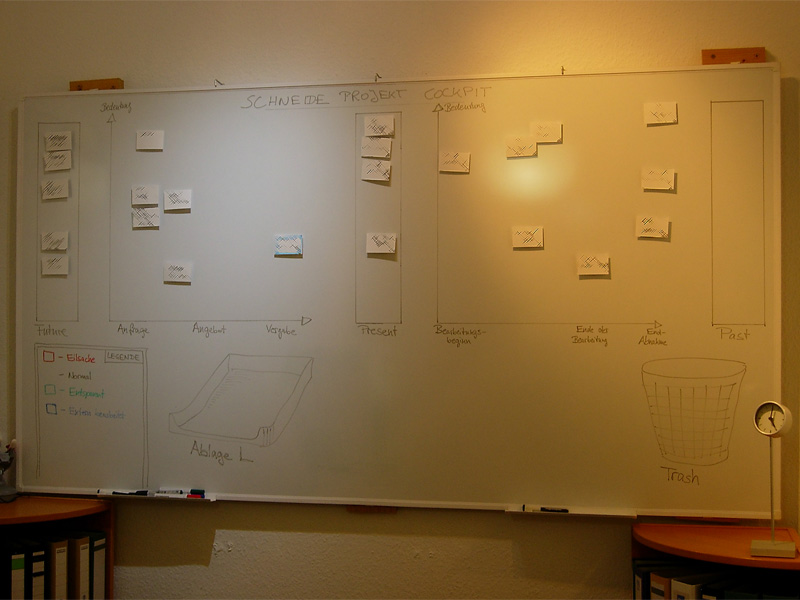
Here is a photo of our Project Cockpit (with actual project names obscured for obvious reasons):

cockpit1

How does it work?

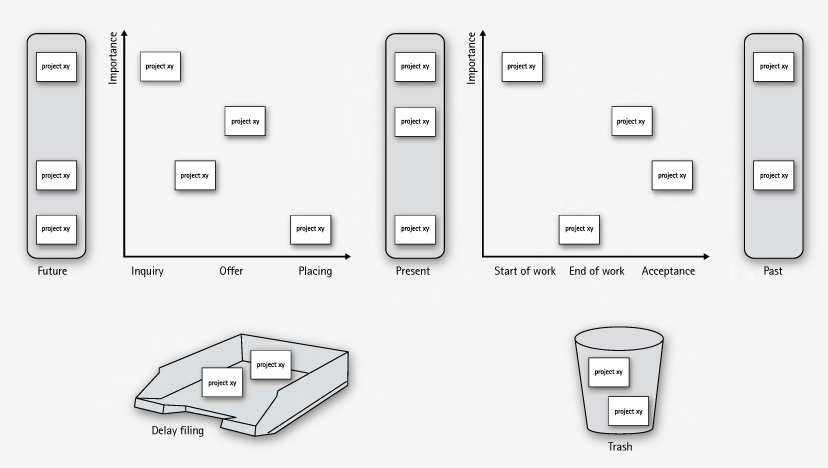
In summary, each project gets a card and transitions through its lifecycle, from left to right on the cockpit.

The Project Cockpit consists of two main areas, “upcoming projects” and “current projects”. Both areas are separated into three stages eachs, denoting the usual steps of project placing and project realization.

Every project we are contacted for gets represented by an index card with some adhesive tape and a whiteboard magnet on its back. The project card enters the cockpit on the left (in the “future” or “inquiry” region) and moves to the right during its lifecycle. The y-axis of the chart denotes the “importance” of the project, with higher being more important.

cockpit2

In the “upcoming” area, projects are in acquisition phase and might drop out to the bottom, either into the “delay filing” or the “trash”. The former is used if a project was blocked, but is likely to make progress in the future. The latter is the special place we put projects that went awry. It’s a seldom action, but finally putting a project card there was always a relief.

The more natural (and successful) progress of a project card is the advance from the “upcoming” area to the “present” bar. The project is now appointed and might get a redefinition on importance. Soon, it will enter the right area of “current” projects and be worked on.

The right area of “current” projects is a direct indicator of our current workload. From here on, project cards move to the rightmost bar labeled “past” projects. Past projects are achievements to be proud of (until the card magnet is needed for a new project card).

If you want to, you can color code the project cards for their urgency or apply fancy numbers stating their volume.

What’s the benefit?

The Project Cockpit enables every member of our company to stay informed about the project situation. It’s a great place to agree upon the importance of new projects and keep long running acquisitions (the delay filing cases) in mind. The whiteboard acts as an information radiator, everybody participates in project and workload planning because it’s always present. Unlike simpler approaches to the task, our Project Cockpit includes project importance, urgency and volume without overly complicating the matter.

The whiteboard occupies a wall in our meeting room, so every customer visiting us gets a glance on it. As we use internal code names, most customers even don’t spot their own project, let alone associate the other ones. But its always clear to them in which occupancy condition we are, without a word said about it.

Ultimately, we get visibility of very crucial information from our Project Cockpit: When the left side is crowded, it’s a pleasure, when the right side is crowded, it’s a pressure 😉