Smell if it’s well

Ever wondered how a code smell would taste like? We chose it to be like vanilla. Our latest extreme feedback device scents our office air depending on code quality.

We at the Softwareschneiderei are constantly searching for ways to gather feedback from our projects. We get feedback from our customers and their users, but we also get feedback directly from the code, be it through test results or code analysis. A great way to make your code speak for itself is to provide it some Extreme Feedback Devices (XFD).

IntroduciIMG_0574_smellng the Smell-O-Mat
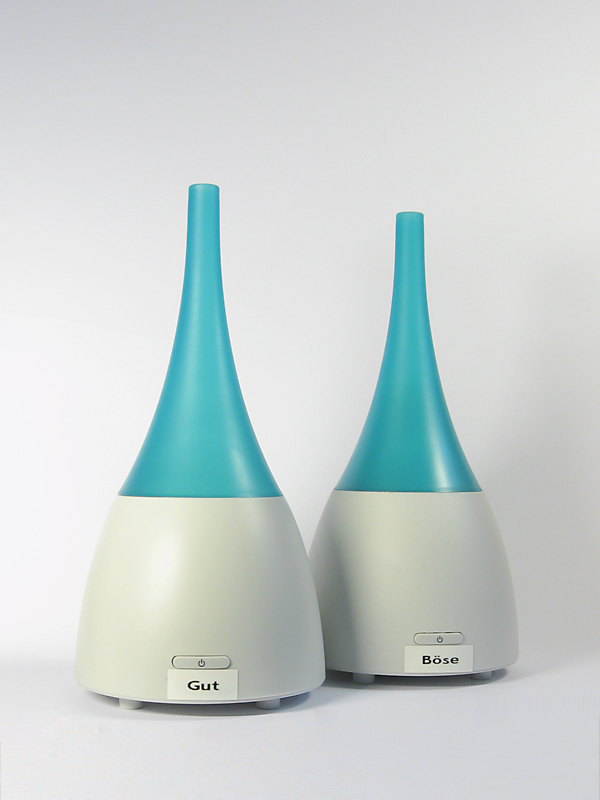
One thing we always wanted to have was “code smells” that really smell for themselves. When we ran across an ultrasonic humidifier that can produce room-wide smells by dispensing essential oils, we found the right device for this feedback. We bought two humidifiers and labeled them “good” and “evil”. The hardest part was to find a smell everybody relates to “evil”, but won’t distract you too much from your work. Whenever our code analysis finds a new real code smell, the “evil” humidifier is turned on for some minutes. If an existing code smell is fixed, we get the “good” smell.

The effects

We do not produce code smells all too often. But once in a while, it happens. And this incident can now be perceived throughout the day just by breathing. On the other hand, fixing old smells is a source of refreshing air. Whenever the office atmosphere needs replenishment, all you have to do is to fix some code smells in our large code base (they do get rare!). Of course, most junior developers just open a window for that.

We chose grapefruit being our “good” smell, so our work area tastes mostly limony now instead of just “developer’s thoughts”, a fragrance that yet has to bottled.

The technical solution

Technically, the integration of the two humidifiers with our reporting infrastructure was very easy. Every XFD is controlled by an IRC bot that understands certain commands suitable for the device and hangs around at our central IRC server. As an humidifier only understands “on” and “off”, it could be controlled just like the ONOZ! lamp. We connected the humidifiers to a remote controlled power supply, switched it on and let the bot control the supply.

Our reporting infrastructure forwards its results to an aggregation software that interprets the numbers and produces IRC commands for the device bots. All of this is done with a combination of website scraping (Hudson as our continuous integration server has a wonderful XML API) and IRC messaging.

The history of XFD so far

Over the last years, we gathered XFDs for almost every human sense. We have visual effects, audible feedback using speech synthesis and even bought an USB rocket launcher for forced feedback needs. With the Smell-O-Mat, we can now deal with smelling, too.
The last human sense we have to address is tasting. Plans for the “coffee salter” were impeded by our sense of humanity. We keep searching.


Read more about our Extreme Feedback Devices:

A Small XML Builder in Ruby

From a C++ point of view, i.e. the statically typed world with no “dynamic” features that deserved the name, I guess you would all agree that languages like Groovy or Ruby are truly something completely different. Having strong C++ roots myself, my first Grails project gave me lots of eye openers on some nice “dynamic” possibilities. One of the pretty cool things I encountered there was the MarkupBuilder. With it you can just write XML as if it where normal Groovy Code. Simple and just downright awesome.

The other day in yet another C++ project I was again faced with the task to generate some XML from text file. And, sure enough, my thoughts wandered to the good days in the Grails project where I could just instantiate the MarkupBuilder… But wait! I remembered that a colleague had already done some scripting stuff with Ruby, so the language was already kind of introduced into the project. And despite the fact that it was a new language for him he did some heavy lifting with it in just no time (That sure does not come as a big surprise all you Ruby folks out there).

So if Ruby is such a cool language there must be something like a markup builder in it, right? Yes there is, well, sort of. Unfortunately, it’s not part of the language package and you first have to install a thing called gems to even install the XML builder package. Being in a project with tight guidelines when it comes to external dependencies and counting in the fact that we had no patience to first having to learn what Ruby gems even are, my colleague and I decided to hack our own small XML builder (and of course, just for the fun of it). I mean hey, it’s Ruby, everything is supposed to be easy in Ruby.

Damn right it is! Here is what we came up with in what was maybe an hour or so:

class XmlGen
   def initialize
      @xmlString = ""
      @indentStack = Array.new
   end

   def method_missing(tagId, attr = {})
      argList = attr.map { |key, value|
         "#{key}=\"#{value}\""
      }.reverse.join(' ')

      @xmlString << @indentStack.join('') 
      @xmlString << "<" << tagId.to_s << " " << argList
      if block_given?
         @xmlString << ">\n"
         @indentStack.push "\t"
         yield
         @indentStack.pop
         @xmlString << @indentStack.join('') << "</" << tagId.to_s << ">\n"
      else
         @xmlString << "/>\n"
      end
      self
   end

   def to_s
      @xmlString
   end
end

And here is how you can use it:

xml = XmlGen.new
xml.FirstXmlTag {
   xml.SubTagOne( {'attribute1' => 'value1'} ) {
      someCollection.each { |item|
         xml.CollectionTag( {'itemId' => item.id} )
      }
   }
}

It’s not perfect, it’s not optimized in any way and it may not even be the Ruby way. But hey, it served our needs perfectly, it was a pretty cool Ruby experience, and it sure is not the last piece of Ruby code in this project.

Give open source some love back!

Like many others our work is enabled by open source software. We make a heavy use of the several great open source projects out there. Since they help us doing our business and doing it in a productive way, we want to give some love aehmm work back. So we decided to dedicate one day per month to open source contributions. These can be bug fixes, new features, even documentation or bug reports. I believe that every contribution helps an open source project and many projects need help.
The whole development team will work on projects they like. One day per month does not sound much but I think even starting small helps. And maybe you can suggest a similar day in your company, too ?
Besides the obvious boost in developer motivation (and therefore productivity) there are several things your company will benefit from:

  • help in your own projects: fixing bugs in the open source projects you use is like fixing bugs in your own project
  • image for your company: being active in open source gives a better image regarding potential future employees and also shows responsibility in the field they work in
  • PR for your company and an edge over your competition: writing about your contributions and your insights in your company blog, remember: out teach your competition

So get your company to spend just one day per month or so for open source. It may not be much but every little bit helps!

On developer workplace ergonomics

Most developers don’t care much about their working equipment, especially their intimate triple. That’s a missed opportunity.

workplace_failMost developers don’t care much about their working equipment. The company they work in typically provides them a rather powerful computer with a mediocre monitor and a low-cost pair of keyboard and mouse. They’ll be given a regular chair at a regular desk in a regular office cubicle. And then they are expected (and expect themselves) to achieve outstanding results.

The broken triple

First of all, most developers are never asked about their favorite immediate work equipment: keyboard, mouse and monitor.

With today’s digitally driven flat-screens, the monitor quality is mostly sufficient for programming. It’s rather a question of screen real estate, device quantity and possibility of adjustments. Monitors get cheaper continuously.

The mouse is the second relevant input device for developers. But most developers spend more money on their daily travel than their employer spent for their mices. A good mouse has an optimal grip, a low monthly mouse mile count, enough buttons and wheels for your tasks, your favorite color and is still dirt cheap compared to the shirt you wear.

The keyboard is the most relevant device on a programmer’s desk. Your typing speed directly relies on your ability to make friends with your keyboard. Amazingly, every serious developer has her own favorite layout, keystroke behavior and general equipment. But most developers still stick to a bulk keyboard they were never asked about and would never use at home. A good keyboard matches your fingertips perfectly and won’t be much more expensive than the mouse.

Missed opportunities

The failure is two-fold: The employer misses the opportunity to increase developer productivtiy with very little financial investment and the developer misses the opportunity to clearly state her personal preferences concerning her closest implements.

Most employers will argue that it would place a heavy burden on the technical administration and the buying department to fit everybody with her personal devices. That’s probably true, but it’s nearly a one-time effort multiplied by your employee count, as most devices last several years. But it’s an ongoing effort for every developer to deliver top-notch results with cumbersome equipment. Most developers will last several years, too.

Some developers will state that they are happy with their devices. It really might be optimal, but it’s likely that the developer just hasn’t tried out alternatives yet.

Perhaps your organizational culture treats uniformity as professionality. Then why are you allowed to have different haircuts and individual ties?

Room for improvement

Our way to improve our workplaces was to introduce an annual “Creativity Budget” for every employee. It’s a fair amount of money destined to use one’s own creativity to improve productivity. It could also have been named “Productivity Budget”, but that would miss the very important part about creative solutions. There is no formal measurement of productivity and only loose rules on what not to do with the money. Above all, it’s a sign to the developer that she’s expected to personally care for her work environment, her equipment and her productivity. And that she’s not expected to do that without budget.

The Creativity Budget outcome

The most surprising fact about our budgets was that nearly none got fully spent. Most developers had very clear ideas on what to improve and just realized them – without further budget considerations. On top of that, everybody dared to express their preferences, without fear of overbearance. It’s not a big investment, but a very worthwile one.

Branching support missing in JIRA

JIRA is a really great tool when it comes to issue tracking. It is powerful, extensible, usable and widespread. We and many of our clients use it for years and are quite satisfied coming from other tools like Bugzilla.

One thing we find is missing though is the concept of branching. In JIRA you have projects and can define a roadmap consisting of versions that follow each other. Many software products require sooner or later a development line which is only maintained getting bug and security fixes while feature development happens on a separate branch.

Tracking issues for a software with different branches is a bit more demanding because you have to identify the branches one issue affects and possibly separately fix them on each branch. One and the same issue could have different resolutions per branch, i.e. invalid if a broken functionality does not exist anymore. Nevertheless, all branches have to be checked, likely in different time frames.

Unfortunately JIRA does not support the notion of branches. You have to emulate the behaviour using different schemes like:

  • One issue per version that represents a branch
  • Multiple fix versions for an issue
  • Subtasks for an issue or issue links to ckeck and fix the issue for different versions

To me all those are workarounds which lack polished usability and add overhead to your issue management. Real branching support could help you check on which branch an issue is done, where it has still to be resolved and so on without adding more and more (perhaps loosely connected) issues to your system or forgetting to fix the issue on some branch (no question/warning when resolving an issue with multiple fix versions).

[Update:]

I created a new feature request for JIRA where you can vote or track progress on this issue.

Grails Web Application Security: XSS prevention

XSS (Cross Site Scripting) became a favored attack method in the last years. Several things are possible using an XSS vulnerability ranging from small annoyances to a complete desaster.
The XSS prevention cheat sheet states 6 rules to prevent XSS attacks. For a complete solution output encoding is needed in addition to input validation.
Here I take a further look on how to use the built in encoding methods in grails applications to prevent XSS.

Take 1: The global option

There exists a global option that specifies how all output is encoded when using ${}. See grails-app/conf/Config.groovy:

// The default codec used to encode data with ${}
grails.views.default.codec="html" // none, html, base64

So every input inside ${} is encoded but beware of the standard scaffolds where fieldValue is used inside ${}. Since fieldValue uses encoding you get a double escaped output – not a security problem, but the output is garbage.
This leaves the tags from the tag libraries to be reviewed for XSS vulnerability. The standard grails tags use all HTML encoding. If you use older versions than grails 1.1: beware of a bug in the renderErrors tag. Default encoding ${} does not help you when you use your custom tags. In this case you should nevertheless encode the output!
But problems arise with other tags like radioGroup like others found out.
So the global option does not result in much protection (only ${}), double escaping and problems with grails tags.

Take 2: Tainted strings

Other languages/frameworks (like Perl, Ruby, PHP,…) use a taint mode. There are some research works for Java.
Generally speaking in gsps three different outputs have to be escaped: ${}, <%%> and the ones from tags/taglibs. If a tainted String appears you can issue a warning and disallow or escape it. The problem in Java/Groovy is that Strings are value objects and since get copied in every operation so the tainted flag needs to be transferred, too. The same tainted flag must also be introduced for GStrings.
Since there isn’t any implementation or plugin for groovy/grails yet, right now you have to take the classic route:

Take 3: Test suites and reviews

Having a decent test suite in e.g. Selenium and reviewing your code for XSS vulnerabilities is still the best option in your grails apps. Maybe the tainted flags can help you in the future to spot places which you didn’t catch in a review.

P.S. A short overview for Java frameworks and their handling of XSS can be found here

An highly profitable investment

Some analysis on the financial aspects of using a second monitor on your computer. Dual monitoring is an investment with high payoff rates.

coinsWhen it comes to workplace ergonomics, oftentimes money matters most. And money is always short, except for a really good investment. A profitable investment is what every businessman will understand. Here is an investment that boosts both, ergonomics and finance.

The goal

In my definition, an highly profitable investment is money you get a return of an additional 25% in just a year. After that year, the investment does not vanish, but continues to pay off. The investment is socially acceptable at best: Everyone involved will feel happy as long as the investment runs. And the investment can be explained to every developer at your shop with just two words: dual monitors.

The maths

Ok, lets have some hard calculus about it. Here are some modest assumptions about the investment:

You already own a decent monitor, as you are a screen worker. Buying another one of the same type will cost you about 300 EUR, with 25% return on our investment, it needs to earn us about 400 EUR. A monitor that earns money?

Your income, without any additional costs for your employer, is at 40.000 EUR per year. If you happen to have an higher income, the investment just gets more profitable. You work for 200 days a year, according to the usual employment. If you look at the numbers, you see that you earn 200 EUR per day. The new monitor needs to earn two days worth of your work or one percent of your yearly working time.

If the monitor speeds you up by just one percent of your time, it’s a highly profitable investment.

A productivity boost by one percent

How much is one percent of your daily working time? If you work for eight hours a day, it’s about five minutes. You need to accelerate your work by using the second monitor by five minutes or one percent every day, that’s all. All the other goodies come for free: Better mood, higher motivation, lower defect rate, improved code quality.

Some minor limitations

We experimented with setups of N monitors, with N being a natural number. Three or more monitors do not pay off as much as the second one does. Hardware issues rear their ugly heads and generally, overview decreases. This might not be true with rapid context switching tasks like customer support, but with focussed software development, it is.

When using dual monitors, it’s crucial to get used to them and really utilize all their possibilities. Perhaps you might need additional software to fully drive your dual power home. You might have to rethink your application window layout habits.

Assigning a second monitor to a developer is an irreversible action. If you take it away again, the developer will feel jailed with too less screen real estate and might even suffer a mild form of claustrophobia. Morale and motivation will plummet, too.

Conclusion

Introducing dual monitoring to developers is a win-win situation for both the company and the developers. It’s a highly profitable investment while boosting staff morale and productivity. If there is one reason not to do it, it’s because of the irreversibility of the step. But a last word of secret to the management: You can even use it to raise employee loyalty, as nobody wants to work in a single monitor environment anymore.

Small gaps in the grails docs

Just for reference, if you come across one of the following problems:

Validation only datasource

Looking at the options of dbCreate in Datasource.groovy I only found 3 values: create-drop, create or update. But there is a fourth one: validate!
This one helps a lot when you use schema generation with Autobase or doing your schema updates external.

Redirect

Controller.redirect has two options for passing an id to the action id and params, but if you specify both which one will be used?

controller.redirect(id:1, params:[id:2])

Trying this out I found the id supersedes the params.id.

Update:
Thanks to Burt and Alvaro for their hints. I submitted a JIRA issue

A guide through the swamp – The CrapMap

Locate your crappy methods quickly with this treemap visualization tool for Crap4J report data.

One of the most useful metrics to us in the Softwareschneiderei is “CRAP”. For java, it is calculated by the Crap4J tool and provided as an HTML report. The report gives you a rough idea whats going on in your project, but to really know what’s up, you need to look closer.

A closer look on crap

The Crap4J tool spits out lots of numbers, especially for larger projects. But from these numbers, you can’t easily tell some important questions like:

  • Are there regions (packages, classes) with lots more crap than others?
  • What are those regions?

So we thought about the problem and found it to be solvable by data visualization.

Enter CrapMap

If you need to use advanced data visualization techniques, there is a very helpful project called prefuse (which has a successor named flare for web applications). It provides an exhaustive API to visualize nearly everything the way you want to. We wanted our crap statistics drawn in a treemap. A treemap is a bunch of boxes, crammed together by a clever layouting strategy, each one representing data, for example by its size or color.

The CrapMap is a treemap where every box represents a method. The size gives you a hint of the method’s complexity, the color indicates its crappyness. Method boxes reside inside their classes’ boxes which reside in package boxes. That way, the treemap represents your code structure.

A picture worth a thousand numbers

crapmap1

This is a screenshot of the CrapMap in action. You see a medium sized project with few crap methods (less than one percent). Each red rectangle is a crappy method, each green one is an acceptable method regarding its complexity.

Adding interaction

You can quickly identify your biggest problem (in terms of complexity) by selecting it with your mouse. All necessary data about this method is shown in the bottom section of the window. The overall data of the project is shown in the top section.

If you want to answer some more obscure questions about your methods, try the search box in the lower right corner. The CrapMap comes with a search engine using your methods’ names.

Using CrapMap on your project

CrapMap is a java swing application, meant for desktop usage. To visualize your own project, you need the report.xml data file of it from Crap4J. Start the CrapMap application and load the report.xml using the “open file” dialog that shows up. That’s all.

In the near future, CrapMap will be hosted on dev.java.net (crapmap.dev.java.net). Right now, it’s only available as a binary executable from our download server (1MB download size). When you unzip the archive, double-click the crapmap.jar to start the application. CrapMap requires Java6 to be installed.

Show your project

We would be pleased to see your CrapMap. Make a screenshot, upload it and leave a comment containing the link to the image.

Stacked smartness doesn’t add up

When a software is composed of different layers, friction occurs. That’s when features turn into bugs.

houseofcardsThere is a strong urge to make software smart. Whenever something smart gets built in, it’s called a feature. Features of a software are effects you don’t foresee, but find handy for your use case. If your use case is impaired by a feature, you’ll likely call it a bug.

Some features of various software

To make my point clear, i have to introduce two features of software that are very practical for their anticipated use case and then change their context by adding another layer:

Ant filesets

If you use Ant as a build script language, you’ll find filesets very pratical. If you want to modify, copy or delete a bunch of files, you specify a root directory and some similarities between the files (like equal filetypes or names) and you’re done. Let me give you an example to show the use case:

<delete>
    <fileset dir="${basedir}" include="**/build.xml,**/pom.xml"/>
</delete>

This will very likely delete all ant build scripts and maven setting files in your project (so please use with care). Notice how the include attribute is comma-separated for multiple patterns. According to the documentation, the comma can be omitted for a space character.

Then, there is Hudson, a very powerful continuous integration server. One source of its power is the familiarity of configuration syntax, specifically when accessing a bunch of files:

hudson-include

The given text field specifies the include attribute of an Ant fileset. You immediately inherit all the power of ant’s fileset, but the features, too. Here, it’s a feature that two pattern can be excluded by just a space character. If your path contains spaces, you cannot express your pattern in this text field. When using the fileset directly in Ant, you can alter the syntax and use multiple nested include tags, but within Hudson, you are stuck with the single include attribute.

Struts2 internationalization

The second example is fully described in my previous blog entry (“The perils of \u0027”).

As a short summary: The Struts2 framework inherits the power of Java’s MessageFormat when loading language dependent text. As the apostrophe is a special character to MessageFormat, it cannot be used directly in the text entries.

The principle behind the examples

Both examples share a common principle: “Stacked smartness doesn’t add up“. What’s a feature to one software, may be a bug to a software that builds on top of it.

Software developers tend to “stack up” different third party software products to compose their own product with even higher-level functionality. There is nothing wrong with this approach, as long as the context of the underlying products doesn’t change much. If it changes, features begin to behave like bugs.

The cost of stacking

Stacked products are likely to increase the ability of skilled users to re-use their knowledge. Every developer familiar to Ant will instantly be empowered to use the file patterns of Hudson. Every developer familiar to MessageFormat can produce powerful i18n entries that do most of the formatting automatically. That’s a great productivity gain.

But on the other side, if you aren’t familiar to ant when using hudson or know nothing about MessageFormat when just translating the i18n entries of a Struts2 webapp, you’ll be surprised by strange effects. And you won’t find sufficient documentation of these effects in the first place. There will be a link to some obscure project or class you never heard about, telling you all sorts of details you don’t want to hear right now. You can’t easily put them into the right context anyway. You will be down to trial and error, frustrated that your use case seems impossible without explanation. That’s a great productivity loss.

Often, you can’t blame any part of the stack, not even the topmost, for the occuring bugs. If a specific stack maintains and increases productivity, depends on the use case of the topmost layer compared to the underlying anticipated ones. If those aren’t documentated, its hard to notice the displacement.

A metaphor on software stacks

Whenever I hear about a software stack, a picture of a man on a stack of crates occurs to me. Here is the original photo of my thoughts.

What’s your encounter with a shaky stacking?