The fallacy of “the right tool”

There is a fallacy around Polyglot Programming, especially the term “the right tool for the job”: Programming languages aren’t tools.

Let me start this blog post with a disclaimer: I’m really convinced of the value of multilingual programming and also think that applying the “right tool for the job” is a good thing. But there is a fallacy around this concept in programming that i want to point out here. The fallacy doesn’t invalidate the concept, keep that in mind.

Polyglot cineasts

Let me start with an odd thought: What if there was a movie, a complicated international thriller around a political intrigue, playing in over half a dozen countries. The actors of each country speak their native tongue and no subtitles are provided. Who would be able to follow the plot? Only a chosen few of really polyglot cineasts would ever appreciate the movie. Most of us wouldn’t want to see it.

Polyglot programming

Our last web application project was comprised of that half a dozen languages (Groovy, Java, HTML, CSS, HQL/SQL, Ant). We could easily include more programming languages if we feel the need to do it. Adding Clojure, Scala or Ruby/JRuby doesn’t sound absurd to us. A programmer capable of knowing and switching between numerous programming languages is called a “Polyglot Programmer“.

The main justification for heterogeneous (polyglot) projects often is the concept of “using the right tool for the job”. The job often is a subtask of the whole project, like building the project, accessing the database, implementing the ever-changing business logic. For each subtask, some other language might outshine the competitors. Besides some reasonable doubt concerning the hidden cost of this approach, there is a misconception of the term “tool”.

Programming languages aren’t tools

If you use a tool in (basic or advanced) engineering, let’s say a hammer to drive some nails into a wooden plate or a screwdriver to decompose your computer, you’ll put the tool aside as soon as “the job” is finished. The resulting product (a new wooden cabinet or a collection of circuit boards) doesn’t include the tool. Most of the times, your job is really finished, without “change requests” to the product.

If your tool happens to be a programming language, you’ll produce source code bound to the tool. Without the tool, the product isn’t working at all. If you regard your compiled binaries as “the product”, you can’t deal with “change requests”, a concept that programmers learn early and painful. The product of a programmer obviously is source code. And programming languages don’t act as tools, but as materials in this respect. Tools go away, materials stick.

Programming languages are materials

As source code is tied to its programming language, they form a conceptional union. So I suggest to change the term to “using the right material for the job” when speaking about programming languages. This is a more profound decision to make in comparision to choosing between a Phillips style or a TORX screwdriver. Materials need to outlast when the tools are long put aside.

But there are tools, too

In my web application example above, we used a lot of tools. Grails is our framework of choice, Jetty our web container to deploy to, the Spring Framework provides mighty utilities and we used IDEA to bolt it all together. We could easily exchange Tomcat for Jetty or IDEA with Eclipse without changing the source code (the example doesn’t work that easy for Grails and Spring, though). Tools need to be replaceable or even disposable.

Summary

The term “the right tool for the job” cannot easily be applied to programming languages, as they aren’t tools, but materials. This is why polyglot programming is dangerous to when used heavily in a single project. It’s easy to end up with a tangled “amalgam project”.

Two more disclaimers:

  • If chosen right, “composite construction” is a powerful concept that unifies the advantages of two materials instead of adding up their drawbacks.
  • Being multilingual is advantageous for a programmer. Just don’t show it all off in one project.

Follow-up to our Dev Brunch December 2009

A follow-up to our December 2009 Dev Brunch which was omitted because of really bad weather and bad health.

Yesterday, we had an appointment for our Dev Brunch meeting in December 2009. We tried to adapt to the christmas time and scheduled the “brunch” to be in the late evening, replacing coffee with mulled wine and toast with ginger bread. We even called it a “drunch” as a combination of “drunk” and “brunch”. It didn’t help.

The Dev Drunch omitted

It was the coldest and most snowy weekend in years. Most participants called in sick, others refused to go outside. Two brave remainders accomplished to reach our company but decided to concentrate on the mulled wine and the heating radiator instead of talking about software development. We chattered about a lot of topics, but none of it is worth to be reported. When the wine ran out, we went home again.

This was the last chance in 2009 to attend a Schneide Dev Brunch. See you all in 2010 and get well soon.

Blog harvest, December 2009

Some noteworthy blog articles, harvested for early December 2009

Today’s blog harvest spans a lot of topics that i’ve found noteworthy in the last weeks. As an added bonus, there’s a watchworthy video link at the end. I hope you enjoy reading the articles as much as I did. If you have thoughts one the articles, feel free to comment them here.

This was the article side of this harvesting. Let’s have some fun by watching a video and relieving our conscience:

  • Living with 1000 Open Source Projects – It might get crowded on your disk! Nic Williams shares his secrets of mastering open source heavy lifting. The video runs a short half hour and has its funniest minute between 11:20 and 12:20. Brilliant!
  • The Bad Code Offset – Guilty of writing bad code? Well, remember the last entry of the list above? You’ve probably created a new job. If not, you can find absolution by buying some “Bad Code Offsets”. Think of it as the Carbon offset of the software industry.

Follow-up to our Dev Brunch November 2009

A follow-up to our November 2009 Dev Brunch, summarizing the talks and providing bonus material.

Today we held our Dev Brunch meeting for November 2009. It was the last possible date for this month, but we were affected by absences nonetheless. This is the follow-up posting for this rather small gathering, summarizing the topics and providing additional information.

The Dev Brunch

If you want to know more about the meaning of the term “Dev Brunch” or how we realize it, have a look at the follow-up posting of October’s brunch. This time, no notebook was needed.

The November 2009 Dev Brunch

The topics of this session were:

  • Object Calisthenics by example – Experiences gained while programming a small project following the Object Calisthenics rules while practicing Test Driven Development, too.
  • Object Calisthenics inspected – Observations and insights gained when explaining Object Calisthenics to several teams, programmers and student courses.

As you can immediately see, the meeting was small, but surprisingly consistent. We didn’t agree upon the topic beforehands, but it was a perfect match. Everybody who missed this brunch definitely missed some very interesting first-hand experiences on Object Calisthenics, too. To ease this lack a bit, let me rephrase the content a bit.

Object Calisthenics

You might have heard about Object Calisthenics before, on this blog or other resources on the net. Perhaps you’ve read the original article, which is highly advised. In short, Object Calisthenics are a set of inspiring, if not irritating programming rules that should lead to better programming style through excercise. You should consult the links above for specifics.

Object Calisthenics by example

When applying the rules to a domain class model, some new techniques arose to compensate the “train wreck line”-programming style (see rule 4) and to introduce first class collections (rule eight) and avoid getters and setters (rule 9). This techniques included the use of the Visitor design pattern, which wasn’t the author’s first choice beforehands. Test Driven Development alone wouldn’t have led to this solution, but the solution works well for the given use case.

The author softened some rules for his example and found valid explanations for doing so. This might be the content of an additional blog posting that still needs to be written. It will be announced in the comments when published.

Test Driven Development and Object Calisthenics do not interfere with each other. They both aim for better code and design, but through different means. They could be regarded as complements in a programmer’s toolbox.

Object Calisthenics inspected

When teaching the nine rules, some effects occurred repeatedly. The first observation was that the rules follow a dramatic composition that orders them from “most obvious and immediate code improvement” to “hardest to achieve code improvement” and in the same order from “easiest to acknowledge” to “most controversial”. At the end of the list, the audience rioted most of the time. But if you reject the last few rules, you’ve silently agreed to the first ones, the ones with the greatest potential for immediate improvement.

Another observation is that the rules stick. Even if you reject them on first notion, it creeps into your thinking, whispering that “it might be possible right now with this code“. It’s a learning catalyst for those of us that aren’t born as programming super-heros. To speak in terms Kent Beck coined: Object Calisthenics provide some handy practices that might eventually lead to a better understanding of their underlying principles. Even beginners can follow the practices and review their code on compliance. When they fully get to know the principles (like Law Of Demeter, for example), they are already halfway there.

The third observation was that most experienced programmers intuitively revealed the principles behind the rules before I could even try to explain. Some even found very interesting associations with other principles that weren’t so obvious.

At last, Object Calisthenics, if performed as a group exercise, can be a team solder. You can rant over code together without regrets – the rules were made elsewhere. And you can discuss different solutions without feeling pointless – fulfilling the rules is the common goal for a short time.

The Dev Brunch retrospected

This brunch was small both in attendee and topic count. That created a very productive discussion. We’ll try to grow the insights gained today into additional blog entries. Stay tuned.

Open Source Love Day November 2009

Our Open Source Love Day for November 2009 brought love for EGit, the Eclipse git plugin and some frustration over lacking documentation.

Today, we celebrated our third Open Source Love Day (OSLD). It was slightly degraded by a company-wide illness outbreak, but we tried to make the best out of the situation.

Open Source Love Days are our way to show our appreciation and care to the Open Source software ecosystem. Our work wouldn’t be as fun or just not possible without professional Open Source software. You can read more about our motivation and specifica in our first OSLD blog posting.

You can participate at our OSLD by using the features we’ve built today:

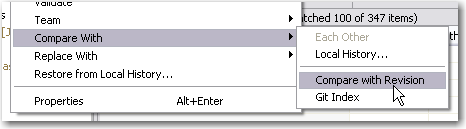
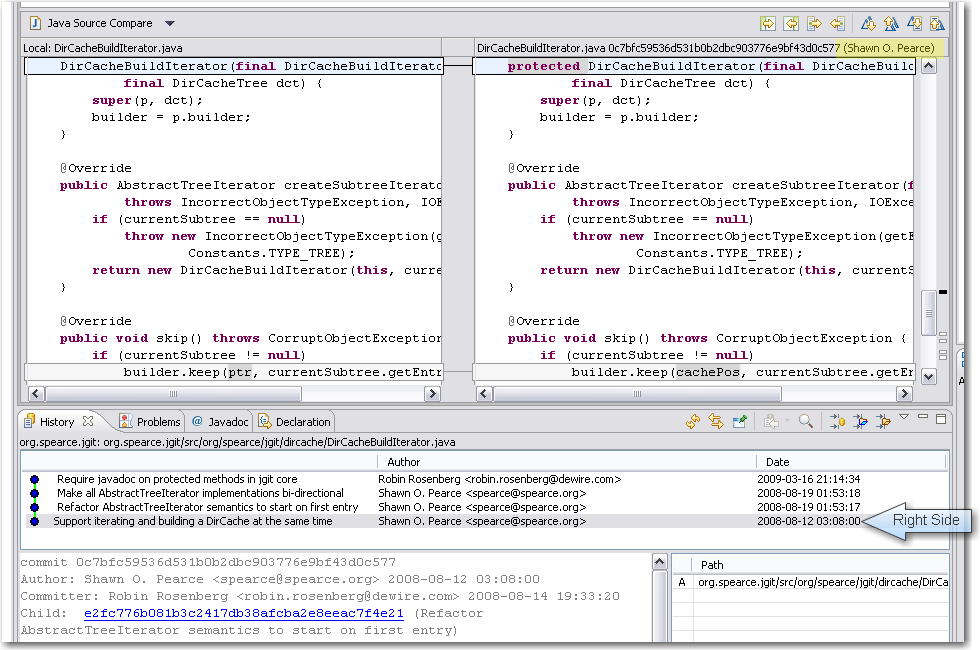
  • We think git is an enrichment to the SCM market, as is Eclipse to the IDE market. Improving the quality of Eclipse’s git plugin is the next logical step. The ability to diff the content of two revisions in EGit was committed today. As a bonus, the name of the committer shows up in the right manner, too. See the screenshots to get the idea:

When developing EGit, we were already using it to pull the sources. Unfortunately, the repository URL changed bigtimes since our checkout without us noticing. This got us into trouble trying to follow the contributor guide. The command line version of git isn’t that communicative yet. But after all, this is a great time to learn about the real world problems when using git. The EGit contributor guide itself is a fantastic way for a project to show initial appreciation to volunteer efforts. Thanks for caring, guys! If you are interested to review our changes yourself, fetch the patch.

  • Another part of today’s work was on the KDevelop project. We tried to fix some outstanding little features or bugs, whatever is on the list of KDevelop 4. But we spent our day fixing our development machines instead. The Ubuntu linux operating system (8.10) was way too old to get useful results and KDE needs to be up-to-date to develop KDevelop. Besides our sluggishness to keep our virtual machines on the bleeding edge, the checkout experience of KDevelop was rather sleek. What bothers us a bit is the ominous entanglement between KDevelop and KDE. It seems you can’t have one without the other and need to master both to make a stand.
  • As a third part, we wanted to contribute to the TANGO project (not the useful icon collection, but the useful control system). They migrated their main repository from CVS to SVN lately, but the migration seems unfinished still. At least, the migration effort lacks public documentation for the occasional contributor. That’s a real showstopper, because you never get beyond the very first step: setting up a working project. We won’t give up and email the project leads on this topic, but it didn’t fit into this OSLD.

What were our lessons learnt today?

  • Just having a possibility to view or download the source code doesn’t make an Open Source project. The key to success is the ability of complete strangers to hop in and perform useful work. Having terse, but accurate documentation helps a lot. The EGit contributor guide is a good example of a single document that makes the difference. If you own an open source project and want to attract occassional contributors (like us), write such a document and watch us (and others) drop you a patch. That said, we come to belief that the person that writes technical documentation for the developers is one of the most important roles on a project. Perhaps we join some projects in the future to fill that role.

To sum it up, this OSLD was limited from the beginning by developer availibility. With lacking documentation, we nearly grinded to a halt. We look forward to our next OSLD in December.

Speed up your buildbox, Part III: Memory

This is the third part of a series on how to boost your build box without much effort. This episode talks about the effects of faster and more RAM.

© Friedberg - Fotolia.comIn the first and second part of our effort to speed up our buildbox, we replaced the harddisk with a RAM disk and swapped in a bigger CPU. This brought the build time down from 03:30 minutes to 02:00 minutes.

Boosting the memory

When we began the journey, we wanted to undercut the 02:00 minutes threshold. The last component that directly impacts performance of our box was the memory. We started out with 4 GB of DDR2-800 modules. To have a feeling for the effects, we upgraded to 4 GB of DDR2-1066 first and then added another 4 GB, resulting in 8 GB of RAM. We expected the performance gain to be small, but noticeable. The RAM disk, for example, is directly affected by memory speed.

As much, but faster

The first upgrade brought the first surprise: Upgrading from DDR2-800 to DDR2-1066 modules didn’t change anything. It’s not that the mainboard or CPU doesn’t support the faster RAM, it just seems to be fast enough, despite the data bus clock rate. Our build process still took 02:00 minutes, reproducible and without exception.

Filling all the banks

The mainboard can load up to 16 GB of RAM, but our budget just allowed to buy 8 GB of DDR2-1066 RAM. We installed it and ran the same 32 bit Ubuntu Linux as before. The build process took 02:00 minutes, which was expected now.

Changing to 64bit

We changed to boot harddisk, installed a 64 bit Ubuntu Linux and ran the build again. Still 02:00 minutes. The switch to 64 bit wasn’t a big deal with Java, but some of the included native libraries complained about the change. Recompiling them solved the issue.

Finally reaching the target

As a last measure, we increased the maximum memory of the build JVM to the biggest value it would accept. This was -Xmx2600m, a surplus of 600 MB to the original setting. This sped up the build process by five seconds, it took 01:55 minutes now.

Conclusion and perspective

We’ve reached our anticipated target of less than two minutes build time. We exceeded our original budget of 500 EUR, but bought some parts that finally weren’t used in the build box, but elsewhere. The two parts that made the whole difference were the CPU and some more memory to spend it on the RAM disk.

If you want to speed up your single build box, aim for the CPU/RAM combo and try to install a RAM disk to perform all the work on.

This leads me to the perspective of the next part of the series: If you plugged in the most expensive CPU and enormous amounts of RAM to speed up your buildbox, you still aren’t done. You should invest some time to look into distributed builds. Hudson as our continuous integration server provides nearly instant “build slave” support. With this feature, you can set up a whole build farm to further increase your build throughput.

Stay tuned for “Part IV: Beyond the box”

Blog harvest, October II

Some interesting blog articles, harvested for late October 2009

harvest64A great way to stay up to date with current musings and hypes of our industry is to follow other people’s blogs. We do this regularly – everybody scans his RSS feeds and roams the internet. But to have a pool of shared knowledge, we pick our favorite recent blog articles and usually write an email titled “blog harvest” to the rest of the company.

Then, the idea came up to replace the internal email by a public blog post. So here it is, the first entry of a new category called “blog harvests”. You’ll read more harvests in the future. They will be categorized and tagged appropriate and have the harvest icon nearby.

Second Blog harvest for October 2009

There are four main blog entries I want to share:

  • 8 Signs your code sucks – Let’s assume we all read Martin Fowler’s classic “Refactoring” book, then these eight signs are a mere starter. But as the follow-up post indicates, it got quite a few people started and upset for the “comments are code smells” line. Well, we heartfully agree with the premise that comments are clutter and code should be the comment. /* TODO: Add a joke using comments here */
  • ORMs are a thing of the past – Another opinion that might get in the way of hibernate fanboys. We’ve had our share of hibernate “experiences”. It’s a useful tool if you know how to use it – and when not to. Replies followed instantly, here are two noteworthy ones by Scot Mcphee and by Jens Schauder.
  • The Case for Clojure – Clojure is functional programming on the Java VM (think LISP). Stay tuned for our own book review on this topic. You can argue that Clojure isn’t pure, though.
  • Bad Programmers Create Jobs – As is already is a controversy harvesting, lets add some more, written by Mohammad Azam. Side note: Half of our work was initially created by “bad” programmers, so I think Mohammad hit the nail on the head. And remember that you’ve produced legacy code today.

Then there is a bit of (future) knowledge you shouldn’t miss:

That’s it for now. My harvest format has changed for the blog, i’ll evolve it further in the next months, Thanks for your attention, stay tuned.

Follow-up to Schneide “Dev Brunch” October 2009

A follow-up to our October 2009 Dev Brunch, summarizing the talks and providing bonus material.

brunch64Last weekend, we held our October Dev Brunch in the rooms of our company. This posting is the follow-up, summarizing the topics and providing additional information.

The Dev Brunch

Let me start by introducing the concept of a “Dev Brunch” as we perform it. Once a month, we spend nearly half a day of the weekend by meeting and talking about topics related to software development. The meeting starts at perfect brunch time, everybody brings along some brunchable food and the party begins.

Everybody who attains the Dev Brunch has to prepare a topic to tell about. We set a limit of 15 minutes for the talk and unlimited time for questions and discussion. We elect a moderator, though, to bring us back on course when we disgress too much.

To prepare a topic isn’t hard work. No slides are required, no written handout or code examples. You just have to work up a topic to fit it into 15 minutes.

The October 2009 Dev Brunch

The topics of this session were:

  • Java’s upcoming Fork/Join framework – Java 5 brought the util.concurrent classes, Java 7 will bring the Fork/Join framework to further ease concurrency in Java.
  • The current status of JIT on mobile devices – the tagline was “why is my Android phone so slow?”. This talk even included slides!
  • Project estimation with planning poker – the talk gave away the secrets of planning poker and even more secrets of how to sell it to the management.
  • Pitfalls of unit testing Spring infected code – Developers often mix up the framework with its concepts. The example given was dependency injection (concept) vs. Spring (framework).
  • First impressions of Scala – Tales of a first contact with Scala from a Java developer.

Several talks included bonus material that will be provided in the comment section of this blog posting. Most material will be in german, as were the talks. But to ease our international readers: most links within the bonus material point to english articles.

Stage your own Dev Brunch

We cannot stress this enough – holding your own Dev Brunch isn’t complicated but very valuable. Just invite your mates and bring food. Once you started, you’ll attract other developers from your vicinity and get to know them in an informal manner.

Speed up your buildbox, Part II: Processor

This is the second part of a series on how to boost your build box without much effort. This episode talks about the effects of different processors.

© Friedberg - Fotolia.comIn the first part of our effort to speed up our buildbox, we replaced the spindle harddisk with a Solid State Disk (SSD) and finally, a RAM disk. This brought the build time down from 03:30 minutes to 02:50 minutes.

The Central Performance Unit

The next step on our journey to a faster buildbox was to replace the processor. Our initial processor was an Intel Core2 Duo E6750 with 2.67 GHz. To our pleasure, the processor socket, namely the LGA775 socket, is extremely versatile in supporting different processors. We had no problem in plugging in faster dual or even quad core processors, except upgrading the BIOS.

Taking the 3 GHz mark

The next processor to try out was an Intel Core2 Duo E8500 with 3.17 GHz operating frequency. The L2 cache went up from 4 MB to 6 MB.

The build time went down immediately from 02:50 minutes to 02:20 minutes. That’s nearly 20 percent less build time. And it’s perfectly linear with the CPU speed increase (also nearly 20 percent).

As a result: Investing in CPU clock power seems to pay off. The higher the frequency, the lower the build time.

Doubling the cores

Fortunately, the LGA775 socket supports quad core processors, too. We plugged in a Core2 Quad Q9550 with 2.8 GHz and ran the build again.

The result was astonishing: Despite the lower frequency, the build time dropped from 02:20 minutes to 02:00 minutes. We can’t really explain this one with basic math like the frequency coupling of the dual cores.

If your build is perfectly multithreaded, something javac isn’t, you’ll notice an even bigger speedup.

To sum it up: you can’t have enough GHz or processor cores when running a build.

Reviewing the result

We replaced the harddisk with RAM and upgraded the processor to meet the current performance threshold. This brought us from a starting 03:30 minutes build time to 02:00 minutes now. The CPU is the major player in this game, so upgrade it first.

Outlook on the third part

But what about the RAM? We really wanted to know what happens when we replace the RAM with bigger and faster one. Read more about this experiment in the third part of the series, coming soon.

Our second Open Source Love Day (OSLD)

A retrospective report of our second Open Source Love Day (OSLD). We present the results of our work on hudson and git and the lessons learnt.

opensourceloveday

Today we celebrated our second Open Source Love Day (OSLD). When we say “celebrated”, we actually mean that all of us worked hard and concentrated for hours, just to have a short meeting with candy at the end of the day.

The Open Source Love Day is our way to show our appreciation to the Open Source software development ecosystem. We heavily rely on Open Source products for our customer projects, so it’s just fair to donate back. You can read more about our motivation and specifica in our first OSLD blog posting.

For this day, we adjusted the rules a bit. While Object Calisthenics are very powerful in formulating rather academic software development values in some easy-to-remember rules, they just don’t fit well with existing projects. We still kept the rules in mind, but didn’t follow them strictly. We also learnt our share from last time’s experience of jumping right into the middle of arbitrary projects without a real need to do so. Today, we scratched more of our own itches.

You can participate at our OSLD by using the feature we’ve built today:

  • Hudson gets a brand new plugin. Currently, it’s in alpha status and needs some more nurturing, but is planned to be published within the next few weeks. The proof of concept was successful today. You will read more about it on this blog soon.
  • Another of our hudson plugins, namely the cmake builder plugin, got some feature love, incorporating suggestions from plugin users. We especially thank Ole B. for his feedback. The new features are checked in and will be available with the next plugin version 0.6, scheduled to be published in a few days. You’ll read the details about the new features here.
  • We’ve produced a feature implementation for hudson, adding the ability to use environment variables for the job’s workspace path. This feature touches core hudson functionality, so we just proposed a patch and leave it up to the core hudson team to decide on its inclusion. For more details, head over to the hudson issue tracker, entry #3997.
  • And we didn’t forget about git. As we are multi-IDE users (today’s development took place using NetBeans, IDEA and Eclipse), the EGit eclipse plugin for git will soon have the ability to diff the content of two revisions. An undocumented method argument took too much time to finish the feature today. After email communication with the project owner, the feature works on our machine, but needs some polishing before being committed in the near future.

As you can see, the hudson continuous integration server received a great share of our today’s love. It’s a great tool with a great community that really deserves our contributions.

What were our lessons learnt today?

  • While implementing the variable expansion feature, the author got distracted by a similar concept and followed this red herring. Namely, instead of a hudson.util.VariableResolver, we needed to use the hudson.EnvVars class. The EnvVars are pre-filled with all global variables like JAVA_HOME, while the VariableResolver is not. This could have been avoided by looking at the actual code instead of just type names. Once you think you’ve found your type, you read code the wrong way just to sustain your assumption.
  • To implement advanced plugin features, whether for hudson or eclipse, is a matter of skill with the “monkey see, monkey do” development style. Documentation is mostly non-existent or out-dated.
  • When handling HTML and HTTP in java, some survival tricks are crucial. Stay tuned for a whole blog post on that topic.
  • We still don’t feel comfortable within the JGit source code, as we still lack advanced git feature and terminology knowledge and the project lacks documentation. Our part of the problem will decline over time, as it’s a question of tool/mindset/slang exposure.

To sum it up, this OSLD worked out much better than our first one. We had more fun and yielded better results, mostly because we adjusted our goals to better suit our working style.

What are your experiences with open source development? Drop a comment!