Honey, I shrunk the build box

Meet the world’s smallest hudson server, operating with even less power than your energy saving light bulb.

We are currently posting an ongoing series on how to make your (hudson) build box faster. This article talks about making it smaller.

Making a build box as small as possible isn’t the most familiar requirement today and wasn’t for us. But when i privately bought a fit-PC2, we couldn’t resist trying it out as a hudson server.

The fit-PC2

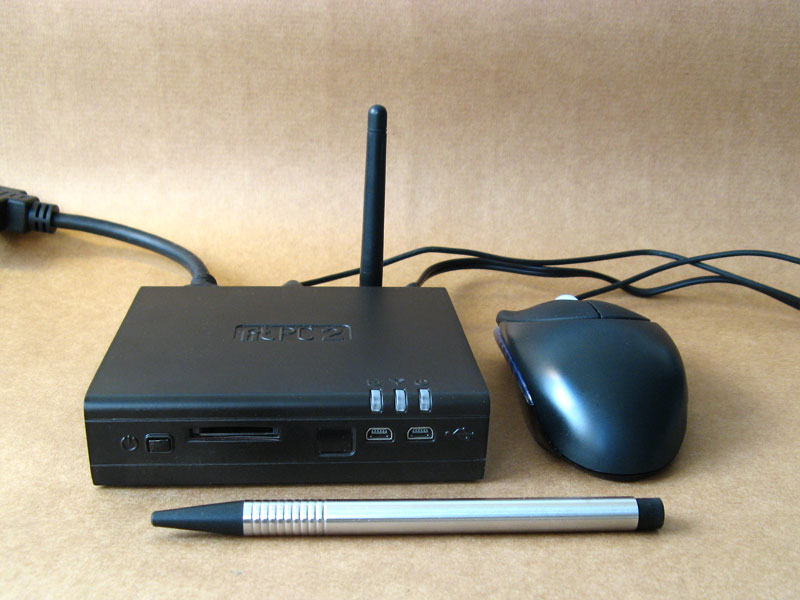
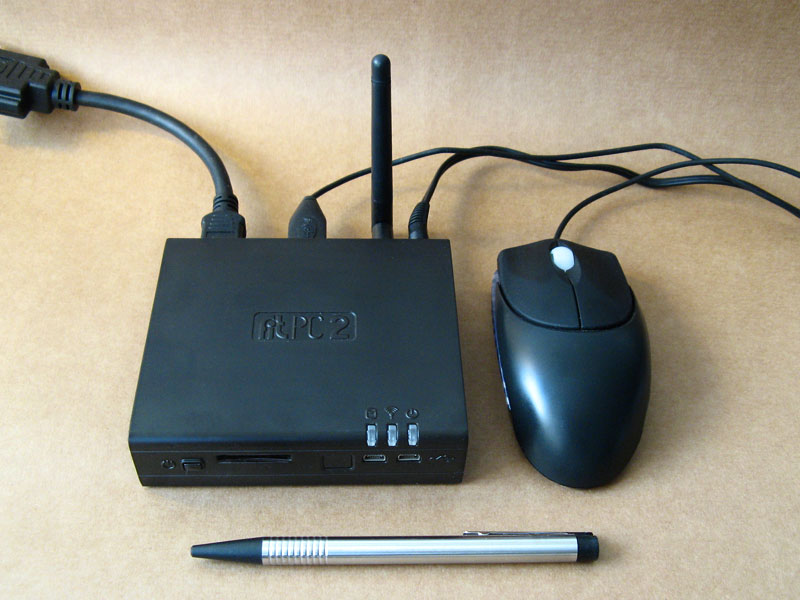
mini1This is a computer that really fits everywhere. In your car, on the back of your monitor or just, as in our case, on a beer mat. It’s a fully equipped PC with the specification of a standard netbook (Atom 1.6GHz CPU, 1GB RAM, 160GB HDD) and the dimensions of a 5-port Ethernet switch. The most astonishing fact about it is that it uses standard size 2,5″ notebook harddisks. For more information about the computer, look around the CompuLab website, they do not exaggerate.

Operating the fit-PC2

mini2The fit-PC2 is a normal computer in every aspect. We run ours with Ubuntu linux and official Java packages from Sun. As the case is fanless, it accumulates some heat, but never over 60° Celsius (140° Fahrenheit). We measured an average temperature of 45°C on the case surface while building a large project. The Gnome desktop feels snappy, application load delays are sufficiently small and customizing the software outfit is as easy as it can get with Ubuntu.

Setting up hudson

Installing the hudson continuous integration server on a Debian based linux system is a matter of three commands. See Koshuke Kawaguchi’s blog entry on that topic for details. After the automatic installation procedure, hudson already runs on port 8080 of the machine. Setting up the project’s job and initiating the first build were a matter of a few minutes. Hudson reacts swiftly to website clicks.

The world’s smallest hudson server

mini3This is the smallest hudson instance we’ve heard of up to now. It runs in a case measuring 11,5 x 10,0 x 2,6 centimeters. The power consumption is around 8 Watt when building (including the self-usage of the measuring device itself), which would be even lower once we replace the mechanical harddisk with a solid state disk (SSD).

From the performance specifications given above, you should not expect a speed wonder. The fit-PC2 finished the project’s build within 09:50 minutes, which is dangerously near the ten-minutes mark for acceptable continuous feedback. So this box will not go into regular duty, but return home to me (remember, i bought it privately).

Conclusion

The whole purpose of this experiment was to get used to a new era of microcomputers. They are palm-sized and nearly battery operated, but fully equipped with standard components and powerful enough to perform regular tasks. The fit-PC2 is a strong instance of these devices.

Show off your hudson server

Well, to be honest, another purpose of this experiment was to show off our hudson skills, operating with hudson instances from heterogeneous slave farms to this single 300 cubic centimetres box. We would like to hear from your hudson instance. You may add a comment and/or share a link with your story. Maybe the hudson wiki is the ultimate place to gather all the stories.


P.S. This blog entry’s title is an adaption of my childhood’s favorite movie.

Speed up your buildbox, Part I: Introduction & Harddisk

This is the first part of a series on how to boost your build box without much effort. This episode talks about the effects of different harddisks.

W© Friedberg - Fotolia.come actively use Hudson as our continuous integration server software. It has a nice little feature called “build history trend” that shows the duration of all archived builds. One of our major projects started out small and fast with a build duration of 01:20 minutes. One and a half year later, it reached for the 04:00 minute hurdle. It wasn’t a surprise to us, as the build has more than four times the work now and the hardware staid the same.

But a question emerged: How can we speed up our build?

Applying optimization: The basic maths

We did a quick review of our ant build scripts to ensure there’s nothing fundamentally wrong with them and then decided which road to follow first: Optimizing the build scripts or boosting the hardware? There is only one pragmatic answer to us: boost the hardware as long as it stays reasonable in price. Every optimization in the build script would need its time (which isn’t cheap) and possibly increase the script complexity (which is very expensive later on).

Optimizing the hardware

So we went on the journey to make a fast buildbox even faster. We started out with a dual core processor (2.6 GHz), a decent-but-standard harddisk and 4 GB of memory. We replaced every part on its own to see the effect. The journey includes:

Our goal is to cut our build time down by 50 percent, to a little less than 02:00 minutes. We don’t want to spend more than 500 EUR for new hardware. So now, after this introduction:

Part I: Replacing the harddisk

Our buildbox starts with a more or less normal harddisk (0.5 TB), certified for continuous usage. We could have bought just another normal harddisk of a newer generation, but that doesn’t cut it in our experience (we didn’t verify specifically, though).

Calling the carnivores

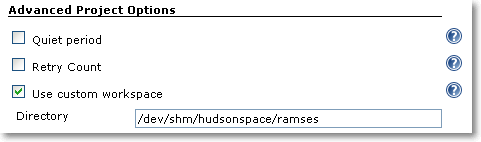
If you need to upgrade your harddisk, you can buy yourself a VelociRaptor drive and be pretty much assured that you’ll notice the difference. We had pleasant experiences with this kind of fast-spinning drives before, but this time, we wanted to go a step further and try a fast Solid State Disk (SSD). As you only need to relocate the working directories (called workspaces in hudson terminology) of your projects to the new disk, the capacity isn’t important as long as it’s greater than your project sizes. You can just plug your new disk in the buildbox and format it with a high performance file system. As our buildbox runs on Linux, relocating the workspace is just setting a symbolic link. You do not even tell hudson about it. If you happen to run on Windows, check out the “use custom workspace” setting on your job’s configuration page.

An investment of about 200 EUR and 15 minutes of installation later, we had the result: The build average before was 03:30 minutes and now 03:10 minutes. That’s not a big leap forward, as others found out, too. It’s not that the SSD was bad, it performed exceptionally well in the benchmarks, but the harddisk wasn’t the bottleneck. To further proof our assumption, we installed the fastest harddrive you can get: the RAM disk.

Only pretend to use the disk

Linux (like other unixoid systems) has the great feature of an emulated harddisk right in your memory. On Debian/Ubuntu systems, this emulated drive is mounted at /dev/shm and has a capacity of half your total physical memory. It grows dynamically, so you don’t have to worry about its initial size. But you have to check if your workspace fits into it. Our buildbox had 4 GB of RAM and 2 GB were enough to contain the hudson workspace. We configured hudson to build there (you can use symbolic links or the “custom workspace” setting as shown in the picture) and got the result: The build average went down to 02:50 minutes.

custom_workspace

Review on the results

That’s as far as we could speed up our buildbox by just replacing the harddisk. Down from 03:30 minutes to 02:50 minutes, a reduction of 40 seconds or 20 percent. In fact, we even cheated as the buildbox doesn’t use an harddisk anymore for building. With Linux, it’s incredibly easy to utilize a RAM disk as long as you have enough RAM to loan. For Windows systems, there are several software products that can do the same. If you don’t want to loan your RAM, you can look into HyperDrives, but for a price!

So we conclude that the fastest harddisk is an emulated one and even then, its effect on the build time is limited.

Stay tuned for the next episode of our journey to a faster buildbox, when we apply a faster CPU.

Smell if it’s well

Ever wondered how a code smell would taste like? We chose it to be like vanilla. Our latest extreme feedback device scents our office air depending on code quality.

We at the Softwareschneiderei are constantly searching for ways to gather feedback from our projects. We get feedback from our customers and their users, but we also get feedback directly from the code, be it through test results or code analysis. A great way to make your code speak for itself is to provide it some Extreme Feedback Devices (XFD).

IntroduciIMG_0574_smellng the Smell-O-Mat

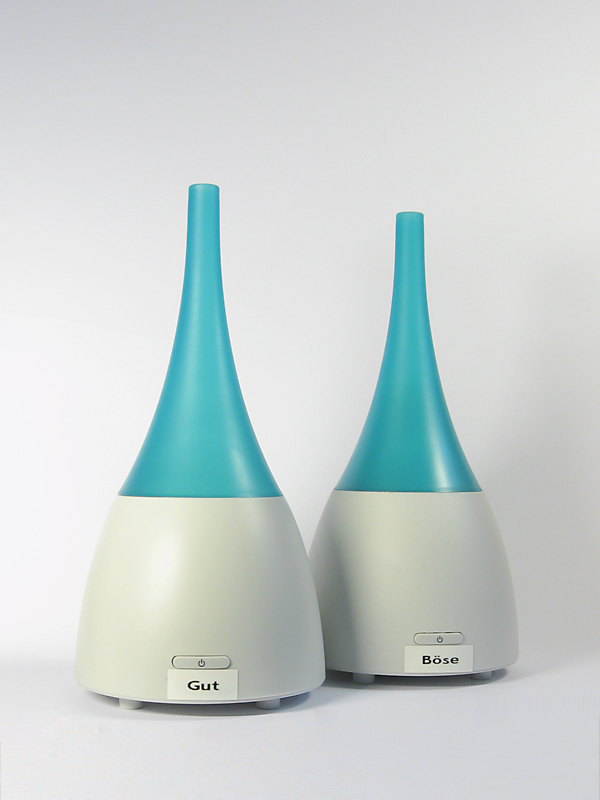
One thing we always wanted to have was “code smells” that really smell for themselves. When we ran across an ultrasonic humidifier that can produce room-wide smells by dispensing essential oils, we found the right device for this feedback. We bought two humidifiers and labeled them “good” and “evil”. The hardest part was to find a smell everybody relates to “evil”, but won’t distract you too much from your work. Whenever our code analysis finds a new real code smell, the “evil” humidifier is turned on for some minutes. If an existing code smell is fixed, we get the “good” smell.

The effects

We do not produce code smells all too often. But once in a while, it happens. And this incident can now be perceived throughout the day just by breathing. On the other hand, fixing old smells is a source of refreshing air. Whenever the office atmosphere needs replenishment, all you have to do is to fix some code smells in our large code base (they do get rare!). Of course, most junior developers just open a window for that.

We chose grapefruit being our “good” smell, so our work area tastes mostly limony now instead of just “developer’s thoughts”, a fragrance that yet has to bottled.

The technical solution

Technically, the integration of the two humidifiers with our reporting infrastructure was very easy. Every XFD is controlled by an IRC bot that understands certain commands suitable for the device and hangs around at our central IRC server. As an humidifier only understands “on” and “off”, it could be controlled just like the ONOZ! lamp. We connected the humidifiers to a remote controlled power supply, switched it on and let the bot control the supply.

Our reporting infrastructure forwards its results to an aggregation software that interprets the numbers and produces IRC commands for the device bots. All of this is done with a combination of website scraping (Hudson as our continuous integration server has a wonderful XML API) and IRC messaging.

The history of XFD so far

Over the last years, we gathered XFDs for almost every human sense. We have visual effects, audible feedback using speech synthesis and even bought an USB rocket launcher for forced feedback needs. With the Smell-O-Mat, we can now deal with smelling, too.
The last human sense we have to address is tasting. Plans for the “coffee salter” were impeded by our sense of humanity. We keep searching.


Read more about our Extreme Feedback Devices:

On developer workplace ergonomics

Most developers don’t care much about their working equipment, especially their intimate triple. That’s a missed opportunity.

workplace_failMost developers don’t care much about their working equipment. The company they work in typically provides them a rather powerful computer with a mediocre monitor and a low-cost pair of keyboard and mouse. They’ll be given a regular chair at a regular desk in a regular office cubicle. And then they are expected (and expect themselves) to achieve outstanding results.

The broken triple

First of all, most developers are never asked about their favorite immediate work equipment: keyboard, mouse and monitor.

With today’s digitally driven flat-screens, the monitor quality is mostly sufficient for programming. It’s rather a question of screen real estate, device quantity and possibility of adjustments. Monitors get cheaper continuously.

The mouse is the second relevant input device for developers. But most developers spend more money on their daily travel than their employer spent for their mices. A good mouse has an optimal grip, a low monthly mouse mile count, enough buttons and wheels for your tasks, your favorite color and is still dirt cheap compared to the shirt you wear.

The keyboard is the most relevant device on a programmer’s desk. Your typing speed directly relies on your ability to make friends with your keyboard. Amazingly, every serious developer has her own favorite layout, keystroke behavior and general equipment. But most developers still stick to a bulk keyboard they were never asked about and would never use at home. A good keyboard matches your fingertips perfectly and won’t be much more expensive than the mouse.

Missed opportunities

The failure is two-fold: The employer misses the opportunity to increase developer productivtiy with very little financial investment and the developer misses the opportunity to clearly state her personal preferences concerning her closest implements.

Most employers will argue that it would place a heavy burden on the technical administration and the buying department to fit everybody with her personal devices. That’s probably true, but it’s nearly a one-time effort multiplied by your employee count, as most devices last several years. But it’s an ongoing effort for every developer to deliver top-notch results with cumbersome equipment. Most developers will last several years, too.

Some developers will state that they are happy with their devices. It really might be optimal, but it’s likely that the developer just hasn’t tried out alternatives yet.

Perhaps your organizational culture treats uniformity as professionality. Then why are you allowed to have different haircuts and individual ties?

Room for improvement

Our way to improve our workplaces was to introduce an annual “Creativity Budget” for every employee. It’s a fair amount of money destined to use one’s own creativity to improve productivity. It could also have been named “Productivity Budget”, but that would miss the very important part about creative solutions. There is no formal measurement of productivity and only loose rules on what not to do with the money. Above all, it’s a sign to the developer that she’s expected to personally care for her work environment, her equipment and her productivity. And that she’s not expected to do that without budget.

The Creativity Budget outcome

The most surprising fact about our budgets was that nearly none got fully spent. Most developers had very clear ideas on what to improve and just realized them – without further budget considerations. On top of that, everybody dared to express their preferences, without fear of overbearance. It’s not a big investment, but a very worthwile one.

An highly profitable investment

Some analysis on the financial aspects of using a second monitor on your computer. Dual monitoring is an investment with high payoff rates.

coinsWhen it comes to workplace ergonomics, oftentimes money matters most. And money is always short, except for a really good investment. A profitable investment is what every businessman will understand. Here is an investment that boosts both, ergonomics and finance.

The goal

In my definition, an highly profitable investment is money you get a return of an additional 25% in just a year. After that year, the investment does not vanish, but continues to pay off. The investment is socially acceptable at best: Everyone involved will feel happy as long as the investment runs. And the investment can be explained to every developer at your shop with just two words: dual monitors.

The maths

Ok, lets have some hard calculus about it. Here are some modest assumptions about the investment:

You already own a decent monitor, as you are a screen worker. Buying another one of the same type will cost you about 300 EUR, with 25% return on our investment, it needs to earn us about 400 EUR. A monitor that earns money?

Your income, without any additional costs for your employer, is at 40.000 EUR per year. If you happen to have an higher income, the investment just gets more profitable. You work for 200 days a year, according to the usual employment. If you look at the numbers, you see that you earn 200 EUR per day. The new monitor needs to earn two days worth of your work or one percent of your yearly working time.

If the monitor speeds you up by just one percent of your time, it’s a highly profitable investment.

A productivity boost by one percent

How much is one percent of your daily working time? If you work for eight hours a day, it’s about five minutes. You need to accelerate your work by using the second monitor by five minutes or one percent every day, that’s all. All the other goodies come for free: Better mood, higher motivation, lower defect rate, improved code quality.

Some minor limitations

We experimented with setups of N monitors, with N being a natural number. Three or more monitors do not pay off as much as the second one does. Hardware issues rear their ugly heads and generally, overview decreases. This might not be true with rapid context switching tasks like customer support, but with focussed software development, it is.

When using dual monitors, it’s crucial to get used to them and really utilize all their possibilities. Perhaps you might need additional software to fully drive your dual power home. You might have to rethink your application window layout habits.

Assigning a second monitor to a developer is an irreversible action. If you take it away again, the developer will feel jailed with too less screen real estate and might even suffer a mild form of claustrophobia. Morale and motivation will plummet, too.

Conclusion

Introducing dual monitoring to developers is a win-win situation for both the company and the developers. It’s a highly profitable investment while boosting staff morale and productivity. If there is one reason not to do it, it’s because of the irreversibility of the step. But a last word of secret to the management: You can even use it to raise employee loyalty, as nobody wants to work in a single monitor environment anymore.

A guide through the swamp – The CrapMap

Locate your crappy methods quickly with this treemap visualization tool for Crap4J report data.

One of the most useful metrics to us in the Softwareschneiderei is “CRAP”. For java, it is calculated by the Crap4J tool and provided as an HTML report. The report gives you a rough idea whats going on in your project, but to really know what’s up, you need to look closer.

A closer look on crap

The Crap4J tool spits out lots of numbers, especially for larger projects. But from these numbers, you can’t easily tell some important questions like:

  • Are there regions (packages, classes) with lots more crap than others?
  • What are those regions?

So we thought about the problem and found it to be solvable by data visualization.

Enter CrapMap

If you need to use advanced data visualization techniques, there is a very helpful project called prefuse (which has a successor named flare for web applications). It provides an exhaustive API to visualize nearly everything the way you want to. We wanted our crap statistics drawn in a treemap. A treemap is a bunch of boxes, crammed together by a clever layouting strategy, each one representing data, for example by its size or color.

The CrapMap is a treemap where every box represents a method. The size gives you a hint of the method’s complexity, the color indicates its crappyness. Method boxes reside inside their classes’ boxes which reside in package boxes. That way, the treemap represents your code structure.

A picture worth a thousand numbers

crapmap1

This is a screenshot of the CrapMap in action. You see a medium sized project with few crap methods (less than one percent). Each red rectangle is a crappy method, each green one is an acceptable method regarding its complexity.

Adding interaction

You can quickly identify your biggest problem (in terms of complexity) by selecting it with your mouse. All necessary data about this method is shown in the bottom section of the window. The overall data of the project is shown in the top section.

If you want to answer some more obscure questions about your methods, try the search box in the lower right corner. The CrapMap comes with a search engine using your methods’ names.

Using CrapMap on your project

CrapMap is a java swing application, meant for desktop usage. To visualize your own project, you need the report.xml data file of it from Crap4J. Start the CrapMap application and load the report.xml using the “open file” dialog that shows up. That’s all.

In the near future, CrapMap will be hosted on dev.java.net (crapmap.dev.java.net). Right now, it’s only available as a binary executable from our download server (1MB download size). When you unzip the archive, double-click the crapmap.jar to start the application. CrapMap requires Java6 to be installed.

Show your project

We would be pleased to see your CrapMap. Make a screenshot, upload it and leave a comment containing the link to the image.

Stacked smartness doesn’t add up

When a software is composed of different layers, friction occurs. That’s when features turn into bugs.

houseofcardsThere is a strong urge to make software smart. Whenever something smart gets built in, it’s called a feature. Features of a software are effects you don’t foresee, but find handy for your use case. If your use case is impaired by a feature, you’ll likely call it a bug.

Some features of various software

To make my point clear, i have to introduce two features of software that are very practical for their anticipated use case and then change their context by adding another layer:

Ant filesets

If you use Ant as a build script language, you’ll find filesets very pratical. If you want to modify, copy or delete a bunch of files, you specify a root directory and some similarities between the files (like equal filetypes or names) and you’re done. Let me give you an example to show the use case:

<delete>
    <fileset dir="${basedir}" include="**/build.xml,**/pom.xml"/>
</delete>

This will very likely delete all ant build scripts and maven setting files in your project (so please use with care). Notice how the include attribute is comma-separated for multiple patterns. According to the documentation, the comma can be omitted for a space character.

Then, there is Hudson, a very powerful continuous integration server. One source of its power is the familiarity of configuration syntax, specifically when accessing a bunch of files:

hudson-include

The given text field specifies the include attribute of an Ant fileset. You immediately inherit all the power of ant’s fileset, but the features, too. Here, it’s a feature that two pattern can be excluded by just a space character. If your path contains spaces, you cannot express your pattern in this text field. When using the fileset directly in Ant, you can alter the syntax and use multiple nested include tags, but within Hudson, you are stuck with the single include attribute.

Struts2 internationalization

The second example is fully described in my previous blog entry (“The perils of \u0027”).

As a short summary: The Struts2 framework inherits the power of Java’s MessageFormat when loading language dependent text. As the apostrophe is a special character to MessageFormat, it cannot be used directly in the text entries.

The principle behind the examples

Both examples share a common principle: “Stacked smartness doesn’t add up“. What’s a feature to one software, may be a bug to a software that builds on top of it.

Software developers tend to “stack up” different third party software products to compose their own product with even higher-level functionality. There is nothing wrong with this approach, as long as the context of the underlying products doesn’t change much. If it changes, features begin to behave like bugs.

The cost of stacking

Stacked products are likely to increase the ability of skilled users to re-use their knowledge. Every developer familiar to Ant will instantly be empowered to use the file patterns of Hudson. Every developer familiar to MessageFormat can produce powerful i18n entries that do most of the formatting automatically. That’s a great productivity gain.

But on the other side, if you aren’t familiar to ant when using hudson or know nothing about MessageFormat when just translating the i18n entries of a Struts2 webapp, you’ll be surprised by strange effects. And you won’t find sufficient documentation of these effects in the first place. There will be a link to some obscure project or class you never heard about, telling you all sorts of details you don’t want to hear right now. You can’t easily put them into the right context anyway. You will be down to trial and error, frustrated that your use case seems impossible without explanation. That’s a great productivity loss.

Often, you can’t blame any part of the stack, not even the topmost, for the occuring bugs. If a specific stack maintains and increases productivity, depends on the use case of the topmost layer compared to the underlying anticipated ones. If those aren’t documentated, its hard to notice the displacement.

A metaphor on software stacks

Whenever I hear about a software stack, a picture of a man on a stack of crates occurs to me. Here is the original photo of my thoughts.

What’s your encounter with a shaky stacking?

The perils of \u0027

Adventures (read: pitfalls) of internationalization with Struts2, concerning the principle “stacked smartness doesn’t add up”.

u0027Struts2 is a framework for web application development in Java. It’s considered mature and feature-rich and inherits the internationalization (i18n) capabilities of the Java platform. This is what you would expect. In fact, the i18n features of Struts2 are more powerful than the platform ones, but the power comes with a price.

Examples of the sunshine path

If you read a book like “Struts 2 in Action” written by Donald Brown and others, you’ll come across a chapter named “Understanding internationalization” (it’s chapter 11). You’ll get a great overview with a real-world example of what is possible (placeholder expansion, for example) and if you read a bit further, there is a word of warning:

“You might also want to further investigate the MessageFormat class of the Java platform. We saw its fundamentals in this chapter when we learned of the native Java support for parameterization of message texts and the autoformatting of date and numbers. As we indicated earlier, the MessageFormat class is much richer than we’ve had the time to demonstrate. We recommend consulting the Java documentation if you have further formatting needs as well. “

If you postpone this warning, you’re doomed. It’s not the fault of the book that their examples are the sunshine case (the best circumstances that might happen). The book tries to teach you the basics of Struts2, not its pitfalls.

A pitfall of Struts2 I18N

You will write a web application in Struts2, using the powerful built-in i18n, just to discover that some entries aren’t printed right. Let’s have an example i18n entry:

impossible.action.message=You can't do this

If you include this entry in a webpage using Struts2 i18n tags, you’ll find the apostrophe (unicode character \u0027) missing:

You cant do this

What happened? You didn’t read all about MessageFormat. The apostrophe is a special character for the MessageFormat parser, indicating regions of non-interpreted text (Quoted Strings). As there is only one apostrophe in our example, it just gets omitted and ignored. If there were two of them, both would be omitted and all expansion effort between them would be ceased.

How to overcome the pitfall

You’ll need to escape the apostrophe to have it show up. Here’s the paragraph of the MessageFormat APIDoc:

Within a String, "''" represents a single quote. A QuotedString can contain arbitrary characters except single quotes; the surrounding single quotes are removed. An UnquotedString can contain arbitrary characters except single quotes and left curly brackets. Thus, a string that should result in the formatted message “‘{0}'” can be written as "'''{'0}''" or "'''{0}'''".

That’s bad news. You have to tell your translators to double-type their apostrophes, else they won’t show up. But only the ones represented by \u0027, not the specialized ones of the higher unicode regions like “grave accent”  or “acute accent”. If you already have a large amount of translations, you need to check every apostrophe if it was meant to be printed or to control the MessageFormat parser.

The underlying principle

This unexpected behaviour of an otherwise powerful functionality is a common sign of a principle I call “stacked smartness doesn’t add up”. I will blog about the principle in the near future, so here’s just a short description: A powerful (smart) behaviour makes sense in the original use case, but when (re-)used in another layer of functionality, it becomes a burden, because strange side-effects need to be taken care of.

Easy code inspection using QDox

Spend five minutes and inspect your code for the aspect you always wanted to know using the QDox project.

Copyright by http://www.clipartof.com/So, you’ve inspected your Java code in any possible way, using Findbugs, Checkstyle, PMD, Crap4J and many other tools. You know every number by heart and keep a sharp eye on its trend. But what about some simple questions you might ask yourself about your project, like:

  • How many instance variables aren’t final?
  • Are there any setXYZ()-methods without any parameter?
  • Which classes have more than one constructor?

Each of this question isn’t of much relevance to the project, but its answer might be crucial in one specific situation.

Using QDox for throw-away tooling

QDox is a fine little project making steady progress in being a very intuitive Java code structure inspection API. It’s got a footprint of just one JAR (less than 200k) you need to add to your project and one class you need to remember as a starting point. Everything else can be learnt on the fly, using the code completion feature of your favorite IDE.

Let’s answer the first question of our list by printing out all the names of all instance variables that aren’t final. I’m assuming you call this class in your project’s root directory.

public class NonFinalFinder {
    public static void main(String[] args) {
         File sourceFolder = new File(".");
         JavaDocBuilder parser = new JavaDocBuilder();
         builder.addSourceTree(sourceFolder);
         JavaClass[] javaClasses = parser.getClasses();
         for (JavaClass javaClass : javaClasses) {
             JavaField[] fields = javaClass.getFields();
             for (JavaField javaField : fields) {
                 if (!javaField.isFinal()) {
                     System.out.println("Field "
                       + javaField.getName()
                       + " of class "
                       + javaClass.getFullyQualifiedName()
                       + " is not final.");
                }
            }
        }
    }
}

The QDox parser is called JavaDocBuilder for historical reasons. It takes a directory through addSourceTree() and parses all the java files it finds in there recursively. That’s all you need to program to gain access to your code structure.

In our example, we descend into the code hierarchy using the parser.getClasses() method. From the JavaClass objects, we retrieve their JavaFields and ask each one if it’s final, printing out its name otherwise.

Praising QDox

The code needed to answer our example question is seven lines in essence. Once you navigate through your code structure, the QDox API is self-explanatory. You only need to remember the first two lines of code to get started.

The QDox project had a long quiet period in the past while making the jump to the Java 5 language spec. Today, it’s a very active project published under the Apache 2.0 license. The developers add features nearly every day, making it a perfect choice for your next five-minute throw-away tool.

What’s your tool idea?

Tell me about your code specific aspect you always wanted to know. What would an implementation using QDox look like?

Software Craftsman Project Priority Survey

Answers to a question of project priorities from the upcoming book “Apprenticeship Patterns”.

apprenticeship-patters-coverThere is an upcoming and very promising book title written by Dave Hoover and Adewale Oshineye called “Apprenticeship Patterns: Guidance For The Aspiring Software Craftsman”.  It will cover all the basic rules you’ll need to become a Software Craftsman. This is a rather new term to describe professional software developers, eventually leading to the Software Craftsmanship Manifesto. The Manifesto itself reads like an addition to the Agile Manifesto:

As aspiring Software Craftsmen we are raising the bar of professional software development by practicing it and helping others learn the craft. Through this work we have come to value:

  • Not only working software, but also well-crafted software
  • Not only responding to change, but also steadily adding value
  • Not only individuals and interactions, but also a community of professionals
  • Not only customer collaboration,but also productive partnerships

That is, in pursuit of the items on the left we have found the items on the right to be indispensable.

© 2009, the undersigned. this statement may be freely copied in any form, but only in its entirety through this notice.

A very good question

When i read the blog of “Apprenticeship Patterns“, i noticed a very good question about project priorities:

Rank the following 3 project attributes in order of importance and explain why.

  • Test Coverage
  • Timely Delivery
  • Code Quality

This question really got me hooked, because there is no single valid answer, only personal statements about values.

An informal survey

I’m in the lucky position of meeting a lot of senior developers and a great number of software engineering students. So I instantly decided to perform a survey on this question and watch out for emerging answer patterns.

I gave each project attribute an unique letter, C for “Test Coverage”, D for “Timely Delivery” and Q for “Code Quality”. There are six possible answers, here are their rates in the survey (when 58 persons gave their answers):stats-all1

  • CDQ: 7 percent
  • CQD: 9 percent
  • DCQ: 5 percent
  • DQC: 7 percent
  • QCD: 41 percent
  • QDC: 31 percent

The vast majority of developers stated Code Quality as their highest goal. This isn’t very surprising to me, as most developers take pride in writing high quality code.

Comparing the answers

But what about the answers of only senior developers? Lets have a look at the numbers without student answers:stats-senior1

  • CDQ: 7 percent
  • CQD: 14 percent
  • DCQ: 7 percent
  • DQC: 14 percent
  • QCD: 21 percent
  • QDC: 36 percent

The big pattern still applies: Code Quality first. It’s amazing to see the other attributes gaining importance, though. To me, that’s a sign that code-centric thinking is one pattern of apprenticeship.

What’s not in the numbers

When i held the survey, the relevant group of people was gathered together, so a discussion of the results arose every time.  But the discussions followed different patterns:

  • The teams (of senior developers) gave very distinct answers while working on the same project. The answers were driven by personal conviction rather than project necessities.
  • The courses (of students) gave more similar answers while having a wide variety of backgrounds. The answers were mostly explained with current project necessities (like security-critical systems as reason for Test Coverage being most important).

When I have to compare the two groups, I tend to say that younger developers are more driven by extrinsic demands while more experienced developers act on their own internal values.

Our duty as Software Craftsman

In conclusion, I see a duty for experienced developers: to share their experience. Leading a discussion about “Team Values” at your current project is the least you can do. Helping others to develop their own set of internal values, even if it isn’t yours, seems crucial to me.

The upcoming “Apprenticeship Patterns” book and the brand new “97 Things Every Software Architect Should Know” are perfect starting points for this.