Easy code inspection using QDox

Spend five minutes and inspect your code for the aspect you always wanted to know using the QDox project.

Copyright by http://www.clipartof.com/So, you’ve inspected your Java code in any possible way, using Findbugs, Checkstyle, PMD, Crap4J and many other tools. You know every number by heart and keep a sharp eye on its trend. But what about some simple questions you might ask yourself about your project, like:

  • How many instance variables aren’t final?
  • Are there any setXYZ()-methods without any parameter?
  • Which classes have more than one constructor?

Each of this question isn’t of much relevance to the project, but its answer might be crucial in one specific situation.

Using QDox for throw-away tooling

QDox is a fine little project making steady progress in being a very intuitive Java code structure inspection API. It’s got a footprint of just one JAR (less than 200k) you need to add to your project and one class you need to remember as a starting point. Everything else can be learnt on the fly, using the code completion feature of your favorite IDE.

Let’s answer the first question of our list by printing out all the names of all instance variables that aren’t final. I’m assuming you call this class in your project’s root directory.

public class NonFinalFinder {
    public static void main(String[] args) {
         File sourceFolder = new File(".");
         JavaDocBuilder parser = new JavaDocBuilder();
         builder.addSourceTree(sourceFolder);
         JavaClass[] javaClasses = parser.getClasses();
         for (JavaClass javaClass : javaClasses) {
             JavaField[] fields = javaClass.getFields();
             for (JavaField javaField : fields) {
                 if (!javaField.isFinal()) {
                     System.out.println("Field "
                       + javaField.getName()
                       + " of class "
                       + javaClass.getFullyQualifiedName()
                       + " is not final.");
                }
            }
        }
    }
}

The QDox parser is called JavaDocBuilder for historical reasons. It takes a directory through addSourceTree() and parses all the java files it finds in there recursively. That’s all you need to program to gain access to your code structure.

In our example, we descend into the code hierarchy using the parser.getClasses() method. From the JavaClass objects, we retrieve their JavaFields and ask each one if it’s final, printing out its name otherwise.

Praising QDox

The code needed to answer our example question is seven lines in essence. Once you navigate through your code structure, the QDox API is self-explanatory. You only need to remember the first two lines of code to get started.

The QDox project had a long quiet period in the past while making the jump to the Java 5 language spec. Today, it’s a very active project published under the Apache 2.0 license. The developers add features nearly every day, making it a perfect choice for your next five-minute throw-away tool.

What’s your tool idea?

Tell me about your code specific aspect you always wanted to know. What would an implementation using QDox look like?

Software Craftsman Project Priority Survey

Answers to a question of project priorities from the upcoming book “Apprenticeship Patterns”.

apprenticeship-patters-coverThere is an upcoming and very promising book title written by Dave Hoover and Adewale Oshineye called “Apprenticeship Patterns: Guidance For The Aspiring Software Craftsman”.  It will cover all the basic rules you’ll need to become a Software Craftsman. This is a rather new term to describe professional software developers, eventually leading to the Software Craftsmanship Manifesto. The Manifesto itself reads like an addition to the Agile Manifesto:

As aspiring Software Craftsmen we are raising the bar of professional software development by practicing it and helping others learn the craft. Through this work we have come to value:

  • Not only working software, but also well-crafted software
  • Not only responding to change, but also steadily adding value
  • Not only individuals and interactions, but also a community of professionals
  • Not only customer collaboration,but also productive partnerships

That is, in pursuit of the items on the left we have found the items on the right to be indispensable.

© 2009, the undersigned. this statement may be freely copied in any form, but only in its entirety through this notice.

A very good question

When i read the blog of “Apprenticeship Patterns“, i noticed a very good question about project priorities:

Rank the following 3 project attributes in order of importance and explain why.

  • Test Coverage
  • Timely Delivery
  • Code Quality

This question really got me hooked, because there is no single valid answer, only personal statements about values.

An informal survey

I’m in the lucky position of meeting a lot of senior developers and a great number of software engineering students. So I instantly decided to perform a survey on this question and watch out for emerging answer patterns.

I gave each project attribute an unique letter, C for “Test Coverage”, D for “Timely Delivery” and Q for “Code Quality”. There are six possible answers, here are their rates in the survey (when 58 persons gave their answers):stats-all1

  • CDQ: 7 percent
  • CQD: 9 percent
  • DCQ: 5 percent
  • DQC: 7 percent
  • QCD: 41 percent
  • QDC: 31 percent

The vast majority of developers stated Code Quality as their highest goal. This isn’t very surprising to me, as most developers take pride in writing high quality code.

Comparing the answers

But what about the answers of only senior developers? Lets have a look at the numbers without student answers:stats-senior1

  • CDQ: 7 percent
  • CQD: 14 percent
  • DCQ: 7 percent
  • DQC: 14 percent
  • QCD: 21 percent
  • QDC: 36 percent

The big pattern still applies: Code Quality first. It’s amazing to see the other attributes gaining importance, though. To me, that’s a sign that code-centric thinking is one pattern of apprenticeship.

What’s not in the numbers

When i held the survey, the relevant group of people was gathered together, so a discussion of the results arose every time.  But the discussions followed different patterns:

  • The teams (of senior developers) gave very distinct answers while working on the same project. The answers were driven by personal conviction rather than project necessities.
  • The courses (of students) gave more similar answers while having a wide variety of backgrounds. The answers were mostly explained with current project necessities (like security-critical systems as reason for Test Coverage being most important).

When I have to compare the two groups, I tend to say that younger developers are more driven by extrinsic demands while more experienced developers act on their own internal values.

Our duty as Software Craftsman

In conclusion, I see a duty for experienced developers: to share their experience. Leading a discussion about “Team Values” at your current project is the least you can do. Helping others to develop their own set of internal values, even if it isn’t yours, seems crucial to me.

The upcoming “Apprenticeship Patterns” book and the brand new “97 Things Every Software Architect Should Know” are perfect starting points for this.

On teaching software engineering

Be sure to include current topics in your lectures when teaching software engineering. Here are some hints.

overheadIn my rare spare time, I hold lectures on software engineering at the University of Cooperative Education in Karlsruhe. The topics range from evergreens like UML to modern subjects like aspect oriented programming (AOP) or Test Driven Development (TDD).
One thing I observe is that students don’t have difficulty separating the old topics from the current ones, even if they hear both of them for the first time. It seems that subject matter ages by itself, just like source code does. So, I’m constantly searching for new topics to include in the lectures, replacing the oldest ones.

Three things to include in your lectures

Some months ago, I read a very good blog post written by Alan Skorkin, titled “3 Things They Should Have Taught In My Computer Science Degree”. Alan covers three points:

  1. Open Source Development
  2. An Agile Process (e.g. XP, Scrum)
  3. Corporate Politics/Building Relationships

The idea of missed opportunities to tell some fundamentals to my students struck me. I compared my presentations to the list, finding the leading two topics covered to a great extent. The last one, corporate politics, is a bit off-topic for a technical lecture. But nevertheless, it’s too important to omit completely, so I already had included some Tom DeMarco lessons in my presentations. Perhaps I can build this part up a bit in the future.

What they should have taught me

Soon afterwards, I though about things my lecturers missed during my study. Here’s the list with only two points in addition to Alan’s list:

  • Age and “maturity” of topic: When I was a student, I quickly identified old topics, like my students do nowadays. What I couldn’t tell was if a topic was mature (a classic) or just deprecated. It would have helped to announce that a topic was necessary, but of little actual relevance in modern software development craftmanship. Or that a topic is academical news, but yet unheard of in the industry and lacking wide-spread acceptance. Both extremes were blended together in the presentations, creating an unique mixture of antiquated and futuristic approaches. This is a common problem of Advanced Beginners in the Dreyfus model.
  • Ergonomics and Effectiveness: I still can’t believe I didn’t hear a word about proper workplace setup from my teachers. I had courses teaching me how to learn, but not a single presentation that taught me how to work. This topic ranges from the right chair over lighting to screen size and quantity and could be skimmed over in less than an hour. But it doesn’t stop with the hardware. Entire books like Neal Ford’s “The Productive Programmer” cover the software side of effective workplace setup. And even further, the minimal set of tools a software developer should use (e.g. IDE, SCM, CI, issue tracker, Wiki) wasn’t even mentioned.

I hope to provide all these topics and information to my students in a recognizable (and rememberable) manner. They deserve to learn about the latest achievements in software engineering. Otherwise you aren’t prepared to work in an industry changing fundamentally every five to ten years. Of course, hearing about the classic stuff is necessary, too.

Give me feedback. What are your missed topics during apprenticeship, study or even work?

Update: In case you can’t visit my lectures but want to know a bit about ergonomics, I’ve written two blog articles on this topic:

Lightweight dependency management

Managing project dependencies without maven or ant ivy, using a custom ant task to ensure classpath orthogonality.

Java’s classpath is a powerful concept – when used appropriate. As your project grows larger in terms of code and people, it gets harder to ensure that your classpath is correct. A great danger arises from JAR files containing different versions of the same resource. You might end up running different code than you think, leading to strange effects. If you build your classpath using wildcards, you can’t even control the order your JAR files are loaded.

Managing dependencies

To avoid the issues mentioned above, you need to manage your project dependencies. It’s a common practice to implement the build process of the project using maven or ant ivy. Both tools provide dependency mangement by declaration. But at a high cost. Especially maven has received some malice lately, criticizing its steep learning curve and complexity.

Scratching the biggest itch

We decided to try a different approach to dependency management, tackling only our biggest concern: The duplication of classpath resources. We take care of the scope of a third-party library, put required JARs in the repository (to us, third party binary artifacts are part of the project source) and update manually. The one thing we cannot assure manually is that every resource is unique. Sometimes, the same class is included in different JARs, as it seems to be common practice among java web frameworks.

Ant to the rescue

Thus, I wrote a custom ant task that, given the classpath, checks for duplicate entries. If it finds one, it lists the culprits and optionally aborts the build process. Included in our continuous integration system, it gets run every time somebody performs a change. You can’t forget to delete an old version of a library or check in the same library twice without breaking the build now.

Our ClasspathCollisionCheckTask

I provide this task here, without any warranty. The source code is included in the JAR alongside the classes, if you want to know what it does exactly.

Assuming you already know how to use custom tasks within an ant build script, here’s only a short usage description.

Import the custom task:

<taskdef
    name="check.collision"
    classname="com.schneide.internal.anttask.ClasspathCollisionCheckTask"
    classpath="${customtasks.library.directory}/schneidetasks.jar"
/>

Next, use it on your classpath:

<check.collision verbose="true" failOnCollision="true">
    <path>
        <fileset dir="${classpath.library.directory}">
            <include name="**/*.jar"/>
        </fileset>
        <fileset dir="${internal.library.directory}">
            <include name="**/*.jar"/>
        </fileset>
    </path>
</check.collision>

The task scans the whole path you give it and reports any collision it detects. You will see the warnings in your build log.

If the failOnCollision parameter is set to true (optional, defaults to false), the build will abort after a collision. If you want to have debug information, set the verbose parameter to true (optional, defaults to false).

Conclusion

If you manage your project dependencies manually, you might find our custom ant task useful. If you use maven or ant ivy, you already have this functionality in your build process.

Feedback

I’m very interested in hearing your opinion on the task or about your way of handling dependencies. Leave us a comment.

Make it visible: The Project Cockpit

How to use a whiteboard as information radiator for project management, showing progress, importance, urgency and volume of projects.

We are a project shop with numerous customers booking software development projects as they see fit, so we always work on several projects concurrently in various sub-teams.

We always strive for a working experience that provides more productivity and delight. One major concept of achieving it is “make it visible”. This idea is perfectly described in the awesome book “Behind Closed Doors” by Johanna Rothman and Esther Derby from the Pragmatic Bookshelf. Lets see how we applied the concept to the task of managing our project load.

What is the Project Cockpit?

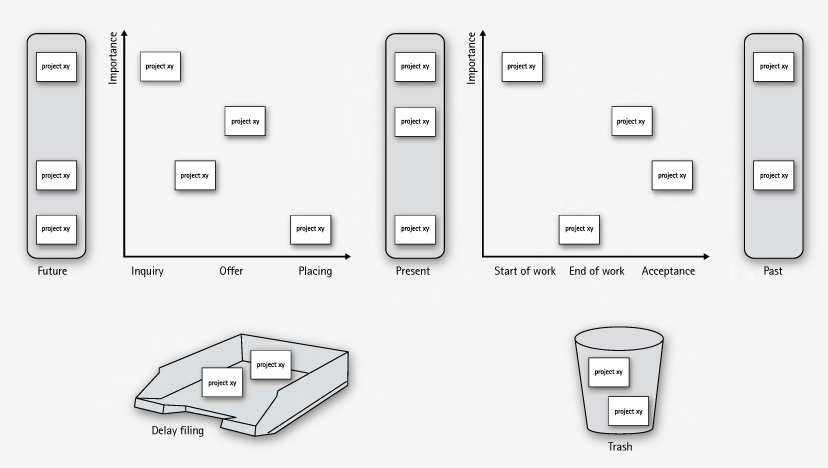
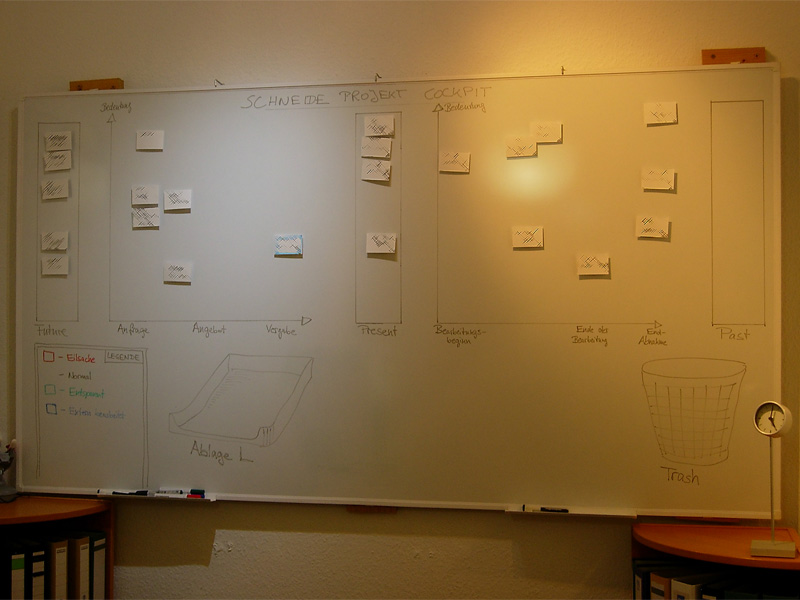
The Project Cockpit is a whiteboard with titled index cards and separated regions. If you glance at it, you might be reminded of a scrum board. In effect, it serves the same purpose: Tracking progress (of whole projects) and making it visible.

Here is a photo of our Project Cockpit (with actual project names obscured for obvious reasons):

cockpit1

How does it work?

In summary, each project gets a card and transitions through its lifecycle, from left to right on the cockpit.

The Project Cockpit consists of two main areas, “upcoming projects” and “current projects”. Both areas are separated into three stages eachs, denoting the usual steps of project placing and project realization.

Every project we are contacted for gets represented by an index card with some adhesive tape and a whiteboard magnet on its back. The project card enters the cockpit on the left (in the “future” or “inquiry” region) and moves to the right during its lifecycle. The y-axis of the chart denotes the “importance” of the project, with higher being more important.

cockpit2

In the “upcoming” area, projects are in acquisition phase and might drop out to the bottom, either into the “delay filing” or the “trash”. The former is used if a project was blocked, but is likely to make progress in the future. The latter is the special place we put projects that went awry. It’s a seldom action, but finally putting a project card there was always a relief.

The more natural (and successful) progress of a project card is the advance from the “upcoming” area to the “present” bar. The project is now appointed and might get a redefinition on importance. Soon, it will enter the right area of “current” projects and be worked on.

The right area of “current” projects is a direct indicator of our current workload. From here on, project cards move to the rightmost bar labeled “past” projects. Past projects are achievements to be proud of (until the card magnet is needed for a new project card).

If you want to, you can color code the project cards for their urgency or apply fancy numbers stating their volume.

What’s the benefit?

The Project Cockpit enables every member of our company to stay informed about the project situation. It’s a great place to agree upon the importance of new projects and keep long running acquisitions (the delay filing cases) in mind. The whiteboard acts as an information radiator, everybody participates in project and workload planning because it’s always present. Unlike simpler approaches to the task, our Project Cockpit includes project importance, urgency and volume without overly complicating the matter.

The whiteboard occupies a wall in our meeting room, so every customer visiting us gets a glance on it. As we use internal code names, most customers even don’t spot their own project, let alone associate the other ones. But its always clear to them in which occupancy condition we are, without a word said about it.

Ultimately, we get visibility of very crucial information from our Project Cockpit: When the left side is crowded, it’s a pleasure, when the right side is crowded, it’s a pressure 😉

“Tag, you’re it!” – how we manage our blog heartbeat

We successfully revived a nearly abandonded blog by using a token and a few metaphors.

The new year 2009 just started. A great opportunity to review some things. Here is a review of our blogging.

heartbeatWe started this blog in February 2007. Soon afterwards, it was nearly dead, as no new articles were written. Why? We would have answered to “be under pressure” and “have more relevant things to do” or simply “have no idea about what to write”. The truth is that we didn’t regard this blog as being important to us. We didn’t allocate any ressources, be it time, topics or attention to it. Seeming unimportant is a sure death cause for any business resource in any mindful managed company.
The Revival

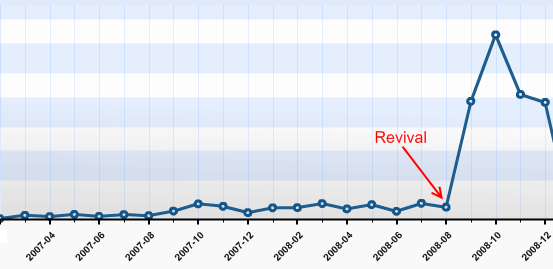
This changed in late August 2008, after we heard from several sources that our articles published so far were very promising. Some new contacts even asked about our Code Flow-O-Meter before they asked any other question. So we sat together and thought about a way to revive this blog with minimal possible effort. We came to the conclusion that, being a four-man-show company, it would be sufficient for everyone to write one blog article a month in order to show a weekly blog heartbeat. It’s simple math. The same discussion led to the conclusion that blogging in english would reach a broader audience.

It’s a management problem

This laid the foundation for a few new blog entries, as everyone was eager to tell some news. But how could we manage the blog heartbeat in a sustainable fashion, with minimal effort and attention of the individual?

blogtoken

We decided to give the “Blog Token” a try. This token is nothing more than a little index card informing you that you are responsible for the blog entry in the next week. You can keep the index card on your desk or take it with you to remind you of the task. If you published your entry, you hand it over to the following team member in line. The token order is defined on a very viewable whiteboard. It took us 5 minutes to set up the token and define the order. Everything else is managed by the one who wants to get rid of the token and the one who receives it.

It doesn’t work without metaphors

When we reviewed the process, we realized that without a few maxims and their impact, things would have gone astray even with the token in place. Here are some of our maxims, spelled by the metaphors we found for them:

  • “blog heartbeat”: When you want to “keep it flowing” in a sustainable pace, you need to have a pace first. We defined that our blog is alive when it has a periodic heartbeat. Weekly articles seemed to be a good start and were approved in every review yet.
  • “to grow vegetables”: Good ideas (and good blog topics) need to evolve and grow. You need to care about them for an amount of time and publish them when they are mature. But first of all, you need to put the seeds for ideas (and blog topics) in your garden. Whenever somebody mentions something that might be worth a blog entry, somebody calls “this is a vegetable!”. A first sketch of a new blog entry (a new vegetable in your garden) is born in this moment. To be honest, some vegetables starve over time.
  • “it’s not a competition”: We try to publish high quality blog entries. But it’s more important to us to tell you about our favorite vegetable (see second metaphor) than to win a pulitzer price for every article. We even try to remind ourselves that we do not compete for the recoginition from our readers (you, in this case!). To be honest here, too: Though it’s not a contest, we issued an internal price for our most read article: Using Hudson for C++/CMake/CppUnit

Reviewing the Revival

We revived our blog with three ingredients:

  • Our commitment (“it’s important to us”)
  • The Blog Token (“tag, you’re it!”)
  • Metaphors (“everyone can grow vegetables”)

Telling from the statistics, it simply skyrocketed us:

blog-stats

Thank YOU, our blog visitors, for making this possible. It’s been a great experience for us and we are looking forward to continue our blog heartbeat in 2009 with fully stacked vegetable gardens. Stay tuned and if you like, share your thoughts (or just say hello) by adding a comment. We really appreciate your opinion.

Merry christmas – and check your candles before you light them

LED tea lights are dangerously akin to their waxen antetypes.

xmas-treeThe Softwareschneiderei (Schneide) team wishes you all a merry christmas and a happy new year.

We might pause this blog for a few weeks as everybody is on holiday.

This year, we sent out christmas cards that needed to be assembled. The card with a tea light made up a little latern. To have all batteries included, we bought some tea lights but couldn’t resist to buy some LED tea lights, too. The we put the parts together in giant envelopes and sent them out.

We got really nice feedback, but several reports suggested we might additionally package a warning note next time we send out LED tea lights that look too similar to traditional ones. The LED tea lights refuse to catch fire when burned, that’s for certain now.

So a word of warning in advance: Double-check your christmas tree candles before you kindle them. They might operate with batteries instead of fire.

Batteries not included

Your feature isn’t ready-to-use until you provide the necessary requirements alongside, too.

When I bought a label printing device lately, it came bundled with a label tape roll. That suggested instant usage – no need to think of additional parts upfront. Only tousb-battery-little find out that, you’ve guessed it already, batteries weren’t included. A bunch of standardized parts missing (Murphy’s law applied) and the whole ready-to-use package was rendered useless. The time and effort it took me to get the batteries was the same as to get the label tape I really wanted to use instead of the bundled one.

This is a common pattern not only with device manufacturers, but with software developers, too.

Instant feature – just add effort

Frequently, a software comes “nearly” ready-to-use. All you have to do to make it run is

  • upgrade to the latest graphics drivers
  • install some database system (we won’t tell you how as it’s not our business)
  • create some file or directory manually
  • login with administrator rights once (or worse: always) to gather write access to the registry or configuration file
  • review and change the complete configuration prior to first usage

The last point is a personal pet peeve of mine.

It all boils down to the question if a software or a feature is really ready-to-use. Most of the work you have to do manually is tedious or highly error-prone. Why not add support for this apparently crucial steps to the software in the first place?

It works instantly – with my setup

A common mistake made by developers is to forget about the history of a feature emerging in the development labs. The history includes all the little requirements (a writeable folder here, an existing database table there) that will naturally be present on the developer’s machine when she finishes work, because fulfilling them was part of the development process.

If the same developer was forced to recreate the feature on a fresh machine, she would notice all these steps with ease and probably automate or support (e.g. documentate) them, least to save herself the work of wading through it a third time.

But given that most developers regard a feature “finished”, “done” or “resolved” when the code was accepted by the repository (and hopefully the continuous integration system), the aching of the users wont reach them.

This is a case of lacking feedback.

Feel the pain – publicly

To close this open feedback loop, we established a habit of “adopting” features and bringing them to the user in person to overcome the problem of “nearly done”. If you can’t make your own feature run on the client’s machine within a few seconds, is it really that usable and “ready”? The unavoidable presence of the whole process – from the first feature request to the installed and proven-to-work software acts as a deterrent to fall for the “works on my machine” style of programming. It creates a strong relationship between the user, a feature and the developer as a side-effect.

We’ve seen quite a few junior developers experiencing a light bulb moment (and heavy sweating) in front of the customer. This is the hot-wired feedback loop working. In most cases, the situation (a feature requiring non-trivial effort to be run) will not repeat ever.

Batteries are part of the product

If your product (e.g. software) isn’t usable because some standard part (e.g. a folder) is missing, make sure you add these parts to the delivery package. It is a very pleasant experience for the user to just unwrap a software and use it right away. It shows that you’ve been cared for.

We’ve won a prize!

When we switched our continuous integration platform from CruiseControl to Hudson, it was still a younhudsonbutler-149_50pxg project with many white areas on the project roadmap. But it already was powerful enough to handle our settings and delivered real value, so we eagerly wanted to contribute back.

The development process with “release early, release often” policy and community focussed drive fit right into our mindset, so we (in fact, mostly me) spent a few nights figuring out what and how to contribute. The effort materialized in a few private tweaks and a new plugin: the Crap4J hudson plugin.

With the knowledge of Hudson’s internals, we were able to help out various customers to set up their own sophisticated installations (which nearly led to the development of a Perforce plugin when Mike Wille finished his one right on time). This led to various bug reports and feature requests that we filed to Hudson’s issue database.

Soon afterwards, Sun Microsystems announced the GlassFish Awards Program (GAP) as part of the Community Innovation Awards Program. Hudson was part of the participating projects, so I gave it a try and submitted some feature requests and the plugin.

lauriersAnd we won a prize! It’s not the big sort of prize (look at position 50 in the list), but a reward for our filed issues and a honorable mention of the plugin (which truly stands no chance compared to the awesome work of Dr. Hafner, who contributed a complete “get-them-all” collection of useful metrics reporting plugins). At least, we are the only winner from Karlsruhe.

Lately, we blogged about awarding your customers. Well, that’s just what Sun did here. Thanks for that!

Spelling the feedback: The LED bar

Our fully automated project ecosystem provides us with feedback of very different type and granularity. We felt it was impossible to render every single notable event into its own extreme feedback device (XFD). Instead, we implemented an universal feedback source: the LED bar.

ledbar-alone

You know the LED bar already from a shop window of your town. It tells you about the latest special bargain, the opening hours of the shop or just something you didn’t want to know. But you’ve read it, because it is flashing and moving. You just can’t pass that shop window without noticing the text on the LED bar.

Our LED bar sells details to us. The most important issues are already handled by the ONOZ Lamp and the Audio feedback, as both are very intrusive. The LED bar is responsible to spell the news, rather than to tell it.

A very comforting news might be “All projects sane”, which happen to be our regular state. You might be told that you rendered “project X BROKEN”, but you already know this, as the ONOZ Lamp lit up and you were the one to check in directly before. It’s better to be informed that “project X sane” was the build’s outcome. After a while, the text returns to the regular state or blanks out.

Setting up the LED bar

We aren’t the only ones out there with a LED bar on the wall. Dirk Ziegelmeier for example installed his at the same time, but blogged much earlier about it. He even gives you detailed information about the communication protocol used by the device and a C# implementation for it. The lack of protocol documentation was a bugger for us, too. We reverse engineered it independently and confirm his information. We wrote a complete Java API for the device (in our case a LSB-100R), which we might open source on request. Just drop us a note if you are interested.

Basically, we wrote an IRC bot that understands commands given to it and transforms it into API calls. The API then deals with the low-level transformation and the device handshake. This way, software modules that want to display text on the LED bar from anywhere on the internal net only need to talk on IRC.

The idea of connecting an IRC channel and the led bar isn’t unique to us, either. The F-Secure Linux Team blogged about their setup, which is disturbingly equal to ours. Kudos to you guys for being cool, too.

Effects of the LED bar

The LED bar is the perfect place to indicate project news. Its non-intrusive if you hold back those “funny” displaying effects but versatile enough to provide more than simple binary (on/off) information. Its the central place to look up to if you want to know what’s the news.

We even found out that our company logo (created by Hannafaktur) is scalable down to 7×7 pixels, which exactly fits the LED bar in height:

logo_on_led

Try this with your company’s logo!


Read more about our Extreme Feedback Devices: