On teaching software engineering

Be sure to include current topics in your lectures when teaching software engineering. Here are some hints.

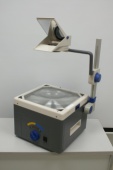
overheadIn my rare spare time, I hold lectures on software engineering at the University of Cooperative Education in Karlsruhe. The topics range from evergreens like UML to modern subjects like aspect oriented programming (AOP) or Test Driven Development (TDD).
One thing I observe is that students don’t have difficulty separating the old topics from the current ones, even if they hear both of them for the first time. It seems that subject matter ages by itself, just like source code does. So, I’m constantly searching for new topics to include in the lectures, replacing the oldest ones.

Three things to include in your lectures

Some months ago, I read a very good blog post written by Alan Skorkin, titled “3 Things They Should Have Taught In My Computer Science Degree”. Alan covers three points:

  1. Open Source Development
  2. An Agile Process (e.g. XP, Scrum)
  3. Corporate Politics/Building Relationships

The idea of missed opportunities to tell some fundamentals to my students struck me. I compared my presentations to the list, finding the leading two topics covered to a great extent. The last one, corporate politics, is a bit off-topic for a technical lecture. But nevertheless, it’s too important to omit completely, so I already had included some Tom DeMarco lessons in my presentations. Perhaps I can build this part up a bit in the future.

What they should have taught me

Soon afterwards, I though about things my lecturers missed during my study. Here’s the list with only two points in addition to Alan’s list:

  • Age and “maturity” of topic: When I was a student, I quickly identified old topics, like my students do nowadays. What I couldn’t tell was if a topic was mature (a classic) or just deprecated. It would have helped to announce that a topic was necessary, but of little actual relevance in modern software development craftmanship. Or that a topic is academical news, but yet unheard of in the industry and lacking wide-spread acceptance. Both extremes were blended together in the presentations, creating an unique mixture of antiquated and futuristic approaches. This is a common problem of Advanced Beginners in the Dreyfus model.
  • Ergonomics and Effectiveness: I still can’t believe I didn’t hear a word about proper workplace setup from my teachers. I had courses teaching me how to learn, but not a single presentation that taught me how to work. This topic ranges from the right chair over lighting to screen size and quantity and could be skimmed over in less than an hour. But it doesn’t stop with the hardware. Entire books like Neal Ford’s “The Productive Programmer” cover the software side of effective workplace setup. And even further, the minimal set of tools a software developer should use (e.g. IDE, SCM, CI, issue tracker, Wiki) wasn’t even mentioned.

I hope to provide all these topics and information to my students in a recognizable (and rememberable) manner. They deserve to learn about the latest achievements in software engineering. Otherwise you aren’t prepared to work in an industry changing fundamentally every five to ten years. Of course, hearing about the classic stuff is necessary, too.

Give me feedback. What are your missed topics during apprenticeship, study or even work?

Update: In case you can’t visit my lectures but want to know a bit about ergonomics, I’ve written two blog articles on this topic:

Lightweight dependency management

Managing project dependencies without maven or ant ivy, using a custom ant task to ensure classpath orthogonality.

Java’s classpath is a powerful concept – when used appropriate. As your project grows larger in terms of code and people, it gets harder to ensure that your classpath is correct. A great danger arises from JAR files containing different versions of the same resource. You might end up running different code than you think, leading to strange effects. If you build your classpath using wildcards, you can’t even control the order your JAR files are loaded.

Managing dependencies

To avoid the issues mentioned above, you need to manage your project dependencies. It’s a common practice to implement the build process of the project using maven or ant ivy. Both tools provide dependency mangement by declaration. But at a high cost. Especially maven has received some malice lately, criticizing its steep learning curve and complexity.

Scratching the biggest itch

We decided to try a different approach to dependency management, tackling only our biggest concern: The duplication of classpath resources. We take care of the scope of a third-party library, put required JARs in the repository (to us, third party binary artifacts are part of the project source) and update manually. The one thing we cannot assure manually is that every resource is unique. Sometimes, the same class is included in different JARs, as it seems to be common practice among java web frameworks.

Ant to the rescue

Thus, I wrote a custom ant task that, given the classpath, checks for duplicate entries. If it finds one, it lists the culprits and optionally aborts the build process. Included in our continuous integration system, it gets run every time somebody performs a change. You can’t forget to delete an old version of a library or check in the same library twice without breaking the build now.

Our ClasspathCollisionCheckTask

I provide this task here, without any warranty. The source code is included in the JAR alongside the classes, if you want to know what it does exactly.

Assuming you already know how to use custom tasks within an ant build script, here’s only a short usage description.

Import the custom task:

<taskdef
    name="check.collision"
    classname="com.schneide.internal.anttask.ClasspathCollisionCheckTask"
    classpath="${customtasks.library.directory}/schneidetasks.jar"
/>

Next, use it on your classpath:

<check.collision verbose="true" failOnCollision="true">
    <path>
        <fileset dir="${classpath.library.directory}">
            <include name="**/*.jar"/>
        </fileset>
        <fileset dir="${internal.library.directory}">
            <include name="**/*.jar"/>
        </fileset>
    </path>
</check.collision>

The task scans the whole path you give it and reports any collision it detects. You will see the warnings in your build log.

If the failOnCollision parameter is set to true (optional, defaults to false), the build will abort after a collision. If you want to have debug information, set the verbose parameter to true (optional, defaults to false).

Conclusion

If you manage your project dependencies manually, you might find our custom ant task useful. If you use maven or ant ivy, you already have this functionality in your build process.

Feedback

I’m very interested in hearing your opinion on the task or about your way of handling dependencies. Leave us a comment.

Make it visible: The Project Cockpit

How to use a whiteboard as information radiator for project management, showing progress, importance, urgency and volume of projects.

We are a project shop with numerous customers booking software development projects as they see fit, so we always work on several projects concurrently in various sub-teams.

We always strive for a working experience that provides more productivity and delight. One major concept of achieving it is “make it visible”. This idea is perfectly described in the awesome book “Behind Closed Doors” by Johanna Rothman and Esther Derby from the Pragmatic Bookshelf. Lets see how we applied the concept to the task of managing our project load.

What is the Project Cockpit?

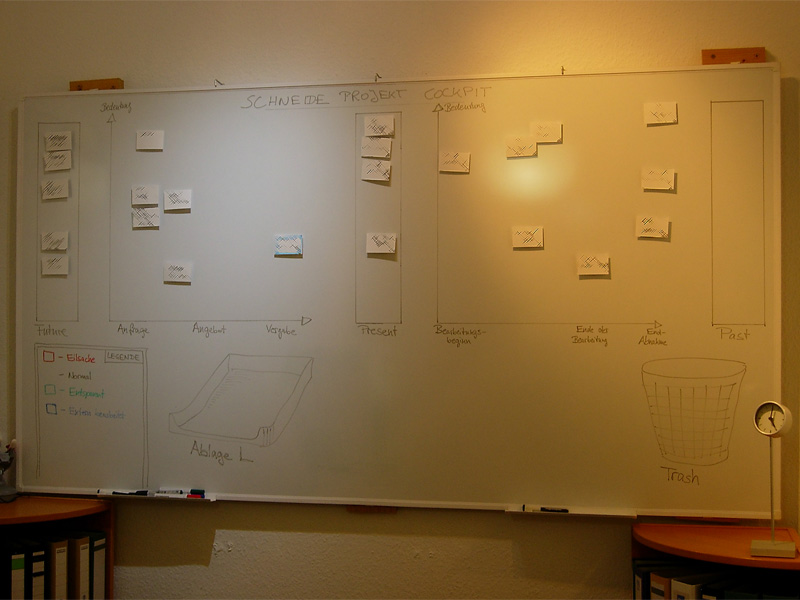
The Project Cockpit is a whiteboard with titled index cards and separated regions. If you glance at it, you might be reminded of a scrum board. In effect, it serves the same purpose: Tracking progress (of whole projects) and making it visible.

Here is a photo of our Project Cockpit (with actual project names obscured for obvious reasons):

cockpit1

How does it work?

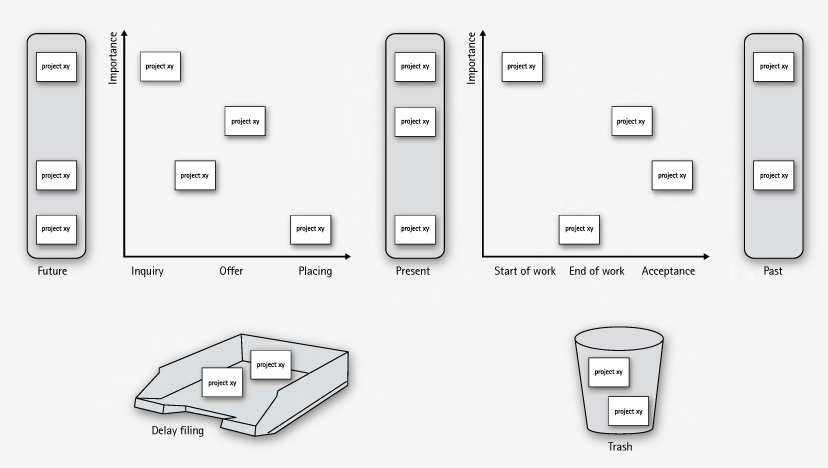
In summary, each project gets a card and transitions through its lifecycle, from left to right on the cockpit.

The Project Cockpit consists of two main areas, “upcoming projects” and “current projects”. Both areas are separated into three stages eachs, denoting the usual steps of project placing and project realization.

Every project we are contacted for gets represented by an index card with some adhesive tape and a whiteboard magnet on its back. The project card enters the cockpit on the left (in the “future” or “inquiry” region) and moves to the right during its lifecycle. The y-axis of the chart denotes the “importance” of the project, with higher being more important.

cockpit2

In the “upcoming” area, projects are in acquisition phase and might drop out to the bottom, either into the “delay filing” or the “trash”. The former is used if a project was blocked, but is likely to make progress in the future. The latter is the special place we put projects that went awry. It’s a seldom action, but finally putting a project card there was always a relief.

The more natural (and successful) progress of a project card is the advance from the “upcoming” area to the “present” bar. The project is now appointed and might get a redefinition on importance. Soon, it will enter the right area of “current” projects and be worked on.

The right area of “current” projects is a direct indicator of our current workload. From here on, project cards move to the rightmost bar labeled “past” projects. Past projects are achievements to be proud of (until the card magnet is needed for a new project card).

If you want to, you can color code the project cards for their urgency or apply fancy numbers stating their volume.

What’s the benefit?

The Project Cockpit enables every member of our company to stay informed about the project situation. It’s a great place to agree upon the importance of new projects and keep long running acquisitions (the delay filing cases) in mind. The whiteboard acts as an information radiator, everybody participates in project and workload planning because it’s always present. Unlike simpler approaches to the task, our Project Cockpit includes project importance, urgency and volume without overly complicating the matter.

The whiteboard occupies a wall in our meeting room, so every customer visiting us gets a glance on it. As we use internal code names, most customers even don’t spot their own project, let alone associate the other ones. But its always clear to them in which occupancy condition we are, without a word said about it.

Ultimately, we get visibility of very crucial information from our Project Cockpit: When the left side is crowded, it’s a pleasure, when the right side is crowded, it’s a pressure 😉

“Tag, you’re it!” – how we manage our blog heartbeat

We successfully revived a nearly abandonded blog by using a token and a few metaphors.

The new year 2009 just started. A great opportunity to review some things. Here is a review of our blogging.

heartbeatWe started this blog in February 2007. Soon afterwards, it was nearly dead, as no new articles were written. Why? We would have answered to “be under pressure” and “have more relevant things to do” or simply “have no idea about what to write”. The truth is that we didn’t regard this blog as being important to us. We didn’t allocate any ressources, be it time, topics or attention to it. Seeming unimportant is a sure death cause for any business resource in any mindful managed company.
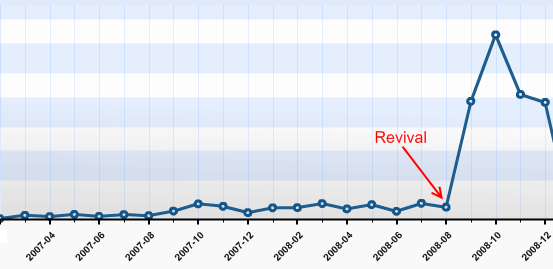
The Revival

This changed in late August 2008, after we heard from several sources that our articles published so far were very promising. Some new contacts even asked about our Code Flow-O-Meter before they asked any other question. So we sat together and thought about a way to revive this blog with minimal possible effort. We came to the conclusion that, being a four-man-show company, it would be sufficient for everyone to write one blog article a month in order to show a weekly blog heartbeat. It’s simple math. The same discussion led to the conclusion that blogging in english would reach a broader audience.

It’s a management problem

This laid the foundation for a few new blog entries, as everyone was eager to tell some news. But how could we manage the blog heartbeat in a sustainable fashion, with minimal effort and attention of the individual?

blogtoken

We decided to give the “Blog Token” a try. This token is nothing more than a little index card informing you that you are responsible for the blog entry in the next week. You can keep the index card on your desk or take it with you to remind you of the task. If you published your entry, you hand it over to the following team member in line. The token order is defined on a very viewable whiteboard. It took us 5 minutes to set up the token and define the order. Everything else is managed by the one who wants to get rid of the token and the one who receives it.

It doesn’t work without metaphors

When we reviewed the process, we realized that without a few maxims and their impact, things would have gone astray even with the token in place. Here are some of our maxims, spelled by the metaphors we found for them:

  • “blog heartbeat”: When you want to “keep it flowing” in a sustainable pace, you need to have a pace first. We defined that our blog is alive when it has a periodic heartbeat. Weekly articles seemed to be a good start and were approved in every review yet.
  • “to grow vegetables”: Good ideas (and good blog topics) need to evolve and grow. You need to care about them for an amount of time and publish them when they are mature. But first of all, you need to put the seeds for ideas (and blog topics) in your garden. Whenever somebody mentions something that might be worth a blog entry, somebody calls “this is a vegetable!”. A first sketch of a new blog entry (a new vegetable in your garden) is born in this moment. To be honest, some vegetables starve over time.
  • “it’s not a competition”: We try to publish high quality blog entries. But it’s more important to us to tell you about our favorite vegetable (see second metaphor) than to win a pulitzer price for every article. We even try to remind ourselves that we do not compete for the recoginition from our readers (you, in this case!). To be honest here, too: Though it’s not a contest, we issued an internal price for our most read article: Using Hudson for C++/CMake/CppUnit

Reviewing the Revival

We revived our blog with three ingredients:

  • Our commitment (“it’s important to us”)
  • The Blog Token (“tag, you’re it!”)
  • Metaphors (“everyone can grow vegetables”)

Telling from the statistics, it simply skyrocketed us:

blog-stats

Thank YOU, our blog visitors, for making this possible. It’s been a great experience for us and we are looking forward to continue our blog heartbeat in 2009 with fully stacked vegetable gardens. Stay tuned and if you like, share your thoughts (or just say hello) by adding a comment. We really appreciate your opinion.

Merry christmas – and check your candles before you light them

LED tea lights are dangerously akin to their waxen antetypes.

xmas-treeThe Softwareschneiderei (Schneide) team wishes you all a merry christmas and a happy new year.

We might pause this blog for a few weeks as everybody is on holiday.

This year, we sent out christmas cards that needed to be assembled. The card with a tea light made up a little latern. To have all batteries included, we bought some tea lights but couldn’t resist to buy some LED tea lights, too. The we put the parts together in giant envelopes and sent them out.

We got really nice feedback, but several reports suggested we might additionally package a warning note next time we send out LED tea lights that look too similar to traditional ones. The LED tea lights refuse to catch fire when burned, that’s for certain now.

So a word of warning in advance: Double-check your christmas tree candles before you kindle them. They might operate with batteries instead of fire.

Batteries not included

Your feature isn’t ready-to-use until you provide the necessary requirements alongside, too.

When I bought a label printing device lately, it came bundled with a label tape roll. That suggested instant usage – no need to think of additional parts upfront. Only tousb-battery-little find out that, you’ve guessed it already, batteries weren’t included. A bunch of standardized parts missing (Murphy’s law applied) and the whole ready-to-use package was rendered useless. The time and effort it took me to get the batteries was the same as to get the label tape I really wanted to use instead of the bundled one.

This is a common pattern not only with device manufacturers, but with software developers, too.

Instant feature – just add effort

Frequently, a software comes “nearly” ready-to-use. All you have to do to make it run is

  • upgrade to the latest graphics drivers
  • install some database system (we won’t tell you how as it’s not our business)
  • create some file or directory manually
  • login with administrator rights once (or worse: always) to gather write access to the registry or configuration file
  • review and change the complete configuration prior to first usage

The last point is a personal pet peeve of mine.

It all boils down to the question if a software or a feature is really ready-to-use. Most of the work you have to do manually is tedious or highly error-prone. Why not add support for this apparently crucial steps to the software in the first place?

It works instantly – with my setup

A common mistake made by developers is to forget about the history of a feature emerging in the development labs. The history includes all the little requirements (a writeable folder here, an existing database table there) that will naturally be present on the developer’s machine when she finishes work, because fulfilling them was part of the development process.

If the same developer was forced to recreate the feature on a fresh machine, she would notice all these steps with ease and probably automate or support (e.g. documentate) them, least to save herself the work of wading through it a third time.

But given that most developers regard a feature “finished”, “done” or “resolved” when the code was accepted by the repository (and hopefully the continuous integration system), the aching of the users wont reach them.

This is a case of lacking feedback.

Feel the pain – publicly

To close this open feedback loop, we established a habit of “adopting” features and bringing them to the user in person to overcome the problem of “nearly done”. If you can’t make your own feature run on the client’s machine within a few seconds, is it really that usable and “ready”? The unavoidable presence of the whole process – from the first feature request to the installed and proven-to-work software acts as a deterrent to fall for the “works on my machine” style of programming. It creates a strong relationship between the user, a feature and the developer as a side-effect.

We’ve seen quite a few junior developers experiencing a light bulb moment (and heavy sweating) in front of the customer. This is the hot-wired feedback loop working. In most cases, the situation (a feature requiring non-trivial effort to be run) will not repeat ever.

Batteries are part of the product

If your product (e.g. software) isn’t usable because some standard part (e.g. a folder) is missing, make sure you add these parts to the delivery package. It is a very pleasant experience for the user to just unwrap a software and use it right away. It shows that you’ve been cared for.

We’ve won a prize!

When we switched our continuous integration platform from CruiseControl to Hudson, it was still a younhudsonbutler-149_50pxg project with many white areas on the project roadmap. But it already was powerful enough to handle our settings and delivered real value, so we eagerly wanted to contribute back.

The development process with “release early, release often” policy and community focussed drive fit right into our mindset, so we (in fact, mostly me) spent a few nights figuring out what and how to contribute. The effort materialized in a few private tweaks and a new plugin: the Crap4J hudson plugin.

With the knowledge of Hudson’s internals, we were able to help out various customers to set up their own sophisticated installations (which nearly led to the development of a Perforce plugin when Mike Wille finished his one right on time). This led to various bug reports and feature requests that we filed to Hudson’s issue database.

Soon afterwards, Sun Microsystems announced the GlassFish Awards Program (GAP) as part of the Community Innovation Awards Program. Hudson was part of the participating projects, so I gave it a try and submitted some feature requests and the plugin.

lauriersAnd we won a prize! It’s not the big sort of prize (look at position 50 in the list), but a reward for our filed issues and a honorable mention of the plugin (which truly stands no chance compared to the awesome work of Dr. Hafner, who contributed a complete “get-them-all” collection of useful metrics reporting plugins). At least, we are the only winner from Karlsruhe.

Lately, we blogged about awarding your customers. Well, that’s just what Sun did here. Thanks for that!

Spelling the feedback: The LED bar

Our fully automated project ecosystem provides us with feedback of very different type and granularity. We felt it was impossible to render every single notable event into its own extreme feedback device (XFD). Instead, we implemented an universal feedback source: the LED bar.

ledbar-alone

You know the LED bar already from a shop window of your town. It tells you about the latest special bargain, the opening hours of the shop or just something you didn’t want to know. But you’ve read it, because it is flashing and moving. You just can’t pass that shop window without noticing the text on the LED bar.

Our LED bar sells details to us. The most important issues are already handled by the ONOZ Lamp and the Audio feedback, as both are very intrusive. The LED bar is responsible to spell the news, rather than to tell it.

A very comforting news might be “All projects sane”, which happen to be our regular state. You might be told that you rendered “project X BROKEN”, but you already know this, as the ONOZ Lamp lit up and you were the one to check in directly before. It’s better to be informed that “project X sane” was the build’s outcome. After a while, the text returns to the regular state or blanks out.

Setting up the LED bar

We aren’t the only ones out there with a LED bar on the wall. Dirk Ziegelmeier for example installed his at the same time, but blogged much earlier about it. He even gives you detailed information about the communication protocol used by the device and a C# implementation for it. The lack of protocol documentation was a bugger for us, too. We reverse engineered it independently and confirm his information. We wrote a complete Java API for the device (in our case a LSB-100R), which we might open source on request. Just drop us a note if you are interested.

Basically, we wrote an IRC bot that understands commands given to it and transforms it into API calls. The API then deals with the low-level transformation and the device handshake. This way, software modules that want to display text on the LED bar from anywhere on the internal net only need to talk on IRC.

The idea of connecting an IRC channel and the led bar isn’t unique to us, either. The F-Secure Linux Team blogged about their setup, which is disturbingly equal to ours. Kudos to you guys for being cool, too.

Effects of the LED bar

The LED bar is the perfect place to indicate project news. Its non-intrusive if you hold back those “funny” displaying effects but versatile enough to provide more than simple binary (on/off) information. Its the central place to look up to if you want to know what’s the news.

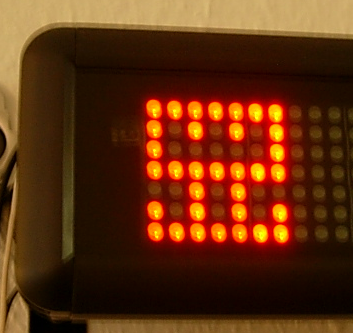
We even found out that our company logo (created by Hannafaktur) is scalable down to 7×7 pixels, which exactly fits the LED bar in height:

logo_on_led

Try this with your company’s logo!


Read more about our Extreme Feedback Devices:

Extreme Feedback Device (XFD): The ONOZ! Lamp

When two good ideas meet, there’s a chance for an even better idea to be born. This happened to us some time ago, when the ONOZ! Lamp came up.

(This is a free translation and revision of an earlier article written in german)

The first good idea

On April 1st 2004, Alberto Savioa published a blog entry about an idea of two lava lamps (green and red) displaying the current build state of a project. I was somewhat distracted that day, marrying my wife, so the idea came to us two years later. Mike Clark wrote his wonderful book “Pragmatic Project Automation” and included not only the idea of the lava lamps, but also detailed construction guidance.

The second good idea

One day, an email contained a little animated gif with two panic guys running around.

Investigation suggests Jonn Wood as the author. We thought the guys act exactly like us after a broken build (one of the worst things that may happen here), so the gif and the word “ONOZ” were integrated into our company culture.

The birth of another idea

After we read about the lava lamps, we wanted to own them, too. But only after inspiration from the animated gif, we were sure about our specific realisation. We merged the two states into one lamp (on/off instead of green/red) and did without the lava. A normal desk light would do the job now.
We even have a good justification for the omission of the green (lava) lamp:

  • it saves energy
  • no timer switch is needed for the nights/weekends
  • our team includes colorblinds

The last reason is a good one when you look at this simulation of colorblindness:
These are pictures of the original green and red lava lamps:

This is how it looks to a colorblind employee. These images were generated by Vischeck, a website trying to inform about colorblindness practically.

Not much of a difference. If you swap them around secretly, ten percent (the percentage of colorblinds in the male population) of your team will panic without reason.

The ONOZ! Lamp

With little investment, we build a system supervising the build state of all our projects. Every build process sends its result to a server that checks for failures. If a build failed, the lamp gets switched on over traditional X10 signals. We can’t overlook the sudden burst of luminance, we panic a bit and try to fix the build. The lamp turns off when all projects are back to normal.

The ONOZ! Lamp is just a lamp standing around, until something ugly happens. Then it turns into a glowing infernal of failure. We nearly failed to give it a correctly spelled name, too. We named it “ONOEZ! Lamp” first, which seems to be the only invalid spelling of this exclamation.

The effects

The ONOZ! Lamp works great. Its mere presence has a comforting effect, as long as it is off. Which is the case most of the time. When it fires, the effect is like an alarm stopping all work. And the operator giving the alarm is always alert and incorruptible: our continuous integration server.


Read more about our Extreme Feedback Devices:

Extreme Feedback Device (XFD): The Code Flow-O-Meter

This is a free translation and revision of an earlier article written in german.

Since March 2007, the Schneide uses another Extreme Feedback Device (XFD): the Code Flow-O-Meter.

So what is this thing?

We bought a portable fountain made of slate, filled in water (no additives) and connected the power supply cord with a X10 application module. Then we programmed a litte IRC Bot (using the ten-minutes-to-success java IRC library pircbot) that triggers the module. We were then able to control the fountain by speaking to it over IRC.

Afterwards, we piped the commit messages of our source repositories to a little script that determines the “impact” of the commit by measuring the amount of changes to the code. This sounds more sophisticated as it really is, the number of changed files was a good enough guess for it. This impact is related to a duration, the more impact, the longer the timespan. Now the script tells the IRC bot to activate the fountain for that amount of time.

This way, we have a direct but unobtrusive notification about what is going on in the repositories, as this is the most important location of our company (talking about the numerous safety nets we applied to it would require another blog post). Initially, we thought about playing an audio sample singing “alleluia”, too, but this became ridiculous soon.

But why do you want this notification?

One of the rules of agile (or good) programming says “commit early, commit often”. But as soon as every little commit gets examined by a continuous integration server, all automated tests and a large number of software quality metric tools, the liability to keep the changes local a little bit longer grows. “After all, it’s ready when it’s done, and this is soon enough to check in” was a common justification especially among the less experienced programmers. But that’s the best way to miss the early feedback. And early feedback is effective feedback.

So we installed our portable fountain as a counter-incentive against late commits and started a little game. The rule of the game is simple:
Keep the Flow-O-Meter running!
When you commit, the fountain flows. The size of your commit is not as important as the commit itself, so its better to commit often. If everyone does it, the fountain may flow the whole day.

The Code Flow-O-Meter may be regarded as a measurement device of “progress”. Things are in a state of flux as long as it is running.

And did it work?

Yes, definitly. The Code Flow-O-Meter has become our little pet. Everyone loves it because it’s friendly and comforting. Think of a tamagochi, but without the annoyances. You only need to change and commit something to feed it and get the reward, nothing more.

As an additional gain, everybody else loves it, too. When we show it to a customer, they first see an ordinary portable fountain. When we explain and demonstrate our working cycle (code, commit, review) to them, something magical happens. I tend to think they involuntary get the notion of something happening after the commit when the fountain comes to life. This may be the concept of a build server, otherwise being invisible and intangible, materializing in the fountain. When we continue to explain what happens after the build, like the ONOZ! lamp lighting up to indicate a failed build, it’s already clear to them that the process does not end with the waterflow. The Code Flow-O-Meter serves as a link between the developer’s local work and the build feedback arriving out of nowhere some minutes later.


Read more about our Extreme Feedback Devices: