Interacting with SVG files inside your React applications

So, for some reason you have a SVG file that somehow resembles a part of the application you are currently developing.

This might be only a sketch that you want to prepare as a Click Dummy, or it might be that you need to display a somewhat unique, complicated structure that is best layed out per SVG editor. This is somewhat expected when you have customers in the technical / scientific research sector.

So now you want to fill it with life.

Now, the SVG format is quite close to the <svg> structure that one can embed into HTML, but there are some steps in between. Most importantly, most SVG Editors fill their .svg files up with meta data or specific information only required for the editor in case you want to edit the files again.

Thus, you have three choices to integrate the SVG component in a React application

  • Re-Build your SVG with custom React Components that, via JSX, render their <svg>, <g>, <path>, etc. accordingly
  • Convert your SVG to valid JSX – this is possible in many cases, but you need to take care e.g. that the style attribute is a string in the SVG and an object in JSX, also it can be still way too large to be readily put in a single React Component
  • Import your .svg as its own React Component and then wrap that into an own Component that takes care about the interaction part

While I also have written a small converter that does the SVG-JSX-Conversion just fine for me for any file that comes out of Inkscape (probably an idea for my next blog post), we had the case of some files with about 16000 lines of SVG each, so I chose the third method in our case.

In my eyes, it is very correct to mention that the following way somehow goes against the React Mindset. In which you render all your components yourself to attach them the required mouse event handlers, never having to interact with a HTML “id” or any document.getElementById() or document.getElementByClassName().

In any React application, these should be avoided, but the idea here is to have a singular point – a SvgWrapper Component – where you allow these functions because you’d agree about the need to somehow target the specific SVG elements.

The gist:

import {ReactComponent as OurHorrificSvgMonster} from "/src/monster.svg";

const OurBeautifulComponent = () => {

    useOurCarefulSvgSynchronizationEffect(); // more on this below

    return (
        <SvgWrapper>
             <OurHorrificSvgMonster/>
        </SvgWrapper>
    )
};

Quick note: you can target the embedded <svg> element itself by <OurHorrificSvgMonster ref={...}/> and you could use this (ref.current holds that HTML element) to traverse all the children, so if you know much about the structure of your svg you could even live without the <SvgWrapper>. But say someone else made the horrific svg monster and all you have is the id or class names to all the individual svg elements inside.

Then

const WithVanillaHandlersConnected = ({children}) => {
    const dispatch = useDispatch();

    React.useEffect(() => {

        const onClick = (event) => {
            dispatch(awesomeAction(event.target.id));
        };

        const awesomeElements = [...document.getElementsByClassName("awesome")];

        awesomeElements.forEach(elem => {
            elem.addEventListener("click", onClick);
        });

        return () => awesomeElements.forEach(pipe => {
            pipe.removeEventListener("click", onClick);
        });
    }, []);

    return children;
};

I chose this dispatch() as a placeholder for any interaction with the surrounding web application, it could also be a simple React state or something. You can register any event listener you want here (also “mouseover”, “mouseout”, “contextmenu”, …), but think of removing it again in the effect return function.

By the way, document.getElementsByClassName(…) returns something like a HTMLCollection which is not exactly iterable, thus the […destructuring] to make the .forEach() possible.

We now have the first part – our elements (in our case, everything that has class “awesome”) has got a click handler that allows to dispatch anything to the application state. But now they need to change, too.

In a purely React-y way, this could be done by a svg element that chooses its fill = {isActive? "magenta" : "black"} but as we choose not to render our components ourselves, we need to once again grab deeply into the DOM and dare to manipulate it by hand.

As mentioned above – this is a step towards very ugly problems as React cannot guarantee that your visual layer matches your application state. You, on yoru own, have to guarantuee to do what’s right.

This is where this comes in:

/*
 for this example, think of that the redux selector selectSomethingFromTheState returns something like:

result = [
  {elementId: "elem1", isActive: true},
  ...
];

and isActive could be the thing that was toggled by our awesomeAction() above

*/

const useOurCarefulSvgSynchronizationEffect = () => {
    const elementStates = useSelector(selectSomethingFromTheState);

    React.useEffect(() => {
        for (const state of elementStates) {
            const element = document.getElementById(state.elementId};
            element.style.fill = isActive ? "magenta" : "black";
            // ... do other stuff with the DOM element
        }
    }, [elementStates]);
};

There we have it – we have the SvgWrapper and the use…SynchronizationEffect() that both stray from the React mindset by accessing the DOM directly, but we do it in a fashion where it is concisely encapsulated inside <OurBeautifulComponent> and there is no direct knowledge about the IDs inside the SVG, or Class manipulations, CSS Selectors, etc. elsewhere.

In my opinion, one can indeed go against the rules if it’s necessary, but I also see the option for a Stockton Rush quotation here.. so, if you know of any more elegant way, please feel free to share.

PS: by the way, if you use vite, you might get an “Uncaught SyntaxError” when trying import { ReactComponent ... }I’ve written about this before.

Do Not Just Eat That Frog!

It is surely remarkable how much advice on Software Development is actually advice on Project Management, sometimes bordering into the psychological field and being more like management of personal Energy, Attention or Motivation. But this does make sense, considering how so often, some seemingly simple task can blow up to something difficult to manage, then becoming trivial again, then mathematically impossible, then simple again.

All of that within a context where somewhere, some customers enjoy their day, not being inclined to be part of these emotional loops at all. Just solve their problems. Which is our job.

So, one of the frequent Time Management tips passed around is “Eat That Frog” (Originally by Brian Tracy with some help from Mark Twain). The main idea is that some seriously demanding task (“having to eat a live frog”) will not become more attractive during the day, so it’s important to make it your very first priority to gulp that thing down, first thing the morning.

I found this approach quite helpful, and it can be part of a larger strategy known as “Risk First” as commonly mentioned by other authors around here.

However, any good advice can only be applied within boundaries and recently, I was dealing with several harder issues that made me refine the original thesis quite a bit.

I did not find this knowledge somewhere else, so feel free to discuss and correct me on my points of view. Not that I could be mistaken, though ¯\_(ツ)_/¯

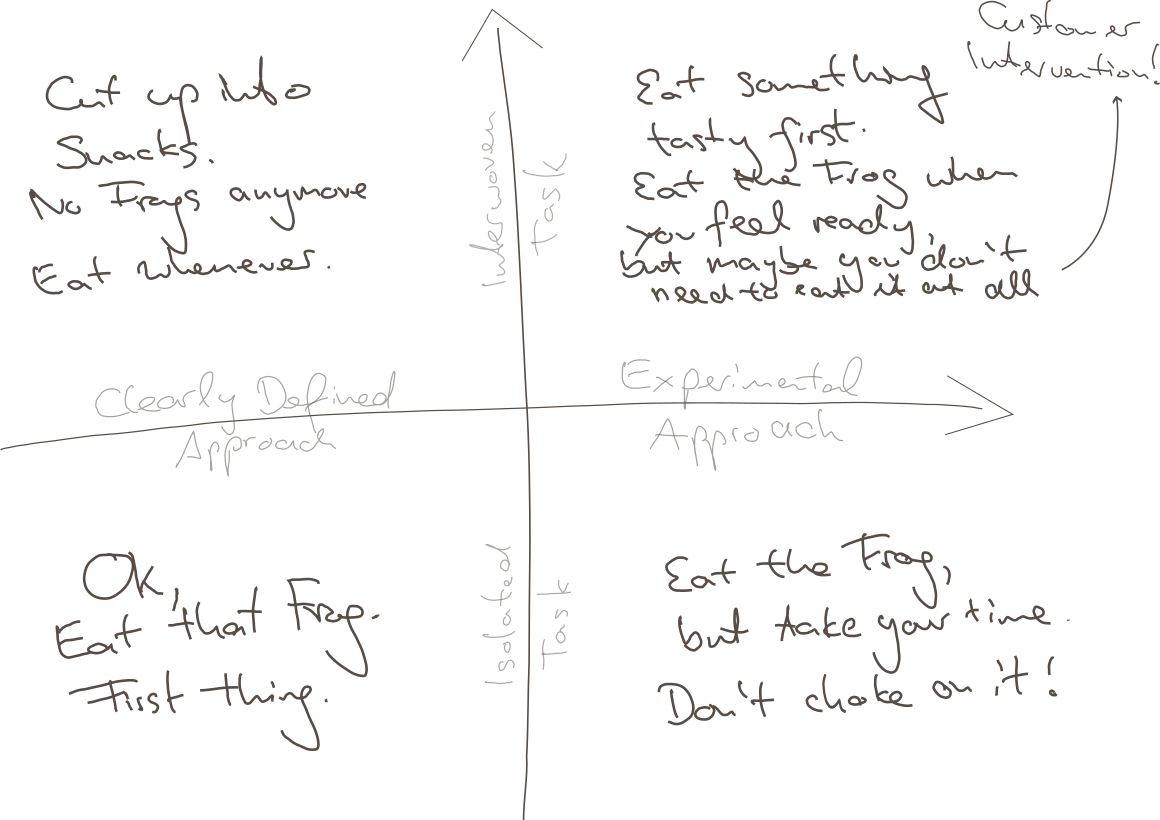
It turns out, there are several cases where it would be straightway destructive just to Eat the next-best Frog, and I will try to explain this to you using my impressive drawing skills:

Point being, there are at least two boundaries of application:

  • Clarity of Approach: How clearly-defined is it, as opposed to requiring one or multiple experimental, creative approachs?
  • Relation to other Tasks: How isolated is your task, is it heavily interwoven with other tasks?

Why these distinctions? Maybe we can agree on

  • Overwhelming Frog tasks can act stifling on your creativity, so if that very mindset is required for your approach, you will not succeed by pressuring through.
  • Thinking yourself into a complex topic first thing in the morning might require some warm up time for your brain, booting every relevant detail into your cloud of thoughts.
  • Parkinson’s Law states “Work expands so as to fill the time available for its completion.” – from which I derive: If your task is too large but it could be divided into sub-tasks, you might use any available time to do something related to your giant Frog, but not necessarily the most precise thing to do.
  • The motivation of having done multiple small tasks can provide you with the energy of finishing “That Frog” within the near future.

So to relate that to the Frogophage subject at hand; my findings are:

  • Bottom Right: If your task is quite isolated from other tasks, but still it’s approach isn’t very clear, do not think of your problem as a frog to be eaten right now. You will have to eventually have eaten it, but take your time, don’t choke on it – don’t destroy your creative thinking by believing that you can rush through it.
  • Top Left: If your Frog is defined as one well-defined task, but can actually be seen as a composition of many Sub-Frogs, stop for a minute and invest your time in actually resolving the atomic issues. This might feel like slowing you down, but there is no honor in having eaten That Disgusting Frog, if actually you could have eaten a tasty buffet of small snacks instead.
  • Top Right: Interwoven Tasks that also require an Experimental Approach are hard because you might just waste your time trying to upfront define your smaller snacks, and you might not have all the relevant information booted into your brain at the time of your supposed Frog Breakfast, so: Try to warm up yourself by solving some smaller of the connected issues first; by bringing your consciousness into the right state it can very well appear what can be tried.
    • Bonus Point: It can also render your whole Frog irrelevant when it becomes clear that your whole problem has to be redefined by Customer Intervention. Sometimes you just have to explain the poor guys that something is complicated (costly for them), and they might come up with a request that is completely different from your original frog.
  • Bottom Left: However, if none of thse apply and there’s just a nauseating thing in front of you, that you just know has to be done, you have somewhat of a clear idea how to start, it does not depend on many other things done first or simultaneously – better Eat That Frog. It likely won’t go away and you can then use the resulting feel-good moment to inspire the rest of your day.
Conclusion

I guess this all boils down to “whatever advice there is, there are some limits to its applications”. I hope you already weren’t the type of person who would just think of any problem as some big unquestionable Frog to be gobbled up without reconsideration…

… but nonetheless, maybe this can help in evaluating your strategy when facing the next difficult thing.

And don’t just eat frogs, please.

Developing for Cordova + SQLite in a standard Browser environment

As any developer, who doesn’t just love it when a product that has grown over the years suddenly needs to target a new platform (e.g. operating system) because some customer demands changed, some dependency broke or some other totally unexpected thing called “progress” happened?

Fortunately, there are some approachs to cross-platform development and if one expects such a change of direction, one can early on adopt a suitable runtime environment such as Apache Cordova or Capacitor/Ionic or similar, who all promise you a Write-Once-Run-Anywhere experience, decoupling the application logic from the lower-level OS interactions.

Unfortunately though, this promise is a total lie and usually, after starting such a totally platform-agnostic project, really soon you will want to use a dependency that will only work for one platform and then your options are limited.

One such example is a Cordova project we are currently moving from Android to iOS, and in that process also redesigning a nice, modern frontend to replace a very outdated (read: unmaintainable) Vanilla JS application. So now we have set it up smoothly (React + Vite + Typescript – you name it!), so technically we do not need anything iOS-specific yet, so we can work on our redesign in a pure-browser environment with hot reloading and the likes – life is good!

Then comes the realization that our application is quite data heavy and uses an on-device SQL database to persist its data, and we don’t have that in the browser – so, life turned bad.

What to do? There had been a client-side WebSQL database specification once, but this was unofficial and never fully implemented, abandoned in 2010, still present in Chrome but they are even live announcing how they are removing it, so this is not the future-proof way to go.

We crave a smooth flow of development.

  • It is not an option to re-build the app at every change.
  • It is not an option to have the production system use its SQLite DB and the development environment to use a totally different one like IndexedDB – certain SQLite queries are too ingrained in our application.
  • It’s only probably an option to use an experimental technology like absurd-sql, which aims to fill in that gap but then again needs advanced API features like Web Workers, SharedArrayBuffer, Atomics API which we wouldn’t require else
  • It is possible to use in-memory SQLite via sql.js but for persistence, it wasn’t instantly obvious to me how to couple that with the partially supported Origin Private File System API

So after all, this is the easiest solution that still gave me most of my developer smoothness back: Use sql.js in memory and for development, display two nice buttons on the UI which let me download the whole DB and upload one from file again. This is the sketch:

We create a CombinedDatabase class which, depending on the environment, can hand out such a database in a Singleton-like manner

class CombinedDatabase {

    // This is the Singleton-part

    private static instance: CombinedDatabase;

    public static get = async (): Promise<CombinedDatabase> => {
        if (!this.instance) {
            const {db, type} = await this.createDatabase();
            this.instance = new CombinedDatabase(db, type);
        }
        return this.instance;
    };

    private static createDatabase = async () => {
        if (inProductionEnvironment()) {
            return {
                db: createCordovaSqliteInstance(),
                type: "CordovaSqlite"
             };
        } else {
            const sqlWasmUrl = (await import("../assets/sql-wasm.wasm?url")).default;
            // we extend the window object for reasons I tell you below
            window.sqlJs = await initSqlJs({locateFile: () => sqlWasmUrl});
            const db = new window.sqlJs.Database();
            return {db, type: "InMemory"};
        }
    }


    // This is the actual flesh, i.e. a switch of which API to use

    private readonly type: string;
    private cordovaSqliteDb: SQLitePlugin.Database | null = null;
    private inMemorySqlJsDb: SqlJsDatabase | null = null;

    private constructor(db: SQLitePlugin.Database | SqlJsDatabase, type: string) {
        this.type = type;
        switch(type) {
            case "CordovaSqlite":
                this.cordovaSqliteDb = db as SQLitePlugin.Database;
                break;
            case "InMemory":
                this.inMemorySqlJsDb = db as SqlJsDatabase;
                break;
            default:
                throw Error("Invalid CombinedDatabase type: " + type);
        }
    }

   // ... and then there are some methods

}

(This is simplified – in actual, type is an enum for me , and there’s also error handling, but you know – not the point here).

This structure is nice, because you can now implement low-level methods like some executeQuery(...) etc. which just decide depending on the type, which of the private DB instances it can address, and even if they work differently, return a unified response format.

The rest of our application does not know anything about any Cordova-SQLite-dependency, or sql.js, or whatever. Life is good again.

So How do Import / Export work?

I gave the CombinedDatabase some interfacing methods, similar to


    public async export() {
        switch (this.type) {
            case "CordovaSqlite":
                throw Error("Not implemented for cordova-sqlite database");
            case "InMemorySqlJs":
                return this.inMemorySqlJsDb!.export();
            default:
                throw Error("DB not initialized, cannot export.");
        }
    }

    public async import(binaryData: Uint8Array) {
        if (this.type !== CombinedDatabaseType.InMemorySqlJs) {
            throw Error("DB import only implemented for the in-memory/sql.js database, this is a DEVELOPMENT feature!");
        }
        await this.close();
        this.inMemorySqlJsDb = new window.sqlJs.Database(binaryData);
    }

This is also the reason why I monkey-patched the window object earlier, so I still have this API around outside the Singleton instantiation (createDatabase). Yes, this is a global variable and a kind of hack, but imo is what can safely be done inside the Browser within some good measure.

Remember, in Typescript you need to declare this e.g. in some global.d.ts file

import {SqlJsStatic} from "sql.js";

declare global {
    interface Window {
        sqlJs?: SqlJsStatic
    }
}

Or go around the Window interface by casting (window as any).sqlJs – you decide what you prefer.

Anyway, the export() functionality can then be used quite handily, it returns the in-memory database as a binary array and you can make the browser download that via a Blob URL:

api.db.export().then((array: Uint8Array) => {
    const blob = new Blob([array], {type: "application/x-sqlite3"});
    const link = document.createElement("a");
    link.href = URL.createObjectURL(blob);
    link.download = `bonpland${Date.now()}.db`;
    link.target = "_blank";
    link.click();
});

And similarly, you can use import() by reading a Uint8Array from a temporary <input type="file"> element with a FileReader() (somewhat common solution, but just comment below if you want the details).

To be exact, I don’t even use the import() button anymore because I pass my development DB as an asset to the dev server. This is nice (and only takes a few seconds on hot reloading because our DB is like 50 MB in size), but somewhat Vite-specific, which is why I will postpone this topic to some later blog time.

How to migrate a create-react-app project to vite

It seems that the React community is finally accepting that their old way of scaffolding a new projects, create-react-app (CRA in short), has outlived its usefulness. While there is no official statement about that, there was no update on npm in about a year, which in the JS universe screams “TOXIC WASTE” in very clear words, and meanwhile also has vanished from the official “Start a new React Project” docs.

In search for possibilities, one can do some quick google searches (e.g. this or that or maybe this) and at the moment, I’m giving vite a chance and it has not disappointed me yet, as the opposite:

  • the build definitely feels faster (as the French would say: plus vite), but I never quantified it
  • that over 9000 deprecation warnings one was accustomed to using CRA – gone TO ZERO
  • and the biggest point, no dependency on webpack. Webpack has this weird custom to introduce brutally breaking changes between their versions and then you have to polyfill Node JS core modules or whatever floats their boat, giving users not a choice – i.e. making it highly TOXIC in itself

But still, the react-scripts which CRA employs have played quite a role in development, as it also helped with the “npm start” development server and also as a test runner – so generally, if you have developed your project over some years, you might have relied on it quite a bit, and now you don’t want to recreate everything from scratch.

I recently migrated one of our projects and this is what worked for me. There were three main concerns

  • switch the general infrastructure to vite, so we can develop and build again
  • introduce vitest as a test runner
  • migrate Redux store tests specifically

Let’s focus today on the thing without tests and I will come back to that next time.

Migrate to vite INFRASTRUCTURE

This was actually surprisingly concise, I just had to

npm install -D vite @vitejs/plugin-react
npm uninstall react-scripts

(when in doubt, remove the node_modules folder and run npm install again, but I didn’t have to), then I adjusted package.json to:

  "scripts": {
    "start": "vite",
    "build": "vite build", 
  },

You might prefer to call your dev server via “npm run dev” instead of “npm start”, in that case just replace the "start": "vite" with "dev": "vite" above.

The Vite templates prefer to include a script "preview": "vite preview" but I do not use it, so I didn’t copy that.

It also was required to set this package.json entry:

  // somewhere top-level, i.e. next to "version" or somewhere like that
  "type": "module",

(I’m not entirely sure whether we can now safely remove the “browserslist” or “babel” entries from the package.json because they might be useless now, but I will have to think about in another minute.)

Now, some real code changes. One of the larger todos here might be to make sure that every JSX-containing source file ends with .jsx – there have been discussions about this and beforehand, it was still possible to just place your <App/> etc. inside an App.js, but vite does not like that anymore, so this is a thing you have to do.

So the code changes amount to:

  • Rename every .js file which has some JSX in it to .jsx – pro tip: do it via the IDE so you do not have to care for every import / require-Statement manually!
  • move the template in ./public/index.html directly to ./index.html and in there, replace every mentioning of %PUBLIC_URL% just by the single slash /
  • In the index.html <body>, include your index.jsx e.g. like:
  <body>
    <noscript>You need to enable JavaScript to run this app.</noscript>
    <div id="root"></div>
    <script type="module" src="/src/index.jsx"></script>
  </body>

It might be said that the vite templates like to call their index file “main.jsx”, but it’s not important – just match whatever you put inside the <script src="..."/>.

Now in order not to change your habits too much, i.e. keep your CI build as it is, plus maybe some Docker Dev Containers or even browser bookmarks, you can use this vite.config.js – see docs:

import { defineConfig } from 'vite';
import react from '@vitejs/plugin-react';

export default defineConfig({
  plugins: [react()],
  server: {
    port: 3000,
    host: true
  },
  build: {
    outDir: './build'
  },
});

otherwise, vite prefers to run its dev server on port 5173 (guess it’s Leetspeak) and build in ./dist – just so you know.

Addon: Using ReactComponents from SVGs with Vite. Also with refs.

Since today morning, when I wrote this article, I already learned something new. In another project we were importing SVG files via the approach

import {ReactComponent as Bla} from "./bla.svg";

const ExampleUsage = () => {
  return <Bla />;
};

Doing so now results in

Uncaught SyntaxError: ambiguous indirect export: ReactComponent

This can be solved by npm install vite-plugin-svgr and then updating vite.config.js:

import {defineConfig} from "vite";
import react from "@vitejs/plugin-react";
import svgr from "vite-plugin-svgr";

export default defineConfig({
    plugins: [
        svgr({
            svgrOptions: {
                ref: true,
            },
        }),
        react(),
    ],
    server: {
        port: 3000,
        host: true,
    },
    build: {
        outDir: "./build",
    },
});

The { svgrOptions: {ref: true} } was a specific requirement for our use case, it is necessary if you ever want to access the imported ReactComponents ref; i.e. in our ExampleUsage we needed a specification <Bla ref={...}/> . Leaving the svgrOption ref then at false (its default) gives us the error:

Warning: Function components cannot be given refs. Attempts to access this ref will fail. Did you mean to use React.forwardRef()?

Then, Make the tests work again

As mentioned above, these were a bit trickier, and while I found a way to leave most tests untouched, there was some specific tweaking to be done with Redux store tests, and also with mocking a foreign class (GraphQLClient from “graphql-request” in my case).

But as also mentioned above, I guess this might be a topic for my next blog post. In case you urgently need that knowledge, drop us a mail or something.. 🙂

Using Docker Containers in Development with WebStorm: Next Iteration

We are always in pursue of improving our build and development infrastructures. Who isn’t?

At Softwareschneiderei, we have about five times as many projects than we have developers (without being overworked, by the way) and each of that comes with its own requirements, so it is important to be able to switch between different projects as easily as cloning a git repository, avoiding meticulous configuration of your development machines that might break on any change.

This is the main advantage of the development container (DevContainer) approach (with Docker being the major contestant at the moment), and last November, I tried to outline my then-current understanding of integrating such an approach with the JetBrains IDEs. E.g. for WebStorm, there is some kind of support for dockerized run configurations, but that does some weird stuff (see below), and JetBrains did not care enough yet to make that configurable, or at least to communicate the sense behind that.

Preparing our Dev Container

In our projects, we usually have at least two Docker build stages:

  • one to prepare the build platform (this will be used for the DevContainer)
  • one to execute the build itself (only this stage copies actual sources)

There might be more (e.g. for running the build in production, or for further dependencies), but the basic distinction above helps us to speed up the development process already. (Further reading: Docker cache management)

For one of our current React projects (in which I chose to try Vite in favor of the outdated Create-React-App, see also here), the Dockerfile might look like

# --------------------------------------------
FROM node:18-bullseye AS build-platform

WORKDIR /opt
COPY package.json .
COPY package-lock.json .

# see comment below
RUN npm install -g vite

RUN npm ci --ignore-scripts
WORKDIR /opt/project

# --------------------------------------------
FROM build-platform AS build-stage

RUN mkdir -p /build/result
COPY . .
CMD npm run build && mv dist /build/result/app

The “build platform” stage can then be used as our Dev Container, from the command line as (assuming, this Dockerfile resides inside your project directory where also src/ etc. are chilling)

docker build -t build-platform-image --target build-platform .
docker run --rm -v ${PWD}:/opt/project <command_for_starting_dev_server>

Some comments:

  • The RUN step to npm install -g vite is required for a Vite project because the our chosen base image node:18-bullseye does not know about the vite binaries. One could improve that by adding another step beforehand, only preparing a vite+node base image and taking advantage of Docker caching from then on.
  • We specifically have to take the WORKDIR /opt/project because our mission statement is to integrate the whole thing with WebStorm. If you are not interested in that, that path is for you to choose.

Now, if we are not working against any idiosyncrasies of an IDE, the preparation step “npm ci” gives us all our node dependencies in the current directory inside a node_modules/ folder. Because this blog post is going somewhere, already now we chose to place that node_modules in the parent folder of the actual WORKDIR. This will work because for lack of an own node_modules, node will find it above (this fact might change with future Node versions, but for now it holds true).

The Challenge with JetBrains

Now, the current JetBrains IDEs allow you to run your project with the node interpreter (containerized within the node-platform image) in the “Run/Debug Configurations” window via

“+” ➔ “npm” ➔ Node interpreter “Add…” ➔ “Add Remote” ➔ “Docker”

then choose the right image (e.g. build-platform-image:latest).

Now enters that strange IDE behaviour that is not really documented or changeable anywhere. If you run this configuration, your current project directory is going to be mounted in two places inside the container:

  • /opt/project
  • /tmp/<temporary UUID>

This mounting behaviour explains why we cannot install our node_modules dependencies inside the container in the /opt/project path – mounting external folders always override anything that might exist in the corresponding mount points, e.g. any /opt/project/node_modules will be overwritten by force.

As we cared about that by using the /opt parent folder for the node_modules installation, and we set the WORKDIR to be /opt/project one could think that now we can just call the development server (written as <command_for_starting_dev_server> above).

But we couldn’t!

For reasons that made us question our reality way longer than it made us happy, it turned out that the IDE somehow always chose the /tmp/<uuid> path as WORKDIR. We found no way of changing that. JetBrains doesn’t tell us anything about it. the “docker run -w / --workdir” parameter did not help. We really had to use that less-than-optimal hack to modify the package.json “scripts” options, by

 "scripts": {
    "dev": "vite serve",
    "dev-docker": "cd /opt/project && vite serve",
    ...
  },

The “dev” line was there already (if you use create-react-app or something else , this calls that something else accordingly). We added another script with an explicit “cd /opt/project“. One can then select that script in the new Run Configuration from above and now that really works.

We do not like this way because doing so, one couples a bad IDE behaviour with hard coded paths inside our source files – but at least we separate it enough from our other code that it doesn’t destroy anything – e.g. in principle, you could still run this thing with npm locally (after running “npm install” on your machine etc.)

Side note: Dealing with the “@esbuild/linux-x64” error

The internet has not widely adopteds Vite as a scaffolding / build tool for React projects yet and one of the problems on our way was a nasty error of the likes

Error: The package "esbuild-linux-64" could not be found, and is needed by esbuild

We found the best solution for that problem was to add the following to the package.json:

"optionalDependencies": {
    "@esbuild/linux-x64": "0.17.6"
}

… using the “optionalDependencies” rather than the other dependency entries because this way, we still allow the local installation on a Windows machine. If the dependency was not optional, npm install would just throw an wrong-OS-error.

(Note that as a rule, we do not like the default usage of SemVer ^ or ~ inside the package.json – we rather pin every dependency, and do our updates specifically when we know we are paying attention. That makes us less vulnerable to sudden npm-hacks or sneaky surprises in general.)

I hope, all this information might be useful to you. It took us a considerable amount of thought and research to come to this conclusion, so if you have any further tips or insights, I’d be glad to hear from you!

Using custom Docker containers for development with WebStorm & Co.

Docker has become one of the go-to tools of many developers these days. Not because any project should implement as many technological buzz words per se, but due to their great deal of flexibility compared with their small hassle of setup.

For stuff like node-based applications, using a Dev Container is useful because in principle, you do not need to have any of the npm stuff on your actual machine – not only you avoid having these monstrous node_modules folders, but also avoid having accidental dependencies on some specific configuration that might hold true on your device, but not generally.

For some of these reasons probably, JetBrains included Docker Dev Containers as a kind of “remote” development. In a sense, a docker container can be thought of as a remote machine, regardless of the fact that it shares your local hardware and is just a software abstraction.

In my opinion, JetBrains usually does great software, but there is some weird behaviour in their usage of Docker Dev Containers and it took us a while to find a quite general and IDE-independent solution; I’ll just use WebStorm as an example of something that appeared unusually hard to tame. I guess it will become better eventually.

For now, one might think of using the built-in config like:

  1. New Run Configuration -> npm
  2. Node Interpreter: “…”
  3. “+” -> Add Remote… -> “Docker”
  4. Use an image of your choice, either one of the node base images or a custom one (see below) with its corresponding tag

Now for reasons that seem to be completely undocumented and unavoidable (tell me if you know more!), the IDE forces you to then mount your project to /opt/project inside this container, where it gets mirrored during runtime to somewhere /tmp/<temporary uuid>/ – and in several of our projects (due to our folder structure which is not even particularly abnormal) this made this option to be completely unusable.

The way one can work without these strange idiosyncrasies is as follows:

First, create a Dockerfile in which you do all the required setup. It might be an optional idea to set the user, away from “root” to something more restricted like “node” (even though in development, you probably have your eyes on everything nevertheless). You can do more custom setup here. This can look like

FROM node:16.18.0-bullseye-slim

WORKDIR /your-home-inside-container
RUN chown node .

COPY package.json package-lock.json /your-home-inside-container

USER node

RUN npm ci --ignore-scripts

# COPY <whatever you might want> <where you want it inside>

EXPOSE 3000

CMD npm start

From that Dockerfile, build a local image in the same folder like:

# you might need -f if the Dockerfile is not named "Dockerfile"
docker build -t your-dev-image .

Then, create a new Run Configuration but choose “Shell script” (not npm)

docker run -it --rm --entrypoint= -v ${PWD}/src:/your-home-inside-container/src -p 0.0.0.0:3000:3000 your-dev-image

You might use a different “-p” port forwarding if you do not want to have your development server broadcasting on port 3000 (another advantage of Dev Containers, you can easily run multiple instances on different ports).

This is about the whole magic. But there are two further things that could be important here:

Hot Reloading (live updating whenever source files change)

This is done rather easily, however seems to change once in a while. We figured out that at least if you are using react-scripts@5.0.1 (which is what “npm start” addresses, unless you do that differently), you just need to set the environment variable “WATCHPACK_POLLING=true”. I.e put that in your Dockerfile a

ENV WATCHPACK_POLLING true

or pass it into your docker run ... -e WATCHPACK_POLLING=true ... your-dev-image line

Routing a development proxy to some “local host”

If your software e.g. adresses a backend that is running on your development machine or another Docker Dev Container, it can not just access that host from inside the Docker container. Neither is the port forwarding via “-p …:…” of any use, because that addresses the other direction – i.e. what port from the container is exposed to outside access – here, we go the other direction.

When the software inside the container would actually want to address “localhost”, it needs to be directed at the host under which your local machine appears. Docker has a special hostname for that and it is host.docker.internal

I.e. if your local backend is running on “localhost:8080” on your machine, you need to tell your Dev Container to direct its requests to “host.docker.internal:8080”.

In one of our projects, we needed some specific control over the proxy that the React development server gives you and here is way to gain that control – add a “setupProxy.js” inside your src/ folder and put in it something like

const { createProxyMiddleware } = require('http-proxy-middleware');

module.exports = function(app) {
    if (process.env.LOCAL_DEVELOPMENT) {
        return;
    }

    let httpProxyMiddleware = createProxyMiddleware({
        target: process.env.REACT_APP_PROXY || 'http://localhost:8080',
        changeOrigin: true,
    });
    app.use('/api', httpProxyMiddleware); // change to your needs accordingly
};

This way, one can always change the address via setting a REACT_APP_PROXY environment variable as in the step above; and one can also disable the whole proxying by setting the LOCAL_DEVELOPMENT env variable to true. Name these as you like, and you can even extend this setupProxy to include web sockets or different proxies for different routes, if you have any questions on that, just comment below 🙂

SQLite in ASP.NET 6.0: Access your database file via HTTP Endpoint

It is one of our fundamental principles to always choose the most-easy-while-capable tool for a job. For this, we try not to shower our customers with the newest, most hip technology available, but to use a technology stack we are

  • comfortable with
  • quick to provide the required minimum of customer value
  • keeping enough options open in order anything changes

One of the heavily affected aspects in that regard is the choice of data storage. There are a lot of different design paradigms one can choose from, but with the “most easy” aspect at hand, the question mostly resolves around the needs of the customer, not the wants (or “might be useful one day”) of the developer.

If your customer already has their PostgreSQL databases distributed in their Kubernetes as an example, it might be advisable to aim for that. If the customer does not have any integrated structure yet, I start with the question:

Is anything more necessary than a single-file database?

For one of our ASP.NET 6.0 applications, this was answered with the choice of Sqlite, due to it being native to the Microsoft universe including Entity Framework, which has many common use cases already answered, i.e. gives you way of caring about your application logic more than their database abstractions.

(It might be said that for .NET, an interesting project seems to have been LiteDB, which also operates on a single database file, but at the time of this writing, seems to have gone stale in development / support, and therefore fell out of my favour soon. Sad.).

Now we have a project in which we are closely in touch with the customer and their live system, very often had it been useful to access their platform and take a snapshot of the database for backup or assurance of our logic, and with the technical overhead in that specific case (which required several steps of sequentially granting remote access), I thought myself:

Why can’t I have a (sufficiently secured) HTTP endpoint that gives me this SQLite file as a File download?

The solution was a bit tricky because either the file was not read-accessible during that HTTP request (having been open already), the filestream was not possible because it was being closed too early, or the encoding of the resulting file would not fit. What finally worked was:

        private readonly static System.Text.Encoding enc1252 =
            CodePagesEncodingProvider.Instance.GetEncoding(1252);

        [HttpGet("database")]
        public ActionResult GetDatabase()
        {
            var dataSource = "sqlite.db";
            if (!System.IO.File.Exists(dataSource))
            {
                return NotFound(dataSource);
            }
            db.SaveChanges();
            // Note: CloseConnection() was not required!

            using var fs = new FileStream(dataSource, FileMode.Open, FileAccess.Read, FileShare.ReadWrite);
            var reader = new StreamReader(fs, enc1252);
            var data = reader.ReadToEnd();
            var ms = new MemoryStream(enc1252.GetBytes(data));
            return new FileStreamResult(ms, "application/octet-stream");
        }

Feel free to comment on that way because I found it more than none-trivial to arrive there, but maybe I missed something obvious. Some definite stumbling stones definitively were in

  • The Mime Type “application/octet-stream”, which for some reason would not work with the more adequately sounding choice “application/x-sqlite3” – I have no idea why.
  • The Encoding, which on our system was the Windows CodePages-1252 default, which needed to be specified not only in the interpretation of our bytes stream (second location), but also in the definition of the StreamReader itself (first location).
  • Please note that if your database is encoded via CP-1252, you also need the System.Text.Encoding.CodePages package (available via NuGet)
  • What looks like a missing “using”, is really intentional: If the StreamReader was opened with “using var reader = …”, it had the effect of being disposed before the request was handled correctly – I ran into an error of FileStreamResult: “Cannot access a closed Stream.” – keeping the StreamReader open solved that and the internet told me that this is still not a memory leak; the StreamReader reader gets disposed when the FileStream fs is disposed (see the using in front of that), but it still feels weird.

If you have any comments on that, I’d be very glad to learn from them, but if you don’t and you just have another use case for that problem – I’m happy to help!

Don’t just useCallback() with higher-order-functions

This is a small thing that once took me longer to debug than necessary, which is why it might be useful to some of you out there.

From time to time, we have that situation in a React application where it’s just not really avoidable that a small component has to accomplish a rather expensive computation. That’s what memoization is for, i.e. reusing the results of old computations when we know that these are still applicable.

React, in its functional approach, has three ways of memoiziating things, and for whole components there is React.memo(), while for usage inside a component we have the hooks React.useMemo() most commonly used for values or value-like objects, and React.useCallback() for functions. Because JavaScript is quite a functional languare, there is a rough equivalence between the latter two – but now I’m here to look into that.

// rather trivial function – these are equal React.useMemo(() => () => x, [x]); React.useCallback(() => x, [x]); // higher-order function – they are not! React.useMemo(() => higherOrderFunction(x), [x]); React.useCallback(higherOrderFunction(x), [x]);

There are various such higher-order components that are avilable for developers to use re-existing logic. One such case is debouncing, i.e. when you expect state changes to sometimes come in very large batches, the most common case probably a <input/> field whose value is triggering a server request or something like that. Other common cases would be drag’n’drop interactions or window resizing.

With a useRef(), one can rather easily write such debouncing oneself (google it or ask in the comments), but there is lodash.debounce which take care of that with such a higher-component function.

const MILLISEC = 500;

const Component = () => {
  const [value, setValue] = React.useState("");

  const handle = React.useMemo(() => debounce(event => { ... }, MILLISEC), []);

  return <input onChange={handle} value={value}/>;
};

Now I don’t want to talk about the specific case of debounce() (but one can look at the source code to guess its doing), this is just an example. Third-party logic is helpful when not-reinventing-the-wheel, but you can’t be that sure about computational costs, especially when some of your dependencies might update in the future – so that might be a good point to use memoization without actually seeing the benefit in the time of developing. (*)

As Dmitir Pavlutin here states nicely for that specific case, you can not juse write useCallback(debounce(...), []) here in place of useMemo. It is rather trivial but you need to take care: The JavaScript engine will have no other option than to execute the debounce() on creation of the callback, it can not know that this is something to be evaluated later.

Anything that is not an arrow function () => { ... } or an old-school function() { ... } will be evaluated when the corresponding line is reached. The syntax does not allow anything to be wrapped around it in order to delay that execution to the first call.

So. Debounce might not be the most expensive thing, and in general one might not even need memoization, but if you do – always remember that something has to be a function in order for any of that to work.

(*) This is not a call for premature optimization.

It cannot be stressed enough that one shouldn’t wrap every single computation into a memoization in either case. Sure, one should care about useless computations as stated above, but always know that the memo thing itself is not free. So when in doubt, think about how to quantify your specific gain, e.g. via the React DevTools Profiler, the performance API or at least logging of Date.now() timestamps.

Also, only think about performance when doing so. If there is any case of “my application actually behaves differently” when using useMemo / useCallback, this is a red flag – drop the thought of optimization instantly and care about your overall architecture first.

A Purpose of Domain-Driven-English-German-Language-Mumbo-Jumbo

Disclaimer: Due to it’s nature, this blog article needs to make some use of the German language. This is part of its essence and could not be avoided, sorry to all international readers.

Since its conception in 2003, the expression “Domain-Driven Design” might have been tossed around a bit, together with all the other XYZ-Driven Designs that are out there. As usual with such terms, I only try to gather the core points of these ideas; I do not like sticking to any such concept with religious fervor or otherwise dogmatic understanding. Moreover, these concepts are usually not of the type “you either use them or you don’t”, but you have some control over the degree in which you employ them, depending on your requirements as a whole.

This is why in a new project, I might implement a handful of ideas and see where it goes, always prepared to call it a day and toss any rule out when it endangers my progress. On the other hand, if I only follow principles that instantly convince me, I risk missing out on some practice that just is unusual, but not bad in itself.

Domain-Driven Design, in my understanding, aims at aligning the architectural details of your code base with the domain model, i.e. the technical peculiarities of your (customer’s) specific use case. Which doesn’t sound hard or bad per se, but as usual, takes some practice to shed some light on.

Enter the idea of using German words in your code. For variables, methods, classes, and such stuff – even with Umlauts and the Eszett (“ß”). If one is not used to that, such code might instantly induce some sort of digestive sickness or at least that’s what it has done to me, because of it’s sheer look, i.e.

// just some example to look at

var sortedZuordnungen = szenario.SortedZeitplanForArbeitsplatz(arbeitsplatz.Id)
.ToList();
var gesperrteHalbtage = sperrungen.Where(s => s.AufArbeitsplatz(arbeitsplatz.Id)).Select(s => s.Halbtag);

var nächsteZuordnung = sortedZuordnungen.FirstOrDefault();
Halbtag tryStart = Constants.HeuteVormittag;

while (nächsteZuordnung != default)
{
    tryStart.CreateListFromHere(anzahlHalbtage, gesperrteHalbtage);
    nächsteZuordnung = FindNächsteZuordnung();
}

(replace “German” with any other language your customer might use; if you’re living in a completely English-speaking environment, this article should be of limited insight for you. Sorry again.)

Now code like this – at first – what is this!? That’s not proper! It looks like the sound of some older German politician who never really bothered learning the English language, with some crazy dialect and whatnot!

The advantage behind this concept becomes especially apparent when dealing with a lot of very generic terms. E.g. the word “component” might just mean a button on your UI, or it might mean something very specific for your customer – or even worse, you might mean something very specific for your customer, but in reality, he would never refer to that entity with that word, so… you’re left with a chance of awkward bewilderment in every single meeting with the guy.

So, despite it’s weird look – this is one of the concepts that I haven’t tossed out the window yet. The key point is the overall reduction of friction in your thoughts. In communicating with various languages, one always has to do some minor translations in your head. These can be faulty or misleading either way – the nature of the language itself is secondary.

What works for me, is

  • Pure code fabrications that are close to the programming language get English names like usual
  • Things that a customer might talk about in German should get a German name
  • German and English can be mixed in a single word without any shame
  • Thus, words can be long, but you have an IDE who can help with that
  • German compound words get the correct German capitalization, i.e. the equivalent of “componentNumber” would be “komponentennummer”, not “komponentenNummer”
  • The linking of two German parts happens with the correct grammatical standards, i.e. a “workPlace” becomes an “arbeitsplatz” with the “s” inbetween (Fugen-s).

For some reason, this by now resulted in quite an uninterrupted workflow for me. The last two rules were an interesting finding because I noticed that without them, I really made a noticeable pause in my thinking process whenever I thought about these entities. This pause is now gone.

E.g. by now, the cognitive load of talking about a “KomponentenController” – something that is a Controller from a software engineering point of view and dealing with components from a domain point of view, appears easier for me than having to talk about a “ComponentController” with the extra translation of Component and Komponente. Mind you, there are enough words that do not sound that similar in our two languages.

I will not use this concept in every single project I might start from now. I.e. for hobby projects (where I’m my own customer), I would still prefer the 100%-English-language solution. But depending on your project, this is worth a try, and I’m positively amazed on how well that can work.

X Forwarding from Linux to Windows

This is a very short statement of joy in that I found something I thought of being very complicated – actually turned out to be done quite easy.

We have a multitude of clients with a multitude of infrastructures. Then there is home office and still a Corona pandemic (according to individual voices..?), so all in all, one does not always have a Linux system at hand when working on a Linux project.

SSH access is usually easy, but if you need graphical UIs, that would be a problem, because the X Window System (X11) that is commonplace for the graphical display of Linux and the standard ssh client allows X11 forwarding via the command line option ssh -X out of the box.

Now Windows is a different story, but it turns out that the right tools… just exist. This is the short version:

  1. There is the Xming Public Domain version (last release in 2016) which you can get from e.g. here and is straightforward to install. This plays the role of a X Server, e.g. a software-side display that can receive data via ssh.
  2. After the straighinstallation, call XLaunch to setup
  3. The “Multiple Windows” option is fine, as is using “Display number 0”. I then opted to “start no client” and ignored the other options.
  4. I already use PuTTY for everything else (including SSH tunnels to various remote networks), and while this has a somewhat objectionable user interface, one can manage. If you have an existing session, make sure to select that first, then click Load, then adjust the settings as follows.
  5. go to Connection > SSH > X11
  6. Enable X11 Forwarding
  7. in “X display location”, enter “localhost:0” if you chose “Display number 0” in step 3. Or choose accordingly.
  8. You might now save (or don’t) and open the connection.

I was more than surprised just to be able to start any gui application on our client’s remote machine and seeing the result.

Sure you might get a few seconds delay, but compared to the hassle I expected – this was a walk in the park.

A big shoutout to the creators of Xming and PuTTY, well deserved.