Schemas, naming and search path in PostgreSQL

Modern (SQL) databases provide a multi-level hierarchy of separated contexts.

A database management system (DBMS) can manage multiple databases.

A database can contain multiple schemas.

A schema usually contains multiple tables, views, sequences and other objects.

Most of the time we developers only care about our database and the objects it contains – ignoring schemas and the DBMS.

In PostgreSQL instances this means we are using the default schema – usually called public – without mentioning it anywhere. Neither in the connection string or in any queries.

Ok, and why does all of the above even matter?

Special situations

Sometimes customers or operators require us to use special schemas in certain databases. When we do not have full control over our database deployment and usage we have to adapt to the situation we encounter.

Camel-casing

One thing I really advise against is using upper case names for tables, columns and so on. SQL itself is not case sensitive but many DBMSes differentiate case when it comes to naming. So they require you to use double-quotes to reference mixed-case objects like schemas and tables, e.g. "MyImportantTable". Imho it is far better to use only lower case letters and use snake_case for all names.

Multiple schemas in one database

I do not endorse using multiple names schemas in one database. Most of the time you do not need this level of separation and can simply use multiple databases in the same DBMS with their default schemas. That way you do not have to specify the schema in your queries.

What if you are required to use a non-default schema? At least for PostgreSQL you can modify your login role to change the search path. So you can leave all your queries and maybe other deployments untouched and without some schema name scattered all around your project:

-- instead of specifying schema name like
select * from "MyTargetSchema".my_table;

-- you can alter the search path of your role
alter role my_login set search_path = public,"MyTargetSchema";

-- to only write
select * from my_table;

Wrapping it up

Today’s software systems are quite complex and the problems we are trying to solve with them have their own, ever growing complexity. So when using DBMSes follow common advice like the above to reduce complexity in your solution even if it seems to be mandated.

Sometimes there are easy to follow conventions or configuration options that can reduce your burden as a developer even if you do not have complete control over the relevant parts of the deployment environment.

The real value of DSLs

A few years ago, domain specific languages (DSLs) were a really hot topic and “the future”. Now, after the dust has settled there are a bunch of successful and useful examples like LINQ and Gradle but no holy grail buzz anymore.

In some of our projects we did implement some small embedded DSLs (eDSL) if we expected great benefit. Most of the time they are just working silently in the background of our solutions. But sometimes they really shine:

A recent story involving a DSL

A few days ago, I got a request from one of our customers regarding a complex “traffic light”-like system for scientific proposals in a proposal submission system. Each proposal goes through a bunch of phases where different parties have participate. While that sounds relatively simple our system has different proposal types, different roles, different states over time and so on.

All of the above leads to “Starbuck’s menu”-style complexity. And now, after several years in production the customer comes up with some special cases that are counterintuitive.

Expecting the worst I dived into the source code and was delighted to see a quite expressive DSL. Our project and thus also the DSL for the “status overview” feature leveraged the flexible syntax of Groovy (which is also used by Gradle). After a few minutes I could not only understand all the rules for the different status lights but also pin-point the cases in question.

I then moved forward and used the rule definition in our DSL to talk to our customer directly! And after a few more minutes he – as the domain expert – also understood our rule definition and the cause for the irritating display of a certain combination of proposal type, role and phase.

The fix was more or less straightforward and I simply handed that one source file to our customer for future reference.

Here is an excerpt of our status phase rules written in our own DSL:

PhaseRules {
    submission {
        green {
            proposal.isValidated()
        }
        red {
           !proposal.isValidated()
        }
        white {
            false
        }
        user {
            yellow {
                proposal.isCallPhaseIndependent())
            }
            grey {
                false
            }
        }
        scientist {
            yellow {
                false
            }
            grey {
                proposalNeedsValidationByProposer(proposal)
            }
        }
        userOffice {
            yellow {
                false
            }
            grey {
                proposalNeedsValidationByProposer(proposal)
            }
        }
    }

    check {
        green {
            proposal.isValidated() && proposal.hasFeasibilityComment()
        }
        red {
        }
    }
    // more phases, roles, states and rules omitted...
}

In that moment I was very proud of my project team, their decision to implement a DSL for this feature and an appropriate implementation.

It saved me a lot of headaches and quite some time. Furthermore it reinforced our customers trust in the application and improved the transparency and traceability of our solution.

This high level abstraction let both me and the customer ignore all the implementation details and focus on the actual functionality and behaviour correcting/improving the status display for our users.

Adding OpenId Connect Authentication to your .Net webapp

Users of your web applications nowadays expect a lot of convenience and a good user experience. One aspect is authentication and authorization.

Many web apps started with local user databases or with organisational accounts, LDAP/AD for example. As security and UX requirements grow single-sign-on (SSO) and two-factor-authentication (2FA) quickly become hot topics.

To meet all the requirements and expectations integrating something like OpenID Connect (OIDC) looks like a good choice. The good news are that the already is mature support for .NET. In essence you simply add Microsoft.AspNetCore.Authentication.OpenIdConnect to your dependencies and configure it according to your needs mostly following official documentation.

I did all that for one of our applications and it was quite straightforward until I encountered some pitfalls (that may be specific to our deployment scenario but maybe not):

Pitfall 1: Using headers behind proxy

Our .NET 8 application is running behind a nginx reverse proxy which provides https support etc. OpenIDConnect uses several X-Forwarded-* headers to contruct some URLs especially the redirect_uri. To apply them to our requests we just apply the forwarded headers middleware: app.UseForwardedHeaders().

Unfortunately, this did not work neither for me nor some others, see for example https://github.com/dotnet/aspnetcore/issues/58455 and https://github.com/dotnet/aspnetcore/issues/57650. One workaround in the latter issue did though:

// TODO This should not be necessary because it is the job of the forwarded headers middleware we use above. 
app.Use((context, next) =>
{
    app.Logger.LogDebug("Executing proxy protocol workaround middleware...");
    if (string.IsNullOrEmpty(context.Request.Headers["X-Forwarded-Proto"]))
    {
        return next(context);
    }
    app.Logger.LogDebug("Setting scheme because of X-Forwarded-Proto Header...");
    context.Request.Scheme = (string) context.Request.Headers["X-Forwarded-Proto"] ?? "http";
    return next(context);
});

Pitfall 2: Too large cookies

Another problem was, that users were getting 400 Bad Request – Request Header Or Cookie Too Large messages in their browsers. Deleting cookies and tuning nginx buffers and configuration did not fix the issue. Some users simply had too many claims in their organisation. Fortunately, this can be mitigated in our case with a few simple lines. Instead of simply using options.SaveTokens = true in the OIDC setup we implemented in OnTokenValidated:

var idToken = context.SecurityToken.RawData;
context.Properties!.StoreTokens([
    new AuthenticationToken { Name = "id_token", Value = idToken }
]);

That way, only the identity token is saved in a cookie, drastically reducing the cookie sizes while still allowing proper interaction with the IDP, to perform a “full logout” for example .

Pitfall 3: Logout implementation in Frontend and Backend

Logging out of only your application is easy: Just call the endpoint in the backend and call HttpContext.SignOutAsync(CookieAuthenticationDefaults.AuthenticationScheme)there. On success clear the state in the frontend and you are done.

While this is fine on a device you are using exclusively it is not ok on some public or shared machine because your OIDC session is still alive and you can easily get back in without supplying credentials again by issueing another OIDC/SSO authentication request.

For a full logout three things need to be done:

  1. Local logout in application backend
  2. Clear client state
  3. Logout from the IDP

Trying to do this in our webapp frontend lead to a CORS violation because after submitting a POST request to the backend using a fetch()-call following the returned redirect in Javascript is disallowed by the browser.

If you have control over the IDP, you may be able to allow your app as an origin to mitigate the problem.

Imho the better option is to clear the client state and issue a javascript redirect by setting window.location.href to the backend-endpoint. The endpoint performs the local application logout and sends a redirect to the IDP logout back to the browser. This does not violate CORS and is very transparent to the user in that she can see the IDP logout like it was done manually.

Dockerized toolchain in CLion with Conan

In the olden times it was relatively hard to develop C++ projects cross-platform. You had to deal with cross-compiling, different compilers and versions of them, implementation-defined and unspecified behaviour, build system issues and lacking dependency management.

Recent compilers mitigated many problems and tools like CMAKE and Conan really helped with build issues and dependencies. Nevertheless, C++ – its compilers and their output – is platform-dependent and thus platform differences still exist and shine through. But with the advent of containerization and many development tools supporting “dev containers” or “dockerized toolchains” this also became much easier and feasible.

CLion’s dockerized toolchain

CLions dockerized toolchain is really easy to setup. After that you can build and run your application on the platform of your choice, e.g. a Debian container running your IDE on a Windows machine. This is all fine and easy for a simple CMake-based hello-world project.

In real projects there are some pitfalls and additional steps to do to make it work seamlessly with Conan as your dependency manager.

Expanding the simple case to dependencies with Conan

First of all your container needs to be able to run Conan. Here is a simple Dockerfile that helps getting started:

FROM debian:bookworm AS toolchain

RUN DEBIAN_FRONTEND=noninteractive apt-get update && apt-get -y dist-upgrade
RUN DEBIAN_FRONTEND=noninteractive apt-get update && apt-get -y install \
  cmake \
  debhelper \
  ninja-build \
  pipx \
  git \
  lsb-release \
  python3 \
  python3-dev \
  pkg-config \
  gdb

RUN PIPX_BIN_DIR=/usr/local/bin pipx install conan

# This allows us to automatically use the conan context from our dockerized toolchain that we populated on the development
# machine
ENV CONAN_HOME=/tmp/my-project/.conan2

The important thing here is that you set CONAN_HOME to the directory CLion uses to mount your project. By default CLion will mount your project root directory to /tmp/<project_name> into the dev container.

If you have some dependencies you need to build/export yourself, you have to run the conan commands using your container image with a bind mount so that the conan artifacts reside on your host machine because CLion tends to use short-lived containers for the toolchain. So we create a build_dependencies.sh script

#!/usr/bin/env bash

# Clone and export conan-omniorb
rm -rf conan-omniorb
git clone -b conan2/4.2.3 https://github.com/softwareschneiderei/conan-omniorb.git
conan export ./conan-omniorb

# Clone and export conan-cpptango
rm -rf conan-cpptango
git clone -b conan2/9.3.6 https://github.com/softwareschneiderei/conan-cpptango.git
conan export ./conan-cpptango

and put it in the docker command:

CMD chmod +x build_environment.sh && ./build_environment.sh

Now we can run the container to setup our Conan context once using a bind-mount like -v C:\repositories\my-project\.conan2:/tmp/my-project/.conan2.

If you have done everything correctly, especially the correct locations for the Conan artifacts you can use your dockerized toolchain and develop transparently regardless of host and target platforms.

I hope this helps someone fighting multiplatform development using C++ and Conan with CLion.

Expose your app/API with zrok during development

Nowadays many of us are developing libraries, tools and applications somehow connected to the web. Often we provide APIs over HTTP(S) for frontends or other services or develop web apps using such services or backends.

As browsers become more and more picky HTTP is pretty much dead but for developers it is extremely convenient to avoid the hassle of certificates, keystores etc.

Luckily, there is a simple and free tool, that can help in several development scenarios: zrok.io

My most common ones are:

  • Allowing customers easy (temporary) access to your app in development
  • Developing SSO and other integrations that need publicly visible HTTPS endpoints
  • Collaborating with your distributed colleagues and allowing them to develop against your latest build on your machine

What is zrok?

For our use cases think of it as an simple, ad-hoc HTTPS-proxy transport-securing your services and exposing them publicly. For the other features and technical zero trust networking platform explanation head over to their site.

How to use zrok?

You only need a few steps to get zrok up and running. Even though their quick start explains the most important steps I will mention them here too:

After these steps your are ready to go and may share your local service running on http://localhost:8080 using zrok share public 8080.

Some practical advice and examples

If you want a stable URL for your service, use a reserved share instead of the default temporary one:

.\zrok.exe reserve public http://localhost:5000 --unique-name "mydevinstance"
.\zrok.exe share reserved mydevinstance

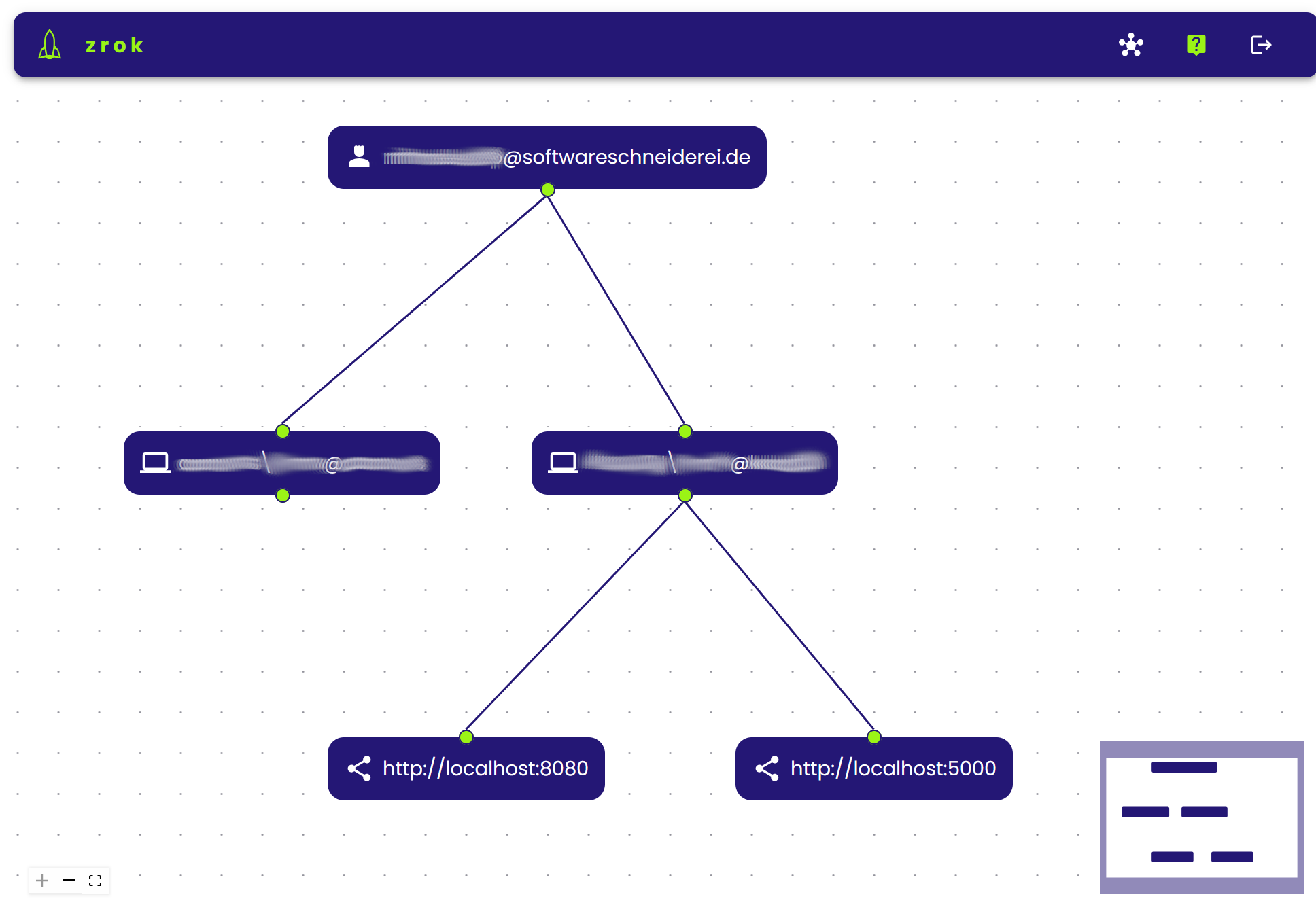
That way you get a stable endpoint over restarts which greatly reduces configuration burden in external services or communication with customers or colleagues. You can manage your shares on multiple machines online on https://api-v1.zrok.io:

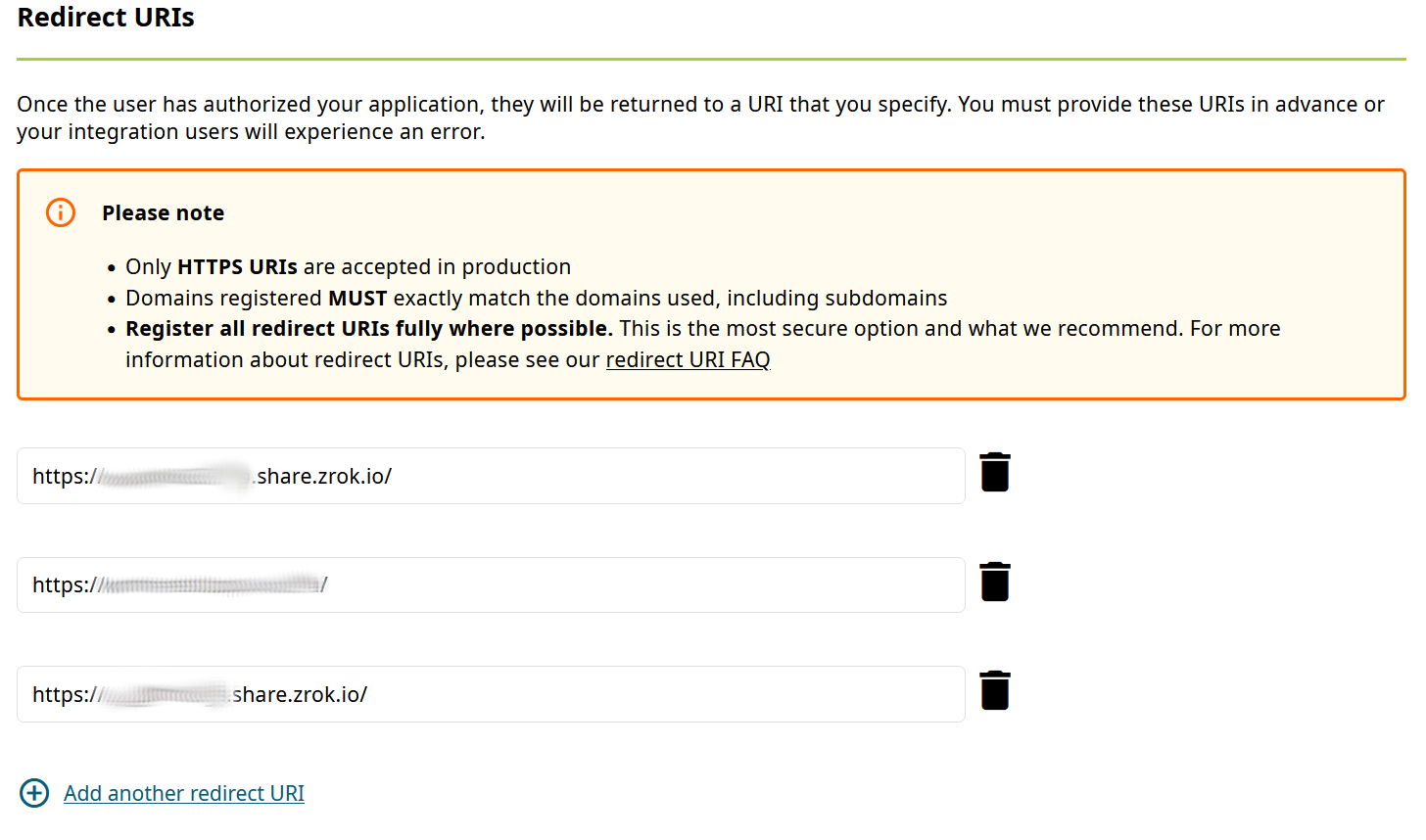
Your service is then accessible under https://mydevinstance.share.zrok.io/ and you may monitor accesses in the terminal or on the webpage above.

That enables you to use your local service for development against other services, like OAuth or OpenID single-sign-on (SSO), here with ORCID:

Conclusion

Using zrok developers may continue to ignore HTTPS for their local development instances while still being able to expose them privately or publicly including transparent SSL support.

That way you can integrate easily with other services expecting secured public endpoint or collaborate with others transparently without VPNs, tunnels or other means.

AI is super-good at guessing, but also totally clueless

AI is still somewhere in its hype phase, maybe towards the end of it. Most of us have used generative AI or use it more or less regularily.

I am experimenting with it every now and then and sometimes even use the output professionally. On the other hand I am not hyped at all. I have mostly mixed feelings (and the bad feelings are not because I fear losing my job…). Let me share my thoughts:

The situation a few years/months ago

Generative AI (or more specifically) chatgpt impressed many people but failed at really simple tasks like

  • Simple trick questions like “Tom’s father has three children. The first one is called Mark and the second Andrea. What is the name of the third child?”
  • Counting certain letters in a word

Another problem were massive hallucinations like shown in Kevlin Henney Kotlin Conf talk and completely made up summaries of a childrens book (german) I got myself.

Our current state of generative AI

Granted, nowadays many of these problems are mitigated and the AI became more useful. On the other hand new problems are found quite frequently and then worked around by the engineers. Here are some examples:

  • I asked chatgpt to list all german cities above 200k citizens. It put out nice tables scraped from wikipedia and other sources, but with a catch: they were all incomplete and the count was clearly wrong. Even after multiple iterations I did not get a correct result. A quick look at the wikipedia page chatgpt used as a source showed a complete picture.
  • If you ask about socially explosive topics like islamic terrorism, crime and controversial people like Elon Musk and Donald Trump you may get varying, questionable responses.

More often then not I feel disappointed when using generative AI. I have zero-trust in the results and end up checking and judging the output myself. In questions about code and APIs I usually have enough knowledge to judge the output or at least take it as a base for further development.

In the really good “IntelliJ Wizardry with AI Assistant Live” by Heinz Kabutz online course we also explored the possibilities, limits and integration of Jetbrains AI assistant. While it may be useful in some situations and has a great integration into the IDE we were not impressed by its power.

Generating test cases or refactoring existing code varies from good to harmful. Sometimes it can find bugs for you, sometimes it cannot…

Another personal critical view on AI

After all the ups and downs and the development and progress with AI and many thoughts and reflections about it I have discovered something that really bothers me about AI:

AI takes away most of the transparency, determinism and control that we as software developers are used to and sometimes worked hard for.

As developers we strive for understanding what is really happening. Non-determinism is one of our enemies. Obfuscated code, unclear definitions, undefined behaviour – these and many other things make me/us feel uncomfortable.

And somehow, for me AI feels the same:

I change a prompt slightly, and sometimes the result does not change at all while at other times it changes almost completely. Sometimes the results are very helpful, on another occasion they are total crap. In the past maybe they were useless, now the same prompts put out useful information or code.

This is where my bad feelings about AI come from. Someone, at some company trains the AI, engineers rules, defines the training data etc. Everything has an enourmous impact on the behaviour of the AI and the results. Everything stays outside of your influence and control. One day it works as intended, on another not anymore.

Conclusion

I do not know enough about generative AI and the mathematics, science and engineering behind it to accurately judge or predict the possibilities and boundaries for the year to come.

Maybe we will find ways to regain the transparency, to “debug” our models and prompts, to be able to reason about the output and to make generative AI reliable and predictable.

Maybe generative AI will collapse under the piles of crap it uses for training because we do not have powerful enough means of telling it how to separate trustful/truthful information from the rest.

Maybe we will use it as assistants in many areas like coding or evaluating X-ray images to sort out the unobtrusive ones.

What I really doubt at this point is that AI will replace professionals, regardless of the field. It may make them more productive or enable us to build bigger/better/smarter systems.

Right now, generative AI sometimes proves useful but often is absolutely clueless.

Local Javascript module development

https://www.viget.com/articles/how-to-use-local-unpublished-node-packages-as-project-dependencies/

yalc: no version upgrade, no publish etc.

Building an application using libraries – called packages or modules in Javascript – is a common practice since decades. We often use third-party libraries in our projects to not have to implement everything ourselves.

In this post I want to describe the less common situation where we are using a library we developed on our own and/or are actively maintaining. While working on the consuming application we need to change the library sometimes, too. This can lead to a cumbersome process:

  1. Need to implement a feature or fix in the application leads to changes in our library package.
  2. Make a release of the library and publish it.
  3. Make our application reference the new version of our library.
  4. Test everything and find out, that more changes are needed.
  5. Goto 1.

This roundtrip-cycle takes time, creates probably useless releases of our library and makes our development iterations visible to the public.

A faster and lighter alternative

Many may point to npm link or yarn link but there are numerous problems associated with these solutions, so I tried the tool yalc.

After installing the tool (globally) you can make changes to the library and publish them locally using yalc publish.

In the dependent project you add the local dependency using yalc add <dependency_name>. Now we can quickly iterate without creating public releases of our library and test everything locally until we are truly ready.

This approach worked nicely for me. yalc has a lot more features and there are nice guides and of course its documentation.

Conclusion

Developing several javascript modules locally in parallel is relatively easy provided the right tooling.

Do you have similar experiences? Do you use other tools you would recommend?

Working with JSON-DOM mapping in EntityFramework and PostgreSQL

A while ago, one of my colleagues covered JSON usage in PostgreSQL on the database level in two interesting blog posts (“Working with JSON data in PostgreSQL” and “JSON as a table in PostgreSQL 17”).

Today, I want to show the usage of JSON in EntityFramework with PostgreSQL as the database. We have an event sourcing application similar to the one in my colleagues first blog post written in C#/AspNetCore using EntityFramework Core (EF Core). Fortunately, EF Core and the PostgreSQL database driver have relatively easy to use JSON support.

You have essentially three options when working with JSON data and EF Core:

  1. Simple string
  2. EF owned entities
  3. System.Text.Json DOM types

Our event sourcing use case requires query support on the JSON data and the data has no stable and fixed schema, so the first two options are not really appealing. For more information on them, see the npgsql documentation.

Let us have a deeper look at the third option which suits our event sourcing use-case best.

Setup

The setup is ultra-simple. Just declare the relevant properties in your entities as JsonDocument and make them disposable:

public class Event : IDisposable
{
    public long Id { get; set; }

    public DateTime Date { get; set; }
    public string Type { get; set; }
    public JsonDocument Data { get; set; }
    public string Username { get; set; }
    public void Dispose() => Json?.Dispose();
}

Using dotnet ef migrate EventJsonSupport should generate changes for the database migrations and the database context. Now we are good to start querying and deserializing our JSON data.

Saving our events to the database does not require additional changes!

Writing queries using JSON properties

With this setup we can use JSON properties in our LINQ database queries like this:

var eventsForId = db.Events.Where(ev =>
  ev.Data.RootElement.GetProperty("payload").GetProperty("id").GetInt64() == id
)
.ToList();

Deserializing the JSON data

Now, that our entities contain JsonDocument (or JsonElement) properties, we can of course use the System.Text.Json API to create our own domain objects from the JSON data as we need it:

var eventData = event.Data.RootElement.GetProperty("payload");
return new HistoryEntry
{
    Timestamp = eventData.Date,
    Action = new Action
    {
        Id = eventData.GetProperty("id").GetInt64(),
        Action = eventData.GetProperty("action").GetString(),
    },
    Username = eventData.Username,
};

We could for example deserialize different domain object depending on the event type or deal with evolution of our JSON data over time to accomodate new features or refactorings on the data side.

Conclusion

Working with JSON data inside a classical application using an ORM and a relational database has become suprisingly easy and efficient. The times of fragile full-text queries using LIKE or similar stuff to find your data are over!

Git revert may not be what you want!

Git is a powerful version control system (VCS) for tracking changes in a source code base as most developers will know by now… It is also known for its quirky command line interface and previously less known concepts like staging area, cherry-picking and rebasing.

This can make Git quite intimidating and there are many memes about how confusing and hard it is to work with.

Especially for people coming from Subversion (SVN) there are a few changes and pitfalls because some commands have the same name but either do different things in the context or altogether, e.g. commit, checkout and revert.

Commit in the SVN world perform synchronization with the remote repository whereas a commit in git is local and has to synchronized with the remote repository using push. Checkout is similar and maybe even worse: In SVN it fetches the remote repository state and puts it in your working copy. In Git is used to replace files in your working copy with contents from the local repository or formerly to switch and/or create local branches…

But now on to our main topic:

What does git revert actually do?

Revert is maybe the most misleading command existing in both SVN and Git.

In SVN it is quite simple: Undo all local edits (see svnbook). It throws away you uncommited changes and causes potential data loss.

Git’s revert works in a completely different way! It creates “inverse” commit(s) in your (local) repository. Your working copy has to be clean without changes to be able to revert and you will undo the specified commit and record this change in the repository and its history.

So both revert commands are fundamentally different. This can lead to unexpected behaviour, especially when reverting a merge commit:

We had the case where our developers had two feature branches and one dev decided to temporarily merge the other feature branch to test some things out. Then he reverted the merge using git revert and opened a merge request. This leads to the situation, that the other feature branch becomes unmergeable because git records no changes. This is rightfully so, because this was already merged as part of the first one, but without the changes (because they were reverted!). So all the changes of the other feature branch were lost and not easily mergeable:

To fix a situation like this you can cherry-pick the reverted commit mentioned in the commit message.

How to revert local changes in git

So revert is maybe not what we wanted to do in the first place to undo our temporary merge of the other feature branch. Instead we should use git reset. It has some variants, but the equivalent of SVN’s revert would be the lossy

git reset --hard HEAD

to clean our working copy. If we wanted to “revert” the merge commit in our example we would do

git reset --hard HEAD^

to undo the last commit.

I hope this clear up some confusion regarding the function of some Git commands vs. their SVN counterparts or “false friends”.

Defeating TimescaleDB or shooting yourself in the foot

Today, almost everything produces periodically data: A car, cloud-connected smart-home solutions, your “smart” refrigerator and yourself using a fitness tracker. This data has to be stored in a certain way to be usable. We want fast access, beautiful charts and different aggregations over time.

There a several options both free and commercial for storing such time-series data like InfluxDB, Prometheus or TimescaleDB. They are optimised for this kind of data taking advantage of different time-series properties:

  • Storing is (mostly) append-only
  • Data points have a (strict) ordering in time
  • Data points often have fixed and variable meta data in addition to the data value itself

In one of our projects we have to store large quantities of data every 200ms. Knowing PostgreSQL as a powerful relational database management system we opted for TimescaleDB that promises time-series features for an SQL database.

Ingestion, probably the biggest problem of traditional (SQL) databases, of the data worked as expected from the beginning. We were able to insert new data at a constant rate without degrading performance.

The problem

However we got severe performance problems when querying data after some time…

So one of the key points of using a time-series database strangely did not work for us… Fortunately, since Timescale is only an extension to PostgreSQL we could use just use explain/explain analyse with our slow queries to find out what was going on.

It directly showed us that *all* chunks of our hypertable were queried instead of only the ones containing the data we were looking for. Checking our setup and hypertable definition showed that Timescale itself was working as expected and chunking the data correctly on the time axis.

After a bit more analysis and thought is was clear: The problem was our query! We used something like start_time <= to AND from <= end_time in our where clause to denote the time interval containing the requested data. Here start_time is the partition column of our hypertable.

This way we were forcing the database to look at all chunks from long ago until our end-time timestamp.

The solution

Ok, so we have to reformulate our where clause that only the relevant chunks are queried. Timescale can easily do this when we do something like start_time >= from AND start_time < to where from and to are the start and end of our desired interval. That way usually only one or only a few chunks of the hypertable are search and everything is lighning-fast even with billions of rows in our hypertable.

Of course the results of our two queries are not 100% the same sematically. But you can easily achieve the desired results by correctly calculation the start and end of the time-series data to fetch.

Conclusion

Time-series databases are powerful tools for todays data requirements. As with other tools you need some understanding of the underlying concepts and sometimes even implementation to not accidently defeat the purpose and features of the tools.

Used in the correct way they enable you to work with large amounts of data in a performant way todays users would expect. We had similar experiences with full text search engines like solr and ElasticSearch, too.