My own little Y2K22 bug

Ever since the year 2000 (or Y2K), software developers dread the start of a new year. You’ll never know which arbitrary limit will affect the fitness of your projects. Sometimes, it isn’t even the new year (see the year 2038 problem that will manifest itself in late January). But more often than not, the first day of a new year is a risky time.

Welcome, 2022!

The year 2022 started with Microsoft Exchange quarantining lots of e-mails for no apparent reason other than it is no longer 2021. I was amused about this “other people’s problem” until my phone rang.

A customer reported that one of my applications doesn’t start anymore, when it ran perfectly a few days ago – in 2021. My mind began to race:

The application in question wasn’t updated recently. It has to be something in the code that parses a current date with an unfortunate date/time format. My search for all format strings (my search term was “MMddHH” without the quotes) in the application source code brought some expected instances like “yyyyMMddHHmmss” and one of a very suspicious kind: “yyMMddHHmm”.

The place where this suspicious format was used took a version information file and reported a version number, some other data and a build number. The build number was defined as an integer (32 bit). Let me explain why this could be a problem:

2G should be enough for everyone!

A 32-bit integer has an arbitrary value limit of 231=2.147.483.648. If you represent the last minute of 2021 in the format above, you get 2.112.312.359 which is beneath the limit, but quite close.

If you add one minute and count up the year, you’ll be at 2.201.010.000 which is clearly above the value limit and result in either an integer overflow ending in a very negative number or an arithmetic exception.

In my case, it was the arithmetic exception which halted the program in its very first steps while figuring out what, where and when it is.

This is a rookie mistake that can only be explained by “it evolved that way”. The mistake is in the source code since the year 2004. I wrote it myself, so it is my mistake. But I didn’t just think about a weird date format that won’t spark joy 18 years later. I started with a build number from continuous integration. The first build of the project is “build 1”, the next is “build 2”, and so on. You really have to commit early, commit often (and trigger builds) to reach the integer limit that way. This is true for a linear series of builds. But what if you decide to use feature branches? The branches can happen in parallel and each have their own build number series. So “build 17” could be the 17th build of your main branch and go in production or it could be a fleeting build result on a feature branch that gets merged and deleted a few days later. If you want to use the build number as a chronological ordering, perhaps to look for updates, you cannot rely on the CI build numbering. Why not use time for your chronological ordering?

Time as an integer

And how do you capture time in an integer? You invent a clever format that captures the essence of “now” in a string that can be parsed as an integer. The infamous “yyMMddHHmm” is born. The year 2022 is a long time down the road if you apply a quick and clever fix in 2004.

But why did the application crash in 2022 without any update? The build number had to be from 2021 and would still pass the conversion. Well, it turned out that this specific application had no build number set, because we changed our build system and deemed this information not important for this application. So the string in the version file was empty. How is an empty string interpreted as today?

Well, there was another clever code by another developer from 2008 that took a string being null or empty and replaced it with the current date/time. The commit message says “Quickfix for new version format”.

Combined cleverness

Combine these three things and you have the perfect timebomb:

  1. A clever way to store a date/time as an integer
  2. A clever way to intepret missing settings
  3. A lazy way to intriduce a new build process

The problem described above was present in a total of five applications. Four applications had fixed build numbers/dates and would have broken with the next version in 2022 or later. The fifth application had an empty build number and failed exactly as programmed after the 01.01.2022.

Lessons learnt

What can we learn from this incident?

First: clever code or a quick fix is always a bad idea.

Second: cleverness doesn’t stack. One clever workaround can neutralize another clever hack even if both “solutions” would work on their own.

Third: If your solution relies on a certain limit to never be reached, it is only a temporary solution. The limit will be reached eventually. At least leave an automated test that warns about this restriction.

Fourth: Don’t mitigate a hack with another hack. You only make your situation worse in the long run.

The fourth take-away is important. You could fix the problem described above in at least two ways:

  • Replace the integer with a long (64 bit) and hope that your software isn’t in production anymore when the long wraps around. Replace the date/time format with the usual “yyyyMMddHHmmss”.
  • Leave the integer in place and change the date/time format to “yyDDDHHmm” with “DDD” being the day of the year. With this approach, you shorten the string by one digit and keep it below the limit. You also make the build number even less readable and leave a timebomb for the year 2100.

You can probably guess which route I took, even if it was a lot more work than expected. The next blog entry about this particular code can be expected at 01.01.10000.


The four stages of automation – Part II

One of the core concepts of software development and IT in general is “automation”. By delegating work to machines, we hope to reduce costs and save time while maintaining the quality of results. But automation is not an all-or-nothing endeavor, there are at least four different stages of automation that can be distinguished.

In the first part of this blog series, we looked at the first two stages, namely “documentation” and “recurring reminders”. Both approaches are low tech, but high effect. Machines only played a minor role – this will change with this blog series part. Let’s look at the remaining two stages of automation:

Stage 3: Semi-automatic

If you have a process that is properly documented and you are reminded in a regular fashion, like once a month, you’ll soon find that some steps of the process could be done by a machine, while you as the “human in duty” still pull all the strings that orchestrate the whole thing.

If you know the term “semi-automatic” from firearms, a semi-automatic firearm doesn’t aim or shoot itself, it just reloads automatically after each shot. The shooter still has to pull (and release) the trigger for each single shot. The shooter is in full control of the weapon, it just automates the mundane and repetitive task of chambering the next round.

This is the kind of automation we are taking about for stage 3. It is the most common type of automation. We know it from our cars, our coffee machines and other consumer electronics. The car manages a lot of different tasks under the hood while we are still in control of the overall task of driving from A to B.

How does it look like for business processes? One class of stage 3 utilities are reporting tools that gather and aggregate data from different sources and present the result in a suitable manner. In our company, these tools make up the majority of stage 3 services. There are reporting tools for the most important numbers (the key performance indices – KPI) and even some for less important, but cumbersome to acquire data. Most tools just present a nice website with the latest results while others send e-mails or create pages in our wiki. If you need a report, just press a button or visit an URL and the machine comes up with the answer. I tend to call this class of tools “sensors”, because they acquire data and process it, but don’t decide on the results.

The other class of stage 3 utilities that are common are “actuators” in the sense that they perform tasks on command. We have scripts in place to shut down whole clusters of computers, clear wiki spaces or reset custom fields on important data objects, but those scripts are only triggered by humans.

A stage 3 actuator could even be something small as a mailto link. Let’s say you have to send a standardized e-mail to a known recipient as part of a monthly process. Sure, you can save a draft in your e-mail application, but you can also prepare the whole mail in an URL directly in the documentation of the process:

mailto:nobody@softwareschneiderei.de?subject=The%20schneide%20blog%20rocks!&body=I%20read%20your%20blog%20post%20about%20automation%20and%20tried%20the%20mailto%20link.%20This%20thing%20is%20awesome%2C%20thank%20you!

If you click the link above, your e-mail application will prompt you to send an e-mail to us. You don’t need to follow through – we won’t read it on that address.

You can read about the format of mailto links here, but you probably want to create working mailto links right away, which is possible with this nifty stage 3 service utility written by Michael McKeever (buy him a beer!).

Be aware that this is a classic example of chaining stage 3 tools together: You use a tool to create the mailto link that you use subsequently to write, but not send, e-mails. You, as the human coordinator, decide when to write the e-mail, if you want to adapt it to current circumstances and when to send it. The tools only speed you up, but don’t act or decide on their own.

An important aspect of this type of automation is the human duty of orchestration (which service does its thing when) and the possibility of inspection and adaption. The mailto link doesn’t send an e-mail, it just prepares it for you to send. You have the final word on the things that happen.

If you require this level of control, stage 3 automation is where your automation journey ends. It still needs the competent human operator (what, when, why) – but given a decent documentation (as outlined in stage 1), this competence can be delegated quickly. It is also the first automation stage that enables higher effectiveness through speedup and error reduction. The speedup is capped by the maximum speed of the human operator, though.

Stage 4: Full automation

The last stage of automation is “full automation”, which means that a machine gathers the data on its own, comes up with a decision based on the data and acts on its own. This is a powerful tool, but a dangerous one, too.

It is powerful because you just employed an additional worker. Not a human worker, but a machine. It doesn’t go on holiday, it doesn’t lose interest and won’t ask for a bonus.

It is dangerous, because your additional worker does exactly what it is told (programmed) to do, even if it doesn’t make sense or needs just the slightest adaption to circumstances.

Another peril lies in the fact that the investment to reach the fully automated stage is maximized. As with nearly everything related to IT, there is a relevant xkcd comic for this:

https://xkcd.com/1319/

The problem is that machines are not aware of their context. They don’t deal well with slight deviations (like “1,02” instead of “1.02”) and cannot weigh the consequences of task failure. All these things are done by a competent human operator, even without specific training. You need to train a machine for every eventuality, down to the dots.

This means that you can’t just program the happy path, as you do in stage 3, when a human operator will notice the error and act accordingly. You have to implement special case behaviour, failure detection, failure handling and problem reporting. You have to adapt the program to changes in the environment in a timely manner (this work is also present in stage 3, but can be delayed more often).

If the process contains mostly routine and is recurring often enough to warrant full automation, it is a rewarding investment that pays off quickly. It will take your human-based work on a new level: designing and maintaining an automation platform that is cost-efficient, scalable and adjustable. The main problem will be time-critical adjustments and their overall effects on the whole system. You don’t need routine workers anymore, but you’ll need competent technicians on stand-by.

Examples of fully automated processes in our company are data backups, operating system upgrades, server monitoring and the recurring reminder system that creates the issues for our stage 2 automation. All of these processes have increased reporting capabilities that highlight problems or just anomalies in a direct manner. They all have one thing in common: They are small, work on only one thing and try to do so with minimal dependencies and interaction.

Conclusion

There are four distinguishable stages of automation:

  1. documentation
  2. recurring reminders
  3. semi-automatic
  4. full automation

The amount of human work for the actual process decreases with each stage, while the amount of human work for the automation increases. For most processes in an organization, there will be a sweet spot between process cost and automation cost somewhere on that spectrum. Our job as automaters is to find the sweet spot and don’t apply too much automation.

If you have a good story about not enough automation or too much automation or even about automation being just right – tell us in the comments!

The four stages of automation – Part I

One of the core concepts of software development and IT in general is “automation”, the “creation and application of technologies to produce and deliver goods and services with minimal human intervention” (definition from techopedia).

The problem is that “minimal human intervention” is often misunderstood as “no human intervention”, which is the most laborious and expensive stage of automation that might not have the most economic return on investment. It might be more efficient to have some degree of intervention left while investing only a fraction of the automation work and duration.

In order to decide “how much” automation is the most profitable for the foreseeable future, I’ve established a model with four stages of automation that I can quickly check against the circumstances. In this blog post, I describe the first two stages and give some ideas how to implement them.

Stage 1: Documentation

The first step to automation is to just describe the process in a manner that can be repeated. The documentation itself does nothing, but it enables repetition and scalability, two fundamental aspects of automation.

Think about baking a pie. If you just mix some ingredients and put it in the oven for an arbitrary amount of time, you might produce the most delicious pie ever, but you cannot do it again if you don’t remember all details and, even more tragic, nobody else can bake your pie. In order to give others the secret to your special pie, you have to give them the recipe – the documentation of its production process. Once the recipe is written down (and published), it can be read by many bakers in parallel and enables all of them to recreate your invention (to some degree at least, there are probably still some tricks and secrets left out of the recipe).

While the pie baking process still needs human intervention (the bakers that read the recipe and transform it into a series of actions), it is automated in the sense that it can be repeated with roughly the same result and these repetitions, given enough bakers and ovens, can be performed in parallel.

The economic evaluation of documentation shows that it is really easy to create, fast to change and, given some quality of content, nearly universally understood. If you don’t want to invest a lot of time and money, documenting your processes is the first and most important step towards automation. For a lot of your processes, it will also be the last possible stage of automation, at least until artificial intelligence learns your tricks and interpretations.

Documenting your processes is (no surprises here) the foundation of most quality assurance standards. But it is surprisingly hard to start with. This is not a matter of tools – pen and paper will do in the beginning. It is a shift in your mindset. The goal is no longer to bake a pie. It is to write a recipe while you bake the pie as a reference piece for it. If you want to start documenting your processes, here are three tips that might help you:

  • Choose a digital tool that doesn’t obstruct you. It should be digital because this facilitates distribution and collaboration. It should not hinder you because every time you need to think about the tool, you lose the focus on your process. I’m using a Wiki that lets me type the things I want to say without interference. In my case, that’s Confluence, but Obsidian or other tools are just as good.
  • Try to adopt a narrative structure to describe your processes. Think about the established structure of a baking recipe. For example, there is an ingredients list separate from the preparation instructions. If you find a structure that works for you, repeat and evolve it. It helps you and your readers to stay on track and don’t scatter the information all over the place. In my case, the structure consists of four paragraphs:
    1. Event/Trigger – The circumstance(s) that should be present at the beginning of the process
    2. Actions/Steps – The things you have to do, described in the necessary details for the target audience. This is often the paragraph with the most content.
    3. Result – Description of the circumstance(s) that should be present once you’ve done all steps. In recipes, this is often a photo of the meal/pastry. For first-time performers, this description is important to be able to declare success.
    4. Report – Who needs to be informed? This paragraph is often missing in descriptions, but crucial for collaboration. If nobody knows there is a fresh and delicious pie in the kitchen, it will not be eaten. Ok, that’s a bad example: Pies in the oven announce themselves with their smell. Digital products often have no smell – inform your peers!
  • Iterate over your documentation any chance you get. It is easy to bake your signature pie from memory. But is the recipe still accurate? Are there details that are important, but missing from the description? Your digital tool probably allows immediate modification of your documentation and maybe even informs interested readers about your update. Unchanged documentation is dead documentation. In my case, I always open my process description on a secondary monitor whenever I perform them. Sometimes, I invite others to perform the process for me to review the accuracy and fidelity of the documentation.

If you can open the process description of many of your routine tasks, you have reached the first stage of automation for your work. Of course, there will be lots of things you do that are not “routine” – yet. With good documentation, you can even think about delegation – the art of maximizing the amount of work done by others – without sacrificing essential quality.

In later stages, the delegation target (the “others”) will be machines.

Stage 2: Recurring reminders

If you’ve documented a process with a structure similar to mine, you specified a trigger or event that requires the process to be performed. Perhaps its the first day of the month and you need to update your timesheet or send out the appointment overview for the next weeks. Maybe your office plants silently thirst for some water. Whatever it is, if your process is recurrent, you might think about recurring reminders.

This will not automate the performance of the process, but unburden you of thinking about the triggering event. The machines will now remind you about certain tasks. This can be a simple series of reminders in your schedular app or, like in my case, the automated creation of issues (or todo items, tickets) in your work planning application.

For example, once every few weeks, a friendly machine creates an issue for me to write a blog entry on this blog. It does the same for my colleagues and even sets a “due date” (The due date for this post is today). With this simple construct, some discipline and coordination, we’ve managed to write one blog post every week for more than ten years now.

The machine that creates the issues doesn’t check them. It doesn’t supervise their progress and isn’t offended if we “won’t fix” issues because we are on holiday or the plants are still wet. It will just create the next issue according to the rhythm. It is our duty as humans to check if that rhythm fits or if it should be sped up or slowed down.

If you want to employ really elaborate triggers for your reminders, a platform like “If this then that (IFTTT)” might be the right choice. Just keep in mind that with complexity, there often comes rigidity, which isn’t always desired.

By automating the aspect of reminding us about the routine tasks, we can concentrate on doing them. We don’t forget to write blog posts or to water the plants because the machine doesn’t forget. Another improvement is that this clearly distinguishes between routine (has a recurring reminder) and anomaly. If the special one-time task occurs again, we give it a recurring reminder and adopt it as a new routine task. If a reminder about a routine task is “won’t fixed” often enough without any inclination that it will be required again, we delete the reminder.

Conclusion for part I

If you combine automated recurring reminders with structured documentation, you already gain a lot of advantages and can free your mind from the mundane details and intervals of your routine tasks. You haven’t automated any aspect of your real work yet, which means that these two stages can be applied to most if not all workplaces.

In the next part of this series, we will look at the two stages that become integrated with your actual work. Stay tuned!

How my display usage changed over time

When I was eight years old, my parents bought our first computer. With it came a tiny monochrome display that could be used to show 80×25 characters in amber yellow. I’m typing this text on my most recent computer that is equipped with several displays that show a combined amount of nearly 27 million pixels with at least 2^24 colors each. I don’t dare to count the number of characters that are on screen right now. Something happened along the way.

The formative years

Me as an eight year old boy immediately “clicked” with that first computer. It became my destiny to unlock its full potential. I was delighted when my parents upgraded to a much better PC years later with a color display that could actually show 256 colors at once on a 14″ frame. It was still a CRT monitor, so the refresh rate was probably around 30 Hz and I remember the “fishbowl eyes” you got from longer computer sessions.

If we want to have a visual representation of this monitor, it looks like this:

14″ CRT, 4:3

My first own computer came with a 17″ CRT monitor, which was considered a luxury size and didn’t really fit on the desk. I used this monitor up until my first year of my studies. Nothing in my world would suggest that using more than one monitor per computer is even possible. This computer had a mouse without scroll wheel and no internet access:

17″ CRT, 4:3

When I studied computer science, I came in contact with a lot of people that all took computing and programming serious. Some had monitors the size of a freezer, which hinted at me (and my peers) that 17″ is not as lavish as we thought. But still, a computer had one CPU and one monitor. I scraped my money together and bought a 19″ flat panel CRT monitor. Flat panel just meant that the display area didn’t resemble a fish bowl by itself. It could run up to 60 Hz:

19″ CRT, 4:3

The professional setup

That was my personal computing situation when I founded my company in the third year of my studies. I knew that the equipment had to be better and more professional. Our first work computers still had one CPU and one monitor. It just happened to be gigantic 21″ CRTs. Our desks had extra depth to provide a healthy distance between eyes and display area. Those monitors were delicate enough to provide a “de-gauss” button that would unhinge random electronics around it if pressed:

21″ CRT, 4:3

This was how software was developed in the early 2000s. A “fast” computer with lots of RAM (1 GB were not unheard of), a magnetic harddisk with 160 GB of storage and still one CPU and one monitor. At least, they had internet access and a mouse with a scroll wheel now.

Everything we did, we did in the same place

This setup lasted for four or five years, with better computers, but still the same old monitors. Then, virtually over night, the prices for the new and very cool TFT “flat panel” monitors dropped to readonable numbers. These monitors were really flat and very thin compared to the CRT fish bowls that hogged our desks. We were thrilled and replaced all of our monitors within one year.

The double setup

But just as the CPUs now got two “cores”, we didn’t just replace our one monitor, we doubled it. Every workplace now had two monitors:

2x 24″ TFT, 16:10

And not just that. The monitors were bigger, better, smaller, easier on the eye and had a greater resolution (called WUXGA, essentially FullHD with some extra pixels on the vertical axis).

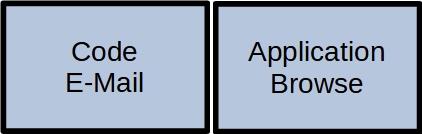
And we had two of them! This was a game changer because things that used to be done one after another could now be done in parallel – on the CPU and on the monitors. We began to dedicate screen estate to fixed activities:

The monitors are now assigned to certain tasks

The left monitor was the “coding space” while the right monitor was the “tryout space”. The actual distribution of activity to screen location differed from developer to developer, but we all agreed that we would not go back to single monitoring.

During that time, I was sometimes asked if two monitors “are worth the investment”. I blogged about it and I’m still convinced that a second monitor is the single most profitable investment you can do for a developer.

The triple setup

In the blog post above, I made one statement that I soon took back: A third monitor is not the game changer like the transition from one to two monitors, but – if the hardware issues are solved – the next step in the evolution that truly separates work, work result and communication:

3x 27″ TFT, 16:9

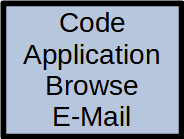
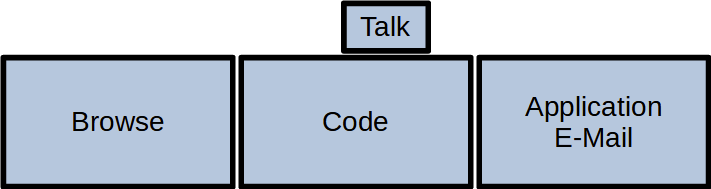
This setup is probably wider than your standard desk and requires a dedicated monitor stand, but it is the first time you can do the three essential things a programmer does in parallel:

  • Browse the internet (like stackoverflow or an API documentation)
  • Edit your source code in a fullscreen IDE
  • Watch the result of your changes live (with hot reloading)

Your workflow essentially moves your head from the left (gather new knowledge) over the middle (apply the new knowledge) to the right (evaluate the result of the new knowledge) and back again for the next step:

A typical left-to-right setup

This is our default workplace setup since 2018, with two possible resolution levels:

  • QHD: 3x 2560 x 1440 pixels. This results in 11 million pixels per computer
  • UHD: 3x 3840 x 2160 pixels. You now have almost 25 million pixels at your disposal

There is a biological limit what a human can see at once. This setup nearly fills your complete viewspace. You cannot fit a fourth monitor to the sides that you can really see. The only possibility to expand is now the vertical axis, with additional monitors above and maybe below.

The pandemic setup

I would probably still use the triple monitor setup if there hadn’t happened a fundemental change in the way we develop software in early 2020. In March 2020, we decided within days to abandon our office desks and retreat into home office workplaces that were improvised at first. Now, nearly two years later, all these workplaces are fully equipped and still continually improved. But not only our places changed, our communication as well. Video calls are a natural component of our workday now. And in my case, they happen in parallel to my normal work. So I had to dedicate screen space to videoconferencing. And I’ve done it by adding a fourth monitor:

3x 27″ TFT, 1x 10″ TFT, 16:9

This small monitor sits right next to the webcam, so if I look at my dialog partner, I also seem to look right into the camera. This setup adds a new distinctive activity to the mix:

You can guess what I’m doing by following my gaze

I’ve described the other ingredients for a fully equipped home office in a previous blog post. You can see an early photo of my setup in this post.

Conclusion

And this is the setup I’m writing this blog post on. 27 million pixels that I can use to speed up my workflow by assigning dedicated working zones. If you had asked my in 2009 if I can imagine to double the amount of monitors and have nearly six times more pixels available, I would have said no way.

But by looking back to the beginning, I can see how the fundamentals of personal computing changed in every aspect. A computer is no longer “one CPU” and it doesn’t have only one monitor. Today’s displaying technology is capable of providing a lot of screen estate. The main limiting factor is our own imagination. Reaping the benefits of dedicated display areas is satisfying and increases your work troughput effortlessly.

If you ask yourself how your ideal monitor setup should look like, try to reflect on how you move your application windows around or how often you switch applications without moving your head. If you would like to make the switch without hiding the previous context, you’ve just found a use case for an additional monitor.

What is your monitor setup and your usage pattern with it? Tell us in the comments!

Hyperfocus on Non-Essentials

When tasked with managing a complex and potentially overwhelming project, a common behaviour of inexperienced managers/developers is to focus on things that are easy to achieve (“low-hanging fruits”), fun to produce (“cherry-picking”) or within the comfort zone.

This means that in the extreme, the developer exclusively focusses on things that are of no interest for the business client but can simulate progress and results.

This behaviour is an application of the “path of least resistance” and I know exactly what it feels like. Here’s the story why:

When I was fourteen years old, my programming career was already 6 years in the making. Of course, I only wrote code for myself, teaching myself new concepts and new errors alike. My only scale of success was “does it run?” and “is it still fun for me?”. My only programming language was BASIC, first the dialect GW-BASIC (still with line numbers!), then the more advanced QBasic (with named jump markers instead of line numbers).

I grew up in small cities and was basically alone with my hobby. But a friend had a parent that owned an optometrist shop that was interested in using computers for their day-to-day operations. I was asked to write a program to handle the shop’s inventory and sales. The task was interesting, but I had no idea how any shop, let alone this particular one, handles their business. I agreed to build a prototype and work from there.

I knew that this project was bigger and more ambitious than any hobby project of my own before, but it was programming after all – how hard could it be?

My plan was to do two things in parallel: Buy and read a book about real software development with BASIC and try to sketch out the application as as “coded paper prototype”.

The book turned out to be the confessions of a frustrated software developer that basically assured the reader on every page that BASIC was not dead and appended dozens of pages with code listings to every chapter. There was probably a lot of wisdom in this book, too, but it missed me by miles.

The sketch of the application began with a menu of all the things I thought would be necessary, like “inventory” or “sales process”. I also included an “Extras” menu and one thing in the menu should be a decent screen saver. Back in those days, the CRT monitors suffered from burn-in if the same image was shown for a long time and I figured that this application would run all day every day, so it seemed logical and important to have a screen saver that is automatically turned on after some period of inactivity.

Which presented itself as a really hard problem, because BASIC was essentially single-threaded (or at least it was to my knowledge back then) and I had to invent some construct that can perhaps be described as “obscure co-routines”. That was some fun programming!

After I solved the automatic activation of the screensaver functionality, I discovered that I could easily make the actual screensaver that gets shown a parameter. So I programmed not one, but several cool and innovative ASCII art screensavers that you could choose from in the extras menu. One screen saver was inspired by the snake game, another one was “colored blocks” that would appear and disappear to form a captivating mood picture.

That was the state of the application when my friend’s parent asked for a demo. I had:

  • No additional knowledge about application design
  • A menu of things I invested no second thought in
  • Several very cool screensavers that activated themselves automatically. Isn’t that great?

You can probably guess how that demo went. None of the things I had developed mattered in the slightest for the optometrist shop. My passion for my creation didn’t translate to the business very well.

I had worked intensively on this project. I hyperfocused on totally non-essential stuff and stayed mostly in my comfort zone, even if I felt as if I had made great progress.

It is easy to fall into this trap. It is easy to mistake one’s own feelings of progress and success with the external (real) ones. It feels very good to work frantically on things that matter to oneself. It becomes a tragedy if the things only matter to oneself and nobody else.

So what can we do to avoid this trap? If you have an idea, write a comment about it! I hope to hear lots of different takes on this problem.

Here is my solution: “Risk first”. With this project strategy, the first task in a project is to solve the hardest part, to cut the biggest knot or to chart the most relevant area. It means that after the first milestone is a success, the project will gradually become easier. It’s the precursor to “fail fast”, which is a “risk first” project that didn’t meet its first milestone.

It is almost guaranteed that the first milestone in a “risk first” project will not be in your comfort zone, is no low-hanging fruit that you can pick without effort and while it might be fun to work on, it’s probably something your customer has a real interest in.

By starting a project “risk first”, I postpone my tendency to focus on non-essentials towards the end of the project. And with concepts like “business value”, I can see very clearly when my work becomes irrelevant for the customer. That’s when I stop my professional work and my hobby begins.

Wear parts in software

I want to preface my thoughts with the story that originally sparked them (and yes, I oftentimes think about software development when unrelated things happen in the real world).

I don’t own a car myself, but I’m a non-hesistant user of rental cars and car sharing services. So when I have to drive long distances, I use many different models of cars. One model family is the Opel Corsa compact cars, where I’ve driven the models A to C and in the story, model D.

It was on the way back, on the highway, when darkness settled in. I switched on the headlamps and noticed that one of them was not working. In germany, this means that your car is unfit for travel and you should stop. You cannot stop on the highway, so I continued driving towards the next gas and service station.

Inside the station, I headed to the shelf with car spare parts and searched for a lightbulb for a Corsa model D. Finding the lightbulbs for A, B and C was easy, but the bulbs for D weren’t there. In fact, there wasn’t even a place for them on the shelf. I asked the clerk for help and he laughed. They didn’t sell lightbulbs for the Corsa model D because changing them wasn’t possible for the layman.

To change a lightbulb in my car, you have to remove the engine block, exchange the lightbulb and install the engine block again. You need to perform this process in a repair shop and be attentive to accidental leakage and connector damage.

Let me summarize the process: To replace an ordinary wear part, you have to perform delicate expert work.

This design paradigm seems to be on the rise with consumer products. If you know how to change the battery on your smartphone or laptop, you probably explicitly chose the device because of this feature.

Interestingly, the trend is reversed for software development. Our architectures and design efforts try to separate between primary code and wear part code. Development principles like SRP (Single Responsibility Principle) or OCP (Open/Closed Principle) have the “wear part code” metaphor in mind, even if it isn’t communicated in such clarity.

On the architecture field, a microservice paradigm maps a complex mechanism onto several small and isolated parts. The isolation aspect is crucial because it promotes replaceability – you don’t need to remove and reinstall a central microservice if you want to replace a more peripheral one. And even the notion of “central and peripheral” services indicates the existence and consideration of an abrasion effect.

For a single application, the clean, hexagonal or onion architecture layout makes the “wear part code” metaphor the central aspect of your code positioning. The goal is to prepare for the inevitable technology replacement and don’t act surprised if the thing you chose as your baseplate turns out to behave like rotting wood.

A good product design (at least for the customer/user) facilitates maintainability by making simple upkeep tasks easy.

We software developers weren’t expected to produce good products because the technological environment moved faster than the wear and nobody but ourselves could inspect the product anyway.

If a field moves faster than the abrasion can occur, longevity of a product is not a primary concern. Your smartphone will be outdated and replaced long before the battery is worn out. There is simply no need to choose wear parts that live longer than the main product. My postulation is that software development as a field has slowed down enough to make the major abrasive factors and areas discernable.

If nobody can inspect the software product and evaluate its sustainability, at least the original developer can, right? You can check for yourself with a simple experiment. Print the source code of your software (or parts of it), take two text markers (my favorite colors for this kind of approach are green and blue) and mark the code you deem primary with the first text marker. Any code you consider a wear part gets colored with the second marker. If you find it difficult to make the distinction or if the colors are mingled all over the place, this might be an indication that you could improve things.

What is a wear part in software? I would love to hear your thoughts and definitions in the comment section! My description, with no claim to be complete, would be any code that has a high probability to change because of one of the following reasons:

  • The customer/user is forced to make a change request by external forces like legal regulation
  • Another software/system/service changes, forcing your software to adjust its understanding of its surrounding
  • The technical field moved, changing your perception of the code

If you plan for maintainability in software development, you always plan for obsolescence and replacement. Our wear parts are different from mechanical ones in their uniqueness – we don’t replace a lightbulb with the same model, we replace unique code with different, but also unique code. But the concept of wear parts is the same:

Things that are likely to be replaced are designed for easy replacement.

Arbitrary limits in IT

When I was a young teenager, a game captured my attention for months: Sid Meyer’s Railroad Tycoon. The essence of the game was to build railways between cities and transport as much passengers and freight goods between them as possible.

I tell this story because it was the first time I discovered a software bug and exploited it. In a way, it was the start of my “hacking” career. Don’t worry, I’m a software developer now, not a hacker. I produce the bugs, I don’t search and exploit them.

The bug in Railroad Tycoon had to do with buying industry. You could not only build tracks and buy trains, you could also acquire industrial complexes like petroleum plants and factories. And while you couldn’t build more tracks once your money ran out, you could accrue debt by buying industry. If you did this extensively, your debt suddenly turned into a small fortune. I didn’t know about the exact mechanics back then, but it was a classic 16-bit signed integer overflow bug. If your debt exceeded 32.768 dollars, the sign turned positive. That was a lot of money in the game and you had a lot of industry, too. The english wikipedia article seems to be a bit inaccurate.

If you are accustomed with IT, there a some numbers that you immediately recognize as problematic, like 255, 32.767, 65.535 or 2.147.483.647. If anything unusual or bad happens around these numbers, you know what’s up. It’s usually related to an integer overflow or (in the case of Railroad Tycoon) underflow.

But then, there are problematic numbers that just seem random. If you want to name a table in an older Oracle database, you couldn’t name it longer than 30 characters. Not 32 or something that could somehow be related to a technical cause, but 30. Certain text values couldn’t be longer than 2000 characters. Not 2048 (or 2047 with a terminating zero character), but straight 2000. These numbers look more “usual” for a normal human, but they appear just as arbitrary to the IT professional’s eye as 2048 might seem to others.

Recently, I introduced a new developer to an internal project of ours. We set up the development environment and let the program run a few times. Then, we introduced some observable changes to the code to explain the different parts. But suddenly, a console output didn’t appear. All we did was to introduce a line of code in the form of:

System.out.println(output);

And the output just didn’t show up. We checked that the program executed the code beforehands and even fired up a debugger (something I’m not really fond of) to see that the output string is really filled.

We changed the line of code to:

System.out.println(output.length());

And got our result: 32.483 characters.

As you can see, the number is somewhat near the 32k danger zone. But in IT, these danger zones are really small. You can be directly besides it and don’t notice anything, but one step more and you’re in trouble. In a way, they act like minefields.

There should be nothing wrong with 32.483 characters printed on a console. Well, unless you use Eclipse and Windows. If you do, there is a new danger zone, starting with 32.000 characters. And this zone isn’t small. In fact, it affects any text with more than 32.000 characters that should be printed in an Eclipse console on Windows:

https://bugs.eclipse.org/bugs/show_bug.cgi?id=23406

‘ScriptShape’ WINAPI fails with E_FAIL for OpenType fonts when the length of the string is over 32000 (0x7d00) characters

Notes: 32000 is hardcoded in ‘gdi32full!GenericEngineGetGlyphs’ Windows function.

https://bugs.eclipse.org/bugs/show_bug.cgi?id=23406#c31

There is nothing special about the number 32.000. My guess is that some developer at Microsoft in the nineties had to impose a limit and just thought that “32.000 characters ought to be enough for anybody”. This is a common mistake made by Microsoft and the whole IT industry.

The problem is that now, 20 or even 30 years later, this limit is still in place. Our processing power grew by a factor of 1.000 (yes, one thousand times more power), the amount of available memory even by a factor of 16.000 and we are still limited to 32.000 characters for a line of text. If the limit would grow accordingly, you could now fit up to 32.000.000 characters in that string and it would just work.

So, what is the moral of this story? IT and software development are minefields where you can step on a mine that was hidden 20+ years ago at any turn. But even more important: If you write code, please be aware that every limit you introduce into your solution will cause trouble in the future. Some limits can be explained by other limits, but others are just arbitrary. Make the arbitrary limits visible and maybe even configurable!

The do-it-yourself rickroll

This is a funny story from a while ago when we were tasked to play audio content in a web application and we used the opportunity to rickroll our web frontend developer. Well, we didn’t exactly rickroll him, we made him rickroll himself.

Our application architecture consisted of a serverside API that could answer a broad range of requests and a client side web application that sends requests to this API. This architecture was sufficient for previous requirements that mostly consisted of data delivery and display on behalf of the user. But it didn’t cut it for the new requirement that needed audio messages that were played to alert the operators on site to be send through the web and played in the browser application, preferably without noticeable delay.

The audio messages were created by text-to-speech synthesis and contained various warnings and alerts that informed the operators of important incidents happening in their system. Because the existing system played the alerts “on site” and all operators suddenly had to work from home (you can probably guess the date range of this story now), the alerts had to follow them to their new main platform, the web application.

We introduced a web socket channel from the server to each connected client application and sent update “news” through the socket. One type of news should be the “audio alert” that contains a payload of a Base64-encoded wave file. We wanted the new functionality to be up and usable on short notice. So we developed the server side first, emitting faked audio alerts on a 30 seconds trigger.

The only problem was that we didn’t have a realistic payload at hand, so we created one. It was a lengthy Base64 string that could be transported to the client application without problem. The frontend developer printed it to the browser console and went on to transform it back to waveform and play it as sound.

Just some moments later, we got some irreproducible messages in the team chat. The transformation succeeded on the first try. Our developer heard the original audio content. This is what he heard, every 30 seconds, again and again:

Yes, you’ve probably recognized the URL right away. But there was no URL in our case. Even if you are paranoid enough to recognize the wave bytes, they were Base64 encoded. Nobody expects a rickroll in Base64!

Our frontend developer had developed the ingredients for his own rickroll and didn’t suspect a thing until it was too late.

This confirmed that our new feature worked. Everybody was happy, maybe a little bit too happy for the occasion. But the days back then lacked some funny moments, so we appreciated it even more.

There are two things that I want to explain in more detail:

The tradition of rickrolling is a strange internet culture thing. Typically, it consists of a published link and an irritated overhasty link clicker. There are some instances were the prank is more elaborate, but oftentimes, it relies on the reputation of the link publisher. To have the “victim” assemble the prank by himself is quite hilarious if you already find “normal” rickrolls funny.

Our first attempt to deliver the whole wave file in one big Base64 string got rejected really fast by the customer organization’s proxy server. We had to make the final implementation even more complex: The server sends an “audio alert” news with a unique token that the client can use to request the Base64 content from the classic API. The system works with this architecture, but nobody ever dared to try what the server returns for the token “dQw4w9WgXcQ” until this day…

Don’t shoot your messengers

Writing small, focused tests, often called unit tests, is one of the things that look easy at the outset but turn out to be more delicate than anticipated. Writing a three-lines-of-code unit test in the triple-A structure soon became second nature to me, but there were lots of cases that resisted easy testing.

Using mock objects is the typical next step to accommodate this resistance and make the test code more complex. This leads to 5 to 10 lines of test code for easy mock-based tests and up to thirty or even fifty lines of test code where a lot of moving parts are mocked and chained together to test one single method.

So, the first reaction for a more complicated testing scenario is to make the test more complicated.

But even with the powerful combination of mock objects and dependency injection, there are situations where writing suitable tests seems impossible. In the past, I regarded these code blocks as “untestable” and omitted the tests because their economic viability seemed debatable.

I wrote small tests for easy code, long tests for complicated code and no tests for defiant code. The problem always seemed to be the tests that just didn’t cut it.

Until I could recognize my approach in a new light: I was encumbering the messenger. If the message was too harsh, I would outright shoot him.

The tests tried to tell me something about my production code. But I always saw the problem with them, not the code.

Today, I can see that the tests I never wrote because the “test story” at hand was too complicated for my abilities were already telling me something important.

The test you decide not to write because it’s too much of a hassle tells you that your code structure needs improvement. They already deliver their message to you, even before they exist.

With this insight, I can oftentimes fix the problem where it is caused: In the production code. The test coverage increases and the tests become simpler.

Let’s look at a small example that tries to show the line of thinking without being too extensive:

We developed a class in Java that represents a counter that gets triggered and imposes a wait period on every tenth trigger impulse:

public class CountAndWait {
	private int triggered;
	
	public CountAndWait() {
		this.triggered = 0;
	}
	
	public void trigger() {
		this.triggered++;
		if (this.triggered == 10) {
			try {
				Thread.sleep(1000L);
			} catch (InterruptedException e) {
				Thread.currentThread().interrupt();
			}
			this.triggered = 0;
		}
	}
}

There is a lot going on in the code for such a simple functionality. Especially the try-catch block catches my eye and makes me worried when thinking about tests. Why is it even there? Well, here is a starter link for an explanation.

But even without advanced threading issues, the normal functionality of our code is worrisome enough. How many lines of code will a test contain that covers the sleep? Should I really use a loop in my test code? Will the test really have a runtime of one second? That’s the same amount of time several hundred other unit tests require for much more coverage. Is this an economically sound testing approach?

The test doesn’t even exist and already sends a message: Your production code should be structured differently. If you focus on the “test story”, perhaps a better structure emerges?

The “story of the test” is the description of the production code path that is covered and asserted by the test. In our example, I want the story to be:

“When a counter object is triggered for the tenth time, it should impose a wait. Afterwards, the cycle should repeat.”

Nothing in the story of this test talks about interruption or exceptions, so if this code gets in the way, I should restructure it to eliminate it from my story. The new production code might look like this:

public class CountAndWait {
	private final Runnable waiting;
	private int triggered;
	
	public static CountAndWait forOneSecond() {
		return new CountAndWait(() -> {
			try {
				Thread.sleep(1000L);
			} catch (InterruptedException e) {
				Thread.currentThread().interrupt();
			}			
		});
	}
	
	public CountAndWait(Runnable waiting) {
		this.waiting = waiting;
		this.triggered = 0;
	}
	
	public void trigger() {
		this.triggered++;
		if (this.triggered == 10) {
			this.waiting.run();
			this.triggered = 0;
		}
	}
}

That’s a lot more code than before, but we can concentrate on the latter half. We can now inject a mock object that attests to how often it was run. This mock object doesn’t need to sleep for any amount of time, so the unit test is fast again.

Instead of making the test more complex, we introduced additional structure (and complexity) into the production code. The resulting unit test is rather easy to write:

class CountAndWaitTest {
	@Test
	@DisplayName("Waits after 10 triggers and resets")
	void wait_after_10_triggers_and_reset() {
		Runnable simulatedWait = mock(Runnable.class);
		CountAndWait target = new CountAndWait(simulatedWait);
		
		// no wait for the first 9 triggers
		Repeat.times(9).call(target::trigger);
		verifyNoInteractions(simulatedWait);
		
		// wait at the 10th trigger
		target.trigger();
		verify(simulatedWait, times(1)).run();
		
		// reset happened, no wait for another 9 triggers
		Repeat.times(9).call(target::trigger);
		verify(simulatedWait, times(1)).run();
	}
}

It’s still different from a simple 3-liner test, but the “and” in the test story hints at a more complex story than “get y for x”, so that might be ok. We could probably simplify the test even more if we got access to the internal trigger count and verify the reset directly.

I hope the example was clear enough. For me, the revelation that test problems more often than not have their root cause in production code is a clear message to improve my ability on writing code that facilitates testing instead of obstructing it.

I don’t shoot/omit my messengers anymore even if their message means more work for me.

It’s not a bug, it’s a missing test

Recently, I changed some wording when I talk about code and code problems. In my opinion, the new words have more correlation with the root cause of the problem, while the old words used to be “nearer” to the symptoms.

Let me explain the changes with a small code example that serves no other purpose than to contain a few problems:

public class InMemoryItemRepository {
	private final Map<String, Item> items;
	
	public InMemoryItemRepository() {
		this.items = new HashMap<>();
	}
	
	public Optional<Item> itemFor(String itemNumber) {
		return Optional.of(this.items.get(itemNumber));
	}
}

This class is a concrete implementation of an “item repository” that stores items by their “item number”. You can retrieve items by calling the itemFor method and giving it a valid itemNumber. Otherwise, you’ll end up with an empty Optional.

The first problem

The first problem in this code is a code smell. The data structure used to store the items is an HashMap. In Java, the HashMap implementation is not thread-safe:

Note that this implementation is not synchronized. If multiple threads access a hash map concurrently, and at least one of the threads modifies the map structurally, it must be synchronized externally.

https://docs.oracle.com/en/java/javase/11/docs/api/java.base/java/util/HashMap.html

With our current implementation, we leak this limitation onto our clients, which will be totally unaware, because nothing in the class design hints towards an HashMap. In most production environments, our in-memory implementation might even be swapped out with a database-based one. And the database implementation hopefully is thread-safe.

A code smell is a bug

My change in wording calls this type of code problem a bug (instead of a code smell). It might be possible that right now, this class is only used in a single-threaded manner and the implementation flaw doesn’t matter. In that case, it’s a bug in hibernation. Right now, it sleeps, but the day will come when it wakes up. That doesn’t change its bug-like features, just its immediate damage potential.

If you label a code smell as a bug, you highlight the damage potential instead of the current “nice to have” prioritization.

The second problem

Let’s return to the code example. There is another problem with this implementation: If you ask for an item number that is not stored in the repository, you don’t get an empty Optional, you’ll get a nice and unexpected NullPointerException.

A small unit test that asks for any item number on an empty repository reveals the problem:

	@Test
	void returnsEmptyIfNotStored() {
		var target = new InMemoryItemRepository();
		assertThat(
			target.itemFor("non-existent")
		).isEmpty();
	}

This test will run red with a NullPointerException, pointing to this line in the implementation:

		return Optional.of(this.items.get(itemNumber));

Of course, this is “just a typo” in the way we construct the Optional. Because our HashMap returns null if a given key is not stored in it, we need to call Optional.ofNullable() and have it convert null to Optional.empty:

		return Optional.ofNullable(this.items.get(itemNumber));

A bug is a missing test

This “little fix” makes our unit test pass and the repository useful. My change in wording calls every bug a “missing test”. This points out that the test you write as you fix the bug could have prevented the bug’s damage altogether.

If you were surprised by my assumption that you write tests when you fix bugs, please consider adopting this as a habit. It is the last possible moment to improve your test coverage at a place that has proven to be important enough to have tests and undertested enough to exhibit bugs. If you want your project to be antifragile (and there are good reasons why it should be), start by strengthening it at every place it breaks.

Tests for every code smell?

The combination of both changes would make every code smell a missing test. Right now, I’m not sure if this needs to be an automatism. The existence of a code smell hints towards a more fragile part of the system, but I’m not sure if “potential fragility” is a valid indicator for additional tests.

Of course, if you program completely test driven, these kind of thoughts probably seem pointless to you.

What are your thoughts on this topic and specifically on compulsory testing for every code smell?