Build a RPM package using CMake

Some while ago I presented a way to package projects using different build systems as RPM packages. If you are using CMake for your projects you can use CPack to build RPM packages (in addition to tarballs, NSIS installers, deb packages and so on). This is a really nice option for deployment of your own projects because installation and update can be easily done by the users using familiar package management tools like zypper, yum and yast2.

Your first CPack RPM

It is really easy to add RPM using CPack to your existing project. Just set the mandatory CPack variables and include CPack below the variable definitions, usually as one of the last steps:

project (my_project)
cmake_minimum_required (VERSION 2.8)

set(VERSION "1.0.1")
<----snip your usual build instructions snip--->
set(CPACK_PACKAGE_VERSION ${VERSION})
set(CPACK_GENERATOR "RPM")
set(CPACK_PACKAGE_NAME "my_project")
set(CPACK_PACKAGE_RELEASE 1)
set(CPACK_PACKAGE_CONTACT "John Explainer")
set(CPACK_PACKAGE_VENDOR "My Company")
set(CPACK_PACKAGING_INSTALL_PREFIX ${CMAKE_INSTALL_PREFIX})
set(CPACK_PACKAGE_FILE_NAME "${CPACK_PACKAGE_NAME}-${CPACK_PACKAGE_VERSION}-${CPACK_PACKAGE_RELEASE}.${CMAKE_SYSTEM_PROCESSOR}")
include(CPack)

These few lines should be enough to get you going. After that you can execute a make package command should obtain the RPM package.

Spicing up the package

RPM packages can contain much more metadata and especially package dependencies and a version changelog. Most of the stuff can be specified using CPACK variables. We sometimes prefer to use a SPEC file template to be filled and used by CPack because it then contains most of the RPM specific stuff in a familiar manner instead of polluting the CMakeLists.txt itself:

project (my_project)
<----snip your usual CMake stuff snip--->
<----snip your additional CPack variables snip--->
configure_file("${CMAKE_CURRENT_SOURCE_DIR}/my_project.spec.in" "${CMAKE_CURRENT_BINARY_DIR}/my_project.spec" @ONLY IMMEDIATE)
set(CPACK_RPM_USER_BINARY_SPECFILE "${CMAKE_CURRENT_BINARY_DIR}/my_project.spec")
include(CPack)

The variables in the RPM SPEC file will be replaced by the values provided in the CMakeLists.txt and then be used for the RPM package. It looks very similar to a standard SPEC file but you can omit the usual build instructions boiling down to something like this:

Buildroot: @CMAKE_CURRENT_BINARY_DIR@/_CPack_Packages/Linux/RPM/@CPACK_PACKAGE_FILE_NAME@
Summary:        My very cool Project
Name:           @CPACK_PACKAGE_NAME@
Version:        @CPACK_PACKAGE_VERSION@
Release:        @CPACK_PACKAGE_RELEASE@
License:        GPL
Group:          Development/Tools/Other
Vendor:         @CPACK_PACKAGE_VENDOR@
Prefix:         @CPACK_PACKAGING_INSTALL_PREFIX@
Requires:       opencv >= 2.4

%define _rpmdir @CMAKE_CURRENT_BINARY_DIR@/_CPack_Packages/Linux/RPM
%define _rpmfilename @CPACK_PACKAGE_FILE_NAME@.rpm
%define _unpackaged_files_terminate_build 0
%define _topdir @CMAKE_CURRENT_BINARY_DIR@/_CPack_Packages/Linux/RPM

%description
Cool project solving the problems of many colleagues.

# This is a shortcutted spec file generated by CMake RPM generator
# we skip _install step because CPack does that for us.
# We do only save CPack installed tree in _prepr
# and then restore it in build.
%prep
mv $RPM_BUILD_ROOT @CMAKE_CURRENT_BINARY_DIR@/_CPack_Packages/Linux/RPM/tmpBBroot

%install
if [ -e $RPM_BUILD_ROOT ];
then
  rm -Rf $RPM_BUILD_ROOT
fi
mv "@CMAKE_CURRENT_BINARY_DIR@/_CPack_Packages/Linux/RPM/tmpBBroot" $RPM_BUILD_ROOT

%files
%defattr(-,root,root,-)
@CPACK_PACKAGING_INSTALL_PREFIX@/@LIB_INSTALL_DIR@/*
@CPACK_PACKAGING_INSTALL_PREFIX@/bin/my_project

%changelog
* Tue Jan 29 2013 John Explainer <john@mycompany.com> 1.0.1-3
- use correct maintainer address
* Tue Jan 29 2013 John Explainer <john@mycompany.com> 1.0.1-2
- fix something about the package
* Thu Jan 24 2013 John Explainer <john@mycompany.com> 1.0.1-1
- important bugfixes
* Fri Nov 16 2012 John Explainer <john@mycompany.com> 1.0.0-1
- first release

Conclusion

Integrating RPM (or other package formats) to your CMake-based build is not as hard as it seems and quite flexible. You do not need to rely on the tools provided by your OS vendor and still deliver your software in a way your users are accustomed to. This makes CPack very continuous integration (CI) friendly too!

A tale of anti-virus software killing local connectivity

We are developing and running a distributed system which is deployed on-site at our client. Everything was running smoothly for years only some minor hick-ups related to network infrastructure problems occurred over time. Then one day our client told us the scheduled database backups were not working anymore. We immediately checked the database, all installed firewall programs and the like on that Windows 7 server machine. The Postgresql database was running and our local and remote application components were able to connect. Strangely though, neither pgAdmin nor psql or even telnet were able to make a connection locally to the database!! Adding more oddity we did not change or update any part of the system at the time things stopped working. Remote access to the database was working though leaving us even more confused. To sum up the situation:

  • Some applications can connect to the database locally, others cannot
  • Remote access to the database works without problems for all applications, even those that cannot connect locally on the server
  • We did not change any of these applications, neither client side nor server side
  • All firewalls were disabled and the problem persisted over reboots

The explanation

So we talked to our client again and depicted our complete analysis pinning the date of the breakage to a moment when we evidently did not change anything. Suddenly it struck him like lightning when he remembered that there was an automatic update of an anti-virus program. He removed the software from the machine and everything worked again as expected. Even reinstalling the anti-virus program did not break the system again. It was only this misbehaving automatic update somewhere in time that killed some part of our system in a most odd way…

Your own CI-based RPM build farm, part 3

In my previous post we learned how to build RPM packages of your software for multiple versions of your target distribution(s). Now I want to present a way of automating the build process and building packages on/for all target platforms. You should have a look at the openSUSE build service to see if it already fits your needs. Then you can stop reading here :-).

We needed better control over the platforms and the process, so we setup a build farm based on the Jenkins continuous integration (CI) server ourselves. The big picture consists of the following components:

  • build slaves allowing a jenkins user to do unattended builds of the packages
  • Jenkins continuous integration server using matrix builds with build slaves for each target platform
  • build script orchestrating the build of all our self-maintained packages
  • jenkins job to deploy the packages to our RPM repository

Preparing the build slaves

Standard installations of openSUSE need some minor tweaks so they can be used as Jenkins build slaves doing unattended RPM package builds. Here are the changes we needed to make it work properly:

  1. Add a user account for the builds, e.g. useradd -m -d /home/jenkins jenkins and setup a password with passwd jenkins.
  2. Change sshd configuration to allow password authentication and restart sshd.
  3. We will link the SOURCES and SPECS directories of /usr/src/packages to the working copy of our repository, so we need to delete the existing directories: rm -r /usr/src/packages/SPECS /usr/src/packages/SOURCES /usr/src/packages/RPMS /usr/src/packages/SRPMS.
  4. Allow non-priviledged users to work with /usr/src/packages with chmod -R o+rwx /usr/src/packages.
  5. Copy the ssh public key for our git repository to the build account in ~/.ssh/id_rsa
  6. Test ssh access on the slave as our build user with ssh -v git@repository. With this step we confirm the host authenticity one time so that future public key ssh interactions work unattended!
  7. Configure git identity on the slave with git config --global user.name "jenkins@build###-$$"; git config --global user.email "jenkins@buildfarm.myorg.net".
  8. Add privileges for the build user needed for our build process in /etc/sudoers: jenkins ALL = (root) NOPASSWD:/usr/bin/zypper,/bin/rpm

Configuring the build slaves

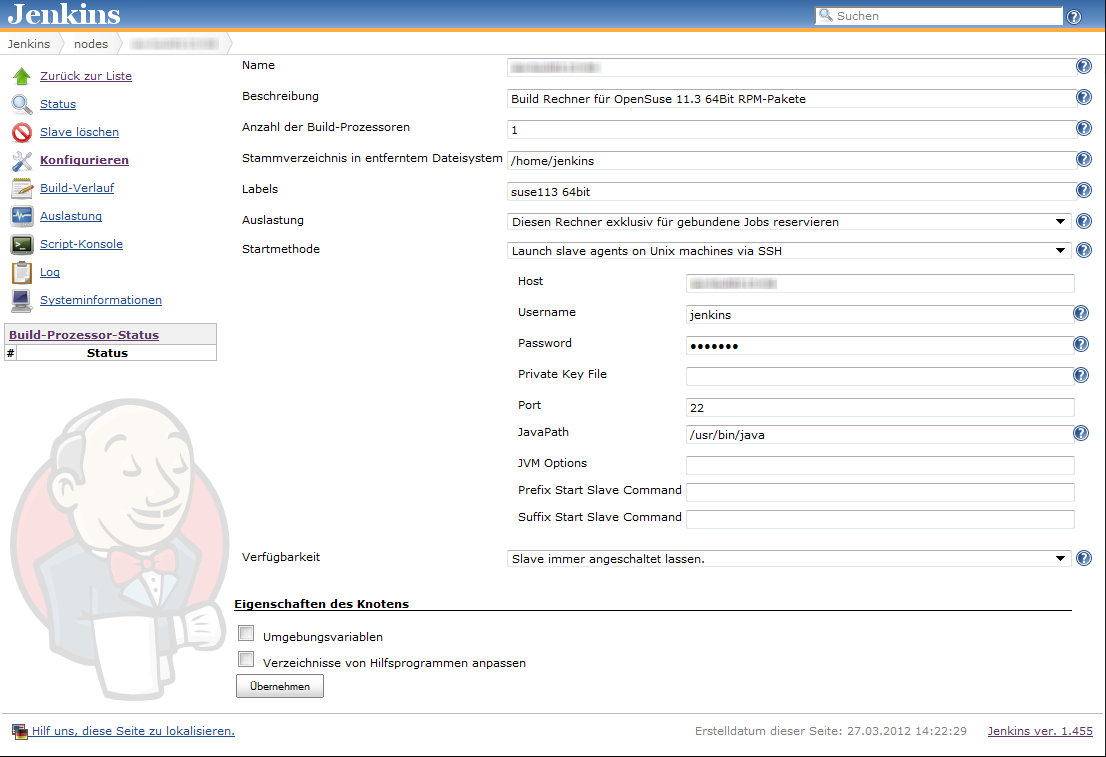
Linux build slaves over ssh are quite easily configured using Jenkins’ web interface. We add labels denoting the distribution release and architecture to be easily able to setup our matrix builds. Then we setup our matrix build as a new job with the usual parameters for source code management (in our case git) etc.

Our configuration matrix has the two axes Architecture and OpenSuseRelease and uses the labels of the build slaves. Our only build step here is calling the script orchestrating the build of our rpm packages.

Putting together the build script

Our build script essentially sets up a clean environment, builds package after package installing build prerequisites if needed. We use small utility functions (functions.sh) for building a package, installing packages from repository, installing freshly built packages and removing installed RPM. The script contains roughly the following phases:

  1. Figure out some quirks about the environment, e.g. openSUSE release number or architecture to build.
  2. Clean the environment by removing previously installed self-built packages.
  3. Setting up the build environment, e.g. linking folder from /usr/src/packages to our working copy or installing compilers, headers and the like.
  4. Building the packages and installing them locally if they are a dependency of packages yet to be built.

Here is a shortened example of our build script:

#!/bin/bash

RPM_BUILD_ROOT=/usr/src/packages
if [ "i686" = `uname -m` ]
then
  ARCH=i586
else
  ARCH=`uname -m`
fi
SUSE_RELEASE=`cat /etc/SuSE-release | sed '/^[openSUSE|CODENAME]/d' | sed 's/VERSION =//g' | tr -d '[:blank:]' | sed 's/\.//g'`

source functions.sh

# setup build environment
ensureDirectoryLinks
# force a repository refresh without checking the signature
sudo zypper -n --no-gpg-checks refresh -f OUR_REPO
# remove previously built and installed packages
removeRPM libomniORB4.1
removeRPM omniNotify2
# install needed tools
installFromRepo c++-compiler
if [ $SUSE_RELEASE -lt 121 ]
then
  installFromRepo java-1_6_0-sun-devel
else
  installFromRepo jdk
fi
installFromRepo log4j
buildRPM omniORB
installRPM $ARCH/libomniORB4.1
installRPM $ARCH/omniORB-devel
installRPM $ARCH/omniORB-servers
buildAndInstallRPM omniNotify2 $ARCH

Deploying our packages via Jenkins

We setup a second Jenkins job to deploy successfully built RPM packages to our internal repository. We use the Copy Artifacts plugin to fetch the rpms from our build job and put them into a directory like all_rpms. Then we add a build step to execute a script like this:

for i in suse-12.1 suse-11.4 suse-11.3
do
  rm -rf $i
  mkdir -p $i
  versionlabel=`echo $i | sed 's/[-\.]//g'`
  cp -r "all_rpms/Architecture=32bit,OpenSuseRelease=$versionlabel/RPMS" $i
  cp -r "all_rpms/Architecture=64bit,OpenSuseRelease=$versionlabel/RPMS" $i
  cp -r "all_rpms/Architecture=64bit,OpenSuseRelease=$versionlabel/SRPMS" $i
  rsync -e "ssh" -avz $i/* root@rpmrepository.intranet:/srv/www/htdocs/OUR_REPO/$i/
  ssh root@rpmrepository.intranet "createrepo /srv/www/htdocs/OUR_REPO/$i/RPMS"

Summary

With a setup like this we can perform an automatic build of all our RPM packages on several targetplatform everytime we update one of the packages. After a successful build we can deploy our new packages to our RPM repository making them available for our whole organisation. There is an initial amount of work to be done but the rewards are easy, unattended package updates with deployment just one button click away.

Packaging RPMs for a variety of target platforms, part 2

In part 1 of our series covering the RPM package management system we learned the basics and built a template SPEC file for packaging software. Now I want to give you some deeper advice on building packages for different openSUSE releases, architectures and build systems. This includes hints for projects using cmake, qmake, python, automake/autoconf, both platform dependent and independent.

Use existing makros and definitions

RPM provides a rich set of macros for generic access to directory paths and programs providing better portability over different operating system releases. Some popular examples are /usr/lib vs. /usr/lib64 and python2.6 vs. python2.7. Here is an exerpt of macros we use frequently:

  • %_lib and %_libdir for selection of the right directory for architecture dependent files; usually [/usr/]lib or [/usr/]lib64.
  • %py_sitedir for the destination of python libraries and %py_requires for build and runtime dependencies of python projects.
  • %setup, %patch[#], %configure, %{__python} etc. for preparation of the build and execution of helper programs.
  • %{buildroot} for the destination directory of the build artifacts during the build

Use conditionals to enable building on different distros and releases

Sometimes you have to use %if conditional clauses to change the behaviour depending on

  • operating system version
    %if %suse_version < 1210
      Requires: libmysqlclient16
    %else
      Requires: libmysqlclient18
    %endif
    
  • operating system vendor
    %if "%{_vendor}" == "suse"
    BuildRequires: klogd rsyslog
    %endif
    

because package names differ or different dependencies are needed.

Try to be as lenient as possible in your requirement specifications enabling the build on more different target platforms, e.g. use BuildRequires: c++_compiler instead of BuildRequires: g++-4.5. Depend on virtual packages if possible and specify the versions with < or > instead of = whenever reasonable.

Always use a version number when specifying a virtual package

RPM does a good job in checking dependencies of both, the requirements you specify and the implicit dependencies your package is linked against. But if you specify a virtual package be sure to also provide a version number if you want version checking for the virtual package. Leaving it out will never let you force a newer version of the virtual package if one of your packages requires it.

Build tool specific advices

  • qmake: We needed to specify the INSTALL_ROOT issuing make, e.g.:
    qmake
    make INSTALL_ROOT=%{buildroot}/usr
    
  • autotools: If the project has a sane build system nothing is easier to package with RPM:
    %build
    %configure
    make
    
    %install
    %makeinstall
    
  • cmake: You may need to specify some directory paths with -D. Most of the time we used something like:
    %build
    cmake -DCMAKE_INSTALL_PREFIX=%{_prefix} -Dlib_dir=%_lib -G "Unix Makefiles" .
    make
    

Working with patches

When packaging projects you do not fully control, it may be neccessary to patch the project source to be able to build the package for your target systems. We always keep the original source archive around and use diff to generate the patches. The typical workflow to generate a patch is the following:

  1. extract source archive to source-x.y.z
  2. copy extracted source archive to a second directory: cp -r source-x.y.z source-x.y.z-patched
  3. make changes in source-x.y.z-patched
  4. generate patch with: cd source-x.y.z; diff -Naur . ../source-x.y.z-patched > ../my_patch.patch

It is often a good idea to keep separate patches for different changes to the project source. We usually generate separate patches if we need to change the build system, some architecture or compiler specific patches to the source, control-scripts and so on.

Applying the patch is specified in the patch metadata fields and the prep-section of the SPEC file:

Patch0: my_patch.patch
Patch1: %{name}-%{version}-build.patch

...

%prep
%setup -q # unpack as usual
%patch0 -p0
%patch1 -p0

Conclusion
RPM packaging provides many useful tools and abstractions to build and package projects for a wide variety of RPM-based operation systems and releases. Knowing the macros and conditional clauses helps in keeping your packages portable.

In the next and last part of this series we will automate building the packages for different target platforms and deploying them to a repository server.

Deployment with the Play! framework

Play! is a great framework for java-base development of modern web applications. Unfortunately, the documentation about deployment options is not really that extensive in certain details. I want to describe a way to automatically build a self-contained zip archive without the source code. The documentation does state that using the standalone web server is preferred so we will use that option.

Our goal is:

  • an artifact with the executable application
  • no sources in the artifact
  • startup script for different platform and environments
  • CI integration with execution of the tests

Fortunately, the play framework makes most of this quite easy if you know some small tricks.

The first very important step towards our goal is embedding the whole Play! framework somewhere in your project directory. I like to put it into lib/play-x.y.z (x.y.z being the framework version). That way you can do perform all neccessary calls to play scripts using relative paths and provide a self-contained artifact which developers or clients may download and execute on their machine. You can also be sure everyone is using the correct (read “same”) framework version.

The next important thing is to write some small start-scripts so you can demo the software easily on any machine with Java installed. Your clients may try it out theirselves if the project policy is open enough. Here are small examples for linux

#!/bin/sh
python lib/play-1.2.3/play run --%demo -Dprecompiled=true

and windows

REM start our app in the "demo" environment
lib\play-1.2.3\play run --%%demo -Dprecompiled=true

The last ingredient to a great deployment and demoing experience is the build script which builds, tests and packages the software together. We do not want to include the sources in the artifact, so there is a bit of work to do. We perform following steps in the script:

  1. delete old artifacts to ensure a clean build
  2. call play to precompile our application
  3. call play to execute all our automatic tests
  4. copy all needed files into our distribution directory ready to be packed together
  5. pack the artifacts into a zip archive

Our sample build script is for the linux shell but you can easily translate it to the scripting environment of your choice, be it apache ant, gradle, windows batch depending on your needs and preference:

#!/bin/sh

rm -r dist
rm -r test-result
rm -r precompiled
python lib/play-1.2.3/play precompile
python lib/play-1.2.3/play auto-test
TARGET=dist/my_project
mkdir -p $TARGET/app
cp -r app/views $TARGET/app
cp -r conf lib modules precompiled public $TARGET
cp programs/my_project* $TARGET
cd dist && zip -r my_project.zip my_project

Now we can hook the project into a continuous integration server like Jenkins and let it archive the build artifact containing an executable installation of our web application. You could grant your client direct access to the artifact, use it for demos and further deployment steps like triggered upload to a staging server or the like.

Prepare for the unexpected

In most larger projects there are many details which cannot be foreseen by the development team. Specifications turn out to be wrong, incomplete or not precise enough for your implementation to work without further adjustments. New features have to work with production data that may not be available in your development or testing environment.

The result I often observed is that everything works fine in your environment including great automated tests but fails nevertheless when deployed to production systems. Sometimes it is minor differences in the operating system version or configuration, the locale for example, may cause your software to fail. Another common problem is  real production data containing unexpected characters, inconsistencies in the data (sometimes due to bugs) or its sheer size.

What can we do to better prepare for unexpected issues after deployment?

The thing is to expect such issues and to implement certain countermeasures to better cope with them. This may conflict with the KISS principle but usually is worth a bit of added complexity. I want to provide some advice which proved useful for us in the past and may help you in the future too:

  1. Provide good, detailed and persistent debug output for certain features: Once we added a complex rule system which operated on existing domain objects. To check every possible combination of domain object states would have been a ton of work, so we wrote tests for the common cases and difficult cases we could think of. Since the correctness of the functionality was not critical we decided to rather display slightly incorrect information instead of failing and thus breaking the feature for the user. We did however provide extensive and detailed logs whenever our rule system detected a problem.
  2. Make certain parts of your communication interface to third party systems configurable: Often your system communicates to different kinds of users and other systems. Common examples are import/export functionality, web service APIs or text protocols. Even if most of the time details like date and number formats, data separators, line endings, character encoding and so forth are specified it often proves valuable to make them configurable. Many times the specification changes or is incorrect, some communication partner implements the protocol slightly different or a format deviates from your assumption breaking your application. It is great if you can change that with a smile in front of your client and make the whole thing work in minutes instead of walking home frustrated to fix the issues.

The above does not mean building applications with ultimate flexibility and configurability and ignoring automated tests or realistic test environments. It just means that there are typical aspects of an application where you can prepare for otherwise unexpected deviations of theory and praxis.

An Oracle story: Null, empty or what?

One big argument for relational databases is SQL which as a standard minimizes the effort needed to switch your app between different DBMSes. This comes particularily handy when using in-memory databases (like HSQL or H2) for development and a “big” one (like PostgreSQL, MySQL, DB2, MS SqlServer or Oracle) in production. The pity is that there are subtle differences with regard to the interpretation of the SQL-standard when it comes to databases from different vendors.

Oracle is particularily picky and offers quite some interesting behaviours: Most databases (all that I know well) treat null and empty as different values when it comes to strings. So it is perfectly valid to store an empty string in a not-null column and retrieving the string from the column yields an empty string. Not so with Oracle 10g! Inserting null and retrieving the value yields unsurprisingly null, even using Oracle. Inserting an empty string and retrieving the value leaves you with null, too! Oracle does not differentiate between empty strings and null values like a Java developer would expect. In our environment this has led to surprised developers and locally unreproducible bug which clearly exist in production a couple of times.

[rant]Oracle has great features for big installations and enterprises that can afford the support, maintenance and hardware of a serious Oracle DBMS installation. But IMHO it is a shame that such a big player in the market does not really care about the shortcomings of their flagship product and standards in general (Oracle 10g only supports SQL92 entry level!). Oracle, please fix such issues and help us developers to get rid of special casing for your database product![/rant]

The lesson to be learnt here is that you need a clone of the production database for your integration tests or acceptance tests to be really effective. Quite some bugs have slipped into production because of subtle differences in behaviour of our inhouse databases and the ones in production at the customer site.

Lightweight dependency management

Managing project dependencies without maven or ant ivy, using a custom ant task to ensure classpath orthogonality.

Java’s classpath is a powerful concept – when used appropriate. As your project grows larger in terms of code and people, it gets harder to ensure that your classpath is correct. A great danger arises from JAR files containing different versions of the same resource. You might end up running different code than you think, leading to strange effects. If you build your classpath using wildcards, you can’t even control the order your JAR files are loaded.

Managing dependencies

To avoid the issues mentioned above, you need to manage your project dependencies. It’s a common practice to implement the build process of the project using maven or ant ivy. Both tools provide dependency mangement by declaration. But at a high cost. Especially maven has received some malice lately, criticizing its steep learning curve and complexity.

Scratching the biggest itch

We decided to try a different approach to dependency management, tackling only our biggest concern: The duplication of classpath resources. We take care of the scope of a third-party library, put required JARs in the repository (to us, third party binary artifacts are part of the project source) and update manually. The one thing we cannot assure manually is that every resource is unique. Sometimes, the same class is included in different JARs, as it seems to be common practice among java web frameworks.

Ant to the rescue

Thus, I wrote a custom ant task that, given the classpath, checks for duplicate entries. If it finds one, it lists the culprits and optionally aborts the build process. Included in our continuous integration system, it gets run every time somebody performs a change. You can’t forget to delete an old version of a library or check in the same library twice without breaking the build now.

Our ClasspathCollisionCheckTask

I provide this task here, without any warranty. The source code is included in the JAR alongside the classes, if you want to know what it does exactly.

Assuming you already know how to use custom tasks within an ant build script, here’s only a short usage description.

Import the custom task:

<taskdef
    name="check.collision"
    classname="com.schneide.internal.anttask.ClasspathCollisionCheckTask"
    classpath="${customtasks.library.directory}/schneidetasks.jar"
/>

Next, use it on your classpath:

<check.collision verbose="true" failOnCollision="true">
    <path>
        <fileset dir="${classpath.library.directory}">
            <include name="**/*.jar"/>
        </fileset>
        <fileset dir="${internal.library.directory}">
            <include name="**/*.jar"/>
        </fileset>
    </path>
</check.collision>

The task scans the whole path you give it and reports any collision it detects. You will see the warnings in your build log.

If the failOnCollision parameter is set to true (optional, defaults to false), the build will abort after a collision. If you want to have debug information, set the verbose parameter to true (optional, defaults to false).

Conclusion

If you manage your project dependencies manually, you might find our custom ant task useful. If you use maven or ant ivy, you already have this functionality in your build process.

Feedback

I’m very interested in hearing your opinion on the task or about your way of handling dependencies. Leave us a comment.

A DSL for deploying grails apps

Everytime I deploy my grails app I do the same steps over and over again:

  • get the latest build from our Hudson CI
  • extract the war file from the CI archive
  • scp the war to a gateway server
  • scp the war to the target server
  • run stop.sh to shutdown the jetty
  • run update.sh to update the web app in the jetty webapps dir
  • run start.sh to start the jetty

Reading the Productive Programmer I thought: “This should be automated”. Looking at the Rails world I found a tool named Capistrano which looked like a script library for deploying Rails apps. Using builders in groovy and JSch for SSH/scp I wrote a small script to do the tedious work using a self defined DSL for deploying grails apps:

Grapes grapes = new Grapes()
def script = grapes.script {
    set gateway: "gateway-server"
    set username: "schneide"
    set password: "************"
    set project: "my_ci_project"
    set ciType: "hudson"
    set target: "deploy_target.com"
    set ci_server: "hudson-schneide"
    set files: ["webapp.war"]

    task("deploy") {
        grab from: "ci"
        scp to: "target"
        ssh "stop.sh"
        ssh "update.sh"
        ssh "start.sh"
    }
}

script.tasks.deploy.execute()

This is far from being finished but a starting point and I think about open sourcing it. What do you think: may it help you? What are your experiences with deploying grails apps?

Batteries not included

Your feature isn’t ready-to-use until you provide the necessary requirements alongside, too.

When I bought a label printing device lately, it came bundled with a label tape roll. That suggested instant usage – no need to think of additional parts upfront. Only tousb-battery-little find out that, you’ve guessed it already, batteries weren’t included. A bunch of standardized parts missing (Murphy’s law applied) and the whole ready-to-use package was rendered useless. The time and effort it took me to get the batteries was the same as to get the label tape I really wanted to use instead of the bundled one.

This is a common pattern not only with device manufacturers, but with software developers, too.

Instant feature – just add effort

Frequently, a software comes “nearly” ready-to-use. All you have to do to make it run is

  • upgrade to the latest graphics drivers
  • install some database system (we won’t tell you how as it’s not our business)
  • create some file or directory manually
  • login with administrator rights once (or worse: always) to gather write access to the registry or configuration file
  • review and change the complete configuration prior to first usage

The last point is a personal pet peeve of mine.

It all boils down to the question if a software or a feature is really ready-to-use. Most of the work you have to do manually is tedious or highly error-prone. Why not add support for this apparently crucial steps to the software in the first place?

It works instantly – with my setup

A common mistake made by developers is to forget about the history of a feature emerging in the development labs. The history includes all the little requirements (a writeable folder here, an existing database table there) that will naturally be present on the developer’s machine when she finishes work, because fulfilling them was part of the development process.

If the same developer was forced to recreate the feature on a fresh machine, she would notice all these steps with ease and probably automate or support (e.g. documentate) them, least to save herself the work of wading through it a third time.

But given that most developers regard a feature “finished”, “done” or “resolved” when the code was accepted by the repository (and hopefully the continuous integration system), the aching of the users wont reach them.

This is a case of lacking feedback.

Feel the pain – publicly

To close this open feedback loop, we established a habit of “adopting” features and bringing them to the user in person to overcome the problem of “nearly done”. If you can’t make your own feature run on the client’s machine within a few seconds, is it really that usable and “ready”? The unavoidable presence of the whole process – from the first feature request to the installed and proven-to-work software acts as a deterrent to fall for the “works on my machine” style of programming. It creates a strong relationship between the user, a feature and the developer as a side-effect.

We’ve seen quite a few junior developers experiencing a light bulb moment (and heavy sweating) in front of the customer. This is the hot-wired feedback loop working. In most cases, the situation (a feature requiring non-trivial effort to be run) will not repeat ever.

Batteries are part of the product

If your product (e.g. software) isn’t usable because some standard part (e.g. a folder) is missing, make sure you add these parts to the delivery package. It is a very pleasant experience for the user to just unwrap a software and use it right away. It shows that you’ve been cared for.